guifi a Torrelles
Tots els nodes de
Torrelles (188 nodes el 20170311),
Baix Llobregat (665 nodes el 20170311).
Torrelles
homepage,
Google group,
foro,
email incidencies,
e_mails,
nif(G66268384)
Si no et funciona ho dius al GoogleGroup i posa el IP de la teva antena. En Lorenzo s'ho va mirant.
La "mask" a Torrelles sempre és 255.255.255.224, "FF.FF.FF.E0" ! Broadcast ?
Els Servidor de noms DNS de Torrelles son
Els proxy de
Torrelles, 22900, son
També tenim 2 "SNP graph server" :
Servidors NT : 10.228.203.104
Contacte :
Daniel Sanchez;
Edgar,
Edgar
e1001 administració Torrelles :
eeeiii,
Israel Antúnez@eeeiii.net,
Carlos Vargas@eeeiii.net,
samsitper : cementiri o campanar
Esquema Torrelles (###)
Contacta amb Interbaix, potser pot donar-vos servei:
ms2k@interbaix.com, 93 654 82 08 / 09
A/At. Josep Alacid, 625 422 876
gMail
Jacint Verdaguer, 144 ; Sant Boi de Llobregat ;
20220704 -
Els nostres super-nodes
Els nostre 4 super-nodes (2010 i 2017) son :
Els nostres clients
Tenim 32 clients (20171031) :
status - ping every 4 sec, HTML page every 5 min, FTP every 10 min, 3 cnt / 10 min.
Esquema troncal
.-----------------------------------------------------------------------------------------.
| pomnia / can sostres |
| PC pomnia |
| { --- --- 10.139.130.33 bridge uTik --- --- } 10.139.238.194 |
.-----------------------------------------------------------------------------------------.
( 10.139.130.38 ) ( 10.139.130.35) ( 10.139.238.195 )
wd-TDLTaborPuntOmnia xarxaTorrelles-TDLCampanarPO guifi.net-wds-TDLCmpnPtOmnia
( 10.139.130.37 ) ( 10.139.238.196 )
.-----------------------------------------------------------.
| 10.139.130.36 10.139.238.193 |
| ether3 ether4 |
| ether5 | AP1 [ 10.139.130.65 / 172.25.33.9 ] ( 172.25.33.10 ) guifi.net-TDLCmpnrAP1
| campanar ether6 | AP2 [ 10.139.238.33 / 172.25.33.13 ] ( 172.25.33.14 ) guifi.net-TDLCmpnrAP2
| 10.139.130.65 ether7 | AP3 [ 10.139.130.97 / 172.25.33.17 ] ( 172.25.33.18 ) guifi.net-TDLCmpnrAP3
| ether8 | AP4 [ 10.139.238.65 / 172.25.33.21 ] ( 172.25.33.22 ) guifi.net-TDLCmpnrAP4
| ether2 |
.-----------------------------------------------------------.
[ 172.25.66.4 ]
( 172.25.66.3 )
guifi.net-TDLTaborCampanarAC
( 10.139.130.39 ) ( 172.25.66.2 )
[ 10.139.130.40 ] [ 172.25.66.1 ]
.----------------------------------------------------------------------------------------------------------------.
| ether11 ether3 |
| |
| tabor st3 ether6 | AP1 [ 10.139.238.225 / 172.25.37.121 ] ( 172.25.37.122 ) xarxaTorrelles-TaborAP1
| 10.138.238.1 ether7 | AP2 [ 10.139.239.65 / 172.25.38.189 ] ( 172.25.38.190 ) xarxaTorrelles-TaborAP2
| ether8 | AP3 [ 10.139.239.97 / 172.25.39.117 ] ( 172.25.39.118 ) xarxaTorrelles-TaborAP3
| ether1 ether2 ether4 ether5 |
.----------------------------------------------------------------------------------------------------------------.
[ 172.25.51.181 ] [ 172.25.51.177 ] [ 172.25.66.9 ] [ 172.25.66.17 ]
( 172.25.66.10 ) ( 172.25.66.18 )
guifi.net-wds-TDLCanColl-Tabor guifi.net-wds-TDLCementiri-Tabor
( 172.25.66.11 ) ( 172.25.66.19 )
[ 172.25.51.182 ] [ 172.25.51.178 ] [ 172.25.66.12 ] [ 172.25.66.20 ]
.--------------------. .--------------------. .--------------------. .--------------------.
| tabor st1 | | tabor st2 | | can coll | | cementiri |
| 10.139.130.129 | | 10.139.239.1 | | 10.139.130.193 | | 10.139.130.161 |
| 10.139.238.97 | .--------------------. .--------------------. | 10.139.238.161 |
| 10.139.238.129 | AP1 10.139.130.193 .--------------------.
.--------------------. AP2 10.139.130.225
See "scan_tronc.sh" at
- //T60/home/sebas/eines/tronc/
- //pomnia/home/mate/eines/tronc/
- //mars/home/nicolau/eines/tronc/
Salt crític : Campanar - Tabor
El nostre enllaç mes critic és sens dubte la conexió del Tabor (172.25.66.2) al Campanar (172.25.66.3).
Son 2 antenes Ubiquity PowerBeam 5AC 300,
model PBE-5AC-300 -
data sheet
Tabor
Tabor firmware WA.V8.5.7, MAC 44:D9:E7:AE:2F:27, Ancho del Canal 80 MHz
Modo Inalambrico := Access Point PtP
Control Frequency List : 5540, 5545, 5550, 5555, 5560, 5700
Te AirMagic !
The airMagic tool is available only if the Wireless Mode is set to an "AP mode".
Campanar
Campanar firmware WA.V8.5.4, MAC 44:D9:E7:AE:2E:FB, Ancho del Canal automatico 20/40/80 MHz
Modo Inalambrico := Station PtP
Control Frequency Scan List :
5180, 5185, 5190, 5195, 5200, 5205, 5210, 5215, 5220, 5225, 5230, 5235, 5240, 5260, 5265, 5270, 5275, 5280, 5285, 5290, 5295,
5300, 5305, 5310, 5315, 5320, 5500, 5505, 5510, 5515, 5520, 5525, 5530, 5535, 5540, 5545, 5550, 5555, 5560, 5565, 5570, 5575, 5580, 5585, 5590, 5595,
5600, 5605, 5610, 5615, 5620, 5625, 5630, 5635, 5640, 5645, 5650, 5655, 5660, 5665, 5670, 5675, 5680, 5685, 5690, 5695,
5700, 5740, 5745, 5750, 5755, 5760, 5765, 5770, 5775, 5780, 5785, 5790, 5795,
5800, 5805, 5810, 5815, 5820, 5825, 5830, 5835, 5840, 5845, 5850, 5855, 5860
Channel width
Available channel widths depend on the selected Wireless Mode. Here are the options for each mode (AirOs v8 UG):
- Access Point PTP Supported wireless channel spectrum widths: 80 MHz, 60 MHz*, 50 MHz, 40 MHz, 30 MHz*, 20 MHz, and 10 MHz.
- Station PTP Supported wireless channel spectrum widths: Auto 20/40/80 MHz (recommended), 60 MHz*, 50 MHz, 30 MHz*, and 10 MHz.
Com carregar el enllaç ? Puc fer
mate@punt-omnia:~$ scp usuari@10.138.238.1:./TDLTaborDipST3.backup .
O baixar un fitxer de 100 MB i mesurar el temps
Millores de la xarxa
Campanar - Can Sostres
20190126 - posem al Campanar una LiteBeam LBE 5AC Gen2 per enllaçar la xarxa guifi de Torrelles
a la fibra óptica de Can Sostres.
Proporciona un guany de 23 dBi i una velocitat de fins a 450 Mbps per només 8 W (24 V, 0,3 A) a 5 GHz -
data sheet,
qsg
20190126 - posem cable a Can Sostres per posar-hi la "parella" de l'antena del Campanar
Tabor - Can Sostres
Tenim un parell de LiteBeam per ficar un enllaç nou del Tabor a Can Sostres.
Hot-Spot a Can Sostres
Comprem en Albert una OmniTIK 5 PoE
i posem un "hot-spot" a Can Sostres.
Porta un PoE de 24 V i 2,5 A (60 W)
guifi a casa meva
31/07/2010 :
Network Name Signal Strength Encryption Wireless Mode Channel MAC Address
guifi.net-TDLCmpnrAP4 17% Open network 802.11a 104 00:0C:42:61:A7:43
guifi.net-wds-TDLCmpnPtOmnia 44% Open network 802.11a 132 00:0C:42:3A:EB:D0
guifi.net-TDLCmpnrAP1 37% Open network 802.11a 36 00:0C:42:3A:E7:24
guifi.net-TDLCmpnrAP3 35% Open network 802.11a 44 00:0C:42:61:A5:F9
wifi home, 20151025 :
Network Name Signal Strength Encryption Wireless Mode Channel MAC Address
WLANGAS2 70% Encrypted 802.11g 9 40.4A.03.AF.5B.FB
WifiLluis 68% Encrypted 802.11n 1 00.F8.1C.91.4A.DD
Un router curiós que veig vora l'estanc : guifi.net-TD-Rectoria, MAC 00:23:cd:1a:6c:d4, TP-Link
Esponsors
No som ningú !
IPs publiques i privades
Les IPs que ens dona guifi.net pels nostres clients son del rang 10.139.130.xxx i en diem "publiques"
A la xarxa guifi de Torrelles els routers tenen adreces 10.139.xx.xx, aixi que es poden accedir amb un SSH normal.
Les antenes de infraestructura interna, en canvi, tenen IPs internes com 172.25.xx.xx, a les que nomes es pot accedir via proxy, i en diem "privades"
Les trobades a 20180214 son :
// see /home/mate/eines/rexx/scan_guifi/IPS.TXT.guifi
172.25.33.9
172.25.33.10
172.25.33.13
172.25.33.14
172.25.33.17
172.25.33.18
172.25.33.21
172.25.33.22
172.25.37.121
172.25.37.122 proxy 10.138.238.1:3128
172.25.38.189 proxy 10.139.130.65:3128
172.25.38.190 proxy 10.138.238.1:3128
172.25.39.117
172.25.39.118 proxy 10.138.238.1:3128
172.25.51.177
172.25.51.181
172.25.51.182
172.25.66.1
172.25.66.2
172.25.66.3
172.25.66.4 proxy 10.139.130.65:3128
172.25.66.9
172.25.66.10
172.25.66.11
172.25.66.12
172.25.66.17
172.25.66.18
172.25.66.20
Accés a les IPs privades via proxy
W500 :
cat \\w500\cygwin64\~/acces_antena_amb_proxy/ssh_amb_proxy.sh
#!/bin/bash
# URL :
https://stackoverflow.com/questions/19161960/connect-with-ssh-through-a-proxy
# set value for SSH
myUSER='user'
# router al que ens volem conectar - Campanar ST1 :
ipFINAL='172.25.66.4'
# IP i PORT del Proxy
proxyHOST='10.139.130.65'
proxyPORT='3128'
echo "*** *** Per anar be, has de estar conectat a la xarxa GUIFI *** ***"
echo "Engeguem SSH amb usuari (" $USER ") per conectar amb (" $FINAL_DEST "). ProxyHost (" $PROXYHOST ")."
ssh $myUSER@$ipFINAL -o "ProxyCommand=nc -X connect -x $proxyHOST:$proxyPORT %h %p"
exit
També :
cat \\w500\cygwin64\~/proxy_tools/2_wget.sh
#!/usr/bin/bash
antena_campanar_ap1="172.25.33.10"
antena_campanar_ap2="172.25.33.14"
antena_campanar_ap3="172.25.33.18"
antena_campanar_ap4="172.25.33.22"
antena_tabor_ap1="172.25.37.122"
antena_tabor_ap2="172.25.38.190"
antena_tabor_ap3="172.25.39.118"
if [ -z "$1" ]
then
myIP=$antena_tabor_ap2
else
myIP=$1
fi
myURL="http://"$myIP
echo "WGET per Guifi.net de la url (" $myURL ")."
export http_proxy=http://10.139.130.65:3128
export https_proxy=https://10.139.130.65:3128
wget -v --no-check-certificate $myURL
exit 0
Tambe /home/mate/eines/curl_i_wget/5_ssh.sh or //T60/home/sebas/eines/curl_i_wget/5_ssh.sh :
#!/bin/bash
user='my_user'
# proxy Campanar :
export http_proxy=http://10.139.130.65:3128
export https_proxy=https://10.139.130.65:3128
# antena Campanar AP1 :
ssh $user@172.25.33.10 ; ask pwd
Conexió amb la resta de la xarxa guifi
Ha de ser un enllaç d'aquestos :
Corbera :
TDLTaborDipST1 - wds-TDLTbrDp-CBLL
40238-
CBLLMestral12 (CBLLMestral12Rd1) 172.25.33.82/172.25.33.81 Inactive 323-NO
Teixera (Lugo) ?
TDLTaborDipST1 - wds-TDLlTaborCstlldflsDmrs
31307-TXR1 (TXR1Rd2) /172.16.1.170 Operativo 284-O
Castelldefels Bellamar - 10.91.112.1
TDLTaborDipST2 - TDLTbrDpST2AP1
73168-
CstlldflsBellamar (CstlldflsBellamar) 172.25.47.26/172.25.47.25 Proyectado 199-S
El node
Bellamar de Castelldefels l'administra en
Bogdan - li escric {20190103}
20190105 - parla de retirar "Tabor-Castelldefels y Tabor-Corbera De Llobregat"
Al Tabor (PTP Bridge CPE) veiem "guifi.net-wds_TDL-ZF, DC.9F.DB.48.60.C9"
TDL-Torre
Hi ha un node que va a Sant Just :
TDL-Torre, amb radio 10.146.6.2, switch 10.146.6.1.
A 7,6 Km te 149102-SJD-RosaLuxemburg (SJD-RosaLuxemburg-RD-TDL-Torre) 172.25.36.162/172.25.36.161, 10.146.6.3/23
SJD-RosaLuxemburg, i el porta MEX Telecom -
info@mextelecom.cat {email 20190111} -
Enric Gomez tf 666 808 306.
Enric Gomez <enric.gomez@everywan.com>
Junta 20170601 - XT2
Edgar Ramon, Albert Romagosa, Jordi Buzon.
Vocals : Carles, Mate, Sebas, Simo.
Juny 2018 : ho deix en Mate i en Albert, jo em poso de secretari i en Aleix de vocal.
La nostra "homepage" és
xarxatorrelles.cat [***] - en un
Plesk Onyx 17.5.3,
i el "tema activo" és "Twenty Seventeen"
Socis 20170722 - XT2
Hauriem de tenir quelcom com ... {compte : contactes email}
..IP.......................Nom soci.................Email............................Tf...............
.
10.139.130.117 Sebastia Altemir sebastiasebas@gmail.com 638.015.371 .
......................................................................................................
All
nodes,
all
socis {own job}
Pagaments
Banc de Sabadell, IBAN: ES47 0081 0122 2800 0113 9623 / BSAB ESBB.
Quota 2016 : 40,00 € {pagat Febrer}
2017 (pagat 8 de juny) :
us recordem que l'ingrés (40 €, uota 2017) s'ha de realitzar abans del dia 30/06/2017.
En l'ingrés, s'ha de fer constar un adreça de correu associada a la persona que obté l'accés a la xarxa.
El justificant de l'ingrés es comunicarà per correu electrònic al tresorer a l'adreça
xarxatorrelles.tresorer@gmail.com
2019 (pagat Desembre 2018) - es imprescindible fer l'ingrés (40 €, quota 2019) abans del dia 10/02/2019.
2020 - pagat 20200419, 40€
no-IP
A noip tenim xarxatorrelles.ddns.net
Falta obrir ports o configurar una VPN.
Funciona el FTP / SSH a guifi ?
SSH a RASPALL
c:\> telnet 62.57.74.22 9008
SSH-2.0-OpenSSH_6.7p1 Raspbian-5+deb8u2
♥♥♥♥as
Protocol mismatch.
FTP a TINET
ping usuaris.fut.es
ftp usuaris.fut.es
20170725, màgicament :
C:\> ftp usuaris.fut.es
Connected to www.tinet.org.
220 TINET (Tarragona InterNET)
User (www.tinet.org:(none)):
500 USER: command requires a parameter
Login failed.
ftp>
Internet Speed Test guifi.net
Eines per mesurar la velocitat
{201410} 8 Mbps baixada, 12 Mbps pujada
{201411} 5 Mbps baixada, 8 Mbps pujada
{20141207, 08h} 6,5 Mbps baixada, 8 Mbps pujada. Pero baixo fitxers a 300 KBps = 2,4 Mbps.
{20150814, 07:05} 5968 kbps = 746 KB/sec baixada, 8776 kbps = 1097 KB/sec pujada. Ping: 18 ms. Jitter: 24 ms.
{20151214, 07:35} 4,0 Mbps baixada, 9,7 Mbps pujada
{20160216, 07:35} 3,8 Mbps baixada, 4,0 Mbps pujada
{20160220, 12:20} 1,9 Mbps baixada, 8,6 Mbps pujada
{20160311, 07:30} 16 Mbps baixada, 12 Mbps pujada
{20160316, 21:00} 3,7 Mbps baixada, 5,7 Mbps pujada
{20160320, 22:30} 140 / 32 Mbps
{20160321, 07:50} 81 / 32 Mbps
{20160518, 09:10} 5 / 3 Mbps [FO]
{20170201, 10:55} 11 / 3 Mbps [Tfca 60/18]
{20170311, 10:01} 83 / 31 [fo tfca 82/79]
{20170511, 14:21} [FO 98 / 96]
esquema guifi Torrelles

Interconexionat entre super nodes
Tabor [172.25.66.9] --- (172.25.66.10) zzz (172.25.66.11) --- [172.25.66.12] Can Coll
24:A4:3C:82:04:9F 24:A4:3C:82:03:45
PowerBeam M5 300 PowerBeam M5 300
Tabor [172.25.66.17] --- (172.25.66.18) zzz (172.25.66.19) --- [172.25.66.20] Cementiri
24:A4:3C:82:01:00
PowerBeam M5 300
Tabor [172.25.66.1] --- (172.25.66.2) zzz (172.25.66.3) --- [172.25.66.4] Campanar
44.D9.E7.AE.2F.27 44.D9.E7.AE.2E.FB
TDLTaborDipPowerRd1 TDLCampanarPowerRd1
PowerBeam 5AC 300 PowerBeam 5AC 300
Tabor [10.139.130.40] --- (10.139.130.39) zzz (10.139.130.38) --- [pomnia] Can Sostres
44:D9:E7:AE:2F:A6 44:D9:E7:AE:2F:1F
TDLTaborDipPowerRd2 PowerBeam 5AC 300
PowerBeam 5AC 300 PowerBeam 5AC 300
Campanar [10.139.238.193] --- (10.139.238.196) zzz (10.139.238.195) --- [10.139.238.194] Punt Omnia (old)
eth3
Campanar [10.139.130.36] --- (10.139.130.37) zzz (10.139.130.35) --- [10.139.130.33] Punt Omnia (new)
E4:8D:8C:0A:3D:91 B4:FB:E4:68:8C:7D B4:FB:E4:68:8A:FE E4:8D:8C:0A:3D:91
Intra-Tabor
Tabor ST1 eth0 172.25.51.182 ---- Tabor ST3 eth1 172.25.51.181
Tabor ST1 ether1 172.25.32.137 ---- Tabor ST2 ether9 172.25.32.13 *** vell ***
Tabor ST2 eth1 172.25.51.178 ---- Tabor ST3 eth2 172.25.51.177
Oldies
Tabor ST1 172.25.32.90 wdswds-TDLTbrDp-DpGuey ---- wds/p2p 172.25.32.89 Can Coll
ST3 172.25.66.9 TDLTaborDipNanoBeam1 ---- ?
Tabor ST1 172.25.39.54 wdswds-TDLTbrDpCemntri ---- wdswds-TDLLCmntrTaborDp 172.25.39.53 Cementiri {old text in guifi.net}
ST3 172.25.66.17 TDLTaborDipNanoBeam2 ---- ?
Tabor ST1 172.25.39.49 wdswds-TDLTbrDpCmpnr ---- wds/p2p 172.25.39.50 Campanar [dropped]
ST3 172.25.66.1 TDLTaborDipNanoStation1 ---- ?
Esquema conexió super nodes - xarxa 172.25.xx.xx
. Can Coll - see "20171006_Inventari fotografic Can Coll.docx"
.
. .----------------.
. 172.25.66.10 (gw .66.9) | 172.25.66.12 | 172.25.66.9 .
. 172.25.66.11 (gw .66.9) | 10.139.130.193 | <---> TaborDipST3 172.25.51.181 .
. PowerBeam M5 300 | TDLCanCollST | microTik 10.138.238.1 .
. guifi.net-wds-TDLCanColl-Tabor | | .
. | | 172.25.32.90 <---> 172.25.32.89 . guifi.net - no existeix
. | | TDLTbrDp-DpGuey TDLTaborDipST1 . - no existeix
. .----------------.
Com accedir des un browser a una IP del rang "172.25.xx.xx" ?
Hem de posar al navegador el Proxy del super-node (controlador) al que ens conectem.
En el meu cas, 10.139.130.65:3128, doncs entro pel Campanar.
Pel Tabor, 10.138.238.1:3128.
Per entrar un browser (des una IP com 10.139.130.117) a una antena amb una IP del rang "172.25.xx.xx"
hem de fer servir un Proxy apuntant al controlador, al router :
IP TDLTaborDipRocketRD1 = 172.25.37.122 {AirOS} : proxy TDLTaborDipST3 = 10.138.238.1:3128 {RouterOS} [ok, 20170818]
IP TDLTaborDipRocketRD2 = 172.25.38.190 {AirOS} : proxy TDLTaborDipST3 = 10.138.238.1:3128 {RouterOS} [ok, 20170818]
IP TDLTaborDipRocketRD3 = 172.25.39.118 {AirOS} : proxy TDLTaborDipST3 = 10.138.238.1:3128 {RouterOS} [ok, 20170818]
Campanar 172.25.66.4 10.139.130.65:3128 [ok, 20171212]
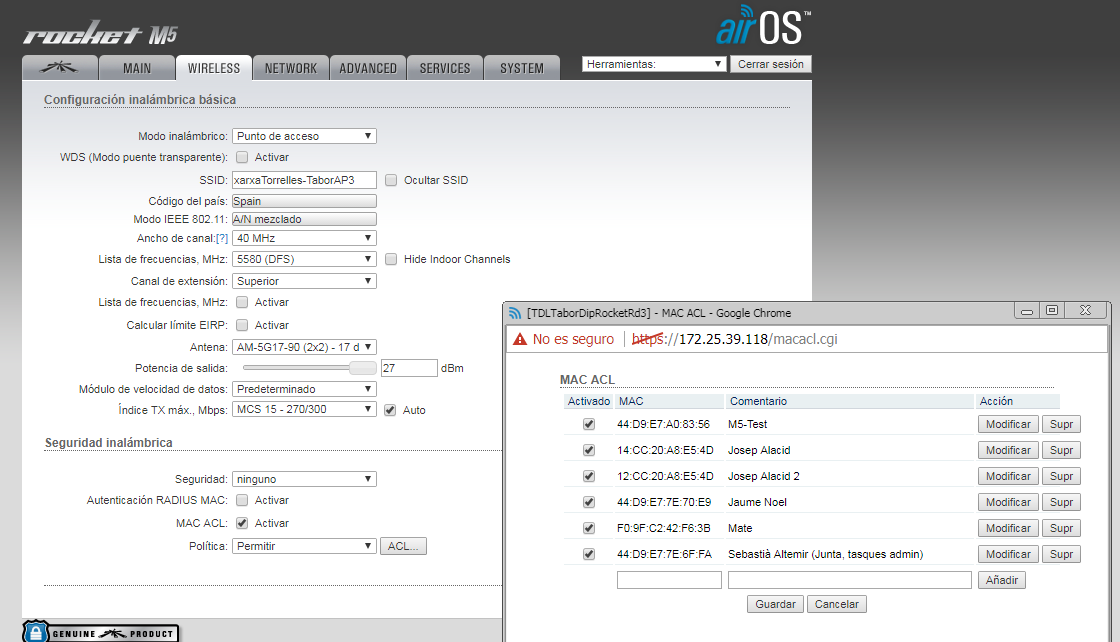
MAC ACL
Només n'hi ha a les antenes noves, és a dir a les "DipRocket", as Tabor ST3/AP3
És troba a
- solapa "Wireless"
- a baix de tot, sota "MAC ACL Activar", picar botó "ACL"
MAC ACL al Tabor AP3 - 20190515
Direct url :
44:D9:E7:A0:83:56 M5-Test
44:D9:E7:7E:70:E9 Jaume Noel (TDLAvTorrellestessn)
44:D9:E7:7E:6F:FA Sebastià Altemir (Junta)
F0:9F:C2:96:03:52 Montse Leal (TDLAvQuatre43b)
80:2A:A8:08:15:54 Carles Segura
F0:9F:C2:52:1B:70 Lourdes Capellà (TDLCanNicolau, node/37561)
44:D9:E7:C0:07:01 Edgar Ramon
FC:EC:DA:2E:51:41 manel carnero (sebas, 20190629)
B4:FB:E4:60:E6:67 carme ruiz (sebas, 20190718) MasGelat21
Com veure qui (IP + MAC) hi ha conectat a una antena en un moment
- fem logon a la antena, as Tabor AP3
- a la solapa "Main", a baix, sota "Monitor", piquem "Stations" - veiem MAC, IP, Device Name i podem fer "Kick"
Com veure qui (IP + MAC) hi ha conectat a un controlador en un moment
- fem logon al controlador amb WebFig
- escollim "IP" a l'esquerra i després "Neighbors"
Tipus de APs dels super nodes
| Super node | Nom AP | Device | Tipus | Clients
[*]
| IP antena | MAC antena
|
| Tabor | AP1 | Rocket 5AC Lite | MIMO | 2
| |
|
| Tabor | AP2 | Rocket 5AC Lite | MIMO | 2
| 172.25.38.190 | FC:EC:DA:DC:C8:D7
|
| Tabor | AP3 | Rocket M5 | SISO | 1
| 172.25.39.118 | 44:D9:E7:52:B2:15
|
| Campanar | AP1 | Rocket M5 | SISO | 5
| 172.25.33.9 | 78.8A.20.EE.80.7D
|
| Campanar | AP2 | Rocket M5 | SISO | 1
| 172.25.33.13 | 44.D9.E7.52.B0.42
|
| Campanar | AP3 | Rocket M5 | SISO | 7
| 172.25.33.17 | 78:8A:20:C8:15:57
|
| Campanar | AP4 | Rocket M5 | SISO | 1
| 172.25.33.21 | 78.8A.20.EE.7F.EE
|
| Cementiri | AP1 | mANTBox 15s | MIMO | 3
|
| Can Coll | AP1 | PowerBeam M5 300 | SISO | 1
|
Aqui
i
aqui
diu que Rocket M5 és MIMO !
Detall dels Super-nodes - rang de IPs dels clients
El rang de IPs dels clients del Tabor :
| AP | IP | client IP range
|
| ST1 AP1 | 10.139.130.129/27 | 10.139.130.129 - 10.139.130.158 | * dead *
|
| ST1 AP2 | 10.139.238.97/27 | 10.139.238.97 - 10.139.238.126 | * dead *
|
| ST1 AP3 | 10.139.238.129/27 | 10.139.238.129 - 10.139.238.158 | * dead *
|
| ST2 | 10.139.239.1 |
|
| ST3 AP1 | 10.139.238.225/27 | 10.139.238.225 - 10.139.238.254
|
| ST3 AP2 | 10.139.239.65/27 | 10.139.239.65 - 10.139.239.94
|
| ST3 AP3 | 10.139.239.97/27 | 10.139.239.97 - 10.139.239.126
|
El rang de IPs dels clients de Can Coll :
| AP | IP | client IP range
|
| AP1 | 10.139.130.193/27 | 10.139.130.193 .. 10.139.130.222
|
| AP2 | 10.139.130.225/27 | 10.139.238.225 .. 10.139.238.254
|
El rang de IPs dels clients del Cementiri :
| AP | IP | client IP range
|
| AP1 | 10.139.130.161/27 | 10.139.130.161 .. 10.139.130.190
|
| AP2 | 10.139.238.161/27 | 10.139.238.161 .. 10.139.238.190
|
El rang de IPs dels clients del Campanar :
| AP | Direccio | clients | MAC | antena | IP |
client IP range
|
| AP1 | Sud-Oest | Ajuntament | {44:D9:E7:44:DF:EE} | AM-5G16-120 - 16 dBi | 10.139.130.65/27 | 10.139.130.65 .. 10.139.130.94
|
| AP2 | Nord-Est | Cesalpina, Can Roig | {44:D9:E7:52:B0:42} | | 10.139.238.33/27 | 10.139.238.33 .. 10.139.238.62
|
| AP3 | Sud-Est | Can Sostres, SAG | {78:8A:20:C8:15:57} | AM-5G17-90 - 17 dBi | 10.139.130.97/27 | 10.139.130.97 .. 10.139.130.126
|
| AP4 | Nord-Oest | Raval Padró | {24:A4:3C:46:DF:6F} | | 10.139.238.65/27 | 10.139.238.65 .. 10.139.238.94
|
Detall dels Super-nodes - conexionat de les antenes (AirOS) amb els routers/controladors (RouteOS/WebFig)
La comanda màgica és "/ip address print"
supernode Tabor
El Tabor te

3 routers/controladors amb WebFig SSID 3 antenes
TDLTaborDipST1 ST1 AP1
10.139.130.129 172.25.51.182 guifi.net-TDLTaborDipAP1 * dead * 00.0C.42.3A.E7.24
ST1 AP2
10.139.238.97 * dead * 00.0C.42.61.A2.5C
ST1 AP3
10.139.238.129 * dead * 00.0C.42.61.A2.67
TDLTaborDipST2 10.139.239.1 172.25.51.178
TDLTaborDipST3 ST3
10.138.238.1 172.25.51.181
ST3 AP1
10.139.238.225 172.25.37.121 xarxaTorrelles-TaborAP1 172.25.37.122 Rocket 5AC Lite XC.V8.6.2 FC.EC.DA.DC.C8.DC
ST3 AP2
10.139.239.65 172.25.38.189 xarxaTorrelles-TaborAP2 172.25.38.190 Rocket 5AC Lite XC.V8.6.2 FC.EC.DA.DC.C8.D7
ST3 AP3
10.139.239.97 172.25.39.117 xarxaTorrelles-TaborAP3 172.25.39.118 Rocket M5 XW.v6.2.0 44.D9.E7.52.B2.15
Tabor a Can Coll TDLTaborNanoBeam1 guifi.net-wds-TDLCanColl-Tabor 172.25.66.10 PowerBeam M5 XW.v6.2.0 24:A4:3C:82:04:9F
Tabor a Cementiri TDLTaborNanoBeam2 guifi.net-wds-TDLCementiri-Tabor 172.25.66.18 PowerBeam M5 XW.v6.2.0 24:A4:3C:82:01:00
Tabor a Campanar TDLTaborDipPowerRd1 guifi.net-TDLTaborCampanarAC 172.25.66.2 PowerBeam 5AC 300 WA.v8.6.2 44:D9:E7:AE:2F:27
Tabor a Can Sostres TDLTaborDipPowerRd2 wds-TDLTaborPuntOmnia 10.139.130.39 PowerBeam 5AC 300 WA.v8.6.2 44:D9:E7:AE:2F:A6

Noms de les antenes (veure imatge a la dreta)
- # 6 - enllaç al Cementiri
- # 11 - enllaç al Campanar
- Can Coll ?
- Can Sostres ?
Els detalls de DipST1 son
{ WebFig(10.139.130.129) + IP + Addresses } or [ putty(10.139.130.129) + /ip address print]
{*** WISP AP ***} Mikrotik-Routerboard 600; RouterOSv4.7+ {al mastil}
ST1
|
| Enllaç Antena Qui hi ha a l'altre cantó
|
. --- #0 --- wlan1 --- 10.139.130.129 --- AP1 ( ) clients
|
. --- #1 --- bridge --- 10.139.238.97 --- AP2 ( ) clients
|
. --- #2 --- wlan3 --- 10.139.238.129 --- AP3 ( ) clients
|
. --- #3 --- ether0 --- 172.25.51.182 --- enllaç TaborST3 <cable> 172.25.51.181 Tabor ST3/eth2
Dubte : com es que puc fer "wget()" de Tabor_ST1, ip = 172.25.51.182
sebas@T60ubuntu:~/eines/tronc$ export http_proxy=http://10.139.130.65:3128
sebas@T60ubuntu:~/eines/tronc$ export https_proxy=https://10.139.130.65:3128
sebas@T60ubuntu:~/eines/tronc$ wget 172.25.51.182
--2018-09-01 13:55:25-- http://172.25.51.182/
Connecting to 10.139.130.65:3128... connected.
Proxy request sent, awaiting response... 200 OK
Pero no puc accedir a Tabor_ST1 amb "ping()", ip = 10.139.130.129
sebas@T60ubuntu:~/eines/tronc$ ping 10.139.130.129
PING 10.139.130.129 (10.139.130.129) 56(84) bytes of data.
From 10.139.130.97 icmp_seq=1 Destination Net Unreachable
Igual de misteriós és
C:\> ping 10.139.238.97 -> va be
C:\> ping 10.139.130.129 -> no va ("Destination net unreachable")
C:\> ping 10.139.238.129 -> no va
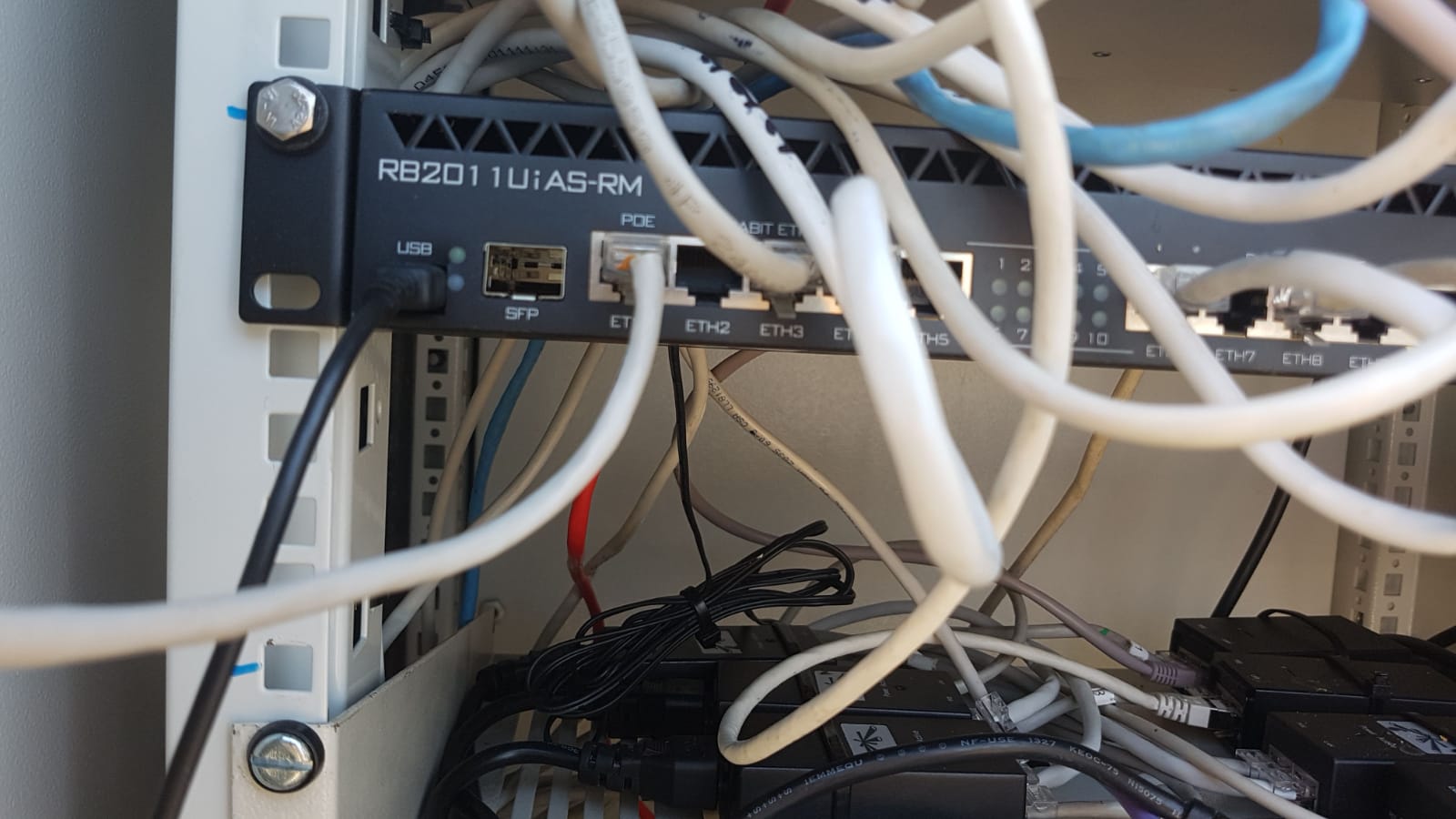
Els detalls de DipST2 (acces a Castelldefels) son
El DipST2 es un RB20 11 UiAS-RM :
- 1U rackmount
- 5xEthernet
- 5xGigabit Ethernet
- USB
- LCD
- PoE out on port 10 - can power other PoE capable devices with the same voltage as applied to the unit.
Maximum load on the port is 500mA
- 600 MHz CPU
- 128 MB RAM
- RouterOS L5
- DC jack input voltage 8-30 V
- max power consumption 28 W
- max power consumption without attachments 6 W
The switch chip used for ports ether6-ether10 only has FastEthernet (100 Mbit/s) ports
Te 10 boques RJ45 ... i MAC D4:CA:6D:60:EB:8B (? 4C:5E:0C:49:92:9B i :A5 ?)
{[ei@TDLTaborDipST2] /interface print + /ip address print}
ST2
| Flags: D - dynamic, X - disabled, R - running, S - slave
# NAME TYPE
0 R ;;; Enllaç TDLTaborST3 - Torrelles ether1 ether 172.25.51.178/30 172.25.51.176
1 S ;;; Sectorial QmP Disponible Util - Zona Franca ether2 ether
2 RS ;;; Rocket Acer - Averiado ether3 ether
3 ;;; BGP Castelldefels ether4 ether 192.168.1.2/24 192.168.1.0 NanoBridge Viladecans
172.25.34.1/29 172.25.34.0 Nanobridge Castelldefels
4 S ;;; ZF ether5 ether
5 RS ;;; Nanobridge Corbera ether6 ether 172.25.32.138/30 172.25.32.136 TDLTaborDipST1 BGP
6 ;;; Averiado ether7 ether
7 RS ;;; Nanobeam ether8 ether 172.25.50.78/29 172.25.50.72
8 ;;; vacio operativo - Averiado ether9 ether
9 ;;; Enlace Nodo Tabor BGP - Averiado ether10 ether
10 X sfp1 ether
11 R Salida Guifiporqmp bridge 192.168.88.1/24 192.168.88.0 Puerto Configuracion
12 Telefonica pptp-out
13 X adamo pptp-out
14 R vlan1 vlan
15 R wLan/Lan bridge 10.139.239.1/26 10.139.239.0
Els detalls de DipST3 son
Es un Mikrotik-Routerboard 1100, RouterOSv6.x {blanc, a dalt de tot}, amb MAC E4:8D:8C:1F:47:25
Les especs del RB 1100 AH son :
- high speed rackmount
- 484000pps
- 13 Gigabit ports
- 1 Ghz CPU
- 2 GB RAM
- Max power consumption without attachments 20W
{ WebFig(10.138.238.1) + IP + Addresses } or [ putty(10.138.238.1) + /ip address print detail + "sort" manually ]
ST3
| Enllaç Antena Qui hi ha a l'altre cantó
|
. --- ether1 --- 172.25.51.181 --- network TaborST1 === ==<cable>== === --- 172.25.51.182 Tabor ST1 / eth0
|
. --- ether2 --- 172.25.51.177 --- network TaborST2 === ==<cable>== === --- 172.25.51.178 Tabor ST2 / eth1
|
. --- ether3 --- 172.25.66.1 --- network Campanar (172.25.66.2) zzz (172.25.66.3) --- [172.25.66.4] {campanar}
|
. --- ether4 --- 172.25.66.9 --- network CanColl (172.25.66.10) zzz (172.25.66.11) --- [172.25.66.12]
|
. --- ether5 --- 172.25.66.17 --- network Cementiri (172.25.66.18) zzz (172.25.66.19) --- [172.25.66.20]
|
. --- ether6 --- 10.139.238.225 --- xarxaTorrelles-TaborAP1
. --- ether6 --- 172.25.37.121 --- TDLTaborDipocketRd1 (172.25.37.122) --- clients
|
. --- ether7 --- 10.139.239.65 --- xarxaTorrelles-TaborAP2
. --- ether7 --- 172.25.38.189 --- TDLTaborDipocketRd2 (172.25.38.190) --- clients
. --- ether7 --- 192.168.1.1 --- TDLTaborDipocketRd2
|
. --- ether8 --- 10.139.239.97 --- xarxaTorrelles-TaborAP3
. --- ether8 --- 172.25.39.117 --- TDLTaborDipocketRd3 (172.25.39.118) --- clients
. -X- ether8 --- 192.168.1.1 --- TDLTaborDipocketRd3
|
. --- ether9 --- ?
. --- ether10 --- ?
. --- ether11 --- [10.139.130.40] --- (10.139.130.39) zzz wd-TDLTaborPuntOmnia zzz (10.139.130.38) --- [pomnia]
|
. --- bridge-local 10.138.238.1 --- public ip --- .
|
. --- ether13 -- 192.168.10.1 --- manage port --- .
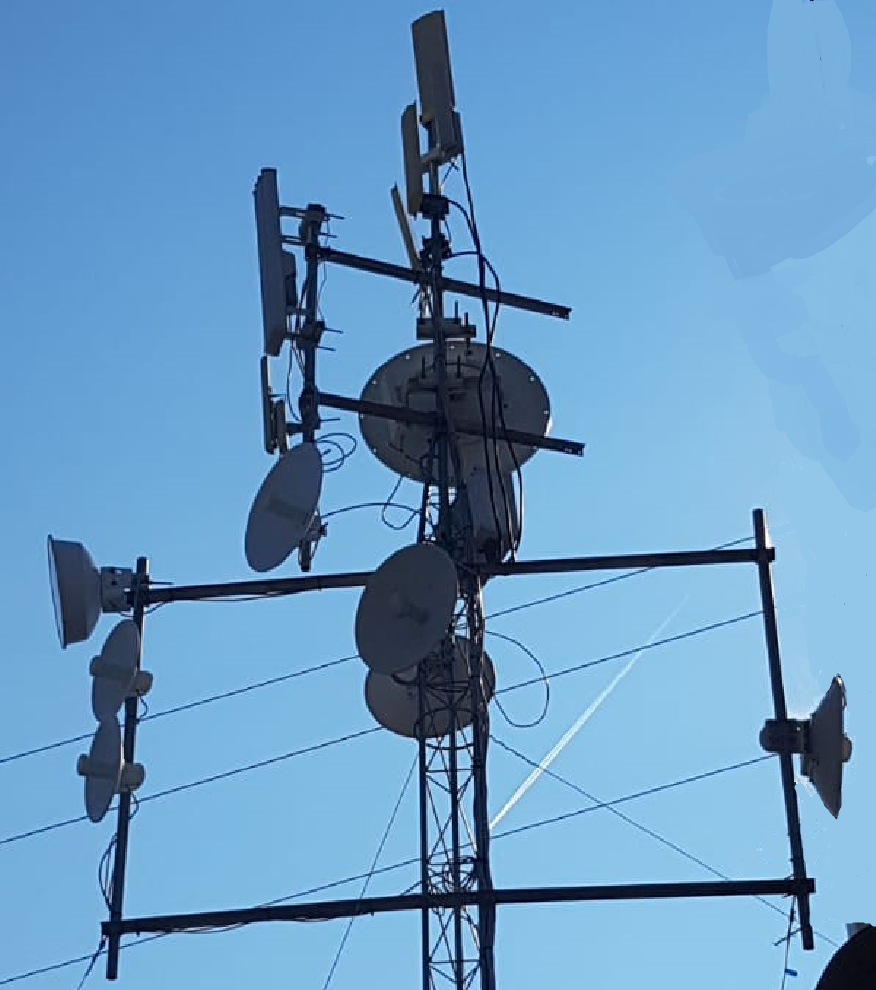
El Tabor te 6 antenes amb AirOs :
Filtre de SSH que trobo a ST2 :
[ei@TDLTaborDipST2] > ip firewall filter print
Flags: X - disabled, I - invalid, D - dynamic
0 XI chain=input action=drop protocol=tcp dst-port=22 log-prefix=""
1 chain=input action=drop protocol=tcp dst-port=23 log-prefix=""
problemes Tabor - avaria 2018 Nov
El 15 de desembre de 2018 posem :
- PoE 38 v 0,5 a
- 2x Rocket R5AC-lite
Clients Tabor AP2 (Jul 2019)
A la antena "Rocket 5AC Lite" (Device Name "TDLTaborDipRocketRd2", SSID "xarxaTorrelles-TaborAP2")
amb IP
172.25.38.190 hi ha (20190721) "Station List" :
Station MAC Device Model Device Name Signal Last IP
04:18:D6:58:E8:67 NanoStation loco M5 TDLMontserratroig22a -66 dBm 10.139.239.66
B4:FB:E4:68:8B:5E LiteBeam 5AC Gen2 TDLOliveretaEdRd1 -54 dBm 10.139.239.94
El Gateway al uTik "ether7" és 10.139.239.65/172.25.38.189
Clients Tabor AP3 (Jul 2019)
A la antena "Rocket M5" (Device Name "TDLTaborDipRocketRd3", SSID "xarxaTorrelles-TaborAP3")
amb IP
172.25.39.118 tenim (20190701) :
MAC Device Name Last IP
FC:EC:DA:2E:51:41 Manel 10.139.239.103
44:D9:E7:7E:70:E9 TDLAvTorrellestessn 10.139.239.100
B4:FB:E4:60:E6:67 TDLMasGelat21bis 10.139.239.125 ! dhcp !
F0:9F:C2:52:1B:70 TDLSantNicolau 10.139.239.126 ? dhcp ?
El Gateway al uTik "ether8" és 10.139.239.97/172.25.39.117
Compte que Tabor AP3 té ACL amb les MACs !
problemes Tabor - avaria 2019 Nov
Deix de funcionar el enllaç amb el Cementiri.
Comprem Ubiquiti LBE-M5-23 50 €
supernode Can Coll
Can Coll te 1 controlador amb 2 antenes per clients i una antena direccional - the IPs are :
172.25.66.11 AirOS = antena Can Coll NanoBeam PowerBeam M5 300 TDLCanCollNanoBeam1 10.138.238.1:3128
172.25.66.12 RouterOS = controlador Can Coll ST 10.138.238.1:3128
10.139.130.193 wlan2 TDLCanCollAP1
10.139.130.225 wlan/lan TDLCanCollAP2
172.25.32.89 wds_TDLTabor wds_TaborDipST1 * disabled *
172.25.39.106 wds_TDeÑGueyGinesta32Rd1 wds_TDeÑGueyGinesta32Rd1 * disabled *
172.25.66.12 ether2 wds TDLTaborDipST3
Les conexions de Can Coll explicades a guifi.net son velles :
links (wds)
TDLCanCollST - wds-TDLCanCollTabor
25419-TDLTaborDip (TDLTaborDipST1/wds-TDLTbrDp-DpGuey) 172.25.32.89/172.25.32.90
TDLCanCollST - wds-TDLCanColl-guifiGy
25713-TDLginesta32 (TDeL-GueyGinesta32Rd1/wds-TDLGuifiDipColl) 172.25.39.106/172.25.39.105
supernode Cementiri
El Cementiri te 1 controlador i 2 antenes.
Les IPs son :
10.139.130.161 wlan AP1 -
10.139.238.161 wlan2 AP2 -
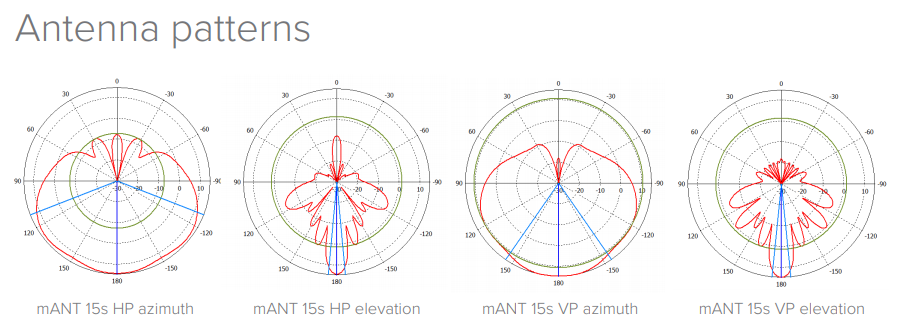
mANTBox 15s
172.25.66.20 ether1 TDLLCementiriST router webFig gw 172.25.66.17 TaborDipST3
172.25.39.53 wds_TDLTaborDipST1 wds_TaborDipST1 * disabled *
El consum del conjunt és aprox :
router mikrotik X {v6.38.1 WISP AP, mipsbe}
PowerBeam M5 300 6 W a 24V [
data sheet]
mANTBox 15s 13 W [
specs]
antena AP1 X
antena AP2 X
La conexio amb el Tabor explicada a guifi.net es vella :
TDLLCementiriST - wds-TDLLCmntrTaborDp
25379-TDLTaborDip (TDLTaborDipST1/wds-TDLTbrDpCemntri) 172.25.39.53/172.25.39.54
The actual one is :
172.25.66.17 = TDLTaborNanoBeam2
172.25.66.18 AirOS = antena Cementiri NanoBeam PowerBeam M5 300 guifi.net-wds-TDLCementiri-Tabor 10.138.238.1:3128
172.25.66.19 AirOS = antena Cementiri ST PowerBeam M5 300 guifi.net-wds-TDLCementiri-Tabor 10.138.238.1:3128
172.25.66.20 = controlador Cementiri ST
El conexionat electric és especial doncs va amb un panel solar :
.---------------. .-------------. .---------------.
| | | | | |
| | ----- | | | | .-----. .--------------.
| Panel Solar | | | | | ----- | | ----- | 2x antenes |
| | ----- | | | | ----- | PoE | ----- | APs |
| | | | | | .-----. .--------------.
.---------------. | | ----- | |
| Regulador | | Trafo 12/24 |
.---------------. | | ----- | |
| | | | | | .-----. .--------------.
| | ----- | | | | ----- | | ----- | 1x antena |
| Bateria | | | | | ----- | PoE | ----- | link Tabor |
| | ----- | | | | .-----. .--------------.
| | | | | |
.---------------. .-------------. .---------------.
Panel solar specs (at STC 1000 W/m2, AM 1,5, cell T 25º) :
- Fabricant : Mitsubishi Electric
- Model : PV-TE125MF5N,
data sheet
- Max Power : 125 W
- Max Power voltage : 17,3 V
- Max Power current : 7,23 A
El regulador es un Foton RAS 300
Si som vora les antenes del Cementiri, podem provar que el node funciona aixi :
- engeguem el wifi del telefon i ens conectem a AP1 [IP 10.139.130.161, ssid "guifi.net-TDLLCmntrAP1"] o AP2
- quina IP tenim ?
- obrim un navegador i anem a
Comprovem el cami : telèfon -> AP1 -> Cementiri -> Tabor -> Campanar -> pomnia
Avaria Cementiri 2018 Juliol
Comprem mANTBox 15s,
5GHz 120 degree 15dBi dual polarization sector Integrated antenna with 720Mhz CPU, 128MB RAM, SFP, PSU and PoE - 135€
Nova bateria del EcoTaller :
- voltatge nominal, 12 V
- capacitat de carrega, 35 Ah
- potencia de descarrega, 300 A
Las baterías de ciclo profundo se caracterizan por su gran capacidad de descargas completas.
De hecho soportan cientos de descargas completas, lo cual no es habitual en otros tipos de baterías.
Existen 2 tipos de reguladores de carga, el PWM o convencional, y el MPPT o maximizador.
- PWN - tension panel = tension bateria. A mayor tension, desconexion y perdida rendimiento. Mas barato.
- MPTT - tension panel >> tension bateria, o panel > 200 W. Mas caro.
Botiga de'n Ramon : Teknosolar
Compra 20180729 : (landatel/landashop)
- bateria AGM 100Ah 12V Enersys 12TD100F4 - 185€
- regulador de carga : charge controller 20A 12/24V LCD, 40A PWM - 39€
Avaria Cementiri 2018 Agost
Trafo sense led verd : reset protecció del regulador
Els DHCP del Cementiri
Tenim :
10.139.130.161/27 interface=bridge-wlan1 server dhcp3 pool dhcp_pool0 10.139.130.162 .. 10.139.130.190 (ex 2)
10.139.238.161/27 interface=bridge-wlan2 (ex wlan2) server dhcp2 pool dhcp_pool1 10.139.238.162 .. 10.139.238.190
supernode Campanar
El Campanar te 2 controladors i 7 antenes. Sembla que ST2 ja no existeix {2010}.
El controlador ST1 es un Mikrotik RB3011 UiAD-RM.
- 1U rackmount
- 10x Gigabit Ethernet
- SFP
- USB 3.0
- LCD
- PoE out on port 10
- 2x 1.4 GHz CPU
- 1 GB RAM
- RouterOS L5
ST1 te MAC E4.8D.8C.0A.3D.8F
Les 6 conexions (5 antenes i un cable) que hi ha son :
- antena enllaç al Tabor
- 4 APs per conexió dels clients
- cable de xarxa del Campanar al Ajuntament
- --- enllaç al Punt Omnia (clients no-socis)
- --- enllaç al Ajuntament -> enllaç al Punt Omnia (clients socis)
Accés al uTik :
MACs de les boques :
ether1 E4:8D:8C:0A:3D:8F
ether2 E4:8D:8C:0A:3D:90
ether3 E4:8D:8C:0A:3D:91
ether4 E4:8D:8C:0A:3D:92
ether5 E4:8D:8C:0A:3D:93
ether6 E4:8D:8C:0A:3D:95
ether7 E4:8D:8C:0A:3D:96
ether8 E4:8D:8C:0A:3D:97
ether9 E4:8D:8C:0A:3D:98
ether10 E4:8D:8C:0A:3D:99
sfp1 E4:8D:8C:0A:3D:94
Configuracio ST1 20210510 :
[usuari@TDLCampanarST1] > /ip address print
# ADDRESS NETWORK INTERFACE
. 172.25.66.4/29 172.25.66.0 ether2 ;;; enllaç TDLTaborDipST3
. 10.139.130.36/27 10.139.130.32 ether3 ;;; --- Enllaç Can Sostres (abans Proxy Ajuntament)
. 10.139.238.193/27 10.139.238.192 ether4 ;;; --- Enllaç PuntOmnia
. 172.25.33.9/30 172.25.33.8 ether5 ;;; enllaç WDS TDLCampanarRocketRd1
. 10.139.130.65/27 10.139.130.64 ether5 ;;; gateway TDLCampanarAP1
. 172.25.33.13/30 172.25.33.12 ether6 ;;; enllaç WDS TDLCampanarRocketRd2
. 10.139.238.33/27 10.139.238.32 ether6 ;;; gateway TDLCampanarAP2
. 172.25.33.17/30 172.25.33.16 ether7 ;;; enllaç WDS TDLCampanarRocketRd3
. 10.139.130.97/27 10.139.130.96 ether7 ;;; gateway TDLCampanarAP3
. 172.25.33.21/30 172.25.33.20 ether8 ;;; enllaç WDS TDLCampanarRocketRd4
. 10.139.238.65/27 10.139.238.64 ether8 ;;; gateway TDLCampanarAP4
. 192.168.1.254/24 192.168.1.0 ether10 ;;; enllaç router fibra ajuntament
. 192.168.10.1/24 192.168.10.0 bridge1 ;;; port de gestió
[xarxa@TDLCampanarST1] > /ip address print
Flags: X - disabled, I - invalid, D - dynamic
# ADDRESS NETWORK INTERFACE
. ;;; Enllas router fibra ajuntament 192.168.1.254/24 192.168.1.0 bridge-Fibra
. ;;; Port de Gestio 192.168.10.1/24 192.168.10.0 bridge1
. ;;; Enllas TDLTaborDipST3 172.25.66.4/29 172.25.66.0 ether2
. ;;; Enllas WDS TDLCampanarRocketRd1 172.25.33.9/30 172.25.33.8 ether5
. ;;; Gateway TDLCampanarAP1 10.139.130.65/27 10.139.130.64 ether5
. ;;; Enllas WDS TDLCampanarRocketRd2 172.25.33.13/30 172.25.33.12 ether6
. ;;; Gateway TDLCampanarAP2 10.139.238.33/27 10.139.238.32 ether6
. ;;; Enllas WDS TDLCampanarRocketRd3 172.25.33.17/30 172.25.33.16 ether7
. ;;; Gateway TDLCampanarAP3 10.139.130.97/27 10.139.130.96 ether7
. ;;; Enllas WDS TDLCampanarRocketRd4 172.25.33.21/30 172.25.33.20 ether8
. ;;; Gateway TDLCampanarAP4 10.139.238.65/27 10.139.238.64 ether8
. X ;;; Enllas PuntOmnia 10.139.238.193/27 10.139.238.192 ether4
. X ;;; Enllas Can Sostres (abans Proxy Ajuntament) 10.139.130.36/27 10.139.130.32 ether3
Fem un bridge (de nom "bridge-Fibra") amb les boques ether9 i ether10 :
[usuari@TDLCampanarST1] > /interface bridge port print
Flags: X - disabled, I - inactive, D - dynamic, H - hw-offload
# INTERFACE BRIDGE HW PVID PRIORITY PATH-COST INTERNAL-PATH-COST HORIZON
0 XI ether2 bridge1 1 0x80 10 10 none
1 XI ether9 bridge1 1 0x80 10 10 none
2 XI ether7 bridge1 1 0x80 10 10 none
3 I H ether1 bridge1 yes 1 0x80 10 10 none
4 H ether9 bridge-Fibra yes 1 0x80 10 10 none
5 I H ether10 bridge-Fibra yes 1 0x80 10 10 none
No se per a que serveix "bridge1" ... boques 1-2-7-9 - administracio ? recollia ports no fets servir ?
[usuari@TDLCampanarST1] > interface bridge print
Flags: X - disabled, R - running
0 R name="bridge-Fibra" mtu=auto actual-mtu=1500 l2mtu=1598 arp=enabled arp-timeout=auto mac-address=E4:8D:8C:0A:3D:98
protocol-mode=rstp fast-forward=yes igmp-snooping=no auto-mac=yes ageing-time=5m priority=0x8000 max-message-age=20s
forward-delay=15s transmit-hold-count=6 vlan-filtering=no dhcp-snooping=no
1 R name="bridge1" mtu=auto actual-mtu=1500 l2mtu=1598 arp=enabled arp-timeout=auto mac-address=E4:8D:8C:0A:3D:8F
protocol-mode=rstp fast-forward=no igmp-snooping=no auto-mac=yes ageing-time=5m priority=0x8000 max-message-age=20s
forward-delay=15s transmit-hold-count=6 vlan-filtering=no dhcp-snooping=no
Podem fer ping de 10.139.130.97 (ether7, AP3) a 192.168.1.254, ether10, sortida del cable :
[usuari@TDLCampanarST1] > /tool ping-speed 192.168.1.254
current: 2.0 Gbps
average: 2.0 Gbps
"Protocol Mode" := (none, STP, MSTP) RSTP
Arribem al router :
[usuari@TDLCampanarST1] > ping 192.168.1.1
SEQ HOST SIZE TTL TIME STATUS
0 192.168.1.1 56 64 0ms
1 192.168.1.1 56 64 0ms
2 192.168.1.1 56 64 0ms
3 192.168.1.1 56 64 0ms
sent=4 received=4 packet-loss=0% min-rtt=0ms avg-rtt=0ms max-rtt=0ms
[usuari@TDLCampanarST1] > /tool ping-speed 192.168.1.1
current: 757.6Mbps
average: 4.2Gbps
Oldie {2010}
TDLCampanarST1
{ WebFig + IP + Addresses } or
[/ip address print]
|
| Enllaç Antena Qui hi ha a l'altre cantó
|
. --- ether1 --- 192.168.1.254 --- router fibra Ajuntament (cable) --- [192.168.1.1] Fibra Optica
|
. --- ether2 --- [172.25.66.4] --- Tabor TDLTaborDipST3 (172.25.66.3) zzz (172.25.66.2) --- [172.25.66.1] {tabor}
|
. --- ether3 --- [10.139.130.36] ---
TDLAjuntamentST (10.139.130.37) zzz (10.139.130.35) --- {10.139.130.33} --- [10.139.130.38+10.139.130.34] PCaj
|
. --- ether3 --- [10.139.130.36] --- Punt Omnia {socis} (10.139.130.37) zzz (10.139.130.35) --- {10.139.130.33}
|
. --- ether4 --- [10.139.238.193] --- Punt Omnia {no socis} (10.139.238.196) zzz (10.139.238.195) --- [10.139.238.194] PCpomnia
|
. --- ether5 --- [10.139.130.65] --- TDLCampanarAP1 --- clients del Sud-Oest, Ajuntament
. --- ether5 --- [172.25.33.9] --- wds TDLCampanarRocketRd1 (172.25.33.10) zzz --- .
|
. --- ether6 --- [10.139.238.33] --- TDLCampanarAP2 --- clients del Nord-Est, Cesalpina i Can Roig
. --- ether6 --- [172.25.33.13] --- wds TDLCampanarRocketRd2 (172.25.33.14) zzz --- .
|
. --- ether7 --- [10.139.130.97] --- TDLCampanarAP3 --- clients del Sud-Est, Can Sostres, sag
. --- ether7 --- [172.25.33.17] --- wds TDLCampanarRocketRd3 (172.25.33.18) zzz --- .
|
. --- ether8 --- [10.139.238.65] --- TDLCampanarAP4 --- clients del Nord-Oest, Raval Padró
. --- ether8 --- [172.25.33.21] --- wds TDLCampanarRockerRd4 (172.25.33.22) zzz --- .
|
. --- ether9 --- ?
|
. --- ether10 -- 192.168.10.1 --- port gestió --- .
TDLCampanarST2
10.139.130.97 --> la IP ens porta a ST1
El encaminament a 20211210 és :
[xarxa@TDLCampanarST1] > ip route print
Flags: X - disabled, A - active, D - dynamic, C - connect, S - static, r - rip, b - bgp, o - ospf, m - mme, B - blackhole, U - unreachable, P - prohibit
# DST-ADDRESS PREF-SRC GATEWAY DISTANCE
0 A S 0.0.0.0/0 192.168.1.1 1 ;;; Fibra
1 X S 0.0.0.0/0 10.139.130.33 1 ;;; Punt Omnia per socis (o tothom ?)
2 ADb 10.138.238.0/24 172.25.66.1 20 ; Tabor ST3
3 ADC 10.139.130.64/27 10.139.130.65 ether5 0 ; campanar AP1
4 ADC 10.139.130.96/27 10.139.130.97 ether7 0 ; campanar AP3
8 ADC 10.139.238.32/27 10.139.238.33 ether6 0 ; campanar AP2
9 ADC 10.139.238.64/27 10.139.238.65 ether8 0 ; campanar AP4
5 ADb 10.139.130.160/27 172.25.66.1 20 ; cementiri (1/2) -> cap a Tabor ST3
6 ADb 10.139.130.192/27 172.25.66.1 20 ; can coll AP1 -> cap a Tabor ST3
7 ADb 10.139.130.224/27 172.25.66.1 20 ; can coll AP2 -> cap a Tabor ST3
10 ADb 10.139.238.160/27 172.25.66.1 20 ; cementiri (2/2) -> cap a Tabor ST3
11 ADb 10.139.238.224/27 172.25.66.1 20 ; tabor st3 AP1 -> cap a Tabor ST3
12 ADb 10.139.239.64/27 172.25.66.1 20 ; tabor st3 AP2 -> cap a Tabor ST3
13 ADC 172.25.33.8/30 172.25.33.9 ether5 0
14 ADC 172.25.33.12/30 172.25.33.13 ether6 0
15 ADC 172.25.33.16/30 172.25.33.17 ether7 0
16 ADC 172.25.33.20/30 172.25.33.21 ether8 0
17 ADb 172.25.37.120/30 172.25.66.1 20 ; tabor st3 AP1 -> cap a Tabor ST3
18 ADb 172.25.38.188/30 172.25.66.1 20 ; tabor st3 AP2 -> cap a Tabor ST3
21 ADb 172.25.66.8/29 172.25.66.1 20 ; can coll -> cap a Tabor ST3
22 ADb 172.25.66.16/29 172.25.66.1 20 ; cementiri -> cap a Tabor ST3
19 ADC 172.25.66.0/29 172.25.66.4 ether2 0 ; per anar al Tabor ST3 -> ether2
20 Db 172.25.66.0/29 172.25.66.1 20
23 ADC 192.168.1.0/24 192.168.1.254 bridge-Fibra 0
24 ADC 192.168.10.0/24 192.168.10.1 bridge1 0
An oldie was :
[usuari@TDLCampanarST1] > /ip route print
Flags: X - disabled, A - active, D - dynamic, C - connect, S - static, r - rip, b - bgp, o - ospf, m - mme, B - blackhole, U - unreachable, P - prohibit
# DST-ADDRESS PREF-SRC GATEWAY DISTANCE
0 A S 0.0.0.0/0 192.168.1.1 1 ;;; Fibra
2 ADb 10.138.238.0/24 172.25.66.1 20 ; per anar al Tabor -> ether2
21 ADC 172.25.66.0/29 172.25.66.4 ether2 0 ; per anar al Tabor -> ether2
1 X S 0.0.0.0/0 10.139.130.33 1 ;;; Punt Omnia per socis (o tothom ?)
3 DC 10.139.130.32/27 10.139.130.36 ether3 255 ; pomnia vell can sostres -> ether3
12 DC 10.139.238.192/27 10.139.238.193 ether4 255 ; pomnia nou can sostres -> ether3
4 ADC 10.139.130.64/27 10.139.130.65 ether5 0 ; campanar AP1
15 ADC 172.25.33.8/30 172.25.33.9 ether5 0
9 ADC 10.139.238.32/27 10.139.238.33 ether6 0 ; campanar AP2
16 ADC 172.25.33.12/30 172.25.33.13 ether6 0
5 ADC 10.139.130.96/27 10.139.130.97 ether7 0 ; campanar AP3
17 ADC 172.25.33.16/30 172.25.33.17 ether7 0
10 ADC 10.139.238.64/27 10.139.238.65 ether8 0 ; campanar AP4
18 ADC 172.25.33.20/30 172.25.33.21 ether8 0
25 ADC 192.168.1.0/24 192.168.1.254 ether10 0
26 ADC 192.168.10.0/24 192.168.10.1 bridge1 0
6 ADb 10.139.130.160/27 172.25.66.1 20 ; desti Cementiri -> gw Tabor ST3
7 ADb 10.139.130.192/27 172.25.66.1 20 ; desti Can Coll AP1 -> gw Tabor ST3
8 ADb 10.139.130.224/27 172.25.66.1 20 ; desti Can Coll AP2 -> gw Tabor ST3
11 ADb 10.139.238.160/27 172.25.66.1 20 ; desti Cementiri -> gw Tabor ST3
13 ADb 10.139.238.224/27 172.25.66.1 20 ; desti Tabor AP1 -> gw Tabor ST3
14 ADb 10.139.239.64/27 172.25.66.1 20 ; desti Tabor AP2 -> gw Tabor ST3
19 ADb 172.25.37.120/30 172.25.66.1 20 ; desti Tabor AP1 -> gw Tabor ST3
20 ADb 172.25.38.188/30 172.25.66.1 20 ; desti Tabor AP2 -> gw Tabor ST3
22 Db 172.25.66.0/29 172.25.66.1 20 ; desti Campanar
23 ADb 172.25.66.8/29 172.25.66.1 20 ; desti Can Coll
24 ADb 172.25.66.16/29 172.25.66.1 20 ; desti Cementiri
El detall de les antenes és :
nom | ----- controlador ------ | ssid antena model firmware
AP1 10.139.130.65 172.25.33.9 guifi.net-TDLCmpnrAP1 172.25.33.10 Rocket M5 XW.v6.2.0 78:8A:20:EE:80:7D
AP2 10.139.238.33 172.25.33.13 guifi.net-TDLCmpnrAP2 172.25.33.14 Rocket M5 XW.v6.2.0 44:D9:E7:52:B0:42
AP3 10.139.130.97 172.25.33.17 guifi.net-TDLCmpnrAP3 172.25.33.18 Rocket M5 XW.v6.2.0 78:8A:20:C8:15:57
AP4 10.139.238.65 172.25.33.21 guifi.net-TDLCmpnrAP4 172.25.33.22 Rocket M5 XW.v6.2.0 78:8A:20:EE:7F:EE
Campanar a Tabor 10.139.238.65 172.25.66.4 guifi.net-TDLTaborCampanarAC 172.25.66.3 PowerBeam 5AC 300 WA.v8.6.2 44:D9:E7:AE:2E:FB
Campanar a Can Sostres (vell) 10.139.238.193 guifi.net-wds-TDLCmpnPtOmnia 10.139.238.196 NanoStation 5 Loco XS5.ar2313.v4.0.4 00:27:22:C6:94:79
Campanar a Can Sostres (nou) 10.139.130.36 xarxaTorrelles-TDLCampanarPO 10.139.130.37 LiteBeam 5AC Gen2 WA.v8.6.2 B4:FB:E4:68:8C:7D
Els models de les antenes del Campanar son :
Aixi, per accedir de un client del Campanar a un client del Tabor, la trassa és :
C:\> tracert -d 10.139.130.138
Tracing route to 10.139.130.138 over a maximum of 30 hops
1 2 ms 2 ms 1 ms 192.168.1.1 client campanar
2 4 ms 2 ms 3 ms 10.139.130.97 campanar
3 4 ms 5 ms 3 ms 172.25.66.1 campanar to tabor
4 5 ms 4 ms 5 ms 172.25.51.182 tabor from campanar
5 5 ms 9 ms 44 ms 10.139.130.138 client tabor
Trace complete.
Clients del Campanar, avui 20190723
AP1 - Device Name: TDLCampanarRocketRd1 - SSID: guifi.net-TDLCmpnrAP1
00:27:22:12:52:AE - - -72 -99 0 1.3 0 / 54 - 00:06:17 10.139.130.74 kick
00:15:6D:82:7C:AB - - -79 -99 8 0.1 54 / 54 99 00:06:15 10.139.130.68 kick
00:15:6D:7C:D4:B2 - - -74 -99 0 1.1 0 / 52 - 00:06:14 unknown kick
00:15:6D:82:7A:94 - - -70 -99 0 1.3 0 / 0 - 00:06:13 unknown kick
00:27:22:14:1D:33 TDLPlzAjuntament2b -72 -73 -99 0 1.3 0 / 52 - 00:05:42 10.139.130.82 kick
00:15:6D:3A:54:C2 TDLSantJoan7Rd - -60 -99 6 0.1 54 / 54 100 00:06:15 10.139.130.69 kick
AP2 - Device Name: TDLCampanarRocketRd2 - SSID: guifi.net-TDLCmpnrAP2
80:2A:A8:08:0D:93 TDLSantPere5 -53 -67 -100 1 0.2 144 / 144 100 00:00:36 10.139.238.36 kick
AP3 - Device Name: TDLCampanarRocketRd3 - SSID: guifi.net-TDLCmpnrAP3
44:D9:E7:7E:71:E7 - - -96 -101 0 0.7 0 / 0 - 00:21:07 unknown kick
88:6B:6E:71:A3:76 - - -85 -101 0 0.7 0 / 6.5 - 00:00:44 169.254.169.47 kick
F0:9F:C2:E2:05:89 NanoBeam M5 16 -69 -82 -101 1 0.4 108 / 27 69 00:21:24 10.139.130.121 kick
44:D9:E7:7E:6F:FA NodeSebastiaNetRd1 -49 -62 -101 1 0.1 300 / 243 98 00:21:14 10.139.130.117 kick
DC:9F:DB:36:B3:36 TDLMajor47Rd1 - -66 -101 1 0.1 216 / 216 84 00:21:28 10.139.130.103 kick
80:2A:A8:74:43:92 TDLSantPau6bRd2 -41 -60 -101 1 0.1 270 / 300 97 00:21:25 10.139.130.99 kick
AP4 - Device Name: TDLCampanarRocketRd4 - SSID: guifi.net-TDLCmpnrAP4
00:15:6D:3C:94:DF - - -69 -102 0 0.7 0 / 54 - 00:00:16 10.139.238.77 kick
78:8A:20:38:73:CE NanoBeam M5 16 -67 -73 -102 2 0.7 52 / 52 100 00:00:11 10.139.238.74 kick
Reinici remot del Campanar
Sonoff - wifi smart switch
Sonoff, 9 €
Requiere
- conexión a internet de la aplicación eWelink (en el smartphone)
- conexio wifi pel aparell de commutacio
Sonoff Basic WiFi electrical switch transmits data to a cloud platform through the WiFi Router,
which enables users to remotely control all the connected appliances, via the mobile application eWeLink.
The server is Amazon AWS global server
Avaria Campanar Juliol 2018
Deix de funcionar AP3. Canvio el PoE pero el LED #7 no s'encén.
Sembla que
- les antenes noves (NanoBeam M5 16, rodones) es conecten ok
- les antenes antigues (NanoStation 5 "Loco") no es conecten (no poden anar a 40 MHz de ample de canal)
Solucio :
- antena Nanostation Loco M5, pujar firmware XW 6.1.8 :
direct,
[local]
- read about
compatibility
between a legacy station and an airMAX M access point
- read about "Compatibility between Non-Ubiquiti radios and an airMAX M access point"
- navigate to the airMAX AP's GUI.
- navigate to the airMAX tab.
- disable airMAX protocol on airMAX.
- click "Change" then "Apply."
- now the airMAX M AP will use the 802.11 CSMA/CA protocol to work with other stations.
- navigate to the Wireless page and ensure that "Channel Shifting" is disabled.
- airMAX "Help" at Rocket M5 :
For compatibility, legacy or 802.11 a/b/g devices should use legacy firmware with airMAX support, such as airOS firmware v4.0.
Legacy clients can only work as airMAX clients with the M Series device acting as an airMAX AP.
- Set a frequency, don't leave it on Auto. Pick a frequency that your device can use. Try 20MHz or 40MHz channel width.
Avaria Campanar Novembre 2018
Deix de funcionar AP1 i AP4. Torna AP1 pero cau al cap de un temps i cal reiniciar tot.
20190119 - canviem les radios de AP1 i AP4
Problemes AP1 Campanar
El AP1 del Campanar es penja amb regularitat i cal reiniciar.
Pensem de posar un rellotge com 1614775O8JPLL, 13 €
Jordi rev.de
20180521 - comprem KWE-TM01-EU de NinGbo Cowell Electronic Technology Co Ltd, Goodaftersales@outlook.com
Monitoritzacio : /home/mate/eines/monit_campanar/monit_campanar.py : s'atura cada dia de 04:11 a 04:13 am
Avaria Campanar Novembre 2018
Deix de funcionar internet i el router de Tfca esta OK.
Decidim canviar el Mikrotik RB30 11 UiAD-RM per el RB20 11 UiAS-RM (ex ST2 del Tabor)
Avaria Campanar Desembre 2020
Canviem el conector del cable del router
[admin@TDLCampanarST1] > ping 8.8.8.8
SEQ HOST SIZE TTL TIME STATUS
0 no route to host
1 no route to host
2 no route to host
3 no route to host
IPs de les antenes - AirOS
Tenim AirOS a
Dispositivo MAC SSID gateway Device model Modo wifi
172.25.33.10 Campanar AP1 TDLCampanarRocketRd1 44:D9:E7:44:DF:EE guifi.net-TDLCmpnrAP1 172.25.33.9 Rocket M5 AP
172.25.33.14 Campanar AP2 TDLCampanarRocketRd2 44:D9:E7:52:B0:42 guifi.net-TDLCmpnrAP2 172.25.33.13 Rocket M5 AP
172.25.33.18 Campanar AP3 TDLCampanarRocketRd3 00:27:22:9A:5E:FA guifi.net-TDLCmpnrAP3 172.25.33.17 Rocket M5 AP
172.25.33.22 Campanar AP4 TDLCampanarRocketRd4 24:A4:3C:46:0F:6F guifi.net-TDLCmpnrAP4 172.25.33.21 Rocket M5 AP
10.139.238.196 Campanar -> Punt Omnia . 00:27:22:C6:94:79 guifi.net-wds-TDLCmpnPtOmnia 10.139.238.193
10.139.238.195 Punt Omnia -> Campanar . 00:15:6D:82:7C:74 guifi.net-wds-TDLCmpnPtOmnia 10.139.238.193
172.25.37.122 Tabor AP1 TDLTaborDipRocketRd1 04:18:D6:EC:7B:F2 xarxaTorrelles-TaborAP1 172.25.37.121 Rocket 5AC Lite AP
172.25.38.190 Tabor AP2 TDLTaborDipRocketRd2 44:D9:E7:52:B0:27 xarxaTorrelles-TaborAP2 172.25.38.189 Rocket 5AC Lite AP
172.25.39.118 Tabor AP3 TDLTaborDipRocketRd3 44:D9:E7:52:B2:15 xarxaTorrelles-TaborAP3 172.25.39.117 Rocket M5 AP
172.25.66.2 Campanar -> Tabor TDLTaborDipPowerRd1 44:D9:E7:AE:2F:27 guifi.net-TDLTaborCampanarAC 172.25.66.3 PowerBeam 5AC 300 AP PtP
172.25.66.3 Tabor -> Campanar TDLCampanarPowerRd1 44:D9:E7:AE:2E:FB guifi.net-TDLTaborCampanarAC 172.25.66.2 PowerBeam 5AC 300 Estacion PtP
172.25.66.10 Tabor -> Can Coll TDLTaborNanoBeam1 24:A4:3C:82:04:9F guifi.net-wds-TDLCanColl-Tabor 172.25.66.8 PowerBeam M5 300 Station WDS
172.25.66.11 Can Coll -> Tabor TDLCanCollNanoBeam1 24:A4:3C:82:03:45 guifi.net-wds-TDLCanColl-Tabor 172.25.66.9 PowerBeam M5 300 Punto de acceso WDS
172.25.66.18 Tabor -> Cementiri TDLTaborNanoBeam2 24:A4:3C:82:01:00 guifi.net-wds-TDLCementiri-Tabor 172.25.66.17 PowerBeam M5 300 Station WDS
172.25.66.19 Cementiri -> Tabor TDLCementiriNanoBeam1 24:A4:3C:82:04:DF guifi.net-wds-TDLCementiri-Tabor 172.25.66.17 PowerBeam M5 300 Access Point WDS
10.139.239.2 . Bellamar-Acer 24:A4:3C:B8:38:AC Test piera . NanoBeamM5 400 Bridge
10.139.239.3 . NanoBridge M5 DC:9F:DB:18:F6:31 wifels.ap.04.test torrelles . NanoBridge M5 AP
Les antenes que no tenen AirOS son :
Dispositivo MAC
10.139.130.161 Cementiri AP1 . . . . mANTBox 15s
Cementiri AP2 . . . . .
10.139.130.193 Can Coll AP1 . . . . .
Can Coll AP2 . . . . .
eina guifi : scan de totes les IPs de antenes i controladors
Fem un wget() de una llista de IPs i intentem esbrinar que hi ha segons la resposta :
Proxy = Campanar 10.139.130.65:3128
w500\\rexx\guifi\wget_amb_proxy\wget_llista> rexx scan_list.rexx IPS.TXT
>>> [172.25.33.9] RC is 0 + ++++ hi ha un ROUTEROS - un controlador - Campanar AP1 - wds TDLCampanarRocketRd1
>>> [172.25.33.10] RC is 0 + ++++ hi ha un AIROS - una antena NOVA - Campanar AP1 - TDLCampanarRocketRd1
>>> [172.25.33.12] RC is 8 + - .
>>> [172.25.33.13] RC is 0 + ++++ hi ha un ROUTEROS - un controlador - Campanar AP2 - wds TDLCampanarRocketRd2
>>> [172.25.33.14] RC is 0 + ++++ hi ha un AIROS - una antena NOVA - Campanar AP2 - TDLCampanarRocketRd2
>>> [172.25.33.17] RC is 0 + ++++ hi ha un ROUTEROS - un controlador - Campanar AP3 - wds TDLCampanarRocketRd3
>>> [172.25.33.18] RC is 0 + ++++ hi ha un AIROS - una antena NOVA - Campanar AP3 - TDLCampanarRocketRd3
>>> [172.25.33.21] RC is 0 + ++++ hi ha un ROUTEROS - un controlador - Campanar AP4 - wds TDLCampanarRockerRd4
>>> [172.25.33.22] RC is 0 + ++++ hi ha un AIROS - una antena NOVA - Campanar AP4 - TDLCampanarRocketRd4
>>> [172.25.37.121] RC is 0 + ++++ hi ha un ROUTEROS - un controlador - xarxaTorrelles-TaborAP1
>>> [172.25.37.122] RC is 0 + ++++ hi ha un AIROS - una antena NOVA - Tabor AP1 - TDLTaborDipRocketRd1
>>> [172.25.38.189] RC is 0 + ++++ hi ha un ROUTEROS - un controlador - xarxaTorrelles-TaborAP2
>>> [172.25.38.190] RC is 0 + ++++ hi ha un AIROS - una antena NOVA - Tabor AP2 - TDLTaborDipRocketRd2
>>> [172.25.39.117] RC is 0 + ++++ hi ha un ROUTEROS - un controlador - xarxaTorrelles-TaborAP3
>>> [172.25.39.118] RC is 0 + ++++ hi ha un AIROS - una antena NOVA - Tabor AP3 - TDLTaborDipRocketRd3
>>> [172.25.51.177] RC is 0 + ++++ hi ha un ROUTEROS - un controlador - Tabor ST2
>>> [172.25.51.181] RC is 0 + ++++ hi ha un ROUTEROS - un controlador - Tabor ST3
>>> [172.25.51.182] RC is 0 + ++++ hi ha un ROUTEROS - un controlador - Tabor ST1
>>> [172.25.66.1] RC is 0 + ++++ hi ha un ROUTEROS - un controlador - Tabor a Campanar
>>> [172.25.66.2] RC is 0 + ++++ hi ha un AIROS - una antena VELLA - Tabor a Campanar
>>> [172.25.66.3] RC is 0 + ++++ hi ha un AIROS - una antena VELLA - Campanar a Tabor
>>> [172.25.66.4] RC is 0 + ++++ hi ha un ROUTEROS - un controlador - Campanar a Tabor
>>> [172.25.66.9] RC is 0 + ++++ hi ha un ROUTEROS - un controlador - Tabor a Can Coll
>>> [172.25.66.10] RC is 0 + ++++ hi ha un AIROS - una antena NOVA - Tabor a Can Coll
>>> [172.25.66.11] RC is 0 + ++++ hi ha un AIROS - una antena NOVA - Can Coll a Tabor TDLCanCollNanoBeam1
>>> [172.25.66.12] RC is 0 + ++++ hi ha un ROUTEROS - un controlador - Can Coll a Tabor
>>> [172.25.66.17] RC is 0 + ++++ hi ha un ROUTEROS - un controlador - Tabor a Cementiri
>>> [172.25.66.18] RC is 0 + ++++ hi ha un AIROS - una antena NOVA - Tabor a Cementiri NB2 TDLTaborNanoBeam2
>>> [172.25.66.19] RC is 4 + - Cementiri NB1 TDLTaborNanoBeam1
>>> [172.25.66.20] RC is 0 + ++++ hi ha un ROUTEROS - un controlador - Cementiri a Tabor
>>> [10.139.130.65] RC is 0 + ++++ hi ha un ROUTEROS - un controlador - Campanar AP1
>>> [10.139.130.97] RC is 0 + ++++ hi ha un ROUTEROS - un controlador - Campanar AP3
>>> [10.139.130.129] RC is 0 + ++++ hi ha un ROUTEROS - un controlador - Tabor DipAP1
>>> [10.139.130.161] RC is 0 + ++++ hi ha un ROUTEROS - un controlador - Cementiri AP1
>>> [10.139.130.193] RC is 0 + ++++ hi ha un ROUTEROS - un controlador - Can Coll AP1
>>> [10.139.130.225] RC is 0 + ++++ hi ha un ROUTEROS - un controlador - Can Coll AP2
>>> [10.139.238.33] RC is 0 + ++++ hi ha un ROUTEROS - un controlador - Campanar AP2
>>> [10.139.238.65] RC is 0 + ++++ hi ha un ROUTEROS - un controlador - Campanar AP4
>>> [10.139.238.97] RC is 0 + ++++ hi ha un ROUTEROS - un controlador - Tabor DipAP2
>>> [10.139.238.129] RC is 0 + ++++ hi ha un ROUTEROS - un controlador - Tabor DipAP3
>>> [10.139.238.161] RC is 0 + ++++ hi ha un ROUTEROS - un controlador - Cementiri AP2
>>> [10.139.238.193] RC is 0 + ++++ hi ha un ROUTEROS - un controlador - Campanar a Pomnia
>>> [10.139.238.195] RC is 6 + - Antena Pomnia
>>> [10.139.238.196] RC is 0 + ++++ hi ha un AIROS - una antena super VELLA - Campanar a Pomnia
>>> [10.139.238.225] RC is 0 + ++++ hi ha un ROUTEROS - un controlador - Tabor RD1/AP1
>>> [10.139.239.1] RC is 0 + ++++ hi ha un ROUTEROS - un controlador - Castefa
>>> [10.139.239.2] RC is 0 + ++++ hi ha un AIROS
>>> [10.139.239.3] RC is 0 + ++++ hi ha un AIROS
>>> [10.139.239.65] RC is 0 + ++++ hi ha un ROUTEROS - un controlador - Tabor RD1/AP2
>>> [10.139.239.97] RC is 0 + ++++ hi ha un ROUTEROS - un controlador - Tabor RD1/AP3
Al "punt-omnia" (fent servir el proxy pxy_campanar = "http://10.139.130.65:3128") tenim
/home/mate/eines/rexx/scan_guifi$ ./do.sh - wget IPs from IPS.txt
Genera qq_127.html, que enviem via FTP a un servidor public.
Podeu veure el resultat aqui qq_127.html
eina guifi : scan de les IPs dels Super Nodes de Torrelles
Eina en Delphi :
\\w500\delphi_xe7\guifi_ping\pingguifi-64bit.exe
Cal afegir-hi el Punt Omnia i en node del Ajuntament (### pend ###)
eina guifi : scan IPs dels usuaris que paguen
Podeu veure el resultat aqui pagina.html
Ara be, igual en lloc de "ping" podem fer servir
wget
o
curl (dead ?)
or
node-libcurl
... per fiabilitat
I usually use
REQUEST, its a simplified but powerful HTTP client for node.js
It can be found in NPM : "npm install request"
Here is a usage sample:
var request = require('request');
request('http://www.google.com', function (error, response, body) {
if ( !error && response.statusCode == 200 ) {
console.log( body ) // Show the HTML for the Google homepage
}
})
Eina guifi : scan qui hi ha conectat als nostres super nodes
Eina en bash + rexx
1er : /home/mate/eines/ssh/scan.sh - fa out.txt amb resultat de la comanda ssh user@ip 'ip ; neighbor ; print detail'
2on : /home/mate/eines/ssh/conectats.rexx - llegeix out.txt i fa conectats.html
Podeu veure el resultat aqui conectats.html
Equips routers q tenim
Campanar ST1 10.139.130.65 E4:8D:8C:0A:3D:8F
Can Coll ST
10.139.130.193 00:0C:42:61:A6:EE (wlan) 00:0C:42:25:FB:E3 (lan)
Cementiri ST 10.139.130.161 00:0C:42:61:A5:AC
Tabor ST1 10.139.130.129 00:0C:42:61:A2:5C (no answer)
Tabor ST2 10.139.239.1 D4:CA:6D:60:EB:8B
Tabor ST3 10.139.238.225 E4:8D:8C:1F:47:25
Conjunt de IPs dels routers/controladors - RouterOS/WebFig
Accedim un "RouterOS WebFig v6.38.1" via
10.138.238.1 Tabor DipST3
10.139.130.65 Campanar AP1, TDLCampanarST1
10.139.130.97 Campanar AP3
10.139.130.129 guifi.net-TDLTaborDipAP1
10.139.130.161 guifi.net-TDLLCmntrAP1 00:0C:42:61:A5:AC
10.139.130.193 TDLCanCollST TDLCanCollAP1
10.139.130.225 TDLCanCollST TDLCanCollAP2
10.139.238.33 Campanar AP2
10.139.238.61 Cementiri wlan2
10.139.238.65 Campanar AP4
10.139.238.97 TDLTaborDipAP2
10.139.238.129 TDLTaborDipAP3
10.139.238.161 guifi.net-TDLLCmntrAP2 00:0C:42:61:A3:61
10.139.238.225 Tabor RD1AP1
10.139.239.1 Tabor DipST2
10.139.239.65 Tabor RD1AP2
10.139.239.97 Tabor RD1AP3
172.25.33.9 Campanar AP1 - wds TDLCampanarRocketRd1
172.25.33.13 Campanar AP2 - wds TDLCampanarRocketRd2
172.25.33.17 Campanar AP3 - wds TDLCampanarRocketRd3
172.25.33.21 Campanar AP4 - wds TDLCampanarRockerRd4
172.25.37.121 xarxaTorrelles-TaborAP1
172.25.38.189 xarxaTorrelles-TaborAP2
172.25.39.117 xarxaTorrelles-TaborAP3
172.25.51.177 Tabor ST3 a ST2
172.25.51.178 Tabor DipST2
172.25.51.181 Tabor ST3 a ST1
172.25.51.182 Tabor ST1 a ST3 00:0C:42:79:B8:C1
172.25.66.1 Tabor a Campanar
172.25.66.4 Campanar a Tabor DipST3
172.25.66.9 Tabor a Can Coll
172.25.66.12 Can Coll a Tabor - wds TDLTaborDipST3
172.25.66.17 Tabor a Cementiri
172.25.66.20 Cementiri a Tabor ST3 00:0C:42:2F:C9:0C
Manual Webfig
&
TOC -> Help Mikrotik docs [***]
See commands
node Ajuntament
El Ajuntament de Torrelles te un node de guifi : el 30625 amb 4 devices :
TDLAjuntamentST radio 10.139.130.33/27 RouterOSv4.7+
TDLAjuntamentSrvr1 server 10.139.130.34/27
TDLAjuntamentNt1 nat 10.139.130.35/27 aixo es una antena - why en diuen NT ?
TDLAjuntamentNt2 nat 10.139.130.36/27 idem
Per algun lloc hi ha una antena:
TDLAjuntamentST : wds-TDLAjntmntCmpnr 172.25.39.41/30 -> .42,
pero no funcionen {20171212}
Fibra óptica de guifi.torrelles
El tf fixe és el 93 461 34 15 i s'administra externament amb Alejandra
o internament via url(192.168.1.1) amb proxy(10.139.130.65:3128)
En Josep Munmany de l'Ajuntament sap on és el router {tf 637 55 77 01, e1001,
te la IP 10.139.238.131 de guifi pero no es soci}
El regidor de Noves Tecnologies (que es troba dins de Recursos Interns) es diu
- 2018 - Miquel Yuste, email
- 2019 - Jose Gallardo
El informàtic del Ajuntament és en Armengol {tf 607.690.293/669.343.160}
armengol.villaro@torrelles.cat,
villarosa@diba.cat,
oldie
El campanar és d'en Mossen Juan Antonio Vargas, [618 354 530], però les claus son a l'Ajuntament.
La Teresa (llogatera de la parroquia) te les darreres claus.
Des la biblioteca
c:\> tracert -d -h 20 8.8.4.4
Tracing route to 8.8.4.4 over a maximum of 30 hops
1 * * * Request timed out.
2 4 ms 2 ms 2 ms 192.168.5.1
3 3 ms 2 ms 2 ms 192.168.10.9
4 49 ms 49 ms 49 ms 80.58.67.116
5 54 ms 49 ms 51 ms 80.58.88.221
6 * * * Request timed out.
7 * * * Request timed out.
ruta des l'exterior
c:\> tracert 2.136.45.31
Tracing route to 31.Red-2-136-45.dynamicIP.rima-tde.net [2.136.45.31]
over a maximum of 30 hops:
1 <1 ms <1 ms <1 ms 213.229.144.193
2 3 ms 3 ms 3 ms 212.74.84.215
3 11 ms 10 ms 10 ms te0-3-0-0-pr1.MAD.router.colt.net [212.74.87.17]
4 9 ms 9 ms 9 ms 195.95.153.1
5 20 ms 19 ms 19 ms 166.Red-80-58-106.staticIP.rima-tde.net [80.58.106.166]
6 18 ms 18 ms 18 ms 118.Red-80-58-85.staticIP.rima-tde.net [80.58.85.118]
7 20 ms 20 ms 19 ms 31.Red-2-136-45.dynamicIP.rima-tde.net [2.136.45.31]
Trace complete.
No m'arriba. A veure ara :
c:\> tracert 10.139.130.69
nodes / IPs / usuaris / emails
Tots els nodes,
buscador per IP {login first}
| nom / email | node | nom node / IP | connected to (gw SSID) / ip | mac | dades | OS |
doc | r/o | cfg | mon
|
| Albert Romagosa
| 80963
| CanColl1bajo | 10.139.239.69
| TaborDipRocketRd2 | 10.139.239.65
| 04.18.D6.62.98.7B
| hw - Can Coll, 1. ex 10.139.130.152/10.139.130.129
| [u/u]
| +
| .
|
| Aleix Fernandez Cols
| 94569
| TDLMontserratRoig14 | 10.139.130.121
| guifi.net-TDLCmpnrAP3 | 10.139.130.97
|
| ex 10.139.130.80 at AP1 = 10.139.130.65
| [?]
|
| .
|
| Baldiri Roig Casas
| 34787
| Can Coll 24 | 10.139.238.231
| Tabor RD1 | 10.139.238.225
|
| ex 10.139.130.153/10.139.130.129
| [u/u]
|
| .
|
| Boi Roig Roig
| 46204
| Olivereta 2a | 10.139.130.131
| Tabor Dip AP1 | 10.139.130.129
| 80.2A.A8.08.09.7F
| 10.139.238.231/10.139.238.225
| [?]
|
| .
|
| Carles Roig Cabello
| 32001
| TDLfcoromines42 | 10.139.238.130
| Tabor ST1 AP3 | 10.139.238.129
|
|
| [?]
|
| .
|
| Carles Segura
| 54501
| TDLcarrer2111 | 10.139.239.102
| TDL Tabor RD1 AP3 | 10.139.239.97
| 44:D9:E7:52:B2:15
| carrer 21, num 1, ex 10.139.238.132 + 80.2A.A8.08.15.54
32887, TDLcarrer211
| [own]
| +
| [g.t]
|
| Carlos Cornella
| 72720
| TDLMontserratroig22a | 10.139.239.66
| TDLTaborDipRocketRd2 | 10.139.239.65
|
| hw,
ex TDL Montserrat Roig 22 = 10.139.238.143, 38230 , os v5.6.6
| [own]
| +
| .
|
| Diego Guiz
| 98464
| TDLDolcaProve24 | 10.139.238.78
| guifi.net-TDLCmpnrAP4 | 10.139.238.65
|
| ex 79071, can Mate, IP = 10.139.238.77
| [u/u]
|
| .
|
| Edgar-Senen Ramon Hernandez
| 85296
| TDLOliveretaEd | 10.139.238.226
| Tabor Dip Rocket Rd1 | 10.139.238.225
|
| ex TDLOlivereta2 46327, 10.139.238.152.
Olivereta2 93338 10.139.238.227
| [?/?]
|
| .
|
| Eric Palet
| 78748
| TDLSantPau25 | 10.139.130.119
| guifi.net-TDLCmpnrAP3 | 10.139.130.97
|
| ex 10.139.130.79/10.139.130.65
| [?/?]
|
| .
|
| Gabriel Ramoneda
| 32794
| TDLSantPau6b | 10.139.130.99
| guifi.net-TDLCmpnrAP3 | 10.139.130.97
| (80:2A:A8:74:43:92)
|
| [?/?]
|
| .
|
| Jaume Noel Juncosa
| 35786
| TDLAvTorrellestessn | 10.139.239.100
| Tabor RD1 AP3 | 10.139.239.97
|
| ex 10.139.130.154/10.139.130.129
| [u/u]
|
| .
|
| Joaquim Travesset
| 119234
| TDLBellavista18 | 10.139.238.228
| Tabor ST3 AP1 | 10.139.238.225
|
| carrer Bellavista 18, ex 38034, 10.139.130.230, Can Coll AP2, 10.139.130.225
| [?]
|
| .
|
| Jordi Buzon
| 32747
| TDLfcoromines15Rd2 | 10.139.130.113
| guifi.net-TDLCmpnrAP3 | 10.139.130.97
|
| distancias, ex 10.139.239.67/10.139.239.65
| [own]
| +
| .
|
| Jordi Travesset
| 37548
| TDLPlzAjuntament2b | 10.139.130.82
| guifi.net-TDLCmpnrAP1 | 10.139.130.65
| (00:27:22:14:1D:33)
| {/var/log/squid3/access.log} - ex 38414, TDLTabor38. Firmware XM.v5.3
| [own]
|
| .
|
| Jose Luis Lobato Fernandez
| 98587
| TDLLaPlana2B | 10.139.130.228
| Can Coll AP2 | 10.139.130.225
| F0:9F:C2:58:20:B6
|
| [?/?]
|
| .
|
| Josep Manel Andreu
| 79881
| TDLRafaelCasanova20 | 10.139.130.116
| guifi.net-TDLCmpnrAP3 | 10.139.130.97
|
| hw - TP link.
Gloria : Herbolari Sajolida
| [?]
| +
| .
|
| Josep Montserrat i Carme Ruiz
| 117920
| TDLMasGelat21bis | 10.139.239.105
| TDLTaborDipRocketRd3 | 10.139.239.97
|
| ex node 40328,
ip 10.139.238.109,
gw 10.139.238.97
| [?]
|
| .
|
| Josep Vico
| 50588
| TDLSantJoan24 | 10.139.130.102
| guifi.net-TDLCmpnrAP3 | 10.139.130.97
|
|
| [?]
|
| .
|
| Lluis Mabilon Martinez
| 32889
| TDLMajor65 | 10.139.130.81
| guifi.net-TDLCmpnrAP1 | 10.139.130.65
|
| ex 10.139.130.100 / gw 10.139.130.97 AP3
| [u/u]
| +
| [g.t]
| Y
| -
|
| Lourdes Capellà Llovera
| ? 37561 ?
| TDLCanNicolau | 10.139.239.104
| Tabor Rocket AP3 | 10.139.239.97
| F0:9F:C2:52:1B:70
| ex TDLCanNicolau, 37561, 10.139.130.136, 10.139.238.228
| [?]
|
| .
|
| Manel Carnero
| 116237
| TDLCnCrnr | 10.139.239.103
| Tabor Rd3 | 10.139.239.97
|
| ex 44752, TDLCanCarnero,
10.139.238.150, gw 10.139.238.129 Tabor ST1 AP3
| [own]
|
| .
|
| Meritxell Llorente Briones
| 110906
| TDLGuell2428bis | 10.139.130.163
| Cementiri AP1 | 10.139.130.161
|
| ex 77640, TDLGuell2428,
10.139.238.180, gw 10.139.238.161 Cmntr AP2
| [?]
|
| .
|
| Miguel Angel Gomez Siurana
| 51781
| TDLMontpedros31 | 10.139.239.70
| Tabor RD1/AP2 | 10.139.239.65
|
| ex 10.139.238.113/10.139.238.97, ex 10.139.238.229/10.139.238.225
| [r/g]
| Baixa 20200425
| [g.t]
|
| Miguel Angel Torres Egea, Mate
| 79071
| TDLSantMarti2 | 10.139.239.68
| Tabor Dip RD1AP2 | 10.139.239.65
|
| ex TDLSantMarti2, 79071 10.139.239.68/10.139.239.65
| [?/?]
|
| .
|
| Moises Potrony
| 33189
| TDLSantJoan7 | 10.139.130.69
| guifi.net-TDLCmpnrAP1 | 10.139.130.65
| (00:15:6D:3A:54:C2)
| ex 10.139.130.113 (ara JB !)
| [?/?]
|
| .
|
| Montse Leal Murcia
| 99732
| TDLAvQuatre43b | 10.139.239.101
| Tabor RD1/AP3 | 10.139.239.97
| F0.9F.C2.96.03.52
|
| [own]
|
| [g.t]
|
| Quises Arruga Vilalta
| 35542
| TDLMajor47 | 10.139.130.103
| guifi.net-TDLCmpnrAP3 | 10.139.130.97
| (DC:9F:DB:36:B3:36)
|
| [u/u]
|
| .
|
| Rafael Garcia Mesas
| 33785
| TDLSegonaAv43AE | 10.139.238.167
| Cementiri AP2 | 10.139.238.161
|
|
| [?/?]
|
| .
|
| Rafael Ruiz Mansilla
| 42218
| TDLMasGelat19 | 10.139.238.74
| guifi.net-TDLCmpnrAP4 | 10.139.238.65
| * 78:8A:20:38:73:CE *
| viu a Mas Gelat 19
| [u/u]
|
| .
|
| Sebastia Altemir
| 33491
| NodeSebastiaNetRd1 | 10.139.130.117
| guifi.net-TDLCmpnrAP3 | 10.139.130.97
| 44:D9:E7:7E:6F:FA
| hw, ex NodeSebastiaNet = 10.139.130.69/10.139.130.65
| [own]
| +
| [g.t]
|
| Simo Garcia Aguerri
| 34143
| TDLSantPere 5 | 10.139.238.36
| guifi.net-TDLCmpnrAP2 | 10.139.238.33
| (00:15:6D:B0:2B:70)
|
| [?/?]
|
| .
|
| Toni Luna
| 34780
| TDLcarrer427 | 10.139.238.169
| Cementiri AP2 | 10.139.238.161
|
|
| [e/2]
|
| .
|
|
|
| (senen)
| 37124
| TDLCirerers21b | 10.139.130.71
| guifi.net-TDLCmpnrAP1 | 10.139.130.65
| (04:18:D6:2A:E0:99) | | | | .
|
| (senen)
| 42304
| TDLFCoromines23 | 10.139.130.74
| guifi.net-TDLCmpnrAP1 | 10.139.130.65
| | | | | .
|
|
| 54501
| TDLcarrer2111 | 10.139.239.102
| TDL RD1 AP3 | 10.139.239.97
| 80.2A.A8.08.15.54
| carrer 21, num 11
|
|
| .
|
| (cvargas)
| 32189
| TDLBellavista3 | 10.139.238.123
| TDL Tabor ST1 AP2 | 10.139.238.97
| .
| carrer Bellavista 2
|
| .
| .
|
|
| 68938
| Av.cuarta 69 | 10.139.238.146
| TDL Tabor ST1 AP3 | 10.139.238.129
| .
| Avinguda Cuarta, 69
|
| .
| .
|
| (senen)
| 34037
| Can Coll 21 | 10.139.130.138
| TDLTaborDipAP1 | 10.139.130.129
| 00:15:6D:82:7C:55
| Can Coll 21
| [e/2]
| .
| .
|
| .
| 100575
| TDLAvDeDos811 | 10.139.238.140
| TDLTaborDipAP3 | 10.139.238.129
| .
| TDLvDDs811Rd1
| .
| .
| .
|
| (senen)
| 39629
| TDLMajor58 | 10.139.238.147
| TDLTaborDip ST1/AP3 | 10.139.238.129
| .
| .
| .
| .
| .
|
|
|
| Matias Fescina
| 65523
| TDLcarrer288 | 10.139.238.179
| Cementiri AP2 | 10.139.238.161
|
|
| [-]
|
| .
|
| Nuria Massons i Solano
| 35543
| TDLcarrer328 | 10.139.238.175
| TDLLCmntrAP2 | 10.139.238.161
|
| carrer 32, 8 - Can Güell, os v3.5
| [r/g]
|
| .
|
| Jorda Bl
| 61015
| TDLGinesta25 | 10.139.130.202
| TDLCanColl | 10.139.130.193
|
|
| [?]
|
| .
|
| Pere Olle
| 33289
| TDLJoanXXIII15 | 10.139.130.135
| TDLTaborDipAP1 | 10.139.130.129
|
| Joan XXIII, 15
| [-]
|
| .
|
| Ramon Ros Gorne
| 77987
| TDLFntdlBrc14 | 10.139.130.203
| Can Coll AP1 | 10.139.130.193
|
|
| [?]
| .
| .
|
| Daniel Gonzalez Vaz-Romero
| #
| nom node | ip node
| nom gw | ip gw
| mac
| dades
| os
| doc
| r/o
| cfg
| mon
|
| Miguel Angel Monterreal Tercero
| 101819
| Ronda del moli |
| Can Coll |
|
| Avinguda del Molí, 44
|
| .
| .
|
| proves biblio
| 31736
| TDLMajor18 | 10.139.130.67
| guifi.net-TDLCmpnrAP1 | 10.139.130.65
| . | . | . | . | .
|
| . | 32275 | TDLRafelCasanoves40 | 10.139.130.68
| . | . | . | . | . | . | .
|
| Daniel Gonzalez Vaz {ex soci}
| 35301 | TDLcarrer3114 | 10.139.238.174
}
| TDLLCmntrAP2 | 10.139.238.161
| 00:15:6D:3C:4E:5A
| NanoStation Loco M5 - XM v5.1.2 -> 6.2.0 {sag 20190917}
| [u/u] | . | [g.t]
|
| Josep Munmany
| 32070
| TDLRavalMas8 | 10.139.238.131
| TDLTaborDip ST1/ | 10.139.238.129
| . | . | . | . | .
|
| Samuel Montalban
| #
| nom | ip
| nom | gw
| mac
| Can Caubet, Capolat (Berguedà)
| u/p
| doc
| r/o
|
Nodes extranys o sospitosos
Al Tabor AP3 veiem
Station MAC Device Name TX RX Noise Lat Dist Tx/Rx Mbps CCQ Conn Time Last IP Action
F0:9F:C2:52:1B:70 TDLSantNicolau -71 -84 -99 1 1.2 108 / 27 90 7 days 02:47:34 10.139.239.126 kick
El device es diu "SantNicolau" pero la MAC es del node "CanNicolau" ...
Nodes de amics
E1001 Jordi.
Mele, 10.139.202.202/27
Badalona
Tot Badalona,
Albertinyu :
Llibertat15,
BDNLlbrtt15Rd1 = 10.139.17.167 ;
es conecta a
BDNmartiPujol301, 10.139.17.161 ;
El seu company és en José M Molés - li escric {20190103}
guifi·net al Barcelonès :
aquesta és la pàgina web de la xarxa guifi·net a la comarca del Barcelonès.
Si vols més informació, per participar-hi, si necessites ajuda, per plantejar dubtes o si tens qualsevol qüestió
pots contactar amb la comunitat de guifi·net al Barcelonès de les següents formes:
- Presencialment: els dijous de 19:00 a 21:00 h ens reunim a les trobades setmanals, anomenades GuifiLabs.
Pots trobar més informació sobre els GuifiLabs aquí,
així com el calendari de l'associació eXO - Expansió Xarxa Oberta.
- Llistes de correu
Per apuntar-t'hi i enviar missatges: subscriu-te a https://llistes.guifi.net/sympa/info/guifi-barcelones
Per veure l'arxiu: entra a https://llistes.guifi.net/sympa/arc/guifi-barcelones
- Xat: sovint som a https://xat.guifi.net
Fòrum: (en desús) http://guifi.net/forum
Deltebre
RiuMorell a RiuMar,
Agusti :
a Riumar no utilizem Nanostations sino
SXT 5HPnD a 5 Ghz de
Mikrotik.
Pots connectar-te a la xarxa amb un sencill
scan desde l'antena.
Forum Mikrotik.
Mario Figueres Casanova, tf 636.878.611 (ebre.cat)
Comunitat Lluis (201709) :
Instalador : Tecnosistems - Mario. Carrer Bonaire 66. 43740 Mora d'Ebre.
628 368 728 o 693 573 415,
email.
Conexio : Eurona Wireless Telecom S.A. - carrer Agricultura, 106. 08019 Barcelona.
Tf 901 444 888,
email,
homepage
Node Lluis Crespo
Ino
Node
Toni, a
L'Ampolla ,
Marti Batalla
Millor contactar directament amb la oficina dels mantenidors de l'antena a la qual et vols connectar :
Delinternet Telecom, 877 990 500 o 600 606 570.
Associació d'usuaris Guifi de les Terres de l'Ebre,
email, tf 977 44 28 23 / 636 11 13 84
- cost de l’antena (el preu pot variar des dels 80€ als 120€ +iva en funció del model triat per la distància al supernode)
- cost del router per als socis (sobre els 30€ +iva, aconsellem el model tplink 841n)
A la zona que em comentes, nosaltres no tenim cobertura.
Hauries de parlar en l'empresa
ebrecom que si que en té - tf 977 077 422,
info@ebrecom.com, c Jaume Ferran i Clua número 3, Tortosa 43500 Tarragona
L'antena ha de ser Ubiquiti AC, recomanem Ubiquiti PBE-5AC-400.
El router TP-Link WR841N.
Per a que funcioni la nostra connexió posem un firmware personalitzat al router, basat en OpenWRT.
Per tenir accés a Internet de franc no hi ha cap opció en aquesta zona.
Per connectar-se al node hi ha un apadrinament obligatori de 20€ mensuals que ja inclouen la connexió a Internet de fins a 20Mbps simètrics.
Router Comtrend CT-536+
En Jordi em deixa un router Comtrend HG536+ o CT-536+ {nov 2010}
192.168.1.1
User: admin. Password: admin.
MAC: 01:15:F2:EB:53:2B ;
Com que la antena agafa la IP 192.168.1.1 des de guifi.net, doncs li posem 192.168.1.2 al router !
Li dones la ip per ex: 192.168.1.2 al comtrend i li poses els dns 192.168.1.1 (nano),
desactives el dhcp del comtrend i deixes activat el dhcp de la nano.
Despres has de anar a l'apartat quality of service del comtrend i eliminar el que hi ha,
per tal de poder utilitzar els 4 ports lan, ja que dos son per iptv i hg.
{ignasiferrer@guifi.net}
imatge.
Ports especials (2)
No es necesario que metas ningún firmware anterior.
Simplemente has de entrar en la configuración del router > Advanced Setup > Wan y verás 2 conexiones.
Deja la pppoe_8_35 y borra la otra.
En cuanto salves los cambios y rebotes el router, tendrás los puertos 3 y 4 listos para funcionar con normalidad.
Consejo: si haces un backup del router antes de eliminar esa conexión wan, siempre podrás restaurar el router a su punto inicial.
Te lo digo por si más adelante quisieras usar tv o voip.
Router ZyXEL P660HW-D1 (timofònica)
20150106 : mac = 40.4A.03.AF.5B.FB {SAA}
Alimentacio : 16 V, 1 A
Per guifi:
- Web Encryption := WEP-128 -> DISABLE
- ZyXEL "Web Configurator" + "Advanced Setup" + "Wireless LAN" + "Wireless" : Enable Wireless LAN
- LAN -> LAN Setup -> DHCP := none ;
Firmware original (no "capat" per tfca) : pàgina del fabricant.
Upgrade procedure,
download
JT 20190109
Advanced Setup
user = 1234 pwd = sebas
LAN Setup
DHCP
DHCP Server
Client IP pool starting address 192.168.1.90
Size of client IP pool 50
Primary DNS server 8.8.8.8
Secondary DNS server 8.8.4.4
Remote DHCP server N/A
TCP/IP
IP address 192.168.1.77
Subnet Mask 255.255.255.0
RIP direction Both
RIP version RIP-2B
Multicast IGMP-v2
Wireless LAN
Wireless
Enable Wireless LAN on
Enable Key Autogeneration off (enables ESSID)
ESSID JordiT
Hide ESSID no
Channel ID Channel 09 2452 MHz
WEP encryption disable
802.1x/WPA
Wireless Port Control Authentication Required
Key Management Protocol WPA/PSK {802.1x / WPA / WPA/PSK}
Pre-shared key jordijordi {from 8 to 63 ASCII chars}
Local User Database
u(sebas) p(sebas2)
WAN
Name MyISP
Mode Routing
Encapsulation PPPoE
Multiplex LLC
Virtual Circuit ID VPI 8
VCI 32
UNMS = Ubiquiti Network Management System
NanoBeam M5 amb firmware XW v6.1.7 porta UNMS
Campanar AP1 : wss://10.139.238.194:8443,
Campanar AP4 : wss://10.139.238.194:8443
Reset Zyxel to factory settings
With the router powered on, push "Reset" micro-button for about 30 seconds.
Default user/pwd = 1234/1234 ;
Zyxel guifi.net configuration
- Main menu
- LAN -> LAN setup -> DHCP := none ;
- IP = 192.168.1.2 ;
- Wireless LAN
- turn off static wep key :
- OFF enable key autogeneration and wep encryption
- 802.1x authentication
- key manager protocol = WPA-PSK ;
- pre-shared key = your-phrase-here
guifi.net configuration (W7)
- wireless network properties
- security type = WPA-Personal ; {shows as WPA-PSK}
- encryption type = TKIP ;
- network secutiry key = your-phrase-here
servei de Internet - my IPs
Tools :
Web Tool Hub,
Proxy Server Privacy,
Checking Tools
201506 - xarxa detectada :
Proxy: No Proxy Detected
City: Barcelona
State/Region: Catalonia
Country: ES - es flag
ISP: Adamo Telecom Iberia S.A.
Your IP: 91.126.241.136
NetCraft i nmap :
c:\> nmap 91.126.241.136
Starting Nmap 6.47 ( http://nmap.org ) at 2015-05-18 10:31 Romance Daylight Time
Nmap scan report for cli-5b7ef188.bcn.adamo.es (91.126.241.136)
Host is up (0.086s latency).
Not shown: 990 closed ports
PORT STATE SERVICE
21/tcp open ftp
23/tcp open telnet
53/tcp filtered domain
80/tcp open http
81/tcp open hosts2-ns
1723/tcp open pptp
2000/tcp open cisco-sccp
3389/tcp open ms-wbt-server
8080/tcp open http-proxy
8291/tcp open unknown
Nmap done: 1 IP address (1 host up) scanned in 22.69 seconds
201507 - 88.0.20.17
c:\> nmap 88.0.20.17
Starting Nmap 6.47 ( http://nmap.org ) at 2015-09-17 10:31 Romance Daylight Time
Nmap scan report for 17.Red-88-0-20.dynamicIP.rima-tde.net (88.0.20.17)
Host is up (0.041s latency).
Not shown: 970 filtered ports, 28 closed ports
PORT STATE SERVICE
80/tcp open http
1723/tcp open pptp
Nmap done: 1 IP address (1 host up) scanned in 10.97 seconds
20151209 - 2.136.45.31
ISP: Telefonica De Espana Sau
Host Name: 31.Red-2-136-45.dynamicIP.rima-tde.net
c:\> nmap 2.136.45.31
Starting Nmap 7.00 ( https://nmap.org ) at 2015-12-08 11:40 Romance Standard Time
Nmap scan report for 31.Red-2-136-45.dynamicIP.rima-tde.net (2.136.45.31)
Host is up (0.015s latency).
Not shown: 991 closed ports
PORT STATE SERVICE
21/tcp open ftp
22/tcp open ssh
23/tcp open telnet
53/tcp open domain
80/tcp open http
443/tcp open https
1723/tcp open pptp
2000/tcp open cisco-sccp
8291/tcp open unknown
Nmap done: 1 IP address (1 host up) scanned in 1.31 seconds
20160107 - 81.32.151.177.
Using Tor I get 216.17.99.183, then 158.130.0.242 in 3 minutes.
seguiment myIP i velocitat a guifi
SpeedTest o
WhatIsMyIP diu :
20160127 - 79.146.202.160
20160128 - 2.136.29.12
20160208 - 83.45.118.50
20160215 - 88.0.100.141
20160216 - 2.136.44.79
20160220 - 88.0.20.146
20160225 - 88.0.20.146
20160229 - 88.13.163.125
20160304 - 88.13.163.125
20160307 - 80.35.139.210 {biblio}
20160307 - 2.137.95.105
20160311 - 2.137.95.105
20160311 - 83.39.4.73
20160316 - 83.39.4.73
20160318 - 80.35.139.210 {biblio}, 4,12 Mbps de baixada, 0 de pujada
20160322 - 83.40.227.38
20160518 - 83.36.141.31
20161130 - 79.158.4.38
20170201 - 83.47.187.198
20170622 - 79.157.162.3, 85 Mbps down, 32 Mbps up
20171022 - 80.29.33.63, 12/14
SAG @ guifi.net
El meu node és el 33491
i soc el usuari 14116.
La meva IP interna : 10.139.130.69/27 al AP1 del Campanar
{gateway 10.139.130.65, DNS 10.139.130.34}
{20160307} Paso a IP 10.139.130.117/27 al AP3 del Campanar
{gateway 10.139.130.97, dns 8.8.8.8}
Els meus documents : T430\\MisCosas\Guifi.net\ o W500\\miscosas\guifi\Torrelles\Sebas\
20101108 - compro una NanoStation 5 "Loco", NS5 from now on -
data sheet : 5 Ghz, max data rate "54 Mbps",
this is IEEE 802.11a
Antena client wifi 5 GHz nanostation5 loco; 13 dBi, 150 mW, 5 GHz, 802.11 a, 54 Mbps, 10 Km range.
TX Power: max. 24dBm, +/-2dB ; RX Sensitivity: min. -94dBm +/-2dB
WimaCom
65 € amb IVA ;
Cilctel 68 € -
[2x PLC = 80 €] ;
Setup Informatica 78 € ;
Default IP = 192.168.1.20 ; usr/pwd = ubnt
(root/guifi after OneTouch cfg, file "unsolclick.cfg";
also nano5's IP is 192.168.1.1 after this moment, so you'd better change router IP to 192.168.1.2);
OpSys = AiROS v 3.5 ; MAC = (1012L) 00:15:6D:18:C8:95 ; firmware "XS5.ar2313.v3.5.4494.091109.1459"
El fitxer de configuracio
de la NS5 s'agafa d'aqui :
anar al node, escollir solapa "Trastos", escollir "unsolclic" i obrir enllaç.
En fem un backup aqui : (C:\sebas\miscosas\guifi\$_NS5) NodeSebastiaNetRd1_AP1.cfg i NodeSebastiaNetRd1_AP3.cfg
Tot el que es pot fer amb una NanoStation loco ("2" o "5") ...
Acacha [*****] - all menus, IP (192.168.1.20), etc etc
Conceptes de configuració
The "Wireless Mode" and "Network Mode" work together to determine the behavior of your device. Suggested configurations :
- Station and Router for a wireless router/gateway
- Station and Bridge for bridge with bi-directional layer 2 NAT
- Station WDS and Bridge for a transparent bridge
- Station WDS and Router for a wireless router/gateway using 4-address frames
- Access Pont to support only Station nodes
- Access Point WDS to support Station and transparent bridges from Station WDS nodes
Valors importants de la configuració de la NS5
- Link Setup
- Wireless Mode := "Station" ;
- Wireless Security := "none" ;
- Network
- Network Mode := "Router" ;
- WLAN IP Address := "static" ;
- IP Address := <IP provided by guifi.net> ;
- Gateway IP := IP of the AP you are associated to ;
- Primary DNS := "8.8.8.8" ;
- Secondary DNS := "8.8.4.4" ;
- Enable NAT := "true" ; /* punt clau */
Detalls TCP/IP de casa
Equip MAC IP usr/pwd
-------- ------------------ ------------- ------------
Nano-5 00:15:6D:19:C8:95 192.168.1.1 admin/admin
Zyxel 40:4A:03:B1:DB:98 192.168.1.2
TP sag 00:22:68:1F:D0:E4 lan 192.168.1.99
00:21:6A:B6:CD:56 wifi .
TP io lan .
TP nav lan .
00:10:A7:2C:42:1A wifi .
TP aav 00:16:36:A7:9E:B2 lan .
00:1A:73:03:18:45 wifi .
TP iav 00:23:8B:12:3E:30 lan .
00:21:5D:4C:3E:D0 wifi .
my MACs
Use "arp -a" to display MACs we know
00:22:68:1F:D0:E4 - W500 lan
00:21:6A:B6:CD:56 - W500 wifi [ipconfig /all, ip = 192.168.1.39]
14:BB:6E:31:93:20 - TV UE55 JY 6500 [Menu, Red, Mostrar, ip = 192.168.1.37]
40:4A:03:AF:5B:FB - old Zyxel
40:4A:03:B1:DB:98 - new Zyxel
44:74:6C:D1:9A:08 - sony Xperia sag
44:A7:CF:37:F3:F7 - LG-P500 sag
54:EE:56:C0:00:01 - T550 lan
60:57:18:6B:44:7D - T550 wifi
6C:88:14:0E:D5:E0 - T430 Sebas
94:E9:79:91:AE:29 - Swift irina [ip = 192.168.1.42]
B8:27:EB:12:C7:01 - Raspberry "odin" wifi [ifconfig wlan0, ip = 192.168.1.123]
C0:56:27:03:29:18 - Belkin lan/wlan
C0:56:27:03:29:19 - Belkin wan
D8:C4:6A:B1:D4:FA - Samsung S7 wifi [settings, about device, status, ip = 192.168.1.36]
F0:7B:CB:11:F2:5C - Arcadi Acer
? - Asus Nicolau
Esquema de la meva ferralla actual
Node 33491, device 25142
10.139.130.117 >>> gw AP3
10.139.130.97
.--------------------------. .---------------. [pi0alby 192.168.1.222]
| | | |
| Antena | .-----. LAN | Router | LAN .---------------.
| NanoStation 5 (rectang) | ======== | PoE | ========= | ZyXel | =======.======= | W2008 |
| NanoBeam M5 (rodona) | gray .-----. yellow | P-660HW-D1 | red ! .---------------.
| | | | ! IP = 192.168.1.129
.--------------------------. .---------------. !
!
Default values Default values ! .---------------.
IP = 192.168.1.20 ; IP = 192.168.1.1 ; .======= | T60 |
u/p = ubnt/ubnt ; u/p = 1234/1234 ; .---------------.
Configured values Configured values Configured values
IP =
192.168.1.1 ; IP =
192.168.1.2 ; IP = 192.168.1.60
u/p = root/guifi ; u/p = 1234/mypwd
PXE server
DHCP = si [61 .. 99]
(1) DHCP = no {never}
(1) DHCP = si [200..239]
WLAN0 MAC 44.D9.E7.7E.6F.FA wifi MAC 40.4A.03.AF.5B.FB
LAN0 MAC 44.D9.E7.7F.6F.FA
Oldies :
- ip 10.139.130.69, gw (AP1) 10.139.130.65
- antena : NanoBeam M5 16, firmware version XW.v6.1.12, build number 32949 {20190610} -
this is AirOS v6 (from "v6")
Device Name : "NodeSebastiaNetRd1"
Services + SNMP Agent : Location := NodeSebastiaNetRd1 ; {20190517, 17:22}
El meu DHCP (1)
Vull posar el DHCP al Zyxel i no a la antena per intentar veure el trafic de Alexa amb WireShark
Si poso el DHCP al Zyxel, el trafic no troba dGW cap a 192.168.1.1
Puc funcionar configurant les IPs fixes i posant dGW = 192.168.1.1 a tots els Ubuntu, pero ...
... hi ha equips (endoll wifi, PC Irina) que els va millor una IP de DHCP
Conclusio : DHCP a la antena
Dubtes del Zyxel ...
- "DHCP Relay" ?
- "RIP direction" ? RIP version "RIP-2B" ?
- "Multicast = IGMPv2" ?
- NAT "Full Feature" or "SUA only" ?
SNMP Agent configuration
NanoBeam M5 Solapa "Services" - see
csv (*)
SNMP Agent : (+) Enable
SNMP Community : public
Contact : guifi@guifi.net
Location : NodeSebastiaNetRd1 (*)
CSV : 25142,#NodeSebastiaNetRd1,10.139.130.117,ath0;TDLNdSbstNtRd1CPE0,Working
El router del Jordi
(2021/10) Movistar Amper asl-26555 :
all manuals ,
manual de usuario
http://192.168.1.1 ,
the default password is "1234"
El ASL-26555 puede reiniciarse con su configuración original de fábrica con un clip.
Apriete suavemente el botón de reinicio en la siguiente secuencia:
- Asegúrese de que el ASL-26555 está encendido.
- Mantenga pulsado el botón de reinicio de la parte trasera del dispositivo durante aproximadamente de 6 a 10 segundos.
- Espere hasta que se reinicie el dispositivo - la luz de power cambia a rojo y parpadea
Recuerde que esto borrará cualquier ajuste almacenado en la memoria flash, incluida la información de la cuenta de usuario y los ajustes IP de la LAN.
La configuración del dispositivo volverá a la dirección IP por defecto de fábrica 192.168.1.1,
la máscara de subred será 255.255.255.0;
el nombre de usuario de gestión por defecto será 1234 y la contraseña por defecto será 1234.
También se definirá por defecto el usuario con el nombre de usuario user y la contraseña user.
Li poso la IP = 192.168.1.2 abans de conectarlo a l'antena Ubiquiti
Verificació del link
C:\> pig.cmd
SET NUM=3
echo --------------------------------------------------------------------------------------------- display my IP
ipconfig | find "IPv4"
echo -------------------------------------------------------------------------------------- router = 192.168.1.2
ping -n %NUM% 192.168.1.2
echo ------------------------------------------------------------------------------------ nanoLOCO = 192.168.1.1
ping -n %NUM% 192.168.1.1
echo ------------------------------------------------------------------------------------------- Me at guifi.net
::ping -n %NUM% 10.139.130.69
ping -n %NUM% 10.139.130.117
echo --------------------------------------------------------------------------------- GateWay 10.139.130.97 AP3
ping -n %NUM% 10.139.130.97
echo ------------------------------------------------------------------------------------------------------- DNS
ping -n %NUM% 8.8.8.8
echo Exit Code is {%errorlevel%}
echo -------------------------------------------------------------------------------------------- ruta a 8.8.8.8
tracert -d -h 20 8.8.8.8
echo Exit Code is {%errorlevel%}
echo -------------------------------------------------------------- wget http://www.msftncsi.com/ncsi.txt (NCSI)
call wget http://www.msftncsi.com/ncsi.txt > nul
echo Exit Code is {%errorlevel%}
Ruta cap a l'exterior
C:\> tracert -d 8.8.8.8
Tracing route to 8.8.8.8 over a maximum of 30 hops
1 1 ms 1 ms 1 ms 192.168.1.1
2 6 ms 3 ms 2 ms 10.139.130.97
3 * * * Request timed out.
4 35 ms 12 ms 24 ms 81.46.38.176
5 14 ms 13 ms 13 ms 81.46.44.33
6 64 ms 14 ms 13 ms 81.46.44.45
7 13 ms 14 ms 15 ms 80.58.106.1
8 * * * Request timed out.
9 17 ms 17 ms 14 ms 213.140.50.43
10 15 ms 17 ms 20 ms 74.125.242.177
11 14 ms 14 ms 14 ms 72.14.234.29
12 19 ms 16 ms 19 ms 8.8.8.8
Trace complete.
NanoStation 5
És bàsic que l'antena tingui senyal del Campanar i es pugui veure des un browser:

Atenció :
els LEDs (físics i virtuals) no s'iluminen si no hi ha "associació" de l'antena amb el node
Atenció :
l'associació de l'antena amb el super-node es fa en el moment de carregar el fitxer de configuració a l'antena
Firmware
Firmware version :
XS5.ar2313.v3.5.4494.091109.1459 {SAG},
XW v6.1.7 build 32555 {SAF NanoBeam M5},
XS5.ar2313.v4.0.4974.110823.1731 {LL.M.}
NS5 + SSL v3
The POODLE Attack and the End of SSL 3.0
SSLv3 will be disabled by default in Firefox 34, which will be released on Nov 25 2014.
- Firefox 39 about:config
- search for "security.tls.version.min"
- double-click on it and set it to "0" (zero)
NS5 + Chrome i SSL
Si en accedir a la NS5 el Chrome "47.0.2526.73 m" ens diu
A secure connection cannot be established because this site uses an unsupported protocol.
ERR_SSL_VERSION_OR_CIPHER_MISMATCH
Change Chrome advanced flags to support
SSL v3.0 :
- in the Chrome address bar type: chrome://flags
- scroll down to Minimum SSL/TLS version supported and change it to SSLv3
- restart chrome
Ara diu -
Protocolo no admitido.
El cliente y el servidor no son compatibles con la misma versión de protocolo SSL o de cifrado.
NS5 + Firefox security
En la mateixa IP (NS5, 192.168.1.1), Firefox "Nightly 45.0a1" diu
Firefox cannot guarantee the safety of your data on 192.168.1.1 because it uses SSLv3, a broken security protocol.
Advanced info: ssl_error_unsupported_version
Tambe Firefox 41 i 39 at Ubuntu 14
SSL v3 i IE
IE 11.0.9600.18097 :
Turn on TLS 1.0, TLS 1.1, and TLS 1.2 in Advanced settings
and try connecting to https://192.168.1.1 again.
VM(xp_min) : IE 6.0.2900.5512 : All OK
T60 & Ubuntu
- unistall firefox : sudo apt-get purge firefox
- url says :
- wget http://downloads.sourceforge.net/project/ubuntuzilla/mozilla/apt/pool/main/f/firefox-mozilla-build/firefox-mozilla-build_39.0.3-0ubuntu1_i386.deb
- sudo dpkg -i firefox-mozilla-build_39.0.3-0ubuntu1_i386.deb
- tenim FireFox 39 - start it with /usr/bin/firefox -> /opt/firefox/firefox
Solucio NS5 i SSL v3
Firefox v30
portable :
\\w500\C:\eines\soft\firefox\FirefoxPortable_v30>
215.816 FirefoxPortable.exe
[.]
Altres error usuals
20190718 Ffox to Tabor AP1 :
SSL_ERROR_RX_RECORD_TOO_LONG
Un altre :
ERR_SSL_PROTOCOL_ERROR
Un altre :
SSL server probably obsolete.
ERR_SSL_FALLBACK_BEYOND_MINIMUM_VERSION
NanoBeam Ubiquiti NBE-M5-16, or NanoBeam M5 16
Homepage.
Nanobeam datasheet,
DS.
User's Guide,
v5,
v6,
v 7.2,
v8
Throughput 150+ Mbps, range 10+ km, gain 16dBi
Power supply : 24V, 0,5A PoE, 6W
Buy at
- Landashop, 54 € - Aquisgrán, 2;
28232 Las Rozas, Madrid. Usuari registrat, 20161010.
- Senetic - Ubiquiti NanoBeam M5 16dBi 5GHz MIMO : 52 € + IVA = 63,34 €
Entrega : DHL - 16 €, UPS - 16 €
- PC componentes : 57 -> 69 €
- Amazon - $69 (sense "wall mount"),
es, 73 € -
{20161011} SEUR, shipment information Nº 2016111088910125436621
- NBE-5AC-16 16dBi, incluye juego de montaje, 74€
- wifi-shop, Hamburg : 68 € amb IVA pero sense transport
Document configuració : $_20161014_NanoBeam_M5.docx {sagpdf}
[]
@ guifi :
instalacio d'una antena NanoBeam Ubiquiti NBE-M5-16
*** Bridge mode versus Router mode ***
Bridge mode
- the device forwards all network management and data packets from one network interface to the other without any intelligent routing.
For simple applications, this provides an efficient and fully transparent network solution.
- WLAN and LAN interfaces belong to the same network segment and share the same IP address space.
They form the virtual bridge interface while acting as bridge ports.
The device features IP settings for management purposes.
- there is no network segmentation, and the broadcast domain is the same.
Bridge mode does not block any broadcast or multicast traffic.
- you can configure additional firewall settings for Layer 2 packet filtering and access control.
Router mode
- the device operates in Layer 3 to perform routing and enable network segmentation.
- wireless clients and the WAN interface are on a different IP subnet.
- the device can act as a DHCP server and use Network Address Translation (masquerading), which is widely used by APs.
- NAT acts as the firewall between the LAN and WAN.
- router mode blocks broadcasts and can pass through multicast packet traffic.
- you can configure additional firewall settings for Layer 3 packet filtering and access control.
user's guide, pg 32 de 63
NBE-M5-16 reset values to default
To reset to factory defaults, press and hold the Reset button for more than 10 seconds while the NanoBeam is already powered on.
Alternatively, the NanoBeam may be reset remotely via a Reset button located on the bottom of the PoE Adapter
dl.ubnt.com
Default valkues are :
- ip = 192.168.1.20
- usr/pwd = ubnt/ubnt
Port Forwarding
Volem portar els accessos des la xarxa guifi a la meva antena (ip 10.139.130.117) via el port 3002
cap al meu T60 (ip fixe 192.168.1.60) on hi haura una APP, al port 3001.
Així la URL que ha de fer servir un client de la xarxa guifi es http://10.139.130.117:3002
Configurem
Interface Private IP Private Port Type Source IP/Mask Public IP/Mask Public Port
WLAN0 192.168.1.60 3001 TCP 0.0.0.0/0 10.139.130.117/24 3002
... i ara piquem
- "Add" del PF
- "Change" a baix
- "Apply" a dalt
Port forwarding allows specific ports of the hosts on the local network to be forwarded to the external network (WAN).
PF available in Router or SOHO Router mode only.
In router mode the NanoBeam became the router for local network (LAN) and client on WLAN (WAN).
Com que no funciona, pregunto al foro :
ubnt.com : "WLAN0", no "LAN0"
AirOS v5 user's guide :
- Interface : Select the appropriate interface.
- Private IP : The IP address of the local host that needs to be accessible from the external network.
- Private Port : The TCP or UDP port of the application running on the local host.
The specified port will be accessible from the external network.
- Type : The Layer 3 protocol (IP) type that needs to be forwarded from the local network.
- Source IP/mask : The IP address and netmask of the source device. {per filtrar els clients}
- Public IP/mask : The public IP address and netmask of the device that will accept and forward
the connections from the external network to the local host.
Problemes DNS
{Israel Antunez} Li recomanem que, si te configurat aquest proxy, el canvii pel del Punt Omnia ip: 10.139.238.194, port: 3128
{Carlos Vargas} Mentre dura aquest incident, us aconsellem que utilitzeu el proxy del Punt Omnia, 10.139.238.194
Problemes Servidor de Grafiques
- tinc el node 33491 i
el trasto 25142
Si pico al trasto "NodeSebastiaNetRd1", hi tinc 2 grafiques :
device 25142 i
pings 25142
- el servidor de grafiques 30628 ...
no em veu en la llista
- pregunto al foro guifi :
cal canviar el servidor de gràfiques per defecte {Albert Homs, 20190514}
- no : el servidor de grafiques veu el trasto, no el node !
A la llista hi ha "25142,#NodeSebastiaNetRd1,10.139.130.117,wifi0;TDLNdSbstNtRd1CPE0,Working"
Throughput guifi.torrelles
Posem a baixar 12 GB amb
$ wget -r -L https://cdimage.debian.org/debian-cd/current/i386/iso-dvd/
inici Fri Mar 16 15:35:14 CET 2018
final vie mar 16 16:27:34 CET 2018
1 GB baixa en 4 minuts :
sebas@T60ubuntu:~/eines$ ./get_1gb.sh
vie mar 16 21:23:39 CET 2018
--2018-03-16 21:23:39-- http://ipv4.download.thinkbroadband.com/1GB.zip
100%[============>] 1,00G 6,40MB/s in 4m 14s
vie mar 16 21:27:53 CET 2018
Also in //punt_omnia/home/mate/eines/curl_i_wget/speed_test_via_wget/get_nGB.sh
Ferralla d'en Jordi Buzón, el millor
Node 32747,
antena 101538
Adrià !
<<<
10.139.130.113 a Campanar AP3, gw
10.139.130.97
.-----------------. .---------------. .---------------. .--------------.
| | | | | | | |
| Antena | .-----. | TP Link | | TP Link | wifi | PC/XP |
| NanoBeam M5 | ======= | PoE | ======= | (in) | ==/ /== | (out) | -.-.-.-.- | |
| 16 dBi | .-----. | AV200 Mbps | | AV200 Mbps | | |
| | | | | + wifi | | |
.-----------------. .---------------. .---------------. .--------------.
Default values
IP = 192.168.1.20 ;
u/p = ubnt/ubnt ;
Configured values
IP =
192.168.1.1
u/p = ubnt/ubnt ;
- antena NanoBeam M5, XW v6.1.12
- Ubiquiti LBE-M5-23 - 5 GHz, Litebeam, 23 dBi
- router TP Link AV200
repetidor
Can Serrat :
Simon y Marta ,
veí ->
LlicaMuntCanXicota
Marta
Conectem JB amb MB.
cfg antena JB
- LiteBeam M5
- u/p = ?/?
- IP = 192.168.1.25
- GW = 192.168.1.21 {marta's}
- device name := "JyB"
cfg antena MB
- NaniBeam-M5-16
- u/p = ubnt/m-
- wireless mode := AP, SSID := farolill0
- network mode := bridge
- IP := 192.168.1.21, dGw := 192.168.1.1 {router tfca}
- device name := mifarol
- mode : AP
sebas@minie:~/dades/guifi/JB/$ cat jb_202501_XW-44D9E77E71E7.cfg
wireless.1.authmode=1 # must be "AP"
wireless.1.ssid=farolillo
netmode=bridge
netconf.3.ip=192.168.1.21
resolv.host.1.name=mifarol
router Adri
- MOVISTAR_DD69 - 86.97.D1.4A.DD.72
- MOVISTAR_PLUS_DD69 - 98.97.D1.4A.DD.72
dades d'en Edgar
Node 85296,
antena nnnnnn
Ferralla d'en Lluis Mabilon, en Balta i en Andreu, TDLmajor65
Node 32889,
antena 101442
<<<
10.139.130.81, a Campanar AP1, gw
10.139.130.65
.-----------------. .------------------. <<< 192.168.1.162 (dhcp) >>> 192.168.2.1
| | | | .-------------------------------------------.
| Antena | | TP | =========== | Ovis Lluis |
| NanoStation 5 | ===== | Link | .-------------------------------------------.
| | | |
.-----------------. | | <<< 192.168.1.173 (dhcp) >>> 192.168.3.1
| | .-------------------------------------------.
>>> IP = 192.168.1.254 | | =========== | Ovis Balta |
! dGW pels Ovis ! | | .-------------------------------------------.
.------------------.
IP = 192.168.0.1
router comunitari
TP-Link TL-SG108E switch, os v4.0
El router/AP és un
Evo-W54ARv2
Hem escrit un document de com es configura :
W500\\guifi\lluis\Configuracio_del_router_OvisLink_per_guifi.docx {sagpdf}.
Per fer-li un "reset", cal :
- turn on the AP power
- press and hold the "Reset" button for 10 seconds
- release the "Reset" button and wait the router to reboot
Llavors agafa la IP 192.168.1.1 i usr/pwd "admin/admin"
Els seus llums frontals son:
- M1 = "access point" status. ON = initializing, flashing = working properly, OFF = AP has hardware error.
- WLAN = wireless radio. OFF = disabled, flashing = enabled.
- 1/2/3/4 & WAN = devices. OFF = no device linked, ON = there is a device linked but no activity, flashing = there is an active device linked to the port.
La versió del firmware de la antena es XS5.ar2313.v4.0.4974.110823.1731
El seu router te problemes
- amb un tablet Lenovo
- amb una impresora
HP ENVY 5644 -
how to stop "wireless direct" ?
Manuals :
hp 5644, pagina 6 - com aturar wi-fi direct
- From the Home screen, touch (Wireless) and then touch (Settings)
- If the display shows that Wi-Fi Direct is Off, touch Wi-Fi Direct and then switch it on
- Turn it off
És el realitzador de un bon programa :
Les Caixes de Amsterdam.
Visita la casa d'en
Néstor Majnó (min 39).
Chomski al minut 16.
Troubleshooting Luis
Hem de veure el resultat de aquesta comanda :
C:\guifi\Luis_Mabilon> type luis.cmd
@echo off
echo configuracio
ipconfig /all
echo switch
ping 192.168.0.1
echo own antena internal
ping 192.168.1.254
echo own antena external
ping 10.139.130.81
echo Campanar AP3
ping 10.139.130.65
echo DNS
ping 8.8.8.8
echo ruta complerta
tracert 8.8.8.8
echo DNS
ping www.google.com
Ferralla d'en Carlos Cornella, TDLMontserratroig22a
Node 72720
El esquema de la seva instalació pot ser :
<<<
10.139.239.66, gw
10.139.239.65, Tabor TDLTaborDipRocketRd2 (antena 172.25.38.190)
.-----------------. .---------------.
| | | |
| Antena | .-----. WAN | Router | LAN .--------.
| NanoStation 5 | === | PoE | ==== | DLink | ======== | XP |
| | .-----. | DIR 605L | .--------.
| | | | IP = 192.168.8.20
.-----------------. .---------------. GW = 192.168.8.111
DNS = 8.8.8.8
Default values Default values 10.139.130.34
IP = 192.168.1.20 ; IP = 192.168.8.110 / 192.168.0.1
u/p = ubnt/ubnt ; u/p = ?/? ;
Configured values Configured values
IP = 192.168.8.111 IP = ? ;
u/p = root/guifi ; u/p = ?/? ;
DHCP server disabled ;
- antena Nanostation Loco M5, firmware XW v5.6.6, compilacion 29183.
Actualitzem el firmware a v 6.1.8 {20181220}
- router :
Troubleshooting Carlos
La comanda de comprovacio :
C:\guifi\Carlos_Cornella> type carlos.cmd
@echo off
echo [casa Carlos] zzz (AP Tabor) zzz (AP Tabor) zzz [AP Campanar]
set IP_CLIENT=10.139.239.66
set IP_AP=10.139.239.65
set IP_DNS=8.8.8.8
echo ++++ ++++ ++++ mostrar configuracio
ipconfig /all
echo ++++++++++++++++++++++++++++ antena vist per dintre
ping 192.168.8.111
echo ++++++++++++++++++++++++++++ antena vist per fora
ping %IP_CLIENT%
echo ++++++++++++++++++++++++++++ antena AP
ping %IP_AP%
echo ++++++++++++++++++++++++++++ Campanar
ping 10.139.130.65
echo ++++++++++++++++++++++++++++ DNS Google
ping %IP_DNS%
echo ++++++++++++++++++++++++++++ ruta complerta
tracert %IP_DNS%
echo ++++++++++++++++++++++++++++ google
ping www.google.com
pause
Ferralla de la Gloria i en Manel, TDLRafaelCasanova20
Node 79881, email
Herbolari Sajolida
<<<
10.139.130.116, gw (Campanar AP3, 10.139.130.97)
.-----------------. .---------------.
| | | |
| Antena | .-----. WAN | Router | LAN .--------.
| TP-LINK | === | PoE | ==== | TP-LINK | ======== | W10 |
| TL WA7510N | .-----. | TD W8970 | .--------.
| | | | IP = 192.168.1.100
.-----------------. .---------------. GW = 192.168.1.1
DNS = 8.8.8.8
Default values Default values
IP = 192.168.1.254 IP = 192.168.1.1
u/p = admin/admin u/p = admin/admin
Configured values Configured values
IP = 192.168.0.1 IP WAN = 192.168.0.2
IP WLAN = 10.139.130.116/27
El router és un TP-Link "300Mbps Wireless N Gigabit ADSL2+ Modem Router - Model No. TD-W8970" -
homepage ;
[20180702] trobo un Jazztel AR-5387
L'antena és una
TP-Link "5GHz 150Mbps Indoor/Outdoor Wireless Access Point - Model No. TL-WA7510N".
Manual,
homepage
manual online (71 pg)
No sabem on posar la IP de guifi.
Preguntem al foro
guifi, i al
grup
Aquestos dos paios el posen en modus "WISP client router" :
1,
2 :
Configura la WAN de la TPL con la IP estática de Guifinet que le corresponda.
M'agrada mes d'aqui
(*) Operation Mode -> Standard AP -> Save
(*) Wireless Settings:
-> Operation Mode -> Client
-> Search -> (buscar y anotar el supernodo)
-> SSID -> (supernodo)
-> MAC of AP -> (supernodo)
-> Save
Ens conectem a 00-27-22-9A-5E-FA / guifi.net-TDLCmpnrAP3
Document generat : w500\\guifi\gloria\
201608_Guifi_Gloria.docx {sagpdf}
Ferralla del Albert Romagosa
Node 80963
<<<
10.139.239.69, gw
10.139.239.65, TaborDipRocketRd2
.-----------------. .---------------.
| | | |
| Antena | .-----. WAN | Router | LAN .--------.
| NanoBeam M5 16 | === | PoE | ==== | Eminent | ======== | W10 |
| | .-----. | EM4544 | .--------.
| | | | IP = 192.168.1.100
.-----------------. .---------------. GW = 192.168.1.1
DNS = 8.8.8.8
Default values
IP = 192.168.1.1 IP = 192.168.8.1
u/p = admin/admin
Gone tardor 2018.
Instalació Carles Segura : TDLCarrer2111 (new), TDLcarrer211 (old)
202001 - FO amb Parlem
Node nou 54501 :
Node vell
32887
Posem DHCP : IP 10.139.238.186,
gw
10.139.238.161 (Cementiri)
PC-1 ... AN (NanoBeam M5 16) ... Tabor -82 dBm
10.139.239.102 10.139.239.97
PC-2 ... AV (NanoStation 5 "Loco") ... Cementiri -73 dBm
10.139.238.132 (no va) 10.139.238.161
10.139.238.186 (va quan es per DHCP)
Els camins son :
mate@punt-omnia:~$ traceroute 10.139.239.102
traceroute to 10.139.239.102, 30 hops max, 60 byte packets
1 10.139.238.193 (10.139.238.193) pomnia -> campanar
2 172.25.66.1 (172.25.66.1) campanar -> tabor
3 10.139.239.102 (10.139.239.102) tabor -> carles
La seva ruta cap a internet via Tabor ha de ser com
192.168.1.30 PC carles
192.168.1.2 router carles
192.168.1.1 NS5 LAN
10.139.239.102 NS5 WAN
10.139.239.97 Tabor RD1/AP3
172.25.66.1 Tabor -> Campanar
172.25.66.4 Campanar from Tabor
10.139.130.65 Campanar to router fibra optica
Quan apuntava a Cementiri, les dades eren :
ESSID guifi.net-TDLLCmntrAP2
AP MAC 00.0C.42.61.A3.61
IP WAN 10.139.238.132
GW 10.139.238.161
IP LAN 192.168.1.1
DNS 8.8.8.8
I la seva ruta cap a internet via Cementiri ha de ser com
192.168.1.30 PC carles
192.168.1.2 router carles
192.168.1.1 NS5 LAN
10.139.238.132 NS5 WAN
10.139.238.161 Cementiri AP2
? Cementiri -> Tabor
? Tabor from Cementiri
172.25.66.1 Tabor -> Campanar
172.25.66.4 Campanar from Tabor
10.139.130.65 Campanar to router fibra optica
Instalació Miguel Angel Gomez Siurana, TDLMontpedros31
Node 51781 amb 2 radios :
IP nova 10.139.239.70,
gw 10.139.239.65 (TDLTaborDipRocketRd2).
(172.25.38.190)
IP vella 10.139.238.229,
gw 10.139.238.225 (TDLTaborDipRocketRd1).
(172.25.37.122)
IP vella 10.139.238.113, gw 10.139.238.97 (Tabor AP2).
Baixa 20200425 - miguel.ags@hotmail.com
<<<
10.139.239.70, gw (Tabor AP2, 10.139.239.65)
.-----------------. .------------------.
| | | |
| Antena | .-----. WAN | Router | LAN .--------------------.
| Ubiquiti | ============= | PoE | ============== | Belkin | ======== | W10 PAULA |
| NanoBeam M5 | PoE .-----. LAN | F5D7234-4 v3 | .--------------------.
| | | | IP = 192.168.1.238
.-----------------. .------------------. GW = 192.168.1.1
DNS = 8.8.8.8
IP = 192.168.1.1 IP = 192.168.1.2
u/p = ubnt/ubnt u/p = admin/admin
DHCP on (33..254) DHCP (off)
- antena NanoBeam M5, firmware XW v6.1.7 compilacion 32555
- router Belkin, G Wireless Router, model F5D7234-4 v3 ;
update belkin firmware to v3.00.03
Foro :
To get a better idea on what is going on you can try:
- running airview maybe you will see some busy channels there
- run athstats utility from the CPE (antena) via SSH
Troubleshooting Miguel Angel
C:\guifi\Miguel_Angel_Gomez_Siurana> type miguel_angel.cmd
@ echo off
set IP_CLIENT=10.139.239.70
set IP_AP=10.139.239.65
set IP_DNS=8.8.8.8
echo ++++ ++++ ++++ mostrar configuracio
ipconfig /all
echo ++++++++++++++++++++++++++++ router Belkin (DHCP off)
ping 192.168.1.2
echo ++++++++++++++++++++++++++++ antena NanoBeam M5 vista per dintre (DHCP 33..254)
ping 192.168.1.1
echo ++++++++++++++++++++++++++++ antena NanoBeam M5 vista per fora
ping %IP_CLIENT%
echo ++++++++++++++++++++++++++++ antena AP del Tabor
ping %IP_AP%
echo ++++++++++++++++++++++++++++ DNS Google
ping %IP_DNS%
echo ++++++++++++++++++++++++++++ ruta complerta fins al DNS
tracert -d %IP_DNS%
echo ++++++++++++++++++++++++++++ google
ping -t www.google.com
echo +++
pause
Instalació Jordi Travesset, TDLPlzAjuntament2b
Node 37548,
IP 10.139.130.82,
gw 10.139.130.65 (Campanar AP1).
email Jordi Travesset
<<<
10.139.130.82, gw
10.139.130.65 Campanar AP1
.-----------------. .------------------.
| | | |
| Antena | .-----. LAN | Router | LAN .----------------.
| Ubiquiti | ============= | PoE | ============== | ZyXel | ======== | W8 |
| NSlocoM5 | PoE .-----. LAN | P-660HW-D1 | .----------------.
| | | | IP = 192.168.1.104
.-----------------. .------------------. GW = 192.168.1.50
DNS = 8.8.8.8
IP = 192.168.1.50 IP = 192.168.1.77
u/p = ubnt/ubnt u/p = 1234/1234
DHCP on (100.200) DHCP (disabled)
DNS 1 = 8.8.8.8
DNS 2 = 8.8.4.4
Antena NanoStation loco M5, 5 Ghz airMax 13 dBi CPE, IP(int) 192.168.1.90, IP(ext) 10.139.130.82
Firmware XM v5.3 build 7782, updated 20190110
HowTo,
v 6.1.8,
v 6.1.12
Router Lynksys Cisco WRT120N - SN JUT00K427686 :
homepage,
UG -
pdf,
DS
firmware
download :
bin
Update using
TFTP
Recovering Tool, Boot Loader / Tiny Kernel Version v0.03 - keeps SSID "JT" and IP = 192.168.0.1
Josue - Your reference number is 10635826. Mardi B - 10635894.
live chat
Default : u(blank), p(admin), ip 192.168.1.1 (192.168.0.1 if Recovery)
Windows 8 v 6.3
Youtube channel !!
Troubleshooting Jordi Travesset
La comanda de comprovació :
C:\guifi\Jordi_Travesset> type jordi_travesset.cmd
@ echo off
set IP_CLIENT=10.139.130.82
set IP_AP=10.139.130.65
set IP_DNS=8.8.8.8
echo ++++ ++++ ++++ mostrar configuracio
ipconfig /all
echo ++++++++++++++++++++++++++++ router WRT120N (es servidor DHCP)
ping 192.168.0.1
echo ++++++++++++++++++++++++++++ antena NSlocoM5 vista per dintre (DHCP disabled)
ping 192.168.0.90
echo ++++++++++++++++++++++++++++ antena NSlocoM5 vista per fora (Firmware Version:XM.v5.3 Build Number:7782)
ping %IP_CLIENT%
echo ++++++++++++++++++++++++++++ antena AP del Campanar
ping %IP_AP%
echo ++++++++++++++++++++++++++++ DNS Google
ping %IP_DNS%
echo ++++++++++++++++++++++++++++ ruta complerta fins al DNS
tracert -d %IP_DNS%
echo ++++++++++++++++++++++++++++ google
ping -t www.google.com
echo +++
pause
Instalació de'n Joaquim Travesset - TDLBellavista18
Antena model : Nano Station "Loco" M5, MAC = DC:9F:DB:84:76:41
IP interna = 192.160.1.20, gw 255.255.255.0, DHCP (192.168.1.100 .. .200)
Firmware level XM.v6.2.0 {v 5.5.4 no veu Rocket 5AC del Tabor}
Router Cisco LinkSys wireless N Home Router WRT120N, IP = 192.168.1.1
20200529m - nou router 450M TL-WR940N,
UG pdf
El seu node nou es el 119234,
la seva IP es 10.139.238.228, mask 255.255.255.224,
i conecta a Tabor ST3 AP1 = 10.139.238.225
El seu node vell era el 38034,
la seva IP era 10.139.130.230, mask 255.255.255.224,
i conectava a Can Coll AP2 = 10.139.130.225 (a 50 metres)
(20190818 : ip 10.139.130.238 - dhcp),
(20200507 - all OK ip fixe)
email Joaquim Travesset i Barba
<<<
10.139.238.228, gw
10.139.238.225 Tabor AP1
.-----------------. .------------------.
| | | |
| Antena | .-----. LAN | Router | WAN casameua .-------------------.
| Ubiquiti | ============= | PoE | ============== | TP-Link 450M | ===================== | W8 |
| NSlocoM5 | PoE .-----. LAN | WR-940N | .-------------------.
| | | | IP = 192.168.0.104
.-----------------. .------------------. GW = 192.168.1.20
DNS = 8.8.8.8
IP = 192.168.1.20 IP = 192.168.0.1 / 192.168.1.192
u/p = ubnt/ubnt u/p = admin/admin
DHCP on (100..200) DHCP on (100..199)
DNS 1 = 8.8.8.8 GW 192.168.1.20
DNS 2 = 8.8.4.4 mode Standard Wireless Router
Instalació Toni Luna - TDLcarrer427
Node 34780,
IP 10.139.238.169,
gw TDLLCmntrAP2.
<<<
10.139.238.169, gw
TDLLCmntrAP2
.-----------------. .------------------.
| | | |
| Antena | .-----. WAN | Router | LAN .----------------.
| Ubiquiti | ============= | PoE | ============== | OvisLink | ======== | W10 |
| NanoStation5 L | PoE .-----. LAN | EVO-W311AR | .----------------.
| | | | IP = 192.168.1.102
.-----------------. .------------------. GW = 192.168.1.1
DNS = 8.8.8.8
IP = 192.168.1.254 IP = 192.168.0.1 (default)
u/p = ubnt/ubnt u/p = admin/admin
DHCP on (1.100 .. 1.200) DHCP on (0.100 .. 0.199)
DNS 1 = 10.139.130.34
DNS 2 = 10.139.238.194
AirOs formware version "XS5.ar2313.v3.5.4494.091109.1459" -> "XS5.ar2313.v4.0.4.5074.150724.1344" {20180804 per AirControl}
Router :
- OvisLink EVO-W301AR {no se posar IP de DNS}
- OvisLink
EVO-W311AR
{wireless N Broaband Router} - antena al conector groc "WAN"
Dades a tenir/guardar :
- usr/pwd antena {ei/XX+X+.ceigy}
- usr/pwd router {admin x2}
- usr/pwd wifi casolana {toniyoli+fridauu6u->s5.s5}
- usr/pwd guifi.net {?}
Baixa 20200128
Instalació Aleix - TDL Montserrat Roig 14
Node 94569,
2 IP :
<<<
10.139.130.121, gw
TDLCmpnrAP3
.-----------------. .------------------.
| | | |
| Antena | .-----. WAN | Router | LAN .----------------.
| Ubiquiti | ============= | PoE | ============== | Fabricant | ======== | W10 |
| Model | PoE .-----. LAN | Model | .----------------.
| | | | IP = 192.168.1.242
.-----------------. .------------------. GW = 192.168.1.1
DNS = 192.168.1.1
IP = 192.168.1.1 IP = 192.168.1.2
u/p = ubnt/ubnt u/p = admin/admin
DHCP on (1.100 .. 1.200) DHCP on (0.100 .. 0.199)
DNS 1 = 10.139.130.34
DNS 2 = 10.139.238.194
Instalació Rafael Ruiz Mansilla - TDLMasGelat19
Node 42218, MasGelat 19 ;
IP 10.139.238.74
gw 10.139.238.65 Campanar AP4 ;
AP antena 172.25.33.21
Stations at AP4 : MAC 78:8A:20:38:73:CE, antena NanoBeam M5 16, firmware XW.v6.1.4
Troubleshooting Rafa
C:\guifi\Rafa_Ruiz > type rafa.cmd
@ echo off
set IP_CLIENT=10.139.238.74
set IP_AP=10.139.238.65
set IP_DNS=8.8.8.8
echo ++++ ++++ ++++ mostrar configuracio
ipconfig /all
echo ++++++++++++++++++++++++++++ router
ping 192.168.1.2
echo ++++++++++++++++++++++++++++ antena vista per dintre
ping 192.168.1.1
echo ++++++++++++++++++++++++++++ antena vista per fora
ping %IP_CLIENT%
echo ++++++++++++++++++++++++++++ antena AP del Campanar
ping %IP_AP%
echo ++++++++++++++++++++++++++++ DNS Google
ping %IP_DNS%
echo ++++++++++++++++++++++++++++ ruta complerta fins al DNS
tracert -d %IP_DNS%
echo ++++++++++++++++++++++++++++ google
ping -t www.google.com
echo +++
pause
Instalació Carme Ruiz i Josep Montserrat Jorda - Mas Gelat 21
Node 117920,
radio 106076,
user 49438 -
csv
Millor distancia : ip 10.139.238.78, mask 255.255.255.224 o /27, gateway 10.139.238.65 = Campanar AP4 - no hi ha visibilitat
Scaneig : Tabor AP3, pero no AP2 (?)
<<< IP
10.139.239.105, gw Tabor AP3 10.139.239.97 ; antena 172.25.39.118
<<<
10.139.238.78, gw
10.139.238.65, Campanar AP4 ; AP
172.25.33.21
.-----------------. .------------------.
| | | |
| Antena | .-----. WAN | Router | LAN .--------------------.
| Ubiquiti | ============= | PoE | ============== | TP-Link | ======== | W10 |
| LBE-M5-23 | PoE .-----. LAN | TL-WR940N | .--------------------.
| | | | IP = 192.168.1.31
.-----------------. .------------------. GW = 192.168.1.1
DNS = 192.168.1.1
IP = 192.168.1.1 IP = dhcp (192.168.1.30)
u/p = own/own u/p = own/own
DHCP on (30..99) DHCP disabled
DNS 1 = 8.8.8.8
DNS 2 = 8.8.4.4
Hw :
- antena : Ubiquiti LBE-M5-23 LiteBeam M 5GHz 23dBi airMAX
Hostname "TDLMasGelat21Rd1", ip = 192.168.1.1, u/p=ubnt/ubnt, dhcp (30..99)
MAC B4.FB.E4.60.E6.67
- router : TP-Link N450 TL-WR940N
Old
- node 40328
- IP 10.139.238.10
- GW tabor 10.139.238.97 AP2
SNMP Agent
csv (*)
SNMP Agent : (+) Enable
SNMP Community : public
Contact : guifi@guifi.net
Location : TDLMsGlt21bsRd1 (*)
2012 12 20 help
Pol Martí
Instalació Diego Guiz - TDLDolcaProve24
Node nou 98464, TDLDolcaProve24 -
IP = 10.139.238.78/27, gw = 10.139.238.65, TDLCampanarST2/TDLCmpnrAP4
Node vell 79071, TDLSantMarti2
TDLDolcaProve24Rd2 10.139.238.78/27 --- 10.139.238.65 --- TDLCampanarST2/TDLCmpnrAP4
TDLDolcaProve24Rd1 10.139.238.77/27 --- 10.139.238.65 --- TDLCampanarST2/TDLCmpnrAP4
TDLSantMarti2Rd4 10.139.239.68/27 --- 10.139.239.65 --- TDLTaborDipRocketRd2
TDLSantMarti2Rd3 10.139.130.120/27 --- 10.139.130.97 --- TDLCampanarST2/TDLCmpnrAP3
email, email
<<<
10.139.238.78, gw
10.139.238.65, TDLCmpnrAP4 -
172.25.33.21
.-----------------. .------------------.
| | | |
| Antena | .-----. WAN | Router | LAN .--------------------.
| Ubiquiti | ============= | PoE | ============== | Fabricant | ======== | W10 |
| Model | PoE .-----. LAN | Model | .--------------------.
| | | | IP = 192.168.1.242
.-----------------. .------------------. GW = 192.168.1.1
DNS = 192.168.1.1
IP = 192.168.1.1 IP = 192.168.1.2
u/p = ubnt/ubnt u/p = admin/admin
DHCP on (100 .. 200) DHCP (disabled)
DNS 1 = 8.8.8.8
DNS 2 = 8.8.4.4
Instalació Manel Carnero
Node 116237, TDLCnCrnr,
antena 105025,
IP = 10.139.239.103/27,
email,
email ru
old 44752, TDLCanCarnero,
ip 10.139.238.150,
gw 10.139.238.129, Tabor ST1 AP3
<<<
10.139.239.103/27, gw
10.139.239.97, xarxaTorrellesTaborAP3, AP
172.25.39.118
.-----------------. .------------------.
| | | |
| Antena | .-----. WAN | Router | LAN .---------------------.
| Ubiquiti | ============= | PoE | ============== | TP-Link | ======== | W10 |
| LBE-M5-23 | PoE .-----. LAN | TL-WR940N | .---------------------.
| | | | IP = 192.168.1.136
.-----------------. .------------------. GW = 192.168.1.1
DNS = 192.168.1.1
IP = 192.168.1.1 IP = dhcp (192.168.1.30)
u/p = own/own u/p = own/own
DHCP on (30..99) DHCP disabled
DNS 1 = 8.8.8.8
DNS 2 = 8.8.4.4
Antena
Comprem una antena Ubiquiti
LiteBeam M5 LBE-M5-23, 5 GHz, 23 dBi, PoE 25 V 0,2 A -
MAC WLAN0 fc.ec.da.2e.51.41
MAC LAN0 fc.ec.da.2f.51.41
Configuració per defecte:
- ip = 192.168.1.20
- usr/pwd = ubnt/ubnt
- country + language
- network mode := router ;
- wireless mode := station ;
- NAT Enable
Configuracio per guifi :
- usr/pwd = own/own
- IP = 10.139.239.103
- netmask = 255.255.255.0
- gateway IP = 10.139.239.97
- DNS = 8.8.8.8, 8.8.4.4
Wireless settings :
- "esborrar SSID"
- pulsar "Select"
- es fa un escaneig
- seleccionar TaborAP3 (-80 dBm)
- lock to AP
- 44:D9:E7:52:B2:15
Queda "AP MAC : Not Associated" -> posar la MAC al Tabor
Router
Es un Eminent EM4553 R1 wireless 150N router.
Default IP = 192.168.8.1, usr/pwd = admin/admin,
manual
Press the RST/WPS button for 8~10 seconds to set back to factory defaults
Comprem un
TL-WR940N,
MAC B0.BE.76.80.56.B6
Configuracio per defecte :
- browser to 192.168.0.1 or tplinkwifi.net
- usr/pwd = admin/admin
- working mode := Access Point
- network mode : Smart IP = (get DHCP)
- SSID := "TP-Link_56B6"
- security mode : "WPA/WPA2-PSK"
- wireless password := "55839822"
- DHCP enabled [30..99]
Associacio a guifi.net
- yandex : Manel Carnero <manel.carnero@yandex.com>
- guifi.net :
- u : Manel.Carnero
- add a node : 116237 - nick "TDLCnCrnr",
old 44752 (same name)
- add a "wireless device" - adding a new radio at TDLCnCrnr - radio Model : "Ubiquiti, airMaxM5 LBE-M5-23"
- edit radio (boto "llapiç" al TDLCnCrnrRd1)
- go to "Wireless networking section" - click "No radios"
- add new radio (wireless client) - Device: TDLCnCrnrRd1
- edit radio (llapiç de nou) - "Wireless networking section" - 1 radio - click "Radio #0"
- "Connection to AP" - click on icon "Antena to Antena"
- TDLTaborDipAP1 - 10.139.130.129
- TDLTaborDipAP3 - 10.139.238.129
- xarxaTorrellesTaborAP1 - 10.139.238.225
- xarxaTorrellesTaborAP3 - 10.139.239.97 [***] - antena 172.25.39.118 - Rocket M5
- "Got IP address 10.139.239.103/255.255.255.224" - "Save And Exit"
- client/ap o gw : 10.139.239.103/10.139.239.97
- edit device TDLCnCrnrRd1 - status "Online" !
- comprem antena LBE-M5-23, tipus "M"
20200128 - encara no conectat
Lourdes Capellà
Node 118405,
csv
Nuria Massons
Node 35543, TDLcarrer328, carrer 32, numero 8
Troubleshooting Nuria
C:\guifi\Nuria > type nuria.cmd
@ echo off
set IP_CLIENT=10.139.238.175
set IP_AP_CEMENTIRI=10.139.238.161
set IP_TABOR=10.139.238.1
set IP_DNS=8.8.8.8
echo ++++ ++++ ++++ mostrar configuracio
ipconfig /all
echo ++++++++++++++++++++++++++++ router
ping 192.168.1.2
echo ++++++++++++++++++++++++++++ antena vista per dintre
ping 192.168.1.1
echo ++++++++++++++++++++++++++++ antena vista per fora
ping %IP_CLIENT%
echo ++++++++++++++++++++++++++++ antena AP del Cementiri i Link Tabor
ping %IP_AP_CEMENTIRI%
ping %IP_TABOR%
echo ++++++++++++++++++++++++++++ DNS Google
ping %IP_DNS%
echo ++++++++++++++++++++++++++++ ruta complerta fins al DNS
tracert -d %IP_DNS%
echo ++++++++++++++++++++++++++++ google
ping -t www.google.com
echo +++
pause
Bellver de la Cerdanya
Llegim el que hi ha a guifi.net :
Esquema (sense els AP) :
device type opsys IP u/p
--------------------------- ----------- ----------------------------- --------------------- -----------
RidolainaCasaRd1 radio mikrotik RouterOSv5.x 10.140.222.1/27 .
RidolainaCasa-RidolainaPal generic radio 10.140.222.2/27 .
Ridolaina-RidolainaPal link wds antena 172.25.52.75/29 .
RidolainaPalRd1 link wds antena 172.25.52.73/29 .
RidolainaPal-RidolainaCasa generic radio 10.139.107.227/27 .
RidolainaPalRd1 radio mikrotik 10.139.107.225/27 .
RidolainaPal-Poligon generic radio 10.139.107.226/27 .
Poligon-Ridolaina link wds antena 172.25.48.217/29 .
BellverPoligonRd1 link wds antena 172.25.48.219/29 .
Poligon-RidolainaPal generic radio 10.139.107.194/27 .
BellverPoligonRd1 radio mikrotik 10.139.107.193/27 .
BellverPoligonNt1 nat ? 10.139.107.196/27 .
Poligon-TorreBelgica generic radio 10.139.107.195/27 .
wdsPereElies-Poligon link wds antena 172.25.52.83/29 .
TorreBelgicaRd1 link wds antena 172.25.52.81/29 .
TorreBelgica-Poligon generic radio 10.139.107.164/27 .
TorreBelgicaRd1 radio mikrotik 10.139.107.161/27 .
TorreBelgicaDSL1 ADSL inten.ne 10.139.107.162/27 .
Serveis
FTP
OK Filezilla client 3.3.5.1 - s'ha de configurar el proxy amb Squid.
Filezilla 3.2.7.1 : Edita, Paràmetres, Connexió, Servidor Intermediari Genéric, marcar tipus HTTP 1.1, IP+port+usr+pwd.
Te bajas el ultimo Filezilla Client (3.3.5.1) de aki :
url
Lo arrancas y vas a :
edit,
settings,
connection,
"generic proxy",
escoges HTTP/1.1 using CONNECT, pones nuestro proxy:puerto y luego user:pwd.
Total Commander 7.55a, File Manager amb FTP integrat, con el modo FTP on HTTP.
wget
Per fer servir WGET amb proxy, fem un CMD que contingui
echo "WGET per Guifi.net de la url (" %1 ")."
set http_proxy=http://proxy.torrelles.guifi.net:3128
c:\eines\WGET.EXE --proxy-user=usuari.guifi --proxy-passwd=clau.guifi %1
Al T60 :
~/eines$ cat pig.sh
#!/bin/bash
proxy_HOST="10.139.130.65"
proxy_PORT="3128"
myPXY="http://$proxy_HOST:$proxy_PORT"
myPXYs="https://$proxy_HOST:$proxy_PORT"
wget http://192.168.1.1 -t 1 -T 2 -e http_proxy=$myPXY -e https_proxy=$myPXYs --no-check-certificate
VPN
VPN ?
http://80.32.135.160/ - no hi arriba (VPN bisc tfca). OK == Connection refused.
http://213.229.144.190/ - no hi arriba (VPN bisc colt). OK == Connection refused.
IM = Instant Messanging
Messenger - si "v 2009"
Ir a IE : cfg proxy:port
Ir a Messenger :
Herramientas,
Opciones,
Conexion,
Configuraciones Avanzadas.
Ver proxy y puerto de IE + poner usr+pwd
Alternatives :
pidgin - universal chat client :
homepage;
AMSN ;
Browser based :
eBuddy.
Skype
SkyPe - si "v 5.0.0.152"
Remote Desktop
Remote Desktop o escriptori remot per proxy :
TeamViewer.
With TeamViewer you can remotely control any computer as if you were sitting right in front of it - even through firewalls.
All your partner has to do is start a small application, which does not even require installation or administrative rights.
No installation is required, just run the application on both sides and connect - even through tight firewalls.
Spotify
Spotify ?
Abrimos Spotify y nos vamos a Edit > Preferences.
En la parte de Proxy seleccionamos HTTP, e ingresamos la direccion y el puerto.
No olvidar presionar Apply para guardar los cambios.
Reiniciamos el programa.
Confirmacio :
url
Alternativa :
http://listen.grooveshark.com/,
as "Jamendo/Magnatune" at Ubuntu ... {Francisco says}
WinAmp
WinAmp - si "v 5.56" : General Preferences + usr:pwd@10.139.130.34:3128
Radio Paradise
Troubleshooting
- ping 192.168.1.2 (router)
- ping 192.168.1.1 (nanostation)
- ping 10.139.130.69 (own)
- ping 10.139.130.65 (GateWay) []
- ping 10.139.130.34 (DNS)
- ping 10.139.130.34 (proxy.torrelles.guifi.net) + telnet port 3128
- ping 10.139.238.194 (punt Omnia)
- ping 88.17.203.10 (own, external IP)
- ping 8.8.8.8 (google dns)
He muntat un Smokeping, sistema que monitoritza la qualitat del enlaç.
Tambe tinc un MRTG recollint dades.
Monitoring from client
Lets download a large file in loop and monitor the required time
- input : iplist.txt
- code : monit_client.sh
Compte diferencies "bash" de Ubuntu a cygwin : "ping -c" es "ping -n" i "/dev/null" es "nul" (minusculas)
- output : ping_monit.log
#!/bin/bash
ip="8.8.8.8"
fn_Log="./ping_monit.log"
base_url="http://www.thinkbroadband.com/download"
my_url="http://ipv4.download.thinkbroadband.com/100MB.zip"
my_url="http://ipv4.download.thinkbroadband.com/1GB.zip"
my_url="http://ipv4.download.thinkbroadband.com/5MB.zip"
white true ;
do
ping -c 2 $ip > /dev/null 2> /dev/null # ping and discard output
if [ $? -eq 0 ]; then # check the exit code
echo -e "+++ [`date -R`] ($ip)\t is up" >> $fn_Log
( \time -f "\t%E real" wget -q --output-document=/dev/null $my_url >> $fn_Log 2>&1 ) 2>> $fn_Log
else
echo -e "--- [`date -R`] ($ip)\t is down" >> $fn_Log
fi
done
exit 0
On es :
- T60 : /home/sebas/eines/monitor_cliente/monit_client.sh
- w500 : C:\cygwin64\home\Administrator\monitor_client\
Sample code :
Troubleshooting guifi, PI.CMD
Try this :
@echo off
set NUM=10
if .%1. == .+. goto bucdns
if .%1. == .-. goto bucncsi
if .%1. == .t. goto buctracert
if .%1. == .0. goto bucping
if .%1. == .?. goto ajuda
:==========================================================
:bucle
time /t
ping www.google.com -n %NUM%
goto bucle
:==========================================================
:bucdns
netsh int ipv4 show interfaces
:bucdns2
nslookup www.google.es
goto bucdns2
:==========================================================
:bucncsi
nslookup dns.msftncsi.com
goto bucncsi
:==========================================================
:buctracert
echo #### #### #### #### #### #### #### #### ruta des casa meva fins la xarxa
time /t
tracert -d 8.8.4.4
ping -n 1 -w 900 8.8.4.4
curl -m 2 -s icanhazip.com
curl -m 2 -s http://checkip.amazonaws.com
cls
goto buctracert
:==========================================================
:bucping
ping www.google.com -t
goto bucping
:==========================================================
:ajuda
netsh int ipv4 show interfaces
echo nothing = PING GOOGLE -N 10
echo + = hw i NSLOOKUP Google
echo - = NSLOOKUP MS-FT-NCSI
echo t = TRACERT 8.8.4.4
echo 0 = PING GOOGLE -T
echo ? = netsh int ipv4 show interfaces
:fin
OpSys 4 NS5
Openwrt 10.03
Backfire - lliure i altament personalitzable.
Es fa servir per xarxa mesh (bàsicament una xarxa que funciona en mode ad-hoc i un protocol d'enrutament específic)
DD-WRT.
Firewall
MikroTik RouterOS v 2.5, Jul 2002
Usr admin, pwd <empty>.
kntrl
[]
Super node
PC al Ajuntament
ip = 10.139.130.34/38, node 30625 (.34 VM, .38 maquina fisica - .38 desapareix)
- node 30627 = proxy.torrelles.guifi.net:3128, proxy type = HTTP {no SOCKS}.
- node 30628 = servidor de gràfiques de Torrelles
S'hi arriba per la ruta
.--- router ADSL [192.168.1.254] / fibra optica [192.168.1.1]
|
[10.139.130.36] ------ (10.139.130.37) zzz (10.139.130.35) ------ {10.139.130.33/192.168.1.247} ------ [10.139.130.38] === [10.139.130.34]
Mikrotik Campanar Antena Campanar Antena Ajuntament mikrotik RB750 PC Ajuntament UBU14SNP
TDLCampanarST1 { SSID guifi.net-wds-TDLCmpnrAjuntv2 } 00.0C.42.5C.1A.E0 proxy vm snp
Mikrotik RB750 al Ajuntament
RB750G router/bridge details,
usr/pwd/ip,
user's guide -
default IP address from LAN is 192.168.88.1 (with username "admin" and no password)
Les seves IPs i configuracio de cablejat al ajuntament :
[ei@TDLAjuntament] > ip address print
Flags: X - disabled, I - invalid, D - dynamic
# ADDRESS NETWORK INTERFACE
0 ;;; al proxy, pc amb 10.139.130.34
10.139.130.33/27 10.139.130.32 bridgeWlan/Lan
1 ;;; Conexio ADSL
192.168.1.247/24 192.168.1.0 ether2
2 XI 2.2.2.1/30 2.2.2.0 eoip-Tabor
Amb mes detall :
[ei@TDLAjuntament] > ip address print detail
Flags: X - disabled, I - invalid, D - dynamic
0 ;;; al proxy, pc amb 10.139.130.34
address=10.139.130.33/27 network=10.139.130.32 interface=bridgeWlan/Lan actual-interface=bridgeWlan/Lan
1 ;;; Conexio ADSL
address=192.168.1.247/24 network=192.168.1.0 interface=ether2 actual-interface=ether2
2 XI address=2.2.2.1/30 network=2.2.2.0 interface=eoip-Tabor actual-interface=eoip-Tabor
Això ens porta a un conexionat com :
.-------------------.--------.
| | |
| 10.139.130.33 | ether1 | (0, PoE in) --- PC with proxy --- ip = 10.139.130.34
| 192.168.1.247 | ether2 | (1) --- GW to fibra optica --- ip = 192.168.1.254 *** aixo és TDLCampanarST1 ***
| | ether3 | (2) -
| | ether4 | (3) --- antena Nano5 --- ip = 10.139.130.35
| | ether5 | (4) -
| RB750 | |
.-------------------.--------.
Les rutes que te son :
[ei@TDLAjuntament] > ip route print
Flags: X - disabled, A - active, D - dynamic, C - connect, S - static, r - rip, b - bgp, o - ospf, m - mme,
B - blackhole, U - unreachable, P - prohibit
# DST-ADDRESS PREF-SRC GATEWAY DISTANCE
0 S 0.0.0.0/0 192.168.1.254 1 *** aixo és TDLCampanarST1 ***
1 ADC 10.139.130.32/27 10.139.130.33 bridgeWlan/Lan 0
2 DC 192.168.1.0/24 192.168.1.247 ether2 255
El ARP és :
[ei@TDLAjuntament] > /ip arp print
Flags: X - disabled, I - invalid, H - DHCP, D - dynamic, P - published, C - complete
# ADDRESS MAC-ADDRESS INTERFACE
0 C ;;; Loco5-enlace campanar
10.139.130.35 00:15:6D:82:7B:65 bridgeWlan/Lan
1 DC 10.139.130.34 00:22:68:1F:D0:E4 bridgeWlan/Lan
2 D 10.139.130.36 bridgeWlan/Lan
Els fitxers que hi trobo son :
[ei@TDLAjuntament] > file print
# NAME TYPE SIZE CREATION-TIME
0 web-proxy1 web-proxy store jan/02/1970 00:00:12
1 skins directory may/04/1970 00:16:44
2 MikroTik-15101970-0318.backup backup 171.8KiB oct/15/1970 03:18:16
Fem un fitxer que es pugui llegir :
[ei@TDLAjuntament] > export file=MikroTik-15101970-0318.backup
[ei@TDLAjuntament] > file print
# NAME TYPE SIZE CREATION-TIME
0 MikroTik-15101970-0318.backup.rsc script 5.6KiB jul/20/2017 19:07:48 *** data actual 20180222 00:07 ***
1 pub directory jul/20/2017 19:07:47
2 web-proxy1 web-proxy store jan/02/1970 00:00:12
3 skins directory may/04/1970 00:16:44
4 MikroTik-15101970-0318.backup backup 171.8KiB oct/15/1970 03:18:16
Copiem el ".rsc" al w500 per llegir i veiem :
/interface ethernet
set [ find default-name=ether1 ] speed=1Gbps
set [ find default-name=ether2 ] comment=ADSL speed=1Gbps
set [ find default-name=ether3 ] speed=1Gbps
set [ find default-name=ether4 ] comment=nano *** sembla que volem la antena a la boca ether4
/interface bridge port
add bridge=bridgeWlan/Lan interface=ether1
add bridge=bridgeWlan/Lan interface=ether3
add bridge=bridgeWlan/Lan interface=ether4 *** sembla que som a la mateixa xarxa que ether1
add bridge=bridgeWlan/Lan interface=ether5
2 port switch
If you want to keep the Nano5 Antena and the PC proxy in the same subnet
you can bridge the ether1 and ether4 interfaces and just set an IP address to the bridge, then you will have something like a two port switch:
/interface bridge
add name=br1
/interface bridge port
add bridge=br1 interface=ether1
add bridge=br1 interface=ether4
/ip address add address=10.139.130.33 interface=br1
url
Punts a esbrinar
Hi ha una IP interna que és sospitosa : 172.25.39.42,
de Campanar ST1, en un enllaç anomenat "wds-TDLCmpnrAjuntmnt".
Veure node
TDLAjuntament :
25373-TDLCampanar (TDLCampanarST1/wds-TDLCmpnrAjuntmnt) 172.25.39.41/172.25.39.42
BIOS
Foxcom
Model name : G31MVP
BIOS version : S01
Memory : 4GB
MAC address : 00.22.68.86.D7.AB
CPU : Intel Core2 Quad Q8300 @ 2,50 GHz
Op Sys
Abans era Ubuntu 14.04 - php v5 - snpservices OK
Ara és Ubuntu 16.04 - php v7 - snpservices KO
guifi@torrelles:~/software$ cat /etc/issue
Ubuntu 16.04.4 LTS \n \l
All info :
ei@torrelles:~$ uname -a
Linux torrelles 2.6.32-74-generic-pae #142-Ubuntu SMP Tue Apr 28 10:17:31 UTC 2015 i686 GNU/Linux ; so it is a 32-bit machine
After 20180228 :
guifi@torrelles:/etc$ uname -a
Linux torrelles 3.13.0-142-generic #191-Ubuntu SMP Fri Feb 2 12:14:37 UTC 2018 i686 i686 i686 GNU/Linux
CPU :
root@torrelles:~# uname -m ; machine only
i686
Hardware PC Ajuntament
[ PC Ajuntament ]
|
.--- CPU : {/proc/cpuinfo} Intel Core 2 Quad CPU Q8300 @ 2.50GHz ; this is a 64-bit CPU
|
.--- RAM : {/proc/meminfo} 4 GB
|
.--- HD : {df -h} 450 GB
|
.--- DVD :
|
.--- USB : {lspci}
|
.--- Network : {ifconfig} --- eth0
|
.--- VDU :
Configuracions
En engegar el PC, bios :
DEL = enter Setup
ESC = boot menu
En engegar el PC, opsys :
ei@torrelles:/etc$ cat rc.local ; compte amb /etc/init.d !
#!/bin/sh -e
#
# rc.local
#
# This script is executed at the end of each multiuser runlevel.
# Make sure that the script will "exit 0" on success or any other value on error.
#
# In order to enable or disable this script just change the execution bits.
#
# By default this script does nothing.
/usr/bin/pajunt_restart &
exit 0
Where the initial command executed for the user is :
guifi@torrelles:/usr/bin$ cat /usr/bin/pajunt_restart
#!/bin/bash
szTxt="[`date -R`] +++ +++ PAJUNT +++ +++ put all user init code in /usr/bin/pajunt_restart called from /etc/rc.local"
# timestamp last system shutdown at own log file
echo "Shutdown at" >> /home/guifi/logs/engegades.log
last -x >> /home/guifi/logs/engegades.log
# timestamp system start at own log file
echo $szTxt >> /home/guifi/logs/engegades.log
# trace in /var/log/syslog
logger -i -p user.info $szTxt
# start the VM
su -u guifi VBoxManage listvms >> /home/guifi/logs/vms.log
su -u guifi VBoxManage startvm UBU14SNP --type headless &
bus PCI
guifi@torrelles:/etc$ lspci
00:00.0 Host bridge: Intel Corporation 82G33/G31/P35/P31 Express DRAM Controller (rev 10)
00:02.0 VGA compatible controller: Intel Corporation 82G33/G31 Express Integrated Graphics Controller (rev 10)
00:1b.0 Audio device: Intel Corporation NM10/ICH7 Family High Definition Audio Controller (rev 01)
00:1c.0 PCI bridge: Intel Corporation NM10/ICH7 Family PCI Express Port 1 (rev 01)
00:1c.1 PCI bridge: Intel Corporation NM10/ICH7 Family PCI Express Port 2 (rev 01)
00:1d.0 USB controller: Intel Corporation NM10/ICH7 Family USB UHCI Controller #1 (rev 01)
00:1d.1 USB controller: Intel Corporation NM10/ICH7 Family USB UHCI Controller #2 (rev 01)
00:1d.2 USB controller: Intel Corporation NM10/ICH7 Family USB UHCI Controller #3 (rev 01)
00:1d.3 USB controller: Intel Corporation NM10/ICH7 Family USB UHCI Controller #4 (rev 01)
00:1d.7 USB controller: Intel Corporation NM10/ICH7 Family USB2 EHCI Controller (rev 01)
00:1e.0 PCI bridge: Intel Corporation 82801 PCI Bridge (rev e1)
00:1f.0 ISA bridge: Intel Corporation 82801GB/GR (ICH7 Family) LPC Interface Bridge (rev 01)
00:1f.1 IDE interface: Intel Corporation 82801G (ICH7 Family) IDE Controller (rev 01)
00:1f.2 IDE interface: Intel Corporation NM10/ICH7 Family SATA Controller [IDE mode] (rev 01)
00:1f.3 SMBus: Intel Corporation NM10/ICH7 Family SMBus Controller (rev 01)
02:00.0 Ethernet controller: Realtek Semiconductor Co., Ltd. RTL8111/8168/8411 PCI Express Gigabit Ethernet Controller (rev 03)
Configuració de xarxa PC Ajuntament
Les definicions :
ei@torrelles:/etc/network$ cat interfaces
# This file describes the network interfaces available on your system and how to activate them. For more information, see interfaces(5).
# The loopback network interface
auto lo
iface lo inet loopback
# The primary network interface
auto eth0
iface eth0 inet static
#up route -net add 10.0.0.0 netmask 255.0.0.0 gw 10.139.130.33
#up route -net add 0.0.0.0 netmask 0.0.0.0 gw 10.139.130.33
up route add default gateway 10.139.130.33
#up route -net add 172.16.0.0 netmask 255.240.0.0 gw 10.139.130.33
address 10.139.130.34
netmask 255.255.255.224
network 10.139.130.33
Ruta cap al router de FO
Quan no hi ha cable del RB750 al router de FO :
guifi@torrelles:/etc/network$ ping 192.168.1.1 -n -R
PING 192.168.1.1 (192.168.1.1) 56(124) bytes of data.
64 bytes from 192.168.1.1: icmp_seq=1 ttl=62 time=85.1 ms
RR: 10.139.130.34
10.139.130.33
192.168.1.254
192.168.1.1
192.168.1.1
10.139.130.36 *** curiós, oi ?
10.139.130.33
10.139.130.34
Amb cable del RB750 al router de FO :
guifi@torrelles:~$ ping 192.168.1.1 -n -R
PING 192.168.1.1 (192.168.1.1) 56(124) bytes of data.
64 bytes from 192.168.1.1: icmp_seq=1 ttl=63 time=2.01 ms
RR: 10.139.130.34 ; PC ajuntament
192.168.1.247 ; boca RB750
192.168.1.1 ; router FO
192.168.1.1
10.139.130.33 ; boca RB750
10.139.130.34 ; PC servidor de grafiques
La via cap a Internet :
(1) posem dGW = 10.139.130.36
guifi@torrelles:/$ cat /etc/network/interfaces
# The primary network interface
auto eth0
iface eth0 inet static
up route add default gateway 10.139.130.36
address 10.139.130.34
netmask 255.255.255.224
network 10.139.130.33
(2) reiniciem la xarxa
guifi@torrelles:/etc/network$ sudo /etc/init.d/networking restart
[ ok ] Restarting networking (via systemctl): networking.service.
Obtenim sortida a Internet :
guifi@torrelles:/etc/network$ ping 8.8.8.8 -n -R
PING 8.8.8.8 (8.8.8.8) 56(124) bytes of data.
64 bytes from 8.8.8.8: icmp_seq=1 ttl=253 time=4.72 ms ; no route ???
En detall :
guifi@torrelles:/$ traceroute -n 8.8.8.8
traceroute to 8.8.8.8 (8.8.8.8), 30 hops max, 60 byte packets
1 10.139.130.36 5.260 ms 5.569 ms 5.839 ms Campanar ST1
2 192.168.1.1 6.068 ms 6.349 ms 6.586 ms router FO
3 81.46.38.176 12.862 ms 13.671 ms 13.959 ms
4 81.46.44.29 18.661 ms 81.46.44.33 19.059 ms 81.46.44.29 20.114 ms
5 80.58.106.14 20.431 ms 20.665 ms 20.940 ms
6 * * *
7 176.52.253.97 16.963 ms 17.527 ms 17.540 ms
8 84.16.8.59 19.546 ms 14.500 ms 14.463 ms
9 108.170.253.225 14.958 ms 14.553 ms 14.933 ms
10 216.239.35.213 16.758 ms 216.239.50.83 17.285 ms 209.85.248.13 17.644 ms
11 8.8.8.8 17.031 ms 16.590 ms 15.025 ms
Sense F.O. del Ajuntament
.-------> Campanar 192.168.1.254
|
.-------------------------------------.
F.O. Tfca | | 192.168.1.1 -==- 83.34.47.52 (20190301)
.-------------------------------------.
|
| (1) 192.168.1.247
.-----------. (0) .-----------.
| PC prxy | ---- ---- | RB 750 |
.-----------. .-----------.
| (3)
.-------- () zzz () -----> Campanar
Crontab pajunt
Periodicament ("user" crontabs) :
ei@torrelles:/etc$ sudo crontab -l
54 * * * * /usr/bin/proxypasswd.sh >> /var/log/guifi-proxy/proxypasswd.log 2>&1;
05 01-23/1 * * * /usr/sbin/sarg-reports today
20 00 * * * /usr/sbin/sarg-reports daily
00 01 * * 1 /usr/sbin/sarg-reports weekly
30 02 1 * * /usr/sbin/sarg-reports monthly
El movem a
guifi@torrelles:~$ cat /home/guifi/eines/my_cron.txt
# /home/guifi/eines/my_cron.txt - user crontab
# if you modify it, run "crontab -u guifi my_cron.txt", then "crontab -l"
54 * * * * /usr/bin/proxypasswd.sh >> /var/log/guifi-proxy/proxypasswd.log 2>&1;
*/3 * * * * /home/guifi/eines/posa_timestamp.sh >> /home/guifi/logs/timestamp.log
# Minute Hour Day of Month Month Day of Week Command
# (0-59) (0-23) (1-31) (1-12) (0-6 or Sun-Sat)
Enviar IP per email
pendent
Proxy update
El proxy ha de llegir dades de guifi.net amb una certa periodicitat.
La lectura de guifi.net es fa així
guifi@torrelles:/usr/bin$ cat proxypasswd.sh
#!/bin/sh
echo "*** [`date -R`] *** /usr/bin/proxypasswd.sh ***"
wget http://www.guifi.net/ca/node/30627/view/federated -qO /tmp/passwd
touch /usr/etc/passwd
NEW=`diff /usr/etc/passwd /tmp/passwd|wc -l`
OK=`grep Federated /tmp/passwd|wc -l`
if [ $OK != "0" ]; then
if [ $NEW != "0" ]; then
echo "Copiem nou /usr/etc/passwd"
cp /tmp/passwd /usr/etc/
/etc/init.d/squid reload
fi;
fi
També es fa així (?) :
guifi@torrelles:/etc/cron.d$ ls -al
-rw-r--r-- 1 root root 207 2010-05-08 10:13 dnsservices
-rw-r--r-- 1 root root 152 2008-09-21 18:21 guifi-proxy
-rw-r--r-- 1 root root 212 2008-11-11 13:26 mrtg
-rw-r--r-- 1 root root 506 2011-04-28 16:32 php5
-rw-r--r-- 1 root root 102 2009-09-15 15:12 .placeholder
-rw-r--r-- 1 root root 630 2011-09-12 18:54 snpservices
Aixi, tenim un "squid"
ei@torrelles:/usr/bin$ ps -ef | grep -v grep | grep squid
proxy 900 1 0 20:13 ? 00:00:00 /usr/sbin/squid -N -D
Per la 2-a via :
ei@torrelles:/etc/cron.d$ cat guifi-proxy
#
# Regular cron jobs for the guifi-proxy package
#
55 * * * * root /usr/share/guifi-proxy/guifi-proxy.sh >> /var/log/guifi-proxy/guifi-proxy.log 2>&1;
La feina que fa és :
ei@torrelles:/usr/share$ cat /usr/share/guifi-proxy/guifi-proxy.sh
#!/bin/sh
#--- DEFAULT CONFIG ---
node=2619; # overwrite by config file
base_url='http://www.guifi.net'
passwd_dir='/etc/guifi-proxy/'
passwd=${passwd_dir}'passwd'
passwd_md5=${passwd_dir}'passwd.md5'
tmp='/tmp/passwd'
tmp_md5='/tmp/passwd.md5'
tmp_web_md5='/tmp/passwd_web_md5.txt'
# Enable for Debian/Ubuntu
reload='/etc/init.d/squid reload'
# Enable for Fedora/RedHat
#reload='service squid reload'
#--- END DEFAULT CONFIG ---
#--- LOAD CONFIG FILE ---
config='/etc/guifi-proxy/config.sh'
if [ -f $config ]
then
. $config
fi
#--- END LOAD CONFIG FILE ---
echo "*** [`date -R`] *** /usr/share/guifi-proxy/guifi-proxy.sh";
#echo $node;
#echo $base_url;
#echo $passwd_dir;
#echo $passwd;
#echo $tmp;
#echo $reload;
# Check if download passwd file is needed
# Download md5 checksum
wget $base_url/guifi/export/$node/federated_md5 -O $tmp_web_md5
# Calc md5sum of $passwd
touch $passwd
md5sum $passwd > $passwd_md5
# Compare checksums
hash_web=`cut -d" " -f1 $tmp_web_md5`
hash_passwd=`cut -d" " -f1 $passwd_md5`
#echo "md5=$hash_web="
#echo "md5=$hash_passwd="
if [ $hash_web != $hash_passwd ]; then
echo "[`date -R`] - Different Hash, New Passwd File";
wget $base_url/guifi/export/$node/federated -O $tmp
md5sum $tmp > $tmp_md5
hash_tmp=`cut -d" " -f1 $tmp_md5`
if [ $hash_web = $hash_tmp ]; then
echo "[`date -R`] - Download OK, copying Passwd file to $passwd";
cp $tmp $passwd
rm $tmp
rm $tmp_md5
rm $tmp_web_md5
$reload
fi;
fi;
exit 0;
Own configuration :
guifi@torrelles:/etc/guifi-proxy$ cat config.sh
#!/bin/sh
#
# Script at /usr/share/guifi-proxy
#
# Server base url ex: http://www.guifi.net
base_url='http://www.guifi.net';
# Node ID
node=30627;
Al log veiem la darrera activitat del server :
ei@torrelles:/var/log/guifi-proxy$ sudo cat guifi-proxy.log
--2017-06-12 06:55:01-- http://www.guifi.net/guifi/export/30627/federated_md5
Resolving www.guifi.net... failed: Temporary failure in name resolution.
wget: unable to resolve host address "www.guifi.net"
[: 61: !=: unexpected operator
Compte - hem de vigilar que no es faci la feina 2 cops :
/etc/cron.d/guifi-proxy -> /var/log/guifi-proxy/guifi-proxy.log /etc/guifi-proxy/passwd
(crontab -l) /usr/bin/proxypasswd.sh -> /var/log/guifi-proxy/proxypasswd.log /usr/etc/passwd
Veiem els logs :
guifi@torrelles:/var/log/guifi-proxy$ ls -al
-rw-r----- 1 root root 4452 mar 5 2018 guifi-proxy.log ;
-rw-r--r-- 1 ei ei 320 feb 27 20:54 proxypasswd.log ;
El resultat :
guifi@torrelles:/var/log/guifi-proxy$ ls -al /usr/etc/passwd
-rw-r--r-- 1 root root 734035 mar 5 17:54 /usr/etc/passwd
I tambe :
guifi@torrelles:/var/log/guifi-proxy$ ls -al /etc/guifi-proxy/passwd
-rw-r--r-- 1 root root 734035 mar 5 17:55 /etc/guifi-proxy/passwd
Sembla que s'executa dos cops - quin fitxer agafa el Squid ?
guifi@torrelles:/usr/share/guifi-proxy$ cat /etc/squid/squid.conf | grep "auth_param basic program"
auth_param basic program /usr/lib/squid/ncsa_auth /usr/etc/passwd
Aixi, treiem "/etc/cron.d/guifi-proxy" - run-parts does not execute jobs which have a dot in their name, so
guifi@torrelles:/etc/cron.d$ sudo mv guifi-proxy guifi-proxy.disabled
Com que no tenim Squid, aturem ambdós shells !
Fins a finals de Març, a les 19 hores,
funcionava "http://www.guifi.net/guifi/export/32000/federated_md5"
per rebre usuaris/claus_de_pas dels usuaris de proxy federats.
Explicacio : https://llistes.guifi.net/sympa/arc/guifi-dev/2019-04/msg00000.html -> anar a guifi-proxy3
services at pajunt
See pomnia services
guifi@torrelles:~$ service --status-all
[ + ] apache2
[ + ] apparmor
[ - ] apport
[ + ] atd
[ + ] bind9 * DNS server -> stop it
[ - ] bootmisc.sh
[ + ] cgmanager
[ - ] cgproxy
[ - ] checkfs.sh
[ - ] checkroot-bootclean.sh
[ - ] checkroot.sh
[ + ] console-setup
[ + ] cron
[ + ] dbus
[ + ] denyhosts *** modifica /etc/hosts.deny *** configuration file /etc/denyhosts.conf
[ - ] dns-clean
[ + ] grub-common
[ - ] hostname.sh
[ - ] hwclock.sh
[ + ] irqbalance
[ + ] keyboard-setup
[ - ] killprocs
[ + ] kmod
[ - ] lvm2
[ + ] lvm2-lvmetad
[ + ] lvm2-lvmpolld
[ - ] mountall-bootclean.sh
[ - ] mountall.sh
[ - ] mountdevsubfs.sh
[ - ] mountkernfs.sh
[ - ] mountnfs-bootclean.sh
[ - ] mountnfs.sh
[ + ] networking
[ + ] noip2 *
[ + ] ondemand
[ - ] openbsd-inetd
[ - ] plymouth
[ - ] plymouth-log
[ - ] pppd-dns
[ + ] procps
[ + ] rc.local
[ + ] resolvconf
[ - ] rsync
[ + ] rsyslog
[ - ] screen-cleanup
[ - ] screen-cleanup.dpkg-new
[ - ] sendsigs
[ ? ] squid [?] means "managed by upstart" - run "initctl list" - now moved to "systemctl status"
[ + ] ssh
[ + ] udev
[ + ] ufw
[ - ] umountfs
[ - ] umountnfs.sh
[ - ] umountroot
[ + ] unattended-upgrades
[ + ] urandom
[ - ] uuidd
[ + ] webmin
[ - ] x11-common
Servei denyhosts
Homepage - see FAQs
Veiem
guifi@torrelles:/etc$ service --status-all | grep denyhosts
[ + ] denyhosts
To disable it (after next reboot)
guifi@torrelles:/etc$ sudo systemctl disable denyhosts
Synchronizing state of denyhosts.service with SysV init with /lib/systemd/systemd-sysv-install...
Executing /lib/systemd/systemd-sysv-install disable denyhosts
initctl: Imposible conectar con Upstar: Failed to connect to socket /com/ubuntu/upstart: Conexión rehusada
The script you are attempting to invoke has been converted to an Upstart
job, but lsb-header is not supported for Upstart jobs.
insserv: warning: script 'screen-cleanup' missing LSB tags and overrides
insserv: Default-Start undefined, assuming empty start runlevel(s) for script `screen-cleanup'
insserv: Default-Stop undefined, assuming empty stop runlevel(s) for script `screen-cleanup'
insserv: warning: current start runlevel(s) (empty) of script `denyhosts' overrides LSB defaults (2 3 4 5).
insserv: warning: current stop runlevel(s) (0 1 2 3 4 5 6) of script `denyhosts' overrides LSB defaults (0 1 6).
initctl: Imposible conectar con Upstar: Failed to connect to socket /com/ubuntu/upstart: Conexión rehusada
The script you are attempting to invoke has been converted to an Upstart
job, but lsb-header is not supported for Upstart jobs.
insserv: warning: script 'screen-cleanup' missing LSB tags and overrides
insserv: Default-Start undefined, assuming empty start runlevel(s) for script `screen-cleanup'
insserv: Default-Stop undefined, assuming empty stop runlevel(s) for script `screen-cleanup'
It is still running :
guifi@torrelles:/etc$ service --status-all | grep deny
[ + ] denyhosts
[ ? ] squid
guifi@torrelles:/etc$ service denyhosts status
â denyhosts.service - DenyHosts
Loaded: loaded (/lib/systemd/system/denyhosts.service; disabled; vendor preset: enabled)
Active: active (running) since jue 2018-03-08 09:51:31 CET; 1h 13min ago
Main PID: 1070 (python)
CGroup: /system.slice/denyhosts.service
ââ1070 python /usr/sbin/denyhosts --daemon --purge --config=/etc/denyhosts.conf
mar 08 09:51:23 torrelles systemd[1]: Starting DenyHosts...
mar 08 09:51:31 torrelles denyhosts_ctl.py[865]: starting DenyHosts: /usr/bin/env python /usr/sbin/denyhosts --daemon --purge --confi
mar 08 09:51:31 torrelles systemd[1]: denyhosts.service: PID file /run/denyhosts.pid not readable (yet?) after start: No such file or di
mar 08 09:51:31 torrelles systemd[1]: Started DenyHosts.
We stop it
guifi@torrelles:/etc$ sudo service denyhosts stop
Now it is ok
guifi@torrelles:/etc$ service --status-all | grep deny
[ - ] denyhosts
El seu directori de treball és :
guifi@torrelles:~$ sudo cat /etc/denyhosts.conf | grep WORK_DIR
WORK_DIR = /var/lib/denyhosts
Allow forever
Per fer que la nostra IP estigui
sempre permesa, s'ha de posar dintre de allowed-hosts :
root@torrelles:~# cat /var/lib/denyhosts/allowed-hosts
10.139.130.117
Altre software al pajunt
- bind9
- squid
- apache2
- php
- noip2
bind9
This is a DNS server, and we dont use it, so we stop and disable the service :
guifi@torrelles:~/eines$ sudo /etc/init.d/bind9 status
â bind9.service - BIND Domain Name Server
Loaded: loaded (/lib/systemd/system/bind9.service; enabled; vendor preset: enabled)
Drop-In: /run/systemd/generator/bind9.service.d
ââ50-insserv.conf-$named.conf
Active: active (running) since jue 2018-03-08 12:30:24 CET; 23h ago
Docs: man:named(8)
Main PID: 851 (named)
CGroup: /system.slice/bind9.service
ââ851 /usr/sbin/named -f -u bind
Stop it :
guifi@torrelles:~/eines$ sudo service bind9 stop
Disable it :
guifi@torrelles:~/eines$ sudo systemctl disable bind9
Resultat :
guifi@torrelles:~/eines$ service --status-all | grep bind9
[ - ] bind9
Squid
Hi ha una versio vella (al punt omnia tenim 3.5.12) :
guifi@torrelles:/usr/sbin$ ./squid -v
Squid Cache: Version 2.7.STABLE7
I per aixo te algun problema intern :
guifi@torrelles:~/logs$ cat /var/log/guifi-proxy/proxypasswd.log
Rather than invoking init scripts through /etc/init.d, use the service(8)
utility, e.g. service squid reload
Since the script you are attempting to invoke has been converted to an
Upstart job, you may also use the reload(8) utility, e.g. reload squid
/etc/init.d/squid: 73: reload: not found
Nou /usr/etc/passwd copiat
Squid startup
La pregunta és : com s'engega ? Deu ser un servei.
ei@torrelles:/etc/network$ sudo initctl list | grep squid
squid start/running, process 900
Els seus logs :
root@torrelles:/var/log/squid# ls -al
total 40
-rw-r----- 1 proxy proxy 0 2017-06-12 06:31 access.log
-rw-r----- 1 proxy proxy 3017 2017-12-22 20:13 cache.log
-rw-r----- 1 proxy proxy 1278 2017-12-22 21:13 store.log
El aturem per sempre :
guifi@torrelles:/etc$ sudo systemctl stop squid ; el aturem
guifi@torrelles:/etc$ sudo systemctl status squid ; comprovem que esta aturat
guifi@torrelles:/etc$ sudo systemctl disable squid ; el inhibim per la propera vegada
apache2 - HTTP server
Full documentation
Default config file : /etc/apache2/apache2.conf
Main values :
ServerRoot "/etc/apache2"
AccessFileName .htaccess
ErrorLog /var/log/apache2/error.log
# Include all the user configurations:
Include /etc/apache2/httpd.conf
# Include generic snippets of statements
Include /etc/apache2/conf.d/
And here we have
guifi@torrelles:~$ cat /etc/apache2/conf.d/snpservices.conf
Alias /snpservices /var/www/html/snpservices
<Directory "/var/www/html/snpservices">
Options FollowSymLinks -Multiviews
AllowOverride None
</Directory>
El log de acces es troba aqui :
/var/log/apache2/access.log i error.log
El seu estat :
guifi@torrelles:~$ service apache2 status
â apache2.service - LSB: Apache2 web server
Loaded: loaded (/etc/init.d/apache2; bad; vendor preset: enabled)
Drop-In: /lib/systemd/system/apache2.service.d
ââapache2-systemd.conf
Active: active (running) since jue 2018-03-08 11:09:18 CET; 37min ago
Docs: man:systemd-sysv-generator(8)
CGroup: /system.slice/apache2.service
ââ1046 /usr/sbin/apache2 -k start
ââ1049 /usr/sbin/apache2 -k start
ââ1050 /usr/sbin/apache2 -k start
ââ1051 /usr/sbin/apache2 -k start
ââ1052 /usr/sbin/apache2 -k start
ââ1053 /usr/sbin/apache2 -k start
mar 08 11:09:13 torrelles systemd[1]: Starting LSB: Apache2 web server...
mar 08 11:09:13 torrelles apache2[858]: * Starting Apache httpd web server apache2
mar 08 11:09:18 torrelles apache2[858]: *
mar 08 11:09:18 torrelles systemd[1]: Started LSB: Apache2 web server.
guifi@torrelles:/etc$
Prova de que funciona - compte que WGET escriu un fitxer "index.html" :
guifi@torrelles:~$ wget 127.0.0.1
guifi@torrelles:/tmp$ wget 127.0.0.1
--2018-03-08 11:53:15-- http://127.0.0.1/
Conectando con 127.0.0.1:80... conectado.
Petición HTTP enviada, esperando respuesta... 200 OK
Longitud: 692 [text/html]
Grabando a: âindex.htmlâ
index.html 100%[=============================================================>] 692 --.-KB/s in 0s
2018-03-08 11:53:15 (112 MB/s) - âindex.htmlâ
Mentre que CURL no escriu pas :
guifi@torrelles:~$ curl 127.0.0.1
<html><body><h1>It works!</h1>
<script type="text/javascript">
var _gaq = _gaq || [];
_gaq.push(['_setAccount', 'UA-26190956-1']);
_gaq.push(['_trackPageview']);
(function() {
var ga = document.createElement('script'); ga.type = 'text/javascript'; ga.async = true;
ga.src = ('https:' == document.location.protocol ? 'https://ssl' : 'http://www') + '.google-analytics.com/ga.js';
var s = document.getElementsByTagName('script')[0]; s.parentNode.insertBefore(ga, s);
})();
</script>
<p>This is the default web page for this server.</p>
<p>The web server software is running but no content has been added, yet.</p>
<p> Location : /var/www/index.html </p>
</body></html>
Directori amb les dades :
guifi@torrelles:~$ ls -al /var/www/*
. . . index.html
php
Passem a la
versio 7 :
$ sudo apt-get install libapache2-mod-php
guifi@torrelles:/var/log/guifi-proxy$ php -v
PHP 7.0.25-0ubuntu0.16.04.1 (cli) ( NTS )
noip2 service
To verify noip2 is running, both IPs must be the same :
guifi@torrelles:~$ curl -m 2 -s icanhazip.com ; display own external IP
curl -m 2 -s http://checkip.amazonaws.com
83.38.149.14
$ host xarxatorrelles.ddns.net ; verify noip2 is running
xarxatorrelles.ddns.net has address 83.38.149.14
To install noip2 as a
service
Or at /etc/init.d
Configuration file : /var/lib/noip2/noip2.conf (binary file)
webmin
Use https://10.139.130.34:10000/ !
Servidor de gràfiques al Ajuntament
Servidor de gràfiques :
snpservices és un conjunt d'eines que permetran capturar les gràfiques dels nodes i supernodes que estiguin configurats en aquest servidor.
Servei : http://ipdelservidor/snpservices
El servidor de gràfiques és una aplicació que bàsicament funciona
executant de forma periòdica un script PHP i un de MRTG:
$ cat /etc/cron.d/snpservices
*/30 * * * * cd /var/www/html/snpservices/graphs; php mrtgcsv2mrtgcfg.php
*/5 * * * * env LANG=c /usr/bin/mrtg /var/www/html/snpservices/data/mrtg.cfg --lock-file /var/lock/mrtg/guifi_l
La primera entrada és perque cada mitja hora descarregui de guifi.net la llista de trastos dels que ha de fer grafiques.
La segona perque cada 5 minuts reculli les dades de tots els trastos.
De fet, el mrtg només fa que omplir /var/lib/snpservices/rrdb
(url)
Quan el usuari vol una grafica, es genera a l'instant mitjançant /usr/share/snpservices/common/misc.php
En el nostre cas (src) :
guifi@torrelles:/var$ cat /etc/cron.d/snpservices
#
# Regular cron jobs for the snpservices package
#
*/30 * * * * root if [ -x /var/www/html/snpservices/graphs ]; then cd /var/www/html/snpservices/graphs ; fi;
if [ -x /usr/bin/php ] && [ -r /var/www/html/snpservices/graphs/mrtgcsv2mrtgcfg.php ];
then env LANG=C /usr/bin/php mrtgcsv2mrtgcfg.php >> /var/log/snpservices/mrtgccfg.log 2>&1; fi
*/5 * * * * root if [ ! -x /var/lock/mrtg ]; then mkdir /var/lock/mrtg ; fi;
if [ -x /usr/bin/mrtg ] && [ -r /var/lib/snpservices/data/mrtg.cfg ];
then env LANG=C /usr/bin/mrtg /var/lib/snpservices/data/mrtg.cfg
--lock-file /var/lock/mrtg/guifi_l >> /var/log/snpservices/mrtg.log 2>&1; fi
Apuntem 3 fitxers de configuració interessants :
- /var/www/html/snpservices/graphs/mrtgcsv2mrtgcfg.php - es configura a ma
- /var/lib/snpservices/data/mrtg.cfg - es baixa de internet cada 30 minuts
- /etc/snpservices/config.php - es configura a ma
S'ha de copiar a /var/www/html/snpservices/common/, on el busca mrtgcsv2mrtgcfg.php
Apuntem 5 fitxers de log interessants :
- /var/log/snpservices/mrtgccfg.log - problemes en la lectura de la configuracio del mrtg
- /var/log/snpservices/mrtg.log - problemes en la execucio del mrtg
- /var/log/mrtg/mrtg.log - generat per /etc/cron.d/mrtg
- /var/log/apache2/access.log - problemes HTML
- /var/log/apache2/error.log - problemes PHP
La rotacio dels logs és important : /etc/logrotate.d/snpservices.dpkg-new
Apuntem 4 fitxers adicionals :
- /tmp/last_mrtg
- /tmp/last_update.mrtg
- /tmp/mrtg.csv
- /tmp/blacklist.snmp
- /tmp/blacklist.ips
Origen node 9071
Veig en marxa :
ei@torrelles:~$ ps aux | grep -v grep | grep ping
root 19068 0.0 0.0 1864 564 ? S 21:06 0:00 /bin/sh /usr/share/snpservices/common/ping.sh 10.139.238.175
root 19069 0.0 0.0 1864 560 ? S 21:06 0:00 /bin/sh /usr/share/snpservices/common/ping.sh 10.139.130.97
root 19072 0.0 0.0 1864 564 ? S 21:06 0:00 /bin/sh /usr/share/snpservices/common/ping.sh 10.139.130.197
root 19074 0.0 0.0 1864 560 ? S 21:06 0:00 /bin/sh /usr/share/snpservices/common/ping.sh 10.139.130.1
Sembla part de un servidor de gràfiques de guifi.net, i que està lligat al Apache !
detalls de mrtg i rrdtool
mrtg homepage - Multi Router Traffic Grapher
Tenim :
- Fitxer de configuracio de snpservices : /etc/snpservices/config.php
- Configuracio de mrtg : /var/lib/snpservices/data/mrtg.cfg : "LogFormat: rrdtool"
- Comanda per verificar el fitxer de configuracio :
sudo LANG=C LC_ALL=C /usr/bin/mrtg /var/lib/snpservices/data/mrtg.cfg -check
- Eines : cfgmaker, indexmaker, RRDs.pm
sebas@T60ubuntu:~/logs$ which mrtg
/usr/bin/mrtg
sebas@T60ubuntu:~/logs$ /usr/bin/mrtg
-----------------------------------------------------------------------
ERROR: Mrtg will most likely not work properly when the environment variable LANG is set to UTF-8.
Please run mrtg in an environment where this is not the case.
Try the following command to start:
env LANG=C /usr/bin/mrtg
sebas@T60ubuntu:~/logs$ env LANG=C /usr/bin/mrtg
Usage: mrtg <config-file>
mrtg-2.17.4 - Multi Router Traffic Grapher
Copyright 1995-2006 by Tobias Oetiker
Licensed under the Gnu GPL.
If you want to know more about this tool, you might want
to read the docs. You can find everything on the
mrtg website:
http://oss.oetiker.ch/mrtg/
logrotate del PC del Ajuntament
Comencem mirant la versio
guifi@torrelles:/var/log$ logrotate --version
logrotate 3.8.7
Main config is
guifi@torrelles:/var/log$ cat /etc/logrotate.conf
# see "man logrotate" for details
# rotate log files weekly
weekly
Private configuration is here
guifi@torrelles:/var/log$ ls -al /etc/logrotate.d/
total 80
-rw-r--r-- 1 root root 433 mar 19 2016 apache2
-rw-r--r-- 1 root root 219 ene 23 2009 snpservices.dpkg-new
After customizing a configuration, you can test it by ;
guifi@torrelles:/var/log$ sudo logrotate /etc/logrotate.conf --debug --verbose --force
reading config file /etc/logrotate.conf
including /etc/logrotate.d
Ignoring snpservices.dpkg-new, because of .dpkg-new ending
reading config file apache2
url
Configuracions del servidor de grafiques al PC del Ajuntament
Al PC del
Ajuntament (ip = 10.139.130.34) tenim un servidor de grafiques al node
30628 - el identificador del servidor de gràfiques és "30628".
El seu "Service Name" és 30628-GrafiquesTorrelles
La configuració del servidor de grafiques es troba a /etc/snpservices/config.php
Podem fer servir
http://www.guifi.net/snpservices/graphs/cnml2mrtgcsv.php?server=30628
per obtenir un fitxer CSV amb la llista de nodes gestionats pel servidor de gràfiques (cnml2mrtgcsv.txt), as
22587,#TDLCampanarST1,10.139.130.65,wlan1;TDLCmpnrAP1|wlan2;TDLCmpnrAP2|wlan3;wds-TDLCmpnrAjuntmnt,Working
24363,#TDLCampanarST2,10.139.130.97,wlan1;TDLCmpnrAP3|wlan2;TDLCmpnrAP4|wlan3;wds-TDLCmpnrTabor|wlan4;wds-TDLCmpnPtOmnia,Working
24512,#TDLCampanarNt1,10.139.130.98,Working
22591,#TDLTaborDipST1,10.139.130.129,wlan1;TDLTaborDipAP1|wlan2;TDLTaborDipAP2|wlan3;TDLTaborDipAP3|wlan4;wds-TDLTbrDpCmpnr|
wlan5;wds-TDLTbrDpCemntri|wlan6;wds-TDLTbrDp-CBLL|wlan7;wds-TDLlTaborCstlldflsDmrs|wlan8;wds-TDLTbrDp-DpGuey,Working
52055,#TDLTaborDipST2,10.139.239.1,wlan1;TDLTDLTbrDpST2AP0|wlan2;TDLTbrDpST2AP1|wlan3;TDLTDLTbrDpST2AP2|wlan4;TDLTDLTbrDpST2AP3|
wlan5;TDLTDLTbrDpST2AP4,Building
25142,#NodeSebastiaNetRd1,10.139.130.117,wifi0;TDLNdSbstNtRd1CPE0,Working ; Sebas
24582,#TDLmajor65Rd1,10.139.130.100,wifi0;TDLTDLmjr65Rd1CPE0,Working ; Lluis
Fitxer de configuració del servidor de gràfiques :
guifi@torrelles:/var$ cat /etc/snpservices/config.php
<?php
// snp_pat: full directory where snp services are located
$snp_path='/usr/share/snpservices';
// SNPGraphServerID: Default Graph Server ID
$SNPGraphServerId = 30628;
// rootZone: which is the ROOT zone
$rootZone = 3671;
// SNPDataServer_url: without ending backslash, the url where the data is
$SNPDataServer_url = 'http://snpservices.guifi.net';
// MRTGConfigSource: mrtg csv data
// As a input, could be either a local (to be created from
// cached CNML file, or remote
// $MRTGConfigSource='http://snpservices.guifi.net/snpservices/graphs/cnml2mrtgcsv.php';
$MRTGConfigSource='http://snpservices.guifi.net/snpservices/graphs/cnml2mrtgcsv.php?server='.$SNPGraphServerId;
// $MRTGConfigSource='/var/lib/snpservices/data/guifi_mrtg.csv';
// CNMLSource: url for CNML node query, use sprintf syntax
// MySQL-drupal source
// $CNMLSource='http://proves.elserrat.guifi.net/guifi/cnml/%s/node';
// Cached CNML source (prefered)
$CNMLSource='http://snpservices.guifi.net/snpservices/common/qnodes.php?nodes=%s';
$CNMLData='/var/lib/snpservices/data/guifi.cnml';
// rrdtool parameters
$rrdtool_path='/usr/bin/rrdtool';
$rrddb_path='/var/lib/snpservices/rrdb/';
$rrdimg_path='/var/lib/snpservices/rrimg/';
// which version does have this server?
// currently supported versions are:
// 1.2
// 1.3
// 1.4 (we still have not tested it deeply)
$rrdtool_version = '1.4';
Les URLs amb les grafiques son
Com arriba el resultat del servidor de grafiques a guifi.net ?
Si anem a un node de Torrelles, com el del Lluís, veurem que hi ha 2 enllaços buids :
- https://guifi.net/guifi/graph_detail?type=device&node=32889&device=24582
- https://guifi.net/guifi/graph_detail?type=pings&node=32889&device=24582
Mentre que el node del Albert hi ha 2 enllaços plens :
- https://guifi.net/guifi/graph_detail?type=device&node=102168&device=97933
- https://guifi.net/guifi/graph_detail?type=pings&node=102168&device=97933
El origen de les imatges és
<img src="http://10.139.130.34/snpservices/index.php?call=graph&type=device&node=32889&device=24582"></a>
<img src="http://10.139.130.34/snpservices/index.php?call=graph&type=pings&node=32889&device=24582"></a>
crontab del squid
Crontab crida /usr/bin/sarg-reports (Squid usage reports creation tool) amb 3 parametres - SARG is a powerful squid log analyzer.
*** hem aturat aquest cron ***
Altres servidors de grafiques de guifi.net
Alby :
bcn.guifi.net 10.228.203.104 BCNcstlljs352-SRV
Links del servidor de grafiques de guifi
- Empaquetant snpservices per a debian/ubuntu
- configuració - /etc/snpservices/config.php /etc/snpservices/config.php.template
- cron - /etc/cron.d/snpservices
- logrotate - /etc/logrotate.d/snpservices
- codi - /usr/share/snpservices
- dades - /var/lib/snpservices
- logs - /var/log/snpservices
- web - /var/www/html/snpservices (ex softlink a /usr/share/snpservices ?)
- Crear Servidor de Grafiques SNMP guifi.net - (gil.obradors@gmail.com)
- configuració - /var/www/html/snpservices/common/config.php
- comandes de verificació apache2: obrim un explorador i anant a http://127.0.0.1 (o "curl http://127.0.0.1") ens ha de dir "It works!"
- Instal·lant i configurant un servidor de gràfiques de guifi en un Debian Etch
- Servidor de gràfiques Guifi.net o snpservices {*** exemple molt pràctic i detallat ***}
Les dades importants son
Fitxers instal·lats
sebas@ubu14snp:/var/www/html$ dpkg -L snpservices ; List files installed to your system from "package-name"
/.
/var
/var/lib
/var/lib/snpservices
/var/lib/snpservices/rrdb
/var/lib/snpservices/rrimg
/var/log
/var/log/snpservices
/usr
/usr/share
/usr/share/doc
/usr/share/doc/snpservices
/usr/share/doc/snpservices/README
/usr/share/doc/snpservices/copyright
/usr/share/doc/snpservices/changelog.Debian.gz
/usr/share/doc/snpservices/README.Debian
/usr/share/snpservices
/usr/share/snpservices/data
/usr/share/snpservices/index.php
/usr/share/snpservices/graphs
/usr/share/snpservices/graphs/mrtgcsv2mrtgcfg.php
/usr/share/snpservices/graphs/cnml2mrtgcsv.php
/usr/share/snpservices/graphs/LICENSE.txt
/usr/share/snpservices/graphs/config.php
/usr/share/snpservices/graphs/refresh.php
/usr/share/snpservices/graphs/graphs.php
/usr/share/snpservices/services
/usr/share/snpservices/services/graph.php
/usr/share/snpservices/services/availability.php
/usr/share/snpservices/services/example.php
/usr/share/snpservices/services/livetraceroute.php
/usr/share/snpservices/services/stats.php
/usr/share/snpservices/services/liveping.php
/usr/share/snpservices/common
/usr/share/snpservices/common/qnodes.php
/usr/share/snpservices/common/check_blacklist.php
/usr/share/snpservices/common/snpservices.conf
/usr/share/snpservices/common/ping.sh
/usr/share/snpservices/common/pping.sh
/usr/share/snpservices/common/rrdtool.php
/usr/share/snpservices/common/config.php.template
/usr/share/snpservices/common/misc.php
/usr/share/snpservices/common/refresh.sh
/usr/share/snpservices/common/refresh_cnml.php
/usr/share/snpservices/common/check_blacklist.sh
/usr/share/man
/usr/share/man/man1
/usr/share/man/man1/snpservices.1.gz
/etc
/etc/snpservices
/etc/snpservices/config.php.template
/etc/cron.d
/etc/cron.d/snpservices
/etc/apache2
/etc/apache2/conf.d
/etc/apache2/conf.d/snpservices.conf
/etc/logrotate.d
/etc/logrotate.d/snpservices
/usr/share/snpservices/data/mrtg.cfg
/usr/share/snpservices/tmp
/usr/share/snpservices/common/config.php
Reinstalacio de snpservices
Primer amb apt :
guifi@torrelles:~/logs$ sudo apt remove snpservices
Leyendo lista de paquetes... Hecho
Creando árbol de dependencias
Leyendo la información de estado... Hecho
El paquete «snpservices» no está instalado, no se eliminará
Amb dpkg podem eliminar el package deixant els fitxers de configuracio :
guifi@torrelles:~/logs$ sudo dpkg --remove snpservices
dpkg: aviso: se descarta la petición de desinstalar snpservices,
del cual sólo los ficheros de configuración quedan en el sistema.
Use --purge para borrar estos ficheros también
O esborrar-ho tot :
guifi@torrelles:~/logs$ sudo dpkg --purge snpservices
dpkg: aviso: al desinstalar snpservices, el directorio «/var/lib/snpservices/data» no está vacÃo, por lo que no se borra
dpkg: aviso: al desinstalar snpservices, el directorio «/var/lib/snpservices/rrdb» no está vacÃo, por lo que no se borra
dpkg: aviso: al desinstalar snpservices, el directorio «/var/lib/snpservices/tmp» no está vacÃo, por lo que no se borra
dpkg: aviso: al desinstalar snpservices, el directorio «/var/lib/snpservices/rrimg» no está vacÃo, por lo que no se borra
dpkg: aviso: al desinstalar snpservices, el directorio «/var/log/snpservices» no está vacÃo, por lo que no se borra
dpkg: aviso: al desinstalar snpservices, el directorio «/tmp/php-rrdtool/rrdtool» no está vacÃo, por lo que no se borra
Instalem :
guifi@torrelles:~/logs$ sudo apt-get install snpservices
Leyendo lista de paquetes... Hecho
Creando árbol de dependencias
Leyendo la información de estado... Hecho
El paquete snpservices no está disponible, pero algún otro paquete hace referencia a él.
Esto puede significar que el paquete falta, está obsoleto o sólo se encuentra disponible desde alguna otra fuente
E: El paquete «snpservices» no tiene un candidato para la instalación
Ens baixem el paquet :
guifi@torrelles:~/var$ cd /home/guifi/software
wget http://www.samaniego.cat/fitxers/snpservices_0.2.0-2_all.deb
I el instalem :
guifi@torrelles:~/software$ sudo apt install ./snpservices_0.2.0-2_all.deb
Nota, seleccionando «snpservices» en lugar de «./snpservices_0.2.0-2_all.deb»
Posem un nou
repositori apt guifi
$ cat /etc/apt/sources.list
deb http://serveis.guifi.net/debian guifi/ ; php5 - per php7 posa "ubuntu/"
El firmem :
sebas@grafic:/etc/apt $ sudo apt-key adv --keyserver pgp.mit.edu --recv-keys 2E484DAB ; de vegades dona error - provem un altre :
sebas@grafic:/etc/apt $ sudo apt-key adv --keyserver pgp.rediris.es --recv-keys 2E484DAB
Executing: gpg --ignore-time-conflict --no-options --no-default-keyring --homedir /tmp/tmp.64s8hlNwvF
--no-auto-check-trustdb --trust-model always --keyring /etc/apt/trusted.gpg
--primary-keyring /etc/apt/trusted.gpg --keyserver pgp.rediris.es --recv-keys 2E484DAB
gpg: solicitando clave 2E484DAB de hkp servidor pgp.rediris.es
gpg: clave 2E484DAB: clave pública "Miquel Martos <miquel.martos@guifi.net>" importada
gpg: Cantidad total procesada: 1
gpg: importadas: 1 (RSA: 1)
Actualitzem el repositori (sovint) :
$ sudo apt-get update
Actualitzem el sistema (poques vegades) :
$ sudo apt-get upgrade
Instalem snpservices
guifi@torrelles:~/software$ sudo apt-get install snpservices
Leyendo lista de paquetes... Hecho
Creando árbol de dependencias
Leyendo la información de estado... Hecho
No se pudieron instalar algunos paquetes. Esto puede significar que
usted pidió una situación imposible o, si está usando la distribución
inestable, que algunos paquetes necesarios aún no se han creado o se
han sacado de «Incoming».
La siguiente información puede ayudar a resolver la situación:
Los siguientes paquetes tienen dependencias incumplidas:
snpservices : Depende: php5 pero no es instalable
Depende: php5-gd pero no es instalable
Depende: libapache2-mod-php5 pero no es instalable
E: No se pudieron corregir los problemas, usted ha retenido paquetes rotos.
Aqui ens expliquen
com obtenir el font de github, i el seu README s'explica millor :
cd /var/www/html
git clone https://gitorious.org/guifi/snpservices.git
To publish the directory, you might create an alias into the apache configuration for the directory:
guifi@torrelles:/var$ cat /etc/apache2/conf.d/snpservices.conf
Alias /snpservices /var/www/html/snpservices
Make the directory snpservices/tmp writable to everybody
chmod a+rw snpservices/tmp
Edit /etc/snpservices/config.php; in particular take attention to:
- set the Service ID (SNPGraphServerId) to match your service created in the database
- point MRTGConfigSource -if you don't have a cached CNML, use your Data server, be sure you specify the zone you are using as at the server parameter
- point CNMLSource - use your Data server
We have :
<?php
$snp_path='/usr/share/snpservices';
$SNPGraphServerId = 30628;
$rootZone = 3671;
$MRTGConfigSource='http://snpservices.guifi.net/snpservices/graphs/cnml2mrtgcsv.php?server='.$SNPGraphServerId;
$SNPDataServer_url = 'http://snpservices.guifi.net';
$CNMLSource='http://snpservices.guifi.net/snpservices/common/qnodes.php?nodes=%s';
$CNMLData='/var/lib/snpservices/data/guifi.cnml';
$rrdtool_path='/usr/bin/rrdtool';
$rrddb_path='/var/lib/snpservices/rrdb/';
$rrdimg_path='/var/lib/snpservices/rrimg/';
Install mrtg package
sudo apt install mrtg
Verify directory
cguifi@torrelles:/etc/cron.d$ which mrtg
/usr/bin/mrtg
As /etc/cron.d/snpservices !
Verify it runs for the first time :
cguifi@torrelles:/etc/cron.d$ sudo env LANG=C /usr/bin/mrtg /etc/mrtg.cfg
Working directory /var/www/mrtg does not exist
Then :
guifi@torrelles:/etc/cron.d$ sudo env LANG=C /usr/bin/mrtg /etc/mrtg.cfg
guifi@torrelles:/etc/cron.d$
Display it
cguifi@torrelles:/etc/cron.d$ curl http://10.139.130.34/mrtg/
Mirem snpservices per dintre :
root@torrelles:~# apt-cache show snpservices
Package: snpservices
Priority: optional
Section: web
Installed-Size: 152
Maintainer: Miquel Martos <miquel.martos@guifi.net>
Architecture: all
Version: 0.2.2-9
Replaces: php5-rrdtool
Provides: php5-rrdtool
Depends: debconf (>= 0.5) | debconf-2.0, apache2, php5, php5-cli, php5-gd, rrdtool, librrdp-perl, librrds-perl, mrtg-rrd, traceroute, libapache2-mod-php5
Conflicts: php5-rrdtool
Filename: guifi/snpservices_0.2.2-9_all.deb
Size: 31298
MD5sum: 1663a7d7b14aff598e90ccd0bef475af
SHA1: 616b52fce38ef27ef2b3ee81e25a23b08a4bd8f9
SHA256: 370d6e537bf5955e8f2fd440006a501641c2ce6d0d08b331ab14c14aa077ebbe
Description: This software provides graph services in the context of the
Spontaneous Networkink Platform.
.
Uses cnml as a input format, and provides traffic and
latency/availability graphs in image format by using mrtg/rrdtool
collected history by simple HTTP URLs, therefore is easily
plugable to any web application.
Description-md5: 647f6a7cd5b97fbb167dd8a84727b3d8
I les sevs dependencies :
sebas@ubu14snp:~$ sudo apt-cache showpkg snpservices
Package: snpservices
Versions:
0.2.2-9 (/var/lib/apt/lists/serveis.guifi.net_debian_guifi_Packages) (/var/lib/dpkg/status)
Description Language:
File: /var/lib/apt/lists/serveis.guifi.net_debian_guifi_Packages
MD5: 647f6a7cd5b97fbb167dd8a84727b3d8
Reverse Depends:
guifi-server,snpservices
Dependencies:
0.2.2-9 - debconf (18 0.5) debconf-2.0 (0 (null)) apache2 (0 (null))
php5 (0 (null)) php5-cli (0 (null)) php5-gd (0 (null))
rrdtool (0 (null)) librrdp-perl (0 (null)) librrds-perl (0 (null)) mrtg-rrd (0 (null))
traceroute (0 (null)) libapache2-mod-php5 (0 (null)) php5-rrdtool (0 (null)) php5-rrdtool (0 (null))
Provides:
0.2.2-9 - php5-rrdtool
Reverse Provides:
Baixem una nova versio :
guifi@torrelles:~/software$ curl -L http://serveis.guifi.net/debian/guifi/snpservices_0.2.2-9_all.deb > snpservices_0.2.2-9_all.deb
El "dpkg" no veu cap problema :
guifi@torrelles:/var/log/snpservices$ sudo dpkg --configure -a ; verify unpacked packages not yet configured
guifi@torrelles:/var/log/snpservices$ ; none
Solució SNP : "sudo apt-get install snpservices" amb php v5 i ubuntu 14.04 - VM
Veure "dpkg -L snpservices"
Veure "/etc/cron.d/snpservices" :
*/30 * * * * root if [ -x /usr/share/snpservices/graphs ]; then cd /usr/share/snpservices/graphs ; fi;
if [ -x /usr/bin/php ] && [ -r /usr/share/snpservices/graphs/mrtgcsv2mrtgcfg.php ];
then env LANG=C /usr/bin/php mrtgcsv2mrtgcfg.php >> /var/log/snpservices/mrtgccfg.log 2>&1;fi
*/5 * * * * root if [ ! -x /var/lock/mrtg ];
then cd /usr/share/snpservices/graphs; env LANG=C /usr/bin/php mrtgcsv2mrtgcfg.php CACHE >> /var/log/snpservices/mrtgccfg.log 2>&1;
mkdir /var/lock/mrtg ; fi;
if [ -x /usr/bin/mrtg ] && [ -r /var/lib/snpservices/data/mrtg.cfg ];
then cd /usr/share/snpservices/graphs; env LANG=C /usr/bin/php mrtgcsv2mrtgcfg.php CACHE >> /var/log/snpservices/mrtgccfg.log 2>&1;
env LANG=C /usr/bin/mrtg /var/lib/snpservices/data/mrtg.cfg --lock-file /var/lock/mrtg/guifi_l >> /var/log/snpservices/mrtg.log 2>&1; fi;
/usr/share/snpservices/common/check_blacklist.sh 2>&1;
Hem de mirar doncs
/var/log/snpservices/mrtgccfg.log ; log obtencio configuracio del mrtg, fitxer /var/lib/snpservices/data/mrtg.cfg
/var/lib/snpservices/data/mrtg.cfg ; configuracio del mrtg
/var/log/snpservices/mrtg.log ; log execucio mrtg
I les URLS son (funcionen totes des de dintre de guifi.Torrelles)
20180316 - funciona !
Ara des el exterior podem veure les grafiques
Problemes al pajunt
apache2 no fa cas del meu "Alias" o "jo no entenc els alias de apache2"
Configuracio :
guifi@torrelles:/var/www$ apachectl -S
VirtualHost configuration:
*:* torrelles.guifi.net (/etc/apache2/sites-enabled/000-default.conf:1)
ServerRoot: "/etc/apache2"
Main DocumentRoot: "/var/www/html"
Main ErrorLog: "/var/log/apache2/error.log"
El seu contingut :
guifi@torrelles:/var/www$ cat /etc/apache2/sites-enabled/000-default.conf
<VirtualHost *>
Alias /doc/ "/usr/share/doc/"
<Directory "/usr/share/doc/">
Options Indexes MultiViews FollowSymLinks
AllowOverride None
Order deny,allow
Deny from all
Allow from 127.0.0.0/255.0.0.0 ::1/128
</Directory>
</VirtualHost>
Llegeixo pero no fa servir DocRoot :
guifi@torrelles:/var/www$ curl http://127.0.0.1 | grep "Location"
Location : /var/www/index.html
Llegeixo pero no se de on surt :
guifi@torrelles:/var/www$ curl http://127.0.0.1/doc/
. . . el que surt no es de "/usr/share/doc/"
. . . i conté "Index of /doc"
Fent proves, conclueixo que
- funciona si poso el Alias dintre de "/etc/apache2/sites-enabled/000-default.conf"
- no funciona si el poso dintre de "/etc/apache2/conf.d/snpservices.conf"
Solucio : posar a "/etc/apache2/sites-enabled/snpservices.conf" :
Alias /guifigraphs /var/www/html/snpservices/graphs/sag
<Directory "/var/www/html/snpservices/graphs/sag">
Options Indexes FollowSymLinks MultiViews
AllowOverride None
Order allow,deny
allow from all
</Directory>
Ara accedim be :
$ wget http://127.0.0.1/guifigraphs/ && cat index.html | grep Location
Location : /var/www/html/snpservices/graphs/sag/index.html
Diuen : place it in "/etc/apache2/conf-available" and then enabled with "a2enconf snpservices"
Les grafiques no es veuen des guifi.net
Verificacio 1-a part
Volem executar
guifi@torrelles:/var/www/html/snpservices/graphs$ cd /var/www/html/snpservices/graphs; php mrtgcsv2mrtgcfg.php
La sortida es "/var/lib/snpservices/data/mrtg.cfg"
- el fitxer de configuracio l'agafa de "../common/"
Solucio :
guifi@torrelles:/var/www/html/snpservices/common$ cp /etc/snpservices/config.php .
- error :
guifi@torrelles:/var/www/html/snpservices/graphs$ php mrtgcsv2mrtgcfg.php
PHP Notice: Undefined offset: 1 in /var/www/html/snpservices/graphs/mrtgcsv2mrtgcfg.php on line 92
Last: 2018/03/08 20:35:31
Now: 2018/03/08 22:21:21
ServerId: 30628
PHP Notice: A non well formed numeric value encountered in /var/www/html/snpservices/graphs/mrtgcsv2mrtgcfg.php on line 147
Sever CNML dated as: 2018/03/08 20:38:01
Waiting for 0.8 seconds
2018/03/08 22:21:21
/bin/grep: /tmp/blacklist.ips: No existe el archivo o el directorio
PHP Warning: fputs() expects parameter 1 to be resource, boolean given in /var/www/html/snpservices/graphs/mrtgcsv2mrtgcfg.php on line 15
PHP Warning: fclose() expects parameter 1 to be resource, boolean given in /var/www/html/snpservices/graphs/mrtgcsv2mrtgcfg.php on line 89
Els warning de php no son importants
Solucio : "touch /tmp/blacklist.ips"
- PHP Warning: fputs() expects parameter 1 to be resource, boolean given in /var/www/html/snpservices/graphs/mrtgcsv2mrtgcfg.php on line 49 (i 84)
Solucio : "php mrtgcsv2mrtgcfg.php CACHE"
- no existeix "../data/mrtg.cfg"
Solucio : "mkdir data"
*** tenim un "/var/www/html/snpservices/data/mrtg.cfg" magnífic !
Tenim una eina per verificar el funcionament de mrtg :
guifi@torrelles:~/logs$ sudo LANG=C LC_ALL=C /usr/bin/mrtg /var/www/html/snpservices/data/mrtg.cfg -check
ERROR: could not find RRDs.pm. Use LibAdd: in mrtg.cfg to help mrtg find RRDs.pm
Mes tard :
guifi@torrelles:/var/log/apache2$ sudo LANG=C LC_ALL=C /usr/bin/mrtg /var/www/html/snpservices/data/mrtg.cfg -check
ERROR: CFG Error in "logdir", file /var/www/html/snpservices/data/mrtg.cfg line 6: Log directory /var/lib/snpservices/rrdb/ does not exist
Finalment tot funciona be :
guifi@torrelles:/var/lib/snpservices$ sudo LANG=C LC_ALL=C /usr/bin/mrtg /var/www/html/snpservices/data/mrtg.cfg -check
Baixem el fitxer manualment :
ls -al /var/www/html/snpservices/data/mrtg.cfg
cd /var/www/html/snpservices/graphs
php mrtgcsv2mrtgcfg.php
ls -al /var/www/html/snpservices/data/mrtg.cfg
Verificacio 2-a part
Volem executar
sudo env LANG=c /usr/bin/mrtg /var/www/html/snpservices/data/mrtg.cfg --lock-file /var/lock/mrtg/guifi_l
-
Error : "ERROR: could not find rrdtool. Use PathAdd: in mrtg.cfg to help mrtg find rrdtool"
Solucio : "sudo apt install rrdtool"
- Error "ERROR: could not find RRDs.pm" - no hi es al disc :
guifi@torrelles:~/logs$ sudo find / -type f -name RRDs.pm
guifi@torrelles:~/logs$
Verificacio funcionament rrds :
guifi@torrelles:~/logs$ perl -MRRDs -le 'print q(ok!)'
Can't locate RRDs.pm in @INC (you may need to install the RRDs module)
(@INC contains: /etc/perl /usr/local/lib/i386-linux-gnu/perl/5.22.1
/usr/local/share/perl/5.22.1 /usr/lib/i386-linux-gnu/perl5/5.22 /usr/share/perl5
/usr/lib/i386-linux-gnu/perl/5.22 /usr/share/perl/5.22 /usr/local/lib/site_perl /usr/lib/i386-linux-gnu/perl-base .).
BEGIN failed--compilation aborted.
Solucio :
guifi@torrelles:~/logs$ sudo apt install librrds-perl
Ara tenim
guifi@torrelles:~/logs$ perl -MRRDs -le 'print q(ok!)'
ok!
- No existeix /usr/share/snpservices/, as /usr/share/snpservices/common/ping.sh
Es troba a "/var/www/html/snpservices/common/"
Solucio :
guifi@torrelles:/usr/share/snpservices/common$ sudo cp /var/www/html/snpservices/common/ping.sh .
Verificacio de les URLs des el interior/exterior
Les grafiques es generen be i es veuen des guifi.torrelles WLAN_GAS2 :
url
Ara be, des de fora ...
- anem al node del Lluís = http://guifi.net/es/node/32889 - les grafiques no hi son
- la IP base és 109.69.8.5, "guifi.net"
- porten a "graph details for TDLmajor65Rd1 at TDLmajor65" = url - hi falten 4 grafiques
- la primera es url, de IP = 10.139.130.34
sebas a /etc/hosts.deny
Trobo
guifi@torrelles:/etc$ sudo iptables -L -v
Chain INPUT (policy ACCEPT)
target prot opt source destination
DROP all -- sebas anywhere
Chain FORWARD (policy ACCEPT)
target prot opt source destination
Chain OUTPUT (policy ACCEPT)
target prot opt source destination
guifi@torrelles:/etc$ man iptables
Documentacio oficial : "sudo iptables -F" (flush, sobreviu al reboot)
Mirem al servidor :
guifi@torrelles:~$ tail -f /var/log/auth.log
Mar 8 10:52:39 torrelles sshd[1901]: refused connect from 10.139.130.117 (10.139.130.117)
Accedim des un client
Administrator@w500-w2008r2 MINGW64 ~
$ ssh pajunt -v -v -v
OpenSSH_7.3p1, OpenSSL 1.0.2k 26 Jan 2017
debug1: Reading configuration data /etc/ssh/ssh_config
. . .
debug1: Enabling compatibility mode for protocol 2.0
debug1: Local version string SSH-2.0-OpenSSH_7.3
ssh_exchange_identification: read: Connection reset by peer
Trobo el problema :
guifi@torrelles:~$ cat /etc/hosts.deny
sshd: 10.139.130.117
Qui ho posa ? Ha de ser "denyhosts" - posar
disabled
Si editem "/etc/hosts.deny", pensem en el directori "/var/lib/denyhosts"
Slow ssh logon
With ssh login being slow the first thing to check is name resolution on the server running the sshd.
SSHD will attempt to identify the incoming host and part of that is resolving the IP address of the incoming connection to a host name.
So if you have a slow reverse DNS IP to name look up then you will see a delay in the login.
You can disable it :
sudo nano /etc/ssh/sshd_config
at the bottom of the file, add
UseDNS no
Or add the host/ip of your client machine to the server's /etc/hosts
Can't connect via wireless
Queda bloquejat despres de
C:\> ssh -v -v -v ei@10.139.130.34
OpenSSH_3.8.1p1, OpenSSL 0.9.7d 17 Mar 2004
. . .
debug2: callback done
debug2: channel 0: open confirm rwindow 0 rmax 32768
Google en va ple. Sembla que la
solució és
$ sudo iwpriv eth1 set_vlanmode 0
O no fer servir el driver "wl" : disable the driver "wl" from the restricted drivers application - NO.
Nosaltres no entrem per wireless al PC "proxy" del Ajuntament.
Una altra
solucio (per RSPi3) es
$ IPQoS 0x00
tant a /etc/ssh/ssh_config
com a /etc/ssh/sshd_config
Comanda :
(GitBash) $ ssh -v -v -v -o IPQoS=0 ei@10.139.130.34
OpenSSH_7.3p1, OpenSSL 1.0.2k 26 Jan 2017
. . .
debug2: channel 0: open confirm rwindow 0 rmax 32768
debug2: client_check_window_change: changed
debug2: channel 0: request window-change confirm 0
debug3: send packet: type 98
debug3: send packet: type 1
Connection reset by 10.139.130.34 port 22
From POMNIA :
mate@punt-omnia:~$ ssh -v -v -v -o IPQoS=0 ei@10.139.130.34
OpenSSH_7.2p2 Ubuntu-4ubuntu2.4, OpenSSL 1.0.2g 1 Mar 2016
. . .
debug2: channel 0: open confirm rwindow 0 rmax 32768
debug2: client_check_window_change: changed --- on window resize !
debug2: channel 0: request window-change confirm 0
debug3: send packet: type 98
debug3: send packet: type 1
packet_write_wait: Connection to UNKNOWN port 0: Broken pipe
VirtualBox al pajunt
Per no tenir problemes amb el SNPSERVICES, els posem en una VM
Detall : el SNPSERVIVES requereix PHP 5, i el Ubuntu 16.04 porta el 7.
Aixi, a la VM posarem un Ubuntu 14.04, que te PHP5.
Oracle VM VirtualBox is a free and open-source hypervisor for x86 computers currently being developed by Oracle Corporation -
wiki vBox.
To install VirtualBox anyway you need to setup a 64-bit chroot environment.
Here is the VirtualBox packages download page
And some free VirtualBox images
Question : are we 386 or AMD64 ? Suposem 64-bit
Aixi, pel pajunt, agafem Ubuntu 14.04 ("Trusty")
El instalem amb
root@torrelles:/home/guifi/software# dpkg -i virtualbox-5.2_5.2.8-121009~Ubuntu~trusty_amd64.deb
dpkg: error al procesar el archivo virtualbox-5.2_5.2.8-121009~Ubuntu~trusty_amd64.deb (--install):
la arquitectura del paquete (amd64) no corresponde con la del sistema (i386)
Així som i386 !
root@torrelles:/home/guifi/software# dpkg -i virtualbox-5.2_5.2.8-121009~Ubuntu~trusty_i386.deb
sudo apt-get -f install
De un altre mode, afegim a /etc/apt/sources.list :
deb https://download.virtualbox.org/virtualbox/debian trusty contrib
To install VirtualBox, do
sudo apt-get update
sudo apt-get install virtualbox-5.2
User manual
The version we have :
guifi@torrelles:~$ VBoxManage --version
5.2.8r121009
How to manage a VM
Oracle VM VirtualBox offers the following tools to control virtualization engine settings,
create new VMs, and work on existing VMs within Oracle VM VirtualBox:
- VirtualBox Manager, the GUI for controlling Oracle VM VirtualBox
- VBoxManage, the CLI to Oracle VM VirtualBox
No GUI
Hi ha moltes eines
VBoxManager
Run it
from command line,
samples.
complete set of
parameters
Vagrant
wiki Vagrant,
repos (github),
intro
Display VMs
guifi@torrelles:~/backup_pajunt$ VBoxManage list vms ; des el usuari "guifi" !
"UBU14SNP" {982325d6-c638-4f4a-8dd8-8333fee2f09e}
Creating our VM
url,
complete
Create an empty VM
guifi@torrelles:~$ VBoxManage createvm --name UBU14SNP --register
Virtual machine 'UBU14SNP' is created and registered.
UUID: 982325d6-c638-4f4a-8dd8-8333fee2f09e
Settings file: '/home/guifi/VirtualBox VMs/UBU14SNP/UBU14SNP.vbox'
Create the hard disk image for the virtual machine
guifi@torrelles:~$ VBoxManage createhd --filename /home/guifi/VM/UBU14SNP.vdi --size 5124 --variant Standard
0%...10%...20%...30%...40%...50%...60%...70%...80%...90%...100%
Medium created. UUID: e2684ae4-ac5f-48da-9069-3029385f7e5b
Specify OS type
guifi@torrelles:~$ VBoxManage modifyvm UBU14SNP --ostype Ubuntu
Specify memory size
guifi@torrelles:~$ VBoxManage modifyvm UBU14SNP --memory 512
Change CPU specs
guifi@torrelles:~$ VBoxManage modifyvm UBU14SNP --pae on
bibl
Create SATA + IDE storage controllers
guifi@torrelles:~$ VBoxManage storagectl UBU14SNP --name SATA --add sata --controller IntelAhci --bootable on ; SATA
guifi@torrelles:~$ VBoxManage storagectl UBU14SNP --name IDE --add ide --controller PIIX4 --bootable on ; IDE
Attach the hard disk to the SATA controller
guifi@torrelles:~$ VBoxManage storageattach UBU14SNP --storagectl SATA --port 0 --device 0 --type hdd --medium /home/guifi/VM/UBU14SNP.vdi
Attach the ISO file to IDE DVD controller
guifi@torrelles:~/software$ wget http://releases.ubuntu.com/14.04/ubuntu-14.04.5-server-i386.iso
VBoxManage storageattach UBU14SNP --storagectl IDE --port 0 --device 0 --type dvddrive --medium "/home/guifi/software/ubuntu-14.04.5-server-i386.iso"
To remove the DVD from the VM configuration:
guifi@torrelles:~/software$ VBoxManage storageattach UBU14SNP --storagectl IDE --port 0 --device 0 --type dvddrive --medium none
Create network controller
guifi@torrelles:~/logs$ VBoxManage modifyvm UBU14SNP --nic1 bridged --bridgeadapter1 eth0 ; bridged
VBoxManage modifyvm UBU14SNP --nic1 nat --nictype1 82540EM --cableconnected1 on ; NAT
Display VM settings
guifi@torrelles:~/logs$ VBoxManage showvminfo UBU14SNP
Name: UBU14SNP
Groups: /
Guest OS: Ubuntu (32-bit)
UUID: 982325d6-c638-4f4a-8dd8-8333fee2f09e
Config file: /home/guifi/VirtualBox VMs/UBU14SNP/UBU14SNP.vbox
Snapshot folder: /home/guifi/VirtualBox VMs/UBU14SNP/Snapshots
Log folder: /home/guifi/VirtualBox VMs/UBU14SNP/Logs
Hardware UUID: 982325d6-c638-4f4a-8dd8-8333fee2f09e
Memory size: 512MB
NIC1: MAC: 080027C43A7B Attachment: Bridged Interface 'eth0'
VM networking types
The default networking mode in VirtualBox is NAT, as it requires
no configuration
If your virtual machine is using bridged networking, then it is on the same network as the host machine.
It appears to be just another computer on the network, so any remote access or remote command mechanism that works between physical machines will work, as SSH
How to set "bridged" networking ?
VM network configuration
You can use the
VBoxManage guestcontrol command
to run any command runnable in the guest provided you have guest additions installed.
Syntax : VBoxManage guestcontrol <vm> run <cmdlinetool> <cmdline args>
I want a static IP in my host and a static IP in my guest.
url
DNS - we do NOT edit /etc/resolv.conf - it gets overwritten on boot :
sebas@ubu14snp:/etc$ cat /etc/resolvconf/resolv.conf.d/base
nameserver 8.8.8.8
nameserver 8.8.4.4
Then tell resolvconf to regenerate resolv.conf :
sebas@ubu14snp:/etc$ sudo resolvconf -u
To set the default gateway :
sebas@ubu14snp:/etc/network$ cat interfaces
# The primary network interface
auto eth0
iface eth0 inet static
address 10.139.130.34
netmask 255.255.255.224
network 10.139.130.33
up route add default gateway 10.139.130.36
Restart network interface :
sebas@ubu14snp:/etc/network$ sudo ifdown eth0 && sudo ifup eth0
Verify dGW :
sebas@ubu14snp:/etc/network$ route -n
Kernel IP routing table
Destination Gateway Genmask Flags Metric Ref Use Iface
0.0.0.0 10.139.130.36 0.0.0.0 UG 0 0 0 eth0
10.139.130.32 0.0.0.0 255.255.255.224 U 0 0 0 eth0
Use it :
sebas@ubu14snp:/etc/network$ ping www.google.com
PING www.google.com (216.58.211.36) 56(84) bytes of data.
64 bytes from mad08s05-in-f4.1e100.net (216.58.211.36): icmp_seq=1 ttl=54 time=13.7 ms
Hurray !
How you can start a VM on a computer that does not have a monitor
url -
Oracle VM VirtualBox provides remote machine display through the VirtualBox Remote Desktop Extension (VRDE) interface
implemented within the Oracle VM VirtualBox Extension Pack package, which you can download from the
Oracle VM VirtualBox download page :
extension pack
How to install the extension pack ?
guifi@torrelles:~/software$ sudo VBoxManage extpack install /home/guifi/software/Oracle_VM_VirtualBox_Extension_Pack-5.2.8.vbox-extpack
0%...10%...20%...30%...40%...50%...60%...70%...80%...90%...100%
Successfully installed "Oracle VM VirtualBox Extension Pack".
Enable the VRDE server:
guifi@torrelles:~/software$ VBoxManage modifyvm UBU14SNP --vrde on
Now we start the VM :
guifi@torrelles:~/software$ VBoxManage startvm UBU14SNP --type headless
Waiting for VM "UBU14SNP" to power on...
VM "UBU14SNP" has been successfully started.
Run "Remote Desktop" by "mstsc" to the host, ip = 10.139.130.34 - we get a BIOS error :
This kernel requires the following features not present on the CPU : pae
See /home/guifi/VirtualBox VMs/UBU14SNP/Logs/VBox.log file !
Stop the VM using the "Power Off" button :
guifi@torrelles:~/software$ VBoxManage controlvm UBU14SNP poweroff
How to start a VM on host machine boot
Read here
guifi@torrelles:~/eines/vm$ cat /var/log/syslog | grep "VBoxManage: error:"
VBoxManage: error: Could not find a registered machine named 'UBU14SNP'
VBoxManage: error: Could not find a registered machine with UUID {982325d6-c638-4f4a-8dd8-8333fee2f09e}
Running "/usr/bin/VBoxManage list vms" from "/etc/rc.local" shows :
WARNING: The vboxdrv kernel module is not loaded.
Either there is no module available for the current kernel (4.4.0-116-generic) or it failed to load.
Please recompile the kernel module and install it by
And the system log says
guifi@torrelles:~$ cat /var/log/syslog | grep vbox
vboxdrv: module verification failed: signature and/or required key missing - tainting kernel
Disable SecureBoot ?
See status
guifi@torrelles:~$ lsmod | grep vboxdrv
$ sudo modprobe vboxdrv
guifi@torrelles:~$ sudo modinfo vboxdrv
filename: /lib/modules/4.4.0-146-generic/updates/dkms/vboxdrv.ko
version: 5.1.38_Ubuntu r122592 (0x002a0000)
license: GPL
description: Oracle VM VirtualBox Support Driver
author: Oracle Corporation
srcversion: B304FD52598602E6CD60F6B
depends:
retpoline: Y
vermagic: 4.4.0-146-generic SMP mod_unload modversions 686 retpoline
parm: force_async_tsc:force the asynchronous TSC mode (int)
Same user that created the VM has to run the commands !
Set AutoStart
guifi@torrelles:~/eines/vm$ ./see.sh | grep Autostart
Autostart Enabled: off
Tutorial
1,
2
- add user "guifi" to group "vboxusers" :
guifi@torrelles:/etc$ sudo usermod -a -G vboxusers guifi
Verify it :
guifi@torrelles:/etc$ groups guifi
guifi : guifi adm dialout cdrom plugdev lpadmin sambashare admin vboxusers
- logoff and logon "guifi" user
- create file /etc/default/virtualbox
guifi@torrelles:~$ sudo vi /etc/default/virtualbox
VBOXAUTOSTART_DB=/etc/vbox
VBOXAUTOSTART_CONFIG=/etc/vbox/autostart.cfg
- create file /etc/vbox/autostart.cfg
guifi@torrelles:~$ sudo vi /etc/vbox/autostart.cfg
# Default policy is to deny starting a VM, the other option is "allow".
default_policy = allow
- set owner and permissions
guifi@torrelles:~$ sudo chgrp vboxusers /etc/vbox
guifi@torrelles:~$ sudo chmod 1775 /etc/vbox
- set path
guifi@torrelles:~$ VBoxManage setproperty autostartdbpath /etc/vbox
- set autostart
guifi@torrelles:~$ VBoxManage modifyvm UBU14SNP --autostart-enabled on
- verify we have a "myuserid.start" file in /etc/vbox directory :
guifi@torrelles:~$ ls -al /etc/vbox
-rw-r--r-- 1 root root 95 mar 15 22:11 autostart.cfg
-rw------- 1 guifi guifi 1 mar 15 22:23 guifi.start
- restart service :
guifi@torrelles:~$ sudo service vboxautostart-service restart
- reboot your system and your VM should start (without /etc/rc.local !)
How to auto-shutdown guest when doing host shutdown ?
/etc/rc6.d,
url
- make it executable: "sudo chmod +x K99_script"
- must begin with "K99" (odre alfabetic)
- must be with no ".sh" extension
So we shall place a "Save State" shutdown command in K99_script :
Esquema PC Ajuntament i VM
.---------------------------------------------------------.
| |
| hn "torrelles" |
| ubuntu 16.04 |
| php v7 |
| ip 10.139.130.38 |
| VBox v5.2 |
| vm name "UBU14SNP" .--------------------. |
| bridged network | hn "ubu14snp" | |
| | ubuntu 14.04 | |
| | php v5 | |
| | ip 10.139.130.34 | |
| .--------------------. |
| |
.---------------------------------------------------------.
Backup de pajunt i de la VM
Ho tenim tot a /home/guifi/backup_pajunt
Backup de les configuracions de snp a la VM
Ho tenim a /home/sebas/backup_vm :
sebas@ubu14snp:~/backup_vm$ ls -al
-rw-rw-r-- 1 sebas sebas 520 Mar 15 13:20 0_llista_fitxers.txt
-rwxr--r-- 1 sebas sebas 561 Mar 15 11:22 1_copiar_fitxers.sh
-rwxr--r-- 1 sebas sebas 195 Mar 15 11:27 2_comprimir.sh
-rwxr--r-- 1 sebas sebas 489 Mar 15 13:24 3_enviar.sh
El mes important és el primer :
sebas@ubu14snp:~/backup_vm$ cat 0_llista_fitxers.txt
/boot/config.txt : linux cfg
/etc/apache2/conf.d/snpservices.conf ; configuracio de apache per snp
/etc/apt/sources.list ; configuracio per obtenir paquets de ubuntu
/etc/cron.d/snpservices ; crons del Servidor de Grafiques
/etc/logrotate.d/snpservices ; configuracio manegament dels logs de SNP
/etc/network/interfaces ; configuracio de xarxa
/etc/postfix/main.cf ; configuracio del correu
/etc/rc.local ; especifiquem que fer en reboot
/etc/snpservices/config.php ; configuracio del snp
/home/guifi/eines/my_cron.txt ; tots els cron de usuari
/home/guifi/my_motd ; xorrades que vaig apuntant
/home/sebas/backup_vm/0_llista_fitxers.txt
/home/sebas/backup_vm/1_copiar_fitxers.sh
/home/sebas/backup_vm/2_comprimir.sh
/home/sebas/backup_vm/3_enviar.sh
/usr/bin/pajunt_vm_restart ; que fem en reiniciar - engegar la vm
/usr/share/snpservices/graphs/mrtgcsv2mrtgcfg.php ; configuracio per obtenir dades mrtg
/var/lib/snpservices/data/mrtg.cfg ; dades mrtg pel servidor de grafiques
Reconstruccio 20190425
Ens trobem diversos problemes
lvmetad
En recollir el PC del Ajuntament, apareix aquest error en botar :
lvmetad is not active yet; using direct activation during sysinit
Solucions url :
- posem "use_lvmetad = 0" a /etc/lvm/lvm.conf - the warnings remain
- "sudo systemctl disable lvm2-lvmetad.service"
no engega la xarxa
- posem una tarja nova
- configurem amb els noms nous
- dhcp : "iface eth0 inet dhcp" al "/etc/network/interfaces"
- "sudo /etc/init.d/networking restart" - control process exited with error code
- "sudo systemctl status networking.service"
- "sudo ifup eth0" - cannot find device eth0
- find the network device logical name by the command:
- "sudo lshw -C network" : logical name "enp2s0"
- or "ifconfig -a" : enp2s0
- dhcp : "iface enp2s0 inet dhcp" al "/etc/network/interfaces"
La xarxa ja funciona (per dhcp)
guifi@torrelles:~/logs$ ifconfig
enp1s0 Link encap:Ethernet direcciónHW 00:23:54:61:55:ba
Direc. inet:192.168.1.91 Difus.:192.168.1.255 Másc:255.255.255.0
Dirección inet6: fe80::223:54ff:fe61:55ba/64 Alcance:Enlace
ACTIVO DIFUSIÃN FUNCIONANDO MULTICAST MTU:1500 Métrica:1
Paquetes RX:7369 errores:0 perdidos:0 overruns:0 frame:0
Paquetes TX:4427 errores:0 perdidos:0 overruns:0 carrier:0
colisiones:0 long.colaTX:1000
Bytes RX:6993773 (6.9 MB) TX bytes:393795 (393.7 KB)
Amb aquesta configuracio
guifi@torrelles:~/logs$ cat /etc/network/interfaces
# This file describes the network interfaces available on your system
# and how to activate them. For more information, see interfaces(5).
# The loopback network interface
auto lo
iface lo inet loopback
# The primary network interface - tarja nova
auto enp1s0
iface enp1s0 inet dhcp # a can sostres ha de ser 10.139.130.38
# placa base - no va
auto enp3s0
iface enp3s0 inet static
address 192.168.1.133
# up route add default gateway 192.168.1.1
aturem apache2
- sudo systemctl disable apache2
- sudo service apache2 stop
actualitzem el software
Comandes interessants :
- ip link show : display "enp2s0" as "state DOWN" and MAC "00.00.00.00.00.00"
- lshw command :
root@ torrelles: $ lshw -class network
*-network
logical name: enp1s0
*-network DISABLED
logical name: enp3s0
- udevadm info /sys/class/net/enp2s0 ("ls -al /sys/class/net/enp2s0")
- cat /etc/udev/rules.d/70-persistent-net.rules
Generated by "sudo udevadm trigger --subsystem-match=net --action=add"
ATTR{address}="00:22:68:86:d7:ab"
- configurem manualment :
root@ torrelles: $ ip link set dev enp2s0 address 00:22:68:86:D7:AB
- el estat del servei :
$ service --status-all | grep netw
[-] networking
- sudo systemctl status networking.service + sudo systemctl restart networking.service
- editem /etc/network/interfaces i forcem que es llegeixi amb
$ ip addr flush dev enp2s0
$ ifup enp2s0
Com tenim el disc - "/boot" és molt ple
guifi@torrelles:~/logs$ df -h
S.ficheros Tamaño Usados Disp Uso% Montado en
udev 1,6G 0 1,6G 0% /dev
tmpfs 327M 9,0M 318M 3% /run
/dev/mapper/torrelles-root 449G 7,6G 419G 2% /
tmpfs 1,6G 0 1,6G 0% /dev/shm
tmpfs 5,0M 0 5,0M 0% /run/lock
tmpfs 1,6G 0 1,6G 0% /sys/fs/cgroup
/dev/sda5 228M 145M 72M 68% /boot
cgmfs 100K 0 100K 0% /run/cgmanager/fs
tmpfs 327M 0 327M 0% /run/user/1000
VBox
Tampoc funciona VBox
guifi@torrelles:/etc/apt$ VBoxManage --version
WARNING: The vboxdrv kernel module is not loaded.
Either there is no module available for the current kernel (4.4.0-146-generic)
or it failed to load.
Please recompile the kernel module and install it by
sudo /sbin/vboxconfig
You will not be able to start VMs until this problem is fixed.
5.2.8r121009
Trobem
guifi@torrelles:/etc/apt$ sudo /sbin/rcvboxdrv setup
vboxdrv.sh: Stopping VirtualBox services.
depmod: WARNING: could not open /lib/modules/4.4.0-116-generic/modules.order: No such file or directory
depmod: WARNING: could not open /lib/modules/4.4.0-116-generic/modules.builtin: No such file or directory
vboxdrv.sh: Building VirtualBox kernel modules.
vboxdrv.sh: failed: Look at /var/log/vbox-install.log to find out what went wrong.
Fem "sudo apt-get install dkms build-essential linux-headers-`uname -r`"
Ens diu ben clar que hem de fer "sudo /sbin/vboxconfig"
guifi@torrelles:/usr/src/linux-source-4.4.0/linux-source-4.4.0$ sudo /sbin/vboxconfig
vboxdrv.sh: Stopping VirtualBox services.
vboxdrv.sh: Building VirtualBox kernel modules.
vboxdrv.sh: failed: Look at /var/log/vbox-install.log to find out what went wrong.
There were problems setting up VirtualBox. To re-start the set-up process, run
/sbin/vboxconfig
as root.
Tenim errors de kernel, aixi que fem "sudo apt-get upgrade"
Trobo
apt-get install linux-source linux-source-4.4
sudo apt autoremove
guifi@torrelles:/usr/src/linux-source-4.4.0$ sudo tar jxf linux-source-4.4.0.tar.bz2
cd linux-source-4.4.0
sudo cp /boot/config-4.4.0-146-generic ./.config
guifi@torrelles:/usr/src/linux-source-4.4.0/linux-source-4.4.0$ sudo make oldconfig
HOSTCC scripts/basic/fixdep
HOSTCC scripts/kconfig/conf.o
SHIPPED scripts/kconfig/zconf.tab.c
SHIPPED scripts/kconfig/zconf.lex.c
SHIPPED scripts/kconfig/zconf.hash.c
HOSTCC scripts/kconfig/zconf.tab.o
HOSTLD scripts/kconfig/conf
scripts/kconfig/conf --oldconfig Kconfig
#
# configuration written to .config
#
sudo make prepare
Tot be pero el error segueix
sudo apt-get update # Fetches the list of available updates
sudo apt-get upgrade # Strictly upgrades the current packages
$ dpkg --list | grep box
$ sudo apt-get purge --auto-remove virtualbox-5.2
$ sudo apt-get clean
/etc/apt/sources.list : deb https://download.virtualbox.org/virtualbox/debian xenial contrib
$ wget -q https://www.virtualbox.org/download/oracle_vbox_2016.asc -O- | sudo apt-key add -
$ wget -q https://www.virtualbox.org/download/oracle_vbox.asc -O- | sudo apt-key add -
$ sudo apt-get update
$ sudo apt-get install virtualbox-6.0
/home/guifi/software $ wget https://download.virtualbox.org/virtualbox/6.0.6/virtualbox-6.0_6.0.6-130049~Ubuntu~xenial_amd64.deb
$ dpkg -i virtualbox-6.0_6.0.6-130049~Ubuntu~xenial_amd64.deb -> la arquitectura del paquete (amd64) no corresponde con la del sistema (i386)
$ sudo apt install virtualbox
$ sudo apt-get remove virtualbox-dkms
$ sudo apt-get install virtualbox-dkms
$ dpkg -i virtualbox-5.2_5.2.8-121009~Ubuntu~trusty_i386.deb
$ sudo apt-get install libcurl3 -y
$ sudo apt-get purge --auto-remove virtualbox-5.2
$ sudo apt-get -f install
$ sudo apt-get clean
Reinstalem el servidor de grafiques
El nostre servidor de grafiques es el node 30628
URLs que fem servir :
Passos :
- instalem snpservices
guifi@torrelles:~$ sudo apt-get install snpservices
Some packages could not be installed. This may mean that you have
requested an impossible situation or if you are using the unstable
distribution that some required packages have not yet been created
or been moved out of Incoming.
The following information may help to resolve the situation:
The following packages have unmet dependencies:
snpservices : Depends: php5 but it is not installable
Depends: php5-cli but it is not installable
Depends: php5-gd but it is not installable
Depends: libapache2-mod-php5 but it is not installable
E: Unable to correct problems, you have held broken packages.
- instalem php5
guifi@torrelles:~$ sudo apt-get install php5
Reading package lists... Done
Building dependency tree
Reading state information... Done
Package php5 is not available, but is referred to by another package.
This may mean that the package is missing, has been obsoleted, or is only available from another source
E: Package 'php5' has no installation candidate
- mirem si hi ha la versio 7 :
guifi@torrelles:~$ sudo apt-cache search php7-*
libapache2-mod-php7.0 - server-side, HTML-embedded scripting language (Apache 2 module)
php7.0 - server-side, HTML-embedded scripting language (metapackage)
php7.0-cgi - server-side, HTML-embedded scripting language (CGI binary)
php7.0-cli - command-line interpreter for the PHP scripting language
- mirem que tenim accessible :
guifi@torrelles:~/logs$ sudo apt-cache showpkg snpservices
Package: snpservices
Versions:
0.2.2-9 (/var/lib/apt/lists/serveis.guifi.net_debian_guifi_Packages)
Description Language:
File: /var/lib/apt/lists/serveis.guifi.net_debian_guifi_Packages
MD5: 647f6a7cd5b97fbb167dd8a84727b3d8
Reverse Depends:
guifi-server,snpservices
Dependencies:
0.2.2-9 - debconf (18 0.5) debconf-2.0 (0 (null)) apache2 (0 (null)) php5 (0 (null)) php5-cli (0 (null)) php5-gd (0 (null))
rrdtool (0 (null)) librrdp-perl (0 (null)) librrds-perl (0 (null)) mrtg-rrd (0 (null)) traceroute (0 (null))
libapache2-mod-php5 (0 (null)) php5-rrdtool (0 (null)) php5-rrdtool (0 (null))
Provides:
0.2.2-9 - php5-rrdtool (= )
Reverse Provides:
- un altre metode
guifi@torrelles:~/software$ sudo dpkg -i snpservices_0.2.2-9_all.deb
Selecting previously unselected package snpservices.
(Reading database ... 162047 files and directories currently installed.)
Preparing to unpack snpservices_0.2.2-9_all.deb ...
Unpacking snpservices (0.2.2-9) ...
dpkg: dependency problems prevent configuration of snpservices:
snpservices depends on php5; however: Package php5 is not installed.
snpservices depends on php5-cli; however: Package php5-cli is not installed.
snpservices depends on php5-gd; however: Package php5-gd is not installed.
snpservices depends on librrdp-perl; however: Package librrdp-perl is not installed.
snpservices depends on mrtg-rrd; however: Package mrtg-rrd is not installed.
snpservices depends on libapache2-mod-php5; however: Package libapache2-mod-php5 is not installed.
dpkg: error processing package snpservices (--install): dependency problems - leaving unconfigured
Processing triggers for man-db (2.7.5-1) ...
Errors were encountered while processing:
snpservices
- quan estigui rreglat, fem "apt-get -f install"
- install add-apt-repository
sudo apt -y install software-properties-common dirmngr apt-transport-https lsb-release ca-certificates
- $ sudo add-apt-repository universe
- $ sudo add-apt-repository multiverse
- $ sudo apt-get update
- $ sudo vi /etc/default/locale + reboot
LANG="en_US"
LANGUAGE="en_US:en"
LC_ALL=en_US.UTF-8
- sudo add-apt-repository ppa:ondrej/php
- sudo add-apt-repository ppa:ondrej/apache2
- sudo apt-get update
- sudo apt-get -y install php5
Tornem a Ubuntu 14 - 20190508
Si snpservices requereix php5, que ve amb Ubuntu 14.04, i Ubuntu 16.04 porta php7, (i no tenim snpservices per php7)
la solucio es instalar
ubuntu
v 14.04 al pc de grafiques.
- instalem USB installer
- en engegar, escollim el ISO : 638.582.784 ubuntu-14.04.6-server-i386.iso
- botem des USB
- install Ubuntu server
- kbd : spanish
- xarxa : eth0 (sembla que dhcp funciona)
- host(grafic)
- u(sebas)
- scsi3 (sda) 500 GB STM3500418AS - "usar todo el disco"
- sin actualizaciones automaticas
- services :
- basic Ubuntu server
- OpenSSAh server
- Servidor de correo
- sin configuracion
- sitio de Internet - enviar y recibir usando SMTP (*) -
- nombre del sistema de correo : "grafic.guifi.net"
- crear un certificado SSL autofirmado, nombre del equipo (commonName) = ""
- Internet con "smarthost" - recibir con "fetchmail", enviar con "smarthost"
- instalar el cargador de arranque GRUB en el registro principal de arranque (FreeDos en /dev/sdb1)
- cat /etc/issue : Ubuntu 14.04.6 LTS
- ifconfig : ip = 192.168.1.91
- posem "deb http://serveis.guifi.net/debian guifi/" dins "/etc/apt/sources.list" i el firmem
- sudo apt-get update + sudo apt-cache show snpservices +
guifi@torrelles:~ $ sudo apt-get install snpservices (graph server id = 30628)
Creating config file /etc/snpservices/config.php with new version
The file mrtg.cfg is created or refreshed every 30 minutes. Please wait for minute 0 or 30 or run this to generate it manually:
cd /usr/share/snpservices/graphs; /usr/bin/php mrtgcsv2mrtgcfg.php
AH00558: apache2: Could not reliably determine the server's fully qualified domain name, using 127.0.1.1.
Set the 'ServerName' directive globally to suppress this message + "service apache2 reload"
El resultat es el fitxer de configuracio del mrtg : /etc/snpservices/config.php
- ln -s /usr/share/snpservices /var/www/html/snpservices
- dpkg -L snpservices
- cat /etc/cron.d/snpservices
- sudo cat /var/log/snpservices/mrtgccfg.log - log obtencio configuracio del mrtg, fitxer /var/lib/snpservices/data/mrtg.cfg
- /var/log/snpservices/mrtg.log - problemes en la execucio del mrtg [*** error de format ***]
- /var/log/mrtg/mrtg.log - generat per /etc/cron.d (?oldie?)
- http://192.168.1.91/snpservices/ -
pagines de /var/www/html/snpservices
Usage: index.php?call=[service][¶meter[=value]]
- http://192.168.1.91/snpservices/index.php?call=help
- http://192.168.1.91/snpservices/index.php?call=version
- http://192.168.1.91/snpservices/index.php?call=phpinfo
- http://192.168.1.91/snpservices/index.php?call=serverinfo [ok]
- Availability : http://192.168.1.91/snpservices/index.php?call=availability&device=24880 [red],
http://192.168.1.91/snpservices/index.php?call=availability&device=25142 [green]
- http://192.168.1.91/snpservices/index.php?call=example {Hello CNML World!}
- graph device's [<img>] :
{sag "0"} +
{lluis "-", disabled}
- graph + pings [<img>]
{sag} [OK] +
{lluis [offline]}
- http://192.168.1.91/snpservices/index.php?call=liveping&ip=8.8.8.8 [ok]
- http://192.168.1.91/snpservices/index.php?call=livetraceroute&ip=8.8.8.8 [ok]
- http://192.168.1.91/snpservices/index.php?call=stats [ok] {quite large}
- http://192.168.1.91/snpservices/index.php?call=stats&device=25142 {sag stats}
- http://192.168.1.91/php.php - configuracio PHP del servidor
- http://192.168.1.91/snpservices/graphs/graphs.php
- 1a part : cada 30 minuts obtenir la llista de trastos
cd /var/www/html/snpservices/graphs;
php mrtgcsv2mrtgcfg.php
log : /var/log/snpservices/mrtgccfg.log
sortida : /var/lib/snpservices/data/mrtg.cfg
Agafa aquest fitxer 30628 csv
- 2a part : cada 5 minuts agafar dades dels trastos
env LANG=C /usr/bin/mrtg /var/lib/snpservices/data/mrtg.cfg --lock-file /var/lock/mrtg/guifi_l >> /var/log/snpservices/mrtg.log
- snpservices per php7 : https://github.com/guifi/snpservices - Albert Homs 20190508
Tenim resposta al ping, no dades in/out
foto guifi - pings ok, device no
See snmpwalk :
OPTIONS:
-h, --help display this help message
-H display configuration file directives understood
-v 1|2c|3 specifies SNMP version to use
-V, --version display package version number
- install it : "sudo apt-get install snmp"
- how to use it (v1, v2 and v3)
La meva antena es una Nanobeam M5 16 :
sebas@grafic:~/logs$ snmpwalk -v1 -c public 10.139.130.117
Timeout: No Response from 10.139.130.117
Solapa "Services" - "SNMP Agent" := 'enable' ; "SNMP comunity" := 'public' ;
sebas@grafic:~/logs$ snmpwalk -v1 -c public 10.139.130.117 {169 linies}
iso.3.6.1.2.1.1.1.0 = STRING: "Linux 2.6.32.71 #1 Fri Sep 21 15:19:09 EEST 2018 mips"
iso.3.6.1.2.1.1.2.0 = OID: iso.3.6.1.4.1.41112.1.4
iso.3.6.1.2.1.1.3.0 = Timeticks: (260100400) 30 days, 2:30:04.00
iso.3.6.1.2.1.1.4.0 = STRING: "guifi@guifi.net"
iso.3.6.1.2.1.1.5.0 = STRING: "NodeSebastiaNetRd1"
iso.3.6.1.2.1.1.6.0 = STRING: "NodeSebastiaNet"
iso.3.6.1.2.1.1.7.0 = INTEGER: 79
iso.3.6.1.2.1.1.8.0 = Timeticks: (260083600) 30 days, 2:27:16.00
iso.3.6.1.2.1.1.9.1.1.1 = INTEGER: 1
iso.3.6.1.2.1.1.9.1.1.2 = INTEGER: 2
sebas@grafic:~/logs$ snmpwalk -v2c -c public 10.139.130.117
Timeout: No Response from 10.139.130.117
sebas@grafic:~/logs$ snmpwalk -v3 -c public 10.139.130.117
snmpwalk: Timeout
Que es el OID ? Object Identifier
Per generar carrega, al T60 engego /home/sebas/eines/get_1gb.sh que baixa 20 vegades 1 GB
Ara
- tinc ping
- no tinc dades,
pero els comptadors estan a "0", i abans estaven en blanc,
as lluis
Blackhold (email)
diu :
esborra el fitxer rdd corresponent al trasto i que torni a graficar de 0
Paths aqui :
sebas@grafic:/var/lib/snpservices/rrdb$ ls -al 25142*
-rw-r--r-- 1 root root 105160 may 14 20:55 25142-0_traf.rrd
-rw-r--r-- 1 root root 105160 may 14 20:55 25142_ping.rrd
url :
para que cada trasto grafique ha de tener
habilitado el agente SNMP con la comunidad "public",
el nombre del nodo en la localización y el contacto "guifi@guifi.net"
NanoBeam M5 "services" + "SNMP Agent"
SNMP Agent : (+) Enable
SNMP Community : public
Contact : guifi@guifi.net
Location : NodeSebastiaNetRd1
CSV : 25142,#NodeSebastiaNetRd1,10.139.130.117,ath0;TDLNdSbstNtRd1CPE0,Working
En /etc/snpservices/config.php has modificado unas variables -
como puedes comprobar son unas URL - has verificado que esas url funcionan?
1-a part : cd /var/www/html/snpservices/graphs; php mrtgcsv2mrtgcfg.php
log : /var/log/snpservices/mrtgccfg.log
2-a part : sudo env LANG=c /usr/bin/mrtg /var/www/html/snpservices/data/mrtg.cfg --lock-file /var/lock/mrtg/guifi_l
log : /var/log/snpservices/mrtg.log
S'ha de especificar be el "locale" :
$ cat /etc/default/locale
LANG="en_US.UTF-8"
LANGUAGE="en_US:en"
LC_ALL=en_US.UTF-8
Desapareixen els errors per "no resposta"
2019-05-09 19:10:43: ERROR: Target[25142-0_traf][_IN_] ' $target->[11]{$mode} ' did not eval into defined data
2019-05-09 19:10:43: ERROR: Target[25142-0_traf][_OUT_] ' $target->[11]{$mode} ' did not eval into defined data
Instalem Unbrowse-SNMP al w500 -
users guide
Conclusions sobre snpservices, repositoris, etc
- deb http://serveis.guifi.net/debian ubuntu/ a /etc/apt/sources.list {php7}
- deb http://serveis.guifi.net/debian guifi/ {php5}
- sudo apt-key adv --keyserver pgp.mit.edu --recv-keys 2E484DAB o be
- sudo apt-key adv --keyserver pgp.rediris.es --recv-keys 2E484DAB
Posem snpservices al T60 (ubuntu 18.04) - 20190515
- ip eth0 = 192.168.1.60
$ cat /etc/network/interfaces
auto lo
iface lo inet loopback
auto eth0
iface eth0 inet static
address 192.168.1.60
netmask 255.255.255.0
gateway 192.168.1.1
dns-nameservers 8.8.8.8 8.8.4.4
- define fixed IP and DNS
- verify empty "/etc/dhcp/dhclient.conf"
- "sudo ifdown -a" and "sudo ifup -a"
- ubuntu = 18.04
- posem "deb http://serveis.guifi.net/debian ubuntu/" a "/etc/apt/sources.list"
- ho firmem amb "sudo apt-key adv --keyserver pgp.rediris.es --recv-keys 2E484DAB"
- actualitzem el repositori : "sudo apt-get update"
- veiem que es accessible : "sudo apt-cache show snpservices"
- instalem amb "sudo apt-get install snpservices"
- make /etc/mrtg.cfg owned by root ? Yes
- SNP Graph Server Id := 30628 ;
- treiem paquets vells amb "sudo apt autoremove"
- php version : 7.2.17
- fitxer de configuracio : "/etc/snpservices/config.php"
- feina temporitzada : cat /etc/cron.d/snpservices
- com posar CNML a versio 2 ? {email 20190516 rr -> mm}
- CNML són les sigles de Community Networks Markup Language
- CNML a wiki.guifi
- see /etc/snpservices/config.php :
$CNMLSource='http://snpservices.guifi.net/snpservices/common/qnodes.php?nodes=%s'; # read CNML
$CNMLData='/var/lib/snpservices/data/guifi.cnml'; # write CNML {empty ?}
- /var/log/apache2/error.log ens diu que "/usr/share/snpservices/common/qnodes.php linia 22"
no pot carregar "/usr/share/snpservices/data/guifi.cnml"
- apacha :
Hi ha dispositius que no mostres gràfiques,
les gràfiques apareixen els dispositius amb valors -nan {***}
Els dispositius han de tenir activat SNMP i posar la comunitat (community) a "public".
També és important que el nom de la interfície de xarxa que volem monitoritzar
tingui el mateix nom a la web de guifi.net
(la podeu consultar al CNML o al fitxer CSV del servidor de gràfiques) que el que té en la realitat.
El meu CSV conté "NodeSebastiaNetRd1" -> és el que s'ha de posar a la NanoBeam M5 ! {? Amb "#" al davant ? No !}
- NBE-M5-16 te "ath0" (see "snmpwalk" o "ubntbox status"), mentre que guifi.net vol "wifi0" (see CSV)
ath0 is a virtual AP we create on the existing wifi0 physical interface
Un trasto que surt com ath0 al CSV es 92966
i te model "Ubiquiti-airMaxM5 Bullet/PwBrg/AirGrd/NanoBr" amb "AirOsv5.x",
mentre que jo tinc "Ubiquiti-airMaxM5 Rocket/Nano/Loco" amb "AirOsv5.x".
URLs de les grafiques de guifi.net i de Torrelles
URLs :
- CSV
- TDL via "servidor de grafiques" : node 30628,
ip = 10.139.130.34
- TDL via T60 :
CNML services Version: 0.2.3 :
- sag :
pings {ok},
device {ok},
qnodes 33491 {guifi.cnml manual}
- jb :
node 32747,
trasto 101538 ;
pings {ok},
device {ok},
perfect "snmpwalk -v1 -c public 10.139.130.113" [trasto "Working" {blank}, model antena {-nan}]
- jt :
node 37548,
antena 102737,
ip = 10.139.130.82,
pings {ok},
device {ok},
perfect "snmpwalk -v1 -c public 10.139.130.82" [cfg SNMP Agent]
- cc :
node 72720 "TDLMontserratroig22a",
antena 69290,
ip = 10.139.239.66, model "NS Loco M5" {ath0 in csv} ;
pings {ok},
device {ok}
- jnj :
node 35786,
antena 93410 ;
pings {blank} - "Planned"
- sga :
node 34143,
antena 25956,
ip = 10.139.238.36, model NBE-M5,
id = "simoRd1" ;
pings {ok},
device {-nan} - Location := "simoRd1" -> no ath0 neither wifi0 in CSV
- pomnia :
node 31847,
antena 23629,
ip = 10.139.238.195,
id = "TDLPuntOminaNt1" ;
pings {ok},
device {blank} -
type <none>, no wifi0 neither ath0 in CSV
- mabi :
node 32889,
antena 101442,
ip = 10.139.130.81,
id = "TDLmajor65Rd2" ;
pings {blank},
device {blank} -
type = "wifi0" - change Location := "TDLmajor65Rd2" ; radio is "planned"
- mc :
node 116237,
antena 105025,
ip = 10.139.239.103,
pings {?},
device {?},
"snmpwalk -v1 -c public 10.139.239.103" [?]
- BDN (server 55045 "bcn") -
Balmes 52 :
pings {ok},
device {empty 0}
- Girones SNP server 12917 -
Av Font Polvora 3 :
pings {no va tecnoip}
- Alt Camp : server 47007 ;
CNML services Version: 2.0 -
Abat llort 22 :
pings {ok},
device {ok},
graphs blank
- Osona +
Santa Cecilia de Voltrega +
Plana de Vic +
Gurb :
servidor grafiques : 6833,
ramon roca,
CNML services v 2.0
- Catalunya +
serveis - search "grafiques"
Resum : com instalar i configurar un servidor de grafiques per la xarxa guifi sota Ubuntu 18.04
El unic requisit és tenir definit a guifi.net un servidor de grafiques per una zona,
com poden ser 30628 per Torrelles o
47007 per Valls.
Podeu veure tots els serveis de guifi (incloent tots els servidors de grafiques)
aqui (busqueu "SNP graph server").
Així, heu de tenir un "SNP Graph Server Id", que ve a ser el número de aquest node, com 30628 per Torrelles.
Passos per instalar snpservices :
- instalem un Ubuntu 18.04.02 (LTS) -
support guaranteed until April 2023 — 64-bit only
- al fitxer "/etc/apt/sources.list" hi afegim a baix de tot la linia "deb http://serveis.guifi.net/debian ubuntu/"
- firmem el nou repositori amb la comanda "sudo apt-key adv --keyserver pgp.rediris.es --recv-keys 2E484DAB"
De vegades falla i es pot fer servir "sudo apt-key adv --keyserver pgp.mit.edu --recv-keys 2E484DAB"
- actualitzem el repositori : "sudo apt-get update"
- veiem que es accessible : "sudo apt-cache show snpservices"
- instalem amb "sudo apt-get install snpservices"
Aixo hauria de funcionar. Punts a revisar :
- revisem la configuracio a "/etc/snpservices/config.php"
- revisem la feina temporitzada a "/etc/cron.d/snpservices"
- revisem el log de la feina per obtenir mrtg.cfg : sudo cat /var/log/snpservices/mrtgccfg.log
- revisem la feina de mrtg : "sudo tail -f /var/log/snpservices/mrtg.log"
- revisem que guifi ens dongui be el CSV : aqui hi ha el del meu servidor amb
id = 30629 {canvieu la URL}
- revisem que snpservices estigui contestant :
servidor de Valls {canvieu la URL}
Que fem quan les grafiques surten en negre
Posar el trasto "Working" en lloc de "Planned" !
Que fem quan surt grafica de PING pero no de DADES
Per fer la grafica del ping(), el snpservices fa un ping(), aixi que segurament funciona.
En canvi per fer la grafica de dades, eñ snpservices fa servir el SNMP, vist que les antenes tenen un agent.
Possibles problemes i solucions :
- la grafica de dades no te numeros sino que te "-nan", as
here
El servidor SNMP de la antena no està "enabled" o no esta ben configurat
La comanda "$ snmpwalk -v1 -c public 10.138.ip.de-la-antena" dona timeout
- la grafica de dades te "0" en tots els camps, as
here
El
CSV
que demana el snpservices (node 30628) no concorda amb la configuracio de la antena - veure "ATH0 per WIFI0" a sota
forum guifi.net
Com posar ATH0 en el lloc de WIFI0
S'ha de editar el trasto a guifi.net
En el meu cas :
- quan tenia "Ubiquiti, 5Ghz Nano/NanoLoco/Bullet/Lite/Pico" al CSV sortia "wifi0" {antena vella Loco5}
- quan he posat "Ubiquiti, airMaxM5 Rocket/Nano/Loco" al CSV surt "ath0" {antena nova NBE-M5-16}
forum guifi.net
Podem posar snpservices sota Raspbian ?
foro,
Mataro
Can Sostres
A partir de Maig de 2019 tot ho tenim a Can Sostres : PC "proxy" i PC "grafiques" (ex-Ajuntament)
Configuració de xarxa a Can Sostres
El esquema (20190221) és :
.------------------------------.
.---------------------. | pc pomnia/can sostres |
| uTik Campanar | ( antena Campanar ) ( antena Can Sostres ) | |
| eth4 | --- ( ) zZZZz ( ) --------- |
10.139.238.194 *proxy* |
| 10.139.238.193 | ( 10.139.238.196 ) ( 10.139.238.195 ) | enp4s5 {rojo} |
.---------------------. | |
.--- | 192.168.1.254 min_ws |
| | enp4s0 {baix} (80) |
| .------------------------------.
| .
| .
| .
| .-----------------------------------.
.--- | Router FO Tfca (7080) |
| |
| ip = 192.168.1.1 | http://83.38.148.226:7080/lsof
| dhcp = (192.168.1.33 .. 199) | =================================
.--- | |
| .-----------------------------------.
|
| .-------------------------.
| | uTik RB750GL |
| | |
.---------------- | (1/5) 192.168.1.253 |
.---------------. | ether1-gateway |
| uTik Campanar | ( antena Campanar - Can Sostres ) ( antena Can Sostres - Campanar ) | |
| eth3 | --- ( ) zZZZz ( ) --- | (2/5)
10.139.130.33 |
| 10.139.130.36 | ( 10.139.130.37 ) ( 10.139.130.35 ) | ether2/bridge1 |
.---------------. | |
| |
.---------------. | |
| uTik Tabor | ( antena Tabor - Can Sostres ) ( antena Can Sostres - Tabor ) | (3/5) |
| eth11 | --- ( ) zZZZz ( ) --------- | ether3/bridge1 |
| 10.139.130.40 | ( 10.139.130.39 ) ( 10.139.130.38 ) | |
.---------------. | |
[ pc grafiques 10.139.130.34 ] --------- | (5/5) |
| ether5/bridge1 |
.-------------------------.
rutes de la xarxa guifi a Torrelles
El shell per mostrar les rutes es :
$ cat /home/sebas/eines/router_access//routes.sh
#!/bin/bash -x
user='usuari' # set value for SSH
# routers que hi ha :
router_campanar='10.139.130.65' # campanar
router_tabor_st3='10.138.238.1' # tabor
# antena a la que ens volem conectar :
destinacio=$router_campanar #
destinacio=$router_tabor_st3 #
szDesti="Campanar"
szDesti="Tabor ST3"
echo "Engeguem SSH amb usuari (" $user ") per conectar amb (" $szDesti "/" $destinacio ")."
echo "(*) Display ROUTES : IP ROUTE PRINT"
ssh $user@$destinacio '/ip route print'
echo "Sortim del router."
exit
2 altres comandes interessants : "/ip address print detail" i "/ip arp print"
rutes al Campanar
La ruta que ens porta del Campanar a la FO de Can Sostres és - anem a
"IP + Routes" al Campanar :
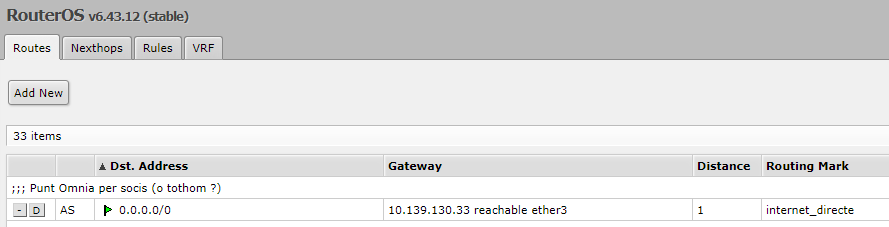
Des la command line :
ssh user@campanar '/ip route print'
Flags: X - disabled, A - active, D - dynamic, C - connect, S - static, r - rip, b - bgp, o - ospf, m - mme, B - blackhole, U - unreachable, P - prohibit
# DST-ADDRESS PREF-SRC GATEWAY DISTANCE
0 A S ;;; Punt Omnia per socis (o tothom ?)
0.0.0.0/0 10.139.130.33 1
1 A S ;;; Fibra
0.0.0.0/0 192.168.1.1 1
rutes al Tabor
La ruta que ens porta del Tabor a la FO de Can Sostres és - anem a
"IP + Routes" al Tabor :
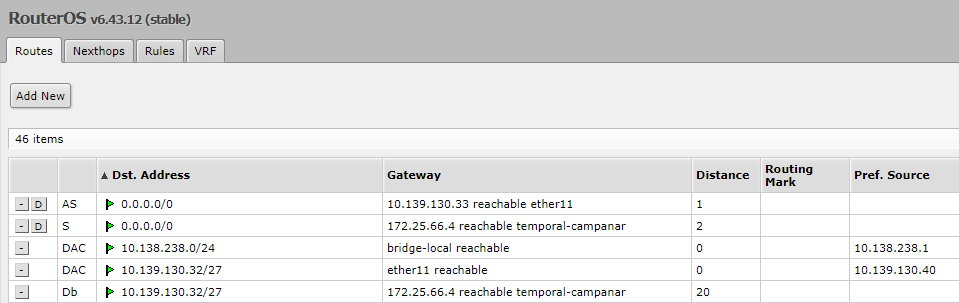
Des la command line :
ssh user@tabor '/ip route print'
Flags: X - disabled, A - active, D - dynamic, C - connect, S - static, r - rip, b - bgp, o - ospf, m - mme, B - blackhole, U - unreachable, P - prohibit
# DST-ADDRESS PREF-SRC GATEWAY DISTANCE
0 A S 0.0.0.0/0 10.139.130.33 1
1 S 0.0.0.0/0 172.25.66.4 2
rutes al proxy de Can Sostres
$ cat /etc/netplan/50-cloud-init.yaml
network:
version: 2
ethernets:
enp4s0: # tarja externa, a baix - cable cap el MikroTik
addresses: [192.168.1.254/24]
routes:
- to: 10.0.0.0/8
via: 10.139.238.193
- to: 0.0.0.0/0
via: 192.168.1.1
nameservers:
addresses: [8.8.8.8, 8.8.4.4]
enp4s5: # tarja placa base, marca vermella - cable cap a la antena vella cap el Campanar
addresses: [10.139.238.194/27]
routes:
- to: 10.0.0.0/8
via: 10.139.238.193
- to: 0.0.0.0/0
via: 192.168.1.1
configuració del uTik de Can Sostres
IP que te
[usuari@TDLPuntOmnia-ST1] > ip address print
Flags: X - disabled, I - invalid, D - dynamic
# ADDRESS NETWORK INTERFACE
0 ;;; default configuration
10.139.130.33/27 10.139.130.32 bridge1
1 192.168.1.253/24 192.168.1.0 ether1-gateway
detalls del bridge
[usuari@TDLPuntOmnia-ST1] > interface bridge port print
Flags: X - disabled, I - inactive, D - dynamic, H - hw-offload
# INTERFACE BRIDGE
0 H ether2-master-local bridge1
1 I H ether3-slave-local bridge1
2 I H ether4-slave-local bridge1
3 H ether5-slave-local bridge1
ARP ben maco
[usuari@TDLPuntOmnia-ST1] > ip arp print
Flags: X - disabled, I - invalid, H - DHCP, D - dynamic, P - published, C - complete
# ADDRESS MAC-ADDRESS INTERFACE
0 DC 192.168.1.1 CC:D4:A1:00:81:6A ether1-gateway
1 DC 10.139.130.36 E4:8D:8C:0A:3D:91 bridge1 MAC del microTik del Campanar
2 DC 10.139.130.35 B4:FB:E4:68:8A:FE bridge1 MAC de la antena LiteBeam 5AC Gen2 cap el Campanar
3 D 192.168.1.20 ether1-gateway
4 DC 10.139.130.34 00:23:54:61:55:BA bridge1 ? MAC del PC de grafiques ?
Problemes
20191025 - mikrotik es penja
- MikroTik RB4011iGS+RM 188 €
- Mikrotik Hex S Ethernet Negro - Router 72 €
(10,100,1000 Mbit/s, 10/100/1000Base-T(X), Negro, 256 MB, 11 W, CC)
- Mikrotik RB750GR3 - Router 57 €
(Gigabit Ethernet, 10/100/1000Base-T(X), 10,100,1000 Mbit/s, MIPS64, 880 MHz, 0,16 GB)
Punt Omnia
*** see new page ***
A la IP
Punt Omnia = 10.139.238.194:3128
hi ha el proxy del PuntOmnia de la xarxa guifi de Torrelles.
És el node 31847,
"TDLPuntOmina" (compte la dislèxia) i és de tipus HTTP, no pas SOCKS.
Un esquema pot ser
[10.139.238.193] ------ (10.139.238.196) zzz (10.139.238.195) ------ [10.139.238.194] PC [192.168.1.254] --- [192.168.1.1] ADSL
Router Campanar ------ Antena Campanar zzz Antena Pomnia ------ [ PC Pomnia ]
wds-TDLCmpnPtOmni TDLPuntOmniaRd1
00:27:22:C6:94:79 00:15:6D:82:7C:74
| ssid = guifi.net-wds-TDLCmpnPtOmnia |
Te 3 "devices" :
TDLPuntOminaRd1 radio 10.139.238.193/27 RouterOSv4.7+
TDLPuntOminaSrvr1 server 10.139.238.194/27 PC
TDLPuntOminaNt1 nat 10.139.238.195/27 antena Loco5 al Parc de Can Sostres - guifi.net-wds-TDLCmpnPtOmnia
I un "link" (obsolet ?) :
27257-TDLCampanar (TDLCampanarST2/wds-TDLCmpnPtOmnia) 172.25.39.177/172.25.39.178
Les claus del edifici del parc ens les dona en Xavi Navarrete.
Conexio des el router de FO
- conectem el w500 al router de FO
- obtenim una IP as 192.168.1.59
- funciona "ping 192.168.1.254", pc de can sostres
- entrem amb Putty
- verifiquem que funciona ping al Campanar : "ping 10.139.238.193"
- verifiquem que funciona ping a Google : "ping 8.8.8.8"
Dades de la antena Loco5 de pomnia
- te un PoE "Ubiquiti" de 15V, 0,8A, model UBI-POE-15-8, 9 € a
amazon.es
- es una nanoStation Loco M5
- Wireless mode := station WDS, mode := station + WDS (Transparent Bridge Mode) := enable :
- Network mode := Bridge ;
- Firmware Version XM v5.6.5, build 29033
Dades del PuntOmnia
Lidia, parc de Can Sostres, 1er pis ; 93.689.0291,
torrelles@xarxaomnia.gencat.cat,
horari (9 a 1 de dilluns a divendres, de 3 a 5 el dilluns i el dimecres)
Mode "sense proxy"
Des Juny de 2014 no cal posar proxy als usuaris que paguem.
[ @@@ to POMNIA.HTM @@@ ]
Software
- commandes interessants
- vi /etc/ssh/sshd_config : "Banner /etc/ssh/sshd_banner.txt" + fill the file + sudo service sshd restart / sudo service ssh reload
- apt list --installed ; docu
- dpkg --get-selections > pkg-list ; get installed pkg list
- sudo apt-get update ; (sovint) updates the list of available packages and their versions
- sudo apt-get upgrade ; (poques vegades) actually installs newer versions of the packages you have : "podeu actualitzar 88 paquets"
- uname -a ; veure versio Linux
- sudo shutdown -h now ; tancar la maquina
- sudo reboot ; sudo shutdown -r now ; reiniciar la maquina
- eines i versions :
- ssh and sshd
mate@punt-omnia:~$ ssh -V
OpenSSH_7.2p2 Ubuntu-4ubuntu2.4, OpenSSL 1.0.2g 1 Mar 2016
- cd /home/mate/eines/rexx/ + sudo apt install ./ooRexx-4.2.0-1.ubuntu1310.x86_64.deb
mate@punt-omnia:~$ rexx -v
Open Object Rexx Version 4.2.0
- sudo apt install npm
mate@punt-omnia:~$ npm -v
3.5.2
- sudo apt install nodejs
mate@punt-omnia:~$ nodejs -v
v4.2.6
- want
nmap to scan network : (sembla que detecta "router" pero no "antena")
mate@punt-omnia:~$ sudo apt install nmap
nmap -sn 10.139.130.0/24 : 16 hosts found in this range
nmap -sn 10.139.238.0/24 : 19
nmap -sn 10.139.239.0/24 : 11
nmap -sn 10.139.0.0/16 : 46
nmap -sn --proxies http://10.139.130.65:3128 172.25.33.0/24 : 4 hosts *** 8 amb qq_127.html ***
nmap -sn --proxies http://10.139.130.65:3128 172.25.37.0/24 : 0 *** 2
nmap -sn --proxies http://10.139.130.65:3128 172.25.38.0/24 : 0 *** 2
nmap -sn --proxies http://10.139.130.65:3128 172.25.39.0/24 : 0 *** 2
nmap -sn --proxies http://10.139.130.65:3128 172.25.51.0/24 : 0 *** 3
nmap -sn --proxies http://10.139.130.65:3128 172.25.66.0/24 : 1 *** 11
nmap -sn --proxies http://10.139.130.65:3128 172.25.0.0/16 : 5
- want to send mail :
- $ sudo apt install ssmtp
- edit /etc/ssmtp/ssmtp.conf - mailhub(smtp.gmail.com:587), AuthUser/AuthPass(gmail usr and pwd as Xarito)
- $ sudo apt install mailutils
- /home/mate/envia-email/fer.sh ; error
- see "/var/log/mail.log"
- see error
- postfix is running with backwards-compatible default settings
- to disable backwards compatibility use "postconf compatibility_level=2" and "postfix reload"
- telnet gmail-smtp-in.l.google.com smtp - see SMTP commands
- $ sudo apt install postfix
- $ sudo postconf compatibility_level=2 ; va al fitxer /etc/postfix/main.cf
- $ sudo /etc/init.d/postfix reload
- /home/mate/envia-email/fer.sh ; OK now
- edit "main.cf" per posar "myhostname=punt-omnia.guifi.net" + sudo service postfix restart
- send IP using email every hour :
mate@punt-omnia: / $ cat /home/mate/envia-email/envia_ip.sh
#!/bin/bash
# filtered to folder "pomnia_ip" at bisc4k9@gmail.com
# list using \\w500\C:\sebas\miscosas\python\read_emails\pomnia
ipVar={$(curl -m 2 -s icanhazip.com)};
ipVar={$(curl -m 2 -s http://checkip.amazonaws.com)};
desti=bisc4k9@gmail.com
myTm=$(date '+%Y %b %d %H:%M')
myLog=/home/mate/logs/envia_email.log
myVer="1.k"
szIP="+++ $myTm +++ [$HOSTNAME] +++ [$(whoami)] +++ [$0] +++ Envia IP externa ($ipVar) a ($desti) +++ v ($myVer) +++"
szSbj="* $myTm * [$0] * [$(whoami)] * [$HOSTNAME] * $myVer * IP {$ipVar} *"
echo "$szIP" >> $myLog 2>&1
echo "$szIP" | mail -s "$szSbj" $desti
# cat /var/log/mail.log
# cat /var/log/mail.err
exit 0
Use it hourly :
mate@punt-omnia:/etc/cron.hourly$ sudo ln -s /home/mate/envia-email/envia_ip.sh enviar_ip
- want to trace system restarts :
The system start code gives us control here :
mate@punt-omnia: /etc $ cat rc.local
#!/bin/sh -e
/usr/bin/pomnia_restart &
exit 0
On tenim
$ cat /usr/bin/pomnia_restart
#!/bin/bash
# timestamp last system shutdown at own log file
echo "Shutdown at" >> /home/mate/logs/engegades.log
last -x >> /home/mate/logs/engegades.log
date_name=`date +"Y%y/M%m/D%d"`
time_name=`date +"h%H:m%M"`
# timestamp system start at own log file
echo "+++ +++ +++ (" $date_name "-" $time_name ") /usr/bin/pomnia_restart from /etc/rc.local" >> /home/mate/logs/engegades.log
# trace in /var/log/syslog
szTxt="("$date_name "-" $time_name") +++ +++ POMNIA +++ +++ put user init code in /usr/bin/pomnia-restart"
logger -i -p user.info $szTxt
# start nodejs to ping users and generate HTML page
/home/mate/nodejs-projects/timer/ru.sh
# start minimal web server so scan_tronc.sh does not indicate a false error on "PC pomnia" :
/home/mate/nodejs-projects/min_web_server/ru.sh -> /usr/bin/node /home/mate/nodejs-projects/min_web_server/my_Server.js >> ~/logs/min_web_server.log
- want to do a periodic and automatic backup using mail :
- install 7z compressor : sudo apt install p7zip-full - now "7z" command is available (de fet no el fem servir, jejeje)
- /home/mate/backup_omnia conte
- llista_de_fitxers.txt : conte el path al fitxer a salvar
- fer_backup.sh : copia els fitxers a "./fitxers/", els comprimeix amb "7z" i els envia per correu
- la comanda per comprimir un directori és "tar cvzf sortida.tar.gz ./fitxers/" (el tar sempre és al linux)
- can install the shell into /etc/cron.weekly or /etc/cron.monthly, as required : "ln -s /home/mate/cat backup_omnia/fer_backup.sh /etc/cron.monthly/pomnia_backup"
- use a yandex.com receiver
mate@punt-omnia:/home/mate/backup_omnia # cat fer_backup.sh
#!/bin/bash
FN_in="/home/mate/backup_omnia/llista_fitxers.txt"
DIR_name="/home/mate/backup_omnia/fitxers"
DESTI="xarxatorrelles@gmail.com" ---
blocked message
DESTI="me@yandex.com,me@gmail.com"
FN_LOG="/home/mate/logs/fer_backup.log"
FN_out="/home/mate/backup_omnia/sortida.tar.gz"
date_name=`date +"Y%y/M%m/D%d"`
time_name=`date +"h%H:m%M"`
time_stamp="("$date_name"-"$time_name")"
echo "+++ [`date -R`] +++ Backup some files del Punt Omnia to be sent to ($DESTI)." >> $FN_LOG
cat $FN_in | while read linia
do
echo "+++ Posem fitxer" $linia >> $FN_LOG
cp -u $linia $DIR_name/. >> $FN_LOG 2>&1
done
echo "esborrem fitxer vell ("$FN_out")" >> $FN_LOG
rm -f $FN_out >> $FN_LOG
echo "fem fitxer nou" >> $FN_LOG
tar cvzf $FN_out $DIR_name/ >> $FN_LOG ; "7z a -pAAA000 $FN_out $DIR_name/"
echo "enviem fitxer" >> $FN_LOG
echo "Fitxers de POMNIA." | mail --attach=$FN_out -s "Backup PUNT-OMNIA data ($time_stamp)." $DESTI
echo "$szCOS" | mutt -s "$szSubject" -a $szAttFiles -- $DESTI
rv=$?
echo "MAIL return code" $rv >> $FN_LOG
echo "Que hi ha al LOG de MAIL :" >> $FN_LOG
cat /var/log/mail.log | grep "yandex.com" >> $FN_LOG
exit 0
And we execute it from :
mate@punt-omnia:/etc/cron.weekly$ sudo ln -s /home/mate/backup_omnia/fer_backup.sh pomnia_backup
La llista de fitxers a salvar avui en dia és :
/home/mate/backup_omnia $ cat llista_fitxers.txt
/boot/config.txt
/etc/apt/sources.list
/etc/cron.hourly/pomnia_hourly
/etc/motd
/etc/network/interfaces
/etc/postfix/main.cf
/etc/squid/squid.conf
/etc/ssmtp/ssmtp.conf
/home/mate/.bashrc
/home/mate/.profile
/home/mate/backup_omnia/fer_backup.sh
/home/mate/cron-jobs/cron_squid_i_ftp.txt
/home/mate/cron-jobs/llegir_ip_externa.sh
/home/mate/cron-jobs/monit_pomnia.sh
/home/mate/cron-jobs/netejar_logs.sh
/home/mate/cron-jobs/squid/guifi-proxy.sh
/home/mate/eines/curl_i_wget/1_curl.sh
/home/mate/eines/curl_i_wget/2_wget.sh
/home/mate/eines/curl_i_wget/3_lynx.sh
/home/mate/eines/curl_i_wget/4_gugel.sh
/home/mate/eines/curl_i_wget/5_ssh.sh
/home/mate/eines/curl_i_wget/6_ftp_via_curl.sh
/home/mate/eines/rexx/scan_guifi/do.sh
/home/mate/eines/rexx/scan_guifi/scan_list.rexx
/home/mate/eines/rexx/scan_guifi/IPS.TXT
/home/mate/eines/rexx/scan_guifi/qq_pfx.html
/home/mate/eines/rexx/scan_guifi/qq_sufx.html
/home/mate/eines/ssh/scan_i_create.sh
/home/mate/eines/ssh/scan.sh
/home/mate/eines/ssh/conectats.rexx
/home/mate/eines/ssh/usuaris_proxy.sh
/home/mate/eines/tronc/hit_one.sh
/home/mate/eines/tronc/scan_tronc.sh
/home/mate/envia-email/envia_ip.sh
/home/mate/nodejs-projects/min_web_server/my_server.js
/home/mate/nodejs-projects/min_web_server/ru.sh
/home/mate/nodejs-projects/timer/1_gen_html.js
/home/mate/nodejs-projects/timer/entrada.json
/home/mate/nodejs-projects/timer/README.MD
/home/mate/nodejs-projects/timer/ru.sh
/home/mate/nodejs-projects/timer/send_page/send_page.sh
/usr/bin/pomnia_restart
(pend) Posar-ne mes !
Corregir "Diagnostic-Code: smtp; 504 Need Fully Qualified Address" : "X-Postfix-Sender: rfc822; root@punt-omnia"
- sudo vi /etc/postfix/main.c - "myorigin = /etc/mailname"
- sudo vi /etc/mailname -
- /etc/init.d/postfix reload - restart
Passem a fer servir
mutt que si que agafa la configuracio de /etc/mailname i /etc/postfix/main.cf,
tot i que el fitxer principal de configuracio es ~/.muttrc (privat) i /etc/Muttrc (global)
- want to do a periodic log :
Code
mate@punt-omnia:/home/mate/cron-jobs$ cat llegir_ip_externa.sh
#!/bin/bash
my_log="/home/mate/logs/read_external_ip.log"
my_IP=$(curl -m 2 -s icanhazip.com)
my_IP=$(curl -m 2 -s http://checkip.amazonaws.com)
rc1=$?
echo ">>> (2) icanhazip rc ($rc1)" >> $myLog
szIP="*** today {$(date '+%Y %b %d %H:%M')} my IP is {"$my_IP"} ***"
echo "$szIP" >> $my_log 2>&1
exit 0
Then make it run every day :
mate@punt-omnia:/etc/cron.daily$ sudo ln -s /home/mate/cron-jobs/llegir_ip_externa.sh pomnia_llegir_ip_externa
- want to do a periodic cleanup :
mate@punt-omnia:/etc/cron.weekly$ sudo ln -s /home/mate/cron-jobs/netejar_logs.sh pomnia_clean_logs
Discs
Sense el disc SCSI és així :
$ fdisk -l
Disk /dev/sda: 38,3 GiB, 41110142976 bytes, 80293248 sectors
Units: sectors of 1 * 512 = 512 bytes
Sector size (logical/physical): 512 bytes / 512 bytes
I/O size (minimum/optimal): 512 bytes / 512 bytes
Disklabel type: dos
Disk identifier: 0x17ce296a
Dispositiu Arrencada Start Final Sectors Size Id Tipus
/dev/sda1 * 2048 76107775 76105728 36,3G 83 Linux
/dev/sda2 76109822 80291839 4182018 2G 5 Estesa
/dev/sda5 76109824 80291839 4182016 2G 82 Intercanvi Linux / Solaris
Filesystem
És força buid :
$ df -h
Filesystem Mida Ús % Lliure
/dev/sda1 36G 3G 9% 31G
Llistarem tot el seu contingut :
$ cd /
$ sudo ls -Ral > /home/mate/logs/ls_disk.txt
services at pomnia
Ubuntu switched from system-V (init) to systemd (2015).
Read systemd for upstart users {****}
See pajunt services
mate@punt-omnia:~$ service --status-all
[ + ] acpid
[ + ] apparmor
[ + ] apport
[ + ] atd
[ - ] bootmisc.sh
[ - ] checkfs.sh
[ - ] checkroot-bootclean.sh
[ - ] checkroot.sh
[ + ] console-setup
[ + ] cron
[ - ] cryptdisks
[ - ] cryptdisks-early
[ + ] dbus
[ + ] grub-common
[ - ] hostname.sh
[ - ] hwclock.sh
[ + ] irqbalance
[ + ] iscsid
[ + ] keyboard-setup
[ - ] killprocs
[ + ] kmod
[ + ] lm-sensors
[ - ] lvm2
[ + ] lvm2-lvmetad
[ + ] lvm2-lvmpolld
[ + ] lxcfs
[ - ] lxd
[ + ] mdadm
[ - ] mdadm-waitidle
[ - ] mountall-bootclean.sh
[ - ] mountall.sh
[ - ] mountdevsubfs.sh
[ - ] mountkernfs.sh
[ - ] mountnfs-bootclean.sh
[ - ] mountnfs.sh
[ + ] networking
[ + ] ondemand
[ + ] open-iscsi
[ - ] open-vm-tools
[ - ] plymouth
[ - ] plymouth-log
[ + ] postfix
[ - ] postgresql-9.5
[ + ] procps
[ + ] rc.local
[ + ] resolvconf
[ - ] rsync
[ + ] rsyslog
[ + ] rxapid
[ - ] screen-cleanup
[ - ] sendsigs
[ + ] squid
[ + ] ssh
[ + ] udev
[ + ] ufw
[ - ] umountfs
[ - ] umountnfs.sh
[ - ] umountroot
[ + ] unattended-upgrades
[ + ] urandom
[ - ] uuidd
[ - ] webmin
[ - ] x11-common
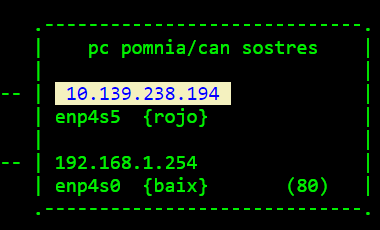
Configuració de xarxa del pc "pomnia", proxy de Can Sostres
Managed in Ubuntu style.
Al PC tenim 2 tarjes de xarxa (però un sol gateway) - tenim un cable de xarxa cap a guifi (ip = 10.139.238.194)
i un altre cable cap a internet (ip = 192.168.1.254)
Fem un "port forwarding" del port 7080 del router de fibra optica cap a 192.168.1.254:80 al PC, on tenim un nodejs
O ha de ser a 10.139.238.194:80 ?
mate@punt-omnia:/etc/network #
cat interfaces
auto enp4s0 ; tarja externa <-> ADSL
iface enp4s0 inet static
address 192.168.1.254
netmask 255.255.255.0
broadcast 192.168.1.255
network 192.168.1.0
gateway 192.168.1.1 ; volem sortir cap el ADSL
dns-nameservers 8.8.8.8 8.8.4.4
dns-domain Home
auto enp4s5 ; tarja amb marca vermella <-> antena guifi
iface enp4s5 inet static
address 10.139.238.194
netmask 255.255.255.224 ; /27 =
subxarxa de 32 ips : 10.139.238.192 a 10.139.238.224, 30 hosts de .193 a .222
broadcast 10.139.238.225 ; o .223 ?!
network 10.139.238.192
; gateway 10.139.238.193 - no volem sortir cap a la fibra optica
up ip route add 10.0.0.0/8 via 10.139.238.193
Els DNS :
mate@punt-omnia:/etc$ cat resolv.conf
# Dynamic resolv.conf(5) file for glibc resolver(3) generated by resolvconf(8)
# DO NOT EDIT THIS FILE BY HAND -- YOUR CHANGES WILL BE OVERWRITTEN
nameserver 192.168.1.1
La ruta cap l'exterior :
mate@punt-omnia:~$ sudo traceroute -n 8.8.8.8
traceroute to 8.8.8.8 (8.8.8.8), 30 hops max, 60 byte packets
1 192.168.1.1 1.270 ms 1.975 ms 1.972 ms
2 81.46.38.176 40.036 ms 42.165 ms 42.159 ms
3 81.46.44.29 55.969 ms 57.426 ms 58.698 ms
4 * * *
5 * * *
6 * * *
7 5.53.1.82 72.626 ms 44.023 ms 45.453 ms
8 108.170.253.225 46.841 ms 45.091 ms 45.053 ms
9 209.85.248.19 46.156 ms 216.239.48.85 45.141 ms 216.239.48.109 46.044 ms
10 8.8.8.8 45.077 ms 45.940 ms 44.841 ms
La IP externa :
mate@pomnia:~$ curl ip.appspot.com | curl ip.elbinario.net | curl -m 2 -s icanhazip.com | curl -m 2 -s http://checkip.amazonaws.com
83.34.47.81 {20171130}
Compareu amb
https://www.whatismyip.com/
NTP
Funciona correctament :
mate@punt-omnia:~$ timedatectl status
Local time: dc 2018-02-28 22:17:56 CET
Universal time: dc 2018-02-28 21:17:56 UTC
RTC time: dc 2018-02-28 21:17:56
Time zone: Europe/Madrid (CET, +0100)
Network time on: yes
NTP synchronized: yes
RTC in local TZ: no
Amb mes detall :
mate@punt-omnia:~$ systemctl status systemd-timesyncd
â systemd-timesyncd.service - Network Time Synchronization
Loaded: loaded (/lib/systemd/system/systemd-timesyncd.service; enabled; vendor preset: enabled)
Drop-In: /lib/systemd/system/systemd-timesyncd.service.d
ââdisable-with-time-daemon.conf
Active: active (running) since dl 2018-02-05 20:26:22 CET; 3 weeks 2 days ago
Docs: man:systemd-timesyncd.service(8)
Main PID: 32739 (systemd-timesyn)
Status: "Synchronized to time server 91.189.89.199:123 (ntp.ubuntu.com)."
Tasks: 2
Memory: 468.0K
CPU: 1.537s
CGroup: /system.slice/systemd-timesyncd.service
ââ32739 /lib/systemd/systemd-timesyncd
feb 26 01:13:56 punt-omnia systemd-timesyncd[32739]: Timed out waiting for reply from 91.189.94.4:123 (ntp.ubuntu.com).
feb 26 01:13:56 punt-omnia systemd-timesyncd[32739]: Synchronized to time server 91.189.89.199:123 (ntp.ubuntu.com).
noip2 al pomnia
Nathan Giesbrecht github owner -
Install DUC :
(assuming results in /usr/local/bin)
mate@punt-omnia:~$ cd /usr/local/src
mate@punt-omnia:/usr/local/src$ sudo wget http://www.no-ip.com/client/linux/noip-duc-linux.tar.gz
mate@punt-omnia:/usr/local/src$ sudo tar xzf noip-duc-linux.tar.gz
mate@punt-omnia:/usr/local/src$ cd noip-2.1.9-1
mate@punt-omnia:/usr/local/src/noip-2.1.9-1$ sudo make
mate@punt-omnia:/usr/local/src/noip-2.1.9-1$ sudo make install
if [ ! -d /usr/local/bin ]; then mkdir -p /usr/local/bin;fi
if [ ! -d /usr/local/etc ]; then mkdir -p /usr/local/etc;fi
cp noip2 /usr/local/bin/noip2
/usr/local/bin/noip2 -C -c /tmp/no-ip2.conf
Auto configuration for Linux client of no-ip.com.
Multiple network devices have been detected.
Please select the Internet interface from this list.
By typing the number associated with it.
0 enp4s0
1 enp4s5
0
Please enter the login/email string for no-ip.com xarxatorrelles
Please enter the password for user 'xarxatorrelles' **********
Only one host [xarxatorrelles.ddns.net] is registered to this account.
It will be used.
Please enter an update interval:[30]
Do you wish to run something at successful update?[N] (y/N)
New configuration file '/tmp/no-ip2.conf' created.
mv /tmp/no-ip2.conf /usr/local/etc/no-ip2.conf
mate@punt-omnia:/usr/local/src/noip-2.1.9-1$ mv /tmp/no-ip2.conf /usr/local/etc/no-ip2.conf
mate@punt-omnia:~$ sudo /usr/local/bin/noip2 -c /usr/local/etc/no-ip2.conf ; start it and verify it works
Place in "/usr/bin/pomnia_restart"
/usr/local/bin/noip2 -c /usr/local/etc/no-ip2.conf
Veure estat :
mate@punt-omnia:~$
service --status-all | grep noip2
ps -ef | grep noip2
host xarxatorrelles.ddns.net
curl -m 2 -s icanhazip.com
curl -m 2 -s http://checkip.amazonaws.com
La feina del cron al pomnia
Te un script important pel squid (veure mes avall)
La llista de coses que es fan sota control de cron es pot veure a /home/mate/cron-jobs/cron_squid_i_ftp.txt,
i és (a mes de /etc/cron.weekly /etc/cron.monthly)
- guifi-proxy.sh : sincronitza els usuaris de guifi.net amb els usuaris del nostre proxy al PuntOmnia
- send_page/send_page.sh : envia unes pagines HTML al host "000webhostapp.com" via FTP un cop cada 5 minuts.
Serveix com "watchdog" del Punt Omnia.
- fer_backup.sh : un cop a la setmana envia els fitxers importants per email a xarxatorrelles@gmail.com
- netejar_logs.sh : un cop a la setmana fa girar els nostres logs privats
- squid -k rotate : fa rotar els logs del Squid per evitar que omplin tot el sistema de fitxers
To trace the "cron" events, we write some lines into "cron.log"
mate@punt-omnia:/etc/cron.monthly$ cat pomnia_monthly
#!/bin/bash
# trace in /var/log/syslog
szTxt="( [`date -R`] ) +++ +++ POMNIA MONTHLY +++ +++"
logger -i -p user.info $szTxt
echo $szTxt >> /home/mate/logs/cron.log
Squid
Ubuntu pages -
Squid is a full-featured web proxy cache server application which provides proxy and cache services with access control
Squid homepage,
wiki FAQs
El Squid és el proxy del Punt Omnia :
10.139.238.194:3128
Així, els usuaris de guifi.net que no siguin socis de l'associacio guifi de Torrelles poden sortir a Internet,
amb un cert control de ample de banda
El nostre entorn és :
10.139.238.193 - Campanar, o sigui, tota la xarxa guifi de Torrelles
10.139.238.196 - wds-TDLCmpnPtOmnia, antena Campanar
10.139.238.195 - TDLPuntOmniaRd1, antena loco5 del Punt Omnia - guifi.net-wds-TDLCmpnPtOmni
10.139.238.194 - PC del Punt Omnia, xarxa interna
192.168.1.254 - PC del Punt Omnia, xarxa externa
192.168.1.1 - router Movistar/ (see "curl -m 2 -s icanhazip.com") -> ADSL -> 83.38.151.59 / 83.34.47.81
Instalació
- install by "sudo apt install squid"
- after making changes to the /etc/squid/squid.conf file, restart the squid server with sudo systemctl restart squid.service
Aqui li diem, entre altres coses, on volem el fitxer amb els usuaris i les claus de pas :
auth_param basic program /usr/lib/squid3/basic_ncsa_auth /usr/etc/passwd
I al job "guifi-proxy.sh" que llegeix de guifi.net hi tenim, casualment :
passwd_dir='/usr/etc/'
- sudo apt-get purge squid ; remove old version and cfg files
- install
squid3 :
sudo apt install squid3
- display squid version : "/usr/sbin/squid -v" : 3.5.12
- there is some warning with "hierarchy_stoplist" sentence in /etc/squid/squid.conf - see "mail" for su
Cron de actualització dels usuaris del proxy
La llista d'usuaris i claus de pas s'actualitza cada hora amb el job "guifi-proxy.sh",
que es programa amb el crontab de root següent:
$ cat /home/mate/cron-jobs/cron_squid_i_ftp.txt
# (1) every time the "minute = 0", this is, once every hour
# (2) any "10th minute", this is, every 10 minutes
# (3) every time "minute=0" and "hour=0" and "day of month=1", this is, once a month, at HH:MM 00:00
#
# ┌──────────────── minute (0 - 59)
# │ ┌───────────── hour (0 - 23)
# │ │ ┌────────── day of month (1 - 31)
# │ │ │ ┌────── month (1 - 12)
# │ │ │ │ ┌── day of week (0 - 6 => Sunday - Saturday, or 1 - 7 => Monday - Sunday)
# │ │ │ │ │
# m h dom mon dow command log
0 * * * * /home/mate/cron-jobs/squid/guifi-proxy.sh >> /home/mate/logs/squid_sync.log
*/10 * * * * /home/mate/nodejs-projects/timer/send_page/send_page.sh >> /home/mate/logs/send_page.log
0 0 1 * * /usr/sbin/squid -k rotate >> /home/mate/logs/squid_log_rotate.log
*/10 * * * * /home/mate/eines/ssh/scan_i_create.sh >> /home/mate/logs/scan_i_create.log
La comanda que engega el cron és
/home/mate/cron-jobs/squid $ sudo crontab cron_squid_i_ftp.txt
Posem com executable el shell amb "chmod 744 guifi-proxy.sh"
Reiniciem el servei : "sudo service cron restart"
Si hi ha algun problema, el servidor de cron envia un "mail" a root !
I al shell "guifi-proxy.sh" hi posarem unes primeres línies com
#!/bin/sh
miTim=$(date +%R)
echo "+++ ($miTim) +++ [`date -R`] +++ sincronisme de Squid amb guifi.net" >> /home/mate/logs/squid_sync.log
Compte que hem editat la linia "$reload" per Ubuntu (i sense el "3")
Al Foro hi diu
Si el proxy on han estat creats els usuaris és federat,
aquests usuaris poden fer servir qualsevol altre proxy federat (i viceversa).
Si els usuaris es creen en un proxy no federat, només poden fer servir el proxy on han estat creats.
El proxy que utilitzin els usuaris cal configurar-lo al navegador web dels usuaris (o al sistema operatiu).
A tal efecte, el connector GuifiProxy per a Firefox
(
https://addons.mozilla.org/ca/firefox/addon/guifiproxy/)
pot ser-te d'utilitat.
Anem a guifi-proxy3
Compte amb la privacitat :
guifi-dev@llistes.guifi.net - fer servir en un Ubuntu :
Afegiu la clau publica: sudo apt-key adv --keyserver pgp.mit.edu --recv-keys 2E484DAB
Afegir el repositori APT: deb http://serveis.guifi.net/debian ubuntu/ {per php7 ; per php5 posa "guifi/"}
Instal·lar el paquet guifi-proxy3 (??)
guifi-dev,
msg
sag @ foro
[***] wiki.guifi : "Que és guifi-proxy3?"
i "Configuració del guifi-proxy3"
Blackhold ens dona un ejemple de configuracio : servidor proxy federado de guifi.net
Els passos son :
# vi /etc/apt/sources.list ; afegim el repositori al Ubuntu
# Repositori oficial de Guifi.net
deb http://serveis.guifi.net/debian guifi/ ; php5 - per php7 posa "ubuntu/"
# Repositori Oficial de Guifi (Testing)
# deb http://serveis.guifi.net/debian guifi-testing/
# sudo apt-key adv --keyserver pgp.mit.edu --recv-keys 2E484DAB
or
$ sudo apt-key adv --keyserver pgp.rediris.es --recv-keys 2E484DAB
# apt-get update ; actualitzem el repositori del nostre sistema, ara amb guifi
$ sudo apt-get upgrade ; actualitzar el sistema, si el volem pujar de versió
# apt-get install guifi-proxy3 ; instalem "guifi-proxy3" - ens pregunta :
*) web base : deixem "www.guifi.net"
*) Guifi Proxy node number :
31847, TDLPuntOmina
*) Force to fetch passwd file now : yes
El procediment s'executa amb un cron cada 30 minuts
i aquest fa una consulta a la web amb els proxys federats que accepta aquell proxy:
http://guifi.net/guifi/export/[id_proxy]/federation
Aquesta petició és instantània a la web.
Amb aquesta comprovació el què es fa és regenerar el fitxer /etc/squid3/guifi.conf
i integra els nous proxys als que el [id_proxy] està federat.
Paral·lelament, cada 30 minuts, ldap consulta la web i integra els usuaris nous de forma incremental
(fa una comparació dels usuaris que hi ha a la bbdd de la web i a l'arbre ldap, i els nous els integra).
Un cop al dia, a les 3 del matí, es regenera la bbdd de usuaris de proxy de la web a l'arbre ldap.
Si canvies la contrasenya, o esborres el usuari, el canvi no s'aplica fins a les 3 de la matinada.
Engegar Squid despres de reboot
Fem servir services o systemctl
mate@punt-omnia:~$ service squid status == sudo systemctl status squid
â squid.service - LSB: Squid HTTP Proxy version 3.x
Loaded: loaded (/etc/init.d/squid; bad; vendor preset: enabled)
Active: active (running) since dl 2018-02-05 20:29:23 CET; 3 weeks 1 days ago
Docs: man:systemd-sysv-generator(8)
Process: 16749 ExecReload=/etc/init.d/squid reload (code=exited, status=0/SUCCESS)
Tasks: 5
Memory: 260.3M
CPU: 5min 20.900s
CGroup: /system.slice/squid.service
ââ 3159 /usr/sbin/squid -YC -f /etc/squid/squid.conf
ââ 3161 (squid-1) -YC -f /etc/squid/squid.conf
ââ 3181 (unlinkd)
ââ31622 (pinger)
ââ31623 (basic_ncsa_auth) /usr/etc/passwd
feb 19 13:00:14 punt-omnia squid[31034]: ...done.
feb 19 13:00:14 punt-omnia systemd[1]: Reloaded LSB: Squid HTTP Proxy version 3.x.
feb 19 14:00:14 punt-omnia systemd[1]: Reloading LSB: Squid HTTP Proxy version 3.x.
feb 19 14:00:14 punt-omnia squid[5716]: * Reloading Squid HTTP Proxy configuration files
feb 19 14:00:14 punt-omnia squid[5716]: ...done.
feb 19 14:00:14 punt-omnia systemd[1]: Reloaded LSB: Squid HTTP Proxy version 3.x.
feb 20 18:00:14 punt-omnia systemd[1]: Reloading LSB: Squid HTTP Proxy version 3.x.
feb 20 18:00:14 punt-omnia squid[16749]: * Reloading Squid HTTP Proxy configuration files
feb 20 18:00:14 punt-omnia squid[16749]: ...done.
feb 20 18:00:14 punt-omnia systemd[1]: Reloaded LSB: Squid HTTP Proxy version 3.x.
mate@punt-omnia:~$
Mes info - (url)
sudo systemctl show squid
sudo systemctl is-active squid
Quite interesting :
mate@punt-omnia:/etc/init.d$ systemctl is-enabled squid
squid.service is not a native service, redirecting to systemd-sysv-install
Executing /lib/systemd/systemd-sysv-install is-enabled squid
enabled
Per a que no engegui mai mes :
$ sudo systemctl disable squid
Obtenir un usuari i contrasenya per a fer servir els proxys federats
- anem al nostre node, as 33491
- fem login()
- anem a la solapa "users"
- piquem el boto "Add User"
- omplim les dades
Fitxers
- /etc/squid/squid.conf
- /var/log/squid/cache.log
- /var/log/squid3/access.log
- /home/mate/cron-jobs/squid/guifi-proxy.sh
- /home/mate/cron-jobs/squid/cron_squid.txt
- /home/mate/logs/squid_sync.log
El directori /usr/etc/ l'hem de crear a ma, doncs no existeix i ens cal.
Squid proxy via telnet
Wiki Squid.
c:\> telnet proxy.torrelles.guifi.net 3128
HTTP/1.0 400 Bad Request
Server: squid/2.7.STABLE6
Date: Tue, 23 Aug 2011 20:31:06 GMT
Content-Type: text/html
Content-Length: 1316
X-Squid-Error: ERR_INVALID_REQ 0
X-Cache: MISS from torrelles.guifi.net
X-Cache-Lookup: NONE from torrelles.guifi.net:3128
Via: 1.0 torrelles.guifi.net:3128 (squid/2.7.STABLE6)
Connection: close
<!DOCTYPE html PUBLIC "-//W3C//DTD HTML 4.01//EN" "http://www.w3.org/TR/html4/strict.dtd">
<html><head> <meta http-equiv="Content-Type" content="text/html; charset=utf-8">
<title>ERROR: The requested URL could not be retrieved</title>
<style type="text/css">
<!-- %l body :lang(fa) { direction: rtl; font-size: 100%; font-family: Tahoma, Roya,
sans-serif; float: right; } :lang(he) { direction: rtl; float: right; } -->
</style>
</head>
<body>
<div id="titles">
<h1>ERROR</h1>
<h2>The requested URL could not be retrieved</h2>
</div>
<hr>
<div id="content">
<p><b>Invalid Request</b> error was encountered while trying to process the request:</p>
<blockquote id="data">
<pre>jaja
</pre>
</blockquote>
<p>Some possible problems are:</p>
<ul>
<li><p>Missing or unknown request method.</p></li>
<li><p>Missing URL.</p></li>
<li><p>Missing HTTP Identifier (HTTP/1.0).</p></li>
<li><p>Request is too large.</p></li>
<li><p>Content-Length missing for POST or PUT requests.</p></li>
<li><p>Illegal character in hostname; underscores are not allowed.</p></li>
</ul>
<p>Your cache administrator is <a href="mailto:webmaster%W">webmaster</a>.</p> <br>
</div>
<hr>
<div id="footer">
<p>Generated Tue, 23 Aug 2011 20:31:06 GMT by torrelles.guifi.net (squid/2.7.STABLE6)</p>
<!-- ERR_INVALID_REQ -->
</div>
</body>
</html>
Se ha perdido la conexión con el host.
Trobo molt interessant la comanda "curl 10.139.238.194:3128", resposta del squid "missing url"
Altres proxy's de guifi.net
Search
here for "Internet access trough a proxy"
Zona Nom IP Port Node
Sallent Ajuntament 10.228.12.2 3128
31050
Prats de Lluçanes Ajuntament 10.138.77.2 3128
11252
Sant Feliu Ajuntament 10.138.73.162 3128
11437
Hi habia un altre proxy :
10.138.27.163, que es troba a Gran Via amb Villarroel (?)
Com arribo al proxy :
C:\> tracert -d 10.139.238.194
Tracing route to 10.139.238.194 over a maximum of 30 hops
1 2 ms 6 ms 6 ms 192.168.1.1
2 2 ms 7 ms 8 ms 10.139.130.97
3 5 ms 4 ms 3 ms 10.139.238.194
Trace complete.
squid logs
Squid will shut itself down if it can't write to its logfiles
- cache.log
- access.log
- store.log
- swap.state
- squid.out
- useragent.log
Location : /var/log/squid or /var/log/squid3
Tons of software to monitor Squid logs :
3rd party, or
Monitis,
SARG,
3 more
... as Cacti :
1,
2
Log files rotate
You need to rotate your log files with a cron job, as
0 0 * * * /usr/sbin/squid -k rotate
How to monit the users using squid at a given moment
Install the Squid client as well, as we will need it for monitoring and testing purposes:
apt-get install squidclient
How do I know who's connected to my SQUID server ?
mate@punt-omnia:~$ squidclient mgr:client_list
HTTP/1.1 200 OK
Server: squid/3.5.12
Mime-Version: 1.0
Date: Thu, 11 Jan 2018 11:55:29 GMT
Content-Type: text/plain;charset=utf-8
Expires: Thu, 11 Jan 2018 11:55:29 GMT
Last-Modified: Thu, 11 Jan 2018 11:55:29 GMT
X-Cache: MISS from punt-omnia
X-Cache-Lookup: MISS from punt-omnia:3128
Via: 1.1 punt-omnia (squid/3.5.12)
Connection: close
Cache Clients:
Address: 10.139.238.175 <<<< Nuria Massons
Currently established connections: 0
ICP Requests 0
HTTP Requests 13172
TAG_NONE 13 0%
TCP_HIT 6 0%
TCP_MISS 2425 18%
TCP_MEM_HIT 326 2%
TCP_DENIED 8317 63%
TCP_TUNNEL 2085 16%
Address: ::1
Name: localhost
Currently established connections: 1
ICP Requests 0
HTTP Requests 0
TOTALS
ICP : 0 Queries, 0 Hits ( 0%)
HTTP: 13172 Requests, 332 Hits ( 3%)
Can get an error :
mate@punt-omnia:~$ squidclient mgr:client_list
ERROR: Cannot connect to [::1]:3128
How to verify the proxy is accepting new clients
To verify that a new access can be done thru pomnia proxy, do :
- run "C:\sebas\miscosas\guifi\Torrelles\punt_omnia\scripts\curl_i_wget\8_verify_proxy.cmd"
- display squidclient mgr:client_list command result
- verify your IP is there, as mine = 10.139.130.117 !
The working script is :
SET http_proxy=http://10.139.238.194:3128
SET https_proxy=https://10.139.238.194:3128
echo Try wget() with usr/pwd :
c:\eines\WGET.EXE --proxy-user=pxy_usr --proxy-passwd=pxy_pwd http://www.google.com
Bandwidth management
Squid proxy server is used to limit bandwidth usage for each user (or for a whole network) using classes.
Linux Help
- edit /etc/squid/squid.config
- add these lines :
acl test sec 192.168.5.0/24 ; acl test src network_address ; the source acl name as “test”
delay_pools 1 ; delay_pools total_poolcount ; one pool is to be created
delay_class 1 2 ; delay_class pool class_type ; 1 indicates pool count order, 2 indicates the class type 2
delay_parameters 1 256000/256000 64000/64000 ; delay_parameters pool aggregate individual ; 1 is pool count order, then maximum allowable overall bandwidth (2Mbps) for the 192.168.5.0/24 network.
; The next(512kbps) is the maximum allowable bandwidth for individual IP comes under the network.
delay_access 1 allow test ;
How to verify the limitation is working ? Downloading a large file,
as 750 MB ISO or
1GB
Squid problems
Instalem FO en lloc de ADSL i obtenim "ERROR - The requested URL could not be retrieved"
Unable to determine IP address from host name "www.apple.com"
The DNS server returned: No DNS records
Solucio :
cat squid.conf | grep 8.8.8
dns_nameservers 8.8.8.8 8.8.4.4
nodejs al pomnia
És un entorn de progamació per escriure aplicacions web en JavaScript.
En el nostre cas, l'aplicació fa "ping" a una llista de nodes (supernodes de guifi i nodes de usuari)
i genera un fitxer HTML amb els resultats.
See results
Install : "sudo apt install git-core"
Github origin :
timer.
Clone it using
git :
cd /home/mate/nodejs-projects
git clone https://github.com/sebastianet/timer.git
End the configuration :
- sudo ln -s /usr/bin/nodejs /usr/bin/node ; some old apps use old name
- sudo npm install -g ; install all packages required by package.json as "global" -> /usr/local/lib/node_modules/
- sudo npm link express
- sudo npm link python-shell
- /home/pi/timer/2_do_ping.py here is /home/mate/nodejs-projects (in python_options)
- sudo apt install python-pip ; install python installer
- sudo pip install pyping ; instal python "ping"
- sudo pip install --upgrade pip ; go to pip 9.0.1
Run APP :
cd /home/mate/nodejs-projects/timer
sudo ./ru.sh
o be
sudo node 1_gen_html.js entrada.json
Aquesta APP fa
- ping a una serie de nodes (de entrada.json)
- genera una pagina HTML amb els resultats
Cal un "cron" que envii la pagina html cap a un servidor públic : veure aqui
La comanda que ho fa és :
mate@punt-omnia:~/nodejs-projects/timer/send_page$ cat send_page.sh
#!/bin/sh
# set timestamp
echo "+++ [`date -R`] +++ FTP a https://torrelles-guifi.000webhostapp.com/pagina.html +++"
FileName='/home/mate/nodejs-projects/timer/public/pagina.html'
FileNme2='/home/mate/eines/ssh/conectats.html'
FileNme3='/home/mate/eines/rexx/scan_guifi/qq_127.html'
HostName='files.000webhost.com'
myUser='torrelles-guifi'
myPwd='on-es-la-clau-de-pas'
ftp -n $HostName << END_SCRIPT
quote USER $myUser
quote PASS $myPwd
binary
put $FileName public_html/pagina.html
put $FileNme2 public_html/conectats.html
put $FileNme3 public_html/qq_127.html
quit
END_SCRIPT
exit 0
web server minim al PC del pomnia
- hi ha una eina que fa "wget" de les IPs de la xarxa guifi de torrelles :
/home/mate/eines/tronc/scan_tronc.sh v 1.5.c or (+)
- el PC del punt omnia no te cap server al port 80, per lo que dona un fals negatiu
- per evitar-ho, engeguem un web-server minim al punt omnia :
/home/mate/nodejs-projects/min_web_server/ru.sh -> /home/mate/logs/min_web_server.log
- s'hi pot acccedir des la ip 10.139.238.194 interna
o ip:7080 externa
logs
Podem fer servir
Winston en el raspberry pi o Morgan en les webapps amb express.
Canvia els console.log per winston i fliparàs !
webmin
Webmin is a program that simplifies the process of managing a Linux or Unix system though a web browser
Homepage,
wiki page,
how-to :
- $ sudo apt install webmin - no s'ha trobat el paquet "webmin"
- 15.462.446 webmin_1.860_all.deb to /home/mate/webmin from source
- sudo apt install ./webmin_1.860_all.deb
- netstat -plnt | grep 10000
- https://192.168.1.102:10000, usr = xarxa,
guifi !
Darrer nivell
Remote Desktop server al pomnia
Volem configurar el router de la Fibra Optica (http://192.168.1.1),
accedint-hi des el PC "pomnia" (ip = 192.168.1.254).
Una via es posar Remote Desktop al pc "pomnia".
Una altra es configurar el proxy del MikroTik ip = (10.139.130.33/192.168.1.253) {Edgar}
url {***}
XRDP
is a Remote Desktop Protocol
(RDP) Server,
allowing RDP clients to be presented an X windows desktop to the user.
Versions
mate@punt-omnia:~$ xrdp -v
xrdp: A Remote Desktop Protocol server.
Copyright (C) Jay Sorg 2004-2011
See http://xrdp.sourceforge.net for more information.
Version 0.6.1
mate@punt-omnia:~$ cat /etc/issue
Ubuntu 16.04.4 LTS \n \l
sebas@T60ubuntu:~$ xrdp -v
xrdp: A Remote Desktop Protocol server.
Copyright (C) Jay Sorg 2004-2014
See http://www.xrdp.org for more information.
Version 0.9.5
sebas@T60ubuntu:~$ cat /etc/issue
Ubuntu 18.04.2 LTS \n \l
Instalem xrdp al pomnia :
- sudo apt-get update {posem la maquina al dia}
- sudo apt-get install ubuntu-desktop {install desktop environment, 2 GB disk}
- sudo apt-get -y install xrdp {install xrdp}
- sudo ufw status verbose {display firewall status}
mate@punt-omnia:~$ sudo ufw status verbose
Estat: inactiu
- si volem activar el Firewall :
- sudo ufw enable {firewall is disabled by default}
- sudo ufw show raw {display actual rules}
- sudo ufw allow 3389/tcp {allow just RDP through the local firewall}
- sudo /etc/init.d/xrdp restart {restart xrdp}
mate@punt-omnia:/var/log$ netstat -an | grep "LISTEN " | grep ":3389"
tcp 0 0 0.0.0.0:3389 0.0.0.0:* LISTEN
- (win) mstsc + "10.139.238.194" ; modules :
- sesman-Xvnc : connecting to sesman ip 127.0.0.1 port 3350
- console : 127.0.0.1:5900
- /etc/init.d/xrdp status {veure estat xrdp}
mate@punt-omnia:/etc/X11$ /etc/init.d/xrdp status
â xrdp.service - LSB: Start xrdp and sesman daemons
Loaded: loaded (/etc/init.d/xrdp; bad; vendor preset: enabled)
Active: active (running) since dv 2019-05-31 17:18:32 CEST; 21min ago
Docs: man:systemd-sysv-generator(8)
Process: 4441 ExecStop=/etc/init.d/xrdp stop (code=exited, status=0/SUCCESS)
Process: 4456 ExecStart=/etc/init.d/xrdp start (code=exited, status=0/SUCCESS)
Tasks: 1
Memory: 1.4M
CPU: 241ms
CGroup: /system.slice/xrdp.service
ââ4465 /usr/sbin/xrdp
mai 31 17:18:32 punt-omnia systemd[1]: Starting LSB: Start xrdp and sesman daemons...
mai 31 17:18:32 punt-omnia xrdp[4456]: * Starting Remote Desktop Protocol server
mai 31 17:18:32 punt-omnia xrdp[4456]: ...done.
mai 31 17:18:32 punt-omnia systemd[1]: Started LSB: Start xrdp and sesman daemons.
- remote desktop client al ubntu :
(t60) rdesktop -u nom_usuari -p clau_de_pas 10.139.238.194
<gray>
(pomnia) mate@punt-omnia:~$ rdesktop -u nom_usuari -p clau_de_pas 192.168.1.60
ERROR: Failed to open display:
rdesktop -d domain -u username -p password -k fr-be -g 1920x1024 -T Customer-SupportPC -a 24 IP
-k keyboard to emulate
-g geometry
-T window title
-a colour depth, bpp (8, 15, 16, 24 or 32)
Missatge :
connecting to sesman ip 127.0.0.1 port 3350
- modify /etc/xrdp/xrdp.ini
to have "address=0.0.0.0" right after "#background=626x72" line
- (win) mstsc + "10.139.238.194" - login OK
mate@punt-omnia:/var/log$ sudo cat xrdp-sesman.log
[20190531-18:30:34] [INFO ] scp thread on sck 7 started successfully
[20190531-18:30:35] [INFO ] ++ created session (access granted): username mate, ip 10.139.130.117:59072 - socket: 7
[20190531-18:30:35] [INFO ] starting Xvnc session...
[20190531-18:30:35] [INFO ] starting xrdp-sessvc - xpid=12081 - wmpid=12080
[20190531-18:30:40] [INFO ] ++ terminated session: username mate, display :10.0, session_pid 12078, ip 10.139.130.117:59072 - socket: 7
- session closes after 5 seconds - I find
mate@punt-omnia:~$ cat .xsession-errors
Xsession: X session started for at dv mai 31 18:28:35 CEST 2019
X Error of failed request: BadValue (integer parameter out of range for operation)
Major opcode of failed request: 109 (X_ChangeHosts)
Value in failed request: 0x5
Serial number of failed request: 6
Current serial number in output stream: 8
localuser:mate being added to access control list
X Error of failed request: BadValue (integer parameter out of range for operation)
Major opcode of failed request: 109 (X_ChangeHosts)
Value in failed request: 0x5
Serial number of failed request: 6
Current serial number in output stream: 8
openConnection: connect: El fitxer o directori no existeix
cannot connect to brltty at :0
gpg-agent[10794]: directory '/home/mate/.gnupg/private-keys-v1.d' created
gpg-agent[10795]: gpg-agent (GnuPG) 2.1.11 started
- config file : /etc/xrdp/sesman.ini
- stop xrdp : /etc/init.d/xrdp stop
- try
- create another user "sebas" :
mate@punt-omnia:/home$ sudo adduser sebas
- make it "auto login" :
- add line to /etc/pam.d/lightdm
mate@punt-omnia:/etc/pam.d$ cat lightdm
auth sufficient pam_succeed_if.so user ingroup nopasswdlogin
- add user to group "nopasswdlogin"
mate@punt-omnia:/etc/pam.d$ groupadd -r nopasswdlogin {create group}
gpasswd -a sebas nopasswdlogin {assign user to group}
- verify user is in group
mate@punt-omnia:/home$ getent group nopasswdlogin
nopasswdlogin:x:121:sebas
- try remote login : "error - problem connecting"
sebas@punt-omnia:~$ cat .xsession-errors
Xsession: X session started for at ds jun 1 12:10:44 CEST 2019
X Error of failed request: BadValue (integer parameter out of range for operation)
Major opcode of failed request: 109 (X_ChangeHosts)
Value in failed request: 0x5
Serial number of failed request: 6
Current serial number in output stream: 8
localuser:sebas being added to access control list
X Error of failed request: BadValue (integer parameter out of range for operation)
Major opcode of failed request: 109 (X_ChangeHosts)
Value in failed request: 0x5
Serial number of failed request: 6
Current serial number in output stream: 8
openConnection: connect: No such file or directory
cannot connect to brltty at :0
- verify
sebas@punt-omnia:/usr/share/xsessions$ cat ubuntu.desktop
[Desktop Entry]
Name=Ubuntu
Comment=This session logs you into Ubuntu
Exec=gnome-session --session=ubuntu
TryExec=unity
Icon=
Type=Application
DesktopNames=Unity
X-Ubuntu-Gettext-Domain=gnome-session-3.0
- install Light Desktop LXDE :
- sudo apt-get update
- sudo apt-get install lxde
- echo lxsession -s LXDE -e LXDE > ~/.xsession
- sudo service xrdp restart
To remove it : "$ sudo apt-get --purge autoremove lxde"
To restore session :
cd /home/youruser
echo "gnome-session --session=ubuntu-2d" > .xsession
sudo /etc/init.d/xrdp restart
- "~/.xsession" and "/etc/xrdp/startwm.sh" (/etc/X11/Xsession)
- gray screen : xfce4
- amb un "restart" el xrdp funciona amb usuari "sebas" i desktop "XFCE" (sudo apt-get install xfce4)
sebas@punt-omnia:~$ cat .xsession
xfce4-session
- T60 + "rdesktop -u user -p passwd 10.139.238.194"
Accés a les antenes des SSH, ip = 172.xxx
El nostre entorn és :
(a) client = 10.139.130.117, casa --- ---> HTTP Proxy = 10.139.130.65:3128 --- ---> .
|
(b) client = 10.139.238.194, pomnia --- ---> HTTP Proxy = 10.139.238.193:3128 --- ---> .
|
. --- ---> antena Campanar RD3 = 172.25.33.18
Des de casa : (a) si que va
\\w500\C:\sebas\miscosas\guifi\Torrelles\punt-omnia\scripts\curl_i_wget> 1_curl.cmd ---> OK
SET http_proxy=http://10.139.130.65:3128
SET https_proxy=https://10.139.130.65:3128
set myIP="172.25.33.18"
echo "*** acces a Campanar AP3, ip" %myIP%
curl -v -k -L http://%myIP%/login.cgi?uri=/
Des de pomnia : (b) si va el SSH
mate@punt-omnia:~/eines/curl_i_wget$ cat 5_ssh.sh
#!/bin/bash
# proxy Campanar :
export http_proxy=http://10.139.130.65:3128
export https_proxy=https://10.139.130.65:3128
# proxy Tabor ST3 :
# export http_proxy=http://10.138.238.1:3128
# export https_proxy=https://10.138.238.1:3128
# antena tabor AP1 del ST3 :
ssh usuari@172.25.37.122
Des de pomnia : (b) no va el CURL
/home/mate/eines/curl_i_wget/1_curl.sh ---> HTTP/1.0 403 Forbidden
export http_proxy=http://10.139.238.193:3128
export https_proxy=https://10.139.238.193:3128
myIP="172.25.33.18"
echo "*** acces a antena Campanar AP3, ip" $myIP
curl -v -k -L http://$myIP/login.cgi?uri=/
Ens cal una eina com :
mate@punt-omnia:~/eines$ sudo apt install connect-proxy
mate@punt-omnia:~/eines$ sudo apt install corkscrew
Configurem :
mate@punt-omnia:~/eines$ cat /home/mate/.ssh/config
# outside firewall use HTTPS proxy
Host 172.25.33.18
ProxyCommand corkscrew 10.139.130.65 3128 %h 22
# ProxyCommand connect -H 10.139.130.65:3128 %h 22
# inside the firewall dont use proxy
Host *
ProxyCommand connect %h %p
And we test :
mate@punt-omnia:~/eines$ ssh -v -v -v 172.25.33.18
Compte : aquesta comanda actualitza "/home/mate/.ssh/known_hosts" -> ho hem de fer per totes les IP 172.xxx !
Solució : Web Proxy
Troubleshooting ssh(d)
Read
here
Lynx
wiki Lynx is a customizable text-based web browser
for use on cursor-addressable character cell terminals.
Homepage,
users guide
Install : sudo apt install lynx
We can use /etc/lynx/lynx.cfg to allow proxy for lynx, or
mate@punt-omnia:~/eines/curl_i_wget$ cat 3_lynx.sh
#!/bin/bash
# proxy Campanar :
export http_proxy=http://10.139.130.65:3128
export https_proxy=https://10.139.130.65:3128
# antena Campanar RD3
lynx http://172.25.33.18
Result : HTTP/1.0 403 Forbidden
Lynx under Guindous
It starts loading lynx.isc.org, configured at "C:\Program Files (x86)\Lynx\lynx.cfg"
This client does not contain support for HTTPS URLs
You will need these DLLs, either in Lynx's directory or in your system32 directory:
- libssl-1_1.dll (replaces ssleay32.dll)
- libcrypto-1_1.dll (replaces libeay32.dll)
url
- msvcr120.dll (provided with Visual Studio 2012)
Or use the Cygwin version of lynx :
cygwin homepage - run "setup", select location, goto "web" section and select "lynx"
How to
install sshpass at cygwin :
- $ curl -LO http://downloads.sourceforge.net/sshpass/sshpass-1.06.tar.gz
- $ md5sum sshpass-1.06.tar.gz
- $ tar xvf sshpass-1.06.tar.gz
- $ cd sshpass-1.06
- $ ./configure - "gcc" compiler required
- $ make
- $ sudo make install
- $ sshpass
Servidor de gràfiques al PuntOmnia
Al PuntOmnia tenim el servidor de grafiques al node
31998 - el identificador del servidor de gràfiques és "31998".
El seu "Service Name" és 31998-GraficsTDLLPuntOmnia
No esta ben configurat a guifi :
http://www.guifi.net/snpservices/graphs/cnml2mrtgcsv.php?server=31998 no treu res
Seqüencia d'instalació :
- instalar apache2
- instalar snpservices
- configurar crontab
Instala i configura apache
$ sudo apt install apache2 php5
Important : "DocumentRoot /var/www" a /etc/apache2/sites-available/000-default.conf !
És recomenable afegir un alias al servidor. Un alies es una redirecció o un nom més curt d'una adreça més llarga.
$ cat /etc/apache2/conf.d/snpservices.conf
Alias /guifigraphs /var/www/html/snpservices/graphs
Ho farem a través del Webmin : https://localhost:10000 o
https://10.139.130.34:10000/
Buscarem "Apache" al formulari de buscar serveis. Entrem al servei Apache - si no surt busqueu-lo manualment a la llista de servidors.
Allà entrarem a un servidor virtual qualsevol, el per defecte ja va bé.
Entrem i anem a "Àlies i Redireccions" i posem alies de directoris de documents> de: /guifigraphs/ a : /var/www/html/snpservices/graphs
Hem fet que fent http://127.0.0.1/guifigraphs anem a http://127.0.0.1/snpservices/graphs que en el fons és /var/www/html/snpservices/graphs
$ sudo service apache2 restart
$ sudo service apache2 reload ; if configuration changes seem no to work
Comprovar que Apache funciona : anem a http://127.0.0.1 (o "curl http://127.0.0.1") i ens ha de dir "It works!""
Comprovar que DocumentRoot és correcte : "curl http://10.139.130.34/index.html"
Comprovar que "Alias" funciona : "curl http://127.0.0.1/guifigraphs"
Mostar la configuracio del Apache :
guifi@torrelles:/var/www/html$ apachectl -S
VirtualHost configuration:
*:* torrelles.guifi.net (/etc/apache2/sites-enabled/000-default.conf:1)
ServerRoot: "/etc/apache2"
Main DocumentRoot: "/var/www/html"
Main ErrorLog: "/var/log/apache2/error.log"
Comprovar que php5 funciona :
- editem /var/www/html/php.php :
<?php
phpinfo();
phpinfo(INFO_MODULES);
?>
- obrim http://127.0.0.1/php.php (local) o
http://10.139.130.34/php.php (remot)
Compte que "curl http://127.0.0.1/php.php" no treu tot el contingut pero si l'esquelet
- surt una pàgina ben llarga amb un munt de dades del PHP -> ok, 2010227
Instala i configura snpservices
$ sudo apt install snpservices
Ens sortirà un menú de configuració que ens demanarà algunes dades (/var/www/html/snpservices/common/config.php):
SNP Graph Server Id. (Default: bandoler=6559)
30628 El numero de id del servei que hem creat a la web de guifi
rootZone: which is the ROOT zone. (Default: 3671)
Deixem el valor per defecte 3671
SNPDataServer_url: without ending backslash, the url where the data is. (Default: http://snpservices.guifi.net)
Deixem el valor per defecte http://snpservices.guifi.net
MRTGConfigSource: mrtg csv data. (Only URL, Graph Server Id will be concatenated)
Deixem el valor per defecte http://www.guifi.net/snpservices/graphs/cnml2mrtgcsv.php?server=
CNMLSource: url for CNML node query, use sprintf syntax.
Deixem el valor per defecte http://www.guifi.net/snpservices/common/qnodes.php?nodes=%s_
rrddb path.
Deixem el valor per defecte /var/lib/snpservices/rrdb/
rddimg path.
Deixem el valor per defecte /var/lib/snpservices/rrimg/
rddtool version.
Deixem el valor per defecte 1.3
Force to fetch mrtg.cfg now. Yes
I començarà a descarregar el fitxer mrtg.cfg corresponent al servidor de gràfiques definit en el punt 1.
per comprovar que php_snpservices funciona, anem a una cosola i escrivim:
guifi@torrelles:/var/www/html/snpservices/graphs$ sudo php /var/www/html/snpservices/graphs/mrtgcsv2mrtgcfg.php
PHP Notice: Undefined offset: 1 in /var/www/html/snpservices/graphs/mrtgcsv2mrtgcfg.php on line 92
Last: 2018/03/08 20:35:31
Now: 2018/03/08 20:31:00
ServerId: 6579
Still fresh.
A bit later :
guifi@torrelles:/var/www/html/snpservices/graphs$ cd /var/www/html/snpservices/graphs; php mrtgcsv2mrtgcfg.php
PHP Notice: Undefined offset: 1 in /var/www/html/snpservices/graphs/mrtgcsv2mrtgcfg.php on line 92
Last: 2018/03/08 20:35:31
Now: 2018/03/08 21:13:00
ServerId: 6579
PHP Notice: A non well formed numeric value encountered in /var/www/html/snpservices/graphs/mrtgcsv2mrtgcfg.php on line 147
Sever CNML dated as: 2018/03/08 20:38:01
Waiting for 0.9 seconds
2018/03/08 21:13:00
Error reading MRTG csv input
En aquest punt ja podem accedir al servei snpservices via web a aquesta url:
Si no funciona comprova que tinguis un enllaç simbòlic a /var/www que es digui snpservices i apunti a /usr/share/snpservices.
Si no existeix, crea'l :
# ln -s /usr/share/snpservices /var/www/snpservices
# ln -s /usr/share/snpservices /var/www/html/snpservices ; per server Ubuntu 14.04.1 LTS
Compte - snpservices utilitza MRTG però no en el format original (utilitzava uns fitxers de log) sinó utilitzant RRD com a logformat.
Això es pot veure al fitxer /var/lib/snpservices/data/mrtg.cfg on s'ha indicat la variable: LogFormat: rrdtool
Funciona (20180227) :
Tens totes les urls aqui
Configuracio crontab
2 linies :
- la primera perque cada mitja hora descarregui de guifi.net la llista de trastos dels que ha de fer grafiques
- la segona perque cada 5 minuts reculli les dades de tots els trastos
# crontab -e
*/30 * * * * cd /var/www/html/snpservices/graphs; php mrtgcsv2mrtgcfg.php
*/5 * * * * env LANG=c /usr/bin/mrtg /var/www/html/snpservices/data/mrtg.cfg --lock-file /var/lock/mrtg/guifi_l
Forceu la primera descarrega dels trastos a graficar des de guifi.net executant:
# cd /var/www/html/snpservices/graphs; php mrtgcsv2mrtgcfg.php
Podem veure la configuració aqui :
Temperatura CPU
mate@punt-omnia:~$ sudo apt install acpi
mate@punt-omnia:~$ acpi -t
sudo apt-get install lm-sensors
sudo service kmod start
Ara tenim :
mate@punt-omnia:~$ cat /home/mate/eines/ssh/scan_i_create.sh
echo "3 +++ +++ [`date -R`] +++ +++ trace CPU temperature +++" >> /home/mate/logs/cpu_temperature.log
/usr/bin/sensors >> /home/mate/logs/cpu_temperature.log
Ens dona
mate@punt-omnia:~$ cat /home/mate/logs/cpu_temperature.log
3 +++ +++ [Sat, 10 Mar 2018 09:50:05 +0100] +++ +++ trace CPU temperature +++
coretemp-isa-0000
Adapter: ISA adapter
Core 0: +72.0°C (high = +86.0°C, crit = +100.0°C) ALARM (CRIT)
Core 1: +71.0°C (high = +86.0°C, crit = +100.0°C)
AirControl at pomnia
*** Access our AirControl by https://10.139.238.194/ {20180703} ***
Read
how-to-install
in
nanobeam data sheet
- download server and install
- install airControl client for Windows/Linux/OSX
- to check the connection to the server is working properly,
in a web browser on the client navigate to http://ip-of-ac2-server:9081/diag.
You will then see diagnostic information for the airControl Server.
Read the AirControl User's Guide
Here's how to reset pwd
using /opt/Ubiquiti/AirControl2/airControl2Server.vmoptions
Monitoring cannot be started on a device with firmware version older than 3.6
In pomnia we have :
/home/mate/eines/aircontrol/aircontrol-v2.0.3.2875.171010.1120-unix64.bin
Els logs son a
mate@punt-omnia:~$ ls -al /var/log/aircontrol2/
/opt/Ubiquiti/AirControl2/pgsql/data/pg_log
In W500 we have
C:\eines\soft\aircontrol-v2.0.2.2874.170719.1835-win64.exe
AirControl2 service management under Ubuntu
Please add a "Google Maps" API key here
In order to use Google Maps locally a valid API key is required.
For details on obtaining a key please see
this guide.
The key should be assigned to the domain or IP address of your airControl.
IP thru a proxy
Si volem monitoritzar les antenes de infraestructura (172.25.37.122 = Dip Rocket RD1)
des pomnia (10.139.238.194)
ens cal passar per un proxy.
foro AC 2 beta
pomnia hang - es penja
Dates de quan re-engego la maquina (no de quan s'ha aturat) :
$ cat /home/mate/logs/engegades.log
Y18/M05/D31 - h11:m40
Y18/M06/D07 - h11:m53
Fitxer interessant :
$ cat /var/log/auth.log
Jun 4 15:29:36 punt-omnia systemd-logind[1136]: Power key pressed.
Jun 4 15:29:36 punt-omnia systemd-logind[1136]: Powering Off...
Jun 4 15:29:36 punt-omnia systemd-logind[1136]: System is powering down.
La seva configuració :
/etc/systemd/logind.conf
Comanda interessant :
$ sudo udevadm trigger -v -n -g power-switch
/sys/devices/LNXSYSTM:00/LNXPWRBN:00/input/input1/event1
/sys/devices/LNXSYSTM:00/LNXSYBUS:00/PNP0C0E:00/input/input0/event0
Els serveis s'aturen via "services-manager" :
$ cat /var/log/aircontrol2/serverlog_20180604-00.log
2018.06.04-15:29:37.259 [SRV] INFO: Shutting down AirController server via request from services-manager, request code: 0
Molt interessant :
mate@punt-omnia:/etc/systemd$ systemctl status systemd-logind.service
â systemd-logind.service - Login Service
Loaded: loaded (/lib/systemd/system/systemd-logind.service; static; vendor preset: enabled)
Active: active (running) since dj 2018-06-07 11:53:26 CEST; 4h 41min ago
Docs: man:systemd-logind.service(8)
man:logind.conf(5)
http://www.freedesktop.org/wiki/Software/systemd/logind
http://www.freedesktop.org/wiki/Software/systemd/multiseat
Main PID: 1119 (systemd-logind)
Status: "Processing requests..."
Tasks: 1
Memory: 960.0K
CPU: 40ms
CGroup: /system.slice/systemd-logind.service
ââ1119 /lib/systemd/systemd-logind
jun 07 11:53:20 punt-omnia systemd[1]: Starting Login Service...
jun 07 11:53:26 punt-omnia systemd-logind[1119]: New seat seat0.
jun 07 11:53:26 punt-omnia systemd[1]: Started Login Service.
jun 07 11:53:26 punt-omnia systemd-logind[1119]: Watching system buttons on /dev/input/event1 (Power Button)
jun 07 11:53:26 punt-omnia systemd-logind[1119]: Watching system buttons on /dev/input/event0 (Sleep Button)
Un missatge similar, pero no igual :
$ cat /etc/acpi/powerbtn.sh
# timestamp system stop at own log file
szTxt="[`date -R`] +++ +++ [/etc/acpi/powerbtn.sh] power button pressed +++ +++"
echo $szTxt >> /home/guifi/logs/engegades.log
/sbin/shutdown -h now " [/etc/acpi/powerbtn.sh] Power button pressed"
Pregunta : on es el texte "Power key pressed." ?
Comanda
root@punt-omnia:/# grep -Ril "Power key pressed" > /home/mate/logs/txt.txt 2>&1 &
pomnia backup
Fitxers
- installed software and its configuration files
- personal settings
- system settings
- crontab
Clonezilla
El disc dur envia missatges extranys al log de Ubuntu - fem copia (despres de "fsck /dev/sda1")
- CPU architecture : i396/AMD64 - i396
- get ISO :
clonezilla-live-20190108-cosmic-i386.iso [289.406.976] to
//w500/c:\temp\guifi\eines\clonezilla
- Rufus 1.4.12.535 (-> 3.4) to USB :
- device - USB name [klnzlla] == Integral 8GB
- Boot selection - ISO file
- Partition scheme - MBR
- Target system - BIOS
- Volume Label - from file
- File System - FAT32
- Cluster size - 4.096
Botem el USB al T60 :
Al USB "TDK" hi ha
- 2019-03-04-10-img <dir>
- dintre hi ha un log a "clonezilla-img"
Live version :
E:\> type Clonezilla-Live-Version
clonezilla-live-20190108-cosmic-i386
This Clonezilla live iso file was created by this command:
ocs-iso -n a -s --extra-boot-param quiet components -y 6.03 -i 20190108-cosmic-i386
Other
url :
Reconstruccio PC pomnia 20191011
- disk dur 40 GB dona errors de hardware
- poso un disk dur de 60 GB
- instalem Ubuntu Server "874.512.384 ubuntu-18.04.2-live-server-amd64.iso" del USB 2 GB
Servidor de grafiques a Can Sostres
Es el que abans era "servidor de grafiques al PC del Ajuntament".
2 PCs den Mate
20190610 :
- Dell Power Edge 1850, model EMU, serial GNTDV1J (gran), 1 GB RAM, 2x 133 GB raid 1
- Dell Power Edge R200, model SVP, serial 3K9NP3J (petit), 2 GB RAM, 2x 146 GB raid 1
- pantalla Dell 1707FPt, 1280x1024
Dell™ PowerEdge™ 1850 Server
specs,
user's guide [***],
installation and troubleshooting guide [as disable pwd]
pdf
Tech specs :
1850
|
.--- chipset Intel E7520
|
.--- CPU :
|
.--- VDU : embedded ATI Radeon 7000-M with 16MB SDRAM
|
.--- RAM :
|
.--- HDD :
|
.--- CD-ROM model GCR-8240N
Power On :
F2 Setup :
- Intel Xeon processor
- processor speed 3,20 GHz, bus speed 800 MHz, level 2 cache 2 MB
- BIOS Revision A04
- service tag GNTDV1J
- system memory 1024 MB ECC DDR2
- video memory 16 MB
- boot sequence
- IDE CD-ROM device
- hard drive C:
- PXE
- integrated devices
- embedded RAID controller - SCSI enabled
- embedded Gb NIC1 enabled with PXE, MAC 00.14.22.17.8B.14 (mes extern dels dos, enp6s7)
- embedded Gb NIC2 enabled without PXE, MAC 00.14.22.17.8B.15 (me intern dels dos, enp7s8)
Instalació :
- DVD - no el detecta, no puc botar de DVD : es un CD-ROM !
- CD amb mini.iso, 64 MB :
missatge ISOLINUX 6.03 20171017 ETCD i res mes
- PXE @ T60 : engega instalacio Ubuntu, pero dona "loading libc6-udeb failed"
Debian GRUB
krak :
- reach the GRUB menu and touch any key
- go to "linux" line and add "init=/bin/bash" at end
- boot with "Ctrl+x"
- make filesystem read-write : "mount -o remount /"
- set pwd with "passwd"
- reboot (ja fa "sync")
Administració i configuracio
Amb Webmin o htop o lshw o hardinfo o
inxi :
- TCP/IP : IP fixe = 192.168.1.9
- CPU (bogomips at cat /proc/cpuinfo) :
- RAM (cat /proc/meminfo) :
- HDD : 2x 133 GB, raid 1
Dell™ PowerEdge™ R200 Server (petit, nou)
spec sheet,
all manuals :
owner's manual,
drivers
Tech specs :
R200
|
.--- Motherboard :
|
.--- CPU :
|
.--- VDU :
|
.--- RAM :
|
.--- HDD :
|
.--- CD-ROM :
Power On :
- BIOS Revision 1.2.1
- F2 = setup mode, F10 = Utility mode, F11 = Boot menu, F12 = PXE boot
- one 2,13 GHz Quad-core processor, bus speed 1066 MHz, L2 cache 2x4 MB
- system memory size = 2,0 GB, system memory speed = 667 MHz
- Broadcom NetXtreme Ethernet Boot Agent
press "Ctrl+S" for ethernet MBA boot agent configuration (requires PXE enabled NIC)
- Dell SAS 6 Host Bus Adapter BIOS (enter ctrl+C)
press "Ctrl+C" for SAS configuration utility (Serial Attached SCSI)
HBA 0 = virtual disk 135 GB, HBA 1 Lsi Logic SAS 1068
- Baseboard Management Console
press "Ctrl+E" for BMC setup
- Debian GNU/Linux 7 mateum tty1
Setup menu
- memory :
- system memory size 2,0 GB
- system memory type ECC DDR2
- system memory speed 667 MHz
- video memory 32 MB
- CPU :
- 64 bit : yes
- core speed 2,13 GHz
- bus speed 1066 MHz
- level 2 cache 2x4 MB
- number of cores 4
- SATA :
- port C : HL-DT-STCD-RW/DVD-ROM GCC-T20N
- boot sequence
- SATA CD-ROM
- hard drive c:
- PXE embedded NIC
- integrated
- embedded Gb NIC1 - enabled with PXE, MAC 00.1E.C9.BB.D3.0A
- embedded Gb NIC2 - enabled without PXE, MAC 00.1E.C9.BB.D3.0B
SAS configuration
- adapter list : SAS1068E, enabled
- limited to RAID 0 or 1
- RAID properties
- type = integrated mirror
- slot #0 ST3146855SS, primary
- slot #1 ST3146855SS, secondary
Instalació
- 64 bit ubuntu server 18.04.2, 834 MB
- eth interfaces :
- eno1 : upper
- eno2 : lower
- hard disk : use whole disk, 135,972 GB {invisible raid}
- popular snaps :
- mosquitto : eclipse mqtt broker
- google-cloud-sdk : command line interface for Google Cloud Platform
- reboot
Ubiquiti stuff
Homepage,
community,
V55 user's guide,
AirOs v8 et all, as
V 8
v02
Nice article : airMAX
Which product should I use ? [*****]
Comandos basicos
para Ubiquiti :
mostrar configuracion, modificarla, cambiar la contraseña, ...
Main Ubiquiti concepts
- wireless mode : AP or station
- network mode : bridge or router
Lets join 2 networks using 2 antenas
El esquema queda aixi :
[ router telefonica ] --- [ antena-1 ] ---XXX--- [ antena-2 ] --- [ pc ]
[ 192.168.1.1 ] [ wireless mode = AP ] [ wireless mode = station ] [ ip by dhcp ]
[ DHCP enabled (30..250) ] [ network mode = bridge ] [ network mode = bridge ]
[ 192.168.1.20 ] [ 192.168.1.21 ]
- if antena-2 has set "network mode" to router
(set WAN static IP and dGW, set LAN IP and DHCP) the traffic back from internet can not find those IPs
- so, all antenas must have "network mode" to bridge
- AP antena : set "wireless mode" to AP, set SSID
Atencio : les antenes "Loco" no poden treballar en mode "AP" - minim "antena rodona" NB-M5-16
- "station" antena - associate to ESSID
En general, ... the omni to be the AP, and directionals pointing to it, stations
Les antenes Ubiquiti poden tenir 3 valors en el cap "wireless mode" :
- station
- AP, access point {nomes NanoBeam M5 16, no la Loco}
- AP-repeater - what is it ?
will only work between two Ubiquiti radios
ubiquiti : what wireless mode to use to connect 2 networks ? {20211111 - "bridge"}
wireless mode
Station - if you have a client device to connect to an AP, configure the client device as Station mode.
The client device acts as the subscriber station while it is connecting to the AP.
The SSID of the AP is used, and all the traffic to and from the network devices connected to the Ethernet interface is forwarded
Access Point - if you have a single device to act as an AP, configure it as Access Point mode.
airOS ug , pg 28/68
network mode
Bridge - the device acts as a transparent bridge, operates in Layer 2 (like a managed switch),
and usually has only one IP address (for management purposes only).
Router - the device is usually separated into two networks or subnets (one WAN and one LAN).
The WLAN functions as the Wide Area Network (WAN). The Ethernet ports function as the LAN.
Each wireless or wired interface on the WAN or LAN has an IP address (for management purposes only).
airOS ug , pg 34/68
The following summarizes the differences between Bridge and Router modes:
- Bridge Mode
- • The device forwards all network management and data packets from one network interface to the other without any intelligent routing.
For simple applications, this provides an efficient and fully transparent network solution.
- • There is no network segmentation, and the broadcast domain is the same.
Bridge mode does not block any broadcast or multicast traffic.
You can configure additional firewall settings for Layer 2 packet filtering and access control.
- • WLAN and LAN interfaces belong to the same network segment and share the same IP address space.
They form the virtual bridge interface while acting as bridge ports. The device features IP settings for management purposes.
- Router Mode
- • The device operates in Layer 3 to perform routing and enable network segmentation ;
wireless clients and the WAN interface are on a different IP subnet.
Router mode blocks broadcasts and can pass through multicast packet traffic.
You can configure additional firewall settings for Layer 3 packet filtering and access control.
- • The device can act as a DHCP server and use Network Address Translation (Masquerading), which is widely used by APs.
NAT acts as the firewall between the LAN and WAN.
- • For example, Router mode is used in a typical Customer Premises Equipment (CPE) installation.
The device acts as the demarcation (demarc) point between the CPE and Wireless Internet Service Provider (WISP),
with the wireless interface of the device connecting to the WISP.
Enable services or not ?
- ping watchdog - failure count to reboot [!?!?]
- Device Discovery ?
- CDP ? Cisco Discovery Protocol
- DFS ? Dynamic Frequency Selection selects a free channel at startup and changes to a free channel if radar etc is detected.
To disable it, just set country to US and it works
- System Log - on es pot veure ?
You can access the system log on the Main tab, under "Monitor" (bottom part), far right, besides "DHCP leases"
Some addtional info can be found by SSHing to the unit, and running "dmesg".
If you want to see what is inside the .sup file, change the extension to .tgz and use something like 7Z to extract it.
- Remote Log (port 514)
Ubiquiti protocols
- airMax {pdf} -
AirControl is a powerful and intuitive web based server network management application
which allows operators to centrally manage entire networks of Ubiqutii devices.
- Ubiquiti-proprietary UDP discovery protocol
There is a Ubiquiti discovery protocol that operates over UDP port 10001.
It sends probes for radio hardware, and gets back responses that describe the hardware, firmware image, MAC address, etc.
- Ubiquiti-proprietary spectral analysis ("AirView", spectral{player,server,tool} binaries, TCP/18888 protocol)
There is a Ubiquiti protocol that operates over TCP port 18888,
dumping spectral signal information from a special daemon that operates on the radio hardware.
In conjunction with a Java program on the client side, this displays a spectragraph showing spectral usage.
Ubiquiti's AirView is a revolutionary product which consists of a tiny USB module,
that when paired with a common laptop or PC, transforms into a powerful Spectrum Analyzer -
ubnt news
- ubbnut at github -
ubbnut is a library for programmatically interacting with Ubiquiti networks wireless devices.
AirView
From AixOS v6 UG :
Use the airView Spectrum Analyzer to analyze the noise environment of the radio spectrum
and intelligently select the optimal frequency to install a PtP airMAX link
There are two system requirements for the airView Spectrum Analyzer:
- your system is connected to the device via Ethernet, as launching airView will terminate all wireless connections on the device
- Java Runtime Environment 1.6 (or above) is required on your client machine to use airView
airview.jnlp
AirView at T440
- 1st we connect to guifi antena network using LAN
- log in into 192.168.1.1
- "Main" + "Tools" + "airView"
- "airview.jnlp can warm your computer" - download it anyway and double-click on it
- set "https://192.168.1.1:443" in "Java Security" list
- "device is unreachable or not in Spectral Analysis mode" - connecting to ubnt://192.168.1.1:18888
Read 3 chart details
Updating Firmware
If you see a message stating "File size too large,"
ensure you are not uploading the firmware in the Configuration Management Upload Configuration box.
SISO versus MIMO
Per investigar ...
- wikipedia MIMO
- wikipedia SISO, Single-input single-output system
The LiteBeam M5 is a SISO device while the LiteBeam 5AC is a MIMO device.
If you are using AC CPEs, your AP must also be AC.
So if your AP is a Rocket M5, you have to use an M5 CPE.
Les antenes SISO son les del tipus "M" i arriben a 100 Mbps.
Les antenes MIMO son les del tipus "AC" i ariben a 450 Mbps.
TDLTaborDipRocketRd2 (AP2) es Rocket 5AC Lite i te clients com TDLMontserratroig22a que es Nanostation Loco M5.
Conclusion :
M clients can connect to M servers and also to AC servers
AC clients can only connect to AC server
client / CPE \ AP | AC | M |
-----------------------------.--------------------.
AC | ok | no |
-----------------------------.--------------------.
M | ok | ok |
-----------------------------.--------------------.
AC radio standard
CPE = Customer Premise Equipment
M client to AC access point
2 items to configure :
- access point configuration
- station radio configuration
- troubleshooting
AP configuration
- verify airMax AC radio has airOS 8 or higher
- go to "Wireless" tab
- change Wireless mode to "Access Point PtMP Mixed Mode".
This is the only wireless mode that will allow airMAX M clients on airOS 6+ to connect.
- set the channel width to 20MHz
- save the changes with the "Save Changes" button at the bottom
Station Radio configuration
- verify airMax M radio has airOS 6 or higher
- go to "Wireless" tab
- set Wireless Mode to "Station"
- enable WDS (Transparent Bridge Mode)
- confirm channel width matches AP configuration (20MHz in this example or Auto 20/40MHz)
- set the SSID to match the AP or use the "Select" button to find the Mixed Mode Wireless Network
It should show as airMAX AC under "Radio Mode"
Troubleshooting
Verify each item :
- SSID and WPA2-AES values on both radios
- channel width
- disable any frequency lists and confirm the Station supports the AP operating frequency
- confirm radios are on firmware that supports mixed mode operation:
airOS 8+ for AC devices and airOS 6+ for M devices
url
SSH access to NBE M5 16
C:\> ssh 172.25.39.118
|\ \|\ \ Welcome to airOS
\ \ \\\ \
\ \ \\\ \ PRODUCT: Rocket 5AC Lite
\ \ \\\ \ MAC: FCECDADCC8DC
\ \_______\
\|_______| VERSION: XC.v8.7.1
XC#
SSH access to NBE M5 16
We can access the antena using "SSH" - at W500 we must use "CygWin64 Terminal" :
C:\> ssh ubnt@192.168.1.1
ubnt@192.168.1.1's password:
KM ,ok0KNWW
KM :NMMMMMMMM
KM .. WMMMMMMMMM
KM KM WMMMMMMMMM
KM KM WMMMMMMMMM
KM KM .. WMMMMMMMMM
KM .. KM WMMMMMMMMM
KM KM KM WMMMMMMMMM
KMNXWM KM WMMMMMMMMK
KMMMMMKONM WMMMMMMMW
KMMMMMMMMM WMMMMMMM x
lMMMMMMMMM WMMMMMN xK
MMMMMMMMMl ,WMMMP dXM:
lMMMMMMMMx . ,,,aaadXMMd
lNMMMMMMW: XOxolcclodOKMMMMWc
lXMMMMMNc lMMMMMMMMMMMMNo.
llONMMM0c lMMMMMMNOo'
'lMN;. lMWl'
BusyBox v1.11.2 (2015-07-16 11:45:19 EEST) built-in shell (ash)
Enter 'help' for a list of built-in commands.
XW.v5.6.2#
XW.v5.6.2# help
Built-in commands:
-------------------
. : [ [[ alias bg break cd chdir command continue echo eval exec
exit export false fg getopts hash help jobs kill let local printf
pwd read readonly return set shift source test times trap true
type ulimit umask unalias unset wait
XW.v5.6.2#
El tipus de sistema operatiu es un Linux :
XW.v5.6.2# uname -a
Linux NodeSebastiaNetRd1 2.6.32.65 #1 Thu Jul 16 11:50:24 EEST 2015 mips unknown
La versio :
XW.v6.1.11# cat /etc/version
XW.v6.1.11
Filesystem :
XW.v5.6.2# cd /
XW.v5.6.2# ls -al
drwxr-xr-x 2 ubnt admin 3692 Jul 16 08:45 bin
drwxrwxrwt 4 ubnt admin 2500 Jul 16 11:49 dev
lrwxrwxrwx 1 ubnt admin 7 Jul 16 08:49 etc -> var/etc
-rwxr-xr-x 1 ubnt admin 4851 Jul 16 08:49 init
drwxr-xr-x 2 ubnt admin 3 Jul 16 08:50 jffs
drwxr-xr-x 13 ubnt admin 1882 Jul 16 08:49 lib
drwxr-xr-x 2 ubnt admin 3 Jul 16 08:45 mnt
dr-xr-xr-x 35 ubnt admin 0 Jan 1 1970 proc
lrwxrwxrwx 1 ubnt admin 3 Jul 16 08:49 sbin -> bin
drwxr-xr-x 11 ubnt admin 0 Jan 1 1970 sys
lrwxrwxrwx 1 ubnt admin 7 Jul 16 08:49 tmp -> var/tmp
drwxr-xr-x 5 ubnt admin 96 Jul 16 08:49 usr
drwxrwxrwt 7 ubnt admin 140 Jan 1 1970 var
El entorn es
XW.v5.6.2# echo $PATH
/usr/bin:/bin:/usr/sbin:/sbin
La configuració es troba a
XW.v5.6.2# cat /tmp/system.cfg (compte : sortida molt llarga, unes 190 linies)
Inicialitzacio :
XW.v5.6.2# ls -al /etc/sysinit
-rw------- 1 ubnt admin 102 Aug 11 12:16 airview.conf
-rw------- 1 ubnt admin 67 Aug 11 12:16 dhcpc.conf
-rw------- 1 ubnt admin 224 Aug 11 12:16 dhcpd.conf
-rw------- 1 ubnt admin 49 Aug 11 12:16 fixup.conf
-rw------- 1 ubnt admin 160 Aug 11 12:16 httpd.conf
-rw------- 1 ubnt admin 1267 Aug 11 12:16 iptables.conf
-rw------- 1 ubnt admin 1189 Aug 11 12:16 net.conf
-rw------- 1 ubnt admin 2273 Aug 11 12:16 radio.conf
-rw------- 1 ubnt admin 104 Aug 11 12:16 resolv.conf
-rw------- 1 ubnt admin 370 Aug 11 12:16 route.conf
-rw------- 1 ubnt admin 147 Aug 11 12:16 route6.conf
-rw------- 1 ubnt admin 68 Aug 11 12:16 snmpd.conf
-rw------- 1 ubnt admin 465 Aug 11 12:16 sshd.conf
-rw------- 1 ubnt admin 66 Aug 11 12:16 system.conf
-rw------- 1 ubnt admin 49 Aug 11 12:16 ulogger.conf
-rw------- 1 ubnt admin 49 Aug 11 12:16 users.conf
-rw------- 1 ubnt admin 905 Aug 11 12:16 wireless.conf
Llistar potencies (see "iwlist --help") :
XW.v5.6.2# iwlist ath0 txpower
ath0 8 available transmit-powers :
0 dBm (1 mW)
2 dBm (1 mW)
4 dBm (2 mW)
6 dBm (3 mW)
8 dBm (6 mW)
10 dBm (10 mW)
12 dBm (15 mW)
14 dBm (25 mW)
Current Tx-Power=14 dBm (25 mW)
Escanejar wireless :
XW.v5.6.2# iwlist ath0 scan
ath0 Scan completed :
Cell 01 - Address: 78:94:B4:00:A3:35
ESSID:"vodafoneA330_5G"
Mode:Master
Frequency:5.5 GHz (Channel 100)
Quality=8/94 Signal level=-88 dBm Noise level=-96 dBm
Encryption key:on
Bit Rates:54 Mb/s
IE: IEEE 802.11i/WPA2 Version 1
Group Cipher : CCMP
Pairwise Ciphers (1) : CCMP
Authentication Suites (1) : PSK
Extra:ubnt=01
Extra:ieee_mode=802.11ac
Cell 02 - Address: 78:94:B4:82:C8:F5
ESSID:"WifiLluis"
Mode:Master
. . .
Veure xarxa actual :
XW.v5.6.2# iwgetid
ath0 ESSID:"guifi.net-TDLCmpnrAP3"
XW.v6.1.11# iwgetid -a Print the access point address
ath0 Access Point/Cell: 78:8A:20:C8:15:57
XW.v6.1.11# iwgetid -c Print the current channel
ath0 Channel:116
XW.v6.1.11# iwgetid -f Print the current frequency
ath0 Frequency:5.58 GHz
XW.v6.1.11# iwgetid -m Print the current mode
ath0 Mode:Managed
XW.v6.1.11# iwgetid -p Print the protocol name
ath0 Protocol Name:"IEEE 802.11na"
XW.v6.1.11# iwgetid -r Format the output as raw value for shell scripts
guifi.net-TDLCmpnrAP3
XW.v6.1.11# iwgetid -s Format the output as a PCMCIA scheme identifier
guifinetTDLCmpnrAP3
Llistar estacions asociades al AP:
XW.v5.6.2# wlanconfig ath0 list station
ADDR AID CHAN RATE RSSI IDLE TXSEQ RXSEQ CAPS ACAPS ERP STATE HTCAPS
00:27:22:9a:5e:fa 7 100 130M 50 0 15947 41328 Es - 1 224b PS VEN
Una mica millor (pero mes lent) és :
XC.v8.5.8# ubntbox discover
Hardware Address IP address Name
80:2A:A8:A8:BD:00 10.139.239.70 NanoBeamM5 16 'TDLMontpedros31Rd4'
La trassa de botar l'antena M5 és :
XW.v6.3.2# dmesg
[ 0.000000] Linux version 2.6.32.71 (buildd@builder) (gcc version 4.8.3 (OpenWrt/Linaro GCC 4.8-2014.01 r18801) ) #1 Wed Jul 15 16:28:17 EEST 2020
[ 0.000000] flash_size passed from bootloader = 8
[ 0.000000] CPU revision is: 0001974c (MIPS 74Kc)
[ 0.000000] ath_sys_frequency: cpu srif ddr srif cpu 535 ddr 400 ahb 200
[ 0.000000] Determined physical RAM map:
[ 0.000000] memory: 04000000 @ 00000000 (usable)
[ 0.000000] User-defined physical RAM map:
[ 0.000000] memory: 04000000 @ 00000000 (usable)
[ 0.000000] Initrd not found or empty - disabling initrd
[ 0.000000] Zone PFN ranges:
[ 0.000000] Normal 0x00000000 -> 0x00004000
[ 0.000000] Movable zone start PFN for each node
[ 0.000000] early_node_map[1] active PFN ranges
[ 0.000000] 0: 0x00000000 -> 0x00004000
[ 0.000000] On node 0 totalpages: 16384
[ 0.000000] free_area_init_node: node 0, pgdat 8028a470, node_mem_map 81000000
[ 0.000000] Normal zone: 128 pages used for memmap
[ 0.000000] Normal zone: 0 pages reserved
[ 0.000000] Normal zone: 16256 pages, LIFO batch:3
[ 0.000000] Built 1 zonelists in Zone order, mobility grouping on. Total pages: 16256
[ 0.000000] Kernel command line:
console=tty0 root=31:03 rootfstype=squashfs init=/init
mtdparts=ath-nor0:256k(u-boot),64k(u-boot-env),1024k(kernel),6528k(rootfs),256k(cfg),64k(EEPROM) mem=64M panic=3 quiet
[ 0.000000] PID hash table entries: 256 (order: -2, 1024 bytes)
[ 0.000000] Dentry cache hash table entries: 8192 (order: 3, 32768 bytes)
[ 0.000000] Inode-cache hash table entries: 4096 (order: 2, 16384 bytes)
[ 0.000000] Primary instruction cache 64kB, VIPT, 4-way, linesize 32 bytes.
[ 0.000000] Primary data cache 32kB, 4-way, VIPT, cache aliases, linesize 32 bytes
[ 0.000000] Writing ErrCtl register=00000000
[ 0.000000] Readback ErrCtl register=00000000
[ 0.000000] Memory: 61936k/65536k available (2081k kernel code, 3532k reserved, 516k data, 132k init, 0k highmem)
[ 0.000000] Hierarchical RCU implementation.
[ 0.000000] NR_IRQS:128
[ 0.000000] CPU0 IRQ stack at 0x83810000 - 0x83814000
[ 0.000000] plat_time_init: plat time init done
[ 0.000000] Console: colour dummy device 80x25
[ 0.000000] console [tty0] enabled
[ 0.000000] Calibrating delay loop... 266.24 BogoMIPS (lpj=133120)
[ 0.022000] Mount-cache hash table entries: 512
[ 0.024000] NET: Registered protocol family 16
[ 0.032000] bio: create slab <bio-0> at 0
[ 0.034000] Switching to clocksource MIPS
[ 0.036000] NET: Registered protocol family 2
[ 0.037000] IP route cache hash table entries: 1024 (order: 0, 4096 bytes)
[ 0.038000] TCP established hash table entries: 2048 (order: 2, 16384 bytes)
[ 0.038000] TCP bind hash table entries: 2048 (order: 1, 8192 bytes)
[ 0.038000] TCP: Hash tables configured (established 2048 bind 2048)
[ 0.038000] TCP reno registered
[ 0.039000] NET: Registered protocol family 1
[ 0.039000] ATH GPIOC major 0
[ 0.041000] squashfs: version 4.0 (2009/01/31) Phillip Lougher
[ 0.041000] msgmni has been set to 121
[ 0.041000] io scheduler noop registered (default)
[ 0.065000] Serial: 8250/16550 driver, 1 ports, IRQ sharing disabled
[ 0.066000] serial8250.0: ttyS0 at MMIO 0xb8020000 (irq = 19) is a 16550A
[ 0.067000] 6 cmdlinepart partitions found on MTD device ath-nor0
[ 0.067000] Creating 6 MTD partitions on "ath-nor0":
[ 0.067000] 0x000000000000-0x000000040000 : "u-boot"
[ 0.069000] 0x000000040000-0x000000050000 : "u-boot-env"
[ 0.070000] 0x000000050000-0x000000150000 : "kernel"
[ 0.071000] 0x000000150000-0x0000007b0000 : "rootfs"
[ 0.072000] mtd: partition "rootfs" set to be root filesystem
[ 0.072000] 0x0000007b0000-0x0000007f0000 : "cfg"
[ 0.073000] 0x0000007f0000-0x000000800000 : "EEPROM"
[ 0.074000] u32 classifier
[ 0.074000] Performance counters on
[ 0.074000] input device check on
[ 0.074000] Actions configured
[ 0.076000] TCP westwood registered
[ 0.076000] NET: Registered protocol family 10
[ 0.079000] NET: Registered protocol family 17
[ 0.079000] Bridge firewalling registered
[ 0.079000] 802.1Q VLAN Support v1.8 Ben Greear <greearb@candelatech.com>
[ 0.079000] All bugs added by David S. Miller <davem@redhat.com>
[ 0.079000] athwdt_init: Registering WDT success
[ 0.080000] Reset: Normal
[ 0.080000] ath_otp_init: Registering OTP success
[ 0.080000] ath_clksw_init: Registering Clock Switch Interface success
[ 0.088000] VFS: Mounted root (squashfs filesystem) readonly on device 31:3.
[ 0.089000] Freeing unused kernel memory: 132k freed
[ 0.100000] Please be patient, while AirOS loads ...
[ 0.804000] Algorithmics/MIPS FPU Emulator v1.5
[ 1.327000] ubnthal: module license 'Proprietary' taints kernel.
[ 1.328000] Disabling lock debugging due to kernel taint
[ 1.372000] ubnthal: initializing...
[ 1.372000] ath-gpio 2.0 initialised
[ 1.372000] ubnthal: initialised, board found, sysid = 0xe815, name = NanoBeam M5
[ 1.372000] ubnthal: host_board_t size: 1400B, boards table size: 41kB, SoC id: 0x1122
[ 6.101000] ATHR_GMAC: Length per segment 1536
[ 6.101000] ATHR_GMAC: skb_overhead 64, shinfo: 344
[ 6.101000] ATHR_GMAC: RX sizes - 2k_fit: 1612, reserve: -2
[ 6.101000] ATHR_GMAC: fifo cfg 3 01f00140
[ 6.102000] AR8032 Detected
[ 6.102000] ATHR_GMAC: Mac address for unit 0:bfff0000
[ 6.102000] ATHR_GMAC: 44:d9:e7:7f:6f:fa
[ 6.657000] MAC0 MDC is 3 at line 2917
[ 6.657000] mac:0 Registering S27....
[ 6.657000] Configuring GPIO4 GPIO Function.
[ 6.657000] Setting GPIO4 to INPUT.
[ 6.657000] Setting GPIO15 to INPUT.
[ 6.657000] Setting GPIO17 to INPUT.
[ 6.657000] ATHR_GMAC: Max segments per packet : 1
[ 6.657000] ATHR_GMAC: Max tx descriptor count : 128
[ 6.657000] ATHR_GMAC: Max rx descriptor count : 252
[ 6.657000] ATHR_GMAC: Mac capability flags : 4381
[ 6.658000] ATHR_GMAC: Mac address for unit 1:bfff0006
[ 6.658000] ATHR_GMAC: 46:d9:e7:7f:6f:fa
[ 7.213000] mac:1 Registering S27....
[ 7.213000] ATHR_GMAC: Max segments per packet : 1
[ 7.213000] ATHR_GMAC: Max tx descriptor count : 128
[ 7.213000] ATHR_GMAC: Max rx descriptor count : 252
[ 7.213000] ATHR_GMAC: Mac capability flags : 4B80
[ 7.487000] PPP generic driver version 2.4.2
[ 10.132000] PPP MPPE Compression module registered
[ 10.160000] NET: Registered protocol family 24
[ 10.266000] URD Init
[ 10.742000] ath_hal: 0.9.17.1 (AR9380, DEBUG, 11D)
[ 11.447000] ubnt_ewma_ht loaded
[ 11.815000] ath_rate_atheros: Copyright (c) 2001-2005 Atheros Communications, Inc, All Rights Reserved
[ 12.252000] ath_dev: Copyright (c) 2001-2007 Atheros Communications, Inc, All Rights Reserved
[ 12.756000] ath_ahb: 9.2.0_U11.14 (Atheros/multi-bss)
[ 12.756000] __ath_attach: Set global_scn[0]
[ 12.756000] ACBKMinfree = 48
[ 12.756000] ACBEMinfree = 32
[ 12.756000] ACVIMinfree = 16
[ 12.756000] ACVOMinfree = 0
[ 12.756000] CABMinfree = 48
[ 12.756000] UAPSDMinfree = 0
[ 12.764000] Bootstrap clock 40MHz
[ 12.767000] ar9300Attach: This Mac Chip Rev 0x300.2 PCI devid 0x31
[ 12.767000] Wasp Enterprise mode: 0x00000000
[ 12.768000] ar9300RadioAttach: Need analog access recipe!!
[ 12.782000] Restoring Cal data from Flash
[ 12.782000] Using Cal data from Flash 0xbfff1000
[ 12.782000] ath_hal: Ubiquiti Osprey (0777:e815)
[ 12.783000] ath_hal: DFS Testing disabled.
[ 12.791000] ath_set_tx: FF mode xmit queue created HWQ=4
[ 12.791000] ubnt_ewma_ath_rate_attach: Attach succesful
[ 12.798000] ath_get_caps[5755] rx chainmask mismatch actual 3 sc_chainmak 0
[ 12.798000] ath_get_caps[5730] tx chainmask mismatch actual 3 sc_chainmak 0
[ 12.811000] IRQ 2/wifi0: IRQF_DISABLED is not guaranteed on shared IRQs
[ 12.824000] wifi0: Atheros 9340: mem=0xb8100000, irq=2
[ 13.208000] ubnt_poll: Initializing polling module...
[ 13.208000] ubnt_poll: Initializing packet classifier...
[ 13.209000] ubnt_poll: OS timer frequency 1000 Hz
[ 13.229000] rssi-leds 1.2 loaded
[ 13.371000] ubnt_poll: Attaching hooks...
[ 13.376000] wlan_vap_create : enter. devhandle=0x83ba02c0, opmode=IEEE80211_M_STA, flags=0x3
[ 13.376000] ubnt_poll: TX CTRL configured with 0/18/200/0/6/0/0
[ 13.376000] ubnt_poll: Initializing STA ranging engine
[ 13.376000] ubnt_poll_host: Initialized in STA mode for device wifi0
[ 13.376000] ubnt_poll_11ac: Initialized
[ 13.376000] ubnt_poll_11ac: Configured in STA mode
[ 13.377000] ubnt_ewma_ath_rate_create_vap: succesful
[ 13.377000] VAP attach: burst beacon mode.
[ 13.379000] wlan_vap_create : exit. devhandle=0x83ba02c0, opmode=IEEE80211_M_STA, flags=0x3.
[ 13.544000] ubnt_poll_set_noack_rate: was set auto_rate 1 mcs_index 15
[ 13.871000] nf_conntrack version 0.5.0 (970 buckets, 3880 max)
[ 13.933000] ip_tables: (C) 2000-2006 Netfilter Core Team
[ 14.704000] nf_conntrack_rtsp v0.6.21 loading
[ 14.723000] nf_nat_rtsp v0.6.21 loading
[ 15.127000] athr_gmac_ring_alloc Allocated 2048 at 0x82dd7000
[ 15.127000] athr_gmac_ring_alloc Allocated 4032 at 0x83bec000
[ 15.426000] athr_gmac_mii_setup 0
[ 15.426000] WASP ----> AR8032 PHY
[ 15.426000] MAC0 MDC is 3 at line 643
[ 15.426000] Setting Drop CRC Errors, Pause Frames and Length Error frames
[ 15.426000] Setting FIFO_CFG_5 to 0x7efff
[ 15.427000] Setting PHY...
[ 15.427000] Forced AR8032 PHY hardware reset on PHY setup.
[ 18.449000] ATH_MAC_TIMER: MAC 0 PHY 0x01 - LINK NOW UP [link=UP speed=100Mbps duplex=full duplex carrier=0]
[ 18.455000] athr_gmac_ring_alloc Allocated 2048 at 0x8283d800
[ 18.455000] athr_gmac_ring_alloc Allocated 4032 at 0x83be9000
[ 18.755000] athr_gmac_mii_setup 1
[ 18.755000] WASP ----> S27 PHY MDIO
[ 18.755000] MAC1 MDC is 3 at line 728
[ 18.755000] Setting Drop CRC Errors, Pause Frames and Length Error frames
[ 18.755000] ATHRS27: resetting s27
[ 18.856000] ATHRS27: s27 reset done
[ 18.866000] Setting PHY...
[ 19.879000] ADDRCONF(NETDEV_UP): eth1: link is not ready
[ 19.879000] athr_gmac_ring_free Freeing at 0x8283d800
[ 19.879000] athr_gmac_ring_free Freeing at 0x83be9000
[ 19.885000] ubnt_poll: Setting timing params to min:1000 max:3000 offset:3000 tx_time: 3000 init: 5
[ 19.885000] ubnt_poll: Setting aggregation params to non-txop:0 tx-op:0 scheduling:0
[ 19.885000] ubnt_poll: Setting TXOP Window parameters to size:25 timeout-perc:5
[ 19.885000] ubnt_poll: AR934x CPU Freq set at 535 MHz, using auxillary timer at 40 KHz, ref=40 MHz
[ 19.886000] ubnt_poll: Module started in STA mode
[ 22.902000] ADDRCONF(NETDEV_UP): ath0: link is not ready
[ 22.908000] device ath0 entered promiscuous mode
[ 22.919000] device eth0 entered promiscuous mode
[ 33.206000] DS id proc vs queued: 1068 1069:1 txq[3](0-4) 0<1069:1:1069 1<106a:1:106a 2<106b:1:106b 3<106c:1:106c $
[ 33.206000] DS id proc vs queued: 1069 106a:1 txq[3](1-5) 1<106a:1:106a 2<106b:1:106b 3<106c:1:106c 4<106d:1:106d $
[ 33.209000] DS id proc vs queued: 106a 106b:1 txq[3](2-5) 2<106b:1:106b 3<106c:1:106c 4<106d:1:106d $
[ 33.209000] DS id proc vs queued: 106b 106c:1 txq[3](3-5) 3<106c:1:106c 4<106d:1:106d $
[ 33.213000] DS id proc vs queued: 106c 106d:1 txq[3](4-5) 4<106d:1:106d $
[ 35.509000] ubnt_poll: Channel BW set to 40(0) MHz
[ 35.509000] ubnt_poll: Setting timing params to min:1000 max:1000 offset:3000 tx_time: 1000 init: 9
[ 35.509000] ubnt_poll: Setting aggregation params to non-txop:0 tx-op:0 scheduling:0
[ 35.509000] ubnt_poll: Setting TXOP Window parameters to size:25 timeout-perc:5
[ 35.563000] ADDRCONF(NETDEV_CHANGE): ath0: link becomes ready
XW.v6.3.2#
Super comanda "iwpriv"
"maccmd" is what defines if you're either using black lists, white lists or whatever.
XC.v8.5.8# iwpriv ath0 get_maccmd
ath0 get_maccmd:0
iwpriv ath0 maccmd 3 To clear the MAC list.
iwpriv ath0 maccmd 1 To make the list a whitelist.
iwpriv ath0 maccmd 2 To make the list a blacklist.
iwpriv ath0 addmac 00:11:22:33:44:55 To add a mac address to the list.
iwpriv ath0 delmac 00:11:22:33:44:55 To delete a mac from the list.
iwpriv ath0 kickmac 00:11:22:33:44:55 To send a disassociation frame to an associated station.
url,
url
Super comanda "ubntbox"
Interesting command :
XW.v5.6.2# ubntbox
Ubiquiti system tools colection
bgnd Background daemon
cfgmtd Configuration reader/writer
dfs-unlock
discover *
ethcfg
factorytest Factory test utility (factorytest -h)
fwupdate.real
iflist.cgi https://192.168.1.1/iflist.cgi
ifstats.cgi https://192.168.1.1/ifstats.cgi
infctld
mca-status *
scan.cgi not found
speedicmp
speedsrv
speedtest
sqfsck
status *
sysled
ubntconf System configurator (ubntconf -h)
ubnt-caldata
ubnt-gps-reader
ubnt-pcap-filter
ulogger ulogger is a daemon for loging netlink events to syslog (ulogger -h)
An older antena has
XS5.ar2313.v3.5.4494.091109.1459# ubntbox discover
Usage: ubntbox <tool>
Supported tools:
ubntconf
cfgmtd
fwupdate.real
speedtest
speedsrv
speedicmp
infctld
factorytest
sysled
bgnd
mca-status
ubntbox discover
Per mostrar els equips conectats a Campanar AP3 (el nostre AP), donem aquesta comanda a la nostra antena :
XW.v5.6.2# ubntbox discover
Hardware Address IP address Name
00:27:22:20:D6:10 10.139.130.119 NanoStation Loco M5 'NanoStation Loco M5'
00:15:6D:82:7A:94 10.139.130.100 NanoStation5 L 'TDLMajor65Rd1'
00:27:22:9A:5E:FA 172.25.33.18 Rocket M5 'TDLCampanarRocketRd3'
80:2A:A8:74:43:92 10.139.130.99 NanoBeam M5 16 'TDLSantPau6bRd2'
DC:9F:DB:6E:2F:42 10.139.130.121 NanoStation Loco M5 'NanoStation Loco M5'
DC:9F:DB:36:B3:36 10.139.130.103 NanoStation Loco M5 'TDLMajor47Rd1'
44:D9:E7:7E:6F:FA 10.139.130.117 NanoBeam M5 16 'NodeSebastiaNetRd1'
Total: 7 devices.
ubntbox mca-status
To display all data of our antena (as antenna model), use this command :
XW.v5.6.2# ubntbox mca-status
deviceName=NodeSebastiaNetRd1,deviceId=44:D9:E7:7E:6F:FA,firmwareVersion=XW.ar934x.v6.3.0.33226.200428.1819,platform=NanoBeam M5,deviceIp=10.139.130.117
apMac=78:8A:20:C8:15:57
wlanOpmode=sta
wlanConnections=1
wlanUptime=59434
essid=guifi.net-TDLCmpnrAP3
security=none
freq=5180
centerFreq=5190
txPower=7
chanbw=40
signal=-49
chain0Signal=-54
chain1Signal=-50
noise=-102
ccq=959
uptime=301415
cpuUsage=2.0
loadavg=0
memTotal=62136
memFree=35388
memBuffers=2992
ackTimeout=25
distance=150
netrole=router
lanIpAddress=192.168.1.1
wlanIpAddress=10.139.130.117
wlanTxRate=300.0
wlanRxRate=300.0
wlanTxLatency=9
wlanPolling=0
wlanPollingQuality=0
wlanPollingCapacity=0
lanRxBytes=2226468342
lanRxPackets=24313918
lanRxErrors=0
lanTxBytes=876348624
lanTxPackets=30139669
lanTxErrors=0
lanPlugged=1
lanSpeed=100Mbps-Full
wlanRxBytes=1571523233
wlanRxPackets=30542323
wlanRxErrors=0
wlanTxBytes=3123138620
wlanTxPackets=24409893
wlanTxErrors=0
wlanRxErrNwid=0
wlanRxErrCrypt=0
wlanRxErrFrag=0
wlanRxErrRetries=0
wlanRxErrBmiss=0
wlanRxErrOther=0
latitude=0.000000
longitude=0.000000
boardCrc=4910751a
cfgCrc=e1da94c4
status_flags=0
ubntbox status
Increible - es JSON ? Use
json lint
XW.v5.6.2# ubntbox status
{
"version": 1,
"device": {"id": "44d9e77f6ffa","system_id": 59413,"revision": 0},
"board": {
"system_id": 59413,"netmodes": 7,"duration": {"reboot": 40,"upgrade": 150},
"radio": [{
"name": "","bus": 0,"country_code": 840,"dfs_locked": false,"ieee_modes": 5,
"channel_widths": [5, 8, 10, 20, 30, 40],"distance_limit": 0,"capabilities": 8212,"chain_count": 2,
"txpower": {"offset": 4,"max": 26},"low_txpower": {"limit": -4},
"default_antenna": 4,"antenna": [{"id": 4,"gain": 16,"builtin": true,"name": "Combined"}]
}],
"poe_passthrough": true,"advanced_ethernet": true,"phy_count": 1,"eth": [{"max_mtu": 2024}, {"max_mtu": 2024}], "rssi_leds": 4
},
"firmware": {"version": "XW.ar934x.v5.6.2.27929.150716.1149"},
"host": {"uptime": 2263900,"time": 1439311235,"hostname": "NodeSebastiaNetRd1","netrole": 2},
"interfaces": [{
"ifname": "eth0","hwaddr": "44:D9:E7:7F:6F:FA","type": 1,"enabled": true,
"status": {"plugged": true,"speed": 100,"duplex": 3},
"stats": {"rx_bytes": -1721441746,"tx_bytes": -714480729},
"ipv4": {"addr": "192.168.1.1","netmask": "255.255.255.0","broadcast": "192.168.1.255"},
"services": 2,
"wireless": {
"mode": 4,"essid": "guifi.net-TDLCmpnrAP3","hide_essid": false,"apmac": "00:27:22:9A:5E:FA","country_code": 724,"channel": 100,
"frequency": 5500,"opmode": "11NAHT20","antenna": 4,"signal": -46,"rssi": 50,"noisef": -97,"txpower": 14,"ack": 26,"distance": 750,
"ccq": 991,"txrate": 130.000000,"rxrate": 130.000000,"security": 1,"qos": 1,"rstatus": 5,"count": 1,
"polling": {
"enabled": false,"quality": 0,"capacity": 0,"priority": 0,"noack": false,
"airsync": {"mode": 0,"connections": 0,"down_util": 0,"up_util": 0},
"airselect": {"enabled": false,"interval": 0}
},
"stats": {"rx_nwids": 0,"rx_crypts": 0,"rx_frags": 0,"tx_retries": 0,"missed_beacons": 0,"err_other": 0},
"wds": false,"aprepeater": false,"chwidth": 20,"chanbw": 20,"cwmmode": 0,"rx_chainmask": 3,"tx_chainmask": 3,
"chainrssi": [47, 47],"chainrssimgmt": [47, 47],"chainrssiext": [47, 47],
"utilization": {"airtime": -1680238336,"busy": 1419047701,"rx_busy": 1790114907,"tx_busy": 48339114}
}
}, {"ifname": "eth1","hwaddr": "46:D9:E7:7F:6F:FA","type": 1,"enabled": false, ...}
}, {
"ifname": "ath0","hwaddr": "44:D9:E7:7E:6F:FA","type": 2,"enabled": true,
"status": {"plugged": true,"speed": 0,"duplex": 1},
"stats": {"rx_bytes": 276337300,"tx_bytes": -697684863},
"ipv4": {"addr": "10.139.130.117","netmask": "255.255.255.224","broadcast": "10.139.130.127"},
"services": 0,
"wireless": {
"mode": 4,"essid": "guifi.net-TDLCmpnrAP3","hide_essid": false,"apmac": "00:27:22:9A:5E:FA","country_code": 724,"channel": 100,
"frequency": 5500,"opmode": "11NAHT20","antenna": 4,"signal": -46,"rssi": 50,"noisef": -97,"txpower": 14,"ack": 26,"distance": 750,
"ccq": 991,"txrate": 130.000000,"rxrate": 130.000000,"security": 1,"qos": 1,"rstatus": 5,"count": 1,
"polling": {
"enabled": false,"quality": 0,"capacity": 0,"priority": 0,"noack": false,
"airsync": {"mode": 0,"connections": 0,"down_util": 0,"up_util": 0},
"airselect": {"enabled": false,"interval": 0}
},
"stats": {"rx_nwids": 0,"rx_crypts": 0,"rx_frags": 0,"tx_retries": 0,"missed_beacons": 0,"err_other": 0},
"wds": false,"aprepeater": false,"chwidth": 20,"chanbw": 20,"cwmmode": 0,
"rx_chainmask": 3,"tx_chainmask": 3,"chainrssi": [47, 47],"chainrssimgmt": [47, 47],"chainrssiext": [47, 47],
"utilization": {"airtime": -1680237762,"busy": 1419047766,"rx_busy": 1790114974,"tx_busy": 48339114}
}
}],
"firewall": {"iptables": false,"ebtables": false},
"airview": {"enabled": false},
"configuration": {"checksum": "e5c5c96ebe4b623ee48ce1ffe536435c"},
"connections": {
"wireless": {"ap": [{"port": "ath0","hwaddr": "00:27:22:9A:5E:FA","name": "TDLCampanarRoc"}]},
"arp": [{
"port": "ath0","hwaddr": "e4:8d:8c:0a:3d:96","ip": "10.139.130.97"}, {
"port": "eth0","hwaddr": "00:21:6a:b6:cd:56","ip": "192.168.1.156"}, {
"port": "eth0","hwaddr": "d0:50:99:4e:81:ee","ip": "192.168.1.118"}],
"route": [{"destination": "10.139.130.96","gateway": "0.0.0.0","netmask": "255.255.255.224","interface": "ath0"},
{"destination": "192.168.1.0","gateway": "0.0.0.0","netmask": "255.255.255.0","interface": "eth0"},
{"destination": "0.0.0.0","gateway": "10.139.130.97","netmask": "0.0.0.0","interface": "ath0"}]
}
}
DHCP server in M5
My NanoBeam M5 has a DHCP server :
XW.v6.3.0# cat /var/log/messages
Jun 2 21:24:30 dnsmasq-dhcp[960]: DHCPREQUEST(eth0) 192.168.1.97 84:16:f9:0e:4d:75
Jun 2 21:24:30 dnsmasq-dhcp[960]: DHCPACK(eth0) 192.168.1.97 84:16:f9:0e:4d:75 nicolau-desktop
display leased IPs using command line
How can I display the leased IP's ?
There is some service code here : /etc/udhcpc/udhcpc
Here is the file :
- use "ps" :
XW.v6.3.0# ps -l | grep -v grep | grep dnsmasq
S 0 960 1 880 464 0:0 Jun07 00:00:16 /bin/dnsmasq --bind-dynamic -I lo -k -C /etc/dnsmasq.conf -x /var/run/dnsmasq.pid
- look into config file :
XW.v6.3.0# cat dnsmasq.conf
dhcp-leasefile=/tmp/dhcpd.leases
- here are the leased IPs :
XW.v6.3.0# cat /tmp/dhcpd.leases
1592234461 a8:9c:ed:ba:06:44 192.168.1.72 MI9-Mi9_sebas 01:a8:9c:ed:ba:06:44
1592234506 d0:50:99:4e:81:ee 192.168.1.83 nicolau-desktop *
1592234471 d8:c4:6a:b1:d4:fa 192.168.1.87 Samsung-Galaxy-S7-edge 01:d8:c4:6a:b1:d4:fa
1592234545 b4:e6:2d:74:d5:57 192.168.1.67 ESP_74D557 *
So the shell to read those values from "mars" is (//mars/home/nicolau/eines/ubiquiti/llegir_dhcp_leased_ips.sh)
#!/bin/bash
# anem a accedir a la nostra antena Ubiquiti local
IP_ANTENA="192.168.1.1"
MY_USER="ubnt"
MY_PWD="my_pwd"
sshpass -p $MY_PWD ssh -o StrictHostKeyChecking=no $MY_USER@$IP_ANTENA 'cat /tmp/dhcpd.leases'
Reset a airMAX unit to factory default
"cp /usr/etc/system.cfg /tmp/system.cfg; save; reboot"
Re-enable the HTTP service
- vi /tmp/system.cfg
- press the "insert" key on the keyboard, find the line "httpd.status=disabled" and change to "httpd.status=enabled"
- press the "escape key", type ":wq" and press the "enter" key
- make the changes persistent (to remain after reboot): "cfgmtd -f /tmp/system.cfg -w"
- powercycle the unit : "reboot"
url
Access a guifi Ubiquiti antena using SSH
Un shell senzill per rebotar la antena local :
Administrator@w500-w2008r2 ~/reboot_antena $ cat rebotar_antena.sh
#!/bin/bash
# anem a accedir a la nostra antena Ubiquiti local
IP_ANTENA="192.168.1.1"
MY_USER="ubnt"
MY_PWD="my_pwd"
# ssh -o StrictHostKeyChecking=no $MY_USER@$IP_ANTENA 'uname -a'
sshpass -p $MY_PWD ssh -o StrictHostKeyChecking=no $MY_USER@$IP_ANTENA 'uname -a ; ifconfig ; reboot'
Access a guifi Ubiquiti antena 172.25.xx.xx using proxy
Ens conectem al proxy i saltem :
#!/bin/bash
# URL :
https://stackoverflow.com/questions/19161960/connect-with-ssh-through-a-proxy
# set value for SSH
user='xarxa'
# antena a la que ens volem conectar - Campanar AP3 :
final_dest='172.25.33.18'
# IP i PORT del Proxy
proxyhost='10.139.130.65'
proxyport='3128'
echo "*** *** Per anar be, has de estar conectat a la xarxa GUIFI *** ***"
echo "Engeguem SSH amb usuari (" $user ") per conectar amb (" $final_dest "). Proxy (" $proxyhost:$proxyport ")."
ssh $user@$final_dest -o "ProxyCommand=nc -X connect -x $proxyhost:$proxyport %h %p" << 'ENDSSH'
echo "Mostrar HOSTNAME : UNAME -A"
uname -a
echo "Mostrar equips conectats : UBNTBOX DISCOVER"
ubntbox discover
ENDSSH
echo "Sortim de la antena (" $final_dest ")."
exit
w500 cygwin "Administrator@w500-w2008r2 ~/acces_antena_amb_proxy/ssh_amb_proxy.sh"
//pomnia/home/mate/eines/ssh/antena_command_amb_proxy.sh
//mars/eines/guifi_ssh_proxy_nc.sh
Des un shell :
mate@punt-omnia:/home/mate/eines/curl_i_wget$ cat 5_ssh.sh
#!/bin/bash
# set value for SSH
user='xarxa'
# proxy Campanar :
export http_proxy=http://10.139.130.65:3128
export https_proxy=https://10.139.130.65:3128
# proxy Tabor ST3 :
# export http_proxy=http://10.138.238.1:3128
# export https_proxy=https://10.138.238.1:3128
# antena tabor AP1 del ST3 :
ssh $user@172.25.37.122
At //T60/eines/curl_i_wget/5_ssh.sh !
//mars/eines/guifi_ssh_proxy_set.sh
Busybox help
Here's some
busybox help and
wiki BusyBox
Currently available applets include :
adjtimex, ar, arp, arping, ash, awk, basename, blockdev,
brctl, bunzip2, bzcat, bzip2, cal, cat, chgrp, chmod, chown,
chpasswd, chroot, chvt, clear, cmp, cp, cpio, crond, crontab,
cttyhack, cut, date, dc, dd, deallocvt, depmod, df, diff, dirname,
dmesg, dnsdomainname, dos2unix, dpkg, dpkg-deb, du, dumpkmap,
dumpleases, echo, ed, egrep, env, expand, expr, false, fdisk, fgrep,
find, fold, free, freeramdisk, ftpget, ftpput, getopt, getty, grep,
groups, gunzip, gzip, halt, head, hexdump, hostid, hostname, httpd,
hwclock, id, ifconfig, ifdown, ifup, init, insmod, ionice, ip,
ipcalc, kill, killall, klogd, last, less, ln, loadfont, loadkmap,
logger, login, logname, logread, losetup, ls, lsmod, lzcat, lzma,
md5sum, mdev, microcom, mkdir, mkfifo, mknod, mkswap, mktemp,
modinfo, modprobe, more, mount, mt, mv, nameif, nc, netstat,
nslookup, od, openvt, passwd, patch, pidof, ping, ping6, pivot_root,
poweroff, printf, ps, pwd, rdate, readlink, realpath, reboot,
renice, reset, rev, rm, rmdir, rmmod, route, rpm, rpm2cpio,
run-parts, sed, seq, setkeycodes, setsid, sh, sha1sum, sha256sum,
sha512sum, sleep, sort, start-stop-daemon, stat, static-sh, strings,
stty, su, sulogin, swapoff, swapon, switch_root, sync, sysctl,
syslogd, tac, tail, tar, taskset, tee, telnet, telnetd, test, tftp,
time, timeout, top, touch, tr, traceroute, traceroute6, true, tty,
tunctl, udhcpc, udhcpd, umount, uname, uncompress, unexpand, uniq,
unix2dos, unlzma, unxz, unzip, uptime, usleep, uudecode, uuencode,
vconfig, vi, watch, watchdog, wc, wget, which, who, whoami, xargs,
xz, xzcat, yes, zcat
Busybox display IP configuration
At my NanoBeam-M5, I see :
XW.v6.1.7# ifconfig
ath0 Link encap:Ethernet HWaddr 44:D9:E7:7E:6F:FA
inet addr:10.139.130.117 Bcast:10.139.130.127 Mask:255.255.255.224
UP BROADCAST RUNNING PROMISC ALLMULTI MULTICAST MTU:1500 Metric:1
eth0 Link encap:Ethernet HWaddr 44:D9:E7:7F:6F:FA
inet addr:192.168.1.1 Bcast:192.168.1.255 Mask:255.255.255.0
UP BROADCAST RUNNING PROMISC ALLMULTI MULTICAST MTU:1500 Metric:1
lo Link encap:Local Loopback
inet addr:127.0.0.1 Mask:255.0.0.0
UP LOOPBACK RUNNING MTU:16436 Metric:1
wifi0 Link encap:Ethernet HWaddr 44:D9:E7:7E:6F:FA
UP BROADCAST RUNNING MULTICAST MTU:2286 Metric:1
XW.v6.1.7#
Busybox display DGW
XW.v6.1.7# netstat -rn
Kernel IP routing table
Destination Gateway Genmask Flags MSS Window irtt Iface
10.139.130.96 0.0.0.0 255.255.255.224 U 0 0 0 ath0
192.168.1.0 0.0.0.0 255.255.255.0 U 0 0 0 eth0
0.0.0.0 10.139.130.97 0.0.0.0 UG 0 0 0 ath0
XW.v6.1.7# ip route
10.139.130.96/27 dev ath0 proto kernel scope link src 10.139.130.117
192.168.1.0/24 dev eth0 proto kernel scope link src 192.168.1.1
default via 10.139.130.97 dev ath0
Busybox display DNS
XW.v6.1.7# cat /etc/resolv.conf
nameserver 8.8.8.8
nameserver 8.8.4.4
XW.v6.1.7#
Busybox verify connectivity
From 10.139.130.117 {SAG} we contact the AP and a client :
XW.v6.1.7# ping 10.139.130.97
PING 10.139.130.97 (10.139.130.97): 56 data bytes
64 bytes from 10.139.130.97: seq=0 ttl=64 time=1.843 ms
64 bytes from 10.139.130.97: seq=1 ttl=64 time=2.372 ms
XW.v6.1.7# ping 192.168.1.129
PING 192.168.1.129 (192.168.1.129): 56 data bytes
64 bytes from 192.168.1.129: seq=0 ttl=128 time=51.926 ms
64 bytes from 192.168.1.129: seq=1 ttl=128 time=14.432 ms
Busybox reboot antena
XW.v6.1.7# reboot -c
BusyBox v1.24.2 (2018-05-23 17:50:17 EEST) multi-call binary.
Usage: reboot [-d DELAY] [-n] [-f]
Reboot the system
-d SEC Delay interval
-n Do not sync
Una mica mes radical :
BusyBox v1.19.4 (2019-02-12 11:14:22 EET) built-in shell (ash)
XD.v9.5.11# poweroff - shutdown the antena
XD.v9.5.11# packet_write_wait: Connection to UNKNOWN port 0: Broken pipe
AirOS bits
Double confirm / test
Te una particularitat en manegar els menus :
- canviem un valor de un menu - llavors ...
- ... primer hem de donar "Change" / "Cambiar", a baix
- ... després hem de donar "Apply" / "Aplicar", a dalt
airMax
What is it ?
SNMP Agent
See description in airOS 6 User Guide (Pg 50)
The SNMP MIB for airOS can be found here.
Mikrotik stuff
RouterOS is MikroTik's stand-alone operating system based on linux v3.3.5 kernel
Mikrotik homepage,
documentation wiki ,
Help Mikrotik docs [***]
RouterOS -
documentation ,
features
To manage your router, use the web interface, or
download the maintenance utilities :
- Winbox to connect to your device - download winbox 4 guidous
- Dude to monitor your network
- Netinstall for recovery and re-installation
Configure the router using
scripting, .RSC files
Top 10 RouterOS configuration mistakes (video) :
- 10 - same IP on multiple/different interfaces : "/ip address print" o "/ip route print" (3:12)
- 9 - lack of monitoring
- what is the health of my router ? see "System Health" menu !
- is it reachable from everywhere it should ?
- isn't it overloaded ?
- 8 - DNS issues
- 7 - firewall inefficiency (25:17)
- 6 - NAT issues
- 5 - allowed IP spoofing - test your network : https://spoofer.caida.org
- 4 - bridge issues
- 3 - PoE issues (44:40)
- 2 - waiting for hackers
- 1 - admin / no password (52:05)
Reset to factory :
- turn "off" the router
- push the "RESET" button and keep it pushed
- turn "on" the router and wait for the "beep"
- LCD message in red : "Secure your router"
- IP = 192.168.88.1, user "admin", pwd {blank}
Read how to use TouchScreen
If configuring a port you are required to enter a "PIN", the defalut is 1234
Interesting commands :
[usuari@TDLCampanarST1] > /system routerboard print
routerboard: yes
model: RouterBOARD 3011UiAS
serial-number: 689A05EFADEB
firmware-type: ipq8060
factory-firmware: 3.27
current-firmware: 6.46.5
upgrade-firmware: 6.47.4
[usuari@TDLCampanarST1] > /user export
# may/31/2021 10:56:34 by RouterOS 6.47.4
# software id = 37TX-UIS8
#
# model = RouterBOARD 3011UiAS
# serial number = 689A05EFADEB
[usuari@TDLCampanarST1] > /system health print
voltage: 23.7V
temperature: 27C
More :
QuickSet
Depending on the router model, different Quickset modes might be available from the Quickset dropdown menu:
- CAP: Controlled Access Point, an AP device, that will be managed by a centralised CAPsMAN server. Only use if you have already set up a CAPsMAN server.
- CPE: Client device, which will connect to an Access Point (AP) device. Provides option to scan for AP devices in your area.
- HomeAP: The default Access Point config page for most home users. Provides less options and simplified terminology.
- HomeAP dual: Dual band devices (2GHz/5GHz). The default Access Point config page for most home users. Provides less options and simplified terminology.
- PTP Bridge AP: When you need to transparently interconnect two remote locations together in the same network,
set one device to this mode, and the other device to the next (PTP Bridge CPE) mode.
- PTP Bridge CPE: When you need to transparently interconnect two remote locations together in the same network,
set one device to this mode, and the other device to the previous (PTP Bridge AP) mode.
- WISP AP: Similar to the HomeAP mode, but provides more advanced options and uses industry standard terminology, like SSID and WPA.
QuickSet
RouterOS routing
Some links :
Naltros al Campanar tenim :
/ip route
add comment=Fibra distance=1 gateway=192.168.1.1 routing-mark=internet_directe
/ip firewall mangle
add action=mark-routing chain=prerouting comment=directa dst-address=\
!10.0.0.0/8 log-prefix=directe_ new-routing-mark=internet_directe \
passthrough=yes src-address-list=directa
Interessant :
Packets that are marked by firewall with this value of routing-mark
will be routed using routes from this table, unless overridden by policy routing rules.
RouterOS commands
MMMM MMMM KKK TTTTTTTTTTT KKK
MMM MMMM MMM III KKK KKK RRRRRR OOOOOO TTT III KKK KKK
MMM MM MMM III KKKKK RRR RRR OOO OOO TTT III KKKKK
MMM MMM III KKK KKK RRRRRR OOO OOO TTT III KKK KKK
MMM MMM III KKK KKK RRR RRR OOOOOO TTT III KKK KKK
MikroTik RouterOS 6.38.1 (c) 1999-2017 http://www.mikrotik.com/
[?] Gives the list of available commands
command [?] Gives help on the command and list of arguments
[Tab] Completes the command/word. If the input is ambiguous, a second [Tab] gives possible options
/ Move up to base level
.. Move up one level
/command Use command at the base level
First list is :
[usuari@TDLCampanarST1] >
beep --
blink --
caps-man --
certificate -- certificate management
console --
delay -- does nothing for a while
disk --
do -- executes command
driver -- driver management
environment -- list of all variables
error -- make error value
execute -- run script as separate console job
file -- local router file storage.
find -- find items by value
for -- executes command for a range of integer values
foreach -- executes command for every element in a list
global -- set value global variable
if -- executes command if condition is true
import --
interface -- interface configuration
ip -- IP options
ipv6 --
lcd --
len -- return number of elements in value
local -- set value of local variable
log -- system logs
mpls --
nothing -- do nothing and return nothing
parse -- build command from text
partitions --
password -- change password
pick -- return range of string characters or array values
ping -- send ICMP Echo packets
port -- serial ports
ppp -- Point to Point Protocol
put -- prints argument on the screen
queue -- bandwidth management
quit -- quit console
radius -- Radius client settings
redo -- redo previously undone action
resolve -- perform a dns lookup of domain name
return -- return value from function
routing --
set -- change item properties
setup -- do basic setup of system
snmp -- SNMP settings
special-login -- special login users
system -- system information and utilities
terminal -- commands related to terminal handling
time -- returns time taken by command to execute
toarray -- convert argument to array value
tobool -- convert argument to truth value
toid -- convert argument to internal number value
toip -- convert argument to IP address value
toip6 -- convert argument to IPv6 address value
tonum -- convert argument to integer number value
tool -- diagnostics tools
tostr -- convert argument to string value
totime -- convert argument to time interval value
typeof -- return type of value
undo -- undo previous action
user -- user management
while -- executes command while condition is true
export -- print or save an export script that can be used to restore configuration
"tool" details
[usuari@TDLTaborDipST3] /tool> {? entered}
.. -- go up to root
bandwidth-server -- Bandwidth tester service
bandwidth-test -- Run bandwidth test to remote router
dns-update -- Dynamic DNS update
e-mail --
fetch --
flood-ping -- Send a lot of ICMP Echo packets and wait for response
graphing -- System resource and traffic graphing
ip-scan --
kid-control --
mac-scan -- Scan for MAC addresses
mac-server -- MAC Telnet Server
mac-telnet -- MAC Telnet Client
netwatch -- Network watching tool
ping-speed -- The ICMP bandwidth test
profile --
romon --
sms --
sniffer -- Packet sniffering
snmp-get --
snmp-walk --
torch -- Realtime traffic monitor
traceroute -- Trace route to host
traffic-generator --
traffic-monitor -- The traffic monitor tool
wol --
export -- Print or save an export script that can be used to restore configuration
To display locally connected MACs we do
[usuari@TDLCampanarST1] /tool mac-scan all
MAC-ADDRESS ADDRESS AGE
00:0C:42:5C:1A:E1 192.168.1.247 1
44:D9:E7:AF:2E:FB 48
E4:8D:8C:1F:47:27 10.139.239.70 0
DC:9F:DB:36:AF:DF 10.139.238.195 64
Sota de ip tenim:
[usuari@TDLCampanarST1] /ip>
.. -- go up to root
accounting -- Traffic accounting
address -- Address management
arp -- ARP entries management
cloud --
dhcp-client -- DHCP client settings
dhcp-relay -- DHCP relay settings
dhcp-server -- DHCP server settings
dns -- DNS settings
firewall -- Firewall management
hotspot -- HotSpot servers management
ipsec -- IP security
neighbor -- Neighbors
packing -- Packet packing settings
pool -- IP address pool
proxy --
route -- Route management
service -- IP services
settings --
smb --
socks -- SOCKS version 4 proxy
ssh -- SSH settings
tftp -- TFTP
traffic-flow --
upnp -- Universal Plug and Play
export -- Print or save an export script that can be used to restore configuration
[usuari@TDLCampanarST1] > /ip firewall nat print
Flags: X - disabled, I - invalid, D - dynamic
0 chain=srcnat action=masquerade out-interface=bridge-Fibra log=no log-prefix=""
[usuari@TDLCampanarST1] > /ip dns print
servers: 8.8.8.8,8.8.4.4
dynamic-servers:
use-doh-server:
verify-doh-cert: no
allow-remote-requests: yes
max-udp-packet-size: 4096
query-server-timeout: 2s
query-total-timeout: 10s
max-concurrent-queries: 100
max-concurrent-tcp-sessions: 20
cache-size: 2048KiB
cache-max-ttl: 1w
cache-used: 26KiB
Quatre comandes que funcionen (see "/home/mate/eines/ssh/router_command.sh") :
[usuari@TDLCampanarST1] > /user print ;
Flags: X - disabled
# NAME GROUP ADDRESS LAST-LOGGED-IN
0 X ;;; system default user
admin full jan/02/1970 01:19:44
1 usuari full dec/10/2021 17:21:50
[usuari@TDLCampanarST1] > /ip service print
Flags: X - disabled, I - invalid
# NAME PORT ADDRESS CERTIFICATE
0 telnet 23
1 ftp 21
2 www 80
3 ssh 22
4 XI www-ssl 443 none
5 api 8728
6 winbox 8291
7 api-ssl 8729 none
/ip firewall filter print
/interface wireless access-list print ; pensava que "MAC ACL" seria aqui, pero no
/ip firewall address-list print ; usuaris que tenen sortida a la Fibra Optica (Jordi)
[usuari@TDLCampanarST1] > /ip neighbor print ; nodes conectats a un super-node
# INTERFACE ADDRESS MAC-ADDRESS IDENTITY VERSION BOARD
0 ether2 44:D9:E7:AF:2E:FB
1 ether5 78:8A:20:EF:80:7D
2 ether6 44:D9:E7:53:B0:42
3 ether6 10.139.238.36 80:2A:A8:08:0D:93 TDLSant... XW.v6.1.11
4 ether7 78:8A:20:C9:15:57
5 ether7 10.139.130.103 DC:9F:DB:36:B3:36 TDLMajo... XM.v5.5.3
6 ether7 10.139.130.117 44:D9:E7:7E:6F:FA NodeSeb... XW.v6.3.2
7 ether7 10.139.130.119 00:27:22:20:D6:10 NanoSta... XM.v5.6.15
8 ether8 78:8A:20:EF:7F:EE
9 ether8 10.139.238.74 78:8A:20:38:73:CE NanoBea... XW.v6.1.4
10 ether8 10.139.238.78 18:E8:29:8C:D4:5A TDLDolc... XW.v6.1.7
/ip proxy access print ; usuaris privilegiats del Web Proxy
/ip firewall filter
add chain=forward src-mac-address=aa:bb:cc:dd:ee:ff action=drop ; aqui hi ha una MAC
Si es criden des un shell, el "print" ha de ser "print detail" :
mate@punt-omnia:~/eines/ssh$ cat router_command.sh
#!/bin/bash
# aquest programa es conecta via SSH a un RouterOS i li dona una comanda
export IFS='#' # canviem el Internal Field Separator per poder passar string com a parametres
# define possible commands we can use :
sz_CMD_IPS='ip ; neighbor ; print detail' # nodes conectats a un super-node
sz_CMD_FW_USR='ip ; firewall ; address-list ; print detail' # usuaris que tenen sortida a la Fibra Optica
sz_PXY_USERS='ip ; proxy ; access ; print detail' # usuaris privilegiats del Web Proxy, o sigui, amb acces a 172.xxx
my_USER="my_user"
FN_O="router_response.txt"
echo ' ' > $FN_O # erase old output file
function accedir { # +++ define function
sz_SERVIDOR=$1
sz_COMMAND=$2
szMSG="+++ +++ [`date -R`] +++ +++ Accedir al server {"$sz_SERVIDOR"}, command {"$sz_COMMAND"}."
echo $szMSG
echo $szMSG >> $FN_O
sshpass -p "my_pwd" ssh -o StrictHostKeyChecking=no $my_USER@$sz_SERVIDOR $sz_COMMAND >> $FN_O
return 0
} # --- define function
TaborST1AP1=10.139.130.129
TaborST1AP3=10.139.238.129
TaborRD1AP1=10.139.238.225
TaborRD1AP2=10.139.239.65
TaborRD1AP3=10.139.238.97
CampanarST1AP1=10.139.130.65
CementiriAP1=10.139.130.161
CanCollAP1=10.139.130.193
accedir $CampanarST1AP1 $sz_CMD_IPS
accedir $CampanarST1AP1 $sz_CMD_FW_USR
accedir $CampanarST1AP1 $sz_PXY_USERS
echo "+++ Tens la sortida a" $FN_O
Una altra manera de fer-ho és :
sebas@T60ubuntu:~$ cat /home/sebas/eines/router_access/router_4_comandes.sh
nicolau@mars:~/home/nicolau/eines/4_router_commands.sh
#!/bin/bash
# set value for SSH
USER='xarxa'
# routers que hi ha :
router_campanar='10.139.130.65' # campanar
router_tabor_st3='10.138.238.1' # tabor
# antena a la que ens volem conectar :
FINAL_DEST=$router_campanar #
echo "*** *** Per anar be, has de estar conectat a la xarxa GUIFI *** ***"
echo "Engeguem SSH amb usuari (" $USER ") per conectar amb (" $FINAL_DEST "). ProxyHost (" $PROXYHOST ")."
ssh $USER@$FINAL_DEST -o "ProxyCommand=nc -X connect %h %p" << 'ENDSSH'
echo "(1) Mostrar IPs : IP ADDRESS PRINT"
/ip address print
echo "(2) Display ROUTES : IP ROUTE PRINT"
/ip route print
echo "(3) Mostrar ARP : IP ARP PRINT"
/ip arp print
echo "(4) Mostrar nodes conectats : IP NEIGHBOR PRINT"
/ip neighbor print detail
ENDSSH
echo "Sortim del router."
exit
MikroTik : test connectivity
Use ping or flood-ping :
[usuari@TDLCampanarST1] > ping 10.138.238.1
SEQ HOST SIZE TTL TIME STATUS
0 10.138.238.1 56 64 2ms
1 10.138.238.1 56 64 1ms
2 10.138.238.1 56 64 2ms
3 10.138.238.1 56 64 2ms
4 10.138.238.1 56 64 2ms
5 10.138.238.1 56 64 4ms
[usuari@TDLPuntOmnia-ST1] > /tool flood-ping 8.8.8.8
sent: 500
received: 500
min-rtt: 11
avg-rtt: 11
max-rtt: 19
[usuari@TDLCampanarST1] > /system ssh 10.138.238.1 # cant provide "user" ?
MikroTik : /system commands
A very interesting set of commands via putty :
[usuari@TDLTaborDipST3] > /system
[usuari@TDLTaborDipST3] /system>
.. -- go up to root
backup -- makes a full system backup
check-installation -- check installed packages
clock -- print/change system date and time
console -- connection over serial port
default-configuration --
health -- router health
history -- command history
identity -- system identity
leds --
license -- licensing information
logging -- global logging configuration
note -- login note
ntp --
package -- software packages
reboot -- restart the router
reset-configuration --
resource -- system resources
routerboard -- routerboard options
scheduler -- schedule scripts to be run at times
script -- scripting management
serial-terminal -- serial terminal
shutdown -- shutdown the router
ssh -- SSH client
sup-output -- create support output file
telnet -- run Telnet
upgrade -- router upgrading
watchdog -- watchdog
export -- print or save an export script that can be used to restore configuration
MikroTik : wireless interface details
[usuari@TDLTaborDipST1] /interface wireless> print
Flags: X - disabled, R - running
0 R name="wlan1" mtu=1500 l2mtu=1600 mac-address=00:0C:42:3A:E7:24 arp=enabled interface-type=Atheros AR92xx mode=ap-bridge ssid="guifi.net-TDLTaborDipAP1"
frequency=5640 band=5ghz-a channel-width=20mhz scan-list=default wireless-protocol=any vlan-mode=no-tag vlan-id=1 wds-mode=disabled wds-default-bridge=none
wds-ignore-ssid=no bridge-mode=enabled default-authentication=yes default-forwarding=yes default-ap-tx-limit=0 default-client-tx-limit=0 hide-ssid=no
security-profile=default compression=no
1 name="wlan2" mtu=1500 l2mtu=1600 mac-address=00:0C:42:61:A2:5C arp=enabled interface-type=Atheros AR92xx mode=ap-bridge ssid="guifi.net-TDLTaborDipAP2"
frequency=5680 band=5ghz-a channel-width=20mhz scan-list=default wireless-protocol=any vlan-mode=no-tag vlan-id=1 wds-mode=disabled wds-default-bridge=none
wds-ignore-ssid=no bridge-mode=enabled default-authentication=yes default-forwarding=yes default-ap-tx-limit=0 default-client-tx-limit=0 hide-ssid=no
security-profile=default compression=no
2 name="wlan3" mtu=1500 l2mtu=1600 mac-address=00:0C:42:61:A2:67 arp=enabled interface-type=Atheros AR92xx mode=ap-bridge ssid="guifi.net-TDLTaborDipAP3"
frequency=5700 band=5ghz-a channel-width=20mhz scan-list=default wireless-protocol=802.11 vlan-mode=no-tag vlan-id=1 wds-mode=disabled wds-default-bridge=none
wds-ignore-ssid=no bridge-mode=enabled default-authentication=yes default-forwarding=yes default-ap-tx-limit=0 default-client-tx-limit=0 hide-ssid=no
security-profile=default compression=no
Wireless interfaces in AP mode don't show as "running" unless a client is connected.
Network configuration
Here we can see the relationship between the port number and cable (under "interface", numbering as on case) to their IP (or IPs)
[usuari@TDLCampanarST1] > /ip address print
Flags: X - disabled, I - invalid, D - dynamic
# ADDRESS NETWORK INTERFACE (*sorted)
0 ;;; Enllaç router fibra ajuntament 192.168.1.254/24 192.168.1.0 ether1
2 ;;; Enllaç TDLTaborDipST3 172.25.66.4/29 172.25.66.0 ether2
5 ;;; Enllaç TDLAjuntamentST1 10.139.130.36/27 10.139.130.32 ether3
6 ;;; Enllaç PuntOmnia 10.139.238.193/27 10.139.238.192 ether4
3 ;;; Enllaç WDS TDLCampanarRocketRd1 172.25.33.9/30 172.25.33.8 ether5
9 ;;; Gateway TDLCampanarAP1 10.139.130.65/27 10.139.130.64 ether5
4 ;;; Enllaç WDS TDLCampanarRocketRd2 172.25.33.13/30 172.25.33.12 ether6
10 ;;; Gateway TDLCampanarAP2 10.139.238.33/27 10.139.238.32 ether6
7 ;;; Enllaç WDS TDLCampanarRocketRd3 172.25.33.17/30 172.25.33.16 ether7
11 ;;; Gateway TDLCampanarAP3 10.139.130.97/27 10.139.130.96 ether7
8 ;;; Enllaç WDS TDLCampanarRocketRd4 172.25.33.21/30 172.25.33.20 ether8
12 ;;; Gateway TDLCampanarAP4 10.139.238.65/27 10.139.238.64 ether8
1 ;;; Port de Gestió 192.168.10.1/24 192.168.10.0 ether10
Network routes from TDLCampanarST1
[usuari@TDLCampanarST1] > ip route print
Flags: X - disabled, A - active, D - dynamic, C - connect, S - static, r - rip, b - bgp, o - ospf, m - mme, B - blackhole, U - unreachable, P - prohibit
# DST-ADDRESS PREF-SRC GATEWAY DISTANCE
0 A S 0.0.0.0/0 192.168.1.1 1 ;;; Fibra
1 X S 0.0.0.0/0 172.25.66.1 1
2 ADb 10.138.238.0/24 172.25.66.1 20
3 ADC 10.139.130.32/27 10.139.130.36 ether3 0
4 ADC 10.139.130.64/27 10.139.130.65 ether5 0
5 ADC 10.139.130.96/27 10.139.130.97 ether7 0
6 ADb 10.139.130.128/27 172.25.66.1 20
7 ADb 10.139.130.160/27 172.25.66.1 20
8 ADb 10.139.130.192/27 172.25.66.1 20
9 ADb 10.139.130.224/27 172.25.66.1 20
10 ADC 10.139.238.32/27 10.139.238.33 ether6 0
11 ADC 10.139.238.64/27 10.139.238.65 ether8 0
12 ADb 10.139.238.96/27 172.25.66.1 20
13 ADb 10.139.238.160/27 172.25.66.1 20
14 ADC 10.139.238.192/27 10.139.238.193 ether4 0
15 ADb 10.139.238.224/27 172.25.66.1 20
16 ADb 10.139.239.0/26 172.25.66.1 20
17 ADb 10.139.239.64/27 172.25.66.1 20
18 ADb 10.139.239.96/27 172.25.66.1 20
19 ADC 172.25.33.8/30 172.25.33.9 ether5 0
20 ADC 172.25.33.12/30 172.25.33.13 ether6 0
21 ADC 172.25.33.16/30 172.25.33.17 ether7 0
22 ADC 172.25.33.20/30 172.25.33.21 ether8 0
23 ADb 172.25.37.120/30 172.25.66.1 20
24 ADb 172.25.38.188/30 172.25.66.1 20
25 ADb 172.25.39.116/30 172.25.66.1 20
26 ADb 172.25.51.176/30 172.25.66.1 20
27 ADb 172.25.51.180/30 172.25.66.1 20
28 ADC 172.25.66.0/29 172.25.66.4 ether2 0
29 Db 172.25.66.0/29 172.25.66.1 20
30 ADb 172.25.66.8/29 172.25.66.1 20
31 ADb 172.25.66.16/29 172.25.66.1 20
32 ADC 192.168.1.0/24 192.168.1.254 ether1 0
33 Db 192.168.1.0/24 172.25.66.1 20
34 DC 192.168.10.0/24 192.168.10.1 ether10 255
Mikrotik backup / restore
Backup
manual ,
configuration ,
Management
How to do a backup of a router configuration
RouterOS backup feature allows you to save your current device's configuration,
which then can be re-applied on the same or a different device (with the same model name/number).
Read wiki on backup
To save the router configuration to file test :
[admin@MikroTik] system backup> save name=test
Configuration backup saved
[admin@MikroTik] system backup>
In a more explicit way :
mars $ ssh user@campanar_ap3
[usuari@TDLCampanarST1] > /system backup save
Saving system configuration
Configuration backup saved
[usuari@TDLCampanarST1] > /system backup save name=nomdelmeufitxer
[usuari@TDLCampanarST1] > system
[usuari@TDLCampanarST1] /system> backup
[usuari@TDLCampanarST1] /system backup> save name=sag20210607
Saving system configuration
Configuration backup saved
[usuari@TDLCampanarST1] /system backup>
If you want to save the configuration to a remote site, use FTP or WinSCP
How to display available (backup) files
To see the files stored in the router:
[admin@MikroTik] > /file print
# NAME TYPE SIZE CREATION-TIME
0 test.backup backup 12567 sep/08/2004 21:07:50
1 TDLCampanarST1-20160503-0033.backup backup
2 20171103-TDLCampanarST1.backup backup
[admin@MikroTik] >
How to restore the backup of a router configuration from "backup" file
To load the saved backup file "test.backup" :
[admin@MikroTik] system backup> load name=test
Restore and reboot? [y/N]: y
...
export : how to have the backup in plain text
The export command prints a script that can be used to restore configuration.
The command can be invoked at any menu level, and it acts for that menu level and all menu levels below it.
[usuari@TDLCampanarST1] > export file=TDLCampanarST1-20160503-0033.backup
export file=20171103-TDLCampanarST1.backup
Now we have
TDLCampanarST1-20160503-0033.backup.rsc script
20171103-TDLCampanarST1.backup.rsc script
At mikrotik forum they ask me for
/export hide-sensitive file=anynameyouwish -> anynameyouwish.rsc
import : how to restore router configuration from "rsc" file
The root level command /import [file_name] executes a script stored in the specified file (in "Files")
See cfg mgmnt :
see "Configuration parts to watch out for in exported .rsc files"
reset router configuration to default
The command /system reset-configuration clears all configuration of the router
and sets it to the default including the login name and password ('admin' and no password),
IP addresses and other configuration is erased, interfaces will become disabled.
After the reset command router will reboot.
See default configurations
/system reset-configuration no-defaults=yes
The simplest way to make sure you have absolutely clean router is to run :
/system reset-configuration no-defaults=yes skip-backup=yes
mikrotik help
All RouterBOARDs from factory come with default configuration.
There are several different configurations depending on board type:
- CPE Router
- LTE CPE AP router
- AP Router (single or dual band)
- PTP Bridge (AP or CPE)
- WISP Bridge (AP in ap_bridge mode)
- Switch
- IP Only
- CAP
You can run command /system default-configuration print to see exact applied default configuration commands.
Lets backup all our RouterOS machines
Campanar ST1 10.139.130.65 20171103-TDLCampanarST1.backup 20171103-TDLCampanarST1.backup.rsc
utik20210702.backup utik20210702.backup.rsc
Cementiri 10.139.130.161 20171103-guifi.net-TDLLCmntrAP1.backup 20171103-guifi.net-TDLLCmntrAP1.backup.rsc
Can Coll 10.139.130.193 20171103-TDLCanCollST.backup 20171103-TDLCanCollST.backup.rsc
Tabor
ST1 10.139.238.129 . (no answer)
ST2 10.139.239.1 . (no ssh no telnet ?)
ST3 10.139.238.225 20171103-TDLTaborDipST3.backup 20171103-TDLTaborDipST3.backup.rsc
RB750 Ajuntament 10.139.130.33 MikroTik-15101970-0318.backup MikroTik-15101970-0318.backup.rsc
Contingut Campanar :
[usuari@TDLCampanarST1] > file print
# NAME TYPE SIZE CREATION-TIME
0 skins directory jan/01/1970 01:00:03
1 TDLCampanarST1-20160503-0033.backup backup 62.5KiB may/02/2016 23:33:08
2 20171103-TDLCampanarST1.backup backup 56.9KiB nov/01/2017 01:26:49
Mikrotik : Log
Interessant :
[usuari@TDLTaborDipST1] > /log
[usuari@TDLTaborDipST1] /log> print
01:55:28 wireless,info 00:15:6D:82:7A:CB@wlan2: connected
01:55:32 wireless,info 24:A4:3C:FA:D9:F6@wlan3: disconnected, extensive data loss
02:24:06 wireless,info 00:15:6D:82:7A:CB@wlan2: disconnected, extensive data loss
02:26:42 wireless,info wlan3: radar detected on 5700000
02:26:42 wireless,info 24:A4:3C:FA:D9:F6@wlan3: disconnected, disabling
02:26:48 wireless,info wlan3: radar detected on 5620000
02:28:01 wireless,info 00:15:6D:82:7A:CB@wlan2: connected
02:28:01 wireless,info 24:A4:3C:FA:D9:F6@wlan3: connected
02:28:24 wireless,info 00:15:6D:82:7A:CB@wlan2: disconnected, extensive data loss
02:28:53 wireless,info wlan3: radar detected on 5580000
02:28:53 wireless,info 24:A4:3C:FA:D9:F6@wlan3: disconnected, disabling
02:39:10 wireless,info wlan3: radar detected on 5600000
02:40:22 wireless,info 24:A4:3C:FA:D9:F6@wlan3: connected
02:40:27 wireless,info wlan3: radar detected on 5660000
02:40:27 wireless,info 24:A4:3C:FA:D9:F6@wlan3: disconnected, disabling
02:41:35 wireless,info 24:A4:3C:FA:D9:F6@wlan3: connected
02:42:09 wireless,info 24:A4:3C:FA:D9:F6@wlan3: reassociating
02:42:09 wireless,info 24:A4:3C:FA:D9:F6@wlan3: disconnected, ok
02:42:09 wireless,info 24:A4:3C:FA:D9:F6@wlan3: connected
02:42:31 wireless,info wlan3: radar detected on 5680000
02:42:31 wireless,info 24:A4:3C:FA:D9:F6@wlan3: disconnected, disabling
02:48:29 wireless,info 00:15:6D:82:7A:CB@wlan2: connected
MikroTik : clear the log
Click "system->logging->actions->memory" and set 1 lines, OK, then set back to 1000 lines.
uTik forum
Packages
We have
[usuari@TDLCampanarST1] > system package print
Flags: X - disabled
# NAME VERSION SCHEDULED
0 dude 6.40.5
1 routeros-arm 6.40.5
2 system 6.40.5
3 X ipv6 6.40.5
4 wireless 6.40.5
5 hotspot 6.40.5
6 dhcp 6.40.5
7 mpls 6.40.5
8 routing 6.40.5
9 ppp 6.40.5
10 security 6.40.5
11 advanced-tools 6.40.5
Access a router Mikrotik using SSH
Un shell senzill per donar una comanda al router (see mate@punt-omnia:~/eines/ssh$ cat router_command.sh) :
Administrator@w500-w2008r2 ~/mikrotik_send_command
$ cat send_command.sh
#!/bin/bash
# anem a accedir a un router Mikrotik
IP_ROUTER="10.139.238.161"
MY_USER="usr"
MY_PWD="clau"
# ssh -o StrictHostKeyChecking=no $MY_USER@$IP_ROUTER 'uname -a'
sshpass -p $MY_PWD ssh -o StrictHostKeyChecking=no $MY_USER@$IP_ROUTER 'ip dhcp-server lease print detail'
Si accedim a una IP nova, ens cal "ssh-keygen -f "/home/mate/.ssh/known_hosts" -R 10.139.130.161"
WinBox
WinBox
is a small utility that allows administration of MikroTik RouterOS using a fast and simple GUI. It is a native Win32 binary.
Get it here
Compte vulnerabilitat WinBox !
Mikrotik API from Delphi
Wiki :
API
API Delphi
API Delphi Client,
at github
API Links (sense Delphi)
Mikrotik NAT and masquerade
Network Address Translation is an Internet standard that allows hosts on local area networks
to use one set of IP addresses for internal communications and another set of IP addresses for external communications.
A LAN that uses NAT is referred as natted network.
For NAT to function, there should be a NAT gateway in each natted network.
The NAT gateway (NAT router) performs IP address rewriting on the way a packet travel from/to LAN.
There are two types of NAT:
- source NAT or srcnat.
This type of NAT is performed on packets that are originated from a natted network.
A NAT router replaces the private source address of an IP packet with a new public IP address as it travels through the router.
A reverse operation is applied to the reply packets travelling in the other direction.
- destination NAT or dstnat.
This type of NAT is performed on packets that are destined to the natted network.
It is most comonly used to make hosts on a private network to be acceesible from the Internet.
A NAT router performing dstnat replaces the destination IP address of an IP packet as it travel through the router towards a private network.
Masquerade
Firewall NAT action=masquerade is unique subversion of action=srcnat.
It was designed for specific use in situations when public IP can randomly change,
for example DHCP-server changes it, or PPPoE tunnel after disconnect gets different IP.
In short - when public IP is dynamic.
Every time interface disconnects and/or its IP address changes,
router will clear all masqueraded connection tracking entries that send packet out that interface,
this way improving system recovery time after public ip address change.
When action=srcnat is used instead, connection tracking entries remain and connections can simply resume.
mikrotik wiki on NAT
[usuari@TDLCampanarST1] > /ip firewall nat print detail
Flags: X - disabled, I - invalid, D - dynamic
0 chain=srcnat action=masquerade out-interface=bridge-Fibra log=no log-prefix=""
Mikrotik http proxy
MikroTik RouterOS performs proxying of HTTP and HTTP-proxy (for FTP and HTTP protocols) requests.
proxy configuration
[usuari@TDLCampanarST1] > /ip proxy print
enabled: yes
src-address: ::
port: 3128
anonymous: no
parent-proxy: 0.0.0.0
parent-proxy-port: 0
cache-administrator: webmaster
max-cache-size: unlimited
max-cache-object-size: 2048KiB
cache-on-disk: no
max-client-connections: 600
max-server-connections: 600
max-fresh-time: 3d
serialize-connections: no
always-from-cache: no
cache-hit-dscp: 4
cache-path: web-proxy
proxy access to 172.xxx
Ens cal configurar
mate@punt-omnia:~$ cat /home/mate/eines/ssh/usuaris_proxy.sh
sshpass -p "my_pwd" ssh -o StrictHostKeyChecking=no $MY_USER@$SERVIDOR 'ip ; proxy ; access ; print detail' >> $FN_O
O directament al router :
[usuari@TDLCampanarST1] > /ip proxy access print
+++ +++ [Mon, 12 Feb 2018 19:13:18 +0100] +++ +++ Accedir al router {10.139.130.65}.
Flags: X - disabled
0 ;;; Edgar src-address=10.139.238.226 dst-port="" action=allow hits=172
1 ;;; Jordi src-address=10.139.239.67 dst-port="" action=allow hits=63
2 ;;; Sebas src-address=10.139.130.117 dst-port="" action=allow hits=2428
3 ;;; * pOmnia src-address=10.139.238.194 dst-port="" action=allow hits=90
4 dst-port="" action=deny hits=43731
Proxy links
Mikrotik architecture
Alguns dels mikrotik que tenim van amb mipsle i d'altres amb ppc;
tenim 1 que és ARM: el campanar ST1
Podem veure l'arquitectura del Mikrotik anant al seu WebFig i allí al "Terminal" :
[usuari@TDLTaborDipST1] > system resource print
uptime: 5w1d5h58m27s
version: 6.38.1 (stable)
build-time: Jan/13/2017 05:51:35
free-memory: 39.1MiB
total-memory: 64.0MiB
cpu: MIPS 24Kc V7.4
cpu-count: 1
cpu-frequency: 300MHz
cpu-load: 14%
free-hdd-space: 47.9MiB
total-hdd-space: 63.8MiB
write-sect-since-reboot: 5199648
write-sect-total: 65398729
bad-blocks: 0%
architecture-name: mipsbe
board-name: RB433
platform: MikroTik
[usuari@TDLTaborDipST3] > system resource print
uptime: 5w1d6h2m17s
version: 6.38.1 (stable)
build-time: Jan/13/2017 05:51:35
free-memory: 1488.6MiB
total-memory: 1518.6MiB
cpu: e500v2
cpu-count: 2
cpu-frequency: 1066MHz
cpu-load: 0%
free-hdd-space: 86.0MiB
total-hdd-space: 128.0MiB
architecture-name: powerpc
board-name: RB1100AHx2
platform: MikroTik
[usuari@TDLLCementiriST] > system resource print
uptime: 16w6d22h20m52s
version: 6.38.1 (stable)
build-time: Jan/13/2017 05:51:35
free-memory: 98.7MiB
total-memory: 128.0MiB
cpu: MIPS 24Kc V7.4
cpu-count: 1
cpu-frequency: 680MHz
cpu-load: 1%
free-hdd-space: 48.3MiB
total-hdd-space: 64.0MiB
write-sect-since-reboot: 18093417
write-sect-total: 185969675
bad-blocks: 1%
architecture-name: mipsbe
board-name: RB433AH
platform: MikroTik
[usuari@TDLLCementiriST] >
[usuari@TDLCanCollST] > system resource print
uptime: 21w3d18h39m38s
version: 6.38.1 (stable)
build-time: Jan/13/2017 05:51:35
free-memory: 98.5MiB
total-memory: 123.7MiB
cpu: e300c1
cpu-count: 1
cpu-frequency: 533MHz
cpu-load: 1%
free-hdd-space: 42.2MiB
total-hdd-space: 64.0MiB
write-sect-since-reboot: 27574465
write-sect-total: 128131535
bad-blocks: 0%
architecture-name: powerpc
board-name: RB600A
platform: MikroTik
[usuari@TDLCampanarST1] > system resource print
uptime: 7w6d19h33m35s
version: 6.38.1 (stable)
build-time: Jan/13/2017 05:51:35
free-memory: 979.4MiB
total-memory: 1011.0MiB
cpu: ARMv7
cpu-count: 2
cpu-frequency: 1400MHz
cpu-load: 2%
free-hdd-space: 92.1MiB
total-hdd-space: 128.3MiB
architecture-name: arm
board-name: RB3011UiAS
platform: MikroTik
MIPSBE : CRS1xx, CRS2xx, DISC, LDF, LHG, NetBox, NetMetal, PowerBox, QRT, RB9xx, hAP, hAP ac, hAP ac lite,
mANTBox, mAP, RB4xx, cAP, hEX, wAP, BaseBox, DynaDish, RB20 11, SXT, OmniTik, Groove, Metal, Sextant, RB7xx
SMIPS : hAP mini, hAP lite
TILE : CCR
PPC : RB3xx, RB600, RB8xx, RB1100AHx2, RB1100AH, RB1100
ARM : Wireless Wire, CRS3xx, RB3011, RB1100AHx4
X86 : RB230, X86
MIPSLE : RB1xx, RB5xx, Crossroads
MMIPS : RB750Gr3, RBMxx
Dude monitoring tool
Dude
homepage,
download,
installation
V6 applies to RouterOS v6.34+
It will automatically scan all devices within specified subnets,
draw and layout a map of your networks,
monitor services of your devices and execute actions based on device state changes.
El client va a Guindous.
El Server que hem de posar és ... MIPSBE o SMIPS o TILE o PPC o ARM o X86 o MIPSLE o MMIPS ?
Mostrar :
[usuari@TDLCanCollST] > /system package print
Flags: X - disabled
# NAME VERSION
0 routeros-powerpc 6.38.1
1 system 6.38.1
2 X ipv6 6.38.1
3 wireless 6.38.1
4 hotspot 6.38.1
5 dhcp 6.38.1
6 mpls 6.38.1
7 routing 6.38.1
8 ppp 6.38.1
9 security 6.38.1
10 advanced-tools 6.38.1
Campanar (gracies, Edgar)
[usuari@TDLCampanarST1] > /system package print
Flags: X - disabled
# NAME VERSION SCHEDULED
0 dude 6.47.4
1 routeros-arm 6.47.4
2 system 6.47.4
3 X ipv6 6.47.4
4 wireless 6.47.4
6 dhcp 6.47.4
7 mpls 6.47.4
8 routing 6.47.4
9 ppp 6.47.4
10 security 6.47.4
11 advanced-tools 6.47.4
No hi ha DUDE per PPC (tabor i can coll) ni mipsbe (tabor i cementiri)
(foro)
dude client al w500
Enter guifi network and start client pointing to 10.139.130.65 (campanar)
Al servidor ...
[usuari@TDLCampanarST1] > /dude print
enabled: no
data-directory: dude
status: stopped
[usuari@TDLCampanarST1] > /dude set enabled=yes
[usuari@TDLCampanarST1] > /dude print
enabled: yes
data-directory: dude
status: running
Compte :
[usuari@TDLCampanarST1] >
12:42:51 echo: system,error,critical login failure for user admin from 10.139.130.97 via dude
Dubtes Mikrotik
- webfig + routing : que es
- BFD
- BGP - Border Gateway Protocol - url
- Filters
- MME
- OSPF - Open Shortest Path First - url
- Prefix Lists
- RIP - Routing Information Protocol - url
F.O.
Diputació 2018
La Diputació estendrà la fibra òptica una desena de municipis de l'Alt Penedès, el Garraf i el Baix Llobregat
16/04/2018 - 20.30 - ACN Vilafranca del Penedès.
La Diputació de Barcelona iniciarà aquest mes d'abril les obres per fer arribar la fibra òptica
a sis municipis de la comarca de l'Alt Penedès (Font-rubí, Les Cabanyes, Sant Llorenç d'Hortons, Santa Fe del Penedès, Torrelavit i Vilobí del Penedès),
dos del Garraf (Sitges i Sant Pere de Ribes), i un del Baix Llobregat (Torrelles de Llobregat).
En conjunt, s'abastiran més de 33.500 veïns a través de 40 quilòmetres nous de cablejat
que la Diputació construirà seguint la xarxa local de carreteres.
Hi invertirà 3,21 milions d'euros (MEUR) i preveu que l'obra estarà acabada a finals d'aquest 2018,
segons ha anunciat aquest dilluns el diputat d'Hisenda, Recursos Humans, Processos i Societat de la Informació, Joan Carles García Cañizares,
i el d'Infraestructures Viàries i Mobilitat, Jordi Fàbrega, davant del Consell Comarcal de l'Alt Penedès.
Per comarques,
a l'Alt Penedès es cablejaran 20,9 Km de carreteres amb una inversió de 1,67 MEUR per una població potencial de 7.794 habitants;
al Garraf, es realitzaran 6,4 Km amb una inversió de 359.000 euros
i al Baix Llobregat, 12,7 km amb una inversió de 1,185 MEUR.
La Diputació assegura que el projecte de fibra òptica té la voluntat
de "promoure que qualsevol persona tingui accés als serveis de banda ampla treballant,
alhora, per mantenir l'equilibri territorial de la demarcació".
Pel que fa als detalls de l'obra, a la xarxa de transport soterrada es proposa una secció de 4 tri-tubs de 20 mm
i comptarà amb arquetes als extrems, als nuclis de població i als polígons.
El projecte s'ha fet de forma coordinada amb el Centre de Telecomunicacions i Tecnologies de la Informació de la Generalitat (CTTI)
i l'acord permetrà a la corporació reservar conductes per al seu possible ús en serveis tecnològics sobre les carreteres.
La Diputació destaca que soterrar la fibra òptica és un sistema de distribució dels senyals de telecomunicació
"molt fiable, de molt altes prestacions, i poc o gens afectat per les condicions ambientals i meteorològiques externes".
3/24
Timofonica per guifi.pc_ajuntament
El tf fixe és el 93 461 34 15 - baixa el 20190424, numero A925299319
Des el exterior es pot arribar a nosaltres aixi :
http://xarxatorrelles.ddns.net/ -
[83.38.149.14] 20180308, [83.34.47.52] 20190301
Obro el port 80 (http) i el 443 (https)
per a que vagi al port 80 de la IP 10.139.130.34 (PC del Ajuntament), on hi ha un Apache.
Anem a "Menu" i "Puertos" :
Nombre regla de puertos http apache
Direccion IP 10.139.130.34 *** no li agrada : ha de ser 192.168.1.x ***
Protocolo TCP
Abrir puerto rango externo /wan 80 *** igual hauria de ser 21212
Abrir puerto rango interno /lan 80
Veig
Puerto 1 192.168.1.254 TCP 447..447 54470..54470
Puerto 2 192.168.1.254 TCP 80..80 58000..58000
Puertp 3 192.168.1.247 TCP 80..80 21212..21212
És millor fer-ho via Alejandra
Encaminament del trafic intern
Des del Campanar tenim la bifurcació :
[usuari@TDLCampanarST1] /ip route> print
Flags: X - disabled, A - active, D - dynamic, C - connect, S - static, r - rip,
b - bgp, o - ospf, m - mme, B - blackhole, U - unreachable, P - prohibit
# DST-ADDRESS PREF-SRC GATEWAY DISTANCE
0 A S ;;; Fibra
0.0.0.0/0 192.168.1.1 1
1 X S ;;; Punt Omnia
0.0.0.0/0 10.139.238.194 1
2 ADb 10.138.238.0/24 172.25.66.1 20
Com saber la IP externa del router del Ajuntament ?
[2.138.13.247] 20190313
- conectar-se a la wifi "WLAN_GAS2"
- w500 + "curl -m 2 -s icanhazip.com"
- chrome whatismyip
Ruta de casa al exterior via Ajuntament
Al W500 fem : [20190407], ip = 83.34.47.97
[2017] c:\> tracert -d 8.8.8.8
Tracing route to 8.8.8.8 over a maximum of 30 hops
1 1 ms 1 ms 1 ms 192.168.1.1
2 2 ms 2 ms 2 ms 10.139.130.97 Campanar AP3
3 * * * Request timed out.
4 4 ms 4 ms 5 ms 81.46.38.176 176.red-81-46-38.customer.static.ccgg.telefonica.net
5 18 ms 17 ms 15 ms 81.46.44.33 33.red-81-46-44.customer.static.ccgg.telefonica.net
6 13 ms 14 ms 13 ms 81.46.44.45 45.red-81-46-44.customer.static.ccgg.telefonica.net
7 33 ms 14 ms 13 ms 80.58.106.1 1.red-80-58-106.staticip.rima-tde.net
8 15 ms 14 ms 13 ms 176.52.253.93
9 37 ms 19 ms 13 ms 72.14.219.20
10 19 ms 21 ms 18 ms 108.170.253.241
11 15 ms 14 ms 14 ms 108.177.3.195
12 14 ms 17 ms 14 ms 8.8.8.8 google-public-dns-a.google.com
Trace complete.
Baixa 20190424
Numero A925299319
Timofonica @ Can Sostres
20181109 - venen de Movistar al parc
20181110 - mirem com fer la nostra instalacio : els avis tenen una fibra "10D-7A2 INT" - url
Los cables presentarán en el exterior de la cubierta la siguiente inscripción:
Nombre del fabricante (CCSA) / Año fabricación / Nº fibras / Tipo de fibra (10.D) / Tipo de cubierta (PKP) / MOVISTAR-RTLD / Metraje / Orden fabricación -
url
20181113 - venen de Movistar a passar la fibra cap a Can Sostres
MitraStar modelo GPT-2541 GNAC,
guia usuario.
Caixeta 900.024.103.374
Configuracio per defecte (10 segons apretant el boto de "Reset")
- nom wifi = "MOVISTAR_816A", seguretat WPA2-PSK, clau "1A8AF6F6777CB592BA26" ;
- nom wifi Plus = "MOVISTAR_PLUS_816A", seguretat WPA2-PSK, clau "1A8AF6F6777CB592BA26" ;
- lan, http://192.168.1.1, pwd hs4jwc3Q ;
Acces via putty :
login as: 1234
1234@192.168.1.1's password:
fail to read file >
Com fer "port forwarding" - via Alejandra en Local.
Conectem el w500 al router, entrem
http://192.168.1.1 i configurem el "port forward" :
192.168.1.254:22 <-> ip-ext:7022 ; acces putty pc can sostres
192.168.1.254:80 <-> ip-ext:7080 ; acces
webserver pc can sostres
Els avis tenen un "Aruba APIN0207" de HP
Com saber la IP externa del router de FO del pomnia ?
[83.34.45.208] 20190313
- /home/mate/envia-email/envia_ip.sh -> bisc4k9@gmail.com folder "pomnia_ip"
- conectar-se a la wifi "WLAN_GAS2" + pomnia + "myip" = curl
- ffox(pxy 10.139.238.194:3128)+ url(whatismyip)
Ruta de casa al exterior via Can Sostres
Al "pomnia" veiem :
root@punt-omnia:/etc# traceroute -n 8.8.8.8
traceroute to 8.8.8.8 (8.8.8.8), 30 hops max, 60 byte packets
1 192.168.1.1 0.340 ms 0.527 ms 0.498 ms
2 81.46.38.176 6.835 ms 6.812 ms 6.780 ms 176.red-81-46-38.customer.static.ccgg.telefonica.net
3 81.46.44.33 15.111 ms 14.042 ms 14.020 ms 33.red-81-46-44.customer.static.ccgg.telefonica.net
4 * * * 81.46.44.45
5 * * 80.58.106.1 51.546 ms 1.red-80-58-106.staticip.rima-tde.net
6 176.52.253.93 14.736 ms 14.579 ms *
7 72.14.211.154 16.654 ms 12.977 ms 213.140.50.43 12.906 ms
8 * 108.170.253.225 11.958 ms *
9 108.170.230.190 15.162 ms 72.14.233.124 12.674 ms 74.125.253.196 12.650 ms
10 8.8.8.8 10.156 ms 216.239.50.219 11.585 ms 8.8.8.8 11.541 ms
Al T60 fem (20190415) :
sebas@T60ubuntu:~$ traceroute -n 8.8.8.8
traceroute to 8.8.8.8 (8.8.8.8), 30 hops max, 60 byte packets
1 192.168.1.1 2.469 ms 2.434 ms 2.377 ms
2 10.139.130.97 3.846 ms 5.712 ms 5.681 ms
3 10.139.130.33 6.483 ms 7.335 ms 7.313 ms link "Campanar - Can Sostres"
4 * * *
5 81.46.38.176 28.311 ms 28.278 ms 29.999 ms
6 81.46.44.33 18.592 ms 18.075 ms 18.025 ms
7 81.46.44.45 17.998 ms * *
8 80.58.106.1 19.681 ms 19.074 ms 18.327 ms
9 176.52.253.93 14.782 ms * *
10 176.52.253.102 16.688 ms 213.140.50.43 16.630 ms 72.14.211.154 16.694 ms
11 * * 74.125.242.161 16.140 ms
12 216.239.48.81 15.477 ms 74.125.253.196 15.453 ms 108.170.232.25 16.203 ms
13 216.239.47.227 15.979 ms 209.85.246.13 17.734 ms 72.14.232.185 16.152 ms
14 8.8.8.8 14.360 ms 14.091 ms 16.091 ms
Ruta dels usuaris de guifi.torrelles cap a Can Sostres
\\pomnia/eines/ssh/campanar-rutes.sh :
[usuari@TDLCampanarST1] > ip route print
Flags: X - disabled, A - active, D - dynamic, C - connect, S - static, r - rip, b - bgp, o - ospf, m - mme,
B - blackhole, U - unreachable, P - prohibit
# DST-ADDRESS PREF-SRC GATEWAY DISTANCE
0 A S ;;; Punt Omnia
0.0.0.0/0 10.139.130.33 1
1 A S ;;; Fibra
0.0.0.0/0 192.168.1.1 1
2 ADb 10.138.238.0/24 172.25.66.1 20
3 ADC 10.139.130.32/27 10.139.130.36 ether3 0
. . .
Zyxel
Zyxel MAC filter & signal strength
Nice page:
comandos router Zyxel
c:\> telnet
192.168.1.2
Copyright (c) 1994 - 2006 ZyXEL Communications Corp.
P-660HW-D1 Main Menu
Getting Started Advanced Management
1. General Setup 21. Filter Set Configuration
2. WAN Backup Setup 22. SNMP Configuration
3. LAN Setup 23. System Security
(change pwd here)
4. Internet Access Setup 24. System Maintenance
(change signal strenght here)
25. IP Routing Policy Setup
Advanced Applications 26. Schedule Setup
11. Remote Node Setup
12. Static Routing Setup
14. Dial-in User Setup 99. Exit
15. NAT Setup
Menu 1 - General Setup
System Name= ?
Location=
Contact Person's Name=
Domain Name=
Edit Dynamic DNS= No
Route IP= Yes
Bridge= No
Menu 3 - LAN Setup
1. LAN Port Filter Setup
2. TCP/IP and DHCP Setup
5. Wireless LAN Setup
Menu 3.2 - TCP/IP and DHCP Setup
DHCP Setup
DHCP= None
Client IP Pool Starting Address= N/A
Size of Client IP Pool= N/A
Primary DNS Server= 80.58.61.250
Secondary DNS Server= 80.58.61.254
Remote DHCP Server= N/A
TCP/IP Setup:
IP Address= 192.168.1.2
IP Subnet Mask= 255.255.255.0
RIP Direction= Both
Version= RIP-2B
Multicast= IGMP-v2
IP Policies=
Edit IP Alias= No
Menu 3.5- Wireless LAN Setup
Key Auto-generation= N/A
ESSID=
WLAN_GAS
Hide ESSID= No
Channel ID= CH09 2452MHz
RTS Threshold= 2432
Frag. Threshold= 2432
WEP= N/A
Default Key= N/A
Key1= N/A
Key2= N/A
Key3= N/A
Key4= N/A
Edit MAC Address Filter=
No
Menu 3.5.1 - WLAN MAC Address Filter
Active= No
Filter Action= Allowed Association
------------------------------------------------------------------------------
1= 00:10:a7:2c:42:1a 13= 00:00:00:00:00:00 25= 00:00:00:00:00:00
2= 00:00:00:00:00:00 14= 00:00:00:00:00:00 26= 00:00:00:00:00:00
3= 00:00:00:00:00:00 15= 00:00:00:00:00:00 27= 00:00:00:00:00:00
4= 00:00:00:00:00:00 16= 00:00:00:00:00:00 28= 00:00:00:00:00:00
5= 00:00:00:00:00:00 17= 00:00:00:00:00:00 29= 00:00:00:00:00:00
6= 00:00:00:00:00:00 18= 00:00:00:00:00:00 30= 00:00:00:00:00:00
7= 00:00:00:00:00:00 19= 00:00:00:00:00:00 31= 00:00:00:00:00:00
8= 00:00:00:00:00:00 20= 00:00:00:00:00:00 32= 00:00:00:00:00:00
9= 00:00:00:00:00:00 21= 00:00:00:00:00:00
10= 00:00:00:00:00:00 22= 00:00:00:00:00:00
11= 00:00:00:00:00:00 23= 00:00:00:00:00:00
12= 00:00:00:00:00:00 24= 00:00:00:00:00:00
------------------------------------------------------------------------------
Enter here to CONFIRM or ESC to CANCEL:
Press Space Bar to Toggle.
Menu 4 - Internet Access Setup
ISP's Name= MyISP
Encapsulation= PPPoE
Multiplexing= LLC-based
VPI #= 8
VCI #= 32
ATM QoS Type= UBR
Peak Cell Rate (PCR)= 0
Sustain Cell Rate (SCR)= 0
Maximum Burst Size (MBS)= 0
My Login= adslppp@telefonicanetpa
My Password= ********
Idle Timeout (sec)= 0
IP Address Assignment= Dynamic
IP Address= N/A
Network Address Translation= SUA Only
Address Mapping Set= N/A
Menu 23.4 - System Security - IEEE802.1x
Wireless Port Control= Authentication Required
ReAuthentication Timer (in second)= 1800
Idle Timeout (in second)= 3600
Key Management Protocol= WPA-PSK
Dynamic WEP Key Exchange= N/A
PSK= ********
WPA Mixed Mode= N/A
WPA Broadcast/Multicast Key Update Timer= 1800
Authentication Databases= N/A
Enter Menu Selection Number: 8 (after "24")
Copyright (c) 1994 - 2006 ZyXEL Communications Corp.
ras> dir
Valid commands are:
sys exit ether wan
wlan ip ppp bridge
bm lan radius 8021x
ras>
ras> wlan load ; cargar la configuración inalámbrica en el buffer para modificar
ras> wlan power 1 ; [1:19dbm=79mW / 2:18dbm=63mW / 3:16dbm=39mW / 4:15dbm=31mW / 5:14dbm=25mW]
ras> wlan save ; guarda los cambios realizados
wlan: save ok
ras>
ras> wlan clear ; borra la configuración inalámbrica
ras> wlan reset ; reinicia la WLAN
ras> wlan active 1 ; enciende la red WIFI
ras> wlan active 0 ; apaga la red WIFI
ras> wlan load {20151231}
ras> wlan display
essid = WLAN_GAS2
chid = 9
hide essid = No
RTS threshold = 2432
Frag threshold = 2432
WEP key type = none
WEP default key = 1
MAC filter active = 0
MAC filter action = Allow
index MAC address index MAC address
--------------------------------------------------
1 00:00:00:00:00:00 17 00:00:00:00:00:00
2 00:00:00:00:00:00 18 00:00:00:00:00:00
3 00:00:00:00:00:00 19 00:00:00:00:00:00
4 00:00:00:00:00:00 20 00:00:00:00:00:00
5 00:00:00:00:00:00 21 00:00:00:00:00:00
6 00:00:00:00:00:00 22 00:00:00:00:00:00
7 00:00:00:00:00:00 23 00:00:00:00:00:00
8 00:00:00:00:00:00 24 00:00:00:00:00:00
9 00:00:00:00:00:00 25 00:00:00:00:00:00
10 00:00:00:00:00:00 26 00:00:00:00:00:00
11 00:00:00:00:00:00 27 00:00:00:00:00:00
12 00:00:00:00:00:00 28 00:00:00:00:00:00
13 00:00:00:00:00:00 29 00:00:00:00:00:00
14 00:00:00:00:00:00 30 00:00:00:00:00:00
15 00:00:00:00:00:00 31 00:00:00:00:00:00
16 00:00:00:00:00:00 32 00:00:00:00:00:00
ras> wlan power
outputpower <1-5: TX Power Level>
ras>
guifi pending items
- verificar el throughput del enllaç campanar a tabor
- determinar si el problema es de "propagació del BGP" :
- verificar si la velocitat del cable del Campanar al Ajuntament és de 1.000 Mbps
- conectar-nos a la resta de la xarxa guifi : ping 10.139.17.167 (albert)
- ping 10.139.130.38 des casa meva (antena de Tabor a Can Sostres, va amb proxy)
Dubtes que tinc
bufferbloat problem
Origin :
- fq_codel (RFC8290)
- fq_codel for wifi
- google ( ending the anomaly )
- sch_cake mainlined into linux 4.19
- What is a typical dslreports score for bufferbloat on various bits of guifi's network?
guifi links
- associació guifi de Torrelles :
- homepage amb noticies, estat de la xarxa, etc -
és un Plesk
- grup de
Google per reportar incidents, discusions, etc
- email per contactar-nos directament
- tots els nodes de Torrelles, as
Tabor,
Campanar,
Can Coll o
Cementiri
- a noip tenim xarxatorrelles.ddns.net
- Hostname [punt-omnia] generem pàgines a https://www.000webhost.com/ :
- qSocis : estat dels nodes clients i infraestructura
- programa : JavaScript, "/home/mate/nodejs-projects/timer/1_gen_html.js"
- com engega : via /etc/rc.local -> /usr/bin/pomnia_restart -> /home/mate/nodejs-projects/timer/ru.sh -> 1_gen_html.js
- entrada : llegeix "/home/mate/nodejs-projects/timer/entrada.json" amb nom+ip
- sortida : genera "/home/mate/nodejs-projects/timer/public/pagina.html"
- log : /home/mate/logs/timer.log
- [1] internet : s'envia "pagina.html" a webhost via ftp via crontab
- [2] git : el projecte es pot veure a github/sebas/timer,
see README.MD
- qIntNodes : estat dels nodes interns
- programa : /home/mate/eines/rexx/scan_guifi/scan_list.rexx
- com engega : via crontab, que llença /home/mate/eines/ssh/scan_i_create.sh cada 10 minuts
- entrada : IPS.TXT
- sortida : genera "qq_127.html"
- log : /home/mate/logs/scan_guifi.log
- [1] internet : s'envia "qq_127.html" a webhost via ftp via crontab
- [2] git / backup
- qConnNodes : nodes conectats ara mateix
- programa [ /home/mate/eines/ssh/scan.sh ] - in : <none>, out : out.txt
programa [ /home/mate/eines/ssh/conectats.rexx ] - in : out.txt, out : conectats.html
- com engega : via crontab, que llença /home/mate/eines/ssh/scan_i_create.sh cada 10 minuts
- entrada : hi ha una llista de IPs dins de "scan.sh"
- sortida : genera "conectats.html"
- log : /home/mate/logs/scan.log i /home/mate/logs/conectats.log : out.txt pot contenir errors del scan.sh
- [1] internet : s'envia "conectats.html" a webhost via ftp via crontab
- [2] git / backup
[1] Per enviar pagines (de public_html/) a internet, fem servir :
*/10 * * * * /home/mate/nodejs-projects/timer/send_page/send_page.sh >> /home/mate/logs/send_page.log
Els fitxers enviats son
- /home/mate/nodejs-projects/timer/public/pagina.html
- /home/mate/eines/rexx/scan_guifi/qq_127.html
- /home/mate/eines/ssh/conectats.html
[2] Per salvar codi (enviant-lo en un email), fem servir
- posem el nom del fitxer a "/home/mate/backup_omnia/llista_fitxers.txt" amb el path sencer, as
here
- des cron.weekly s'engega "/home/mate/backup_omnia/fer_backup.sh"
- gent
federada al
TDLLPuntOmnia
- guifi te :
- homepage
- forums guifi en català
- buscador de nodes de guifi (cal fer login per fer-ho servir)
- per IP, as "10.139.130.117" - compte que la IP no pot portar ni un espai al darrere
- per MAC
- router Mikrotik links :
- Ubiquiti links :
- antena firmware Ubiquiti links :
- ubiquiti trainings, as "Broadband Wireless Admin"
- Alejandra : administracio dels routers de fibra optica
- els repositoris per "apt" son a /etc/apt/sources.list - buscar el de guifi per SNP
- speed test sites :
- homepage Mate
- projectes de'n Sebas a github
- $$$ Ajuntament -
proposta : 11 Febrer 2019, 20 h !
72 acceptades,
13 filtrades
- guifi mailing lists :
guifi-dev : go to "Arxiu" i alli fem servir "Cercar"
- directius guifi (wiki) :
Ramon Roca <ramon.roca@guifi.net>,
Lluis Dalmau
Altra gent de guifi que conec :
- Albert Homs i Gall <alberthoms@gmail.com>
- Miguel Martos <miquelmartos@gmail.com> i <miquel.martos@guifi.net>
- reparacio antena Tabot 202102 : Reformes Jordi Joan Trisot - Segona Avinguda, 64 - 679 95 81 58 -
info@reformesjordijoan.cat , homepage
-
webmin docu :
doxfer - web browser tool to admin a Linux system
- Blackhold : nusepas, blog a guifi.net
- Power Over Ethernet (wiki)
- es wiki guifi Portada !
- seguros antenas
- vulnerabilidad routeros