Hardware
[ Punt Omnia ]
|
.--- CPU : Intel Core2 Duo E4600 @ 2,40 GHz, System-Bus a 800 MHz, L2 cache 2 MB, Intel EM64T {cat /proc/cpuinfo}
|
.--- RAM : 2 GB, 2 plaques de 1 GB, 4 ranures {cat /proc/meminfo}
|
.--- HD : SeaGate ST3160212ACE 160 GB {fdisk -l, lsblk}
|
.--- DVD : ( ATAPI on Primary IDE Master )
|
.--- USB : v 2.0 {lspci}
|
.--- Network --.-- enp3s0f0 : Intel 82573 Gigabit Ethernet controller {k.o., disabled in BIOS} MAC = 00:15:17:5C:9E:54 {ifconfig}
| |
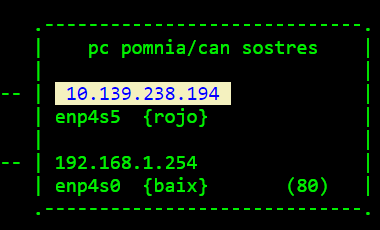
| .-- enp4s5 : Intel 82541GI Gigabit Ethernet controller {marca vermella} MAC = 00:15:17:5C:9E:55 antena guifi
| |
| .-- enp4s0 : Intel 82557/8/9/0/1 Ethernet Pro 100 {a baix} MAC = 00:04:AC:F3:62:D0 fibra optica
|
.--- VDU :
Que hi ha al bus PCI ?
sebas@pomniav2:~$ lspci
00:00.0 Host bridge: Intel Corporation E7230/3000/3010 Memory Controller Hub
00:1c.0 PCI bridge: Intel Corporation NM10/ICH7 Family PCI Express Port 1 (rev 01)
00:1c.4 PCI bridge: Intel Corporation 82801GR/GH/GHM (ICH7 Family) PCI Express Port 5 (rev 01)
00:1c.5 PCI bridge: Intel Corporation 82801GR/GH/GHM (ICH7 Family) PCI Express Port 6 (rev 01)
00:1d.0 USB controller: Intel Corporation NM10/ICH7 Family USB UHCI Controller #1 (rev 01)
00:1d.1 USB controller: Intel Corporation NM10/ICH7 Family USB UHCI Controller #2 (rev 01)
00:1d.2 USB controller: Intel Corporation NM10/ICH7 Family USB UHCI Controller #3 (rev 01)
00:1d.3 USB controller: Intel Corporation NM10/ICH7 Family USB UHCI Controller #4 (rev 01)
00:1d.7 USB controller: Intel Corporation NM10/ICH7 Family USB2 EHCI Controller (rev 01)
00:1e.0 PCI bridge: Intel Corporation 82801 PCI Bridge (rev e1)
00:1f.0 ISA bridge: Intel Corporation 82801GB/GR (ICH7 Family) LPC Interface Bridge (rev 01)
00:1f.1 IDE interface: Intel Corporation 82801G (ICH7 Family) IDE Controller (rev 01)
00:1f.2 IDE interface: Intel Corporation NM10/ICH7 Family SATA Controller [IDE mode] (rev 01)
00:1f.3 SMBus: Intel Corporation NM10/ICH7 Family SMBus Controller (rev 01)
03:00.0 Ethernet controller: Intel Corporation 82573E Gigabit Ethernet Controller (Copper) (rev 03)
03:00.3 Serial controller: Intel Corporation Active Management Technology - SOL (rev 03)
03:00.4 IPMI SMIC interface: Intel Corporation 82573E KCS (Active Management) (rev 03)
04:00.0 Ethernet controller: Intel Corporation 82557/8/9/0/1 Ethernet Pro 100 (rev 08)
04:04.0 VGA compatible controller: Advanced Micro Devices, Inc. [AMD/ATI] ES1000 (rev 02)
04:05.0 Ethernet controller: Intel Corporation 82541GI Gigabit Ethernet Controller (rev 05)
Un llistat molt llarg i molt detallat ...
sebas@pomniav2:~$ sudo lshw
Arquitectura, bus
Tenim
mate@punt-omnia:~$ uname -a
Linux punt-omnia 4.4.0-104-generic #127-Ubuntu SMP Mon Dec 11 12:16:42 UTC 2017 x86_64 x86_64 x86_64 GNU/Linux ; 64-bit machine
sebas@pomniav2:~$ uname -a
Linux pomniav2 4.15.0-65-generic #74-Ubuntu SMP Tue Sep 17 17:06:04 UTC 2019 x86_64 x86_64 x86_64 GNU/Linux
sebas@pomniav2:~$ uname -r
4.15.0-65-generic
Disc
Tenim
sebas@pomniav2:~$ sudo fdisk -l /dev/sda
Disk /dev/sda: 149.1 GiB, 160041885696 bytes, 312581808 sectors
Units: sectors of 1 * 512 = 512 bytes
Sector size (logical/physical): 512 bytes / 512 bytes
I/O size (minimum/optimal): 512 bytes / 512 bytes
Disklabel type: gpt
Disk identifier: 4B0C0955-D713-4335-B5A0-1AC55E73F086
Device Start End Sectors Size Type
/dev/sda1 2048 4095 2048 1M BIOS boot
/dev/sda2 4096 312578047 312573952 149G Linux filesystem
Hi ha problemes amb els discs SCSI
- install
smartmontools -
wiki Smartmontools
S.M.A.R.T. Monitoring Tools (smartmontools) package contains two utility programs (smartctl and smartd)
to control and monitor storage systems using the Self-Monitoring, Analysis and Reporting Technology System (SMART)
built into most modern ATA and SCSI harddisks.
- "# smartctl -a /dev/sdf"
- "# badblocks -s /dev/sdf"
- canvi cable SATA
- lspci -vvv
Verificacio del disc dur
Triga 30 minuts per un disc de 160 GB :
sebas@pomniav2:~$ sudo badblocks -s /dev/sda
Checking for bad blocks (read-only test): done
Nous noms de tarja amb prefixe "enp"
Es diu
Predictable Network Interface naming
Nosaltres tenim :
sebas@pomniav2:~$ ifconfig -a | grep flags
enp3s0f0: flags=4099<UP,BROADCAST,MULTICAST> mtu 1500
enp4s0: flags=4163<UP,BROADCAST,RUNNING,MULTICAST> mtu 1500
enp4s5: flags=4099<UP,BROADCAST,MULTICAST> mtu 1500
lo: flags=73<UP,LOOPBACK,RUNNING> mtu 65536
Compte amb el seu manegament :
sebas@pomniav2:/etc/network$ cat /etc/network/interfaces
# ifupdown has been replaced by netplan(5) on this system. See /etc/netplan for current configuration.
# To re-enable ifupdown on this system, you can run: sudo apt install ifupdown
Hi ha problemes amb la tarja de xarxa "enp3s0"
La inhabilitem a la BIOS i en posem una altra
On es udev de Ubuntu ?
Default : /lib/udev/rules.d/80-net-setup-link.rules
Configure new card :
- ifconfig -a : display new card name
- sudo vi /etc/networking/interfaces
Software
BIOS
- beep codes : 1 beep + 1 beep
- startup messages :
- ESC to view Diagnostic Messages
- F2 to enter Setup
- F12 Network Boot
- version 1.17.1057 American Megatrends
- Main : POST Error Pause := enabled ;
- Advanced + SATA mode := Enhanced / Legacy
- boot order :
- ATAPI
- HDD
- EFI shell
OpSys
Comencem instalant un Ubuntu des un USB :
889.192.448 ubuntu-18.04.3-live-server-amd64.iso
Versio de Ubuntu :
mate@punt-omnia:~$ cat /etc/issue
Ubuntu 16.04.3 LTS \n \l ; codename Xenial Xerus
sebas@pomniav2:~$ cat /etc/issue
Ubuntu 18.04.2 LTS \n \l ; codename Bionic Beaver
sebas@pomniav2:~$ lsb_release -a
No LSB modules are available.
Distributor ID: Ubuntu
Description: Ubuntu 18.04.2 LTS
Release: 18.04
Codename: bionic
Actualitzacions automatiques
Disable it !
sebas@pomniav2:/etc$ cat /etc/apt/apt.conf.d/20auto-upgrades
APT::Periodic::Update-Package-Lists "0";
APT::Periodic::Unattended-Upgrade "1";
url
Ens avisa que hi ha paquets per actualitzar :
$ sudo apt update # 113 packages can be upgraded
$ apt list --upgradable # display them
$ sudo apt upgrade #
$ sudo apt autoremove # clean up
Packages we want
Anem apuntant :
Anem instalant :
sudo apt install inetutils-traceroute
sudo apt install traceroute
webmin at pomnia
- edit /etc/apt/sources.list to include this line :
deb http://download.webmin.com/download/repository sarge contrib
- add webmin PGP key :
$ wget http://www.webmin.com/jcameron-key.asc
$ sudo apt-key add jcameron-key.asc
- update the list of packages to include the Webmin repository:
$ sudo apt update
- install webmin:
$ sudo apt install webmin
- verify it is installed :
$ sudo apt list --installed | grep -i webmin
- verify it is running :
sebas@T60ubuntu:~$ service webmin status
â webmin.service - LSB: web-based administration interface for Unix systems
Loaded: loaded (/etc/init.d/webmin; generated)
Active: active (running) since Sat 2019-10-19 13:20:27 CEST; 1 weeks 5 days ago
Docs: man:systemd-sysv-generator(8)
Process: 978 ExecStart=/etc/init.d/webmin start (code=exited, status=0/SUCCESS)
Tasks: 2 (limit: 4915)
CGroup: /system.slice/webmin.service
ââ 2410 /usr/bin/perl /usr/share/webmin/miniserv.pl /etc/webmin/miniserv.conf
ââ13263 gpg-agent --homedir /root/.gnupg --use-standard-socket --daemon
oct 19 13:20:12 T60ubuntu systemd[1]: Starting LSB: web-based administration interface for Unix systems...
oct 19 13:20:16 T60ubuntu perl[980]: pam_unix(webmin:auth): authentication failure; logname= uid=0 euid=0 tty= ruser= rhost= user
oct 19 13:20:19 T60ubuntu webmin[980]: Webmin starting
oct 19 13:20:27 T60ubuntu systemd[1]: Started LSB: web-based administration interface for Unix systems.
- verify we can use it :
url
Configuracions
Backup a "c:\temp\guifi\pomnia\fitxers"
Network configuration - netplan
We want
enp4s0 192.168.1.254 baix, tarja externa - fibra optica
enp4s5 10.139.238.194 dalt, marca vermella - antena campanar vella
Ubuntu 18.04 no longer uses /etc/network/interfaces file to configure IP address.
Now we use a YAML file found under /etc/netplan/ directory.
In case a YAML file is not created by the distribution installer,
you can generate the required configuration for the renderers with this command.
sebas@pomniav2:~$ sudo netplan --debug generate
In our PC we have :
sebas@pomniav2:~$ ls -al /etc/netplan/
-rw-r--r-- 1 root root 465 Oct 11 23:35 50-cloud-init.yaml
And its original contents is :
sebas@pomniav2:~$ cat /etc/netplan/50-cloud-init.yaml
network:
ethernets:
enp3s0f0:
dhcp4: true
enp4s0:
dhcp4: true
enp4s5:
dhcp4: true
version: 2
Before making any changes in this file, let us backup it
sebas@pomniav2:~$ sudo cp /etc/netplan/50-cloud-init.yaml /etc/netplan/50-cloud-init.yaml.bak
Now we edit the proper values, keeping in mind NOT TO USE TAB, but SPACES and indent by 2 spaces ** ALLWAYS **
$ cat /etc/netplan/50-cloud-init.yaml
network:
version: 2
ethernets:
enp4s0: # internet : conexio a la Fibra Optica
dhcp4: no
dhcp6: no
addresses: [192.168.1.254/24]
gateway4: 192.168.1.1
nameservers:
addresses: [8.8.8.8, 8.8.4.4]
enp4s5: # intranet : conexio a la antena del Campanar
dhcp4: no
dhcp6: no
addresses: [10.139.238.194/27]
routes:
- to: 10.0.0.0/8
via: 10.139.238.193
metric: 100
Sense gateway :
$ cat /etc/netplan/50-cloud-init.yaml
network:
version: 2
ethernets:
enp4s0: # tarja externa, a baix - cable cap el MikroTik
dhcp4: no
dhcp6: no
addresses: [192.168.1.254/24]
# gateway4: 192.168.1.1
routes:
- to: 10.0.0.0/8
via: 10.139.238.193
- to: 0.0.0.0/0
via: 192.168.1.1
nameservers:
addresses: [8.8.8.8, 8.8.4.4]
enp4s5: # tarja placa base, marca vermella - cable cap a la antena vella cap el Campanar
dhcp4: no
dhcp6: no
addresses: [10.139.238.194/27]
routes:
- to: 10.0.0.0/8
via: 10.139.238.193
- to: 0.0.0.0/0
via: 192.168.1.1
Eina :
net calculator "apt-get install ipcalc"
Detalls de la ruta de volta :
PC SAG PC POMNIA INT PC POMNIA EXT Router
192.168.1.41
10.139.130.117 10.139.238.194 192.168.1.254 192.168.1.1
netplan.io examples
Apply this configuration
$ sudo netplan --debug apply
tecmint,
ostechnix
Per posar la ruta de volta, I did
Ask Ubuntu,
Super User
What configuration does this actually produce? That is, what do you see in ip addr and in ip route? –
sebas@pomniav2:~$ ip addr
1: lo: <LOOPBACK,UP,LOWER_UP> mtu 65536 qdisc noqueue state UNKNOWN group default qlen 1000
link/loopback 00:00:00:00:00:00 brd 00:00:00:00:00:00
inet 127.0.0.1/8 scope host lo
valid_lft forever preferred_lft forever
inet6 ::1/128 scope host
valid_lft forever preferred_lft forever
2: enp4s0: <BROADCAST,MULTICAST,UP,LOWER_UP> mtu 1500 qdisc fq_codel state UP group default qlen 1000
link/ether 00:04:ac:f3:62:d0 brd ff:ff:ff:ff:ff:ff
inet 192.168.1.254/24 brd 192.168.1.255 scope global enp4s0
valid_lft forever preferred_lft forever
inet6 fe80::204:acff:fef3:62d0/64 scope link
valid_lft forever preferred_lft forever
3: enp3s0f0: <NO-CARRIER,BROADCAST,MULTICAST,UP> mtu 1500 qdisc fq_codel state DOWN group default qlen 1000
link/ether 00:15:17:5c:9e:54 brd ff:ff:ff:ff:ff:ff
4: enp4s5: <BROADCAST,MULTICAST,UP,LOWER_UP> mtu 1500 qdisc fq_codel state UP group default qlen 1000
link/ether 00:15:17:5c:9e:55 brd ff:ff:ff:ff:ff:ff
inet 10.139.238.194/27 brd 10.139.238.223 scope global enp4s5
valid_lft forever preferred_lft forever
inet6 fe80::215:17ff:fe5c:9e55/64 scope link
valid_lft forever preferred_lft forever
sebas@pomniav2:~$ ip route
default via 192.168.1.1 dev enp4s0 proto static
10.0.0.0/8 via 10.139.238.193 dev enp4s5 proto static
10.139.238.192/27 dev enp4s5 proto kernel scope link src 10.139.238.194
192.168.1.0/24 dev enp4s0 proto kernel scope link src 192.168.1.254
network management under netplan
$ sudo ip link set dev enp4s5 up
$ ifconfig -a {enp4s5 no te IP}
$ sudo netplan apply
routing under netplan
See "man netplan" :
Routing
Complex routing is possible with netplan.
Standard static routes as well as policy routing using routing tables are supported via the networkd backend.
These options are available for all types of interfaces.
routes (mapping)
The routes block defines standard static routes for an interface.
At least to and via must be specified.
For from, to, and via, both IPv4 and IPv6 addresses are recognized, and must be in the form addr/prefixlen or addr.
from (scalar)
Set a source IP address for traffic going through the route.
to (scalar)
Destination address for the route.
via (scalar)
Address to the gateway to use for this route.
Network configuration - old style
Si volem administrar "pomnia" des el interior de guifi.torrelles,
ens cal la ruta de tornada des pomnia a sag
Exemple : T60 !
Problemes engegada NetworkManager : "$ sudo journalctl"
$ sudo /etc/init.d/NetworkManager stop
$ sudo apt-get purge network-manager
Disable /
remove Network Manager
motd
Now the initial display is :
login as: sebas
sebas@192.168.1.254's password:
Welcome to Ubuntu 18.04.2 LTS (GNU/Linux 4.15.0-65-generic x86_64)
* Documentation: https://help.ubuntu.com
* Management: https://landscape.canonical.com
* Support: https://ubuntu.com/advantage
System information as of Sun Oct 13 11:40:25 UTC 2019
System load: 0.0 Processes: 102
Usage of /: 2.8% of 145.71GB Users logged in: 1
Memory usage: 8% IP address for enp4s0: 192.168.1.254
Swap usage: 0%
* Kata Containers are now fully integrated in Charmed Kubernetes 1.16!
Yes, charms take the Krazy out of K8s Kata Kluster Konstruction.
https://ubuntu.com/kubernetes/docs/release-notes
111 packages can be updated.
0 updates are security updates.
Last login: Sun Oct 13 10:20:35 2019 from 192.168.1.94
sebas@pomniav2:~$
Alias
Global vs private
"Success is the ability to go from failure to failure without losing your enthusiasm" ― Winston Churchill