W-MQI
 Top
Top
| home / infca / wbi (navigation links) | No pierdas la ocasión de causar una buena primera impresión |
| MQI | MB | MQSI cmd's | Best Practices | Nice Shell's | ODBC | HealthCheck | URLs | Books |
WMQ -> W-MQI -> WBI-MB -> WMQ-WF -> WBI-ICS -> WBI-SF
|
WMQ
WebSphere MQ -
URL
W-MQI
WebSphere MQ Integrator
WBI-MB
WebSphere Bussiness Integration Message Broker
WMQ-WF
WebSphere MQ WorkFlow
WBI-ICS
WebSphere Interchange Server
WBI-SF
WebSphere Business Integration Server Foundation
WSAD-IE
WBI-WB
WBI-FN
WebSphere Business Integration for Financial NetWorks (denali)
|
W-MQI |
Top
|
Using the MQSeries Integrator Version 1.0 , SG24-5386-00 Llibres MQI :
| ||
These can be existing MQSeries-enabled applications and need not be aware of WebSphere MQ Integrator; in this case, the message flows set the correct configuration values to handle the messages. Alternatively, the application can prefix the user data of the message with a WebSphere MQ Integrator header (MQRFH or MQRFH2) to control the way the broker handles the message. WebSphere MQ Integrator Deployment and Migration, SG24-6509-00 If the message has an MQRFH or MQRFH2 header, the domain that is identified in the header (either in Format or the name/value data) determines the parser that is associated with this message. MB v 6.0 Message Flows, page 11, [19/1020]. struct tagMQRFH2 {
MQCHAR4 StrucId; /* Structure identifier */
MQLONG Version; /* Structure version number */
MQLONG StrucLength; /* Total length of MQRFH2 including all NameValueLength and NameValueData fields */
MQLONG Encoding; /* Numeric encoding of data that follows last NameValueData field */
MQLONG CodedCharSetId; /* Character set identifier of data that follows last NameValueData field */
MQCHAR8 Format; /* Format name of data that follows last NameValueData field */
MQLONG Flags; /* Flags */
MQLONG NameValueCCSID; /* Character set identifier of NameValueData */
};
Mapping JMS messages onto MQ messages
|
| Basic operations | Toolkit cfg | System obj | Fixes |
WBI-MB |
Top
|
IBM Integration Bus (IIB) - formerly known as WebSphere Message Broker - is an enterprise service bus (ESB) providing connectivity and universal data transformation for service-oriented architecture (SOA) and non-SOA environments.
| ||||||||||||||||||||||||||||
|
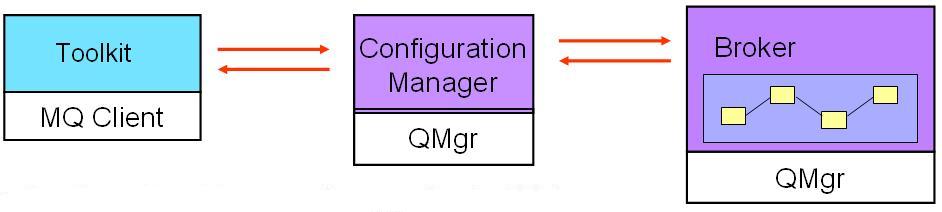
Conceptes / esquema arquitectura
[MB_toolkit]
| [workspace]
| |
.-----|--------------|------------ domain -------.
| | | |
| V V |
| [configuration manager] |
| | | |
| | | |
| V | |
| [broker] | |
| | V |
| | [broker] |
| | | |
| | | |
.------------|--------|----------- domini -------.
| |
[App] [App]
Flavours
Terminologia
Broker
The broker is a set of application processes that host and run message flows.
When a message arrives at the broker from a business application,
the broker processes the message
before passing it on to one or more other business applications.
The broker routes, transforms, and manipulates messages
according to the logic that is defined in their message flow applications.
A broker uses MQ as the transport mechanism
both to communicate with the Configuration Manager,
from which it receives configuration information,
and to communicate with any other brokers to which it is associated.
Each broker has a database
in which it stores the information that it needs to process messages at run time.
MB Basics, SG24-4713-7, pg 15 [41/372] The broker depends on a broker database to hold broker information. This includes control data for resources defined to the broker, for example deployed message flows. You need to define a database and authorize access for specific users before you create the broker because creating the broker creates tables within the database. The database is also known as the broker's local persistent store. The broker connects to the database using an ODBC connection.
(Broker) Domain
A broker domain is one or more brokers that share a common configuration, together with the single Configuration Manager that controls them.
Configuration Manager
The Configuration Manager has four main functions:
Toolkit
Message set
Message flows
Execution group
DataBases
WBI-MB Basics, SG24-7090, page 4 [18 of 262] Conectivitat
To connect to a broker, you can user a ".broker" file (old ".config"), whose contents is: c:\> type sebas.broker
It can be used in "mqsicreateexecutiongroup" command, after "-n" flag. | ||||||||||||||||||||||||||||
|
MB Explorer
IS02 = MB Explorer plug-in | ||||||||||||||||||||||||||||
|
Message flow application deployment
Server project
|
Message Flow project ------> Compiled Message Flow )
| .cmf file )
| (depends on) ) ---> Package ---> BAR file ---> Cfg ---> Broker
| ) Mgr
Message Set project ------> Dictionary )
.dictionary
MB Flows, SG24-5386-00, page 531, 541/556
Broker archive file
messagebroker Message Flows, page 532 [542 of 556] Remove Override configurable property values if you want to customize and keep the BAR file. Problems creating the BAR file
Abrir la perspectiva "Broker Application Development", y el flujo. Se ve algún error (una marca roja en el flujo, a la izquierda) ? En el cuadrante inferior derecho, hay un tab, "Problems". Darle click y se verá la lista de problemas no resueltos. El fichero ".log" del directorio ".metadata" (en el workspace) puede tener información útil. También están los logs del Bar File Editor (User / Service Log; tab abajo, a la derecha). | ||||||||||||||||||||||||||||
|
Basic operations
When you create a broker, a CM or a UNS, MQ resources are created to support their configuration. The resources that are created have names that begin with the reserved characters SYSTEM. All the resources are queues with the exception of SYSTEM.BKR.CONFIG, which is a channel of type SVRCONN. It is the connection channel for Message Broker Toolkit clients. MB Installation Guide, page 155/174.
MB v 6.0, "Configuration, Administration and Security" page 322 [330/474] Manually creating a basic MB configuration
WSBIMB Basics RedBook, SC24-7090-00, page 134
MB setup checklist
[another]
MB cleanup checklist
| ||||||||||||||||||||||||||||
MB v6.0 install on Win
c:\temp\C85RAML\messagebroker_runtime1\setup.exe [35.747.523]
WS MB for Multiplatforms
Version 6.0.0.0
[-] Instalación del Producto / Product Install
|
[-] - [v] Intermediario / Broker
| |
| .--- [v] Servicios de Transformación
|
.--- [v] Servidor de Nombres de Usuarios
|
.--- [v] Gestor de Configuracioń
Requisito : MQ v 5.3 or 6
c:\temp\C85MJML\messagebroker_runtime2\MQ_V6.0\setup.exe [360.448]
Requisito : Eclipse v3.0 (CD)
MB v6.0 install on AIX
See v 6.1 install ! MB no se instala con el SMIT ! tar -xvf nom.tar
chown wbrkadm:mqbrkrs *
chmod 777 *
/tmp/soft/MB/messagebroker_runtime1/setupaix -console
/tmp/soft/MBv8/messagebroker_runtime1/setupaix -i console {v8}
The user wbrkadm .profile has to have this line at the bottom :
echo "Establir el entorn per accedir a MQSI :"
. /usr/wbimb/bin/mqsiprofile
. /opt/IBM/mqsi/6.1/bin/mqsiprofile {default}
Tampoc es desinstala amb el SMIT : /usr/wbimb/_uninst_runtime/uninstaller
/ust/mqsi_trial/Uninstaller/Uninstaller
Crear Configuration Manager : (no cal Oracle => no posem "-n" => es ferà servir Derby) mqsicreateconfigmgr CMDES01 -i wbrkadm -a password -q MQCFGDES
Al directori de variables del MB (/var/wbimb), crear un fitxer de nom user.log, ficar-li 755 de flags, i ferlo propietat del gestor de Brokers : [root@dmqb261]:/var/wbimb> touch user.log { empty }
[root@dmqb261]:/var/wbimb> chown wbrkadm:mqbrkrs user.log
[root@dmqb261]:/var/wbimb> chmod 775 user.log
Al fitxer /etc/syslog.conf posar-hi al final una línia com user.debug /var/wbimb/user.log
Refrescar les propietats del SYSLOG mitjançant refresh -s syslogd
logger -p user.info hello
Ara ja podem fer : [wbrkadm@dmqb261]:/usr/wbimb> mqsistart CMDES01
[wbrkadm@dmqb261]:/usr/wbimb> ps -ef | grep wb*
wbrkadm 356466 397412 81 10:18:52 - 0:03 bipconfigmgr CMDES01
wbrkadm 397412 1 0 10:18:52 - 0:00 bipservice CMDES01
[wbrkadm@dmqb261]:/usr/wbimb> mqsistop CMDES01
La comunicació des el Toolkit cap el Configuration Manager es fa amb el canal SYSTEM.BRK.CONFIG (del tipus SVRCONN) Per conectar el Toolkit (PC) amb el CfgMgr (AIX), el usuari de Guindous del Toolkit ha de ser wbrkadm, o hem de fer servir mqsicreateaclentry - [detalls] Otherwise, you get a BIP1711W message ! BIP1711W: The ConfigManagerProxy is not viewable by user newname\wbrkadm
An attempt was made to view or manipulate the ConfigManagerProxy with UUID '',
but the user who initiated this operation does not have the required authority to do so.
Ask the domain's administrator to grant your user ID the necessary authority to perform the requested action.
MB threads
When considering the storage usage of message flows, then the main process to monitor is the DataFlowEngine. The bipservice process is a very small process that monitors (and restarts if necessary) the bipbroker process. The bipbroker process is designed to monitor and administrate the execution groups. It performs such functions as handling deploy requests and communicating with the Configuration Manager. It does not process any message flows, but its size is governed by the size of the deploy requests that are being received. The biphttplistener process is only used when webservice functionality is being used (when the HTTPInput, HTTPRequest and HTTPReply nodes are in use). Therefore, if the message flows deployed do not contain such resources, then this should not increase by any significant amount. Preparació del Oracle : /usr/wbimb/bin/mqsi_setupdatabase.sh oracle9 Compte requerimets Java
Creació del Broker : mqsicreatebroker BRK_NAME -i service_user -a service_pwd
-q QM_NAME -n dataSourcename -u db_user -p db_pwd
Que dona com a resultat : [wbrkadm@dmqb261]:/usr/wbimb> mqsistart BRKNAME
[wbrkadm@dmqb261]:/usr/wbimb> ps -ef | grep wb*
wbrkadm 356467 397412 81 10:18:52 - 0:03 biphttplistener BRKNAME
wbrkadm 356466 397412 81 10:18:52 - 0:03 bipbroker BRKNAME
wbrkadm 397412 1 0 10:18:52 - 0:00 bipservice BRKNAME
Problemes en la creació del Broker : mqsicreatebroker BROKER_NAME
-i service_UserId -a service_Password
-q queueManager Name
-n dataSourceName
-u dataSource_UserId -p dataSource_Password
Que fem ? | ||||||||||||||||||||||||||||
|
ODBC configuration
Create an ODBC connection for the broker database:
MB Basics, SG24-7090-00, page 136, 151/262. When you define a data source for Oracle, choose the driver: MQSeries DataDirect Technologies 5.00 32-BIT Oracle
Complete these steps to configure the driver:
"Configuring an ODBC data source on Windows" (v 6.0) url url url WS MB v 6.0, "Configuration, Administration and Security", page 94 [102/474] Documentació ODBC DataDirect & Trouble Shoot (ivtestlib). Trassa ODBC (AIX) : ODBCINI=/var/mqsi/odbc/.odbc.ini
[ODBC]
Trace=0 // use 1 or 2 or 3 to trace.
TraceFile=/home/wbrkadm/odbctrace/odbctrace.out // directory must exist
traceDll=/usr/wbimb/merant/lib/odbctrac.so
InstallDir=/usr/wbimb/merant // *** debe estar bien ***
UseCursorLib=0
IANAAppCodePage=4
Emir:
Para conectarse al DB2 en otra máquina, el port que usa DB2 es 50000.
Por ello el ODBC debe apuntar a <hostname:50000>.
En Windows, hay que tener cuidado con qué configurador ODBC usas. Si el broker es 64 bit, usas el configurador normal (Start / Administrative Tools / ODBC). Pero si el Broker es 32 bit, hay que usar el configurador que hay en C:\Windows\SysWOW64\odbcad32.exe No hay que olvidar que una vez se ha configurado el ODBC, hay que usar mqsisetdbparms para darle el userid+password. | ||||||||||||||||||||||||||||
|
JDBC setup
To configure the JDBC, all we have to do is to create a new configurable service mqsicreateconfigurableservice WBRK61_DEFAULT_BROKER -c JDBCProviders -o DB2_LA
Here DB2_LA is the name which developer will use to make a JDBC connection to the database in the java Compute node, as: Connection DB2_Connection = getJDBCType4Connection("DB2_LA",JDBC_TransactionType.MB_TRANSACTION_AUTO);
Now lets see how to configure DB2 with the Broker. If you run the command mqsireportproperties WBRK61_DEFAULT_BROKER -c JDBCProviders -o DB2 -r
you will be able to see that the console returns some configuration data in which you will identify the Connection URL Format : connectionUrlFormat='jdbc:db2://[serverName]:[portNumber]/[databaseName]:user=[user];password=[password];'
We will have to add this parameters to our JDBC connection too, so lets start with the commands. We have to create the security profile so that the broker uses it to authenticate with the database: mqsisetdbparms WBRK61_DEFAULT_BROKER -n jdbc::DB2SEC -u merlin -p merlin
Once the security profile is created, we have to attach this to our JDBC: mqsichangeproperties WBRK61_DEFAULT_BROKER -c JDBCProviders -o DB2_LA -n securityIdentity -v DB2SEC
Now we just need to set the database name post number host number...etc To add the connection url: mqsichangeproperties
WBRK61_DEFAULT_BROKER
-c JDBCProviders
-o MYSQL
-n connectionUrlFormat
-v jdbc:db2://[serverName]:[portNumber]/[databaseName]:user=[user];password=[password];
To add the database name host name port number: mqsichangeproperties WBRK61_DEFAULT_BROKER -c JDBCProviders -o DB2 -n portNumber -v 5000
mqsichangeproperties WBRK61_DEFAULT_BROKER -c JDBCProviders -o DB2 -n serverName -v 172.17.3.113
mqsichangeproperties WBRK61_DEFAULT_BROKER -c JDBCProviders -o DB2 -n databaseType -v DB2
By this time you should be able to identify that the -n is the name of the property and -v is the value of the property... At the end your configuration parameters should look like C:\Program Files\IBM\MQSI\6.1> mqsireportproperties WBRK61_DEFAULT_BROKER -c JDBCProviders -o DB2_LA -r
JDBCProviders
DB2_LA
connectionUrlFormat='jdbc:db2://[serverName]:[portNumber]/[databaseName]:user=[user];password=[password];'
connectionUrlFormatAttr1=''
connectionUrlFormatAttr2=''
connectionUrlFormatAttr3=''
connectionUrlFormatAttr4=''
connectionUrlFormatAttr5=''
databaseName='SAMPLE'
databaseType='DB2 Universal Database'
databaseVersion='8.2.0'
description='default_Description'
environmentParms='default_none'
jarsURL='C:\Program Files\IBM\SQLLIB\java'
portNumber='50000'
securityIdentity='DB2SEC'
serverName='172.17.3.113'
type4DatasourceClassName='com.ibm.db2.jcc.DB2XADataSource'
type4DriverClassName='com.ibm.db2.jcc.DB2Driver'
BIP8071I: Successful command completion.
C:\Program Files\IBM\MQSI\6.1>
After setting up all the parameters in place, all that we have to do is to just run the flow. If it throws an exception the primary things you have to check are:
Screwing up the connection URL format:
| ||||||||||||||||||||||||||||
Oracle: granting and revoking user access to databases
The Oracle database administrator controls user access to Oracle databases. The WebSphere Message Broker does not provide any special commands to administer an Oracle database. MB v6, "Configuration, Administration and Security", page 29 [37/474] Database schema
When you create a broker, the database tables required by that component are created in the default schema associated with the user ID used to access that database. You specify this user ID on the create command (mqsicreatebroker). For Oracle, the default behavior is for the schema name to default to the user ID used to access the database. MB v6, "Configuration, Administration and Security" WebSphere MQ Integrator Broker does not demand a particular schema or set of tablespaces for keeping broker information. When you create a broker, the tables are created in the database with an ownership defined by the user identifier specified on the command line (the user ID must already be known to the database). MQI Broker for Solaris, v 2.1, "Installation Guide", page 71, tip7ac05.pdf User Identifier
The Oracle user ID that you use to store broker information needs the privileges: connect, resource, and create table. For example, the following is sufficient: CREATE USER dbid IDENTIFIED BY dbpw;
GRANT CONNECT TO dbid;
GRANT RESOURCE TO dbid;
GRANT CREATE TABLE TO dbid;
and optionally: ALTER USER dbid DEFAULT TABLESPACE brktbspc;
MQI Broker for Solaris, v 2.1, "Installation Guide", page 72, tip7ac05.pdf SC : grant connect to ora_user
grant resource to ora_user
grant create table to ora_user
grant create session to ora_user
Oracle authorization
To authorize access to an Oracle database:
MB v6, "Configuration, Administration and Security", page 104 [112/474] SQLPLUSW (Win Cmd Line) or sqlplus (AIX) Comando para crear usuarios desde SQLplus (usr=nom@sid) : CREATE USER "WBRKADM" PROFILE "DEFAULT"
IDENTIFIED BY "password" DEFAULT TABLESPACE "DATA"
TEMPORARY TABLESPACE "TEMP"
QUOTA UNLIMITED
ON "DATA"
QUOTA UNLIMITED
ON "INDX"
ACCOUNT UNLOCK;
GRANT "CONNECT" TO "WBRKADM";
Oracle specs
Per a crear un usuari, ens cal saber el nom i tamany del TABLESPACE ... El "grupo" creado por Oracle es ... ora_dba (Win) or dba (AIX). Obtenim que els Tablespaces han de ser DAT i NDX, de 2 GB i 1GB respectivament. Llibre ?
MQI books (14) - [\\WS-BI-MB\MQI]
El driver de Oracle es v 10.02.00.01 - quina versió de ODBC requereix ?
Oracle FAQs
For the installed database drivers for Oracle,
entries that contain driver locations and parameters
are created under the following key:
For Event Log information,
an entry is added under the following key:
| ||||||||||||||||||||||||||||
Configuración
para acceder con el Toolkit (Windows)
al CfgManager (AIX)
En el Windows, crear los siguientes grupos y meter al usuario de windows en todos ellos mqbrasgn
mqbrdevt
mqbrkrs
mqbrops
mqbrtpic
En el AIX: mqsicreateaclentry CMDES01 -u DX9327 -a -x F -p
mqsilistaclentry CMDESA -u st1153 -a -p
Comando mqsicreateaclentry
mqsicreateaclentry
BIP8843W: Creates a security Access Control Entry in the Configuration Manager repository.
Syntax:
mqsicreateaclentry configMgrName
(-f fileName | ((-g groupName | (-u userName (-m machineName | -a)))
-x accessLevel ((-b broker (-e executionGroup))
| -s | -t | -r | -p))) [-n connectionFile] [-w timeoutValue]
Command Options:
'configMgrName' name of the Configuration Manager
'-f fileName' File containing list of Access Control Entries to create.
'-g groupName' Add Access Control Entry for the specified group
'-u userName' Add Access Control Entry for the specified user (must be accompanied by either -a or -m)
'-m machineName' Add the Access Control Entry for the user for this specific machine/domain name only
'-a' Add an Access Control Entry for the user for all machines/domains
'-x accessLevel' Level of authority to grant (F, E, D, V)
F = full
E = edit
D = deploy
V = view
'-b broker' Add access to the specified broker
'-e executionGroup' Add access to the specified execution group (must be accompanied by -b)
'-s' Add access to the subscriptions table
'-t' Add access to the pub/sub topology
'-r' Add access to the root topic
'-p' Add access to the ConfigManagerProxy. Also known as the "All resources" Access Control Entry.
'-w timeoutValue' value in seconds to wait for responses.
'-n connectionFile' Optional "connection file" to allow the command to communicate with a remote ConfigMgr.
Sembla que s'ha de re-iniciar el CM després de definir un nou usuari ... Configuration, Administration and Security Data we need
Configuration Manager Queue Manager name ..... ..... ..... ..... ..... ..... . n
Configuration Manager Queue Manager Dead Letter queue name ..... ..... ..... . n
Configuration Manager Queue Manager Lister Port number ..... ..... ..... ..... n
Configuration Manager name ..... ..... ..... ..... ..... ..... ..... ..... ... n
Configuration Manager Data Base name ..... ..... ..... ..... ..... ..... ..... n
Broker Queue Manager name ..... ..... ..... ..... ..... ..... . n
Broker Queue Manager Dead Letter queue name ..... ..... ..... . n
Broker Queue Manager Lister Port number ..... ..... ..... ..... n
Broker name ..... ..... ..... ..... ..... ..... ..... ..... ... n
Broker Data Base name ..... ..... ..... ..... ..... ..... ..... n
Create and start a listener (for CfgMgr)
Start a listener as a background task by using WebSphere MQ Services:
MB v 6.0 Configuration, Administration and Security, page 157, 165/474. Create a domain connection
Before you start, you must complete the following tasks:
Create a domain connection in the workbench using the Create a New Domain Connection wizard. Enter a set of parameters to create a .configmgr file. The parameters contained within the .configmgr file are used to connect to the Configuration Manager, where you can view and edit your broker domain. To create a domain connection:
MB v 5.0 Configuration, Administration and Security, page 75, 83/288. MB v 6.0 Configuration, Administration and Security, page 181, 189/474. Add a broker to the domain
Before you start, you must have completed the following tasks:
Adding a broker to the broker topology creates a reference to the broker in the configuration repository; it does not create the physical broker. When you add a broker, be sure to use the same name that you used to create the broker. To add a broker to a broker domain:
In the Domains view, the broker is added to the broker domain and a default execution group is added to the broker. Adding a broker to the broker topology creates security ACL groups, which give the user ID full control of the broker and its default execution group. These ACL groups exist until this broker is removed from the broker domain. This means that the user ID can be removed from the mqbr* groups, but the user still has the full control access level for the broker and its default execution group. Next: Continue to add further execution groups to the broker if necessary. Then create, modify, or reuse message flows, message sets and other required files, and add them to the broker archive for deploying to the broker. MB v 5.0 Configuration, Administration and Security, page 77, 85/288. MB v 6.0 Configuration, Administration and Security, page 184, 192/474. Para hacerlo desde una command line se utiliza el comando mqsicreateexecutiongroup con la opción -f. Una vez ejecutado este comando ya se pueden realizar los despliegues con el comando mqsideploy. También veremos que en el Toolkit aparece el broker en el dominio. La sintáxis es la siguiente:
mqsicreateexecutiongroup -b <nombre_broker> -e <nombre_grupo_ejecución>
-i <ip del configmgr> -p <puerto configmgr>
-q <QM del Configmgr> -f <nombre_broker>
Por ejemplo: mqsicreateexecutiongroup -b TKT99BK -e MYEG -i localhost -p 2414 -q WBRK61_DEFAULT_QUEUE_MANAGER -f TKT99QM
BIP1044I: Connecting to the Configuration Manager's queue manager...
BIP1045I: Connecting to the Configuration Manager...
BIP1145I: Defining broker 'TKT99BK' on 'TKT99QM' in the Configuration Manager...
BIP1124I: Creating execution group 'MYEG' on broker 'TKT99BK'...
BIP1126I: The execution group was created successfully.
The Configuration Manager will ask the broker to initialize the execution group when a resource is deployed to it.
BIP8071I: Successful command completion.
Flow creation, etc
Creating a message flow project
MB v 6.0 Message Flows, page 123, [131/1020].
Creating a message flow
MB v 6.0 Message Flows, page 126, [134/1020].
Deployment overview
MB v 6.0 Message Flows, page 419, [427/1020]. How to delete a domain
Delete the .configmgr file in servers project.
| ||||||||||||||||||||||||||||
"Default WebSphere MQ resources created during configuration", page 98 [107/118], MB V 5 R 0 "Installation". When you issue the command mqsicreatebroker, it grants put and get authority on your behalf to the group mqbrkrs for the following queues: * SYSTEM.BROKER.ADMIN.QUEUE
* SYSTEM.BROKER.CONTROL.QUEUE
* SYSTEM.BROKER.EXECUTIONGROUP.QUEUE
* SYSTEM.BROKER.EXECUTIONGROUP.REPLY
* SYSTEM.BROKER.INTERBROKER.QUEUE
* SYSTEM.BROKER.MODEL.QUEUE
When you issue the command mqsicreateconfigmgr, it grants put and get authority on your behalf to the group mqbrkrs for the following queues: * SYSTEM.BROKER.CONFIG.QUEUE
* SYSTEM.BROKER.CONFIG.REPLY
* SYSTEM.BROKER.ADMIN.REPLY
* SYSTEM.BROKER.SECURITY.REPLY
* SYSTEM.BROKER.MODEL.QUEUE2
"Securing WS MQ resources", page 2 [10/88], MB V 5 R 0 "Application Programming".
Al recurs SYSTEM.DEF.SVRCONN de MQCFGDES, posar la linia MCAUSER('mqm')
| ||||||||||||||||||||||||||||
See c:\Program Files\IBM\WebSphere Business Integration Message Brokers\bin MQSI Report Options
Used to display actual values. C:\Program Files\IBM\MQSI\6.0> mqsireportproperties /?
BIP8122W: Displays broker property settings.
Syntax:
mqsireportproperties brokerName
( -e executionGroupName | -b httplistener | -c configurableService )
-o object [-n attribute | -a | -r]
Command Options:
'brokerName' name of the broker
'-e executionGroupName' name of the execution group
'-b httplistener' report properties for the HTTP Listener component
'-c configurableService' report properties for a configurable service used by the Broker.
Use AllTypes for a list of all service types
'-o object' object name to report on.
Use AllReportableEntityNames for a list of allowable object names
'-n attribute' display the value of the attribute with this name
'-a' display all attribute values (non-recursive)
'-r' display all attribute values (recursive).
BIP8071I: Successful command completion.
The list of properties for an Execution Group is : C:\Program Files\IBM\MQSI\6.0> mqsireportproperties INTPRE01 -e GE_SEBAS -o AllReportableEntityNames -r
ReportableEntityName='MessageFlow'
ReportableEntityName='AllMessageFlows'
ReportableEntityName='ComIbmAggregateNodeFactory'
ReportableEntityName='ComIbmBasicNodeFactory'
ReportableEntityName='ComIbmConfigurationNodeFactory'
ReportableEntityName='ComIbmCpiParserFactory'
ReportableEntityName='ComIbmDBTxnCtxManager'
ReportableEntityName='ComIbmDatabaseConnectionManager'
ReportableEntityName='ComIbmDummyParserFactory'
ReportableEntityName='ComIbmGeneralParserFactory'
ReportableEntityName='ComIbmGenericParserFactory'
ReportableEntityName='ComIbmGenericXmlParserFactory'
ReportableEntityName='ComIbmIDOCParserFactory'
ReportableEntityName='ComIbmJVMManager'
ReportableEntityName='ComIbmJavaNodeFactory'
ReportableEntityName='ComIbmJavaPluginNodeFactory'
ReportableEntityName='ComIbmJmsTransformNodeFactory'
ReportableEntityName='ComIbmMQConnectionManager'
ReportableEntityName='ComIbmMQNodeFactory'
ReportableEntityName='ComIbmMQParserFactory'
ReportableEntityName='ComIbmMQeNodeFactory'
ReportableEntityName='ComIbmMtiParserFactory'
ReportableEntityName='ComIbmSCADANodeFactory'
ReportableEntityName='ComIbmSQLNodeFactory'
ReportableEntityName='ComIbmSocketConnectionManager'
ReportableEntityName='ComIbmTimeoutNodeFactory'
ReportableEntityName='ComIbmWSNodeFactory'
ReportableEntityName='ComIbmWSParserFactory'
ReportableEntityName='ComIbmXMLResourceManager'
ReportableEntityName='ComIbmXSLResourceManager'
ReportableEntityName='ComIbmXmlParserFactory'
ReportableEntityName='DynamicSubscriptionEngine'
ReportableEntityName='EventLog'
ReportableEntityName='JAR'
ReportableEntityName='LabelManager'
ReportableEntityName='MIMEFactory'
ReportableEntityName='TraceLog'
ReportableEntityName='UserTraceLog'
ReportableEntityName='EventLog'
ReportableEntityName='UserTraceLog'
ReportableEntityName='TraceLog'
BIP8071I: Successful command completion.
The list of properties for all services is {*** very large on v7 ***}: C:\Program Files\IBM\MQSI\6.0> mqsireportproperties INTPRE01 -c AllTypes -o AllReportableEntityNames -r
ReportableEntityName=''
JMSProviders
BEA_Weblogic=''
jarsURL='default_Path'
nativeLibs='default_Path'
Generic_File=''
jarsURL='default_Path'
nativeLibs='default_Path'
Generic_LDAP=''
jarsURL='default_Path'
nativeLibs='default_Path'
SonicMQ=''
jarsURL='default_Path'
nativeLibs='default_Path'
Tibco_EMS=''
jarsURL='default_Path'
nativeLibs='default_Path'
WebSphere_MQ=''
jarsURL='C:\Program Files\IBM\WebSphere MQ\Java\lib'
nativeLibs='C:\Program Files\IBM\WebSphere MQ\Java\lib'
WebSphere_WAS_Client=''
jarsURL='default_Path'
nativeLibs='default_Path'
BIP8071I: Successful command completion.
ChangeProperties / ReportProperties commands
Per exemple, per canviar el port on escolta el Debug, ferem servir : mqsichangeproperties WBRK61_DEFAULT_BROKER -e EXEGRP1 -o ComIbmJVMManager -n jvmDebugPort -v 1003
mqsistop BROKER_NAME
mqsistart BROKER_NAME
Per canviar el tamany del Heap de la JVM : mqsichangeproperties BROKER_NAME -e EXEGRP_NAME -o DynamicSubscriptionEngine -n jvmMaxHeapSize -v 1003
This value must be in the range 16 777 216 to 8 589 934 592. Initial value = 134 217 728
Com es veuen les properties actuals ?
dx0609:/home/wbrkadm # mqsireportproperties /?
BIP8122W: Displays broker property settings.
Syntax:
mqsireportproperties brokerName
( -e executionGroupName | -b httplistener | -c configurableService )
-o object
[-n attribute | -a | -r]
Command Options:
'brokerName' name of the broker
'-e executionGroupName' name of the execution group
'-b httplistener' report properties for the HTTP Listener component
'-c configurableService' report properties for a configurable service used by the Broker.
Use AllTypes for a list of all service types
'-o object' object name to report on.
Use AllReportableEntityNames for a list of allowable object names
'-n attribute' display the value of the attribute with this name
'-a' display all attribute values (non-recursive)
'-r' display all attribute values (recursive)
BIP8071I: Successful command completion.
Per exemple, per veure el Heap que té una JVM, ferem : mqsireportproperties BROKERNAME -e EG_name -o ComIbmJVMManager -n jvmMaxHeapSize
-1
BIP8071I: El mandato ha finalizado correctamente.
Per veure el mínim i el màxim a la vegada : myhost:/home/wbrkadm/JVM # mqsireportproperties MY_BK -e MY_EG -o ComIbmJVMManager -a
ComIbmJVMManager=''
uuid='ComIbmJVMManager'
userTraceLevel='none'
traceLevel='none'
userTraceFilter='none'
traceFilter='none'
jvmVerboseOption='none'
jvmDisableClassGC='false'
jvmNativeStackSize='-1'
jvmMinHeapSize='134217728'
jvmMaxHeapSize='-1'
jvmDebugPort='0'
MQSI command list
mqsibackupconfigmgr.bat
mqsirestoreconfigmgr.bat - restore Derby from ZIP file.
mqsicmdt.bat
mqsicmrv.bat - access CM's derby DB : c:\d&s\All Users\App Data\ibm\mqsi\components\CMNAME\BERNARD\
mqsicvp - verify an Object ! use it when "mqsistart BRK_NAME" fails !
mqsistartmsgflow.bat - Andrew ? Lourdes !
mqsistopmsgflow.bat - Andrew ! Lourdes ?
mqsicreateexecutiongroup.bat
mqsideleteexecutiongroup.bat
mqsicreateaclgroup.bat
mqsideleteaclgroup.bat
mqsilistaclgroup.bat
mqsicreateaclentry.exe
mqsideleteaclentry.exe
mqsilistaclentry.exe
mqsideploy.bat
mqsibrowse.exe
mqsicbrreport.exe
mqsichangeflowstats.exe
mqsichangeflowuserexits.exe
mqsichangeproperties.exe
mqsireportproperties.exe
mqsiclearmqpubsub.exe
mqsijoinmqpubsub.exe
mqsilistmqpubsub.exe
mqsicreatebroker.exe
mqsideletebroker.exe
mqsichangebroker.exe
mqsicreateconfigmgr.exe
mqsideleteconfigmgr.exe
mqsichangeconfigmgr.exe
mqsicreatedb.exe - create a guindous (Derby/DB2) database
mqsideletedb.exe - only on databases created using the mqsicreatedb command
mqsichangedbimgr.exe
mqsichangetrace.exe - start/stop trace
mqsireadlog.exe - get trace
mqsiformatlog.exe - format trace
mqsireporttrace.exe - display trace status
mqsicreateusernameserver.exe
mqsichangeusernameserver.exe
mqsideleteusernameserver.exe
mqsideploy.exe
mqsilist.exe
mqsimigratecomponents.exe
mqsireload.exe
mqsireportflowstats.exe
mqsireportflowuserexits.exe
mqsiservice.exe
mqsisetdbparms.exe
mqsisetsecurity.exe
mqsistart.exe
mqsistop.exe
Commands by function
Objecte Operacio Comanda
CfgMgr
crear mqsicreateconfigmgr
borrar mqsideleteconfigmgr
ver mqsilist
engegar mqsistart nomCfgMgr
aturar mqsistop nomCfgMgr
backup mqsibackupconfigmgr
restore mqsirestoreconfigmgr
Broker
crear mqsicreatebroker
borrar mqsideletebroker
ver mqsilist
ver propiedades mqsireportproperties
engegar mqsistart nomBroker
aturar mqsistop nomBroker
User Name Server
crear mqsicreateusernameserver
borrar mqsideleteusernameserver
cambiar mqsichangeusernameserver
ver mqsilist
ExecutionGroup
crear mqsicreateexecutiongroup.bat
borrar mqsideleteexecutiongroup.bat
ver mqsilist nomBroker
engegar ( start broker )
aturar ( stop broker )
BAR files
crear mqsicreatebar.bat
borrar mqsideploy -d
ver mqsireadbar.bat
engegar mqsistartmsgflow.bat
aturar mqsistopmsgflow.bat
altres mqsideploy.bat moure de Toolkit a Broker
altres mqsireload restart DataFlowEngine
ACL grup
crear mqsicreateaclgroup
borrar mqsideleteaclgroup
ver mqsilistaclgroup
engegar -
aturar -
ACL
crear mqsicreateaclentry
borrar mqsideleteaclentry
ver mqsilistaclentry
engegar -
aturar -
Trace
engegar mqsichangetrace
aturar mqsichangetrace
crear mqsireadlog.exe
mostrar mqsiformatlog
ver estado mqsireporttrace
PubSub
. mqsiclearmqpubsub
. mqsijoinmqpubsub
. mqsilistmqpubsub
Command line interface
url (player) mqsiservice
C:\MQSI\9.0.0.0> mqsiservice -t
BIPmsgs es_ES
Console OEM CP=437, ICU CCSID=5348
Default codepage=ibm-5348_P100-1997, in ascii=ibm-5348_P100-1997
JAVA console codepage name=cp437
ICU Version: 4.8.1.1
ICU TZ Data Version: 2012c
Current Local time: 2014-02-25 10:28:21.079
Current UTC time: 2014-02-25 09:28:21.080999
ICU TimeZone ID: Europe/Budapest
ICU Non-DST Name: CET
ICU DST Name: CEST
Standard offset from GMT: 60
Supports DST? true
Locating DST boundaries
GMT Local DST Mins
2014-01-01 13:00:00 2014-01-01 14:00:00 0
2014-03-29 13:00:00 2014-03-29 14:00:00 0
2014-03-30 13:00:00 2014-03-30 15:00:00 60
2014-10-25 13:00:00 2014-10-25 15:00:00 60
2014-10-26 13:00:00 2014-10-26 14:00:00 0
Day Names: domingo, lunes, martes, mircoles, jueves, viernes, sbado,
Month Names: enero, febrero, marzo, abril, mayo, junio, julio, agosto, septiembre, octubre, noviembre, diciembre,
First day of week: 2
Days in first week of year: 4
AM: a.m. PM: p.m.
BIP8071I: El mandato ha finalizado correctamente.
mqsicvp
Verify :
c:\MQSI\9.0.0.0\bin> mqsicvp
The user environment was not adequately prepared to continue execution.
Locate and run the profile supplied with the product.
This file is called mqsiprofile, and is located in the bin subdirectory for the product.
c:\MQSI\9.0.0.0\bin>dir mqsiprofile*.*
Directory of c:\MQSI\9.0.0.0\bin
12-10-13 16:12 4.139 mqsiprofile.cmd
1 File(s) 4.139 bytes
| ||||||||||||||||||||||||||||
Es recomendable poner el Configuration Manager y el Broker en 2 Queue Managers distintos. Para comunicarlos hay que definir los 2 canales y sus colas (locales) de transmision. Es imprescindible que el nombre de esta cola de envio sea el nombre del queue manager remoto, pues es el unico parámetro que acepta el Broker, y se pone el las Propiedades de Broker, en el Toolkit.
win | aix
ip = 1.2.3.4 | ip = 1.2.3.5
QMN = CMQM | QMN = BKQM
listen port 1414 | listen port 1414
|
----------------------- -------------------------
|
BKQM CMQM.TO.BKQM
-------- |
| ---------
| O > > > )
| ---------
-------- |
|
BKQM.TO.CMQM CMQM
| --------
--------- |
( < < < O |
--------- |
| --------
|
----------------------- -------------------------
| ||||||||||||||||||||||||||||
Toolkit :
Discovering the capabilities of WS MB Toolkit v 6 - Hints and Tips Great page :
| ||||||||||||||||||||||||||||
C53YHML.ZIP - Message Broker 5.0.1 eAssembly"Custom Install" allow to select :
WBIEB Security Wizard creates 5 Local groups :
| ||||||||||||||||||||||||||||
(1) MDAC and RAC are on Supplement CD ! (2) If you develop message flows that use WebSphere MQ Real-time Transport with Multicast PGM support, you must install WebSphere MQ Version 6.0 or later on each affected broker system. WS MB v 6.0 Installation Guide, GC34-6621-0, page 13 [29 of 144] | ||||||||||||||||||||||||||||
Names we want to have : Queue Manager Name SAGQM
Configuration Manager Name SAGCM
Configuration Manager Data Base Name CMDB (not used anymore)
Broker Name SAGBRK
Commands we use : createQM.bat SAGQM = create Queue Manager SAGQM
createDB.bat CMDB = create the (Cfg Mgr &) Broker database
create ODBC connection
mqsicreateconfigmgr SAGCM -i wmqiusr -a kui -q SAGQM = crear CfgMgr
mqsicreatebroker SAGBRK -i wmqiusr -a kui -q SAGQM -n CMDB = crear Broker
createQM.bat - Advanced
endmqm -p SAGQM
dltmqm SAGQM
crtmqm -q -lc -lf 2560 -u SAG.DLQ SAGQM
strmqm SAGQM
del crearQM.out
runmqsc SAGQM < crearQM.in > crearQM.out
type crearQM.out
reg add HKEY_LOCAL_MACHINE\SYSTEM\CurrentControlSet\Services\Tcpip\Parameters
/v KeepAlive /t REG_DWORD /d 60000
where crearQM.in has :
alter ql(SYSTEM.DEFAULT.LOCAL.QUEUE) maxmsgl(104857600) maxdepth(500000)
def ql(SAG.DLQ) replace
alter chl(SYSTEM.DEF.SENDER) chltype(sdr) maxmsgl(104857600) discint(0)
alter chl(SYSTEM.DEF.RECEIVER) chltype(rcvr) maxmsgl(104857600)
alter chl(SYSTEM.DEF.CLUSSDR) chltype(clussdr) maxmsgl(104857600) discint(0)
alter chl(SYSTEM.DEF.CLUSRCVR) chltype(clusrcvr) maxmsgl(104857600) discint(0)
define channel(SYSTEM.ADMIN.SVRCONN) CHLTYPE(SVRCONN) REPLACE
define LISTENER(BRKLSR) trptype(TCP) port(1416) control(QMGR) replace
start LISTENER(BRKLSR)
define ql(BLCFGI00) usage(xmitq) +
trigger trigdata(BLBRKI00.TO.BLCFGI00) initq(SYSTEM.CHANNEL.INITQ) replace
define channel(BLBRKI00.TO.BLCFGI00) chltype(SDR) +
conname('localhost(1415)') trptype(TCP) xmitq(BLCFGI00) discint(0) replace
define channel(BLCFGI00.TO.BLBRKI00) chltype(RCVR) trptype(TCP) replace
 C:\Program Files\IBM\MQSI\6.0\bin\createDB2Database.bat
 \\WS-BI-MB\Emir\Comandos\createDB.cmd [*****]
By now, we have c:\> mqsilist
BIP8099I: ConfigMgr - SAGQM
BIP8099I: SAGBRK - SAGQM
If we do not change the size of the MQ Log, then a deploy of a 500 KB BAR file produces a Log Full error, (as the Win-MQ default log size is 1MB) with an Event Id of 7463. Problema extrany : The directory name
C:\Program Files\IBM\MessageBrokersToolkit\6.0\updater\workspace\proxies\eclipse\
features\updater.rwd_shared.plugins.6011.ifix002_1.0.0\backup\files\eclipse\plugins\
com.ibm.etools.utc_6.0.2\IBMUTC\IBMUTC.ear\UTC.war\WEB-INF\
classes\com\ibm\etools\utc\form\formactions is too long.
| ||||||||||||||||||||||||||||
|
Let's start learning ...
Para el desarrollo de los procesos de MB se usa el MB Toolkit. Consta de dos partes :
Al arrancar el entorno de desarrollo, se debe seleccionar una de las perspectivas :
"First Things To Do"
Al obrir el Toolkit per primer cop, hem de fer :
Creación del proyecto
Creación del flujo de mensajes
El flujo de mensajes es el componente que contiene la lógica del flujo a ejecutar.
Right-click on any part of the white desktop
to assign a Version value to this flow.
You can see this value in the deployed BAR
to verify you are running the latest version of the flow.
[Emir, 12/11/2007]
Creación del BAR y despliegue del flujo en el broker
Modificación del BAR
Por ejemplo, para modificar "Aditional Instances" :
[esbpre1][/opt/IBM/mqsi/6.1/bin]# ./mqsiapplybaroverride /?
BIP1136I: Overrides properties in a broker archive file.
Syntax: mqsiapplybaroverride -b barfile [-p overridesFile] [-m manualOverrides] [-o outputFile] [-v traceFileName]
Command options:
'-b barfile' file name of the broker bar archive file (in zip format) to be overridden.
'-p overridesFile' file name of EITHER the plain text file containing the broker properties to be overwritten
OR the entire new deployment descriptor
OR a broker archive that contains the entire new deployment descriptor
'-m manualOverrides' comma separated list of key=value pairs that describe the overrides to apply.
On Windows platforms, the list must be enclosed in double quotes ("").
If used in conjunction with -p,
overrides specified here will be performed after any overrides specified by the -p flag have been made.
'-o outputFile' name of the output BAR file to which the BAR file changes should be made.
If this is not specified, the input file is overwritten
'-v traceFileName' send verbose internal trace to the specified file.
Note: Overrides must be supplied either in the form FLOW#NODE.PROPERTY=NEWVALUE or in the form OLDVALUE=NEWVALUE.
If the latter form is used, OLDVALUE must already be an overridden value in the deployment descriptor.
Specify FLOW#NODE.PROPERTY on its own to remove an override.
| ||||||||||||||||||||||||||||
z/OS Intel
.-------------------. .----------------------------------.
| | | |
| Broker <---> QMgr | <=====> | QMgr <---> CfgMgr <---> ToolKit |
| | | |
.-------------------. .----------------------------------.
| ||||||||||||||||||||||||||||
|
Download
 WebSphere Message Broker for Windows V6.0 eAssembly(CR2WWML)

 C85RAML   WebSphere Message Broker for Windows V6.0 - (C85RAML)
 C85MJML   WebSphere MQ for Windows V6.0 for WebSphere Message Broker V6.0 - (C85MJML)
 C85MIML   DB2 for Windows V8.2 for WebSphere Message Broker V6.0 - (C85MIML)

 WebSphere Message Broker Toolkit for Windows V6.0 eAssembly(CR2WZML)

 C88HIML   WebSphere Message Broker Toolkit V6.0 Windows Disk 1 - (C88HIML)
 C88HJML   WebSphere Message Broker Toolkit V6.0 Windows Disk 2 - (C88HJML)
 C88HKML   WebSphere Message Broker Toolkit V6.0 Windows Disk 3 - (C88HKML)
 C88HLML   WebSphere Message Broker Toolkit V6.0 Windows Disk 4 - (C88HLML)
 C88HMML   WebSphere Message Broker Toolkit V6.0 Windows Disk 5 - (C88HMML)
Expansión
If you are creating directories for the Message Broker Toolkit on Linux (x86 platform) or Windows, you must create all five disk subdirectories in the same directory, for example: /instbroker/disk1 /instbroker/disk2 /instbroker/disk3 /instbroker/disk4 /instbroker/disk5 Si no, la instalación falla. WS MB v 6.0 Installation Guide, GC34-6621-02, chapter 6, page 55 [73 of 176] Cuando lo vayas a instalar, acordate de poner disk1, disk2 y disk3 en el mismo directorio. Por ejemplo: temp\MB61\Toolkit\disk1 < C16MGML.zip
temp\MB61\Toolkit\disk2 < C16MHML.zip
temp\MB61\Toolkit\disk3 < C16MIML.zip
Luego, instalar usando el mqsilaunchpad.exe que está en disk1. Toolkit fix pack(s)
Decidint que instalar
[+] Broker
| |
| [+] Transformation Services
[+] User Name Server
[+] Configuration Manager
You can install any combination of these components, and you can install them more than once on any system.
Instalació
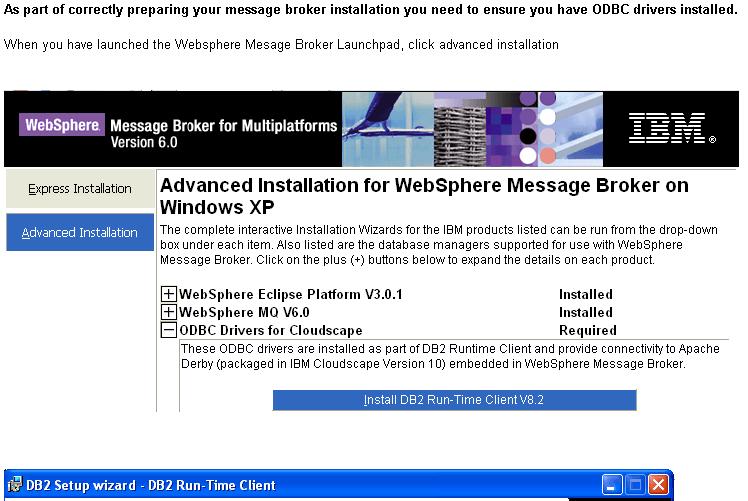
WebSphere Eclipse Platform v3.0.1 Required
WebSphere MQ v6.0 Required
ODBC Drivers for Cloudscape Required
WebSphere Messabe Broker v6.0 Required
WebSphere Messabe Broker Toolkit v6.0 Required
Rational Agent Controlled v6 Not Installed
DB2 UDB ESE v8.2 (optional) Not Installed
Oracle (optional) Not Installed
Sybase (optional) Not Installed
Microsoft SQL Server 2000 (optional) Not Installed
Configuració
Dades : Cfg Mgr Queue Manager name SAGCMQM (*) SAGQMCFM
Cfg Mgr QM Dead Letter Queue name SAGDLQ DLQ
Cfg Mgr QM Listener port 1421 2415
Configuration Manager Name SAGCM SAG_CM
Configuration Manager Data Base Name (- none at v 6.0)
Broker Queue Manager name SAGBKQM (*) SAGQMBRK
Broker QM Dead Letter Queue name SAGDLQ DLQ
Broker QM Listener port 1422 2416
Broker Name SAGBRK SAG_BRK
Broker Data Base Name BKDB BD_BRK
(*) can be the same if only one Broker will be used.
Operacions : createQM.bat CMQM SAGDLQ 1421 = crea QM & DLQ
createQM.bat BKQM SAGDLQ 1422 = crea QM & DLQ (lsr ?)
mqsicreateconfigmgr SAGCM -i wmqiusr -a pwd -q SAGCMQM = crea CfgMgr
createDB.bat BKDB = crea Broker database
{ODBC setup} - detail
mqsicreatebroker SAGBRK -i wmqiusr -a pwd -q BKQM -n BKDB = crea Broker
Fixes
Los parches que necesitas son:
WMQ 6.0 --> parche 6.0.1.1 --> 6.0.1-WS-MQ-WinIA32-FP0001-EnUs.zip (Ingles)
WBIMB 6.0 --> Broker runtime --> parche 6.0.0.1 --> U200255.exe
--> Toolkit --> parche 6.0.0.1 MB_60_6001.zip
--> rational updater product --> parche 6.0.1 --> rpu_601.zip
DB2 V8 UDB ESE --> parche FP12 --> FP12_WR21368_ESE.exe
Toolkit update to 6.0.2
To go to 6.0.2 from 6.0.0.1, do :
Verificació
WS MB v 6.0 Installation Guide, GC34-6621-02, chapter 11, page 107 [125 of 176] Conectar-se (només) al Configuration Manager (AIX) des el Toolkit (PC) fent servir en el Guindous el usuari de AIX (wbrkadm). Toolkit cleanup & other flags
| ||||||||||||||||||||||||||||
|
Hints and Tips
How to get a Clean configuration
WSBIMB Basics RedBook, SC24-7090-00, page 217 How to delete a Broker by hand (BIP8087E)
OutOfMemory Java heap space
Display broker JVM heap size C:\MQSI\9.0.0.0> mqsireportproperties IB9NODE -b agent -o ComIbmJVMManager -r
ComIbmJVMManager
uuid='ComIbmJVMManager'
jvmVerboseOption='none'
jvmDisableClassGC='false'
jvmEnableIncGC='false'
jvmNativeStackSize='-1'
jvmMinHeapSize='16777216'
jvmMaxHeapSize='393216000'
jvmDebugPort='0'
BIP8071I: El mandato ha finalizado correctamente.
Display Execution Group JVM heap size C:\MQSI\9.0.0.0> mqsireportproperties IB9NODE -e EGsebas -o ComIbmJVMManager -r
ComIbmJVMManager
uuid='ComIbmJVMManager'
userTraceLevel='none'
traceLevel='none'
userTraceFilter='none'
traceFilter='none'
vrmfIntroducedAt='7.0.0.0'
resourceStatsReportingOn='inactive'
activityLogSupported='no'
jvmVerboseOption='none'
jvmDisableClassGC='false'
jvmShareClasses='false'
jvmNativeStackSize='-1'
jvmJavaOSStackSize='-1'
jvmMinHeapSize='-1'
jvmMaxHeapSize='-1'
jvmDebugPort='0'
jvmSystemProperty=''
keystoreType=''
keystoreFile=''
keystorePass='********'
truststoreType=''
truststoreFile=''
truststorePass='********'
crlFileList=''
enableCRLDP=''
kerberosConfigFile=''
kerberosKeytabFile=''
Modify and restart broker: // broker
mqsichangeproperties %BKNAME% -o ComIbmJVMManager -n jvmMaxHeapSize -v size in bytes
// EG
mqsichangeproperties %BKNAME% -e %EGNAME% -o ComIbmJVMManager -n jvmMaxHeapSize -v size in bytes
Changing the max JVM heap size for the broker and execution group | ||||||||||||||||||||||||||||
|
{bestp}
MB throughput
There are two recommended mechanisms that let you run multiple copies of a message flow within a Message Broker. These are the use of the Additional Instances attribute and the assignment of a message flow to more than one execution group. The number of instances for a message flow has to be specified in at the message flow level in the relevant Broker Archive (BAR). To do this:
developerWorks Dunn Details here, as max=256 As it is already set in the BAR file, you can use "mqsiapplybaroverride(bar)" and then "mqsideploy(bar)". | ||||||||||||||||||||||||||||
|
{bestp}
MB best practices
Links :
Mind there are MQ Best Practices also ... | ||||||||||||||||||||||||||||
|
CM backup
mqsibackupconfigmgr requirements :
Can't use "create new CM" + "adopt broker(s)", because ...
Domain backup - we need an MS03-type utility for WMB [P.P.]
See Running the broker domain management sample :
INST_DIR\sample\ConfigManagerProxy\StartDomainInfo.bat CONFIG_MANAGER
T42 + VM + XP 6.0.2.5 = c:\MB61\sample\ConfigManagerProxy
So your output is:
Your list of operations for recreating the environment would be:
V7: mqsibackupbroker BROKERNAME -d dirName [-a archiveName]
mqsirestorebroker BROKERNAME -d dirName -a archiveName [-c]
{repos}
MB shell sample(s)
echo "Enter the broker name -- valid broker names are :"
mqsilist | grep Broker
read brokerName
return_stat=`mqsilist | grep "$brokerName" | grep -c -v "grep"`
if [ $return_stat = 1 ] ; then
for LCV2 in `mqsilist $brokerName | cut -d \- -f 1 | cut -d : -f 3`
do
echo " \tExecution groups : $LCV2"
for LCV3 in `mqsilist $brokerName -e $LCV2 | cut -d : -f 3 `
do
echo "\t\tMessage Flow : $LCV3"
done
done
else
echo "BrokerName incorrect or Broker does not exist."
fi
An interesting variation: BROKER=`mqsilist -d 0 | tr - : | tr -d ' ' | cut -d: -f3`
QMGRNM=`mqsilist -d 0 | tr - : | tr -d ' ' | cut -d: -f4`
echo $BROKER $QMGRNM
#List EGs
for eg in `mqsilist $BROKER -d 0 | tr - : | tr -d ' ' | cut -d: -f3`; do echo $eg; done;
#List Msgflows in all Executiongroups
for eg in `mqsilist $BROKER -d 0 | tr - : | tr -d ' ' | cut -d: -f3`;
do
echo "Executiongroup: $eg"; mqsilist $BROKER -e $eg -d 0| grep -v "Successful" | sed "s/.*:/Msgflow:/1";
done;
while read ... do ... done
#!/bin/ksh
MF=0
PN=0
# Get broker name and broker queue manager name
mqsilist | grep BIP8099I | while read msgid broker other brokerqm other2
do
echo "Processing broker $broker with QM $brokerqm..."
# Get each execution group name
mqsilist $broker | grep BIP8130I | while read a b c exgrp other
do
echo "Processing execution group $exgrp..."
# Dump out this execution group; filter out everything except these items
mqsireportproperties $broker -e $exgrp -o AllMessageFlows -r | egrep \
"MessageFlow|ComIbmMQOutputNode|queueName=|label=|ComIbmMQInputNode" | \
awk -F'=' '{print $1 " " $2}' | while read label data
do
case $label in
MessageFlow)
# Indicate next label is the name of the flow
MF=1
;;
label)
if (($MF==1)) ; then
FLOWNAME=$data
MF=0
fi
;;
ComIbmMQOutputNode)
# Indicate direction
TYPE=Output
PN=1
;;
ComIbmMQInputNode)
# Indicate direction
TYPE=Input
PN=1
;;
queueName)
if (($PN==1)) ; then
# Remove quotes
QUEUENAME=`print $data|tr -d "'"`
PN=0
if [[ "$QUEUENAME" != "" ]]; then
echo "DISPLAY QUEUE('$QUEUENAME')" | runmqsc $brokerqm > /dev/null
if (($?>0))
then
echo "$QUEUENAME does not exist!"
fi
fi
fi
;;
*);;
esac
done
done
done
use sed
#!/bin/bash
echo ">>> Get broker names"
# BIP1284I: Broker 'BKP9111' on queue manager 'P9111' is running
mqsilist | grep BIP1284I | sed -e "s/'/ /g" | while read -r msgid a BROKER b c d brokerqm e
do
echo "Processing broker ($BROKER) with QM ($brokerqm)"
# BIP1286I: Execution group EG_cat_A on broker BKP9111 is running.
mqsilist $BROKER | grep BIP1286I | sed -e "s/'/ /g" | while read -r msgidi2 a b EGN c d BKNM e
do
echo "Processing eg ($EGN) in broker ($BKNM)"
# BIP1288I: Message flow 'mfP9111' on execution group 'EG_cat_A' is running.
mqsilist $BROKER -e $EGN | grep BIP1288I | sed -e "s/'/ /g" | while read -r msgid3 a b MFNM c d e EGNM f
do
echo "Have msg flow ($MFNM) in eg ($EGNM)"
done
done
done
| ||||||||||||||||||||||||||||
|
Usual problems (and their solution)
Constantemente los usuarios olvidan los requerimientos
para el despliegue de un flujo,
por lo que es muy habitual que se intente el despliegue de un flujo
con el Broker y/o el CM inactivo.
Para que un flujo pueda ejecutarse,
es necesario que se hayan creado los objetos MQ que requiere.
Éste olvido también es bastante habitual.
Al pasar flujos del entorno de Desarrollo a PreProducción
es fácil que
se arrastren nombres de objetos del entorno antiguo,
que ahora no existirán.
Engegar / aturar : user.log
Acces / contingut : $ExceptionList (see Trace Node destination FileName)
Problemes amb els recursos compartits ?
AMQICLEN
Known problems (and their solution)
MB V6.1 abends on startup due to memory allocation failures.
Cause
Resolving the problem
(flow&esql) Problems and solutions when migrating to MB V6.0 and V6.1
BIP2308E errors when starting the V6.1 broker after upgrade
BIP2060W Broker startup failure using the Oracle 10.2.0.3 client
BIP1711W - user "name" cant access Proxy.
Solution : mqsicreateaclentry. | ||||||||||||||||||||||||||||
Local error logs
WebSphere Business Integration Message Broker components
use the local error log
(also known as the system log)
to record information about major activities within the system.
When an error occurs, check the local error log first.
On Windows,
the local error log is the Windows Event log (Application view).
MB v5 R0 Diagnostics, page 113 [121 of 152] [hlh] /var/wbimb/user.log AIX, cat /etc/syslog.conf : user.debug /var/log/mqsi.log
/etc/init.d/syslog restart
logger -p user.info hello
"Linux and UNIX systems: Configuring the syslog daemon", Troubleshooting, page 114 [122/188]
| ||||||||||||||||||||||||||||
|
Trasses
mqsichangetrace /?
-r
This option requests that the trace log is reset: that is, all current records are discarded.
-c Size
The size of the trace file in KB (kilobytes).
If you do not specify this parameter, the current value is left unchanged, 4096 KB.
The maximum value you can specify depends on how you subsequently intend to read the log,
using the mqsireadlog command:
* if you use this command with the -f option set, the log file is read directly from the file system.
In this case, the maximum value that you can specify is 2097151,
which allows a trace file up to 2 GB (gigabyte) to be created.
* if you use this command without setting the -f option, a WebSphere MQ message is sent to the broker to retrieve the log.
In this case, do not allow the trace file to exceed 70 MB (megabytes). The maximum value that you can set is 70000.
El fichero de la traza se deja en el directorio /var/mqsi/common/log
Use the mqsichangetrace command to set the tracing characteristics for a component.
This command is valid for:
* User trace. Specify the -u option.
* Service trace. Specify the -t option.
You are recommended to use this option only if directed to do so.
* Trace nodes. Specify the -n option to switch Trace nodes on or off.
You can significantly improve the performance of a flow by switching Trace nodes off.
Sample: mqsichangetrace <brokername> -u -e <egroup> -l debug -r
mqsireadlog <brokername> -u -e <egroup> -o C:\Books\Trace.xml
mqsiformatlog -i C:\Books\Trace.xml -o C:\Books\Trace.txt
mqsichangetrace <brokername> -u -e <egroup> -f "<Message Flow Name>" -l none
| ||||||||||||||||||||||||||||
| ||||||||||||||||||||||||||||
MB
At T42, we install WBI-MB v 5
WBI-MB total size = 775 / 643,9 / 411 MB Unresolved dependencies :
Agent Controller version 5.0.1
Microsoft Data Access Component version 2.7 SP1
WebSphere MQ version 5.3 Java Messaging Component
After WBI-MB is installed, we have to :
GNI
Data we need : Configuration Manager Queue Manager name ..... ..... ..... ..... SAGQMCFM
Configuration Manager Queue Manager Dead Letter queue name ..... DLQ
Configuration Manager Queue Manager Lister Port number ..... ... 2415
Configuration Manager name ..... ..... ..... ..... ..... ..... . SAG_CM
Configuration Manager Data Base name ..... ..... ..... ..... ... (none)
Broker Queue Manager name ..... ..... ..... ..... ..... ..... .. SAGQMBRK
Broker Queue Manager Dead Letter queue name ..... ..... ..... .. DLQ
Broker Queue Manager Lister Port number ..... ..... ..... ..... 2416
Broker name ..... ..... ..... ..... ..... ..... ..... ..... .... SAG_BRK
Broker Data Base name ..... ..... ..... ..... ..... ..... ...... BD_BRK
Software levels : c:\> db2level
+++ DB21085I Instance "DB2" uses "32" bits and DB2 code release "SQL08025"
with level identifier "03060106"
+++ Informational tokens are "DB2 v8.1.12.99", "s060429", "WR21368", and FixPak "12"
+++ Product is installed at "C:\PROGRA~1\IBM\SQLLIB"
c:\> dspmqver
+++ Name: WebSphere MQ
+++ Version: 6.0.1.1
+++ CMVC level: p600-101-060504
+++ BuildType: IKAP - (Production)
c:\Program Files\IBM\MQSI\6.0> mqsiservice -v
+++ BIPv600 en GB
+++ ucnv Console CCSID 437 dft ucnv CCSID 5348
+++ ICUW ibm-5348_P100-1997 ICUA ibm-5348_P100-1997
+++
+++ BIP8996I: Version: 6001
+++ BIP8997I: Product: WebSphere Message Brokers
+++ BIP8998I: CMVC Level: S600-L60323 DH600-L60313
+++ BIP8999I: Build Type: Production
+++
+++ BIP8071I: Successful command completion.
C:\Program Files\IBM\MQSI\6.0\bin\> mqsilist
BIP8099I: Broker: SAG_BK - SAGQMV6
BIP8099I: Broker: SAG_BRK - SAGQMBRK
BIP8099I: ConfigMgr: SAG_CM - SAGQMCFM
BIP8071I: Successful command completion.
Steps for manually creating a simple broker domain
[another]
WBI-MB Basics- v 6.0, SG24-7137, page 209 [235 of 372] Resum
crtmqm -u DLQ QM_MB
strmqm QM_MB
runmqlsr -t TCP -p 1494 -m QM_MB
Setup MB envir : "c:\Program Files\IBM\MQSI\6.0\bin\mqsiprofile.cmd"
mqsicreateconfigmgr GAS_CM -i wbrkadm -a wbrkadm -q QM_MB
mqsistart GAS_CM
mqsicreatedb DB2GAS -i wbrkadm -a wbrkadm
mqsicreatebroker GAS_BROKER -i wbrkadm -a wbrkadm -q QM_MB -n DB2GAS -u wbrkadm -p wbrkadm
mqsistart GAS_BROKER
| ||||||||||||||||||||||||||||
|
Connecting MB to MONGO
If I can share 6 tips for MongoDB Tutorial please follow these details:
| ||||||||||||||||||||||||||||
Pager
El PATH a pager.properties, que es donde se especifica el Queue Manager, es
El arranque desde Browser es desde aqui Soccer / fútbol
Puc trobar el "Socker Results Publisher" ... "WS BI MB Help" (centro de información) + "Galeria de ejemplos" + "Resultados de fútbol" c:\ > soccerResults SAGQM
Results Service is ready for match input,
instances of soccerGame can now be started.
LATEST: Brazil 0, Germany 0
LATEST: Brazil 0, Germany 1
LATEST: Brazil 0, Germany 2
LATEST: Brazil 0, Germany 3
FULLTIME: Brazil 0, Germany 3
c:\ > soccerGame Brazil Germany SAGQM
Match between Brazil and Germany
GOAL! Germany scores after 10 minutes
GOAL! Germany scores after 23 minutes
GOAL! Germany scores after 48 minutes
Full time
c:\ >
See few in Toolkit samples in on-line documentation : v6, v7 : import, deploy, run. | ||||||||||||||||||||||||||||
Tuning a WebSphere MQ Integrator Broker Reconfiguring message flows in MB V6.1 Estadísticas de Broker: SupportPacs de performance, + developerWorks: dunn 0712, dunn 0406. {1000 gracias, Emir}
2012, Madrid :
per veure el NUS ON ÉS EL PROBLEMA:
IS03: WebSphere Message Broker - Message Flow Statistics Visualiser, by Martin Brown
| ||||||||||||||||||||||||||||
url. See ... "Using Logs" and "Using Trace". This section contains information about the various techniques that you can use to diagnose problems with Message Broker :
Knowledge Collection: WebSphere Message Broker trace directions [excelent and large] Gracias, Vicente ! Stop the broker, clear all SYSTEM.BROKER.*.* queues, restart broker and deploy MB HealthCheck
MB (installation) troubleShooting :
See also flow troubleshooting | ||||||||||||||||||||||||||||
This icon starts this BAT C:\MB61\sample\ConfigManagerProxy\StartConfigManagerProxyExerciser.bat
Used to
As Verifying WebSphere Message Broker V6 without using the toolkit. See Customizing the CMP API Exerciser and Secrets of the Configuration Manager in WebSphere Message Broker V6. Descr (player) | ||||||||||||||||||||||||||||
| ||||||||||||||||||||||||||||
|
CMP = cfg mgr proxy
Open Information Center and enter "Configuration manager proxy samples" search argument ... CMP = MB API
| ||||||||||||||||||||||||||||
|
Ventaja MB : Broker es que no es Java (especficamente, no es JEE), por lo que tiene mucha mejor performance.
Y puede conectarse a casi todo (MQ, SOAP, File, FTP, HTTP, Sockets, JMS, Database, ...).
Los competidores que usan Java en realidad compiten con WESB (el broker que corre en WAS). | ||||||||||||||||||||||||||||
|
Connect the MQInput node "Catch" pin to a MQOutput queue and produce an Exception in the flow ...
Generic XML does not require Document Type Definitions.
Some XML messages can be very complex and have an associated DTD which defines the properties of the document in more detail.
Schema Quality Checker [VMware MB]
Para llamar a EJB's se requiere acceso a com.ibm.websphere.naming.WsnInitialContextFactory Tenemos este JAR en el disco. Como especificar su ubicación al Broker ?
el acceso a com.ibm.websphere.naming.WsnInitialContextFactory es lo que se llama Initial Context, y se puede pasar a una JVM como uno de sus parámetros.
Para pasarle un parámetro a la JVM del broker, esto es lo que dice el manual :
Non-broker option for passing parameters to a brokers' JVM
URL :
MB supports the use of the IBM_JAVA_OPTIONS environment variable.
Set this variable before the broker is started
to pass options to any JVM created within its scope.
Note that this a Java option and is not broker functionality.
Use this non-broker method with caution
as you may inadvertently cause problems with broker operations.
El ejemplo anterior sería:
Use Resource Statistics and Activity Log
Utilidades, ejemplos y documentacion: MB SP's, performance reports.
IPL9: WebSphere Message Broker V8 for Linux on System x64 - Performance Report
publib - use Online Help + "Resource statistics"
Maybe you need an MB admin agent flow
Mind Business-level monitoring !
See Real Time Monitoring Tools Read v9 performance and monitoring
J2EE |
Top
|
Adapters |
Top
|
| Lotus Domino Adapter |
Top
|
The adapter for Lotus Domino consists of an adapter and the adapter framework. The adapter framework is the software that IBM provides to configure and run an adapter. Together, the adapter and adapter framework enable a Lotus Domino server to exchange information with an integration broker such as the WebSphere Application Server, the WebSphere Business Integration Message Broker (or any supported WebSphere message broker) or the WebSphere InterChange Server (ICS).
WS Adapters Library - Information Center
Framework 2.6.0 [420 MB] + Domino Adapter 1.3.0 =>
 [\\ws-bi-mb\Adapter_Framework\C58HLML.exe     377.303.094 v 2.6.0]
 [\\ws-bi-mb\Adapter_Framework\C54GHML.exe     259.006.464 v 2.4.0]

 [\\ws-bi-mb\Lotus_Domino_Adapter\C58HXML.exe   35.990.128 v 1.3.0]
Ojo : pre-requisitos del Lotus Adapter 1.3.0 ?
See
Adapter for Lotus Domino User Guide -
pdf
[\\WS-BI-MB\Lotus_Domino_Adapter\lotus_domino_13_Users_Guide.pdf]
El curs (BI726.03) diu
UG url.
System requirement and library links for WebSphere Business Integration products - url
Enter Implementing Adapters with WebSphere Message Brokers in Information Center :
To determine the adapter and Adapter Framework versions, you can open the log file created when you start the adapter. The version of the framework and adapter should be listed there.
The installation logs must look like this :
|
Directory of C:\IBM\WebSphereAdapters\installLogs 10/02/2006 12:09 7.224 BIA_WBI_AdapterFramework.log
BIA01014: IBM WebSphere Business Integration Adapter Framework 2.6.0 successfully installed. Return code: 0
10/02/2006 12:12 1.934 BIA_WBI_LotusDomino.log
BIA01014: IBM WebSphere Business Integration Adapter for Lotus(R) Domino(R) 1.3.0 successfully installed. Return code: 0
|
\LotusAlmirall\domino\lotus.ini
Server configuration = nserver (from DOS)
usr = admin / pwd = sag
DOS : sh ser (show server), restart server
B.D. principal : names.nsf
Enllaços |
Top
|
MB links
Grácias, Lourdes !
MQ main entry point =>
MB homepage
WebSphere.org
[filtrar ! WAS, PS, etc]
Tutorial online :
Using WebSphere Business Integration Brokers Toolkit V5.02 -
ID required.
Gran
llista d'enllaços [kirani, mq.net - *****]
Few bookmarks : [mq.net]
Generic message retry and requeue with WebSphere Message Broker V6
Message Broker Connectivity Pack for Healthcare :
education assistant.
HL7 v2.
Toolkit sample
intro.
HC library :
MB v7 InfoCenter
MB
WebCast(s) [37, as SAP]
Integrating IBM Operational Decision Management (ODM)
with WebSphere Message Broker (WMB)
using the IAM9 SupportPac for Message Broker
Enhancing flexibility of Websphere Message Broker applications by
deploying application resources as source files
Setting up SSL configuration in WebSphere Message Broker -
developerWorks :
this article show you how to implementi SSL on WebSphere Message Broker and configure HTTP to use SSL (HTTPS) communication.
Configuring role-based security with the IBM Integration Bus V9
web user interface
| ||
Portal
Xtreme Leverage portal -
IntraNet SWG (redbooks, tech specs, etc)
WS Business Integration zone - links to : WS Business Integration Server, WS Business Integration Server Foundation, WS Business Modeler, WS Business Monitor v6, WS Message Broker, WS MQ, WS MQ WorkFlow v 3.6, WS Partner Gateway, WS Process Server, WS Enterprise Service Bus, WS Integration Developer.
Formació
V6
V6.1
Redbooks
developerWorksWebSphere Business Integration Server Foundation Process Choreographer http://www.ibm.com/developerworks/websphere/zones/was/wpc.html Bussiness process modeling (using WS BI Modeler, Oct 2005) tutorial Forums Support
|
||
|
Few URL's
|
||
|
URL's pack
In the spotlight
Planned maintenance
Education
1. IBM Education Assistant content for WebSphere Message Broker
General self-help resources
|
||
|
Other
ESB
|
Tot això és només WBISF+WSADIE ... ademés hi ha WBIMB, WBIICS, WMQWF, etc


|
Updated 20150522 (a)
|

|