|
home /
infca /
mb /
SAP
(navigation links)
|
Ella amó esa noche como si fuera mortal
y él fue inmortal mientras duró esa noche
|
Parlant amb el SAP des MB
What is it ?
SAP is the largest Enterprise Resource Planning (ERP) solution provider.
SAP is actually the name of the company, officially SAP AG,
based on the phrase
Systeme, Anwendungen und Produkte in der Datenverarbeitung.
Systems Applications Products in Data Processing (SAP)
is a client/server application
that helps you manage your business processes
in sales, materials management, and distribution.
SAP has mainframe and UNIX solutions
to support an interface for an EDI subsystem.
The R/3 product is their client-server solution for Enterprise Resource Planning.
mySAP.com is the current offering. It is an evolution of R/3
bundled with a number of additional components,
as CRM, Business Warehouse plus SAP's middleware platform,
SAP NetWeaver.
{2012 wiki} :
SAP's products focus on Enterprise Resource Planning (ERP).
The company's main product is SAP ERP.
The current version is SAP ERP 6.0 and is part of the SAP Business Suite.
Its previous name was R/3.
The "R" of SAP R/3 stood for realtime even though it is not a realtime solution.
The number 3 related to the 3-tier architecture: database, application server and client (SAPgui).
SAP ERP is one of five enterprise applications in SAP's Business Suite. The other four applications are:
- Customer Relationship Management (CRM) helps companies acquire and retain customers, gain marketing and customer insight
- Product Lifecycle Management (PLM) helps manufacturers with product-related information
- Supply Chain Management (SCM) helps companies with the process of resourcing its manufacturing and service processes
- Supplier Relationship Management (SRM) enables companies to procure from suppliers
Products
SAP provides a range of business applications including
customer relationship management (CRM),
supply chain management (SCM),
and product lifecycle management (PLM).
SAP integration overview [*** entry point ***]
The march of the 3-letter acronyms
- R/3 : realtime data processing { == SAP ERP }
- ERP : enterprise resource planing
- APO : advanced planner and optimizer
- BW : bussiness information warehouse
- CRM : customer relationship management
- SRM : supplier relationship management
- HRMS : human resource management systems
- PLM : product lifetime management
- XI : exchange infrastructute = SAP integration broker !
- KW : knowledge warehouse
- GRC : governance, risk and compliance -
pdf.
XI
El XI es la eina de integració de moduls SAP,
així com la única via de comunicació amb l'exterior.
Parla MQ i JMS amb el "Adapter for (SAP) XI" que porta el MB.
    .--------.           .--------.
    |        |           |        |
    |  SAP   |           |  SAP   |
    |        |           |        |
    .--------.           .--------.
        |                |        |
        |                |   XI   |
        |                |        |
        |                .--------.
        |                    |
        |                    |
  .-----------.        .-----------.
  |           |        |           |
  | Adapter   |        | Adapter   |
  | for mySAP |        | for XI    |
  |           |        |           |
  .-----------.        .-----------.
Detalls XI :
SAP Exchange Infrastructure (SAP XI) enables you
to implement cross-system processes.
It enables you to connect systems from different vendors
(non-SAP and SAP) in different versions
and implemented in different programming languages
(Java, ABAP, and so on) to each other.
Mandant (or client)
|
En una installació d'un sistema SAP es creen el que s'anomena mandant (mandante en castella i client en angls).
En general els mandants comparteixen la installaci SAP per no les dades (encara que comparteixen la BD).
Quan et logues a un sistema SAP li has de dir a quin mandant (000 i 066 sn del propi sistema).
Gracies, Josep !
|

|
Detalls IDoc
url
SAP generates application data in the SAP Intermediate Document (IDoc) layout.
url
The connected systems transfer or receive IDocs through their IDoc RFC interface.
IDoc adapter
IDoc
concepts (wiki),
links,
sample,
SAP designed IDocs ("Intermediate Documents") for exactly this purpose
-- for encapsulating, moving around, and processing
just the sections of data needed for specific purposes.
url
IDoc processing message flows
Data distribution SAP to WebSphere MQ:
one-way (for IDoc) pattern.
IDoc processing
message flows -
for each message flow complete the following steps:
- Run the Adapter Connection wizard and find the IDoc that you want to process with the message flow.
The wizard generates a message set that describes the model for your chosen IDoc.
- Create a message flow and add an MQInput node. Also:
- Set the Queue name property to match the queue to which the IDoc is routed by the IDoc Routing flow.
- Select DataObject as the message domain.
- Select the message set that was generated in the previous step.
- Select SAP ALE IDoc as the message format.
- Develop the remainder of the message flow.
The incoming IDoc exits the Out terminal of the MQInput node in the same format as if it is the Out terminal of an SAPInput node but with the addition of an MQMD header.
Tamaño IDoc
Un mensaje IDoc ALE típico
que se ha enviado desde SAP al enlace WebSphere MQ para R3
consta de
una cabecera MQMD, una cabecera MQSAPH y el propio IDoc ALE.
El IDoc consta de estructuras de tamaño fijas:
-
La primera estructura es la estructura de control (DC).
Este es un elemento complejo con una longitud de 524 bytes
que contiene un conjunto fijo de elemento simples definidos por SAP.
-
Una o varias Estructuras de datos (DD).
Cada DD es un elemento complejo con una longitud de 1063 bytes
que contiene un conjunto fijo de elementos simples definidos por SAP
que ocupa 63 bytes, seguido de 1000 bytes de datos de segmento
definidos por el usuario.
url
A typical ALE IDoc message that has been sent from SAP to the WebSphere MQ link for R3 consists of
an MQMD header, an MQSAPH header, and the ALE IDoc itself.
The IDoc is made up of fixed size structures:
- The first structure is the Control Structure (DC).
This is a complex element 524 bytes long that contains a fixed set of SAP-defined simple elements.
- One or more Data Structures (DDs).
Each DD is a complex element 1063 bytes long that contains a fixed set of SAP-defined simple elements that occupies 63 bytes, followed by 1000 bytes of user-defined segment data.
url
An IDoc structure contains 1 DC segment and more DD segments.
Length of DC is 524 bytes and all DDs are 1063 bytes (version 4 IDoc).
The length of your message structure (referenced by DD.segnam) must be 1000 bytes.
You have to fill up the DD header. This is very important because DD segnam describes which model the MRM uses.
OK, but why 1695 bytes? When you get a simple IDoc from SAP it is 1695 bytes long because:
MQSAPH - 108
DC - 524
DD - 1063
MQSAPH fields - 12 parser's !
WS MB Information Center [*****]
See Pager sample {com.ibm.etools.mft.samples.pager.res}
&
See Soccer Results sample ! {com.ibm.etools.mft.samples.soccer.res}
[ VMware MB - c:\PF\ibm\ws\evtoolkit\eclipse\plugins\com ... ]
IDoc Control type
10 10 TABNAM Name_of_table_structure
3 MANDT Client
16 DOCNUM IDoc_number
4 DOCREL SAP_Release_for_IDoc
2 STATUS Status_of_IDoc
1 DIRECT Direction_for_IDoc_transmission
1 OUTMOD Output_mode
1 EXPRSS Overriding_in_inbound_processing
1 TEST Test_flag
30 IDOCTYP Name_of_basic_type
30 CIMTYP Extension
30 MESTYP Logical_message_type
3 MESCOD Logical_message_code
3 MESFCT Logical_message_function
1 STD EDI_standard
6 STDVRS Version_of_EDI_standard
6 STDMES EDI_message_type
10 SNDPOR Sender_port
2 SNDPRT Partner_type_of_sender
2 SNDPFC Partner_function_of_sender
10 SNDPRN Partner_number_of_sender
21 SNDSAD IDoc_SADR_fields_in_total_Sender
70 SNDLAD Logical_address_of_sender
10 RCVPOR Receiver_port
2 RCVPRT Partner_type_of_recipient
2 RCVPFC Partner_function_of_recipient
10 RCVPRN Partner_number_of_recipient
21 RCVSAD IDoc_SADR_fields_in_total
70 RCVLAD Logical_address_of_recipient
8 CREDAT IDoc_creation_date
6 CRETIM IDoc_creation_time
14 REFINT Reference_to_interchange_file
14 REFGRP Reference_to_message_group
14 REFMES Reference_to_message
70 ARCKEY EDI_archive_key
20 524 x'20C SERIAL EDI_ALE_Serialization_field
8 532 x'214 DOCTYP IDoc_type
IDoc format/contents :
Your best bet to answer this question before someone else does
is to use AMQSBCG to dump a message produced by SAP.
Campos de estructura de control (DC)
Todos los campos se deben especificar y establecer.
La sintaxis es:
<nombreraiz>.<NombreAnalizador>.<nombrecarpeta>.<nombrecampo>=
Por ejemplo:
SET "OutputRoot"."IDOC"."DC"."docnum" = '0000000000000001' ; /* 03 */
SET "OutputRoot"."IDOC"."DC"."idoctyp" = 'MATMAS01' ; /* 10 */
Los nombres de campo, que se deben especificar en orden, son:
1) tabnam 2) mandt 3) docnum
4) docrel 5) status 6) direct
7) outmod 8) exprss 9) test
10) idoctyp 11) cimtyp 12) mestyp
13) mescod 14) mesfct 15) std
16) stdvrs 17) stdmes 18) sndpor
19) sndprt 20) sndpfc 21) sndprn
22) sndsad 23) sndlad 24) rcvpor
25) rcvprt 26) rcvpfc 27) rcvprn
28) rcvsad 29) rcvlad 30) credat
31) cretim 32) refint 33) refgrp
34) refmes 35) arckey 36) serial
url
Transactions to create and process IDocs
The following transactions can be used to create and process IDocs. The list does not include any transaction required for the development of new IDoc types. Please note that you get a comprehensive list of available transactions by using area menu WEDI.
- WE02 - IDoc List report - This report can be used to display and edit IDocs.
- WE19 - Test tool for IDoc processing - This transaction allows the creation of IDocs for testing.
- WE20 - Partner Profile - This transaction determines a processing code based on the partner profile identified by the control record of the IDoc.
- WE21 - Ports in IDoc processing - This transaction identifies an external port (RFC, File, ABAP-PI, etc.) that controls the IDoc flow to an external system.
- WE41 - Outbound process code - This transaction links an outbound processing code specified in a partner profile to a function module.
- WE42 - Inbound process code - This transaction links an inbound processing code specified in a partner profile to a function module.
- BD87 - Inbound processing - This transaction processes inbound IDocs.
- BD88 - Outbound processing - This transaction processes outbound IDocs.
Obtenció del iDOC (we60)
url
Consejo:
El SupportPac IA0F contiene una descripción ms detallada de los pasos que hay para crear el modelo de mensaje IDoc.
Importació del IDoc al Toolkit
Quan establim un conector SAP, importem un(s) IDoc(s).
Es guarden al Toolkit en forma de fitxers .mxsd.
Managing IDoc's
See
Manipulating messages in the IDoc domain -
url
url
Also
from SAP IDoc to XML and viceversa -
mqseries.net
Utilice el ejemplo de ESQL siguiente desde un nodo Compute:
SET OutputRoot = InputRoot;
SET OutputRoot.IDOC.DC[1].tabnam = 'EDI_DC40 ';
SET OutputRoot.IDOC.DD[2].sdatatag.MRM.maktx = 'Buzzing all day';
La primera lnea del cdigo copia el IDoc de entrada en el IDoc de salida.
La segunda lnea establece el nombre de tabla de la primera DC.
La tercera lnea utiliza el segundo segmento DD, que en este ejemplo es de tipo E2MAKTM001, y establece el campo maktx.
XMP to IDoc
SET OutputRoot.Properties.MessageDomain = 'MRM' ;
SET OutputRoot.Properties.MessageSet = 'PMFK4RK002001' ;
SET OutputRoot.Properties.MessageType = 'z2ddrrt000' ;
SET OutputRoot.Properties.MessageFormat = 'CWF' ;
SET OutputRoot.MQMD.Format = 'MQSTR' ;
SET OutputRoot.IDOC.DD[1].sdatatag.MRM.fn_code = InputBody.EAI_HEADER.CODE ;
SET OutputRoot.IDOC.DD[1].sdatatag.MRM.order_nmbr = InputBody.CREATE.ORDER_NMBR ;
SET OutputRoot.IDOC.DD[1].sdatatag.MRM.d_num = InputBody.CREATE.D_NMBR ;
SET OutputRoot.IDOC.DD[1].sdatatag.MRM.ad_nmbr = ' ' ;
SET OutputRoot.IDOC.DD[1].sdatatag.MRM.ad_flag = InputBody.CREATE.FLAG ;
SET OutputRoot.IDOC.DD[1].sdatatag.MRM.email = InputBody.CREATE.EMAIL ;
SET OutputRoot.IDOC.DD[1].sdatatag.MRM.error_code = InputBody.EAI_HEADER.RESULT_CODE ;
SET OutputRoot.IDOC.DD[1].sdatatag.MRM.pad906 = ' ' ;
url
SAP APIs
-
BAPI's are programming interface to access SAP Database
from within SAP or other development platforms external to R/3
that support the Remote Function Call (RFC) protocol.
The main objective of BAPI is to achieve integration
between the R/3 System and external applications, legacy systems etc.
This gives you the option to have non-SAP front-end for occasional users.
-
ALE is also programming interface.
The integration of various applications is achieved
by using synchronous and asynchronous communication,
rather than by means of a central database.
Uses IDoc document / messages.
It uses RFC API.
url
ABAP - programming language, similar to Java, used to access SAP database.
Access to BAPI from MB
A BAPI is a ABAP program that has been made visible to external world.
Send an IDoc to another SAP using ALE
- create a custom IDoc and Message Type
- create segments transaction WE31
- create Basic IDoc type transaction WE30
- create/Assign Message type transactions WE81/WE82
- configure Outbound settings
- define Logical Systems and Assign Client to Logical System transaction SALE
- maintain RFC Destinations transaction SM59
- define Ports transaction WE21
- maintain Distribution Model transaction BD64
- generate/Create Partner Profile transactions BD82/WE20
- distribute Model View transaction BD64
- write an Outbound IDoc Generation Program - create an executable program
ZRZ_ORDER_IDOC
in SE38.
- write Inbound Function Module to post Inbound IDoc - in the receiving system, create a function module Z_IDOC_INPUT_ZRZSO_MT using SE37.
- configure Inbound settings
- define Logical Systems transaction SALE
- assign Client to Logical System transaction SALE
- maintain RFC Destinations transaction SM59
- define Ports transaction WE21
- generate/Create Partner Profile transactions BD82/WE20
- assign Function Module to Logical message transaction WE57
- define Input method for Inbound Function Module transaction BD51
- create a Process Code transaction WE42
- test ALE scenario to transmit data between systems distributed across the network
- on the sender system, execute the IDoc Generation Program. Check the status of IDoc using transaction WE02.
- check the status of the IDoc in the receiver system using transaction WE02.
You can also check the contents of DDic tables to make sure that the records have been created in the receiver system.
Part 1,
part 2,
part 3.
Step-by-step guide to ALE and IDocs
Page 1,
page 2,
page 3,
page 4,
page 5,
page 6,
page 7,
page 8.
SAP and BI
.--------.-------. .------.---------. .-----------------------------------.
| | | | | | | |
| | | | | | | MQ | XI | |
| Domino | Agent | <-----> | MB | Adapter | <-----> | Link | eXchange | SAP |
| | | | | | | for R/3 | Infrastructure | |
| | | | | | | |
.--------.-------. .------.---------. .-----------------------------------.
The R3/Link product consists of an inbound server,
reading IDocs from an input queue and passing them into SAP,
and an outbound server, reading IDocs from SAP
and writing them to an output queue.
Both these apps run on the MQ machine,
and make a TCP connection to the SAP system using SAP RFC calls.
MQ Series link for R/3 User Guide
MQ Series link for R/3 User Guide (on-line)
MQ Series Link for R/3 v 1.2
CSD03
Preguntes
-
que son els conectores standard MYSAP ?
-
el accés des Domino a MB (Message Broker) es via JMS,
fent servir el adaptador MQ standard.
-
el accés des SAP es mitjançant el
Adapter For MySAP ...
-
ens cal MQ al SAP :
url
SAP Adapter ubication
.------.---------. .--------.
| | | | |
| | SAP | (1) | |
| MB | Adapter | <----------> | SAP | (1) XML sobre HTTP usando JCO RFC [1]
| | | | |
| | | | |
.------.---------. .--------.
.------. .---------.--------.
| | | | |
| | (2) | SAP | |
| MB | <----------> | Adapter | SAP | (2) BAPI XML sobre MQ, o IDoc sobre MQ. JMS
| | | | |
| | | | |
.------. .---------.--------.
What is
RFC ? Remote Function Call
ICS had a "RFC trace" - does MB have anything similar ?
David : the adapter uses JCO to access LIBRFC32.DLL, the RFC API.
Yo prefiero el JCA adapter que viene con Broker 6.1 [emir]
Toolkit [6.1] + "SAP" ;
[int]
SAP nodes licences
You get everything in the standard version
and you are allowed to use them in "unit test"
but to use them for real
you have to pay an additional license fee for the sap nodes
(they have a pid I believe).
Their sales person should be able to work out a price.
From the technical side nothing else has to be installed.
In fact there is no direct checking or enforcement on our part in the code.
Regards, John.
John Reeve, WebSphere Message Broker Developer
Interacting with a SAP application
To interact with an SAP application, you have to :
- obtain external software dependencies
- optional: if you are using Application Link Enabling (ALE) processing,
register a Remote Function Call (RFC) destination on the SAP server and configure the SAP server,
- run the Adapter Connection wizard
- develop a message flow
- then deploy the relevant resources
url
Adding external software dependencies for SAP
|
SAP delivered files:
- sapjco.jar
- sapjcorfc.dll or libsapjcorfc.so
- librfc32.dll or librfccm.so
Atenció : V3 requires ... [/]
v7 & v8 : els fitxers son "SAPJco 3.0.3" per MB7, i "SAPJco 3.0.8" per MB8.
Download these files for your operating system
from the SAP Service Marketplace,
and save them to a directory, such as C:\SAP_LIB.
Set the location of the SAP prerequisite files
using the following command:
C:\SAP_LIB> mqsichangeproperties MB7 -c EISProviders -o SAP -n jarsURL -v C:\SAP_LIB
BIP8071I: El mandato ha finalizado correctamente.
C:\SAP_LIB> mqsichangeproperties MB7 -c EISProviders -o SAP -n nativeLibs -v C:\SAP_LIB
BIP8071I: El mandato ha finalizado correctamente.
To check that the values have been set correctly, run the following command:
c:\SAP_LIB> mqsireportproperties MB7 -c EISProviders -o SAP -r
EISProviders
SAP
jarsURL='C:\SAP_LIB'
nativeLibs='C:\SAP_LIB'
BIP8071I: El mandato ha finalizado correctamente.
MB v 6.1 "Message Flows", page 236 [244/1580]
|
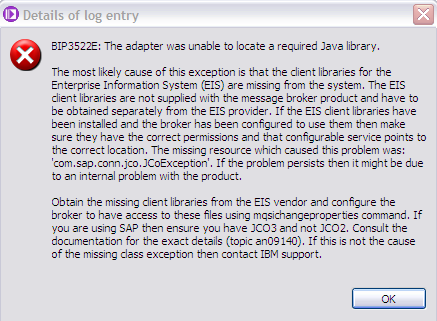
Otherwise, we get:
c:\SAP_LIB> mqsireportproperties MB7 -c EISProviders -o SAP -r
EISProviders
SAP
jarsURL='default_Path'
nativeLibs='default_Path'
BIP8071I: El mandato ha finalizado correctamente.
|
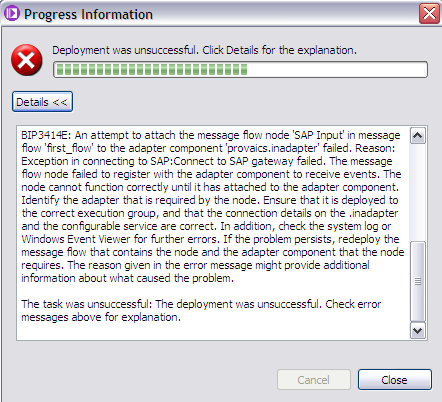
Error : no connection while deploying SAP nodes to MB
If we have no connection to SAP at deploy time, we get :
Configuring the SAP server to work with the adapter
Before you configure the WebSphere Adapter for SAP Software for Application Link Enabling (ALE) processing,
you must :
- register a Remote Function Call (RFC) destination on the SAP server - SM59
- configure a receiver port - WE21
- configure a logical system - BD54
- configure a distribution model - BD64
- configure a partner profile on the SAP server - WE20
url
Daniel Tabuenca
- SM59 - create RFC destination
- BD54 - create Logical System
- BD64 - create Distribution Model and Partner Profile
- WE21 - port in IDoc processing
- WE20 - configure Partner Profile
Connecting to an EIS by using the Adapter Connection wizard
A message flow application that uses one of the WebSphere Adapters requires the following resources:
- one or more message flows that contain one or more WebSphere Adapters nodes
- a message set that contains the XML Schema Definitions (XSD) for each business object in the Enterprise Information System (EIS)
- an adapter component file for the WebSphere Adapter that is being used
The Adapter Connection wizard creates these resources automatically.
The following steps describe how to connect to an EIS.
- switch to the Broker Application Development perspective.
- click File > New > Adapter Connection. The Adapter Connection wizard opens.
When you have completed the steps in the wizard, the specified message set project contains a message set with a message type for each business object that is to be used, and the specified message flow project references the message set project
- ensure that a message flow is open in the Message Flow editor so that the message flow canvas is available.
- in the Broker Development view, expand the folders beneath the message set until you see the adapter component, which has a suffix of inadapter or outadapter.
- drag the adapter component onto the message flow canvas. The component appears as a message flow node.
- configure the node, as decribed
here
SAP configurable services
To display all SAPConnection configurable services,
use the WebSphere Message Broker Explorer,
or the mqsireportproperties command, as shown:
c:\> mqsireportproperties MB7 -c SAPConnection -o AllReportableEntityNames -r
SAPConnection
Template
RFCTraceLevel=''
RFCTraceOn=''
RFCTracePath=''
SAPSystemID=''
applicationServerHost=''
assuredOnceDelivery=''
client=''
gatewayHost=''
gatewayService=''
loadBalancing=''
logonGroup=''
messageServerHost=''
numberOfListeners=''
retryConnectionOnStartup=''
retryInterval=''
retryLimit=''
rfcProgramID=''
sharedTidStoreClientDefinitionFile=''
sharedTidStoreQmgr=''
systemNumber=''
BIP8071I: El mandato ha finalizado correctamente.
SAP nodes
SAP Connectivity sample.
SAP_Input = read from SAP

The SAPInput node is used to capture information (for example an IDoc) that is output by the SAP system,
so that it can be passed to a message flow for processing.
The SAPInput node allows you to interact with SAP applications.
For example,
the SAPInput node monitors an SAP system for any new purchase orders.
When a new purchase order occurs,
the SAPInput node generates a message tree
that represents the business object with the new purchase order details.
The message tree is propagated to the Out terminal
so that the rest of the message flow
can use the data to update other systems, or to audit the changes.
MB v 6.1 "Message Flows", page 996 [1004/1580]
When you get a message, try it this way
- copy the Properties folder
- create the MQMD and then set any properties you might need in the MQMD
- copy the Data
Have you looked at the data coming into the flow with a trace node ?
This will help you name the folders correctly ( get a trace of the root : Pattern := "${Root}" )
SAP_Request = write to SAP

The SAPRequest node is used to send information to the SAP system and retrieve the response from SAP.
In this sample message flow, SAPRequest nodes are used to invoke remote functions in SAP (BAPIs).
The SAPRequest node allows you to interact with SAP applications.
For example, the SAPRequest node
requests information from a SAP Enterprise Information System (EIS).
A customer business object is sent to SAP,
causing SAP to retrieve information about a customer,
such as an address and account details.
The response information that is retrieved by the SAPRequest node
can then be used by the rest of the message flow.
The SAPRequest node can send and receive business data.
MB v 6.1 "Message Flows", page 1000 [1008/1580]
SAP_Reply
Descripció general:
use the SAPReply node to send a reply to an SAP synchronous callout.
Use this node with an SAPInput node to implement a message flow application that acts as a remote function call (RFC) destination.
Detall:
a SAP program can call functions on remote RFC servers.
These functions can be called asynchronously or synchronously, where they must provide a reply.
A message flow can act as an RFC destination and receives the function call through the SAPInput node.
When the function is called synchronously, use the SAPReply node to send a reply back.
SAP samples in MB toolkit
Under "Transports and Connectivity", you can find:
- SAP call out to an asynchronous system sample
- SAP call out to a synchronous system sample
- SAP connectivity sample
Instalar el conector JCA (WMB 6.1) de SAP plataforma AIX
SAP Inbound Adapter Configuration
Inbound adapters allow data to be passed from the EIS system to the MB.
-
Switch to the Broker Application Development perspective.
-
Expand the SapInboundMatMasSampleMSet message set project.
-
Double click SapMatMasInbound.inadapter
to open an editor where you can specify
the connection parameters required to access your SAP system.
-
Click Adapters > Inbound > SAP.
-
Enter the following settings in the editor:
- Hostname or IP address of the SAP Application server.
- RFC Program ID, for example, SAMPRFC.
- Gateway hostname or IP address.
- Gateway service, for example, sapgw00.
The Gateway Service can be found using transaction code SMGW (Gateway monitor)
under the column titled Remote TP Name.
- SAP Client ID (from SAP txn SCC4).
- Language Code if the language is not English.
- SAP System Number.
- Username for SAP system.
- Password corresponding to the username.
Save the updated adapter.

SAP Outbound Adapter Configuration
Outbound adapters allow data to be passed from the MB to the EIS system.

SAP RFC trace settings

Toolkit samples
Open
- Help
- Samples gallery
- Technology samples
- Message Broker
- Transports and connectivity
- SAP connectivity
- 2 samples : Input & Request.
Information Center - MB tkt v7 :
- MB v 7.0.0.2 -
url
- developing message flow applications -
url
- connecting client applications -
url
- using websphere adapters -
url
- developing applications by using websphere adapters -
url
- interacting with an SAP application -
url.
Lee Hollingdale
The Object Discovery Agent (ODA) and Bussiness Object Designer (BOD)
are two design-time tools that can be used to extract metadata
from the target system - in this case, SAP.
The ODA is the connector-specific component
that connects to the targer system
and then waits for requests to obtain metadata.
The BOD connects to the ODA and requests metedata from it.
The BOD displays the data returned, allowing the user
to edit it if they wish, and then saves this metadata
as XML schemas (.xsd files).
The ODA acts as an intermediary between BOD and SAP,
and is used to extract IDoc metadata from the target SAP system.
ALE & IDoc
RFC & BAPI
SAP and WBI MB Integration for Dummies v0.pdf (\\T400\WS-BI-MB\SAP\Emir\)
SAP and WebSphere Message Broker Integration for Beginners v1.2.pdf (\\T400\WS-BI-MB\SAP\Emir\)
MQ SAP link
The IBM MQSeries Link for SAP R/3
allows us to both put and get data into
and out of SAP R/3 from
and to other data sources and legacy applications.
It consists of three parts:
- MQSeries
- MQSeries Integrator
- The SAP Integration Libraries
The MQSeries SAP Link uses ALE
to load SAP IDoc metadata into the MQSeries Integrator Formatter.
This means that it can handle bidirectional IDoc formats.
A library of IDocs is provided and additional or customized IDocs can be
loaded dynamically into the Formatter via the IDoc loader.
Using the MQSeries Integrator Version 1.0 , SG24-5386-00
SAP data required by ODA
- description
- Name / IP of the SAP Application Server
- System ID : 3-chars directory at "/usr/sap/"
- System Number : 2-chars at end of directory name at "/usr/sap/EC1/DVEBMGS10"
- Client Number, User & Password
MB v 6.1 & SAP
- SAP Input node
- SAP Request node
-
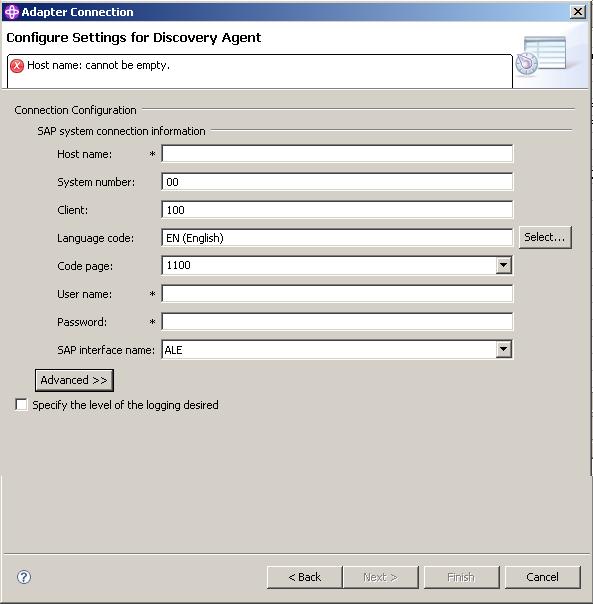
Wizard to discover business object information
from SAP system and generate connection definitions
- Enterprise Metadata Discovery Wizard
v 6.1
adapters :
configure BAPI, configure ALE, etc etc (education assistent)
Wizard
Generates :
- Adapter Component
- Message Set definition (DataObject domain)
High-level steps :
- connect to EIS
- select services
- select business objects
- select operations
- refine connection properties for broker runtime
- generate message set
Adapter Connection Wizard can be invoked from :
- Menu option : File -> New -> Adapter Connection
- Broker Development View : right click, New -> Adapter Connection
- using Quick start wizard : Broker Development view + "Start from adapter connection"
WMB61_Beta_Adapters.ppt
Adapter Connection wizard
The Adapter Connection wizard creates the following resources in the Toolkit:
- An adapter component file
- A message set that contains the XML Schema Definitions (XSD) for the business objects in SAP
- A message flow containing the WebSphere Adapters nodes
Once these resources are deployed to broker runtime via BAR file, the broker uses the same resources to connect to SAP
Broker runtime also gets some details from SAP configurable service
Integrating MB V7 with SAP, Vivek Grover.
\\T400\WS-BI-MB\SAP\WSTE-04082010-IntegratingWMBV7withSAP-Grover.pdf
miniSAP
Una forma sencilla de aprender y practicar ABAP es instalar MiniSAP.
MiniSAP es un release 4.6D de SAP
totalmente funcional durante 1 mes
(ampliable 90 días más)
con el que practicar la creación de
Reports, ALVs, módulos de función, Module Pool, etc.
It is a downscaled version of SAP system without the SAP applications (FI, CO, MM, SD, HR etc.).
Very helpful to those who are just starting to learn ABAP.
Requires : "SDN User id" & "Hardware key (HWID)"
Install How-To.
Description,
download
&
License Key
Working on
http://www.sap.com/minisap page.
SAP Transaccions list
Few transactions I've found :
- BD54 = Change View Logical Systems
- BD64 = Distribution Model
- SM59 = Display and Maintain RFC Destinations
- ST11 = see RFC trace
- WE20 = Partner Profiles
- WE21 = Ports in IDoc processing
Benchmarks
IBM has announced a world-record 4-processor result on Linux on the two-tier SAP Sales and Distribution (SD) standard application benchmark.
This new result was achieved on the IBM System x 3850 X5, running IBM DB2 9.7 and Red Hat Enterprise Linux 6.2, and SAP enhancement package 4 for the SAP ERP application Release 6.0.
Among the notable details of the benchmark,
the x3850 X5 achieved 12,560 SAP SD benchmark users with 0.99 seconds average dialog response time,
68,580 SAPS, measured throughput of 4,115,000 dialog steps per hour (or 1,371,670 fully processed line items per hour),
and an average CPU utilization of 98% for the central server.
The x3850 X5s result beats the previous-best four-processor result of 12,204 SAP SD benchmark users on Linux
achieved by the HP ProLiant DL580 G7.
The x3850 X5 was configured with four Intel Xeon E7-8870 processors at 2.40GHz
with 30MB shared L3 cache per processor (4 processors/40 cores/80 threads),
512GB of memory, 64-bit DB2 9.7, Red Hat Enterprise Linux 6.2,
and SAP enhancement package 4 for SAP ERP 6.0.
The server accessed the DB2 9.7 database on an IBM System Storage DS4800 disk system.
For the latest SAP benchmark results, visit
http://www.sap.com/benchmark.
SAP GUI
SAP GUI
is SAP's universal client for accessing SAP functionality in SAP applications
such as - SAP ERP, SAP Business Suite (SAP CRM, SAP SCM and SAP PLM), SAP Business Intelligence and so on.
SAP GUI functions like a browser.
It gets information from the SAP server like what, where, when and how, to display contents in its window.
All members of the SAP GUI family have unique attributes that make them especially suited for different user environments.
download it
here.
Dades que ens calen
Per entrar al SAP via SAG GUI, ens cal :
- IP
- nmero de sistema : es tracta de 2 dígits, normalment "00" però també pot ser 01 o 02
- ID de sistema : són 3 lletres, as "EC1" ;
- usr/pwd
- client : 3 xifres numèriques, as "100" ;
[/]
Ports
It uses local:2232 and remote:3200
Tips & Tricks
-
Convert RFC / BAPI to WSDL and use it instead of RFC -
url.
-
convert WSDl to BAPI :
Links
Integrating MB V7 with SAP:
webcast.
Insight SAP :
Using SAPGUI, logon to SAP and execute transaction SM51 = Instance Overview.
Education Assistant :
intro to SAP
technology :
6 { video + PDF }
Mind uSoft "Dynamics"


