
|
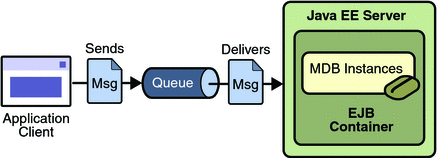
Message Driven Beans are business objects whose execution is triggered by messages instead of by method calls. They were added in EJB to allow event-driven processing. Read here and wiki {very good} Writing an MDB involves the following tasks:
|
|
One of the custom properties that users can set on the message listener service in WebSphere Application Server Versions 5.1.x, 6.0.x, and 6.1.x is NON.ASF.RECEIVE.TIMEOUT. Setting this property disables the Application Server Facilities (ASF) mode, and means that the message-driven beans (MDBs) that use listener ports will use a "synchronous receive" mechanism to get messages.
By default, MDBs that are bound to listener ports will use ASF mode to monitor JMS destinations and to process messages
In ASF mode, when a listener port starts, this is what happens:
- A queue agent is created that polls the destination looking for messages.
- When a message is detected, the queue agent checks if the message is suitable for the MDB using the listener port. If it is, the application server will get a server session from the application's server session pool, and then run this server session on a thread taken from the message listener service thread pool.
- The queue agent passes the ID of the message to the server session, and then resumes its browse of the destination.
- Once the server session has the ID of the message to process, it will get the message from the destination, and start processing it by calling the MDB's onMessage() method.
- When the message has been processed, the server session exits and is returned to the server session pool. The thread that the server session was running on is also returned to the thread pool.
When the message listener service custom property NON.ASF.RECEIVE.TIMEOUT is set, non-ASF mode is activated,
which means that listener ports will use a synchronous model to process messages.
When the listener port starts up, this is what occurs:
- The listener port gets a thread from the message listener service thread pool, and on that thread, creates a JMS message consumer for the destination the listener port is configured to listen to.
- The consumer uses the receive() method to detect incoming messages. This method will take the message off the destination, and the thread then invokes the MDB's onMessage().
- When the message has been processed, the thread calls receive() again, and the cycle starts over.
- If the receive() method does not detect a message in the time specified by the NON.ASF.RECEIVE.TIMEOUT property, the thread performs a small bit of processing before calling receive() again.
The updated MQ messaging provider support in WebSphere Application Server V7 is based on a J2EE Connector Architecture (JCA) 1.5 compliant resource adapter. Part of the JCA 1.5 specification defines a vendor-neutral way of enabling inbound messages to be delivered to message-driven beans (MDBs) running inside a Java EE compliant application server, such as WebSphere Application Server. The construct that is used to configure and setup inbound message delivery is known as an activation specification.


