home / infca / t42 (navigation links) Mejor encender una vela que blasfemar la oscuridad

Admin HW Specs Soft instalat WiFi Links

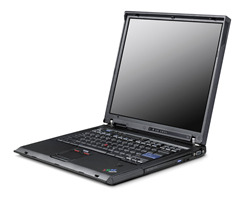
Think Pad T42 - 02/12/05.

T42 pic

Admin
     Type = 2373 - 2VG.
          => Machine type = 2373
          => Model type = 2VG.
     S/N = 99-HN07P.

HW
     CPU = Intel Pentium 1,70 GHz, M 735, IA32.
     RAM = 2x 1GB - 31P9834 SODIMM - PC2700 CL2.5 NP DDR SDRAM SODIMM, P/N = 31P9834.
          En lloc de 1x 512 MB - PC2700U - DDR 333 MHz - CL2.5

     HDD = 52,6 GB, HTS726060M9AT00.
     CD/DVD : MATSHITA UJDA755yDVD/CDRW.

 2006 :
     HDD = 80 GB, HTS541080G9AT00, 5400 rpm, 16383/16/63 C/H/S = 156.280.320 LBA's
     CD/DVD : HL-DT-ST DVDRAM GSA-4083N.
     url : -R, -RW, +R, +RW.

     Display = 14,1" or 15,1" TFT
     GPU = ATI Mobility Radeon 9600, 64 MB (1024x768, 32 colors).

     WiFi card = Intel Pro/Wireless 2200 BG, 802.11g MAC @ = 00.0E.35.9A.07.69
     ETH card = Intel Pro/1000 MT, (238) MAC @ = 00.11.25.43.08.1C

Wifi : "LAN Adapter type is LEAP. [ 377.536 WLANAdapterDetect.exe ]

Ubuntu lspci says

 Intel Corp. PRO/Wireless 2200 BG (rev 05)
So, it is a IPW2200 BG card. To load its drivers, read here.


Esquema

Start + Programs + Accessories + System Tools + System Information

T42 | .--- CPU : Pentium 1,7 GHz | .--- RAM : 2 GB | .--- VDU : ATI Radeon 9600, 64 MB RAM | .--- Display : 1024 x 768 x 60 Hz LCD | .--- NET --.-- LAN | | | .-- WiFi - Intel 2200BG | .--- HD --.-- HTS 726060 M9AT00 - x GB | | | .-- . (2) | .--- PCI Slot . ----- . | (1 Nov 2005) CD removed. (2 Ago 2006) 80 GB lost! (29 Ago 2008) XP went nuts.

Specs
BIOS

Per entrar a la configuració de la BIOS, s'ha de pulsar F1 mentre es fa IPL.

Bluetooth

Managed from

Getting bluetooth activated on a ThinkPad T42
to turn on the Bluetooth transmitter in a ThinkPad T42 hit Fn-F5 url

Infrarojos

Managed from


Configuració

Services I have disabled :

27/11/2007 : /3GB @ BOOT.INI

WiFi sota Win

Radio On/Off : Conexiones de Red + Conexiones de red inalámbricas + Botó dret + Desactivar

CLIP
HKEY_LOCAL_MACHINE\SYSTEM\CurrentControlSet\Control\Class\ {4D36E972-E325-11CE-BFC1-08002bE10318}\0002\ NetworkAddress 00.11.25.43.08.1C System + Device Admin + Intel PRO/1000 MT + Advaced + Local Admin IPconfig /all : 00-11-25-43-08-1C

Command Line ? "\cpp\Registry\QueryRegKeys\QK 1" lists all of them.

Sequence :

  1. Disable card
  2. Change HostName (IPL required)
  3. Change Reg
  4. IPL
  5. Enable card : 28-DB-AF-81-80-38 / 4C-31-85-43-C8-72
Software instalat
Access Connections   v 4.12  
Adobe Image Ready 7.0      
Adobe PhotoShop 7.0      
Adobe Reader 7.0      
Baretail Editor continu   url
Borland C++ compiler Borland site 5.5.1  
Borland Delphi Entorn desenvolupament - eines v 7  
Camplay Camtasia v 2.0.1 Reproductor AVIs    
CD Burner XP Pro 3 10,8 MB v 3.0.116 url
Cerberus FTP server   url  
Clone CD   4.2.0.2  
Command Prompt Explorer Bar ? ? url
Cute PDF Writer Creacio de PDFs   URL
DelaWare Remote Control Console Servei (desactivat) ?  
Desktop Calendar   0.42b url
DivX Reproductor WMVs, MPGs, AVIs v 6 url
EditPlus 2      
iTunes      
Lotus Notes   v 6.5  
Lotus Organizer from SmartSuite 9.8 v 5.04  
Lotus Sametime   v 3.1  
MQ Documentation own cd v 1.3  
Nero own eines cds 6  
Nokia 6021 PC Suite (start Sync, then Backup !) Dades del telèfon al PC 6.82 url
Object Rexx Developer 2.1.2.0 Entorn desenvolupament    
Putty   0.55  
QuickTime Reproductor MOVs v 6.5.2 url
Rational Application Developer v 6.0 Trial      
SkyPE Telefonia per Internet ? url
Super JPG   5.1  
Telnet Server ? ?  
VMware Converter Conerteix Guindows en VM's 3.0.2 url
VNC     url
WinAmp Reproductor MP3, Radio, TV v 5.13 url
WinRar   3.42  
WinSCP   3.5 urls  
WinZip   8.1  
WS_FTP      
Xming X server for windows + Fonts v 6.9, url
Software to install
... ...  
Alcohol 120% .  
AT&T Net Client .  
DirSize .  
EtheReal 0.10.0 .  
Euclides .  
IBM Community Tools as SameTime  
IBM Notes Buddy as SameTime  
ILC .  
IP display in Tray .  
IP Tools .  
Mix Server .  
MSDN Library January 2003 .  
Netscape 7.2 .  
Partition Magic 8.0 .  
Real player .  
Visual Studio C++ 6 own cds 6.0
WinHex .  
Zone Alarm .  
After Ago-2008 Crash
Daemon Emulator  
Delphi Desenvolupament  
DivX Reproductor WMVs, MPGs, AVIs  
Firefox Browser  
ObjRexx Desenvolupament  
Offise2007 Eines  
OpenSSH Shell url
PowerCalc Calculator  
ProcExp Process Explorer  
RealVNC Remote Desktop url
SkyPe Internet Phone  
Super JPG Per manegar fotos  
TCPview TCP tool  
Uedit32 Editor  
VMware Emulador  
WinAmp Reproductor  
WinBoard Visualitzador jocs escacs PGN  
WinRAR Compresor  
Xming X-server  

Pendent :


Backup

At P4:\g:\saveT42 hi ha :

amb data 01/07/2006.

2006-08-03 : disk "D" dead

At USB500GB:\VMs hi ha :

2008-05-22 : fan error [3567-5776]

VMware Converter no funciona al T42 ... a pity.


Hibernate vs Stand By

Using Standby:
Your machine recovers quickly as your data is stored in RAM. The slower part is waking up the peripherals. Although your machine is in "standby" the power has been cut to items such as your hard drive and monitor. You're running your machine in a very low power mode, but it is still on. This mode can be useful if you're on a notebook and need to conserve your battery while you step away.

With Hibernate:
The big difference is that your PC has shut down and is not pulling power. Another difference is that your data is saved to your hard disk and not RAM. This makes it a safer, but slower option for shut down and resume.

Descr


Linux & WiFi

Botem BT4 :

root@bt:~# lspci 02:02.0 Network controller: Intel Corporation PRO/Wireless 2200BG [Calexico2] Network Connectoin /rev 05) root@bt:~# lspci -v 02:02.0 Network controller: Intel Corporation PRO/Wireless 2200BG [Calexico2] Network Connection (rev 05) Subsystem: Intel Corporation Device 2712 Flags: medium devsel, IRQ 11 Memory at c0210000 (32-bit, non-prefetchable) [size=4K] Capabilities: [dc] Power Management version 2 Kernel modules: ipw2200 root@bt:~# lspci -n | grep 02:02 02:02.0 0280: 8086:4220 (rev 05)

Tenim un problema :

root@bt:~# cat /var/log/messages | grep 2200 May 23 13:01:03 bt kernel: ipw2200: Intel(R) PRO/Wireless 2200/2915 Network Driver, 1.2.2kmprq May 23 13:01:03 bt kernel: ipw2200: Copyright(c) 2003-2006 Intel Corporation May 23 13:01:03 bt kernel: ipw2200 0000:02:02.0: PCI INT A -> Link[LNKC] -> GSI 11 (level, low) -> IRQ 11 May 23 13:01:03 bt kernel: ipw2200: Detected Intel PRO/Wireless 2200BG Network Connection May 23 13:01:03 bt kernel: ipw2200 0000:02:02.0: PCI INT A disabled May 23 13:01:03 bt kernel: ipw2200: probe of 0000:02:02.0 failed with error -5 root@bt:~# dmesg ipw2200: Intel(R) PRO/Wireless 2200/2915 Network Driver, 1.2.2kmprq ipw2200: Copyright(c) 2003-2006 Intel Corporation ipw2200 0000:02:02.0: PCI INT A -> Link[LNKC] -> GSI 11 (level, low) -> IRQ 11 ipw2200: Detected Intel PRO/Wireless 2200BG Network Connection ipw2200: ipw2200-bss.fw request_firmware failed: Reason -2 ipw2200: Unable to load firmware: -2 ipw2200: failed to register network device ipw2200 0000:02:02.0: PCI INT A disabled ipw2200: probe of 0000:02:02.0 failed with error -5

Sembla que no tenim be el firmware que correspon al driver.

Quina versio de driver tenim ?

root@bt:~# modinfo ipw2200 filename: /lib/modules/2.6.35.8/kernel/drivers/net/wireless/ipw2x00/ipw2200.ko firmware: ipw2200-bss.fw firmware: ipw2200-sniffer.fw firmware: ipw2200-ibss.fw license: GPL author: Copyright(c) 2003-2006 Intel Corporation version: 1.2.2kmprq

Baixem el FirmWare de la url - com que tenim el driver v 1.2.2, doncs baixem la versio 3.1 : tgz

Ara aixo ja engega :

root@bt:~# tar -xvf ipw2200-fw-3.1.tgz root@bt:~# cp *.fw /lib/firmware root@bt:~# rmmod ipw2200 root@bt:~# modprobe ipw2200 rtap_iface=1 root@bt:~# cat /var/log/messages May 23 11:55:23 bt kernel: ipw2200: Intel(R) PRO/Wireless 2200/2915 Network Driver, 1.2.2kmprq May 23 11:55:23 bt kernel: ipw2200: Copyright(c) 2003-2006 Intel Corporation May 23 11:55:23 bt kernel: ipw2200 0000:02:02.0: PCI INT A -> Link[LNKC] -> GSI 11 (level, low) -> IRQ 11 May 23 11:55:23 bt kernel: ipw2200: Detected Intel PRO/Wireless 2200BG Network Connection May 23 11:55:24 bt kernel: ipw2200: Detected geography ZZR (14 802.11bg channels, 0 802.11a channels) root@bt:~/ipw/ipw2200-fw-3.1# iwconfig lo no wireless extensions. eth0 no wireless extensions. irda0 no wireless extensions. rtap0 no wireless extensions. eth1 IEEE 802.11bg ESSID:off/any Mode:Managed Channel:0 Access Point: Not-Associated Bit Rate:0 kb/s Tx-Power=20 dBm Sensitivity=8/0 Retry limit:7 RTS thr:off Fragment thr:off Encryption key:off root@bt:~/ipw/ipw2200-fw-3.1#

Amaguem la MAC :

root@bt:~# ifconfig eth1 down root@bt:~# macchanger -m 00:11:22:33:44:55 eth1 Current MAC: 00:0e:35:99:d5:90 (Intel Corp) Faked MAC: 00:11:22:33:44:55 (Cimsys Inc) root@bt:~# ifconfig eth1 up root@bt:~# ifconfig eth1 Link encap:Ethernet HWaddr 00:11:22:33:44:55

Per fer anar les eines, cal entrar en mode tafaner :

root@bt:~# iwconfig eth1 mode monitor root@bt:~# iwconfig eth1 eth1 IEEE 802.11bg ESSID:off/any Mode:Monitor Frequency:2.457 GHz Access Point: Not-Associated Bit Rate:0 kb/s Tx-Power=20 dBm Sensitivity=8/0

El airodump ja va :

root@bt:~# airodump-ng eth1 CH 10 ][ Elapsed: 12 s ][ 2011-05-23 12:01 BSSID PWR Beacons #Data, #/s CH MB ENC CIPHER AUTH ESSID C6:2E:D9:FE:8D:CF -1 38 0 0 11 54 OPN Panasonic Display1 00:21:D8:C0:1A:00 -57 21 1 0 6 54e. WPA2 CCMP MGT JAL 00:25:68:F5:71:0E -62 26 35 0 11 54e WPA TKIP PSK RECURSOSHUMANOS 00:80:48:67:5B:2F -69 10 7 0 1 54 . OPN CC_LILLA05 00:25:68:F5:71:3A -71 6 0 0 11 54e WPA TKIP PSK ESPIRITUDEVERANO 4C:54:99:59:3A:1A -74 6 1 0 11 54e WPA TKIP PSK WIFI Direccion 00:21:D8:C0:1C:B0 -77 0 0 0 11 54e. WPA2 CCMP MGT JAL 00:1D:70:9A:AB:20 -78 2 0 0 1 54e. WPA2 CCMP MGT JAL 00:1D:70:9A:A8:90 -78 2 0 0 1 54e. WPA2 CCMP MGT JAL 00:19:A9:40:79:71 -79 2 0 0 1 54e. OPN Guest 00:01:38:FE:94:A9 -79 0 0 0 1 54 . WPA2 CCMP PSK EPC 00:19:A9:40:79:72 -79 3 0 0 1 54e. OPN 2Gbl!Wlan2 00:19:A9:40:79:74 -79 3 0 0 1 54e. WPA TKIP PSK W1rele55C 00:80:48:67:5B:31 -80 2 4 0 3 54 . OPN CC_LILLA03 4C:54:99:59:7D:20 -80 0 1 0 158 -1 WPA 00:19:A9:40:79:70 -80 1 0 0 1 54 . WPA2 CCMP MGT u5UAr105 00:19:A9:40:79:73 -80 3 0 0 1 54e. WPA2 CCMP MGT E0:91:F5:F6:57:0A -80 5 0 0 11 54e WPA2 CCMP PSK TULIPANSKIP E0:91:F5:F6:58:3C -81 2 0 0 11 54e WPA2 CCMP PSK MAGNUMFLORA 00:01:38:CA:BD:C5 -81 4 0 0 13 54 . WEP WEP WLAN_83 E0:91:53:04:7E:00 -82 2 0 0 6 54 . WEP WEP WLAN_BF BSSID STATION PWR Rate Lost Packets Probes 00:21:56:CD:50:A0 C0:CB:38:94:71:33 -80 0 - 1e 0 4 UNLVRW!F!

I també asleap :

root@bt:/pentest/wireless/asleap# iwconfig eth1 mode managed root@bt:/pentest/wireless/asleap# ./asleap -i eth1 asleap 2.2 - actively recover LEAP/PPTP passwords. Unsupported pcap datalink type: (1) Closing pcap ... root@bt:/pentest/wireless/asleap# iwconfig eth1 mode monitor root@bt:/pentest/wireless/asleap# ./asleap -i eth1 asleap 2.2 - actively recover LEAP/PPTP passwords. ^CClosing pcap ...

Pend

Links

Valid HTML 4.01!   Valid CSS! Site under construction. Escriu-me !
Updated : 20150922 {a}  
Uf !