Power on
After power is applied to pSeries, front lights are down for 1-2 minutes.
Then, the green light starts flashing, and in 2-3 minutes it gets fixed.
Sometimes we can see a message like :
To select this console as the active console, press 1
IPL
To boot an OpenPower, p5, i5, or pSeries system from a CD-ROM,
you must specify the install boot device in the System Management Services (SMS) menu.
To enter the System Management Services GUI,
press the [1] key during the boot process when you hear the chime sound.
This brings up a graphical interface similar to
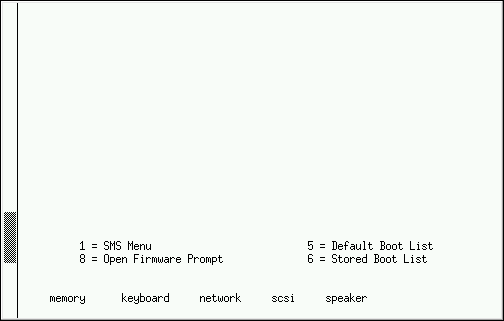
Once in the SMS menu, we see "pSeries Firmware" :
1 - select Language
2 - ? options
3 - view error log
4 - setup remote IPL
5 - SCSI settings
6 - select console
7 - select Boot options -> Select Install or Boot a Device (CD/DVD is IDE !)
URL
if you see
Starting software
20EE000B
it means you missed the time to push [1] key !
HW
We start with
| | CPU | RAM | HD | OpSys
|
| 7029-6E3 | 2x 1,452 GHz | 8 GB | 1x 146 GB | SLES 10
|
| 9111-520 | | | 2x 146 GB | AIX 5
|
| 9113-550 | | | 2x 73 GB | AIX
|
Also we have a HMC, named 7310-C03.
7029-6E3
SLES 10 ;
hostname = p7029-6E3 ;
Graphics card = Matrox MGA G400 AGP ;
Monitor = VESA 800x600x60 Hz ;
/root/autoinst.xml for Autoyast ;
Putty + SSH : ok ;
CPU :
p7029-6E3:/proc # cat cpuinfo
processor : 0
cpu : POWER4+ (gq)
clock : 1452.000000MHz
revision : 2.1 (pvr 0038 0201)
processor : 1
cpu : POWER4+ (gq)
clock : 1452.000000MHz
revision : 2.1 (pvr 0038 0201)
timebase : 181497163
machine : CHRP IBM,7029-6E3
Memory :
p7029-6E3:/proc # cat meminfo
MemTotal: 8091420 kB
MemFree: 7894876 kB
Filesystem :
p7029-6E3:~ # df -h
Filesystem Size Used Avail Use% Mounted on
/dev/sda3 135G 2.0G 133G 2% /
udev 3.9G 100K 3.9G 1% /dev
OpSys :
p7029-6E3:/proc # cat version
Linux version 2.6.16.21-0.8-ppc64 (geeko@buildhost) (gcc version 4.1.0 (SUSE Linux)) #1 SMP Mon Jul 3 18:25:39 UTC 2006
IP config :
p7029-6E3:~ # ifconfig eth0
eth0 Link encap:Ethernet HWaddr 00:09:6B:BE:25:F2
inet addr:9.137.164.139 Bcast:9.137.164.255 Mask:255.255.255.0
inet6 addr: fe80::209:6bff:febe:25f2/64 Scope:Link
X-window :
xWindow v 6.9.0
log = /var/log/Xorg.0.log
cfg = /etc/X11/xorg.conf
Fatal server error : caught signal 11. Server aborting.
Xserver disabled. Restart GDM when configured.
Nous discs
(20121108) Poso 7 discs de 70 GB de'n Javier.
p7029-6E3:~ # fdisk -l
Disk /dev/sda: 146.8 GB, 146814976000 bytes
Disk /dev/sdb: 73.4 GB, 73407488000 bytes
Disk /dev/sdc: 73.4 GB, 73407488000 bytes
Disk /dev/sdd: 73.4 GB, 73407488000 bytes
p7029-6E3:~ # fdisk /dev/sdb + "o" (dos label) + "n" (new) + "p" (primary) + "w" (write)
p7029-6E3:~ # mkfs -t ext3 /dev/sdb1
p7029-6E3:/ # mkdir /discB
p7029-6E3:/ # mount -t ext3 /dev/sdb1 /discB
Per deixar-ho permanent, fem:
p9111-520:/ # vi /etc/fstab
/dev/sdb1 /discB ext3 defaults 0 0
/dev/sdc1 /discC ext3 defaults 0 0
/dev/sdd1 /discD ext3 defaults 0 0
After restart we have:
sebas@p7029-6E3:~> df -h
Filesystem Size Used Avail Use% Mounted on
/dev/sda3 135G 97G 38G 72% /
udev 3.9G 112K 3.9G 1% /dev
/dev/sdb1 68G 129M 64G 1% /discB
/dev/sdc1 68G 129M 64G 1% /discC
/dev/sdd1 68G 129M 64G 1% /discD
There are 4 discs more missing !?
 Top
Top


