|
home /
infca /
mq /
seguretat
(navigation links)
|
Si un no sap on va, és difícil perdre's (rus)
|
La seguretat i el MQ
This page is probably obsolete - please go to
T-Rob's page
for updated scripts and articles.
The OAM maintains an access control list (ACL) for each resource that it controls.
Authorization data is stored on a local queue called SYSTEM.AUTH.DATA.QUEUE.
DefCon 15 (2007)
It worked out that I was able to go to Defcon 15,
meet Martyn Ruks and attend his "Jumping MQ" session.
The interesting thing is that Martyn
is a security consultant and penetration tester
and knew very little about WMQ going in.
Instead of starting with the IBM-provided tools like the WMQ client code,
he sniffed the network packets and reverse-engineered the protocol.
He then wrote some Python code to simulate a client channel,
including the SSL handshakes.
With this Python code he was able to remotely connect to a QMgr,
create a WMQ service to execute OS level commands
and then put messages onto an initiation queue
which also ran OS-level commands.
If you've never been to a Defcon,
think of the "Lone Gunmen" guys from X-Files
and then multiply by a few hundred.
Then add in girls in short skirts,
combat boots and pink hair.
There were a few suits at the convention
but they were the Feds giving the "Meet the Feds" sessions.
Upstairs in the "WiFi Cafe" the intent was not to provide Internet access
but rather they were having contests to see
who could successfully exploit vulnerabilities in Wireless Equivalent Protocol
and other such games of sport.
Now that you have a picture of the crowd,
know that the session on MQ was in one of two main tent rooms
and it was packed.
People started showing up 10 minutes
prior to the end of the previous session
to get seats and by the time Martyn started,
they were stacked up along the walls.
It was pretty scary to look over this particular crowd
with the realization that there was so much interest in WMQ.
If your shop has taken a relaxed stance on WMQ security,
this would be a good time to assess and remediate.
In his research, Martyn discovered two interesting vulnerabilities
working directly with the protocol.
First, it was possible to bypass a server-side security exit
and second that it was possible to bypass the MCAUSER setting in the channel.
These are two things we rely heavily on for WMQ security so this was distressing news.
The good news though is that he reported these to IBM
and a new fix was released as of last Friday that addresses both issues.
Go to...
See
doc for details.
There were no other exploits or recommendations
that the community here does not already know about.
Martyn talked about how the default configuration was vulnerable
and advised folks to turn on security.
He advised to use SSL, MCAUSER, low-privileged accounts for trigger monitors,
not to use channel auto-definition and so forth.
Because the target audience has almost no familiarity with WMQ,
the session was fairly high-level.
But Martyn did post links to the Infocenter, Perl classes and some tools
so folks could get up to speed quickly.
Unlike many other products such as many web servers and operating systems,
there are no publicly available WMQ security baselines
or penetration test tools
so security is still more of an art than a science - and a black art at that.
Martyn's presentation positioned WMQ
as running mission critical applications in large corporations.
Outside of people who use it, WMQ has had a very low profile up to now.
These three factors combine to make WMQ a very interesting product for this community.
From their perspective, large attractive corporate targets use the software,
there is a tremendous potential for harm (or gain),
security is poorly practiced and unstructured,
and the first hackers to publish tools, exploits and hacks in this space
can make a name for themselves - and land jobs as security consultants.
Who knows...by this time next year, the "WMQ Cafe"?
-- T.Rob &
his excelent
page
He is tentatively scheduled to speak at Defcon 16 in August 2008.
Customer review data
Typically the high-level review requires
- the MQ object definitions
- the output of amqoamd -m <qmgrname> -s
- and the contents of /etc/group and /etc/passwd (or the equivalent for the platform).
(-p Principal | -g Group)
How to display existing "principals" and "groups" ?
dmpmqaut -m <qmgr-name>
ObjType
ObjType = the type of object on which to make the inquiry.
Possible values are:
authinfo Authentication information object, for use with SSL channel security
channel or chl a channel
clntconn or clcn a client connection channel
listener or lstr a listener
namelist or nl a namelist
process or prcs a process
queue or q a queue or queues matching the object name parameter
qmgr a queue manager
service or srvc a service
topic or top a topic
dspmqaut
Inquire Entity Authority -
display the current authorities that a user or group has for a specified object.
Use the dspmqaut command to display the current authorizations to a specified object.
dx0609:/home/mqm # dspmqaut ?
Usage: dspmqaut [-m QMgrName]
[-n ObjName]
-t ObjType
(-p Principal | -g Group)
[-s ServiceComponent]
v6
v7
dmpmqaut
Inquire Authority Records -
display the current authorities associated with generic profiles.
Use the dmpmqaut command to dump the current authorizations to a specified object.
C:\> dmpmqaut ?
Usage: dmpmqaut [-m QMgrName]
[-n Profile | -l]
[-t ObjType]
[-p Principal | -g Group]
[-s ServiceComponent]
[-e | -x]
I jo em pregunto : dspmqaut i dmpmqaut mostren les mateixes dades ?
setmqaut
Use the setmqaut command to change the authorizations to a profile, object or class of objects.
Authorizations can be granted to, or revoked from, any number of principals or groups.
Use setmqaut with -remove option to "Delete Authority Record"
c:\> setmqaut /?
Usage: setmqaut [-m QMgrName]
[-n ObjName] -t ObjType
(-p Principal | -g Group)
[-s ServiceComponent] Authorizations
"Table 24 shows the authorities that can be given to the different object types",
MQ v6 System Admin Guide, page 386 [409/647].
Unix details
On UNIX systems,
all authorities are held by user groups internally, not by principals.
This has the following implications:
- If you use the setmqaut command to grant an authority to a principal,
the authority is actually granted to the primary user group of the principal.
This means that the authority is effectively granted to all members of that user group.
- If you use the setmqaut command to revoke an authority from a principal,
the authority is actually revoked from the primary user group of the principal.
This means that the authority is effectively revoked from all members of that user group.
url - thanks (again) T-Rob !
Never use the -p option in setmqaut on UNIX.
When you do this, setmqaut looks up the primary group of the user you specify and authorizes that.
The problem is that the primary group can change over time and then you authorize something you do not expect.
Always explicitly set the group you want with -g.
Alguns exemples :
Configuració per a que un usuari només pugui accedir a una cua (alias)
- dump initial
- remove all
- allow few
@echo off
cls
echo Establir valors generals ...
SET USER=mq_usr_12_ch
SET GESTOR=QMGRNAME
SET NOMCUA=USRPFX.*
echo Mostrar ENVIR ...
echo USUARI=%USER%
echo GESTOR=%GESTOR%
echo NOMCUA=%NOMCUA%
echo Few SETMQAUT commands ...
echo # Primer, donem permis per a conectarse al gestor de cues ...
setmqaut -m %GESTOR% -t qmgr -p %USER% -all +connect +inq +dsp
echo # Segon, donem permis per accedir a certes cues ...
setmqaut -m %GESTOR% -t q -n %NOMCUA% -p %USER% -all +dsp +inq +browse +put +get
echo A veure el resultat ...
dspmqaut -m %GESTOR% -t q -n %NOMCUA% -p %USER%
echo BYE.
[And-Sec, \\03x\Andorra\Seguretat\]
Using WebSphere MQ Explorer as a read-only viewer
The WebSphere MQ Explorer GUI provides a user-friendly way to administer your queue managers.
With a little work, you can use it as a read-only 'viewer' instead.
If you have some staff who don't have authority to make changes to the WMQ network,
but need them to be able to monitor what is happening,
this would let them use WMQ Explorer to do it.
If your staff without authority to make changes are the ones with less WebSphere MQ experience,
then this might be a useful approach.
In this post I'll walk through the steps required
to set this up for a single queue manager,
and highlight a couple of potential problems to watch out for.
Steps to carry out on the machine hosting the queue manager
- create a user - making sure that the user is not a member of the mqm group
- start a channel listener for the queue manager
- create a server-connection (SVRCONN) channel on the queue manager - setting the MCAUSER attribute to the username defined in step 1
- use setmqaut to specify which objects you want the user to be able to see
What permissions do you need to grant?
Firstly, you need permission to connect to the queue manager:
setmqaut -m YOUR_QUEUE_MANAGER -t qmgr -p YOUR_USER_NAME [-all ???] +connect +inq +dsp
Next, you need to give permission to the queues that WMQ Explorer will need:
setmqaut -m YOUR_QUEUE_MANAGER -t q -n SYSTEM.DEFAULT.MODEL.QUEUE -p YOUR_USER_NAME [-all] +get +browse +inq
setmqaut -m YOUR_QUEUE_MANAGER -t q -n SYSTEM.ADMIN.COMMAND.QUEUE -p YOUR_USER_NAME [-all] +get +browse +inq +put
setmqaut -m YOUR_QUEUE_MANAGER -t q -n SYSTEM.MQEXPLORER.REPLY.MODEL -p YOUR_USER_NAME [-all] +get +browse +inq +dsp
# The effect of the next two commands is to grant you ALL access to ALL dynamic queues that match the AMQ.** or MQAI.** profiles.
setmqaut -m YOUR_QUEUE_MANAGER -t q -n 'AMQ.**' -p YOUR_USER_NAME +all
setmqaut -m YOUR_QUEUE_MANAGER -t q -n 'MQAI.**' -p YOUR_USER_NAME +all
2009 improvement, by T-Rob :
My recommendation is to delete the last two lines.
When you create a dynamic queue, MQ grants you complete access to the queue.
There is no need to pre-authorize that access.
Then, you could give access to all objects of a certain type - such as being able to display all channels:
setmqaut -m YOUR_QUEUE_MANAGER -t channel -n '**' -p YOUR_USER_NAME [-all] +dsp
You might want to include additional permissions,
such as the ability to browse messages on queues, or inquire their attributes:
setmqaut -m YOUR_QUEUE_MANAGER -t q -n '**' -p YOUR_USER_NAME +dsp +inq +browse
Origin URL
@echo off
cls
echo Donar accessos a un usuari per poder conectarse remotament amb MQ Explorer.
SET GESTOR=QM2
SET USER=mquser_rmt_admin
SET GRUP=staff
echo GESTOR = (%GESTOR%)
echo USER = (%USER%)
echo GRUP = (%GRUP%)
echo Few SETMQAUT commands ...
echo # Primer, donem permis per a conectarse al gestor de cues :
rem # 8077 - connect
setmqaut -m %GESTOR% -t qmgr -p %USER% -all +connect +inq +dsp
echo # Segon, donem permis per a mirar cues
rem # 8077 - inq to SYSTEM.MQEXPLORER.REPLY.MODEL
setmqaut -m %GESTOR% -t q -n SYSTEM.MQEXPLORER.REPLY.MODEL -p %USER% -all +inq +browse +dsp +get
rem # 8077 - put to SYSTEM.ADMIN.COMMAND.QUEUE and others
setmqaut -m %GESTOR% -t q -n SYSTEM.ADMIN.COMMAND.QUEUE -p %USER% -all +inq +browse +dsp +get +put
setmqaut -m %GESTOR% -t q -n SYSTEM.DEFAULT.MODEL.QUEUE -p %USER% -all +inq +browse +dsp +get
setmqaut -m %GESTOR% -t q -n SYSTEM.AUTH.DATA.QUEUE -p %USER% -all +inq +browse +dsp
rem # 8077 - display channels [sin comillas en Wintel]
setmqaut -m %GESTOR% -t channel -n '**' -p %USER% -all +dsp
rem # 8077 - display queues [sin comillas en Wintel]
setmqaut -m %GESTOR% -t q -n '**' -p %USER% -all +dsp +inq +browse
echo BYE.
Own code [T42:\MQ\CFG\SAG\Seguridad\QM2]
En una AIX, sorprenentment, les dues darreres sentencies es canvien per fer servir grups,
i es converteixen (amqoamd -m -s) en :
setmqaut -m %GESTOR% -t channel -n '**' -g %GRUP% -all +dsp
setmqaut -m %GESTOR% -t q -n '**' -g %GRUP% -all +dsp +inq +browse
Complementari de :
amqoamd
Per verificar la seguretat de una instalació,
o per moure-la a una altra màquina,
farem servir
amqoamd -m %GESTOR% -s.
c:\MQ\bin> amqoamd /?
Usage: amqoamd [-m QMgrName ] [-t ObjType] [-n ObjName] [-f|s]
-f old authorization file format
-s output setmqaut commands
El fitxer de sortida es una llista de comandes SETMQAUT
que podem llençar directament !
(sag) Security Explorer
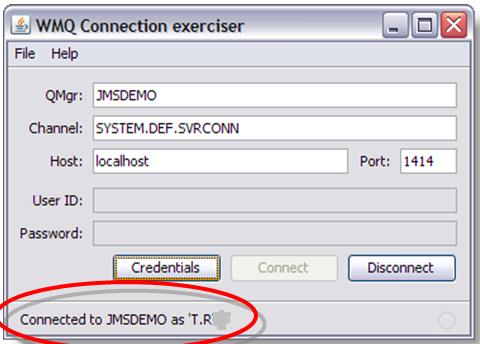
I'd like to have a (Delphi ? NO - Java) program
that allows me to do (via GUI) :
- MQ Client Connect, using User='ABCD' ;
- MQ Inquiry (DLQ name)
- put a command message into SYSTEM.ADMIN.COMMAND.QUEUE
to alter DLQ to be "get(disabled)".
- MQ Inquiry (all Q's depth) = amqsailq.c
- MQ Open Q
- MQ Browse Q
- MQ Read Q
- MQ Create Q - MQCMD_CREATE_Q PCF command = amqsaicq.c
- MQ Write Q
- MQ Delete Q - MQCMD_DELETE_Q PCF command
- mind
mqJexplorer !
By the moment (Ago 08) I have :
- T42:\MQ\Eines\Security_Scanner\SS.CMD that uses MQ samples to do it (few dont work).
- \MQ\Eines\AMQSAILQ_Display_All_Queues_Depth\amqsailqc.exe using SYSTEM.DEF.SVRCONN channel {system object}
- \MQ\Eines\AMQSAILQ_Display_All_Queues_Depth\amqsailqc.exe using SYSTEM.ADMIN.SVRCONN channel {explorer}
- \MQ\Eines\AMQSAILQ_Display_All_Queues_Depth\amqsailqc.exe using SYSTEM.BKR.CONFIG channel {toolkit}
- Java
working sample
(improve to GUI via Eclipse ?)
Security Scanner {SS.CMD} tests
T42 has MQ client, and we try SAVEQMGRC from VM : {"SS 1"}
5/30/2008 11:05:35 - Process(912.2) User(wbrkadm) Program(amqzlaa0.exe)
AMQ8075: Authorization failed because the SID for entity 'ibm' cannot be obtained.
EXPLANATION:
The Object Authority Manager was unable to obtain a SID for the specified entity.
ACTION:
Ensure that the entity is valid, and that all necessary domain controllers are available.
----- amqzfubn.c : 1991 -------------------------------------------------------
Mind
2035 help.
A usual customer wants to prevent :
- [1] remote connection to a queue manager
- [2] remote admin : create/delete queue
- [3] remote put/get messages into/from a queue
- [4] to attach a queue manager to a cluster
- [5] full rights explorer (MQ or MQjExplorer)
[1-2-3] : MCAUSER @ SVRCONN.
[4]
With SSL one can set up SSLPEER to prevent QMgrs from joining the cluster.
You just have to have the cluster name in an OU so you can filter on it.
Then only issue appropriate Distinguished Names to things you want in the cluster.
Unfortunately, this requires the entire cluster to have SSL.
MQCONNX
Sample :
amqscnxc.c
- (*) MQCD.UserIdentifier[12]
- (*) MQCD.MCAUserIdentifier[12] -> surt el usuari de Guindous.
- (*) MQCD.LongMCAUserIdPtr & length
- (*) MQCD.LongRemoteUserIdPtr & length
- (*) User Data Exit -> problemes compilació MQ v 6.0.2.3
RogerLacroix diu de fer servir AlternateUserId
url
Com omplir LongMCAUserIdPtr ?
amqsspin.c :
pChDef -> LongMCAUserIdPtr = malloc( pChDef -> LongMCAUserIdLength ) ;
PCF command messages
Each command and its parameters are sent as a separate command message
containing a PCF header followed by a number of parameter structures.
The PCF header identifies the command
and the number of parameter structures that follow in the same message.
Each parameter structure provides a parameter to the command.
PCF Create Local Queue
Sample :
AMQSAICQ.C
Book :
MQ Administration Interface Programming Guide and Reference,
SC34-5390-01; search for "MQCMD_CREATE_Q".
Cluster Security
Chapter 8 - Keeping clusters secure, MQ v6 queue manager clusters, SC34-6589.
To prevent selected queue managers from sending messages to your queue manager,
define a channel security exit program on the CLUSRCVR channel definition.
Write a program that authenticates queue managers trying to send messages on your cluster-receiver channel
and denies them access if they are not authorized.
Channel security exit programs are called at MCA initiation and termination.
Stopping unauthorized queue managers sending messages to your queue manager,
page 103/201, MQ v6 queue manager clusters, SC34-6589.
If you want to ensure that only certain authorized queue managers attempt to join a cluster,
you must either
use a security exit program on the cluster-receiver channel,
or write an exit program to prevent unauthorized queue managers from writing to SYSTEM.CLUSTER.COMMAND.QUEUE.
Do not restrict access to SYSTEM.CLUSTER.COMMAND.QUEUE
such that no queue manager can write to it,
or you would prevent any queue manager from joining the cluster.
It is difficult to stop a queue manager that is a member of a cluster from defining a queue.
Therefore, there is a danger that a rogue queue manager can
join a cluster, learn what queues are in it, define its own instance of one of those queues,
and so receive messages that it should not be authorized to receive.
To prevent a queue manager receiving messages that it should not, you can write:
- a channel exit program on each cluster-sender channel,
which uses the connection name to determine the suitability of the destination queue manager
to be sent the messages.
- a cluster workload exit program,
which uses the destination records to determine the suitability of the destination queue and queue manager
to be sent the messages
- a channel auto-definition exit program,
which uses the connection name to determine the suitability of defining channels
to the destination queue manager
Preventing queue managers joining a cluster,
page 105/201, MQ v6 queue manager clusters, SC34-6589.
Accessing a cluster qmgr
{20120807, T. Rob} CLUSRCVR accepts conns from SDR
Did you know BLOCKUSER rules do not apply to all channel types?
Or that CLUSRCVR channels accept connections from SDR channels?
Or that in MQ V7.5, not even an MQ administrator can get an AMS protected message from a queue without a key?
(sag) Cluster Explorer
I'd like to have a (Delphi ? NO - Java) program
that allows me to do (via GUI) :
- create a queue manager
- enter my queue manager into a cluster
- display all queue managers in the cluster
- connect to a remote queue manager
- display its queue names and its depths
See amqsailq.c (uses MQAI).
- create a local queue with a given (remote) name
What kind of authorizations are needed when using remote queueing ?
The prescribed method here is to create an ID and group.
The group has only the one service ID in it.
The service ID is a non-login ID
and it's primary and only group is the one we just created.
So in UNIX terms you have ID:group = cms:cms. So far, so good.
The next thing is to set the permissions for the MCAUSER to connect:
setmqaut -m QM2 -g cms -t qmgr -all +connect +inq +set +setall
In this case whether you use JMS has nothing to do with it because it is the MCA that is doing the inquire.
That is how it finds out the name of the DLQ.
Again, so far, so good.
Next you need permissions to put the message on the queue:
setmqaut -m QM2 -g cms -n 'CMS.IN' -t queue -all +put +setall
The +setall allows the MCA to set the fields in the MQMD
such as the User ID and the time stamp to match the values from QM1.
This is what I believe that you are missing.
To address another concern from the thread,
as long as the MCAUSER is the *only* thing using the cms service account,
we like +setall.
It is the only way that the MCA can create the message header to match the values of the message on the originating QMgr.
And we know that the MCA will never do anything but connect, inquire and put.
How to open a SVRCONN to my_mca_user
Anem a descriure els passos per obrir un SVRCONN a un usuari my_user.
- create a user - making sure that the user is not a member of the mqm group
- create a server-connection (SVRCONN) channel on the queue manager - setting the MCAUSER attribute to the username defined in step 1
- use setmqaut to specify which objects you want the user to be able to see
A la maquina LABSS2, tenim el usuari "pere" que no es del grup "mqm".
En fer servir "amqsputc" amb el canal SAG.SVRCONN on tenim "MCAUSER(pere)", obtenim
09/05/2012 07:21:48 PM - Process(14160.5) User(sebas) Program(amqzlaa0) Host(labss2)
AMQ8077: Entity 'pere ' has insufficient authority to access object 'PEREQM'.
EXPLANATION:
The specified entity is not authorized to access the required object. The following requested permissions are unauthorized: connect
ACTION:
Ensure that the correct level of authority has been set for this entity against the required object,
or ensure that the entity is a member of a privileged group.
----- amqzfubx.c : 594 --------------------------------------------------------
Autoritzem el "connect()" per en "pere" :
[sebas@labss2 admin]$ cat 51_permet_connect.sh
#!/bin/bash
QMN="PEREQM"
USUARI="pere"
setmqaut -m $QMN -t qmgr -p $USUARI -all +connect +inq +dsp
Ara el error que obtenim es:
09/05/2012 07:32:04 PM - Process(14193.5) User(sebas) Program(amqzlaa0) Host(labss2)
AMQ8077: Entity 'pere ' has insufficient authority to access object 'QL1'.
EXPLANATION:
The specified entity is not authorized to access the required object. The following requested permissions are unauthorized: put
ACTION:
Ensure that the correct level of authority has been set for this entity against the required object,
or ensure that the entity is a member of a privileged group.
----- amqzfubx.c : 594 --------------------------------------------------------
Autoritzem el "put()" per en "pere" :
[sebas@labss2 admin]$ cat 52_permet_put.sh
#!/bin/bash
QMN="PEREQM"
NOMCUA="QL1"
USUARI="pere"
setmqaut -m $QMN -t q -n $NOMCUA -p $USUARI -all +dsp +inq +browse +put +get
Ara "amqsputc" acaba OK.
Mode profesional
3 millores facils:
- no fer servir cues locals sino cues alias
- no treballar amb usuaris sino amb grups d'usuaris
- no donar accés a una cua específica sino a un grup de cues, fent servir "wildcards"
Si el objecte a administrar és:
DEFINE QL('QL1') USAGE(NORMAL) REPLACE
DEFINE QALIAS('C4T.QA.Q1') TARGQ('QL1')
Per permetre el accés al gestor, (el usuari "pere" és del grup "GSVRCON") fem:
[sebas@labss2 admin]$ cat 51_enable_connect_grup.sh
#!/bin/bash
QMN="PEREQM"
NOMGRUP="GSVRCON"
setmqaut -m $QMN -t qmgr -g $NOMGRUP -all +connect +inq +dsp
I permetem el accés al grup de cues amb:
[sebas@labss2 admin]$ cat 56_enable_put_QA_grup.sh
#!/bin/bash
QMN="PEREQM"
NOMCUAG="C4T.**"
NOMGRUP="GSVRCON"
echo "Enable +put to group" $NOMGRUP "on Objects (" $NOMCUAG ")."
setmqaut -m $QMN -t q -n $NOMCUAG -g $NOMGRUP -all +dsp +inq +browse +put +get
Podem veure els permisos que tenim:
[sebas@labss2 admin]$ cat 59_veure_DSPMQAUT_cues.sh
#!/bin/bash
QMN="PEREQM"
USUARI="pere"
NOMCUA="C4T.QA.Q1"
dspmqaut -m $QMN -t q -n $NOMCUA -p $USUARI
I veiem que controlem ok:
[sebas@labss2 admin]$ ./59_veure_DSPMQAUT_cues.sh
Entity pere has the following authorizations for object C4T.QA.Q1:
get
browse
put
inq
dsp
Ets un crack !
User impersonation (Q34)
Java code:
MQEnvironment.userID = "mqm" ;
MQEnvironment.password = "any" ;
JMS code:
cf.createConnection ( "mqm", "any" ) ;
See:
WebSphere MQ Using Java, SC34-6591-02 (WMQ v6.0)
Original
article.
-
Mastering Eclipse V3.4, Part 1:
the Eclipse workbench
VM 6.0.2.5,c:\> java -version
java version "1.6.0_07"
Java(TM) SE Runtime Environment (build 1.6.0_07-b06)
Java HotSpot(TM) Client VM (build 10.0-b23, mixed mode, sharing)
-
Eclipse FAQs
-
Search
developerWorks for Eclipse
-
Java
tutorial (SWING = GUI toolkit).
Use "java + [swing | awt| swt | jface]"
-
Swing
tutorial
Security on v7.1 - channel authentication records
A partir de la versió 7.1 hi ha
display qmgr CHLAUTH
4 : display qmgr CHLAUTH
AMQ8408: Display Queue Manager details.
QMNAME(QMNAME) CHLAUTH(ENABLED)
Quan accedim per primer cop al gestor remotament, trobem:
----- amqrmrsa.c : 887 --------------------------------------------------------
10/04/2012 03:04:43 PM - Process(24832.5) User(mqm) Program(amqrmppa)
Host(rhv6-64b) Installation(Installation1)
VRMF(7.1.0.0) QMgr(AA)
AMQ9776: Channel was blocked by userid
EXPLANATION:
The inbound channel 'SYSTEM.ADMIN.SVRCONN' was blocked from address
'9.137.165.64' because the active values of the channel were mapped to a userid
which should be blocked. The active values of the channel were 'MCAUSER(sp10305) CLNTUSER(sp10305)'.
ACTION:
Contact the systems administrator, who should examine the channel authentication records
to ensure that the correct settings have been configured.
The ALTER QMGR CHLAUTH switch is used to control whether channel authentication records are used.
The command DISPLAY CHLAUTH can be used to query the channel authentication records.
----- cmqxrmsa.c : 987 --------------------------------------------------------
Hem de veure {molt interessant, read this}
DISPLAY CHLAUTH(*)
Una solució ràpida i bruta és:
ALTER QMGR CHLAUTH(DISABLED)
Però abans de fer-ho, estudiem una mica:
DISPLAY CHLAUTH(SYSTEM.ADMIN.SVRCONN) all
1 : DISPLAY CHLAUTH(SYSTEM.ADMIN.SVRCONN) all
AMQ8878: Display channel authentication record details.
CHLAUTH(SYSTEM.ADMIN.SVRCONN) TYPE(ADDRESSMAP)
DESCR(Default rule to allow MQ Explorer access)
CUSTOM( ) ADDRESS(*)
MCAUSER( ) USERSRC(CHANNEL)
WARN(NO) ALTDATE(2012-09-28)
ALTTIME(15.46.25)
Solució elegant
SET CHLAUTH(MY.ADMIN.SVRCONN) TYPE(ADDRESSMAP) ADDRESS(*) USERSRC(CHANNEL)
SET CHLAUTH(MY.ADMIN.SVRCONN) TYPE(BLOCKUSER) USERLIST('nobody')
Gracias,
Dani !
Channel authentication records can be created to perform the following functions:
- to block connections from specific IP addresses.
- to block connections from specific user IDs.
- to set an MCAUSER value to be used for any channel connecting from a specific IP address.
- to set an MCAUSER value to be used for any channel asserting a specific user ID.
- to set an MCAUSER value to be used for any channel having a specific SSL or TLS Distinguished Name (DN).
- to set an MCAUSER value to be used for any channel connecting from a specific queue manager.
- to block connections claiming to be from a certain queue manager unless the connection is from a specific IP address.
- to block connections presenting a certain SSL or TLS certificate unless the connection is from a specific IP address.
Security on v8 - connect authentication
Using MQ v8, when you first try to use a SVRCONN, it fails with:
AMQ5541: The failed authentication check was caused by the queue manager CONNAUTH CHCKCLNT(REQDADM) configuration.
EXPLANATION:
The user ID 'mqm' and its password were checked because the user ID is privileged
and the queue manager connection authority (CONNAUTH) configuration refers to an authentication information (AUTHINFO) object
named 'SYSTEM.DEFAULT.AUTHINFO.IDPWOS' with CHCKCLNT(REQDADM).
Solucio:
alter qmgr CONNAUTH('')
Security checklist
|
Blindatge
|
| Operació | Abans | Després | Acció
|
| saveqmgrc | NO | SI | mqmcli at MCA
|
| amqsput(c) | si | no |
|
| MisterQ | si | no |
|
CA
A certificate authority (CA) is an authority in a network
that issues and manages security credentials and public keys for message encryption.
As part of a public key infrastructure (PKI),
a CA checks with a registration authority (RA) to verify information provided by the requestor of a digital certificate.
If the RA verifies the requestor's information, the CA can then issue a certificate.
Tricks
- how to verify OAM is not disabled ?
See amqzfuma.exe is running.
- how to disable OAM ?
windows : SET MQSNOAUT=yes
unix : export MQSNOAUT=yes
When an OAM is removed,
it cannot be put back on an existing queue manager.
This is because the OAM needs to be in place at object creation time.
To use the WebSphere MQ OAM again after it has been removed,
the queue manager needs to be rebuilt.
Preventing security access checks
- how to enable Security Events ?
What queue will they use ?
- what data is needed to join a cluster ?
detail
How to manage :
- Allowing only selected queue managers to join a cluster
- Forcing unwanted queue managers to leave a cluster
QM clusters, SC34-6589-00, chapter 8.
Have a look :
Enabling SSL in an existing MQ cluster
- 2035 MQRC_NOT_AUTHORIZED problems ?
Use MQS_REPORT_NOAUTH ! Insert in ".profile" of "mqm" user (probably in /var/mqm/ dir), and make sure qmgr runs under "mqm" user.
export MQS_REPORT_NOAUTH=TRUE
set MQS_REPORT_NOAUTH=TRUE ; // guindous
URL
This is the behavior when this variable is enabled :
-
when the userid exists in the local server host
and does NOT belong to a group listed as valid:
The error log of the queue manager shows 2 error messages:
AMQ8077: Entity '<insert one>' has insufficient authority to access object '<insert two>'.
EXPLANATION:
The specified entity is not authorized to access the required object.
The following requested permissions are unauthorized: <insert three>
AMQ9209: Connection to host 'ipAddress' closed.
-
when the userid does NOT exist in the local server host the error log of the queue manager shows 1 error message:
AMQ9209: Connection to host 'ipAddress' closed.
Note that AMQ8077 is not written.
-
when the userid does NOT exist in a Guindows server, AMQERR01.LOG gets:
-------------------------------------------------------------------------------
05/09/2012 12:33:08 - Process(3568.3) User(MUSR_MQADMIN) Program(amqrmppa.exe) Host(DOGO902SEC)
AMQ9245: Unable to obtain account details for channel MCA user ID.
EXPLANATION:
WebSphere MQ was unable to obtain the account details for MCA user ID 'sebas'.
This user ID was the MCA user ID for channel 'DELPHI.SVRCONN' on queue manager
'MB7QMGR' and may have been defined in the channel definition, or supplied
either by a channel exit or by a client.
ACTION:
Ensure that the user ID is correct and that it is defined on the Windows local
system, the local domain or on a trusted domain. For a domain user ID, ensure
that all necessary domain controllers are available.
----- cmqxrsrv.c : 1636 -------------------------------------------------------
05/09/2012 12:33:08 - Process(4012.3) User(MUSR_MQADMIN) Program(amqzlaa0.exe) Host(DOGO902SEC)
AMQ8075: Authorization failed because the SID for entity 'sebas' cannot be obtained.
EXPLANATION:
The Object Authority Manager was unable to obtain a SID for the specified entity.
ACTION:
Ensure that the entity is valid, and that all necessary domain controllers are available.
----- amqzfubn.c : 2159 -------------------------------------------------------
Another chance is to enable "Authority Events for the QM" (Authorev has been enabled)
so queue SYSTEM.ADMIN.QMGR.EVENT gets some input
-
when the userid exists (on guindous) but does not have enough privileges, AMQERR01.LOG gets:
----- amqzfubn.c : 2159 -------------------------------------------------------
05/09/2012 12:37:50 - Process(4640.3) User(MUSR_MQADMIN) Program(amqzlaa0.exe) Host(DOGO902SEC)
AMQ8077: Entity 'pere' has insufficient authority to access object 'MB7QMGR'.
EXPLANATION:
The specified entity is not authorized to access the required object. The
following requested permissions are unauthorized: connect
ACTION:
Ensure that the correct level of authority has been set for this entity against
the required object, or ensure that the entity is a member of a privileged group.
----- amqzfubn.c : 448 --------------------------------------------------------
{bestp}
Security best practices


