|
home /
infca /
MB_WSRVC
(navigation links)
|
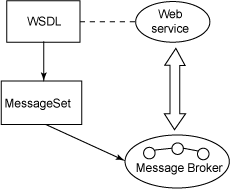
A "web service" is ... |
Web Services
Definicions
What is a Web Service ? :
The W3C defines a Web Service as a software system designed
to support interoperable machine to machine interaction over a network.
Web services are frequently just API's
that can be accessed over a network,
and executed on a remote system hosting the requested services.
Among the many ways devised
to enable humans to use software running on distant computers,
HTML transported over HTTP and presented via a web browser
is surely the most successful yet.
Wiki
The most significant web services technologies address three questions:
- how do I find web services that I want to use ? [UDDI]
- once I find a service, how do I learn how it works ? [WSDL]
- how do I format messages to a web service ? [XML]
Getting started with Web services
What is a Web service?
A Web service is a program that understands SOAP (XML+Rich Content).
A Web service is described by a WSDL definition.
WSDL defines the name and location of the service and its interface.
SOAP consists of a standard XML message wrapper (called Envelope) that embeds payload data within Header and Body elements.
The broker usually isn't the right place to implement a Web service from scratch,
but the strength of the broker is that it can support reuse by:
- acting as a client, invoking existing Web services from a message flow
- acting as an intermediary - providing a new interface or adding some value to an existing Web service
- implementing a Web service interface to an existing application (such as an MQ-enabled application)
URL [*****]
Vocabulary
SOAP
An XML-based, extensible message envelope format with "bindings" to underlying protocols.
The primary protocols are HTTP and HTTPS.
Web Services Description Language (WSDL)
An XML format that allows service interfaces to be described along with the details of their bindings to specific protocols.
Typically used to generate server and client code, and for configuration.
Universal Description Discovery and Integration (UDDI)
A protocol for publishing and discovering metadata about Web services
that enables applications to find them, either at design time or runtime.
Styles of use
Web services are a set of tools that can be used in a number of ways.
The three most common styles of use are RPC, SOA and REST.
Web services can also be used to implement an architecture according to Service-oriented architecture (SOA) concepts,
where the basic unit of communication is a message, rather than an operation.
This is often referred to as "message-oriented" services.
legacy APP goes web-service
In this scenario, the broker implements a new Web service interface.
An existing message flow is modified to provide a Web service.
If the existing message flow models its data in a message set,
a WSDL definition can be generated from that message set and made available to clients.
publib
how to get a web-service WSDL file
Querying WSDL with ?wsdl
How to create a WSDL ?
-
eclipse
- from a Message Set
- from a C header file
Resum
Un client d'un web-service és un programa que parla HTTP per enviar un stream XML a una IP+port.
XSD can be used to express a set of rules to which an XML document must conform in order to be considered 'valid' according to that schema.
wiki.
You can validate XML against XSD : libxml2.
Toolkit nodes
SOAPinput & SOAPreply
See "MB v 6.1 Message Flows" book ! [16.448.996 chars]
See & Run Toolkit samples !
See Toolkit Help !
Lets implement a WebService
What can it do ?
- input : postal code ; output : city name ;
GeoNames ? ;
US zip amb WSDL ;
- input : nothing (empty MQ message, with Reply-To fields); output : actual time (MQ message sent to origin);
- input : postal code ; output : local time ;
url
- input : Fahrenheit : output : Celsius ;
url
- Apache JAX-WS
calculator (requires Tomcat)
- soapUI
sample
-
DB access
-
public web services;
remember, you can get a WSDL from any ASMX endpoint by adding ?WSDL to the url
-
web services using
Apache Axis2
-
list :
GetCurrentTime, HelloWorld,
WS in toolkit samples
ws host
Demostrates how to use a broker to provide an interface to a legacy application as a web service.
See mb_tkt.htm also and
\\T430\IIBv9\workspace
In Toolkit, find "Web Services using HTTP nodes sample" and deploy it. Then,
- start legacy application : runLegacyApp.bat from WSHOST_LEGACY1 folder - verify MQCONN() and MQOPEN() are ok
- send a message -
send WSHOST1IN.xml file to http://localhost:7080/samplebrokerwshost
using \\T430\WebService\MB\host\envia.cmd
set FN=WSHOST1IN.xml
set URL=http://localhost:7080/samplebrokerwshost
"c:\Program Files (x86)\GnuWin32\bin\wget.exe" "%URL%" --post-file="%FN%" --header="Content-Type:text/xml"
Its contents is:
<?xml version="1.0" encoding="UTF-8"?>
<soapenv:Envelope xmlns:soapenv="http://schemas.xmlsoap.org/soap/envelope/
xmlns:c="http://www.brokersamplewshost.ibm.com"
xmlns:xsi="http://www.w3.org/2001/XMLSchema-instance">
<soapenv:Body>
<c:IA81CONFIN>
<MessageId>IA81CONF</MessageId>
<OrderNumber>ON4002</OrderNumber>
<ItemReference>IY4003</ItemReference>
<ItemQuantity>4</ItemQuantity>
<CustomerNumber>CY4004</CustomerNumber>
<DeliveryRef> </DeliveryRef>
<Confirm> </Confirm>
<filler1> </filler1>
</c:IA81CONFIN>
</soapenv:Body>
</soapenv:Envelope>
We receive back
type samplebrokerwshost
<?xml version="1.0"?>
<soapenv:Envelope xmlns:soapenv="http://schemas.xmlsoap.org/soap/envelope/"
xmlns:tns="http://www.brokersamplewshost.ibm.com"
xmlns:xsd="http://www.w3.org/2001/XMLSchema"
xmlns:xsi="http://www.w3.org/2001/XMLSchema-instance">
<soapenv:Body>
<tns:IA81CONFOUT>
<MessageId>IA81CONF</MessageId>
<OrderNumber>ON4002</OrderNumber>
<ItemReference>IY4003</ItemReference>
<ItemQuantity>4</ItemQuantity>
<CustomerNumber>CY4004</CustomerNumber>
<DeliveryRef>JOHNCORP</DeliveryRef>
<Confirm>Y</Confirm>
<filler1> </filler1>
</tns:IA81CONFOUT>
</soapenv:Body>
</soapenv:Envelope>
- you can get WSDL file from
http://localhost:7080/samplebrokerwshost?WSDL
MB as a ws client
Scenario
Assume that you want the broker to invoke an existing web service.
You import a WSDL definition for the web service
to create a message set
and create a message flow to invoke the web service.
If the Web service transport is HTTP,
then you would use an HTTPRequest node.
At run time, your message flow
creates an appropriately formatted web service request,
invokes the web service, and parses the web service response
Possible uses
- a message flow needs to use some capability available as a web service
- a different interface,
such as an alternative web services interface or a WebSphere MQ interface,
needs to be made available for an existing web service.
- the web service implementation needs to be adapted without changing its interface.
In other words, the broker acts as an intermediary to the web service.
For example,
a message flow could be used to enable auditing or to transparently propagate the web service response to another application.
src
 Demonstrates how to call a web service, and how to process the reply from the Web service.
From MB toolkit samples : "web services using HTTP nodes - run web service client"
Own code : \\T430\WebService\MB\legacy
- start legacy application : runLegacyApp.bat - verify MQCONN() and MQOPEN() are ok
- send a message : click WSCLIENT1.mbtest - "message flow test" window opens - click "enqueue", then "dequeue"
Sample input message is in "WSCLIENTIN.dat" and contains
IA81BUY LAB51234ITEM12345678qty00005CUST34567890zzzzzzzz
1234567812345678123456789abc12345678123456789abc12345678
It is based on the following format:
typedef struct tagIA81BUY {
char MessageId[8];
char OrderNumber[8];
char ItemReference[12];
char ItemQuantity[8];
char CustomerNumber[12];
char DeliveryRef[8];
} IA81BUY;
Convert MQ to SOAP :
BROKER SCHEMA WSCLIENT_MFP1
DECLARE ns NAMESPACE 'http://www.brokersamplewshost.ibm.com';
DECLARE tns NAMESPACE 'http://schemas.xmlsoap.org/soap/envelope/';
CREATE COMPUTE MODULE WSCLIENT_WSCLIENT1_Compute
CREATE FUNCTION Main() RETURNS BOOLEAN
BEGIN
CALL CopyMessageHeaders();
-- Save the MQMD; sending to HTTP later in the flow destroys it
SET Environment.MQMD = InputRoot.MQMD;
-- Input is CWF, Ouptut is SOAP, so set the wire format and message name
SET OutputRoot.Properties.MessageType = 'Envelope';
SET OutputRoot.Properties.MessageFormat = 'XML1';
-- Build message to be sent to web service
SET OutputRoot.MRM.tns:Body.ns:IA81CONFIN.MessageId = 'IA81CONF';
SET OutputRoot.MRM.tns:Body.ns:IA81CONFIN.OrderNumber = InputBody.OrderNumber;
SET OutputRoot.MRM.tns:Body.ns:IA81CONFIN.ItemReference = InputBody.ItemReference;
SET OutputRoot.MRM.tns:Body.ns:IA81CONFIN.ItemQuantity = InputBody.ItemQuantity;
SET OutputRoot.MRM.tns:Body.ns:IA81CONFIN.CustomerNumber = InputBody.CustomerNumber;
SET OutputRoot.MRM.tns:Body.ns:IA81CONFIN.DeliveryRef = ' ';
SET OutputRoot.MRM.tns:Body.ns:IA81CONFIN.Confirm = ' ';
SET OutputRoot.MRM.tns:Body.ns:IA81CONFIN.filler1 = ' ';
RETURN TRUE;
END;
Convert response from XML to MQ :
CREATE COMPUTE MODULE WSCLIENT_WSCLIENT1_Compute1
CREATE FUNCTION Main() RETURNS BOOLEAN
BEGIN
CALL CopyMessageHeaders();
-- Output is MQ, so remove HTTP headers
SET OutputRoot.HTTPResponseHeader = NULL;
-- Output is CWF, so set target message properties
SET OutputRoot.Properties.MessageType = 'msg_tagIA81CONF';
SET OutputRoot.Properties.MessageFormat = 'CWF1';
-- Create an MQMD and restore it to saved values
CREATE NEXTSIBLING OF OutputRoot.Properties DOMAIN 'MQMD';
SET OutputRoot.MQMD = Environment.MQMD;
-- Build message to be sent
SET OutputRoot.MRM.MessageId = InputBody.tns:Body.ns:IA81CONFOUT.MessageId;
SET OutputRoot.MRM.OrderNumber = InputBody.tns:Body.ns:IA81CONFOUT.OrderNumber;
SET OutputRoot.MRM.ItemReference = InputBody.tns:Body.ns:IA81CONFOUT.ItemReference;
SET OutputRoot.MRM.ItemQuantity = InputBody.tns:Body.ns:IA81CONFOUT.ItemQuantity;
SET OutputRoot.MRM.CustomerNumber = InputBody.tns:Body.ns:IA81CONFOUT.CustomerNumber;
SET OutputRoot.MRM.DeliveryRef = InputBody.tns:Body.ns:IA81CONFOUT.DeliveryRef;
SET OutputRoot.MRM.Confirm = InputBody.tns:Body.ns:IA81CONFOUT.Confirm;
SET OutputRoot.MRM.filler1 = InputBody.tns:Body.ns:IA81CONFOUT.filler1;
RETURN TRUE;
END;
my first WS
Trying to find an easy one
Hello my friend (using Eclipse)
- File - New - Project - Java Project - "wsServer_hello" - use default JRE
- File - New - Package - "com.myfirst.wsServer"
- New - Class - "SayHello" - public with no main method stub
- code SayHello.java
package com.myfirst.wsServer;
import javax.jws.WebService;
@WebService
public class SayHello {
private static final String SALUTATION = "Hello my friend";
public String getGreeting( String name ) {
return SALUTATION + " " + name;
}
}
- New - File - "build.xml" - open with Ant editor
<project default="wsgen">
<target name="wsgen" >
<exec executable="wsgen">
<arg line="-cp ./bin -keep -s ./src -d ./bin com.myfirst.wsServer.SayHello"/>
</exec>
</target>
</project>
- right-click on build.xml file, select Run As and then select Ant Build - see Console output
BUILD SUCCESSFUL
Total time: 9 seconds
- right-click on Project - select Refresh - see com.myfirst.wsServer.jaxws comes up
- (under com.myfirst.wsServer) New - Class - RunService - with main method stub
package com.myfirst.wsServer;
import javax.xml.ws.Endpoint; // the import Javax cannot be resolved if "Javax" (upper case "J")
public class RunService {
public static void main(String[] args) {
// TODO Auto-generated method stub
System.out.println ( "Hi. Say Hello - Web Service has started." ) ;
Endpoint.publish ( "http://localhost:8080/wsServer_hello", new SayHello() ) ; // http://localhost:8080/wsServerExample in original text
// the Endpoint API simply publishes the web service endpoint, which generates the WSDL at run time at a URL
}
}
- right-click class "RunService" - Run As - Java Application. Verify "Service started"
- display WSDL :
- open internal browser : Window > Show View > Other > General > Internal Web Browser
- enter URL : http://localhost:8080/wsServer_hello?wsdl (get it from RunService.java)
- test the server using Eclipse Web Services Explorer tool to invoke the operations of a web service via native WSDL and SOAP :
- how to access this WS using WGET ?
I want my client to receive 'SALUTATION = "Hello my friend";' text, right ?
part 1
Maybe
part 2
has the answer ?
No - Jose Angel Flores had the solution :
- from Eclipse Web Services Explorer, copy and paste the getGreeting.xml - open
"Invoke a WSDL Operation" and select "Source" top right :
<soapenv:Envelope
xmlns:q0="http://wsServer.myfirst.com/"
xmlns:soapenv="http://schemas.xmlsoap.org/soap/envelope/"
xmlns:xsd="http://www.w3.org/2001/XMLSchema"
xmlns:xsi="http://www.w3.org/2001/XMLSchema-instance">
<soapenv:Header>
</soapenv:Header>
<soapenv:Body>
<q0:getGreeting>
<arg0>sebasas</arg0>
</q0:getGreeting>
</soapenv:Body>
</soapenv:Envelope>
- now we can use WGET to access the web service :
set FN=getGreeting.xml
set URL=http://localhost:8080/wsServer_hello
"c:\Program Files (x86)\GnuWin32\bin\wget.exe" "%URL%" --post-file="%FN%" --header="Content-Type:text/xml"
And we receive a nice answer as:
<?xml version="1.0" ?><S:Envelope xmlns:S="http://schemas.xmlsoap.org/soap/envelope/">
<S:Body><ns2:getGreetingResponse xmlns:ns2="http://wsServer.myfirst.com/">
<return>Hello my friend sebasas</return>
</ns2:getGreetingResponse></S:Body></S:Envelope>
- in the MB project, create a "new ... Message Model",
with "SOAP XML", then select "I already have a WSDL for my data".
Now, check "Select file from outside workspace" and as location,
enter the URL http://localhost:8080/wsServer_hello?wsdl.
Magically, we get wsServer_hello.xsd and wsServer_hello.wsdl !
- now, in the MB flow, lets include a SOAP Request node, with WDSL ( wsServer_hello.wsdl, that
defines Port Type, Binding, Binding Operation and Service Port, as well as Target Namespace )
and Web Service URL ( http://localhost:8080/wsServer_hello ).
- preceeding it, we need a Compute node, to create the message:
CREATE COMPUTE MODULE creaXML
CREATE FUNCTION Main() RETURNS BOOLEAN
BEGIN
declare q0 NAMESPACE 'http://wsServer.myfirst.com/' ;
set OutputRoot.SOAP.Body.q0:getGreeting.arg0 = 'sebasas' ;
END;
END MODULE;
- we receive a nice answer from the web service:
(0x01000000:Folder):Body = ( ['xmlnsc' : 0x276c7590]
(0x01000000:Folder)http://wsServer.myfirst.com/:getGreetingResponse = (
(0x03000102:NamespaceDecl)http://www.w3.org/2000/xmlns/:ns2 = 'http://wsServer.myfirst.com/' (CHARACTER)
(0x03000000:PCDataField ):return = 'Hello my friend sebasas' (CHARACTER)
)
2nd WS : Time Of Day
On Eclipse we code another web service :
package com.ws.tod;
import java.text.SimpleDateFormat;
import java.util.Calendar;
import javax.jws.WebService;
@WebService
public class sayTOD {
private static final String SALUTATION = "TOD server." ;
public String say_TOD ( String name ) {
long timeInMillis = System.currentTimeMillis();
Calendar mycal = Calendar.getInstance();
mycal.setTimeInMillis(timeInMillis);
SimpleDateFormat dateFormat = new SimpleDateFormat("dd/MM/yyyy hh:mm:ss a");
String mydate = dateFormat.format( mycal.getTime() ) ;
return SALUTATION + " " + name + ", now its {" + mydate + "}." ;
}
}
We run it as before, as Java Application, and send this XML:
<soapenv:Envelope
xmlns:q0="http://tod.ws.com/"
xmlns:soapenv="http://schemas.xmlsoap.org/soap/envelope/"
xmlns:xsd="http://www.w3.org/2001/XMLSchema"
xmlns:xsi="http://www.w3.org/2001/XMLSchema-instance">
<soapenv:Header>
</soapenv:Header>
<soapenv:Body>
<q0:say_TOD>
<arg0>pepeta</arg0>
</q0:say_TOD>
</soapenv:Body>
</soapenv:Envelope>
To receive this beautiful answer:
<?xml version="1.0" ?>
<S:Envelope xmlns:S="http://schemas.xmlsoap.org/soap/envelope/">
<S:Body><ns2:say_TODResponse xmlns:ns2="http://tod.ws.com/">
<return>TOD server. pepeta, now its {31/03/2014 12:15:55 PM}.</return>
</ns2:say_TODResponse></S:Body></S:Envelope>
stock quote WS
Full description here :
https://www.ibm.com/developerworks/library/ws-apacheaxis/ :
Axis, ant, Tomcat, Jawa2WSDL, TCP/IP monitor in Eclipse,
Get
Axis
and
ant
We shall create a "Java project in Eclipse"
MQ related WS
To use all my MQ tools, I can use
. --- convert legacy to web service --- . --- old mq server app
|
HTTP input ---> Compute -------------> | MQ input --->
| Compute
HTTP output <--- Compute <------------- | MQ output <---
How to send an XML to a web service
google + how to send a xml to a web service :
url
-
Poster :
a developer tool for interacting with web services and other web resources that lets you make HTTP requests, set the entity body, and content type.
This allows you to interact with web services and inspect the results.
- use wget, as
wget "http://url_of_my_web_service?param1=123¶m2=abc" --post-file="xmlTestFile.xml" --header="Content-Type:text/xml"
Where the xmlTestFile.xml it's an xml file in the same directory you run the wget command.
If you want to send a xml string instead of a xml file, use --post-data="string"
-
soapUI has support for RESTful services, as well as for SOAP-based services.
-
curl is a popular tool.
-
if you're using Eclipse, it has a built in Web Services client.
I had to switch to the Java EE perspective and then find the right button on the main menu bar to launch it.
Once it's up, create a new WSDL page, enter the WSDL url, and then from there you can browse the web service and make requests.
If you click the source button in the top right you can manually enter the XML you want to send.
url
-
Chrome's
Dev HTTP Client is pretty good.
For some reason the "form" and "transformation" options are disabled for me though.
Eclipse TCPIP monitor
If we want to see the HTTP message sent to a web service we can use TCPIP monitor included in Eclipse.
If web service was listening on port 8181, we shall
- change the web service original port to a temporary value, let's say 1212
- insert monitor on the web services's port, as 8181
- open Eclipse -> Window -> Show View -> Other -> Debug -> TCP/IP Monitor
- right-click on empty canvas to set
- monitor on original port (as 8181)
- redirect the request to new app port (as 1212)
VM curs WAS
- develop a Web service from a JavaBean
- setup a private UDDI Registry
- publish the Web service into a private UDDI Registry
You can use a Java bean that already exists and then enable the implementation for Web services.
Enabling the Java bean for Web services includes developing the service endpoint interface,
developing a WSDL file that is the engine of the Web service,
generating and configuring the deployment descriptors,
assembling all artifacts required for the Web service,
and deploying the application into the WebSphere Application Server environment.
1. Create a temporary subdirectory :
*. C:\> mkdir \temp
2. Extract the war file to the temporary subdirectory :
*. C:\> cd \temp
*. C:\temp> C:\WAS6\AppServer\java\bin\jar -xvf
"C:\WAS60STEW\hands-on\1.6WebServicesLab\JavaBean.war"
3. Copy the service endpoint interface into the source subdirectory.
*. C:\> copy "C:\WAS60STEW\hands-on\1.6WebServicesLab\CheckCreditBean_SEI.java"
C:\temp\WEB-INF\source\com\creditcheckcorp\jb
4. Compile the service endpoint interface.
*. C:\temp> cd C:\temp\WEB-INF\source\com\creditcheckcorp\jb
*. C:\temp\WEB-INF\source\com\creditcheckcorp\jb> C:\WAS6\AppServer\java\bin\javac
-d C:\temp\WEB-INF\classes CheckCreditBean_SEI.java
This will create a C:\temp\WEB-INF\classes\com\creditcheckcorp\jb\CheckCreditBean_SEI.class file.
5. Develop a WSDL file.
*. C:\temp\WEB-INF\source\com\creditcheckcorp\jb>cd C:\temp\WEB-INF\classes
*. C:\temp\WEB-INF\classes>C:\WAS6\AppServer\bin\java2wsdl
-implClass com.creditcheckcorp.jb.CheckCreditBean
-location http://localhost:9080/JavaBean/services/CheckCreditBean
com.creditcheckcorp.jb.CheckCreditBean_SEI
This will create a CheckCreditBean.wsdl file in the current directory.
6. Move the WSDL file into the WEB-INF/wsdl subdirectory.
*. C:\temp\WEB-INF\classes> mkdir C:\temp\WEB-INF\wsdl
*. C:\temp\WEB-INF\classes> move CheckCreditBean.wsdl C:\temp\WEB-INF\wsdl
7. Develop Web services deployment descriptor templates for a JavaBeans implementation.
*. C:\temp\WEB-INF\classes> cd C:\temp
*. C:\temp> C:\WAS6\AppServer\bin\wsdl2java -verbose -role server -container web -introspect
-genJava no WEB-INF\wsdl\CheckCreditBean.wsdl
8. Assemble the Web archive file.
*. C:\temp> C:\WAS6\AppServer\java\bin\jar cvf JavaBean.war .
9. Bring up ASTK to complete the packaging and to generate an EAR file.
10. Start the application server.
*. C:\> cd WAS6\AppServer\profiles\AppSvr01\bin
*. C:\WAS6\AppServer\profiles\AppSvr01\bin> startServer server1
*. C:\WAS6\AppServer\profiles\AppSvr01\bin> serverStatus server1
11. Open the administration console :
*. Launch a Web browser and open http://localhost:<admin_port>/admin
The default admin port is 9060.
To know what TCP port the administration console is using,
open the file C:\WAS6\AppServer\profiles\AppSrv01\logs\portdef.props
*. Enter a User ID and select the "Log in" button.
12. Select "Applications", then "Install New Application".
13. Specify the JavaBeanEAR.ear module :
*. Select "Browse.".
*. Navigate to the C:\WAS60STEW\hands-on\1.6WebServicesLab directory
containing the JavaBeanEAR.ear file.
*. Select the JavaBeanEAR.ear file.
*. Select the "Open" button.
14. Select the "Next" button.
15. Select the "Next" button.
16. Select the "Step 4" URL.
17. Select the "Finish" button.
18. You should see a "Application JavaBeanEAR installed successfully." message.
Select the "Save to Master Configuration" URL.
19. Select the "Save" button.
20. Select "Applications", then "Enterprise Applications".
21. Check the JavaBeanEAR box, then select the "Start" button.
22. The JavaBeanEAR application should be started.
*** You have created a Web service from a JavaBean ***
Verify the Web service
Deploy JavaBeanClientEAR.ear and start JavaBeanClientEAR
35. Test the Web service from your browser with the following URL:
http://localhost:9080/JavaBeanClient/sampleCheckCreditBeanProxy/TestClient.jsp
36. Select the "search(java.lang.String)" method.
37. Input the value "1234" into the SSN text box, then select the "Invoke" button.
Install a UDDI V3 Private Registry
1. Ensure that the application server is not running.
__ a. C:\> cd c:\WAS6\AppServer\profiles\AppSvr01\bin
__ b. C:\WAS6\AppServer\profiles\AppSvr01\bin> stopServer server1
__ c. C:\WAS6\AppServer\profiles\AppSvr01\bin> serverStatus server1
2. Deploy UDDI to a standalone server.
__ a. cd c:\WAS6\AppServer\bin
__ b. wsadmin -conntype none -wsadmin_classpath c:\WAS6\AppServer\cloudscape\lib -f
uddiDeploy.jacl Node01 server1 default > uddiDeploy.log
-- c. Edit the uddiDeploy.log file to verify a successful completion.
-- d. Verify that the Cloudscape database has been created at the following subdirectory:
C:\WAS6\AppServer\profiles\AppSvr01\databases\com.ibm.uddi\UDDI30
3. Start the application server.
__ a. C:\> cd c:\WAS6\AppServer\profiles\AppSvr01\bin
__ b. C:\WAS6\AppServer\profiles\AppSvr01\bin> startServer server1
__ c. C:\WAS6\AppServer\profiles\AppSvr01\bin> serverStatus server1
4. Open the administration console.
__ a. http://localhost:9060/admin
__ b. Enter a User ID, then select the "Log in" button.
5. Verify that the UDDI registry application was started.
__ a. Select "Applications", then "Enterprise Applications".
__ b. UDDIRegistry.was60Node01.server1 should be Started
6. Verify that the UDDI node is active.
__ a. Select UDDI - UDDI Nodes
__ b. uddi:was60node01cell:was60node01:server1:default should be Activated
7. Examine the UDDI node settings by clicking on the URL for the UDDI Node ID.
8. Open the UDDI administration interface
__ a. http://localhost:9080/uddigui/
9. Explore registered services, businesses, and technical models
__ a. Select the "Find" tab.
__ b. Select Service with "Starting with:" %
__ c. Select Business with "Starting with:" %
__ d. Select Technical Model with "Starting with:" %
You have deployed a UDDI registry and examined some sample contents.
Populate the Registry Using UDDI Registry User Interface
1. Bring up the UDDI Registry user interface.
__ a. http://localhost:9080/uddigui/
2. Publish a business entry.
__ a. Select the "Publish" tab.
__ b. Select "Add a business".
__ c. Enter the Name: Modern Cars, then select the "Add Name" URL.
__ d. Select the "Show category tree" URL.
__ e. Under "Taxonomies", expand "NAICS 2002", then "Retail Trade [44]",
then "Motor Vehicle and Parts Dealers [441]",
then "Automobile Dealers [4411]", then "Used Car Dealers [44112]",
then select "Used Car Dealers [441120]".
__ f. Notice "Categorizations" is populated. Select the "Publish Business" button.
3. View the business entry
__ a. Select the "Find" URL at the top of the browser screen.
__ b. Select the "Business" radio button, enter "M%" into the "Starting with" text field, then select the "Find" button.
4. You should see the business entry.
5. Add a service to the business entry.
__ a. Select the "Publish" tab, then the "Show owned entities" URL.
__ b. Select the "Add service" URL.
__ c. Enter "Credit Check" into the "Name" text entry field, then select the "Add Name" URL.
__ d. Select the "Add a Service Binding" URL.
__ e. Enter the values for the "Access Point" and "Use Type" text entry fields, then select the "Add Access Point" URL.
The Access Point should usually be "http://localhost:9080/JavaBean/services/CheckCreditBean",
but the port might vary for your installation. The Use Type should be "http".
__ f. Select the "Add Binding" button.
__ g. Select the "Add Service" button to add the service to the business entry.
__ h. You will see the resulting service entry.
You have added a business entry with a service into the UDDI registry.
Libros
RedBook SG24-6583 : using Web Services for Business Integration
URL,
T42
Service Pack IA81 :
WebSphere Business Integration Message Broker and Web Services
This SupportPac examines the role that
WebSphere Business Integration Message Broker
can play in a Web Services environment.
URL
MB Message Flows :
- Creating a Web service with WebSphere MQ as the transport : pg 42
- Accessing a WebSphere MQ enabled application as a Web service : pg 42
- A WebSphere MQ enabled application calling a Web service : pg 44
MB v 6.0 Message Flows,
page [53-55/1020].
Broker implements new Web service interface
In this Web service scenario,
the broker provides a Web service interface
to an existing non-web-service application.
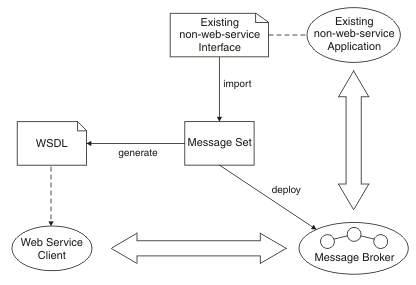
Design steps
- Create a message set for the business messages, possibly by importing an existing interface definition such as a C header file or COBOL copybook.
- Generate a WSDL definition from the message set.
- Use a SOAP toolkit such as Rational Application Developer to create a suitable Web services client based on the WSDL.
- Develop a message flow to implement the Web service.
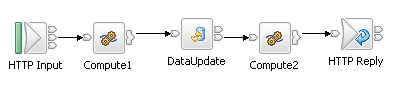
Example 1 - an existing CICS application has a COBOL copybook interface.
Example 2 - the message flow is invoked as a Web service
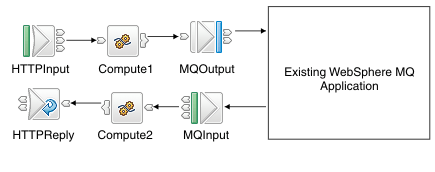
Example 3 - the message flow provides access to a WebSphere MQ application
URL
MQ and Web Services
- MA94 Standalone listener no JEE pre-requisites
- MA0Y Servlet-based HTTP Bridge
TMM44
HTTP connectivity to MQ
Alternative implementation as MA94.
Key features of the MQ bridge for HTTP:
- maps URIs to queues and topics
- enables MQPUT and MQGET from
- web browser
- lightweight client
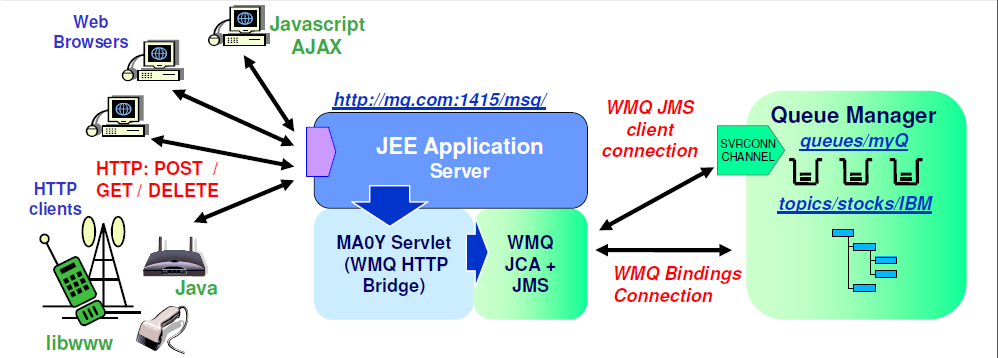
The HTTP/WMQ API is largely based on REST.
The API is modelled after REST ("Representational State Transfer") principles.
REST offers a different integration style to WS-* standards based web services.
Qualities of service are sacrificed for simplicity and scalability to keep barriers-to-entry low.
It is a stateless / connectionless API with one HTTP verb corresponding to one WMQ operation.
No client libraries are provided apps code directly to HTTP verbs using whatever APIs are in the environment.
REST was described by Roy Fielding in
http://www.ics.uci.edu/~fielding/pubs/dissertation/rest_arch_style.htm.
TMM07
WebServices high availability
A web service request comes out as a URL, related to a specific IP.
If we want to provide access to two (or more) diferent servers, we can use a hardwar as F5
Homepage,
wiki,
Links
-
HTTP transport nodes in MB v6
with some throughput, performance and scalability considerations
-
VW503G - A Technical Introduction to Web Services
-
the basic Web Services platform is XML + HTTP.
Web Services intro
-
MA93 - WMQ Service Definition : contains the WebSphere MQ Service Definition specification
which defines how to represent WebSphere MQ applications as Web services using IRIs and WSDL.
-
cataloging WebSphere MQ Applications in WSDL for Reuse in SOA -
RedPaper
-
top 10 SOA and web services
tutorials and articles
-
best web service "Hello World" sample :
part 1
part 2
{\\T430\WebServices\docs}
Eclipse IDE, Java SE 6, Apache Ant, TCP/IP Monitor, Eclipse Web Services Explorer.
-
was8.5+RAD :
jdk-8-windows-x64.exe +
eclipse-jee-kepler-SR2-win32-x86_64.zip +
2x SAG WebServices !