PIX 515 E - PIX Version 6.3(5)
Desc
This product is no longer being sold and might not be supported {May'09}
The Cisco PIX 515E is a modular, purpose-built security appliance
that delivers enterprise-class security for small to medium-sized business networks.
The Cisco PIX 515E versatile one-rack-unit design
supports up to six 10/100 Fast Ethernet interfaces,
making it an excellent choice for businesses requiring
a cost-effective, resilient security solution with "demilitarized zone" support.
It also delivers up to 188 Mbps of firewall throughput
with the capability to handle more than 130,000 simultaneous sessions.
Certain PIX 515E models include high-availability services
as well as integrated hardware VPN acceleration
that delivers up to 140 Mbps of Triple Data Encryption Standard (3DES) VPN throughput
and 140 Mbps of Advanced Encryption Standard-256 (AES) VPN throughput
descripcio curta ;
Cisco PIX 515E Security Appliance = descripció molt detallada.
Console
Alternative Ways to Access the Security Appliance
You can access the CLI for administration using the console port on the security appliance.
To do so, you must run a serial terminal emulator on a PC or workstation.
To set up your system so that you can administer the security appliance
from the command line using the console port, follow these steps:
Step 1
Connect the blue console cable so that you have a DB-9 connector on one end,
as required by the serial port for your computer, and the RJ-45 connector on the other end.
Use the console port to connect to a computer to enter configuration commands.
Locate the blue console cable from the accessory kit.
The blue console cable assembly consists of a null-modem cable with RJ-45 connectors and a DB-9 connector.
Step 2
Connect the RJ-45 connector to the PIX 515E security appliance console port,
and connect the other end to the serial port connector on your computer.
url
Emulacion de terminal
Usaremos un emulador de terminal tipo minicom
(comando 'minicom s') u otro programa terminal, como HyperTerm o TinyTerm.
La configuración del programa de emulación debe ser la siguiente:
- velocidad 9600 bits/s
- sin paridad
- 8 bits de datos
- 1 bit de parada (8N1)
- dispositivo de entrada: ttyS0
url
| Level of access
| User Prompt
|
| User EXEC mode
| pixfirewall>
|
| Provilege EXEC mode
| pixfirewall#
|
| Configuration mode
| pixfirewall(config)#
|
| Monitor mode
| >
|
url - llibre parcial pero molt bo : Cisco PIX firewalls, by Richard A. Deal, by Osborne.
To log out of the PIX while at User EXEC mode, use the exit or quit command.
To gain access to Privilege EXEC mode, use enable command (+ password).
To go back back to User EXEC mode, use the disable command.
Configuration mode is used to enter most of the PIC configuration
implementations and changes.
To enter Configuration mode, execute the configure terminal command
from Privilege EXEC mode.
Pipe a command output
You can filter any command output using the pipe command [|] and the begin, include, or exclude options.
How to change the password
The PIX supports two levels of passwords :
one for access to User EXEC mode via telnet
and one for access to Privilege EXEC.
You configure these passwords in either Provilege EXEC or Configuration mode.
To configure the telnet password, use the passwd command :
pixfirewall# passwd password
The default password is cisco for telnet access.
To set the Privilege EXEC password, use the enable password command :
pixfirewall# enable password password
The default Privilege EXEC password is cisco/c1sc0123.
Password Recovery and Configuration Recovery Procedure for the PIX
This document describes how to recover a PIX password for PIX software releases through 7.0. Note that performing password recovery on the PIX erases only the password, not the configuration.
url
Another
How to save the PIX configuration
The PIX configuration can be saved to a remote TFTP Server :
ping 10.0.0.2
tftp-server inside 10.0.0.2 /filename.cfg
write net
If the configuration you have on the TFTP server is the one you want your firewall to load on startup then type this:
copy tftp %parameters% startup-config
reload <enter>
Or, if you want the configuration on the TFTP server to be placed into memory
and be running as soon as the copy is finished, then type this:
copy tftp %parameters% running-config
Examen : Installation and Configuration for the Cisco PIX Firewall - EAL4 Certification, Version 5.2(3)
URL
How to modify a VLAN
Previous (wrong) state:
3750PoE-pl8#show vlan
VLAN Name Status Ports
---- -------------------------------- --------- -------------------------------
1 default active Fa1/0/13, Fa1/0/19, Fa1/0/20, Fa1/0/21, Fa1/0/22, Gi1/0/1, Gi1/0/2
2 Avaya active Fa1/0/1, Fa1/0/2, Fa1/0/3, Fa1/0/4, Fa1/0/5, Fa1/0/6, Fa1/0/7, Fa1/0/8, Fa1/0/9, Fa1/0/10
Fa1/0/11, Fa1/0/12, Fa1/0/14, Fa1/0/16
3 Cisco active Fa1/0/15, Fa1/0/17, Fa1/0/18, Fa1/0/24
Lets modify the configuration:
3750PoE-pl8>enable
Password:
3750PoE-pl8#configure terminal
Enter configuration commands, one per line. End with CNTL/Z.
3750PoE-pl8(config)#interface Fa1/0/15
3750PoE-pl8(config-if)#switchport access vlan 1
3750PoE-pl8(config)#interface Fa1/0/16
3750PoE-pl8(config-if)#switchport access vlan 1
3750PoE-pl8(config-if)#^Z
3750PoE-pl8#
3750PoE-pl8#show vlan
VLAN Name Status Ports
---- -------------------------------- --------- -------------------------------
1 default active Fa1/0/13, Fa1/0/15, Fa1/0/16, Fa1/0/19, Fa1/0/20, Fa1/0/21, Fa1/0/22, Gi1/0/1, Gi1/0/2
Save it forever:
3750PoE-pl8#write mem
Building configuration...
[OK]
3750PoE-pl8#
Verify we see the terminal:
3750PoE-pl8#show arp | inc Vlan1
Internet 192.168.78.92 0 0050.564d.2dd1 ARPA Vlan1 <<< here it is !!!
How to modify the wifi values
To activate wifi and set a password, do:
$ telnet 192.168.83.62
pisc871# show running-config ; veure configuraci
name# config t ; configuracio basica
name(config)# int dotRadio 0 ; configurar radio (0=2,4 GHz, 1=5 GHz)
name(config-if)# ip address 192.168.83.62 255.255.255.0 ; set IP & mask
name(config-if)# ip route 0.0.0.0 0.0.0.0 192.168.83.1 ; set default gateway
name(config-if)# ssid myssid ; set network id
name(config-if)# password mypwd ; set password
name(config-if)# no shutdown ; engegar interface
name(config-if)# shutdown ; aturar interface
How to modify the wifi channel
$ telnet 192.168.83.62
# enable
# config t
# interface dot11radio 0 // "0" = 2,4 GHz, "1" = 5 GHz
# channel 2462 // this is channel 11; ch 1 = 2412, 6 = 2437, 11 = 2462.
# CTRL-Z
# write mem
Now we can see:
bisc871# show controller dot11 0
!
interface Dot11Radio0
Radio ATHEROS AR5213, Address 001e.4a18.cc40, BBlock version 0.01, Software version 3.00.0
Serial number:
Carrier Set: EMEA (EU )
Current Frequency: 2462 Mhz Channel 11
Allowed Frequencies: 2412(1) 2417(2) 2422(3) 2427(4) 2432(5) 2437(6) 2442(7) 2447(8) 2452(9) 2457(10) 2462(11) 2467(12) 2472(13)
Current CCK Power: 20 dBm
Allowed CCK Power Levels: 7 10 13 15 17 20
Current OFDM Power: 17 dBm
Allowed OFDM Power Levels: 7 10 13 15 17
ERP settings: short slot time.
Neighbors in non-erp mode:
Current Rates: basic-1.0 basic-2.0 basic-5.5 6.0 9.0 basic-11.0 12.0 18.0 24.0 36.0 48.0 54.0
Allowed Rates: 1.0 2.0 5.5 6.0 9.0 11.0 12.0 18.0 24.0 36.0 48.0 54.0
Best Range Rates: basic-1.0 2.0 5.5 6.0 9.0 11.0 12.0 18.0 24.0 36.0 48.0 54.0
Best Throughput Rates: basic-1.0 basic-2.0 basic-5.5 basic-6.0 basic-9.0 basic-11.0 basic-12.0 basic-18.0 basic-24.0 basic-36.0 basic-48.0 basic-54.0
Default Rates: basic-1.0 basic-2.0 basic-5.5 6.0 9.0 basic-11.0 12.0 18.0 24.0 36.0 48.0 54.0
And less interesting:
bisc871# show int dot11Radio 0
Dot11Radio0 is up, line protocol is up
Hardware is 802.11G Radio, address is 001e.4a18.cc40 (bia 001e.4a18.cc40)
MTU 1500 bytes, BW 54000 Kbit, DLY 1000 usec,
reliability 247/255, txload 1/255, rxload 1/255
Encapsulation ARPA, loopback not set
ARP type: ARPA, ARP Timeout 04:00:00
Last input 00:00:01, output 00:00:00, output hang never
Last clearing of "show interface" counters never
Input queue: 0/75/1791/0 (size/max/drops/flushes); Total output drops: 2914
Queueing strategy: fifo
Output queue: 0/30 (size/max)
5 minute input rate 2000 bits/sec, 1 packets/sec
5 minute output rate 6000 bits/sec, 1 packets/sec
382902 packets input, 33542082 bytes, 0 no buffer
Received 6574328 broadcasts, 0 runts, 0 giants, 2 throttles
49971 input errors, 1158559 CRC, 0 frame, 0 overrun, 0 ignored
0 input packets with dribble condition detected
598470 packets output, 692818577 bytes, 0 underruns
331 output errors, 0 collisions, 4 interface resets
0 babbles, 0 late collision, 0 deferred
0 lost carrier, 0 no carrier
0 output buffer failures, 0 output buffers swapped out
bisc871#
How to save configuration changes forever
pix-fw> enable
pix-fw# config t
pix-fw(config)# username nom_usuari password clau_de_pas privilege 3
( Maximum allowed username length is 15 )
( Maximum allowed password length is 16 )
pix-fw# (Control + Z)
pix-fw# write mem
Building configuration...
Cryptochecksum: fe7df3f6 d5e46617 155ed404 94ca7a60
[OK]
pix-fw#
Cisco PIX links
871 (wireless) router
Homepage : cfg guides, examples, downloads, etc
Neteja inicial
The first thing I do with all the newer Cisco routers is wipe the default configuration on them.
You must first log in with username "cisco" and password "cisco."
enable
write erase
reload (confirm reboot)
Once the router is rebooted, you'll see a "router>" prompt and there will be no passwords required.
Now you're starting with a clean slate.
url
Configuració bàsica
name# show running-config ; veure configuració
name# config t ; configuracio basica (veure "int")
name(config)# int dotRadio 0 ; configurar radio (0=2,4 GHz, 1=5 GHz)
name(config-if)# ip address 192.168.83.62 255.255.255.0 ; set IP & mask
name(config-if)# ip route 0.0.0.0 0.0.0.0 192.168.83.1 ; set default gateway
name(config-if)# no shutdown ; engegar interface
name(config-if)# shutdown ; aturar interface
TFTP
Podem salvar fitxers en un servidor TFTP, as Solar-Winds al Pluja :
871-403# copy running-config tftp://192.168.78.99/run-cfg.txt
Address or name of remote host [192.168.78.99]?
Destination filename [run-cfg.txt]?
!!
7832 bytes copied in 3.080 secs (2543 bytes/sec)
871-403# copy startup-config tftp://192.168.78.99/start-cfg.txt
Address or name of remote host [192.168.78.99]?
Destination filename [start-cfg.txt]?
!!
6482 bytes copied in 0.092 secs (70457 bytes/sec)
871-403#
IOS update
- start a TFTP server, on a known IP
- start a putty on PIX and display actual files :
$ dir
16.417.632 c870-advsecurityk9-mz.124-15.T7.bin
So, we have version 12.4(15) running of the "advanced security" brand.
- get new IOS :
Anem a
cisco.com, i després a
download software,
busquem "871" i trobem:
"c870-advsecurityk9-mz.124-24.T5.bin", 18.826.736 bytes
To Download this software, you must Log In with your Cisco.com user id and have a valid service contract associated to your Cisco.com user ID
We place it in the TFTP server directory.
- save actual IOS to TFTP server :
$ copy flash tftp - required parameters will be requested.
- save actual startup :
$ copy startup-config <filename> - copy into flash !
- as we dont have enough space for 2 IOS's, we will have to erase the old one :
$ del filename
- copy new IOS to 871 :
$ copy tftp flash - required parameters will be requested.
- select/define the system to boot : "config t" + "boot system ?" +
$ boot system flash c870-advsecurityk9-mz.124-24.T5.bin
Actual "running-config" will reflect this line !
- display actual running-config : "wr t" = "write terminal"
- put running-config into startup-config :
$ wr
"wr" = "copy running-config startup-config"
- start new IOS :
$ reload
- SDM Download
SDM Release Notes:
How to install.
- display new version :
871-403# show version
Cisco IOS Software, C870 Software (C870-ADVSECURITYK9-M), Version 12.4(24)T5, RELEASE SOFTWARE (fc3)
Technical Support: http://www.cisco.com/techsupport
Copyright (c) 1986-2011 by Cisco Systems, Inc.
Compiled Fri 04-Mar-11 07:45 by prod_rel_team
ROM: System Bootstrap, Version 12.3(8r)YI4, RELEASE SOFTWARE
871-403 uptime is 19 hours, 23 minutes
System returned to ROM by reload
System image file is "flash:c870-advsecurityk9-mz.124-24.T5.bin"
Last reload reason: Reload Command
Usuaris VPN
Podem definir usuaris fent un telnet al 871 :
871-403# config t ; configuració bàsica
871-403(config)# username myuser privilege 1 secret 0 claudepas
871-403(config)# CTRL-Z
871-403# show running-config => OK
871-403# write mem => save configuration
Per esborrar un usuari:
config t
no username name_user_to_delete
CNTL/Z
wr
Per a que no es vegin les claus de pas amb "show running-config" cal engegar el servei d'encriptació de passwords:
Router(config)# service password-encryption
Troubleshooting commands
show tech { *** VERY VERY large and interesting *** }
show version
show log
show interfaces {FastEthernet4}
show interfaces stat
show ip int brief
show interfaces counters errors
show interface FastEthernet1 stat
show interface FastEthernet1 summary
show interface FastEthernet1 switching
show controllers { large }
show processes
show processes cpu
show processes cpu history ; in enable mode:
show process cpu sorted | ex 0.0 ; in enable mode:
show processes memory
show flash
show memory stat ; in enable mode:
Interesting:
871-403# show interfaces FastEthernet4 stat
FastEthernet4
Switching path Pkts In Chars In Pkts Out Chars Out
Processor 28733 7281243 26051 2842335
Route cache 259976 83002142 323762 0
Total 288709 90283385 349813 2842335
To clear or reset the counters:
871-403> enable
Password:
871-403# clear counters
Clear "show interface" counters on all interfaces [confirm]
871-403#
*Oct 5 03:36:09.389: %CLEAR-5-COUNTERS: Clear counter on all interfaces by sebas on console
Command result on OK day
871-403#
show version
Cisco IOS Software, C870 Software (C870-ADVSECURITYK9-M), Version 12.4(24)T5, RELEASE SOFTWARE (fc3)
Technical Support: http://www.cisco.com/techsupport
Copyright (c) 1986-2011 by Cisco Systems, Inc.
Compiled Fri 04-Mar-11 07:45 by prod_rel_team
ROM: System Bootstrap, Version 12.3(8r)YI4, RELEASE SOFTWARE
871-403 uptime is 18 hours, 27 minutes
System returned to ROM by power-on
System image file is "flash:c870-advsecurityk9-mz.124-24.T5.bin"
This product contains cryptographic features and is subject to United
States and local country laws governing import, export, transfer and
use. Delivery of Cisco cryptographic products does not imply
third-party authority to import, export, distribute or use encryption.
Importers, exporters, distributors and users are responsible for
compliance with U.S. and local country laws. By using this product you
agree to comply with applicable laws and regulations. If you are unable
to comply with U.S. and local laws, return this product immediately.
A summary of U.S. laws governing Cisco cryptographic products may be found at:
http://www.cisco.com/wwl/export/crypto/tool/stqrg.html
If you require further assistance please contact us by sending email to export@cisco.com
Cisco 871W (MPC8272) processor (revision 0x300) with 118784K/12288K bytes of memory.
Processor board ID FCZ131912Y1
MPC8272 CPU Rev: Part Number 0xC, Mask Number 0x10
5 FastEthernet interfaces
1 802.11 Radio
128K bytes of non-volatile configuration memory.
28672K bytes of processor board System flash (Intel Strataflash)
Configuration register is 0x2102
871-403#
871-403#
show log
Syslog logging: enabled (0 messages dropped, 2 messages rate-limited,
0 flushes, 0 overruns, xml disabled, filtering disabled)
No Active Message Discriminator.
No Inactive Message Discriminator.
Console logging: level debugging, 36 messages logged, xml disabled,
filtering disabled
Monitor logging: level debugging, 0 messages logged, xml disabled,
filtering disabled
Buffer logging: level debugging, 36 messages logged, xml disabled,
filtering disabled
Logging Exception size (4096 bytes)
Count and timestamp logging messages: disabled
Persistent logging: disabled
No active filter modules.
ESM: 0 messages dropped
Trap logging: level informational, 39 message lines logged
Log Buffer (4096 bytes):
*Mar 1 00:00:13.717: %VPN_HW-6-INFO_LOC: Crypto engine: onboard 0 State changed to: Initialized
*Mar 1 00:00:13.721: %VPN_HW-6-INFO_LOC: Crypto engine: onboard 0 State changed to: Enabled
*Mar 1 00:00:15.537: %LINK-3-UPDOWN: Interface FastEthernet0, changed state to up
*Mar 1 00:00:15.537: %LINK-3-UPDOWN: Interface FastEthernet4, changed state to up
*Mar 1 00:00:16.538: %LINEPROTO-5-UPDOWN: Line protocol on Interface FastEthernet0, changed state to up
*Mar 1 00:00:16.538: %LINEPROTO-5-UPDOWN: Line protocol on Interface FastEthernet4, changed state to up
*Mar 1 00:00:18.142: USB init complete.
*Mar 1 00:00:41.485: %LINEPROTO-5-UPDOWN: Line protocol on Interface Vlan1, changed state to down
*Mar 1 00:00:41.885: %LINK-5-CHANGED: Interface Dot11Radio0, changed state to administratively down
*Mar 1 00:00:42.261: %SYS-5-CONFIG_I: Configured from memory by console
*Oct 4 09:19:26.576: %LINEPROTO-5-UPDOWN: Line protocol on Interface NVI0, changed state to up
*Oct 4 09:19:26.624: %LINEPROTO-5-UPDOWN: Line protocol on Interface Dot11Radio0, changed state to down
*Oct 4 09:19:27.740: %SYS-5-RESTART: System restarted --
Cisco IOS Software, C870 Software (C870-ADVSECURITYK9-M), Version 12.4(24)T5, RELEASE SOFTWARE (fc3)
Technical Support: http://www.cisco.com/techsupport
Copyright (c) 1986-2011 by Cisco Systems, Inc.
Compiled Fri 04-Mar-11 07:45 by prod_rel_team
*Oct 4 09:19:27.740: %SNMP-5-COLDSTART: SNMP agent on host 871-403 is undergoing a cold start
*Oct 4 09:19:27.784: %SSH-5-ENABLED: SSH 1.99 has been enabled
*Oct 4 09:19:27.976: %CRYPTO-6-ISAKMP_ON_OFF: ISAKMP is OFF
*Oct 4 09:19:27.976: %CRYPTO-6-ISAKMP_ON_OFF: ISAKMP is OFF
*Oct 4 09:19:27.976: %CRYPTO-6-ISAKMP_ON_OFF: ISAKMP is ON
*Oct 4 09:19:27.992: %LINK-3-UPDOWN: Interface FastEthernet3, changed state to up
*Oct 4 09:19:27.996: %LINK-3-UPDOWN: Interface FastEthernet2, changed state to up
*Oct 4 09:19:27.996: %LINK-3-UPDOWN: Interface FastEthernet1, changed state to up
*Oct 4 09:19:27.996: %LINK-3-UPDOWN: Interface FastEthernet0, changed state to up
*Oct 4 09:19:29.024: %LINEPROTO-5-UPDOWN: Line protocol on Interface FastEthernet3, changed state to down
*Oct 4 09:19:29.024: %LINEPROTO-5-UPDOWN: Line protocol on Interface FastEthernet2, changed state to down
*Oct 4 09:19:29.024: %LINEPROTO-5-UPDOWN: Line protocol on Interface FastEthernet1, changed state to down
*Oct 4 09:19:29.024: %LINEPROTO-5-UPDOWN: Line protocol on Interface FastEthernet0, changed state to down
*Oct 4 09:19:30.132: %LINK-3-UPDOWN: Interface FastEthernet1, changed state to down
*Oct 4 09:19:31.368: %LINEPROTO-5-UPDOWN: Line protocol on Interface Vlan1, changed state to up
*Oct 4 09:19:32.360: %LINK-3-UPDOWN: Interface FastEthernet1, changed state to up
*Oct 4 09:19:33.360: %LINEPROTO-5-UPDOWN: Line protocol on Interface FastEthernet1, changed state to up
*Oct 4 09:20:46.306: %LINEPROTO-5-UPDOWN: Line protocol on Interface Virtual-Access2, changed state to up
*Oct 4 09:58:04.792: %CRYPTO-4-IKMP_NO_SA: IKE message from 195.212.29.180 has no SA and is not an initialization offer
*Oct 4 11:16:03.520: %LINEPROTO-5-UPDOWN: Line protocol on Interface Virtual-Access2, changed state to down
*Oct 5 03:16:01.453: %LINEPROTO-5-UPDOWN: Line protocol on Interface Virtual-Access2, changed state to up
*Oct 5 03:36:09.389: %CLEAR-5-COUNTERS: Clear counter on all interfaces by sebas on console
*Oct 5 03:37:27.755: %LINEPROTO-5-UPDOWN: Line protocol on Interface Virtual-Access3, changed state to up
871-403#
871-403#
show interface FastEthernet1
FastEthernet1 is up, line protocol is up
Hardware is Fast Ethernet, address is 0025.45e6.6864 (bia 0025.45e6.6864)
MTU 1500 bytes, BW 100000 Kbit/sec, DLY 100 usec,
reliability 255/255, txload 1/255, rxload 1/255
Encapsulation ARPA, loopback not set
Keepalive set (10 sec)
Half-duplex, 100Mb/s
ARP type: ARPA, ARP Timeout 04:00:00
Last input 00:00:01, output never, output hang never
Last clearing of "show interface" counters 00:12:02
Input queue: 0/75/0/0 (size/max/drops/flushes); Total output drops: 0
Queueing strategy: fifo
Output queue: 0/40 (size/max)
5 minute input rate 6000 bits/sec, 5 packets/sec
5 minute output rate 1000 bits/sec, 3 packets/sec
6868 packets input, 1752760 bytes, 0 no buffer
Received 308 broadcasts, 0 runts, 0 giants, 0 throttles
0 input errors, 0 CRC, 0 frame, 0 overrun, 0 ignored
0 input packets with dribble condition detected
4974 packets output, 2038498 bytes, 0 underruns
0 output errors, 150 collisions, 0 interface resets
12 unknown protocol drops
0 babbles, 0 late collision, 0 deferred
0 lost carrier, 0 no carrier
0 output buffer failures, 0 output buffers swapped out
871-403#
871-403#
show interface FastEthernet4
FastEthernet4 is up, line protocol is up
Hardware is PQUICC_FEC, address is 0025.45e6.686d (bia 0025.45e6.686d)
Description: $ETH-WAN$
Internet address is 213.229.144.194/28
MTU 1500 bytes, BW 100000 Kbit/sec, DLY 100 usec,
reliability 255/255, txload 1/255, rxload 1/255
Encapsulation ARPA, loopback not set
Keepalive set (10 sec)
Full-duplex, 100Mb/s, 100BaseTX/FX
ARP type: ARPA, ARP Timeout 04:00:00
Last input 00:00:00, output 00:00:00, output hang never
Last clearing of "show interface" counters 00:12:21
Input queue: 0/75/0/0 (size/max/drops/flushes); Total output drops: 0
Queueing strategy: fifo
Output queue: 0/40 (size/max)
5 minute input rate 2000 bits/sec, 3 packets/sec
5 minute output rate 3000 bits/sec, 3 packets/sec
5463 packets input, 2259087 bytes
Received 8 broadcasts, 0 runts, 0 giants, 0 throttles
0 input errors, 0 CRC, 0 frame, 0 overrun, 0 ignored
0 watchdog
0 input packets with dribble condition detected
5378 packets output, 1512956 bytes, 0 underruns
0 output errors, 0 collisions, 0 interface resets
0 unknown protocol drops
0 babbles, 0 late collision, 0 deferred
0 lost carrier, 0 no carrier
0 output buffer failures, 0 output buffers swapped out
871-403#
871-403#
show interface FastEthernet4 | inc Internet
Internet address is 213.229.144.194/28
871-403#
show interface Vlan1
Vlan1 is up, line protocol is up
Hardware is EtherSVI, address is 0025.45e6.6863 (bia 0025.45e6.6863)
Description: $ETH-SW-LAUNCH$$INTF-INFO-HWIC 4ESW$
Internet address is 192.168.78.2/16
MTU 1500 bytes, BW 100000 Kbit/sec, DLY 100 usec,
reliability 255/255, txload 1/255, rxload 1/255
Encapsulation ARPA, loopback not set
ARP type: ARPA, ARP Timeout 04:00:00
Last input 00:00:00, output never, output hang never
Last clearing of "show interface" counters 00:13:16
Input queue: 0/75/0/0 (size/max/drops/flushes); Total output drops: 0
Queueing strategy: fifo
Output queue: 0/40 (size/max)
5 minute input rate 7000 bits/sec, 6 packets/sec
5 minute output rate 3000 bits/sec, 5 packets/sec
6949 packets input, 1761159 bytes, 0 no buffer
Received 353 broadcasts, 0 runts, 0 giants, 0 throttles
0 input errors, 0 CRC, 0 frame, 0 overrun, 0 ignored
5347 packets output, 2138615 bytes, 0 underruns
0 output errors, 0 interface resets
0 unknown protocol drops
0 output buffer failures, 0 output buffers swapped out
871-403#
871-403#
show ip int brief
Interface IP-Address OK? Method Status Protocol
Dot11Radio0 unassigned YES NVRAM administratively down down
FastEthernet0 unassigned YES unset up down
FastEthernet1 unassigned YES unset up up <<<<<<<<<<<<<<<<<<<<<<<<<<<<<<<<<
FastEthernet2 unassigned YES unset up down
FastEthernet3 unassigned YES unset up down
FastEthernet4 213.229.144.194 YES NVRAM up up <<<<<<<<<<<<<<<<<<<<<<<<<<<<<<<<<
NVI0 213.229.144.194 YES unset up up
Virtual-Access1 unassigned YES unset down down
Virtual-Access2 213.229.144.194 YES TFTP up up
Virtual-Access3 213.229.144.194 YES TFTP up up
Virtual-Template2 213.229.144.194 YES TFTP down down
Vlan1 192.168.78.2 YES NVRAM up up <<<<<<<<<<<<<<<<<<<<<<<<<<<<<<<<<
871-403#
871-403#
show proc cpu sorted
CPU utilization for five seconds: 1%/0%; one minute: 1%; five minutes: 1%
PID Runtime(ms) Invoked uSecs 5Sec 1Min 5Min TTY Process
4 584825 33419 17499 0.79% 0.87% 0.84% 0 Check heaps
50 66809 335769 198 0.07% 0.05% 0.09% 0 COLLECT STAT COU
1 12 25 480 0.00% 0.00% 0.00% 0 Chunk Manager
2 16 13431 1 0.00% 0.00% 0.00% 0 Load Meter
3 0 3 0 0.00% 0.00% 0.00% 0 Collection proce
5 0 2 0 0.00% 0.00% 0.00% 0 Pool Manager
6 0 2 0 0.00% 0.00% 0.00% 0 Timers
7 0 1 0 0.00% 0.00% 0.00% 0 Crash writer
8 2648 8008 330 0.00% 0.00% 0.00% 0 ARP Input
9 8 70069 0 0.00% 0.00% 0.00% 0 ARP Background
10 0 2 0 0.00% 0.00% 0.00% 0 ATM Idle Timer
871-403#
show memory statistics
Head Total(b) Used(b) Free(b) Lowest(b) Largest(b)
Processor 8310EF28 70193368 22892228 47301140 47255496 47268872
I/O 7400000 12582912 3978820 8604092 8575168 8577628
871-403#
show interfaces counters errors
Port Align-Err FCS-Err Xmit-Err Rcv-Err UnderSize
Fa0 0 0 0 0 0
Fa1 0 0 0 0 0
Fa2 0 0 0 0 0
Fa3 0 0 0 0 0
Port Single-Col Multi-Col Late-Col Excess-Col Carri-Sen Runts Giants
Fa0 0 0 0 0 0 0 0
Fa1 180 0 0 0 0 0 0
Fa2 0 0 0 0 0 0 0
Fa3 0 0 0 0 0 0 0
Understanding Data Link Errors (as "Single Col")
871-403> conf t
871-403(config)> int Fa1
871-403(config-if)> speed 100
871-403(config-if)> duplex
Cool Cisco IOS Commands -
show interfaces counters errors.
HT = hyper terminal commands
EXEC commands (to enter at command prompt) :
871-403> ?
Exec commands:
access-enable Create a temporary Access-List entry
access-profile Apply user-profile to interface
clear Reset functions
connect Open a terminal connection
crypto Encryption related commands.
disable Turn off privileged commands
disconnect Disconnect an existing network connection
dot11 IEEE 802.11 commands
enable Turn on privileged commands
exit Exit from the EXEC
help Description of the interactive help system
lock Lock the terminal
login Log in as a particular user
logout Exit from the EXEC
mrinfo Request neighbor and version information from a multicast router
mstat Show statistics after multiple multicast traceroutes
mtrace Trace reverse multicast path from destination to source
name-connection Name an existing network connection
ping Send echo messages
ppp Start IETF Point-to-Point Protocol (PPP)
radius radius exec commands
release Release a resource
renew Renew a resource
resume Resume an active network connection
set Set system parameter (not config)
show Show running system information
slip Start Serial-line IP (SLIP)
ssh Open a secure shell client connection
systat Display information about terminal lines
tclquit Quit Tool Command Language shell
telnet Open a telnet connection
terminal Set terminal line parameters
traceroute Trace route to destination
tunnel Open a tunnel connection
webvpn WebVPN exec command
where List active connections
"show" commands :
871-403> show ?
aaa Show AAA values
appfw Application Firewall information
arp ARP table
auto Show Automation Template
backup Backup status
bfd BFD protocol info
call Show call
caller Display information about dialup connections
cca CCA information
cdapi CDAPI information
cef Cisco Express Forwarding
class-map Show QoS Class Map
clock Display the system clock
cns CNS agents
compress Show compression statistics
connection Show Connection
control-plane Control Plane information
controllers Interface controller status
crypto Encryption module
dampening Display dampening information
dialer Dialer parameters and statistics
dot11 IEEE 802.11 show information
dot1x Dot1x information
eigrp EIGRP show commands
epm EPM information
errdisable Error disable
event-manager Event manager information
exception exception information
flash: display information about flash: file system
flow-sampler Display the flow samplers configured
hardware Hardware specific information
history Display the session command history
hosts IP domain-name, lookup style, nameservers, and host table
inventory Show the physical inventory
ip IP information
iphc-profile Show IPHC Profile
kron Kron Subsystem
location Display the system location
login Display Secure Login Configurations and State
management-interface Host management-interface information
memory Memory statistics
modemcap Show Modem Capabilities database
monitor Monitoring different system events
mpc8270 Show mpc8270 information
parameter-map parameter map information
parser Show parser commands
pm Show Port Manager commands
policy-map Show QoS Policy Map
ppp PPP parameters and statistics
pppoe PPPoE information
queue Show queue contents
queueing Show queueing configuration
radius Shows radius information
rmi Resource User Infrastructure information
rmon rmon statistics
sasl show SASL information
sessions Information about Telnet connections
snmp snmp statistics
sockets Socket Details
ssh Status of SSH server connections
ssl Show SSL command
sss SSS Information
storm-control Show packet storm control configuration
table-map Show Table Map
tacacs Shows tacacs+ server statistics
template Template information
terminal Display terminal configuration parameters
parameter-map parameter map information
parser Show parser commands
pm Show Port Manager commands
policy-map Show QoS Policy Map
ppp PPP parameters and statistics
pppoe PPPoE information
queue Show queue contents
queueing Show queueing configuration
radius Shows radius information
rmi Resource User Infrastructure information
rmon rmon statistics
sasl show SASL information
sessions Information about Telnet connections
snmp snmp statistics
sockets Socket Details
ssh Status of SSH server connections
ssl Show SSL command
sss SSS Information
storm-control Show packet storm control configuration
table-map Show Table Map
tacacs Shows tacacs+ server statistics
template Template information
terminal Display terminal configuration parameters
wifi debug
Comanda interessant :
debug dot11
dot11radio
Es pot fer "monitor ip-address", "print hex" (print entire packets).
Logging
Sintax is :
871-403(config)#logging ?
Hostname or A.B.C.D IP address of the logging host
buffered Set buffered logging parameters
buginf Enable buginf logging for debugging
cns-events Set CNS Event logging level
console Set console logging parameters
count Count every log message and timestamp last occurrence
discriminator Create or modify a message discriminator
dmvpn DMVPN Configuration
esm Set ESM filter restrictions
exception Limit size of exception flush output
facility Facility parameter for syslog messages
filter Specify logging filter
history Configure syslog history table
host Set syslog server IP address and parameters
message-counter Configure log message to include certain counter value
monitor Set terminal line (monitor) logging parameters
on Enable logging to all enabled destinations
origin-id Add origin ID to syslog messages
persistent Set persistent logging parameters
queue-limit Set logger message queue size
rate-limit Set messages per second limit
reload Set reload logging level
server-arp Enable sending ARP requests for syslog servers when first configured
source-interface Specify interface for source address in logging transactions
trap Set syslog server logging level
userinfo Enable logging of user info on privileged mode enabling
Local :
871-403(config)# log buffered
871-403(config)#
Remote :
I would use a syslog server (like Kiwi or tftpd) and log everything to it:
enable
configure terminal
logging x.x.x.x where x.x.x.x is ip address of syslog server
Select :
logging trap warning
Display it :
871-403# show log
Syslog logging: enabled (1 messages dropped, 0 messages rate-limited,
0 flushes, 0 overruns, xml disabled, filtering disabled)
No Active Message Discriminator.
No Inactive Message Discriminator.
Console logging: level debugging, 46 messages logged, xml disabled,
filtering disabled
Monitor logging: level debugging, 0 messages logged, xml disabled,
filtering disabled
Buffer logging: level debugging, 1 messages logged, xml disabled,
filtering disabled
Logging Exception size (4096 bytes)
Count and timestamp logging messages: disabled
Persistent logging: disabled
No active filter modules.
ESM: 0 messages dropped
Trap logging: level informational, 44 message lines logged
Log Buffer (4096 bytes):
*Sep 26 09:30:42.502: %SYS-5-CONFIG_I: Configured from console by sebas on vty0 (192.168.78.103)
show flash
871-403# show flash
28672K bytes of processor board System flash (Intel Strataflash)
Directory of flash:/
2 -rwx 16417632 --- -- ---- --:--:-- ----- c870-advsecurityk9-mz.124-15.T7.bin
3 -rwx 3179 Mar 1 2002 00:04:25 +00:00 sdmconfig-8xx.cfg
4 -rwx 931840 Mar 1 2002 00:04:44 +00:00 es.tar
5 -rwx 1505280 Mar 1 2002 00:05:08 +00:00 common.tar
6 -rwx 1038 Mar 1 2002 00:05:19 +00:00 home.shtml
7 -rwx 112640 Mar 1 2002 00:05:30 +00:00 home.tar
8 -rwx 2242560 Mar 1 2002 00:06:01 +00:00 wlanui.tar
9 -rwx 600 Nov 11 2009 12:03:14 +00:00 vlan.dat
10 -rwx 4849 Nov 11 2009 12:36:53 +00:00 stored-config
11 -rwx 5649 Sep 20 2010 16:54:56 +00:00 SDM_Backup
27611136 bytes total (6375424 bytes free)
Services
871-403(config)# service ?
alignment Control alignment correction and logging
compress-config Compress the nvram configuration file
config TFTP load config files
dhcp Enable DHCP server and relay agent
disable-ip-fast-frag Disable IP particle-based fast fragmentation
exec-callback Enable exec callback
exec-wait Delay EXEC startup on noisy lines
finger Allow responses to finger requests
hide-telnet-addresses Hide destination addresses in telnet command
linenumber enable line number banner for each exec
nagle Enable Nagle's congestion control algorithm
old-slip-prompts Allow old scripts to operate with slip/ppp
pad Enable PAD commands
password-encryption Encrypt system passwords
prompt Enable mode specific prompt
pt-vty-logging Log significant VTY-Async events
sequence-numbers Stamp logger messages with a sequence number
slave-log Enable log capability of slave IPs
tcp-keepalives-in Generate keepalives on idle incoming network connections
tcp-keepalives-out Generate keepalives on idle outgoing network connections
tcp-small-servers Enable small TCP servers (e.g., ECHO)
telnet-zeroidle Set TCP window 0 when connection is idle
timestamps Timestamp debug/log messages
txacc-accounting Enable transmit credit accounting
udp-small-servers Enable small UDP servers (e.g., ECHO)
So,
service dhcp enables DHCP server,
service password-encryption enables password encryption.
SSH
Use the privileged mode commands view ip ssh and view ssh to display SSH configurations and connections (if any):
871-403# show ip ssh
SSH Enabled - version 1.99
Authentication timeout: 120 secs; Authentication retries: 3
871-403# show ssh
%No SSHv2 server connections running.
%No SSHv1 server connections running.
Use the command "debug ip ssh" to troubleshoot SSH configurations.
ARP debug
Commands :
871-403# debug arp
ARP packet debugging is on
871-403# no debug arp
ARP packet debugging is off
ROMMON
Que nassos és quan al HyperTerminal surt "rommon >" ?
Articles de Cisco
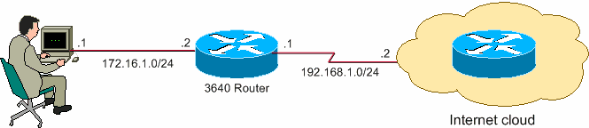 Basic Router Configuration using SDM ;
 Cisco Router as a Remote VPN Server using SDM Configuration Example.
Configuring the Cisco 871W wireless router: SOHO setup -
Tech Republic.


