home / infca / adsl (navigation links) Si t'és igual on anar, tant se val el camí que agafis
- li digué el gat a Alicia

ADSL | Fibra Optica Links | End

ADSL & Fibra Optica


ADSL - que es ?
Asymmetric Digital Subscriber Line (ADSL) is a form of DSL, a data communications technology that enables faster data transmission over copper telephone lines than a conventional modem can provide.
The distinguishing characteristic of ADSL over xDSL is that the volume of data flow is greater in one direction than the other, i.e. it is asymmetric.

url - see How it works


Sep 2006

Model

Zyxel Prestige 660 HW-D1 - Router Inalambrico 802.11G

Manual, tutorial, manual [***].

Llums (Left to Right) :

Es pot canviar la seva MAC @ ?
I la IP ? Si : LAN + LAN Setup.

Wifi : potència = ? mW. Es pot configurar ? YES

Reset to default valuies : on power-on, push the small "reset" button for 10 seconds.
Then, usr = "1234", pwd = "1234"

Comtrend 5361

admin/admin, user/user, support/support, 1234/1234 ;

http://192.168.1.1/, http://192.168.1.1/password.html

Seguretat (wifi)

Zyxel + Advanced Setup + 802.1/WPA :
Wireless Port Control := Auth Required ;
Key Management Protocol := "WPA-PSK" ;

SSID := { WLAN_BA, WLAN_3F, WLAN_8A, WLAN_D7, WLAN19 } ; WEP's ? (13 chars)

Asistente de configuración en CD => cambio de clave WEP & cambio seguridad a WPA-PSK.

IE ( http://192.168.1.1 ) : Wireless LAN + 802.1x/WPA :
Key Management Protocol := WPA_PSK ;
url

T42 : wireless 2200BG Network Connection + Modificar valores WLAN + Tipo de Seguridad Inalambrica := WPA-PSK ;

HP :

RAP / XP :

Authentication Type = WSA-PSK ; Encryption Type = TKIP ; WPA Pre-Shared Key = abcd ; Cifrado de datos : WEP de 128 bits

ACER / Vista :

Tipo de seguridad = WPA-Personal Tipo de cifrado = TKIP
Configuració

Entrar al ZyXEL "Web Configurator" + "Advanced Setup" + "Wireless LAN" + "Wireless" :
Enable Wireless LAN

Entrar al ZyXEL "Web Configurator" + "Advanced Setup" + "Wireless LAN" + "802.1x/WPA" :
Wireless Port Control := Authentication Required ;
Key Management Protocol := WPA-PSK ;
Pre-Shared Key := sag (full cat) ;

Administració

Entrar al ZyXEL "Web Configurator" + "Maintenance" + "Wireless LAN" + "Association List" :
This screen displays the MAC address(es) of the wireless clients that are currently logged in to the network.

Dades i averies

Teléfono para obtener los datos de la configuración ADSL : 900.50.20.10 (call from Router)

ADSL + IP dinamica User = adslppp@telefonicanetpa Clau = adslppp DNS pri = 80.58.61.250 DNS sec = 80.58.61.254 Indicador de circuito virtual = 32 Indicador de trayecto virtual = 8

Averies : 1002.
Avaria ADSL : 902.357.000 (coste llamada => 6 ¢ / min) 2006-Sept : canviar PCR per PTP. 2007-Oct : migracio a 3 Gb : consultar estado : antes del 14-11-2007.

Administració Web : http://192.168.1.1 - usuari = "1234", clau = "1234". [u/k]

Node-Link : 1-PPPoE. Upstream speed : 320 Kbps. Downstream speed : 1024 Kbps. VPI/VCI : 8/32.

Velocitat
Here we measure (02/11/2007, 06/04/2009) 2.644 Kbps down, 280 Kbps up.

300 Kb/s = 40 KB/s = 2400 KB/min = 2,4 MB/min = 144 MB/h = 3456 MB/day = 3,4 GB/day

Desembre 2009 : 5025 Kbps down, 225 Kbps up.

1 GB/hora = 277 KB/seg = 2200 Kbps

ISP parameters

WAN :

Mode : Routing Encapsulation : PPPoE Multiplex : LLC Virtual circuit ID VPI = 8 VCI = 32 User Name : adslppp@telefonicanetpa Password : adslppp IP Address : obtain automatically Connection : nailed-up connection Network Address Translation : SUA only

LAN :

IP address = 192.168.1.1 IP mask : 255.255.255.0 DHCP : on Client IP pool starting address : 192.168.1.33 Size of client IP pool : 222
Ethernet/DHCP values
Adaptador Ethernet Conexión de área local : Sufijo de conexión específica DNS : Descripción. . . . . . . . . . . : Intel(R) PRO/1000 MT Mobile Connection Dirección física. . . . . . . . . : 00-11-25-43-08-1A DHCP habilitado. . . . . . . . . : No Autoconfiguración habilitada. . . : S¡ Dirección IP. . . . . . . . . . . : 192.168.1.33 Máscara de subred . . . . . . . . : 255.255.255.0 Puerta de enlace predeterminada : 192.168.1.1 Servidor DHCP . . . . . . . . . . : 192.168.1.1 Servidores DNS . . . . . . . . . .: 80.58.61.250 80.58.61.254 Concesión obtenida . . . . . . . : lunes, 11 de septiembre de 2006 20:50
Link Status

Enter 192.168.1.1, select System Status and then Show Statistics. The "WAN Port Statistics" show "Node-Link = 1-PPPoE" and "Status = Up", plus "Up Time" !

Reset

Hardware : hay un botón detrás.

Software :

Diagnostic + General -> Reset System Diagnostic + DSL -> Reset ADSL Maintenance + Firmware -> click "Reset" to clear all user-defined configurations and return to factory defaults.
Association List

Enter 192.168.1.1, select "Wireless LAN". The "Association List" shows the MAC address(es) of the wireless clients currently logged in to the network.

Salvar configuración (FTP)
Menu 24.5 - Backup Configuration To transfer the configuration file to your computer, follow the procedure below: 1. Launch the FTP client on your computer. 2. Type "open" and the IP address of your system. Then type "root" and SMT password as requested. 3. Locate the 'rom-0' file. 4. Type 'get rom-0' to back up the current system configuration to your computer.
Quitar Firewall
La opción de firewall en el router Zyxel HW-61 está disponible si tenemos el firmware oficial de Zyxel. El router proporcionado por Telefónica no lo trae con la versión de firmware que incluye.

url

Apertura puertos router Zyxel Prestige 660 HW-61 (via web)

Desde un navegador :

  1. Abrir la URL http://192.168.1.1
  2. Enter username and password for "Prestige 660HW-61" - user := "1234", clau := "1234".
  3. Advanced Setup + NAT
  4. NAT-Mode: SUA Only, Edit Details.
  5. Start Port := ( 4671, 4665, 4661, 4672, 4662 ) ;
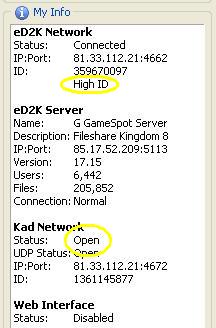
    TCP = 4662 (eD2K network, High/Low ID). UDP = 4672 (Kad network, Firewalled/Open).
  6. End Port := idem
  7. IP Address := PC's IP (192.168.1.2)

url

LaMula

Telnet commands
Mas potencia
telnet 192.168.1.3 24. System Maintenance 8. Command Interpreter Mode ras> sys version ZyNOS version: V3.40(AHF.0)b12 | 7/30/2007 romRasSize: 1797916 system up time: 260:07:27 (594e7ec ticks) bootbase version: V1.05 | 10/17/2005 ras> wlan load = cargar la configuracion del router en el buffer de trabajo ras> wlan power X = ajustar potencia emision [1:19dbm / 2:18 dbm / 3:16 dbm / 4:15 dbm / 5:14 dbm] ras> wlan save = guardar los cambios realizados
Abrir puertos Emule

Desde una Command Line, como los hombres de verdad, que lo hacen en Hexadecimal :

  1. al Prompt de DOS, damos TELNET 192.168.1.1
  2. password := 1234 (parece ser que no hace falta usuario)
  3. escogemos la entrada 15. NAT Setup
  4. y luego el apartado 2. NAT Server Sets
  5. finalment, 1. Server Set 1 (Used for SUA Only)
  6. debemos tener estas reglas / rules :
    Menu 15.2 - NAT Server Setup Rule Start Port No. End Port No. IP Address --------------------------------------------------- 1. Default Default 0.0.0.0 2. 4662 4672 192.168.1.2 < Emule 3. 20 25 192.168.1.33 < FTP, SSH, Telnet. 4. 0 0 0.0.0.0

Pregunta en el Foro ... Es el foro del ZyXEL Prestige 650/660 HW !

To test if your port has been properly forwarded, you can use the Port Checker tool.

1000 q&A : ZyXel 660 url

4994 -> GTS@T42 !

SUA = Single User Account

SUA is a ZyNOS implementation of a subset of NAT that supports two types of mapping : Many-to-One and Server. Choose "SUA Only" if you have just one public WAN IP address for your Prestige.

A SUA server is a list of inside (behind NAT on the LAN) servers, for example, Web or FTP, that you can make visible to the outside world.

MAC filter
N = 00.00.00.00.00.00 {wifi ?} A = 00.1A.73.03.18.45 {wifi ?} I = 00.21.5D.4C.3E.D0 {wifi ?}

Modems / Routers

Tinc 2 Router x ZyXEL 00412651 de Tfca (sense Wifi) i un 00412716

Foto de tots els models

En adslayuda.com, bandaancha.st etc... tienes unos completos manuales para trastear tu router, Zyxel 650

Password's ... ZyXel 660 [1234/1234].

telnet 192.168.1.1 y escoger el menú 24 (System Maintenance) y luego el apartado 8 (Command Interpreter) ras> sys version Ver la Bootbase y firmware del router ZyNOS version: V3.40(PT.0)b46 | 10/5/2005 romRasSize: 1772882 system up time: 164:08:15 (385a2ae ticks) bootbase version: V1.10 | 1/17/2005 ras> ras> ip nat iface wanif0 status Ver las conexiones maximas que soporta nuestro router

Comandos WLAN para el Zyxel 660 (Red Wireless)

wlan load carga la configuración inalámbrica en el buffer de trabajo donde haremos los cambios wlan chgmode [0/1/3] (0: modo 11B+11G / 1: solo modo 11b / 3: solo modo 11g) wlan preamble [0/1/2] (0: Long / 1: Short / 2: Local stations). En el modo 1 se consigue algo más de velocidad (del orden de un 10%) al ser la cabecera de los paquetes más corta. No es compatible con todos los clientes inalámbricos. Puede ser necesario modificar las propiedades del cliente inalámbrico a través del Panel de Control. wlan power [1:19dbm / 2:18 dbm / 3:16 dbm / 4:15 dbm / 5:14 dbm]. Con el modo 1 conseguimos aumentar la potencia de emisión. Si no hay problemas de cobertura es mejor no tocarlo. wlan power 1 wlan save guarda los cambios realizados wlan clear borra la configuración inalámbrica wlan reset reinicia la WLAN wlan active 1 enciende la red WIFI wlan active 0 apaga la red WIFI

url


Descripció Timofónica

Conexió commutada :

Maintenance + Firmware + Reset to Factory Defaults

CDT : Amper Xavi 7968. WLAN_F1 - WEP protected [p/p]

FTP
  1. obrir ports 20 i 21 al Router
  2. engegar servidor FTP [Cerberus]
  3. determinar la IP externa : [url]
  4. accedir mitjançant un client FTP : [WS_FTP]

FTP / Telnet / SSH client | Internet | Router {81.32.167.11} | | < mapeig > | TP {192.168.1.36} | Cerberus / OpenSSHd
Filtres

url

  1. telnet 192.168.1.1
  2. key := 1234 ;
  3. select 21. Filter Set Configuration
  4. we see
    Menu 21 - Filter Set Configuration Filter Filter Set # Comments Set # Comments ------ ----------------- ------ ----------------- 1 - 7 _______________ 2 - 8 _______________ 3 NetBIOS_LAN 9 filtro_gest1 4 IGMP 10 filtro_gest2 5 NetBIOS_WAN 11 WebSet1 6 _______________ 12 WebSet2
  5. 10 has ;

    Menu 21.10 - Filter Rules Summary # A Type Filter Rules M m n - - ---- --------------------------------------------------------------- - - - 1 Y IP Pr=6, SA=193.152.37.192, DA=0.0.0.0 N F N 2 Y IP Pr=6, SA=172.20.25.0, DA=0.0.0.0 N F N 3 Y IP Pr=6, SA=172.20.45.0, DA=0.0.0.0 N F N 4 Y IP Pr=6, SA=0.0.0.0, DA=0.0.0.0, DP=80 N D N 5 Y IP Pr=6, SA=0.0.0.0, DA=0.0.0.0, DP=21 N D N 6 Y IP Pr=6, SA=0.0.0.0, DA=0.0.0.0, DP=23 N D F
  6. and 12 has ;

    Menu 21.12 - Filter Rules Summary # A Type Filter Rules M m n - - ---- --------------------------------------------------------------- - - - 1 Y IP Pr=6, SA=0.0.0.0, DA=0.0.0.0, DP=23 N D N 2 Y IP Pr=6, SA=0.0.0.0, DA=0.0.0.0, DP=21 N D N 3 Y IP Pr=17, SA=0.0.0.0, DA=0.0.0.0, DP=69 N D N 4 Y IP Pr=6, SA=0.0.0.0, DA=0.0.0.0, DP=80 N D N 5 N

nmap !

puspus:~# nmap -v 81.32.167.11 Starting Nmap 4.11 ( http://www.insecure.org/nmap/ ) at 1943-03-31 18:39 WEST DNS resolution of 1 IPs took 0.06s. Initiating SYN Stealth Scan against 11.Red-81-32-167.dynamicIP.rima-tde.net (81.32.167.11) [1680 ports] at 18:39 The SYN Stealth Scan took 18.38s to scan 1680 total ports. Host 11.Red-81-32-167.dynamicIP.rima-tde.net (81.32.167.11) appears to be up ... good. Interesting ports on 11.Red-81-32-167.dynamicIP.rima-tde.net (81.32.167.11): Not shown: 1667 closed ports PORT STATE SERVICE 20/tcp filtered ftp-data 21/tcp filtered ftp 22/tcp filtered ssh 23/tcp filtered telnet 24/tcp filtered priv-mail 25/tcp filtered smtp 80/tcp filtered http 1020/tcp filtered unknown 1021/tcp filtered unknown 1935/tcp filtered rtmp 4662/tcp filtered edonkey 4672/tcp filtered rfa 5900/tcp filtered vnc Nmap finished: 1 IP address (1 host up) scanned in 19.671 seconds Raw packets sent: 1795 (78.960KB) | Rcvd: 1742 (80.132KB) puspus:~#

Sansa

IP FIXA : 80.25.182.138 DNS PRIMARIO : 62.151.8.100 DNS SECUNDARIO : 62.151.2.8 MASCARA SUBRED : 255.255.255.0 PUERTA DE ENLACE : 80.25.182.2

TMB, Gmail, Ya.com

Configurar router, D-Link, model G604T.


Infovia

[07/04/2009] Tres son las redes actualmente operativas que permiten el acceso a Internet por los mismos medios que por los que lo hacía InfoVía (red telefónica básica, RDSI y GSM) y con la ventaja para el usuario de poder aplicar la tarifa metropolitana: InfoVía Plus, propiedad de Telefónica Transmisión de Datos; Retenet, propiedad de Iddeo, filial de Retevisión para Internet e InterPista de BT Telecomunicaciones, hermana pequeña en España de British Telecom.

32 claves para “otear” el panorama ------------------------------------------------- Telefónica Transmisión de Datos www.ttd.es Iddeo www.iddeo.es Retenet, página principal www.iddeo.es/retenet British Telecom www.bt.es Retevisión www.retevision.es Consultar número óptimo para Infovía Plus www.ttd.net/nuevosip/tnap_formulario.htm Consultar número óptimo para Retenet www.iddeo.es/retenet Lista completa de nodos de Interpista BT www.bt.es/portada4.htm Lista completa números de tlf. de acceso a Infovía Plus www.ttd.net/nuevosip/numeros.htm Kit de acceso a Infovía Plus www.ttd.es/nuevosip/kit_frames.htm Descarga del software de acceso a Interpista www.bt.es/serip9.htm Página oficial de Infovía Plus en Telefónica www.telefonica.es/infoviaplus Página de contenido técnico sobre Infovía Plus www.argo.es/%7Ejcea/artic/iplus01.htm

6/1/99 ?


Preus Internet, Abril'09
Proveedor Oferta Torrelles ? Permanencia
Arrakis 36,50 €/mes : ADSL + llamadas
JazzTel 32,95 €/mes : ADSL (< 3 Mbps) + llamadas
Ono 39,90 €/mes : ADSL (4 Mbps) + todo incluido NO
Orange 34,95 €/mes : ADSL + cuota de linea (Ono) incluida
Tele2 32,90 €/mes : ADSL (3 Mbps) + llamadas nacionales + alquiler linea ? 18 meses
Telefónica 29,90 €/mes : ADSL (1 Mbps) + llamadas nacionales sure NO
Vodafone
Ya.com

Comparativa


Com mesurar la velocitat

Test de velocidad ADSL.


Informacio Telefonica

Fer servir 11818 : 0,35 € per trucada, gratis de cabina.

Mai 11822 ni 11888.


Fibra Optica
Telefonica

URL

300 Mbps = 38 €/mes + 17 €/mes quota de linia

Fusion = 59 €/mes : 300 Mbps + Canal+

Familiar = 77 €/mes = 300 Mbps + Canal+ + Futbol


Ep ! Valid HTML 4.01!   Valid CSS! Escriu-me !
Updated 20151008  
Uf !