|
home /
informatica /
delphi
(navigation links)
|
After the Acropolis, Delphi is the most popular archaeological site in Greece.
|
Delphi
Magic keys
- CTRL + SPACE = code completion : dont trust "Object Inspector" !
- CTRL + "J" = code templates
- SHIFT + CTRL + SPACE = code parameters
- CTRL + SHIFT + "C" = class completion
- F4 - Run To Cursor
- F7 - Trace Into
- F8 - Step Over
- F9 - Run (will build if neccessary)
- F10 -
- F11 - Object Inspector
- ALT + F5 = Inspect var at cursor
- CTRL + F5 = Add Watch at Cursor
- CTRL + F9 = compile this PAS
- SHIFT + F9 = build this PAS
url ;
all IDE shortcut keys
New Project
- start Delphi XE7
- File + New + "VLC Forms Application"
- from Tool Palette (bottom right), drag and drop some objects
TTimer (from System) is very useful
- between "uses" and "type" include a "const" sentence
kTimer_SendPing = 3000 ;
- on "Form1" Events, fill "OnCreate" event using your name, as "My_Create" - include here all initializations
As
Timer1.Enabled := false ;
Timer1.Interval := kTimer_SendPing ;
- fill "OnTimer" event of Timer1
Trace_Msg ( 'Timer 1 timeout')
- implement "Trace_Msg", just after "implementation" and "{$R *.dfm}"
Drawing
|
Drawing a line
TCanvas.MoveTo() method takes two arguments, x and y,
that represent the point where the line would start.
To draw a line from point A to point B,
you use the TCanvas.LineTo() method.
This method also takes two arguments that specify the end point of the line.
procedure TForm1.FormPaint ( Sender: TObject ) ;
begin
Canvas.MoveTo ( 20, 15 ) ;
Canvas.LineTo ( 150, 245 ) ;
end;
functionX
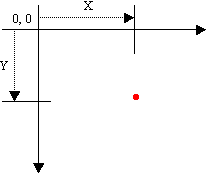
Reposicionament del (0,0) i del sentit creixent dels eixos :
SetMapMode( Image1.Canvas.Handle, MM_ISOTROPIC);
SetViewportOrgEx( Image1.Canvas.Handle, 20, 180, nil) ; // (X,Y)
|
functionX
|
Drawing triangles, poligons
PP4D nice code :
Canvas Demo ;
drawing on canvas ;
drawing on a PaintBox ;
drawing on an Image,
- recommended by
DelphiLand :
Like with a TPaintBox, you can draw items on the canvas of a TImage control.
But a TImage will refresh itself when necessary,
the image will be redrawn without your help if the image is moved or minimized or has other forms popup over it.
This is not the case with a TPaintBox: it's the programmer's job to make sure that it knows how to "repaint" itself.
Canvas
Graphics TCanvas class
Methods, Properties, Events, Members - *** ALL ***
Canvas objects
Canvas.TextOut ( 5, 10, 'Transparent text' ) ;
Canvas.Brush.Style := bsClear ;
Canvas.Brush.Color :=
Canvas.Pen.Width := 1 ;
Canvas.Pen.Color :=
Canvas.MoveTo ( Rect.Left, Y ) ;
Canvas.LineTo ( Rect.Right, Y ) ;
Canvas.Rectangle ( 0, 0, 200, 200 ) ; // left, top, right, bottom
pbxAv.Canvas.Rectangle( X1, Y1, X2, Y2 ) ; // upper left corner at (X1, Y1) and lower right corner at (X2, Y2).
Canvas.Ellipse ( 0, 0, 200, 200 ) ;
Canvas.FillRect( Rect ); // Fill a rectangular region using the current brush.
// The region is filled including the top and left sides of the rectangle, but excluding the bottom and right edges.
Canvas methods
PaintBox vs Image
Like with a TPaintBox,
you can draw items on the canvas of a TImage control.
But a TImage will refresh itself when necessary;
the image will be redrawn without your help
if the image is moved or minimized or has other forms popup over it.
This is not the case with a TPaintBox:
it's the programmer's job
to make sure that it knows how to "repaint" itself.
Try this code :
procedure TForm1.Button1Click(Sender: TObject);
begin
with PaintBox1.Canvas do begin
Brush.Style := bsSolid;
Brush.Color := clBlue;
Rectangle(0, 0, PaintBox1.Width, PaintBox1.Height);
end;
with Image1.Canvas do begin
Brush.Style := bsSolid;
Brush.Color := clBlue;
Rectangle(0, 0, Image1.Width, Image1.Height);
end;
end;
url
Resizing the ListBox size when the Form size changes
Design time :
DBGrid.Align := alClient ;
DBGrid.Anchors := [akLeft,akTop,akRight,akBottom] ;
If you can't make it with align props, handle the OnResize event of the panels' container.
procedure TForm1.FormResize(Sender: TObject);
begin
DBGrid1.Left := 0;
DBGrid1.Width := Panel1.Width -1;
DBGrid1.Top := 0;
DBGrid1.Height := Panel1.Height -1;
end;
Available colors and names
From Embarcadero
TColor :
If you specify TColor as a specific 4-byte hexadecimal number instead of using the constants defined in the Graphics unit,
the low three bytes represent RGB color intensities for blue, green, and red, respectively.
The value $00FF0000 represents full-intensity, pure blue,
$0000FF00 is pure green,
and $000000FF is pure red.
$00000000 is black
and $00FFFFFF is white.
4-th byte use :
If the highest-order byte is zero, the color obtained is the closest matching color in the system palette.
If the highest-order byte is one ($01 or 0x01), the color obtained is the closest matching color in the currently realized palette.
If the highest-order byte is two ($02 or 0x02), the value is matched with the nearest color in the logical palette of the current device context.
Nice (Pere's) colors :
Color := $DDEEFF ;
and
Color := $EFFFEF ;
efg :delphi graphics : algorithms {****}
From "graphics.pas" :
- clBlack = TColor( $000000 ) ;
- clMaroon = TColor( $000080 ) ;
- clGreen = TColor( $008000 ) ;
- clOlive = TColor( $008080 ) ;
- clNavy = TColor( $800000 ) ;
- clPurple = TColor( $800080 ) ;
- clTeal = TColor( $808000 ) ;
- clGray = TColor( $808080 ) ;
- clSilver = TColor( $C0C0C0 ) ;
- clRed = TColor( $0000FF ) ;
- clLime = TColor( $00FF00 ) ;
- clYellow = TColor( $00FFFF ) ;
- clBlue = TColor( $FF0000 ) ;
- clFuchsia = TColor( $FF00FF ) ;
- clAqua = TColor( $FFFF00 ) ;
- clLtGray = TColor( $C0C0C0 ) ;
- clDkGray = TColor( $808080 ) ;
- clWhite = TColor( $FFFFFF ) ;
- clNone = TColor( $1FFFFFFF ) ;
- clDefault = TColor( $20000000 ) ;
Peces de codi
Kuki at Delphi :
 MyTime := FormatDateTime( '"Actual Time is "' + LongTime Format, Now ) ;

 Edit1.Text := TimeToStr(Time) + ' - Has pitjat el boto 2.' ;
More sophisticated
DataTime encoding
function EncodeDateTime ( const Year, Month, Day, Hour, Min, Sec, MSe : Word ) : TDateTime ;
|
|
Get Environment Var : szMqServer := GetEnvironmentVariableAsString ( 'MQSERVER' ) ;
function GetEnvironmentVariableAsString ( const VarName : string ) : string ;
var bsz : Integer ;
begin
// Get required buffer size (including terminal #0)
bsz := GetEnvironmentVariable ( PChar ( VarName ), nil, 0 ) ;
if bsz > 0 then begin
// Read env var value into result string
SetLength ( Result, bsz - 1 ) ;
GetEnvironmentVariable ( PChar ( VarName ), PChar ( Result ), bsz ) ;
end else // No such environment variable
Result := '' ;
end;
Una altra aportació d'en Pere !
I una altra a continuació ...
szMQServer := GetEnvironmentVariable ( 'MQSERVER' ) ;
La forma d'aquesta variable es
SAG.SVRCONN/TCP/11.22.33.44(2416)
|
|
Execution window position
Delphi situa la main form depenent de la property Position.
Quan és poDesigned, Delphi crea la finestra en el lloc en que l'has situat quan l'estàs dissenyant.
Pots provar poScreenCenter, o poDefaultSizeOnly.
També pots restaurar la posició on l'ha deixat l'usuari la darrera vegada que ha executat el teu programa.
Per fer-ho, has de guardar la posició en el moment de tancar la finestra i restaurar-la en obrir-se un altre cop.
Per exemple, mitjançant el
fitxer "ini"
|
|
How to end a Delphi program
If you are used to working in the form unit,
you know you need to call Close or Application.Terminate
to cause your program to end.
procedure TForm1.Button1Click(Sender: TObject);
begin
close;
end;
Lo més estandard és el mètode Close de la main form.
D'aquesta manera executes tots els handlers ....
- The Close method calls CloseQuery
- CloseQuery calls the form's OnCloseQuery event (if it is defined)
- If OnCloseQuery event returns True (or it is not defined), then the Close method calls form's OnClose event (if it is defined)
- If this is the MainForm and OnClose returns anything other than caNone (or it is not defined), then Close calls Application.Terminate to actually close the form.
- If this is not the MainForm, and OnClose returns caHide (or it is not defined), then the Close method calls Hide.
Una altra manera és Application.Terminate,
però no crida onCloseQuery ni onClose.
Mata l'aplicació.
Finalment, pots passar dels mètodes de les classes
i anar directament a matar el procés, usant Halt.
No executa cap codi. Només en casos extrems de "Abormal Termination".
How to hide from Close Program
When you press the Ctrl-Alt-Del key combination the "Close Program" dialog box pops up.
One simple way to hide your program from that dialog (the Task Manager dialog) is to clear the Application object's Title.
If a program's main window does not have a title, Windows does not put the program in the "Close Program" dialog window.
Remember that in Delphi the so called "main" window is not the Application window.
The best place to clear the Title property is inside the Project's source code.
To see the Project source, select Project|View Source in the IDE.
After the Application.Initialize add the bolded line:
Application.Initialize ;
Application.Title := '' ;
Application.CreateForm(TForm1, Form1) ;
|
|
MEMORYSTATUS
procedure TForm1.Button1Click(Sender: TObject) ;
var MemoryStatus: TMemoryStatus ;
begin
MemoryStatus.dwLength := SizeOf(MemoryStatus) ;
GlobalMemoryStatus(MemoryStatus) ;
with MemoryStatus do begin
say(IntToStr(dwLength) + ' Size of ''MemoryStatus'' record') ; { Size of MemoryStatus record }
say(IntToStr(dwMemoryLoad) + '% memory in use') ; { Per-Cent of Memory in use by your system }
say(IntToStr(dwTotalPhys) + ' Total Physical Memory in bytes') ; { Amount of Total Physical memory allocated to your system }
say(IntToStr(dwAvailPhys) + ' Available Physical Memory in bytes') ; { Amount available of physical memory in your system }
say(IntToStr(dwTotalPageFile) + ' Total Bytes of Paging File') ; { Amount of Total Bytes allocated to your page file }
say(IntToStr(dwAvailPageFile) + ' Available bytes in paging file') ; { Amount of available bytes in your page file }
say(IntToStr(dwTotalVirtual) + ' User Bytes of Address space') ; { Amount of Total bytes allocated to this program (generally 2 GB of virtual space) }
say(IntToStr(dwAvailVirtual) + ' Available User bytes of address space') ; { Amount of available bytes that is left to your program to use }
end;
end;
url
O, en una versió més reduida (Unit "mem_sag") :
function Mostrar_Memory_Status ( ) : string ;
var MemoryStatus: TMemoryStatus ;
begin
MemoryStatus.dwLength := SizeOf ( MemoryStatus ) ;
GlobalMemoryStatus ( MemoryStatus ) ;
with MemoryStatus do begin
Mostrar_Memory_Status := IntToStr ( dwAvailVirtual ) ;
end ; // with
end ; // Mostrar_Memory_Status
|
Input parameters
 if paramcount > 0 then
   for i := 1 to paramcount do
     begin
       szStatus := '>>> Param (' + IntToStr(i) + ') is (' + paramstr(i) + ').' ;
       Posar_Status ( szStatus ) ;
   end ;
 if ( ParamCount > 0 )
 then begin
   fInName := ParamStr(1) ;
 end ; { if ... }
|
Init vars
Crida :
FillChar(NTPDataGram, SizeOf(NTPDataGram), 0);
Definicio :
var
NTPDataGram : TNTPGram ;
type TNTPGram = packed record // NTP Datagram format
Head1 : byte;
Head2 : byte;
RootDelay : longint;
RootDispersion : longint;
RefID : longint;
Ref1 : longint;
Ref2 : longint;
Org1 : longint;
Org2 : longint;
Rcv1 : longint;
Rcv2 : longint;
Xmit1 : longint;
Xmit2 : longint;
end ;
How to read a "record" from a file
Jo crearia un arxiu de texte tipus CSV (que té l'avantatge que el pots editar amb Excel)
"10.139.130.65","Campanar ST1/AP1",1000,"http://guifi.net/en/node/30648"
"10.139.238.65","Campanar ST2/AP4",400,"http://guifi.net/en/guifi/device/24363"
"10.139.238.33","Campanar ST1/AP2",800,""
"10.139.130.97","Campanar ST2/AP3",2200,""
... i després el llegiria en un StringList i el parsejaria linia a linia amb un altre StringList
var i : integer ;
lines : TStringList ;
lineparsed : TStringList ;
parsed : record
ip : string ; // 0
description : string ; // 1
power : integer ; // 2
home : string ; // 3
end ;
begin
lineparsed := TStringList.Create ;
lineparsed.Delimiter := ',' ;
lineparsed.StrictDelimiter := true ;
lines := TSTringList.Create ;
lines.loadFromFile(aFileName) ;
for i:=0 to lines.Count-1 do
begin
lineparsed.Clear;
lineparsed.DelimitedText := lines[i] ;
parsed.ip := lineparsed [0] ;
parsed.description := lineparsed [1] ;
parsed.power := StrToInt( lineparsed [2] ) ;
parsed.home := lineparsed [3] ;
// do something with parsed record
end;
end;
Gracies, Pere !
|
Beep
procedure PlayBeep ( ActionType: TMsgDlgType ) ;
var mb: dWord;
begin
case ActionType of
mtInformation: mb := MB_ICONASTERISK ; // SystemAsterisk
mtWarning: mb := MB_ICONEXCLAMATION ; // SystemExclamation
mtError: mb := MB_ICONHAND ; // SystemHand
mtConfirmation: mb := MB_ICONQUESTION ; // SystemQuestion
mtCustom: mb := MB_OK ; // SystemDefault
else
mb:= $0FFFFFFFF ; // Standard beep using the computer speaker
end;
MessageBeep(mb) ;
end;
url
|
File Search
procedure TForm1.Button1Click(Sender: TObject);
var
Search_Result : TSearchRec ;
INstring, OUTstring : string ;
begin
INstring := Edit1.Text ;
StringGrid1.RowCount := 0 ;
debugMsg ( 'Boto-1. Busquem {' + INstring + '}.' ) ;
if FindFirst ( INstring, faAnyFile, Search_Result ) = 0
then begin
repeat
OUTstring := Search_Result.Name +
' ' + IntToStr ( Search_Result.Size ) +
' ' + DateTimeToStr ( FileDateToDateTime( Search_Result.Time) ) ;
StringGrid1.RowCount := StringGrid1.RowCount + 1;
StringGrid1.Cells [ 1, StringGrid1.RowCount - 1 ] := Search_Result.Name ;
StringGrid1.Cells [ 2, StringGrid1.RowCount - 1 ] := IntToStr( Search_Result.Size ) ;
debugMsg ( '+++ Trobat {' + OUTstring + '}.' ) ;
until FindNext ( Search_Result ) <> 0 ;
FindClose ( Search_Result ) ;
end else begin
debugMsg ( '--- No trobat.' ) ;
end ;
end; // Button1 Click
procedure TForm1.Button2Click(Sender: TObject);
var OriginDir, FileToFind : string ;
begin
OriginDir := 'c:\Program Files\MyOrigin\' ;
debugMsg ( 'Boto-2. Busquem {' + OriginDir + '}.' ) ;
FileToFind := FileSearch ( Edit1.Text, OriginDir ) ; // Name DirList
if FileToFind = '' then
ShowMessage('Couldn''t find ' + Edit1.Text + '.')
else
ShowMessage('Found ' + FileToFind + '.');
end;
|
|
Hex Dump
const HexN: array [ 0..15 ] of char = '0123456789ABCDEF' ;
function HexB ( b: byte ) : string ;
begin
HexB:= HexN [ b shr 4 ] + HexN [ b and $0F ] ;
end;
function HexC ( c: char ) : string ;
begin
HexC := HexB ( byte(c) ) ;
end;
function HexW ( w: word ) : string ;
begin
HexW := HexB ( Hi(w) ) + HexB ( Lo(w) ) ;
end;
function HexDW ( i: Integer ) : string ;
begin
HexDW := HexW ( word (i shr 16) ) + HexW ( word (i) ) ;
end;
procedure Hex_Dump ( msgPtr : PtrMsgRecord ; tLB : TListBox; pDades : pointer ; iLlargada : integer ) ;
var
iCnt : integer ;
szHex : string ;
begin
debugMsg ( msgPtr, '#### Hex Dump. Ptr {' + Format( '0x%8p', [pDades] ) + '}, lng {'+ IntToStr( iLlargada) + '}.' ) ;
iCnt := 0 ;
szHex := '' ; // init empty string
szAux := '' ;
while ( iCnt < iLlargada ) do
begin
szAux := Format ( '%2.2X', [ byte( pDades^ ) ] ) ; // get a byte from memory and format it
Inc ( pByte(pDades) ) ; // first cast it to a pointer of a type, so the compiler knows how to increase your pointer.
iCnt := iCnt + 1 ;
szHex := szHex + szAux ;
szAux := '' ;
if ( length( szHex ) > 46 ) then // 15 items of 3 chars + 1 item of 2 chars
begin
debugMsg ( msgPtr, '#### Hex Dump. Data {' + szHex + '}.' ) ;
szHex := '' ;
end else begin
szHex := szHex + '-' ;
end ;
end ;
end ; // Hex_Dump()
Used in \\MQ\Eines\AMQSCNXC_proves_Conexio_Client\IMI_Buscar_Max_Conexiones\thread_conexio.pas
and sag_hexdump unit generated.
Sample in
"c"
|
|
Port Paralel
procedure TForm1.ScrollBar1Change ( Sender : TObject ) ;
var bWriteMe, bErr : byte ;
function Out32 ( wAddr : word; bOut : byte ) : byte ; stdcall ; external 'inpout32.dll' ;
begin
bWriteMe := ScrollBar1.position ;
Label1.caption := IntToStr ( bWriteMe ) ;
bErr := ( Out32 ( $378, bWriteMe ) ) ;
end ;
url
Get INPOUT32.DLL
here ;
good description,
how it works,
Copy inpout32.dll to system directory,
system32\Drivers folder.
Programming For Parallel Port Device {interessant : VC++, Delphi, lots of code}
|
Standard Routines
The table below lists frequently used procedures and functions found in Borland product libraries.
This is not an exhaustive inventory of standard routines.
| Procedure or function
| Description
| | Addr | Returns a pointer to a specified object.
| | AllocMem() | Allocate a memory block and initialize each byte to zero. Released by ?
| | ArcTan | Calculates the arctangent of the given number.
| | Assert | Raises an exception if the passed expression does not evaluate to true.
| | Assigned | Tests for a nil (unassigned) pointer or procedural variable.
| | Beep | Generates a standard beep.
| | Break | Causes control to exit a for, while, or repeat statement.
| | ByteToCharIndex | Returns the position of the character containing a specified byte in a string.
| | Chr | Returns the character for a specified integer value.
| | Close | Closes a file.
| | CompareMem | Performs a binary comparison of two memory images.
| | CompareStr | Compares strings case sensitively.
| | CompareText | Compares strings by ordinal value and is not case sensitive.
| | Continue | Returns control to the next iteration of for, while, or repeat statements.
| | Copy | Returns a substring of a string or a segment of a dynamic array.
| | Cos | Calculates the cosine of an angle.
| | CurrToStr | Converts a currency variable to a string.
| | Date | Returns the current date.
| | DateTimeToStr | Converts a variable of type TDateTime to a string.
| | DateToStr | Converts a variable of type TDateTime to a string.
| | Dec | Decrements an ordinal variable or a typed pointer variable.
| | Dispose() | Release dynamically allocated variable memory, using New()
| | ExceptAddr | Returns the address at which the current exception was raised.
| | Exit | Exits from the current procedure.
| | Exp | Calculates the exponential of X.
| | FillChar | Fills contiguous bytes with a specified value.
| | Finalize | Uninitializes a dynamically allocated variable.
| | FloatToStr | Converts a floating point value to a string.
| | FloatToStrF | Converts a floating point value to a string, using specified format.
| | FmtLoadStr | Returns formatted output using a resourced format string.
| | FmtStr | Assembles a formatted string from a series of arrays.
| | Format | Assembles a string from a format string and a series of arrays.
| | FormatDateTime | Formats a date-and-time value.
| | FormatFloat | Formats a floating point value.
| | FreeMem() | Release memory allocated using GetMem()
| | GetMem() | Allocate dynamic memory and a pointer to the address of the block. Use FreeMem() to release it back. Preferable to use New()
| | Halt | Initiates abnormal termination of a program.
| | Hi | Returns the high-order byte of an expression as an unsigned value.
| | High | Returns the highest value in the range of a type, array, or string.
| | Inc | Increments an ordinal variable or a typed pointer variable.
| | Initialize | Initializes a dynamically allocated variable.
| | Insert | Inserts a substring at a specified point in a string.
| | Int | Returns the integer part of a real number.
| | IntToStr | Converts an integer to a string.
| | Length | Returns the length of a string or array.
| | Lo | Returns the low-order byte of an expression as an unsigned value.
| | Low | Returns the lowest value in the range of a type, array, or string.
| | LowerCase | Converts an ASCII string to lowercase.
| | MaxIntValue | Returns the largest signed value in an integer array.
| | MaxValue | Returns the largest signed value in an array.
| | MinIntValue | Returns the smallest signed value in an integer array.
| | MinValue | Returns smallest signed value in an array.
| | New() | Create a dynamic allocated variable memory and reference it with a specified pointer. Use Dispose() to release the memory block back.
| | Now | Returns the current date and time.
| | Ord | Returns the ordinal integer value of an ordinal-type expression.
| | Pos | Returns the index of the first single-byte character of a specified substring in a string.
[url]
| | Pred | Returns the predecessor of an ordinal value.
| | Ptr | Converts a value to a pointer.
| | Random | Generates random numbers within a specified range.
| | ReallocMem | Reallocates a dynamically allocatable memory.
| | Round | Returns the value of a real rounded to the nearest whole number.
| | SetLength | Sets the dynamic length of a string variable or array.
| | SetString | Sets the contents and length of the given string.
| | ShowException | Displays an exception message with its address.
| | ShowMessage | Displays a message box with an unformatted string and an OK button.
| | ShowMessageFmt | Displays a message box with a formatted string and an OK button.
| | Sin | Returns the sine of an angle in radians.
| | SizeOf | Returns the number of bytes occupied by a variable or type.
| | Sqr | Returns the square of a number.
| | Sqrt | Returns the square root of a number.
| | Str | Converts an integer or real number into a string.
| | StrToCurr | Converts a string to a currency value.
| | StrToDate | Converts a string to a date format (TDateTime).
| | StrToDateTime | Converts a string to a TDateTime.
| | StrToFloat | Converts a string to a floating-point value.
| | StrToInt | Converts a string to an integer.
| | StrToTime | Converts a string to a time format (TDateTime).
| | StrUpper | Returns an ASCII string in upper case.
| | Succ | Returns the successor of an ordinal value.
| | Sum | Returns the sum of the elements from an array.
| | Time | Returns the current time.
| | TimeToStr | Converts a variable of type TDateTime to a string.
| | Trunc | Truncates a real number to an integer.
| | UniqueString | Ensures that a string has only one reference. (The string may be copied to produce a single reference.)
| | UpCase | Converts a character to uppercase.
| | UpperCase | Returns a string in uppercase.
| | VarAsType | Converts a variant to specified type.
| | VarCast | Converts a variant to a specified type, storing the result in a variable.
| | VarClear | Clears a variant.
| | VarCopy | Copies a variant.
| | VarToStr | Converts variant to string.
| | VarType | Returns type code of specified variant.
|
|
Delphi String Types
A string represents a sequence of characters
var MyString : string ;
The standard function Length returns the number of characters in a string.
The SetLength procedure adjusts the length of a string.
You can index a string variable just as you would an array.
First char is "1" and last is "length()".
You can assign the value of a string constant--or any other expression that returns a string--to a variable.
The length of the string changes dynamically when the assignment is made.
Examples:
MyString := 'Hello world!';
MyString := 'Hello ' + 'world';
MyString := MyString + '!';
MyString := ' '; { space }
MyString := ''; { empty string }
url
- Pascal Strings : use length()
- Null-terminated Strings : use strlen()
String Types In Delphi
Help : Find(string) + "About string types"
Help : Index(string) + null-terminated strings
Els string en Delphi tenen la longitut al davant, i no són compatibles amb els *char de C.
- si és un paràmetre d'un call, les llibreries standard de delphi ho saben manegar bastant bé.
En lloc de forçar tu el type cast, deixa que ho faci el llenguatge per tu.
- si és una assignació, utilitza la funció standar pchar o, millor, pansichar.
var s:string; p:pchar;
...
s := 'sebas' ;
p := pchar(s) ;
To manipulate null-terminated strings, it is often necessary to use pointers.
var P: PChar;
...
P := 'Hello world!';
Points P to an area of memory that contains a null-terminated copy of "Hello world!".
This is equivalent to
const TempString: array[0..12] of Char = 'Hello world!'#0;
var P: PChar;
...
P := @TempString[0];
|
String Formatting Routines
FmtLoadStr function
Returns formatted output using a resourced format string.
FmtStr procedure
Assembles a formatted string using a format string and an array of arguments.
Format function
Returns a formatted string assembled from a format string and an array of arguments.
URL
FormatBuf function
Formats the arguments from an array, placing the result in a buffer.
FormatMaskText function
Returns a string formatted using an edit mask.
GetFormatSettings procedure
Resets the date and number format parameters to initial values.
GetLocaleFormatSettings procedure
Populates a TFormatSettings data structure.
StrFmt function
Formats entries in an array.
StrLFmt function
Formats a series of arguments from a specified open array into a buffer.
WideFormat function
Returns a formatted Unicode string assembled from a format string and an array of arguments.
WideFormatBuf function
Formats the arguments from an array, placing the result in a buffer.
String functions
What is the Delphi equivalent on C+ "
strncpy
?
procedure Move ( const SourcePointer; var DestinationPointer; CopyCount : Integer ) ; [url]
function StrCopy ( Dest: PChar; const Source: PChar) : PChar ;
Sample :
procedure TForm1.Button1Click(Sender: TObject);
var
Buffer: PChar ;
begin
GetMem ( Buffer, Length ( Label1.Caption ) + Length ( Edit1.Text ) + 1 ) ;
StrCopy ( Buffer, PChar ( Label1.Caption ) ) ; // destinacio, origin.
StrCat ( Buffer, PChar ( Edit1.Text ) ) ;
Label1.Caption := Buffer ;
Edit1.Clear ;
FreeMem ( Buffer ) ;
end;
function StrpCopy ( Dest: PChar; const Source: string ) : PChar ;
Use StrPCopy
to change a Pascal string into a PChar, or zero-based Char array.
[url]
Example :
uses Sysutils ;
var
A : array [0..79] of Char ;
S : string ;
begin
S := 'Honk if you know Basile' ;
StrpCopy ( A, S ) ; // destination (array), origin (string).
Canvas.textout ( 10, 10, string(A) ) ;
end ;
***
RTL Reference ***
|
|
How to display
ShowMessage ( szSAG + IntToStr(lng) ) ;
Application.MessageBox ( SecondHalf, 'Second Half', 0 ) ;
// Did the directory get created OK?
error := IOResult;
if error = 0
then ShowMessage('Directory created OK')
else ShowMessageFmt('Directory creation failed with error %d',[error]);
|
|
my program ID
const
szProducte = 'Size Resources on MQ Server - MultiThread' ;
szAutor = 'sebas@tinet.cat' ;
szVersio = 'v 1.0.f-07, 20121019' ;
Label29.Caption := szProducte + szVersio + szAutor + DateToStr( Date(now) ) ;
|
|
How do we create Windows Services in Delphi?
Easy :
select the menu items File, New, Other
and select "Service Application" and click OK.
|
|
Console Application
3 ways to do it :
- en Delphi fent File | New | Other... | Console Application
- creant un prg.pas que contingui la directive {$APPTYPE CONSOLE}
program prg;
{$APPTYPE CONSOLE}
begin
writeln('Hello, world!");
end.
i compilant-lo normal :
c:\temp> dcc32 prg
- creant un prg.pas
program prg ;
begin
writeln ( 'Hello, world!" ) ;
end.
i compilant-lo amb el flag -CC :
c:\temp> dcc32 -CC prg
|
|
Basic File I/O
var
fileInputData : TextFile ;
iIORC : integer ;
iNumLines : integer ;
InputDataLine : string ;
begin
AssignFile ( fileInputData, kIniFilename ) ;
FileMode := 0 ; // Set file access to read only
{$I-} // turn OFF I/O checking. "{$IOChecks off}"
Reset ( fileInputData ) ;
iIORC := IOResult ; [url]
iNumLines := 0 ;
while not EOF ( fileInputData ) do
begin
Readln ( fileInputData, InputDataLine ) ;
iNumLines := iNumLines + 1 ;
debugMsg ( 'Linea (' + IntToStr(iNumLines) + ') = {' + InputDataLine + '}.' ) ;
end ; // eof(fileInputData)
CloseFile ( fileInputData ) ;
{$I+} // turn ON I/O checking
debugMsg ( 'Llegides (' + IntToStr(iNumLines) + ') linies.' ) ;
File I/O - Delphi Examples
There are 3 basic methods to perform File I/O
- Use Pascal file variables
- Use Windows API function wrappers
- Use Windows API functions
url
FileMode
NormalMode = $02 ; { ---- 0010 }
ReadOnly = $00 ; { ---- 0000 }
WriteOnly = $01 ; { ---- 0001 }
ReadWrite = $02 ; { ---- 0010 }
DenyAll = $10 ; { 0001 ---- }
DenyWrite = $20 ; { 0010 ---- }
DenyRead = $30 ; { 0011 ---- }
DenyNone = $40 ; { 0100 ---- }
NoInherit = $70 ; { 1000 ---- }
(filutilh.inc) :
const fmShareDenyNone = $0040 ;
I/O rc's
- 30 = ERROR_READ_FAULT
Occurs when the system cannot read from the specified device.
- 31 = ERROR_GEN_FAILURE
Occurs when a device attached to the system is not functioning.
- 32 = ERROR_SHARING_VIOLATION
The process cannot access the file
because it is being used by another process.
|
|
Window control
if ( WindowState = wsNormal ) or ( WindowState = wsMaximized ) then
WindowState := wsNormal ;
Full Screen
procedure TForm1.FormCreate ( Sender: TObject ) ;
begin
BorderStyle := bsNone ; // turn off the form's border
WindowState := wsMaximized ; // maximize window to screen size
end;
|
|
Debug or Trace ListBox
Fitxer "SAG_debug.pas" a \\Delphi\Units\. Posar "SAG_debug," al "Uses" ...
procedure debugMsg ( s: string ) ;
const MaxNumofItems = 1000 ; NumItemstoDelete = 500 ;
var i : integer ;
begin
with Form1.Listbox2 do begin
if Items.Count > MaxNumofItems then begin
for i:=1 to NumItemstoDelete do
Items.Delete(0);
end;
Items.Add ( dateTimeToStr ( now ) + ' ['+inttostr(items.count)+'] ' + s ) ;
ItemIndex := Count - 1 ; // display last item (maybe scrolled)
ItemIndex := -1 ; // no focus at all = remove focus
end;
end ; (* debugMsg *)
|
|
Timer
The "Timer" object has 1 event ("OnTimer") and 4 properties:
- Enabled {boolean} - Controls whether the timer generates OnTimer events periodically.
- Interval {integer, miliseconds} - Determines the amount of time, in milliseconds, that passes before the timer component initiates another OnTimer event.
- Name {string} - Specifies the name of the component as referenced in code.
- Tag {integer} - Tag has no predefined meaning. The Tag property is provided for the convenience of developers.
procedure debugMsg ( s: string ) ;
begin
if not bLB_Enabled then Exit ;
with Form1.ListBox1 do begin
Items.add ( dateTimeToStr ( now ) + ' ' + s ) ;
ItemIndex := Count - 1 ; // focus on last item
ItemIndex := -1 ; // no focus
end;
end;
procedure TForm1.MyShow(Sender: TObject);
begin
Timer1.Enabled := False ;
iInterval := 1000 ;
Timer1.Interval := iInterval ;
debugMsg ( 'Interval is (' + IntToStr(iInterval) + ').' ) ;
end;
procedure TForm1.Timer1Timer(Sender: TObject);
begin
debugMsg ( 'Hola.' ) ;
end;
procedure TForm1.Button1Click(Sender: TObject);
begin
Timer1.Enabled := not (Timer1.Enabled) ;
if Timer1.Enabled
then Button1.Caption := 'Stop.'
else Button1.Caption := 'Start.' ;
end;
end.
|
|
Time Period
uses DateUtils ;
var
tim_Inicio_Periodo, tim_Final_Periodo : TDateTime ;
i64_Lapso : Int64 ;
tim_Inicio_Periodo := Time() ;
repeat
tim_Final_Periodo := Time() ;
i64_Lapso := MilliSecondsBetween ( tim_Final_Periodo, tim_Inicio_Periodo ) ;
until ( i64_Lapso > k_Thread_Delay_mSg ) ;
|
|
PageControl
|
|
Semaphores & Mutexes
There is one very big difference between semaphores and mutexes, however.
While a mutex can be acquired by no more than one thread or process at a time,
semaphores can be designed to allow two or more threads
to acquire the semaphore simultaneously.
A thread gets ownership of a mutex
by specifying a handle of the mutex in one of the wait functions,
as WaitForSingleObject.
The ReleaseMutex function releases ownership of the specified mutex object.
-
Using Semaphores
Part 1,
part 2
-
Mutex
sample : "Program is already Running !".
var
mHandle: THandle; // Mutexhandle
initialization
mHandle := CreateMutex(nil, True, 'XYZ');
if GetLastError = ERROR_ALREADY_EXISTS then
begin
ShowMessage('Program is already running!');
halt;
end;
finalization
if mHandle <> 0 then CloseHandle(mHandle)
end.
|
|
|
|
Q:
How can I turn a regular Delphi application into a service for a Windows NT4 server?
The meaning for this is that the program should run when the server is
rebooted and even when the server is not logged on.
So putting the program in startup folder is not enough.
A:
With Delphi 5, this has become very simple.
Just go to 'File' -> 'New' -> 'Service Application'.
It will create a regular project source with one main 'form', which is
derived from TService.
The TService class encapsulates a Windows NT service in an NT service application.
A service is accessed via the Service Control Manager.
It is usually started during boot time or manually in the control panel 'Services' applet.
The code will look as shown in the example below and consult the
online help about TService.
You may want to handle the OnExecute event.
type
  TService1 = class(TService)
  private
    { private declarations }
  public
    function GetServiceController: TServiceController; override;
  end;
URL
See also
List all installed services and drivers
|
|
Enumerating enumerated type
uses typinfo ;
Type ptypeinfo = ^ ttypeinfo ; // http://docs.embarcadero.com/products/rad_studio/delphiAndcpp2009/HelpUpdate2/EN/html/delphivclwin32/TypInfo_PTypeInfo.html
procedure TForm1.IdcmpClientReply( ASender: TComponent; const AReplyStatus: TReplyStatus ) ;
var
iRepQ : integer ;
pInfo : pTypeInfo ;
szEnumName : string ;
begin
iRepQ := ord( AReplyStatus.ReplyStatusType ) ;
pInfo := System.TypeInfo( TReplyStatus ) ; // returns a pointer to a TTypeInfo record.
szEnumName := TypInfo.GetEnumName( pInfo, iRepQ ) ;
// S := typinfo.getenuname( system.typeinfo( tstatustype), ord(replystatus) );
|
|
Delphi 5 service
An NT service application is a 32-bit Windows application
that can run without requiring a user to be logged on.
In fact, NT service applications seldom interact with the desktop at all.
As you would expect, implementing an NT service requires a special technique.
Fortunately, Delphi 5 takes care of most of the service
implementation details by introducing two special icons in the Object Repository.
To open the Object Repository, choose New from the File menu.
You'll notice a Service icon and a Service Application icon.
The former creates only a new Service unit;
the latter creates a new Delphi project with a Service unit.
Use the Service Application icon and save your project in ServProj.dpr
and the unit in Server42.pas.
If you take a close look at your main project file,
you'll see the following code, which looks like a regular Delphi project:
 program ServProj;
 uses
 SvcMgr,
 Server42 in 'Server42.pas'{Service1: TService};

 {$R *.RES}
 begin
  Application.Initialize;
  Application.CreateForm(TService1, Service1);
  Application.Run;
 end.
However, there are some differences in this code.
For example, the Forms unit has been replaced by the SvcMgr unit.
As a result, the Application variable is not of type TApplication
but of type TServiceApplication
(taking care of the NT service application details for us).
If you switch to the Server42 unit, you’ll see
that it looks similar to a Delphi data module.
And as with a data module, you can add just about any
nonvisual component to the new service.
But remember that you’re restricted
to nonvisual components; you'll get an exception
"Controls Cannot Be Added To A Service" message
if you try to drop a visual component.
URL
|
How to call a DOS function from Delphi
uses ShellApi;
function DosCopy( src, dest: string ) : Integer;
var
bat: TextFile;
batfile: string;
begin
if FileExists(src) then begin
{ Build a batch file that contains
copy <sourcefile> <destfile>
exit
The exit command closes the dos window
}
BatFile := ExtractFilePath(ParamStr(0)) + 'cpy.bat';
AssignFile(bat, batfile);
Rewrite(bat);
WriteLn(bat, 'copy ' + src + ' ' + dest);
WriteLn(bat, 'exit');
CloseFile(bat);
// Now Execute the batch file
Result := ShellExecute(0, 'open', 'cmd.exe', PChar('/k ' + batfile), '', SW_SHOW);
// the /k tells cmd to carry on after executing the batch file
// I've used SW_SHOW in this example so that you see the window running
// normally you would use SW_HIDE
end;
end;
procedure TForm7.Button1Click(Sender: TObject);
var
src, dest, msg: string;
ret: Integer;
begin
src := 'c:\windows\win.ini';
dest := ExtractFilePath(ParamStr(0)) + 'win.ini';
ret := DosCopy(src, dest);
case ret of
0: msg := ' The operating system is out of memory or resources.';
ERROR_FILE_NOT_FOUND: msg := ' The specified file was not found.';
ERROR_PATH_NOT_FOUND: msg := ' The specified path was not found.';
ERROR_BAD_FORMAT: msg := ' The .exe file is invalid (non-Microsoft Win32 .exe or error in .exe image).';
SE_ERR_ACCESSDENIED: msg := ' The operating system denied access to the specified file.';
SE_ERR_ASSOCINCOMPLETE: msg := ' The file name association is incomplete or invalid.';
SE_ERR_DDEBUSY: msg := ' The Dynamic Data Exchange (DDE) transaction could not be completed because
other DDE transactions were being processed.';
SE_ERR_DDEFAIL: msg := ' The DDE transaction failed.';
SE_ERR_DDETIMEOUT: msg := ' The DDE transaction could not be completed because the request timed out.';
SE_ERR_DLLNOTFOUND: msg := ' The specified DLL was not found.';
SE_ERR_NOASSOC: msg := ' There is no application associated with the given file name extension.
This error will also be returned if you attempt to print a file that is not printable.';
SE_ERR_OOM: msg := ' There was not enough memory to complete the operation.';
SE_ERR_SHARE: msg := ' A sharing violation occurred';
end;
if (ret = 32) // This is the documented OK return
or
File extensions
- .bpg - a project group
- .bpl - compiled package
- .cfg - the project configuration file.
Contains compiler and linker settings.
- .dcu - Delphi Compiled Unit, compiled binary object files.
*** regenerated => can be removed IF Source and Compiler are available ***
- .dfm - the form file. It is a binary resource file in disguise. Enviar amb ".pas".
- .dof - the project options file (set in the Project Options dialog)
- .dpk - Delphi package source file
- .dpr - the project source file.
Describes the individual projects, files and associated options.
- .dsk - the project desktop file.
Created only if you turn on the option to save your desktop (Environment Options)
- .exe - the final executable program.
- .pas - object Pascal source files. There will be one for each unit.
- .res - the compiled binary resource file.
-
Delphi wants a DPR file as the project's root.
To Copy/Rename a complete project,
only DFM, DPR and PAS files are required.
DFM files can be saved in Binary or Text format.
Text is better,
and is selected by ...
selecting "Text DFM" when viewing a Form and left button is used.
URL.
Embarcadero to Delphi 7
A complete project looks like this
mqproject.dpr
mqproject.dproj
mqproject.dproj.local
mqproject.identcache
mqproject.res
mqunit.dfm
mqunit.pas
First, lets delete unused files :
- mqproject.dproj
- mqproject.dproj.local
- mqproject.identcache
- mqproject.res
Now lets modify them a bit
mqproject.dpr
Remove Vcl. from
program mqproject;
uses
Vcl.Forms,
mqunit in 'mqunit.pas' {fMQ};
Also, remove the MainFormOnTaskbar line
mqunit.pas
Remove all prefixes as Winapi., System. and Vcl. from
uses
Winapi.Windows, Winapi.Messages, System.SysUtils, System.Variants, System.Classes, Vcl.Graphics,
Vcl.Controls, Vcl.Forms, Vcl.Dialogs, Vcl.StdCtrls, Vcl.ExtCtrls,
MQIS, mq_basic, SAG_debug, ExtCtrls, Controls, StdCtrls, Classes ;
Real case
- pNTP.cfg - project configuration file
- pNTP.dof - project Options file
- pNTP.dpr - project source file
- pNTP.exe - final executable program
- pNTP.res - compiled binary resource file
- uNTP.dcu - Delphi Compiled Init
- uNTP.ddp - ?
- uNTP.dfm - form file
- uNTP.pas - codi de l'aplicacio
Delphi items
|
Dialog Boxes the Delphi way
A modal dialog box is one that must be dismissed
before the user can continue using the application.
A modeless dialog box is one that allows the user to continue to work
with the application while the dialog box is displayed.
To execute a modal dialog box, you call the ShowModal method of TForm.
To create a modeless dialog box, you call the Show method.
url
|
|
To create an MDI (Multiple Document Interface) application in Delphi,
you must set the main form's FormStyle property to fsMDIForm.
Each of the MDI child windows must have the FormStyle property set
to fsMDIChild.
|
|
If you have multiple components selected on the form,
the Object Inspector shows all the properties
that those components have in common.
You can use this feature to modify the properties
of several components at one time.
|
- a form is Delphi's term for a window you can edit
with Delphi's GUI builder.
A form description is stored in a .dfm file,
which contains the form's layout, contents and properties.
- a unit has two parts : interface and implementation.
The interface part declares the types, variables, constants and routines
that are visible to other units.
The implementation section provides the guts of the routines declared
in the interface section.
The implementation section can have additional declarations
that are private to the unit's implementation.
Thus, units are Delphi's primary means of information hiding.
Every unit can have an initialization and a finalization section.
- a Delphi GUI application will contain at least two units.
The project source unit contains the project source code
(it will have an extension of .dpr)
The second type of unit a delphi GUI application always has is the
main form's unit - this type of unit has a filename extension of .pas
- in a GUI application, you cannot use standard Pascal I/O procedures,
because there is no input device to read and no output device to write to.
Instead, you can compile a console application,
which can read and write using standard Pascal I/O routines.
- Delphi's PChar type is the equivalent of char * in C or C++.
- any non-zero value is considered true, zero is false.
- the Format function enables you to build a string
by passing a format string and additional arguments.
 var
  X,Y : Integer;
 begin
  X := 20; Y := 5;
  Label1.Caption := Format(`%d + %d = %d', [X, Y, X + Y]);
 end;
- TRect represents the dimensions of a rectangle.
By convention the top and left edges are considered inside the rectangle,
and the bottom and right edges are considered outside the rectangle.
This convention allows the width of the rectangle to be Right - Left,
and the height to be Bottom - Top.
- the type Pointer is a generic pointer type,
equivalent to void * in C or C++.
- to take the address of a variable, use Addr,
equivalent to & in C or C++.
- file I/O
- Append - open an existing file for appending
- AssignFile or Assign - assign a filename
to a File or TextFile variable.
- BlockRead - read data from a file.
- BlockWrite - write data to a file.
- CloseFile or Close - close an open file.
- Eof - returns true for end of file.
- Erase - delete a file.
- FilePos - return the current file position.
- FileSize - return the size of a file, in records.
- Read - read formatted data from a file or a text file.
- ReadLn - read a line of data from a text file.
- Rename - rename a file.
- Reset - open a file for reading.
- Rewrite - open a file for writing, erasing the previous contents.
- Seek - change the file position.
- Write - write formatted data.
- WriteLn - write a line of text.
When a file is open with Reset, the FileMode variable dictates
the mode for opening the file.
- 2 = read and write access.
- 0 = read only.
- 1 = write only.
Delphi specifics :
- standard Pascal procedures Get and Put are not supported
- better way to do file I/O : use streams
- Delphi borrows a feature from the Eiffel language,
namely the Result variable.
Every function implicitly declares a variable, named Result,
whose type is the function's return type. You can use this variable as an
ordinary variable, and when the function returns, it returns the
value of the Result variable.
Using Result is more convenient than assigning a value to the function name,
which is the standard Pascal way to return a function result.
Because Result is a variable, you can get and use its value repeately.
- think of a class as a record on steroids.
Like a record, a class describes a type that comprises
any number of parts, calles fields.
Unlike a record, a class can also contain functions and procedures
(called methods), and properties.
- An object is a dynamic instance of a class.
An object is always allocated dynamically, on the heap.
When your program finishes using an object,
it must explicitly free the object.
Delphi does not have any automatic garbage collection.
- the object is the chunk of memory where Delphi stores
the values for all the object's fields.
An object reference is a pointer to the object.
The only way to use an object in Delphi is through an object reference.
- Delphi's representation of a class is a read-only table of pointers
to virtual methods about the class.
A class reference is a pointer to the table.
The most common use for a class reference is to create objects
or to test the type of an object reference.
The type of a class reference is called a metaclass.
- A class declaration is a kind of type declaration.
A class declaration describes the fields, methods and properties of the class.
You can declare a class in an interface or implementation section of a unit,
but the methods - like any other function or procedure - are defined
in the implementation section.
- a thread is a flow of control in a program,
with its own stack, its own copy of the processor's registers,
and related information.
- a process is a collection of threads all running in a
single address space.
In a multithreaded application or library, you must be sure that the global variable
IsMultiThread
is True.
Delphi in a Nutshell, page 95
- tools :
- command line compiler : dcc32.exe
- object file dumper : tdump.exe
Object files can be
- in COFF - Common Object File Format
- or OMF - Intel's Object Module Format
- pg 96.
|
|
Available objects
- Standard
- Frames
- MainMenu (Menus)
- PopupMenu (Menus)
- Label (StdCtrls)
- Edit (StdCtrls) - used to retrieve text that users type, but can also display text to the user.
When only displaying text to the user, choose an edit control to allow users to select text and copy it to the Clipboard.
- Memo (StdCtrls) - are appropriate for representing lengthy information, and is intended for moderate amounts of text.
- Button (StdCtrls)
- CheckBox (StdCtrls)
- RadioButton (StdCtrls)
- ListBox (StdCtrls) - displays a collection of items in a scrollable list that users can select, add, or delete.
- ComboBox (StdCtrls)
- ScrollBar (StdCtrls)
- GroupBox (StdCtrls)
- RadioGroup (ExtCtrls)
- Panel (ExtCtrls)
- ActionList (ActnList)
- Additional
- BitBtn (Buttons)
- SpeedButton (Buttons)
- MaskEdit (Mask)
- StringGrid (Grids)
- DrawGrid (Grids)
- Image (ExtCtrls)
- Shape (ExtCtrls)
- Bevel (ExtCtrls)
- ScrollBox (Forms)
- CheckListBox (CheckLst)
- Splitter (ExtCtrls)
- Statictext (StdCtrls)
- ControlBar (ExtCtrls)
- ApplicationEvents (AppEvnts)
- ValueListEditor (ValEdit)
- LabeledEdit (ExtCtrls)
- ColorBox (ExtCtrls)
- Chart (Chart)
- ActionManager (ActnMan)
- ActionMainMenuBar (ActnMenus)
- ActionToolBar (ActnCtrls)
- XPColorMap (ActnColorMaps)
- StandardColorMap (ActnColorMaps)
- TwilightColorMap (ActnColorMaps)
- CustomizeDlg (CustomizeDlg)
- Win32
- TabControl (ComCtrls)
- PageControl (ComCtrls)
- ImageList (Controls)
- RichEdit (ComCtrls)
- TrackBar (ComCtrls)
- ProgressBar (ComCtrls)
- UpDown (ComCtrls)
- HotKey (ComCtrls)
- Animate (ComCtrls)
- DateTimePicker (ComCtrls)
- MonthCalendar (ComCtrls)
- TreeView (ComCtrls)
- ListView (ComCtrls)
- HeaderControl (ComCtrls)
- StatusBar (ComCtrls)
- ToolBar (ComCtrls)
- CoolBar (ComCtrls)
- PageScroller (ComCtrls)
- ComboBoxEx (ComCtrls)
- XPManifest (XPMan)
- System
- Timer (ExtCtrls)
- PaintBox (ExtCtrls)
- MediaPlayer (MPlayer)
- OLEContainer (OleCtnrs)
- DdeClientConv (DdeMan)
- DdeClientItem (DdeMan)
- DdeServerConv (DdeMan)
- DdeServerItem (DdeMan)
- Data Access
- DataSource (DB)
- ClientDataSet (DBClient)
- DataSetProvider (Provider)
- XMLTransform (Xmlxform)
- XMLTransformProvider (Xmlxform)
- XMLTransformClient (Xmlxform)
- Data Controls
- DBGrid (DBGrids)
- DBNavigator (DBCtrls)
- DBText (DBCtrls)
- DBEdit (DBCtrls)
- DBMemo (DBCtrls)
- DBImage (DBCtrls)
- DBListBox (DBCtrls)
- DBComboBox (DBCtrls)
- DBCheckBox (DBCtrls)
- DBRadioGroup (DBCtrls)
- DBLookupListBox (DBCtrls)
- DBLookupComboBox (DBCtrls)
- DBRichEdit (DBCtrls)
- DBCtrlGrid (dbcgrids)
- DBChart (DbChart)
- dbExpress
- SQLConnection (SqlExpr)
- SQLDataSet (SqlExpr)
- SQLQuery (SqlExpr)
- SQLStoredproc (SqlExpr)
- SQLTable (SqlExpr)
- SQLMonitor (SqlExpr)
- SimpleDataSet (SimpleDS)
- DataSnap
- BDE = Borland Database Engine
- Table (DBTables)
- Query (DBTables)
- StoredProc (DBTables)
- Database (DBTables)
- Session (DBTables)
- BatchMove (DBTables)
- UpdateSQL (DBTables)
- NestedTable (DBTables)
- ADO
- ADOConnection (ADODB)
- ADOCommand (ADODB)
- ADODataSet (ADODB)
- ADOTable (ADODB)
- ADOQuery (ADODB)
- ADOStoredproc (ADODB)
- RDSConnection (ADODB)
- InterBase
- WebServices
- InternetExpress
- Internet
- ...
- ClientSocket (from /bin/dclsockets70.bpl)
- ServerSocket (from /bin/dclsockets70.bpl)
- WebSnap
- DecisionCube
- Dialogs
- Win 3.1
- Samples
- gauge
- colorGrid
- spinButton
- spinEdit
- ActiveX
- Rave
- Indy Clients
- Indy Servers
- Indy Intercepts
- Indy I/O Handlers
- Indy Misc
- COM+
- InterBase Admin
- IW Standard
- IW Data
- IW Client Side
- IW Control
- Servers
Edit controls display text to the user and allow the user to enter text.
|
Edit control properties
|
| Property
| Description
|
| Text
| Determines the text that appears in the edit box or memo control.
|
| Font
| Controls the attributes of text written in the edit box or memo control.
|
| AutoSize
| Enables the edit box to dynamically change its height
depending on the currently selected font.
|
| ReadOnly
| Specifies whether the user is allowed to change the text.
|
| MaxLength
| Limits the number of characters in simple edit controls.
|
| SelText
| Contains the currently selected (highlighted) part of the text.
|
| SelStart, SelLength
| Indicate the position and length of the selected part of the text.
|
|
|
Lists
Lists present the user with a collection of items to select from.
Several components display lists:
- TListBox - a list of text strings
[sample]
Form1.ListBox1.Style : TListBoxStyle ;
lbOwnerDrawFixed, lbOwnerDrawVariable,
lbStandard, lbVirtual, lbVirtualOwnerDraw
Form1.ListBox1.Autocomplete : boolean ;
Form1.ListBox1.Align : TAlign ;
Form1.ListBox1.Anchors : TAnchors ;
Form1.ListBox1.Color : TColor ;
Form1.ListBox1.Style : TListBoxStyle ;
Form1.ListBox1.Items : TStrings ;
Form1.ListBox1.Items.SaveToFile( Edit4.Text ) ; save ListBox to File
ListBox3.Items.LoadFromFile( OpenDialog1.Filename ) ; load ListBox from File
Form1.ListBox1.Items.Count = number of items in list
Form1.ListBox1.ItemIndex = selected item in list ( -1 = none ? )
i := LB1.ItemIndex ; // get selected item index.
szOut := LB1.Items.Strings[i] ; // get selected text.
ListBox scrollbars
To make sure that the horizontal scrollbar appears, set ListBox.ScrollWidth (1000) to a value larger than the width of the ListBox (300).
|
|
CheckBox and RadioButton
CheckBox versus RadioButton
CheckBox indicate a user selection, being multiple choices possible.
Radio buttons, also called option buttons, present a set of mutually exclusive choices.
CheckBox :
- init : "CheckBox1.Checked := false ;"
- on click : "bLB_Enabled := CheckBox1.Checked ; // set new value
|
|
mobile Tedit contents
We want to copy TEdit's contents in a loop way :
for i := 1 to kMaxTB-1 do
begin
TBx[i].Text := TBx[i+1].Text ; // moure els valor vells ...
end ;
TBx [kMaxTB].Text := IntToStr( iFondaria ) ; // ... i afegir el valor nou
Manual init is like
TBx[1] := eX1 ; TBx[2] := eX2 ; TBx[3] := eX3 ;
And clever one (Pere's again here) :
for i := Low(TBx) to High(TBx) do
TBx[i] := FindComponent( 'eX' + IntToStr(i) ) as TEdit ;
And a even more dynamic approach: els pots crear dinàmicament....
for i := Low(TBt) to High(TBt) do
begin
TBt[i] := TEdit.Create(self);
with TBt[i] do
begin
Top := 40 + ( i * 16 ) ;
Left := 40 ;
Visible := True ;
Parent := Panel1 ;
end;
end;
We can find a Edit field using this code (en Pere és un monstre)
var e:TEdit ;
if assigned(e) then
e := FindComponent( 'Edit' + IntToStr(i) ) as TEdit ;
e.Text := IntToStr(i) ;
Aqui n'hi ha un altre exemple :
procedure TForm1.Button1Click(Sender: TObject);
var
i: Integer;
const
NamePrefix = 'MyEdit';
begin
for i := 1 to 20 do begin
TEdit.Create(Self).Name := NamePrefix + IntToStr(i) ;
with TEdit ( FindComponent ( NamePrefix + IntToStr(i) ) ) do
begin
Left := 10 ;
Top := i * 20 ;
Parent := self ;
end;
end;
end;
|
|
String Grid
sg.ColCount := 2 ;
sg.RowCount := 9 ;
sg.FixedCols := 0 ;
sg.FixedRows := 1 ;
sg.Cells[0,0] := 'Centro Comercial' ;
sg.Cells[1,0] := 'Tiempo de Respuesta' ;
|
|
Menu bar
Create
To assign a Menu to a form, drop a TMainMenu item (from "Standard" tab) on it (default named "MainMenu1"),
and add menu items, using "right-click + Menu Designer".
It is asigned to the Menu property of the form.
Ajustar
Per ajustar el darrer element a la dreta, fem :
procedure TForm1.FormCreate(Sender: TObject) ;
var
mii : TMenuItemInfo ;
MainMenu : hMenu ;
Buffer : array [ 0 .. 79 ] of Char ;
begin
MainMenu := Self.Menu.Handle ;
// Get Help Menu Item Info
mii.cbSize := SizeOf(mii) ;
mii.fMask := MIIM_TYPE ;
mii.dwTypeData := Buffer ;
mii.cch := SizeOf(Buffer) ;
GetMenuItemInfo ( MainMenu, HelpMenuItem.Command, false, mii ) ;
// Set Help Menu Item Info
mii.fType := mii.fType or MFT_RIGHTJUSTIFY ;
SetMenuItemInfo ( MainMenu, HelpMenuItem.Command, false, mii ) ;
end ;
delphi.about
Amagar
Per amagar/mostrar el menu, podem fer :
// MainForm is the name of the form and menu is "MainMenu1: TMainMenu ;"
// Hide :
MainForm.Menu := nil ;
// Show :
MainForm.Menu := MainMenu1 ;
delphi.about
|
|
Status bar
Simple:
procedure StatusBarWrite ( s : string ) ;
begin
frmBISChttp.sbBISChttp.SimpleText := DateToStr(now) + '. ' + TimeToStr(now) + '. ' + s ;
end ; //
With panels:
procedure TfrmTTclient.TT_TimerTimer(Sender: TObject);
begin
sbTT.Panels[0].Text := DateTimeToStr ( now ) ;
end ; // timer timeout
Configuration steps :
- drop a Status Bar at bottom of your Form
- right click on it and select "Panels Editor" from the pop up menu
- click on the icon to add a new panel, as required
- rename the panels for easier config
- access from code using array
|
|
Progress Bar
Important settings :
- use Step := 5 ;
- use Smooth := true ;
procedure TForm1.My_Init(Sender: TObject); // es posa al "OnCreate()" !
begin
Timer1.Interval := 100 ;
Timer1.Enabled := true ;
ProgressBar1.Smooth := true ;
ProgressBar1.Step := 1 ;
iCnt := 0 ;
ProgressBar1.Position := 0 ;
end;
procedure TForm1.Timer1Timer(Sender: TObject);
var
iRed, iGreen, iBlue, iColor, iOut, iOut2 : integer ;
iSeg, iDec : integer ;
begin
ProgressBar1.StepIt ;
iCnt := iCnt + 1 ;
if ( iCnt >= 100 ) then iCnt := 0 ;
iSeg := iCnt div 10 ;
iDec := iCnt mod 10 ;
Label2.Caption := ' {' + IntToStr(iSeg) + ',' + IntToStr(iDec) + '} seg' ;
iOut2 := 256 * iCnt div 100 ;
iOut := 256 - iOut2 ;
iRed := iOut ;
iGreen := iOut * 256 ;
iBlue := iOut * 256 * 256 ;
iColor := iBlue + iGreen + iRed ;
Panel1.Color := iColor ;
end;
procedure TForm1.Button1Click(Sender: TObject);
begin
if Timer1.Enabled then begin
Timer1.Enabled := false ;
Button1.Caption := 'Re-Start It Again.' ;
end
else begin
iCnt := 0 ;
ProgressBar1.Position := 0 ;
Timer1.Enabled := true ;
Button1.Caption := 'Continue ...' ;
end ;
end;
end.
Progress Bar in a Status Bar !
delphi.about
|
|
SpinButton
Associate to an Edit
field
"Value" field ? (telnet)
|
|
Botons i missatges
MessageDlg
Displays a message, symbol, and selectable buttons
function MessageDlg ( const Message : string;
DialogType : TMsgDlgType;
Buttons : TMsgDlgButtons;
HelpContext : Longint ) : Integer ;
delphibasics
|
|
Object-related events (from Object Inspector)
- OnActivate
- OnCanResize
- OnClick
- OnClose - let's close it, (user has accepted).
- OnCloseQuery - ALT+F4 used : allow user to intercept it !
[Form Life-close]
- OnCconstrainedResize
- OnContextPopup
- OnCreate() - inicialitzacions d'usuari [pere]
[Form Life-create]
- OnDblClick
- OnDeactivate
- OnDestroy() - finalitzacions d'usuari
- OnDockDrop
- OnDockOver
- OnDragDrop
- OnDragOver
- OnEndDock
- OnGetSiteInfo
- OnHelp
- OnHide
- OnKeyDown
- OnKeyPress
- OnKeyUp
- OnMouseDown
- OnMouseMove
- OnMouseUp
- OnMouseWheel
- OnMouseWheelDown
- OnPaint
- OnResize
- OnShortCut
- OnShow - dialog is displayed
- OnStartDock
- OnUnDock
TForm.Create(AOwner) ?
- nil - specifies that no object owns the form
and therefore a developer (you)
is responsible for freeing the created form
(by calling myForm.Free when you no longer need the form)
- Self - specifies the object in which the method is called.
If, for example, you are creating a new instance of a TMyForm form
from inside a Button's OnClick handler
(where this button is placed on a MainForm) -
self refers to "MainForm".
Thus, when the MainForm is freed - it will also free "MyForm".
- Application - specifies a global TApplication type variable
created when you run your application.
"Application" encapsulates your application
as well as providing many functions
that occur in the background of the program.
url
|
|
Owner-draw ListBox
Use OnDrawItem
to write a handler for drawing of the items in list boxes
with the Style values
lbOwnerDrawFixed, lbOwnerDrawVariable, or lbVirtualOwnerDraw.
OnDrawItem occurs when the list box needs to display an item.
OnDrawItem occurs only for owner-draw list boxes.
Set the ListBox1.Style prop. to lbOwnerDrawFixed :
procedure TTest.ListBox1DrawItem (
Control: TWinControl;
Index: Integer;
Rect: TRect;
State: TOwnerDrawState ) ;
begin
With ( Control As TListBox ).Canvas Do
Begin
Case Index Of
0:
Begin
Font.Color := clBlue;
Brush.Color := clYellow;
End;
1:
Begin
Font.Color := clRed;
Brush.Color := clLime;
End;
2:
Begin
Font.Color := clGreen;
Brush.Color := clFuchsia;
End;
End;
FillRect(Rect); // fill a rectangular region using the current brush
TextOut(Rect.Left, Rect.Top, ( Control As TListBox ).Items[Index]);
End;
end;
|
Imatges and GIFs
Natively, Delphi supports BMP, ICO, WMF and JPG images - these can be loaded into a graphic-compatible component (such as TImage) and used in an application.
delphi.about
Per fer servir un "Logo" :
- download the logo of your choice
- place a TImage component on a form
- use object Inspector to load the image into the component
delphi.about
Imatges dinàmiques
[LED_JPG.pas]
var
kVerde, kRojo, kAmarillo: TImage ;
procedure TForm1.MyInit(Sender: TObject);
begin
kVerde.Picture.LoadFromFile ( 'led_verd.JPG' ) ;
kRojo.Picture.LoadFromFile ( 'led_vermell.JPG' ) ;
try // per si no existeix el fitxer ...
kAmarillo.Picture.LoadFromFile ( 'led_groc.JPG' ) ;
except
on Err : Exception do begin
debugMsg ( '--- LoadFromFile() failed. Message ' + Err.Message ) ;
end ;
end ; // except
end; // TForm1.MyInit
{ somewhere else ... }
Image2.Picture := kRojo.Picture ;
{ later ... }
Image2.Picture := kVerde.Picture ;
|
|
Graphics
To draw graphics in a Delphi application,
you draw on an object's canvas, rather than directly on the object.
The canvas is a property of the object, and is itself an object.
|
Delphi 6
Delphi 7
 704.868.352   Borland_Delphi_V7.0_Enterprise_studio_1&2cd.ISO
          71   delphi.7.serial.txt [*]
     584.159   Teach-Yourself-Borland-Delphi-in-21-Days[ebook-html].zip
  15.100.391   Borland Delphi 7 Developer's Guide.pdf

 720.552.973 Delphi7.iso@500GB USB disk, {D:\ISOs\Delphi_v7}
|
System requirements : (Borland Delphi 7 ? Edition)
|
| Studio Architect |
Pentium 233 MHz
XP, 2000, 98
64 MB RAM
520 MB HDD
CD-ROM, SVGA, Mouse.
|
| Studio Professional |
Pentium 233 MHz
XP, 2000, 98
64 MB RAM
400 MB HDD
CD-ROM, SVGA, Mouse.
|
| Studio Enterprise |
Pentium 233 MHz
XP, 2000, 98
64 MB RAM
450 MB HDD
CD-ROM, SVGA, Mouse.
|
| Personal |
Pentium 233 MHz
XP, 2000, 98
32 MB RAM
160 MB HDD
CD-ROM, SVGA, Mouse.
|
|
On a W95, this message comes up when starting Delphi32.exe :
A device attached to the system is not functioning.
And also
COREIDE70.BPL file is linked to missing export USER32.DLL:TrackMouseEvent
|
| Delphi 7 Enterprise Suite setup launcher :
|
|
We can select :
- Delphi 7
- InterBase 6.5 Server
- InterBase 6.5 Desktop Edition
- Remote Debugger Server
- ModelMaker 6.20
- InstallShield Express
|
|
This message comes up :
Setup has found that a system registry setting for Just In Time debugging
is set to another program (e:\VisualStudio\Common\MSDev98\bin\msdev.exe)
See INSTALL.RTF
|
|
Features to be installed :
- Program Files - highest performance rapid application development tool
for W98, W2K and WXP.
- Shared Files - files used by both Delphi and C++ Builder.
- BDE - 32-bit high performance Borland Database Engine technology.
- Database Desktop - database utility program
- IntraWeb - framework and component set for building web applications
in a true RAD manner.
- Rave Visual Designer - Visual reporting Tool that can easily handle
a wide variety of report formats.
SQL driver configuration :
- MS Access : DAO 3.5 (MS Access 97) driver
- Oracle : Oracle 8 driver
- DB2 : DB2 UDB driver
- Sybase : CT library driver
- Informix : Informix 9 driver
Choose wheter you use VisiBroker/COBRA Support.
Install InterBase Client
+
Install/Upgrade to Data Access Components 2.7
InterBase 6.5 Server gets installed.
Java RTE 1.2.2-001 is installed.
VisiBroker (for C++) 4.5 gets installed.
OSAGENT_PORT := 14000
VBROKER_ADM := e:\Borland\adm
PATH larger that 512 chars !
Docu at
file:///d:/Inprise/vbroker/vbcpp.html
|
|
Delphi Direct goes to Internet to get news !
|
|
Your Just-in-Time debugger is currently set to
'"c:\Program Files\Microsoft Visual Studio\Common\MSDev98\msdev.exe" -p %ld -e %ld'
In order for Just-in-Time Debugging and Distributed Debugging features
to work correctly, it needs to be changed to:
'"c:\Program Files\Borland\Delphi7\bin\bordbg70.exe" -aeargs %ld %ld'.
Do you want to change this setting ?
|
Delphi 2005
- CodeName : DiamondBack
-
Demos page
- OnLine
Demo
Delphi's I've got
| Machine
| Version
|
| T42
| delphi 7 Enterprise (Build 4.453) Registration Key: 2292737.
|
| T42 VMware(GN)
| delphi 7 [cd1]
|
| P4
| delphi 7
"InterBase Guardian" service (Automatic)
and
"InterBase Server" service (Manual).
|
| Kayak
| delphi 7 [cd1]
|
[cd1] CD "Borland Delpi v 7.0 Enterprise Studio 1 & 2.
704,868,352 Borland_Delphi_V7.0_Enterprise_studio_1&2cd.ISO @ VMware(gn) E:\Fonts_Delphi [u/k]
As it is an ISO, Daemon shall be used.
- Program Files - highest performance Rapid Application Development Tool.
- Shared Files - files used by both Delphi and C++Builder.
- BDE - 32-bit high performance Borland Database Engine technology.
- Database Desktop - database utility.
- Intraweb - framework and component set for building web applications in a true RAD manner.
- Rave Visual Designer -Rave is a Visual Reporting tool.
Developer's Guide lessons
Examining a Delphi object
Page 4-2 :
When you create a new project,
the IDE displays a new form for you to customize.
In the Code editor, the automatically generated unit
declares a new class type for the form and includes
the code that creates the new form instance.
The generated code for a new Windows application looks like this:
unit Unit1;
interface
uses Windows, Messages, SysUtils, Variants, Classes, Graphics, Controls, Forms, Dialogs ;
type
TForm1 = class(TForm) { The type declaration of the form begins here }
private
{ Private declarations }
public
{ Public declarations }
end; { The type declaration of the form ends here }
var
Form1: TForm1;
implementation { Beginning of implementation part }
{$R *.dfm}
end.{ End of implementation part and unit}
Please, read
What is "var Form1:TForm1" in Delphi Form's Unit Interface section?,
amb preguntes com "Do I need the Form1 global variable?" ...
Suppose you add a button component to this form and
write an OnClick event handler
that changes the color of the form when the user clicks the button.
This is the eventhandler code for the button's OnClick event:
procedure TForm1.Button1Click(Sender: TObject);
begin
Form1.Color := clGreen;
end;
Changing the name of a component
You should always use the Object Inspector to change the name of a component.
Note that the code in the OnClick event handler for the button hasn't changed.
Because you wrote the code,
you have to update it yourself and correct any references to the form.
Scope and Qualifiers
Page 4-5 :
 procedure TForm1.Button1Click(Sender: TObject);
 begin
  Color := clFuchsia ;
  Button1.Color := clLime ;
 end;
The first statement is equivalent to
Form1.Color := clFuchsia ;
You don't need to qualify Color with Form1
because the Button1Click method is part of TForm1;
identifiers in the method body therefore fall
within the scope of the TForm1 instance where the method is called.
The second statement, in contrast,
refers to the color of the button object
(not of the form where the event handler is declared),
so it requires qualification.
Types of socket connections
On page 39-3 :
Socket connections can be divided into three basic types, which reflect how the
connection was initiated and what the local socket is connected to. These are :
- Client connections.
- Listening connections.
- Server connections.
Once the connection to a client socket is completed,
the server connection is indistinguishable from a client connection.
Both end points have the same capabilities and receive
the same types of events.
Only the listening connection is fundamentally different,
as it has only a single endpoint.
Sockets
The Internet palette page includes three socket components
that allow your network application to form connections to other machines,
and that allow you to read and write information over that connection.
These are:
- TcpServer
- TcpClient
- UdpSocket
Associated with each of these socket components are socket objects,
which represent the endpoint of an actual socket connection.
The socket components use the socket objects to encapsulate
the socket server calls,
so that your application does not need to be concerned with the details
of establishing the connection or managing the socket messages.
If you want to customize the details of the connections
that the socket components make on your behalf,
you can use the properties, events, and methods of the socket objects.
After completing the connection to a client or server socket,
you can use the client or server socket object
associated with your socket component
to obtain information about the connection.
Use the LocalHost and LocalPort properties to determine
the address and port number used by the local client or server socket,
or use the RemoteHost and RemotePort properties
to determine the address and port number used by the remote client
or server socket.
Use the GetSocketAddr method to build a valid socket address
based on the host name and port number.
You can use the LookupPort method to look up the port number.
Use the LookupProtocol method to look up the protocol number.
Use the LookupHostName method to look up the host name
based on the host machine's IP address.
To view network traffic in and out of the socket,
use the BytesSent and BytesReceived properties.
Threads
For information on how to provide thread support to your application,
see Chapter 13, "Writing multi-threaded applications", "Borland Delphi 7 for Windows - Developer's Guide"
[\\t400\Delphi\Docu\DevGuide\Borland_Delphi_7_DeveloperS_Guide.pdf]
Thread objects do not allow you to control the security attributes
or stack size of your threads.
If you need to control these, you must use the BeginThread function.
Even when using BeginThread,
you can still benefit from some of the thread synchronization objects
and methods described in "Coordinating threads" on page 13-7.
For more information on using BeginThread, see the online Help.
On the other hand,
because the thread shares the same process space with other threads,
you can use the shared memory to communicate between threads.
Sometimes, however, you may want to use variables that are global
to all the routines running in your thread,
but not shared with other instances of the same thread class.
You can do this by declaring thread-local variables.
Make a variable thread-local by declaring it in a threadvar section.
Once you have implemented a thread class by giving it an Execute method,
you can use it in your application to launch the code in the Execute method.
To use a thread, first create an instance of the thread class.
You can create a thread instance that starts running immediately,
or you can create your thread in a suspended state
so that it only begins when you call the Resume method.
To create a thread so that it starts up immediately,
set the constructor's CreateSuspended parameter to False.
For example, the following line creates a thread and starts its execution:
SecondThread := TMyThread.Create(false) ; { create and run the thread }
Warning - Do not create too many threads in your application.
The overhead in managing multiple threads can impact performance.
The recommended limit is 16 threads per process on single processor systems.
This limit assumes that most of those threads are waiting for external events.
function BeginThread (
SecurityAttributes : Pointer ; // nil is ok
StackSize : LongWord ; // 0 is ok
ThreadFunc : TThreadFunc ; // in : code
Parameter : Pointer ; // in : data
CreationFlags : LongWord ; // 0 is ok
var ThreadId : LongWord // out : unique identifier
) : Integer ; // out : integer used by CloseHandle
Un uso para los threads : lanzar una tarea larga desde un botón.
O poder lanzar una tarea "bloqueante" en paralelo con otra que no queremos que se detenga.
La funció BeginThread crida les primitives de windows.
Crec que és més elegant,
més senzill d'usar i més potent,
utilitzar TThread.
|
MultiThreading
Why do we need to use it ?
Answer : to start an asynchronous call as MQ_Get() or MQ_Subscribe() !
Let's start few Threads
The easiest way to create a multithreaded application in Delphi
is to write a thread class that inherits from
TThread
If you don't want to write a class,
you can use
BeginThread
and
EndThread.
They are wrappers for the Win32 API calls
CreateThread
and
ExitThread
functions,
but you must use Delphi's functions instead of the Win32 API directly.
Deplhi keeps a global flag,
IsMultiThread,
which is True if your program calls
BeginThread
or starts a thread using
TThread.
We can create threads using a simple Windows API function
called CreateThread to bypass the TThread object altogether.
url
function CreateThread (
lpThreadAttributes : Pointer ; // (1) Address of thread security attributes [nil]
dwStackSize : DWORD ; // (2) Thread stack size [0] - Initial size, in bytes
lpStartAddress : TFNThreadStartRoutine ; // (3) Address of the thread function
lpParameter : Pointer ; // (4) Input parameter for the thread
dwCreationFlags : DWORD ; // (5) Creation flags [0]
var lpThreadId : DWORD ) : // (6) ThreadID reference
THandle ; stdcall ; // Function returns a handle to the thread, used by CloseHandle()
Sometimes, however, you may want to use variables
that are global to all the routines running in your thread,
but not shared with other instances of the same thread class.
You can do this by declaring thread-local variables.
Make a variable thread-local by declaring it in a threadvar section.
For example,
threadvar
x : integer;
declares an integer type variable
that is private to each thread in the application,
but global within each thread.
Book :
Martin Harvey
[\\Delphi\MultiThreading\Internet\MartinHarvey]
local sample
dwStackSize =
the initial size of the stack, in bytes.
The system rounds this value to the nearest page.
If this parameter is zero,
the new thread uses the default size for the executable.
CreateThread() @ MSDN2
sample.
The default size for the reserved
and initially committed stack memory
is specified in the executable file header.
Thread or fiber
creation fails
if there is not enough memory to reserve or commit the number of bytes requested.
The default stack size used by the linker is 1 MB.
To specify a different default stack size for all threads and fibers,
use the STACKSIZE statement in the module definition (.def) file.
The linker rounds up the specified value to the nearest 4 bytes.
Thread Stack Size
Pere : caldria cridar GetLastError(), no et sembla ?
Pere's threads
type
tSayHelloThread = class(TThread)
private
sayWhat : string ;
sayHowMany : integer ;
sayIdx : integer ;
public
constructor Create ( s : string; NumMsgs : integer ; IamIdx : integer ) ;
protected
procedure Execute ; override ;
end;
procedure tSayHelloThread.Execute ;
var i, j, k, m : integer ;
begin
Form1.Say ( 'Inici del Thread [' + IntToStr(sayIdx) + '].' ) ;
for i := 1 to sayHowMany do begin
Form1.Say ( 'Soc el Thread '+IntToStr(sayIdx)+', texte <'+sayWhat+'> Bucle '+IntToStr(i)+'/'+IntToStr(sayHowMany) ) ;
end ;
end ; // tSayHelloThread.Execute
constructor tSayHelloThread.Create ( s : string; NumMsgs : integer ; IamIdx : integer ) ;
begin
sayWhat := s ;
sayHowMany := NumMsgs ;
sayIdx := IamIdx ;
inherited Create(false);
end ; // tSayHelloThread.Create
procedure TForm1.Button1Click ( Sender : TObject ) ;
var
t : tSayHelloThread ;
i : integer ;
begin
for i := 1 to 10 do begin
t := tSayHelloThread.Create ( Edit1.Text, 1000, i ) ;
Say ( 'Thread {' + IntToStr(i) +'} created.' ) ;
end ;
end ; // Button1Click
\\Delphi\Pere\HelloThread\
my threads
PtrMsgRecord = ^ TMsgRecord ;
TMsgRecord = record
ptrNext : PtrMsgRecord ; // dynamic chain link
iThreadNumbering : integer ; // individual ID, own generated count.
iThreadID : integer ; // BeginThread return value.
lwThreadPointer : LongWord ; // BeginThread return value.
iCommand : integer ; // 0 = stop, 1 = run
iStatus : integer ; // 0 = stopped, 1 = running
iNumConexions : integer ; // 0 = forever.
szQMN : MQCHAR48 ; // queue manager name
szHost : MQCHAR264 ; // IP(port) of remote host
szCanal : MQCHAR20 ; // channel name used by MQ client
bVerbose : boolean ;
thConexio : THandle ;
iCC : integer ; // Connect() results.
iRC : integer ;
msg : ShortString ; // .
end ;
MyNewItemPointer : PtrMsgRecord ; // dynamic item allocation
Try
new ( MyNewItemPointer ) ; // catch "On E : EOutOfMemory do"
Except
On E : EOutOfMemory do begin
ShowMessage ( '--- new() failed : ' + E.Message ) ;
debugMsg ( '--- NEW() failed.' ) ;
end
// Catch other errors
else
ShowMessage( ' --- Unknown error.') ;
debugMsg ( '--- NEW() Other Error.' ) ;
end ; // except
if ( MyNewItemPointer <> nil ) then begin
iThread := BeginThread ( nil, // SecurityAttributes
lwStackSize, // StackSize
Addr(Codi_De_Un_Thread), // ThreadFunc
MyNewItemPointer, // Parameter
0, // CreationFlags
lw_my_id ) ; // out : ThreadId
MyNewItemPointer^.lwThreadPointer := lw_my_id ;
MyNewItemPointer^.iThreadID := iThread ;
\\T400\MQ\Eines\AMQSCNXC_proves_Conexio_Client\IMI_Buscar_Max_Conexiones\thread_conexio.pas
and
\\T400\Delphi\MultiThreading\BuscarLimitThreads\*.pas -
Raise
A nice and clean sample code :
\\Delphi\MultiThreading\Internet\EjempleFuncional\unit1.pas
Threading links
Instalació
Question:
the TClientSocket and TServerSocket components
seem to be missing from my installation of Delphi 7
Solution:
You need to add the dclsockets package to the IDE.
To do this go to Component | Install Packages | Add (/bin/dclsockets70.bpl).
OK - ja tinc "ClientSocket" i "ServerSocket" a la solapa de "Internet" ...
url
Q : on és TSpinEdit ?
Sol:
The SpinEdit component is in dclsmp70 package, with TGauge, TColorGrid, TSpinButton, TdirectoryOutline and TCalendar.
El pots trobar a la solapa "Samples" !
\\Borland\Delphi7\bin\dclsmp70.bpl
url,
pere
MQ at Delphi
La idea és primer passar el .H i el .LIB a una unit .PAS
i poder accedir la DLL
El segon pas, construir un component Delphi que representi una qua MQ
Tercer, si cal, contruir una jerarquia de components
que representin la comunicació amb MQ tipo JMS
Delphi interaction with MQ
We want to
- declare some MQ vars to Delphi
- init some MQ vars
- call few MQ functions from Delphi
We need some files, adapted from CMQC.H :
- MQIS.pas : mq server headers - requires "MQM.DLL" and "AMQZSAIC.DLL"
- MQIC.pas : mq client headers - requires "MQIC32.DLL" and "AMQZSAIC.DLL"
They are stored in \\T430\Delphi\Units and [tinet]
Finally, functions are declared as C external :
// in MQIC.PAS :
procedure MQCONN ( pQMgrName: PMQCHAR48; pHConn: PMQHCONN; pCompcode, pReason: PMQLONG ) ; cdecl; external 'MQIC32.DLL' ;
// in MQIS.PAS :
procedure MQCONN ( pQMgrName: PMQCHAR48; pHConn: PMQHCONN; pCompcode, pReason: PMQLONG ) ; cdecl; external 'mqm.DLL' ;
How to declare MQ vars
const
kMaxRxLng = 2048 -1 ;
type
ptrTCB = ^ T_TCB ; // TCB pointer ;
T_TCB = record
ptrNext : ptrTCB ; // dynamic chain link
iThreadNumbering : integer ; // individual ID, own generated count.
iThreadID : integer ; // BeginThread return value.
lwThreadPointer : LongWord ; // BeginThread return value.
iCommand : integer ; // in: 0 = stop, 1 = run
iStatus : integer ; // out: 0 = stopped, 1 = running
szQMN : MQCHAR48 ; // queue manager name - requires MQIS or MQIC
sz_Queue_Name : MQCHAR48 ; // queue name
bVerbose : boolean ; //
iTemps_de_Retard : integer ; // mSeg
hConexio : THandle ; // Connect() handle
hOpen : THandle ; // Open() handle
msg : ShortString ; // input param
end ;
var
qmn : MQCHAR48 ; // queue manager name
sz_Queue_Name : MQCHAR48 ; // queue name
hConnect : THandle ; // connection handle, from MQCONNX()
iCC_Connect, iRC_Connect : integer ; // Completion code and Reason code from Connect()
Connect_Options : MQCNO ;
od : MQOD ; // Object Descriptor
oo : integer ; // Open Options
Client_Connection_Definition : MQCD ; // Connection Definition, used by MQCONNX() - MQIC.pas
szQMgrName : MQCHAR48 ; // from configuration file of from GUI
szHost_IP_i_Port : MQCHAR264 ; // from configuration file of from GUI
szChannel_Name : MQCHAR20 ; // from configuration file of from GUI
RxData : array [0 .. kMaxRxLng] of Char ;
How to init MQ vars and how to call MQ operations
// (1-a) connect to queue manager using MQCONNX() // \\MQ\Eines\AMQSCNXC_proves_Conexio_Client\IMI_Buscar_Max_Conexiones
StrPCopy ( qmn, szQMgrName ) ; // destination(array), origin(string).
move ( MQCNO_DEFAULT, Connect_Options, sizeof (MQCNO_DEFAULT) ) ; // source, destination, count.
move ( MQCD_CLIENT_CONN_DEFAULT, Client_Connection_Definition, sizeof (MQCD_CLIENT_CONN_DEFAULT) ) ; // or MQRC = 2277
StrPCopy ( Client_Connection_Definition.ConnectionName, szHost_IP_i_Port ) ; // destination (array), origin (string). Set remote machine network @
StrPCopy ( Client_Connection_Definition.ChannelName, szChannel_Name ) ; // destination (array), origin (string). Set svrconn channel name
Connect_Options.Version := MQCNO_VERSION_2 ; // client connection fields are in the version 2 part of the MQCNO
Connect_Options.ClientConnPtr := @ Client_Connection_Definition ;
MQCONNX ( @ qmn, // MQCHAR48, input : queue manager name
@ Connect_Options, // MQCNO, input/output : connection options
@ hConnect, // MQHCONN, output : connection handle
@ iCC_Connect, // MQLONG, output : completion code
@ iRC_Connect ) ; // MQLONG, output : reason code
// (1-b) ... or connect to queue manager using MQCONN() // \\Delphi\MQ\Buida_Cua
StrPCopy ( TCBptr.szQMN, eQMN.Text ) ; // destination(array), origin(string).
TCBptr.hConexio := ConnectMQ ( formBuidarCua.lbEvents, TCBptr.szQMN ) ; // \\T430\Delphi\Units\mq_basic.pas
// (2-a) open a queue
// Open Options : open to read
oo := MQOO_INPUT_SHARED + MQOO_FAIL_IF_QUIESCING ;
// init Object Descriptor fields with default values, then set few values
move ( MQOD_DEFAULT, od, sizeof (MQOD_DEFAULT) ) ; // source, destination, count.
od.Version := MQOD_VERSION_3 ;
strplcopy ( od.ObjectQMgrName, TCBptr.szQMN, MQ_Q_MGR_NAME_LENGTH ) ;
strplcopy ( od.ObjectName, TCBptr.sz_Queue_Name, sizeof(od.ObjectName)-1 ) ;
TCBptr.hOpen := MQ_Open_Queue ( formBuidarCua.lbEvents, TCBptr.hConexio, TCBptr.sz_Queue_Name, od, oo ) ; // hOpen = 0 if error
// (2-b) or do MQ_SUB()
move( MQSD_DEFAULT, Thread_Ptr.sd, sizeof( MQSD_DEFAULT ) ) ; // init Subscription Descriptor
Thread_Ptr.sd.Options := MQSO_CREATE +
MQSO_NON_DURABLE +
MQSO_FAIL_IF_QUIESCING +
MQSO_MANAGED ;
Thread_Ptr.sd.ObjectString.VSPtr := @ Thread_Ptr.szTopic ; // set pointer to topic string (?)
Thread_Ptr.sd.ObjectString.VSLength := length( Thread_Ptr.szTopic ) ; // set topic length
MQSUB ( Thread_Ptr.hConexio, // in : this handle represents the connection to the queue manager, returned by a previous MQCONN or MQCONNX call
@ Thread_Ptr.sd, // in/out : structure that identifies the object whose use is being registered by the application
@ Thread_Ptr.hObj, // in/out : this handle represents the access that has been established to obtain the messages sent to this subscription
@ Thread_Ptr.hSub, // out : this handle represents the subscription that has been made
@ Thread_Ptr.CC_Sub, // out : completion code
@ Thread_Ptr.RC_Sub ) ; // out : reason code
// (3) do Read ow Write from/to the queue, or inquiry queue manager name or DLQ name ... in some kind of loop
// (3-a) = read from queue
while ( bAlive and ( TCBptr.iCommand > 0 ) and ( TCBptr.hConexio > 0 ) and ( TCBptr.hOpen > 0 ) ) do begin
move( MQMD_DEFAULT, md, sizeof(MQMD_DEFAULT) ) ; // init message descriptor
move( MQGMO_DEFAULT, gmo, sizeof(MQGMO_DEFAULT) ) ; // init get message options
gmo.Options := MQGMO_NO_WAIT + MQGMO_ACCEPT_TRUNCATED_MSG ; // set Get Msg Options
iBufLen := kMaxLng ;
pBuf := @ RxData [0] ;
iMsgLength := MQ_TryToRcv_Msg ( nil, TCBptr.hConexio, TCBptr.hOpen, @ md, gmo, iBufLen, pBuf, @ CC_rx, @ RC_rx ) ;
if ( CC_rx = MQCC_OK ) then begin
iCntMessages := iCntMessages + 1 ;
end ; // cc = ok
end ; // while loop
// (3-b) = write into from queue (mind Open Options)
// (3-c) = inquiry queue manager name
// (3-d1) = inquiry queue manager for DLQ name
// (3-d2) = inquiry DLQ depth
// (4) close a queue
MQ_Close_Queue ( formBuidarCua.lbEvents, TCBptr.hConexio, TCBptr.hOpen ) ;
TCBptr.hOpen := 0 ;
// (5) disconnect from queue manager
MQDISC ( @ hConnect, @ iCC_Disconnect, @ iRC_Disconnect ) ; // disconnect from queue manager
hConnect := 0 ; // clear handle indicating "nor connected"
DisconnectMQ ( formBuidarCua.lbEvents, TCBptr.hConexio ) ;
TCBptr.hConexio := 0 ;
MQ API calls implemented in sag_hexdump unit
1st declare you gonna use it :
// \\delphi\units\sag_hexdump.pas :
uses
Windows, Messages, SysUtils, Variants, Classes, Graphics, Controls, Forms,
Dialogs, ExtCtrls, StdCtrls,
sag_hexdump, // provide pointer and count ...
2nd use it to display a var in memory :
// \\delphi\units\sag_hexdump.pas :
Hex_Dump ( Form1.lbEvents, 'ConnOptions', @ Connect_Options, sizeof (MQCNO) ) ;
MQCONNX ( @ qmn, // queue manager
@ Connect_Options, // options for connection
@ h, // out : connection handle
@ msgPtr.Cnx_CC, // out : completion code
@ msgPtr.Cnx_RC ) ; // out : reason code
MQ API calls implemented in mq_basic unit
// \\delphi\units\mq_basic.pas :
function ConnectMQ ( tLB : TListBox; QMgrName : string ) : THandle ;
procedure DisconnectMQ ( tLB : TListBox; hCon : THandle ) ;
function MQ_Open_Queue ( tLB : TListBox; hCon : THandle; Queue_Name : string ; od : MQOD ; oo : integer ) : THandle ;
procedure MQ_Close_Queue ( tLB : TListBox; hCon, hObj : THandle ) ;
function MQ_TryToRcv_Msg ( tLB : TListBox; hCon, hObj : THandle ; ptr_md : PMQMD ; gmo : MQGMO ; buflen : integer ; Ptr_Buffer : PChar ;
pCC, pRC : PMQLONG ) : integer ;
function MQ_Empty_Rcv_Q ( tLB : TListBox; hCon, hObj : THandle ) : integer ;
procedure MQ_Send_Msg ( tLB : TListBox; hCon, hObj : THandle ; ptr_md : PMQMD ; pmo : MQPMO ; msglen : integer ; Ptr_Buffer : PChar ) ;
// how to use samples:
// TCBptr.hConexio := ConnectMQ ( formBuidarCua.lbEvents, TCBptr.szQMN ) ;
// TCBptr.hOpen := MQ_Open_Queue ( formBuidarCua.lbEvents, TCBptr.hConexio, TCBptr.sz_Queue_Name, od, oo ) ; // hOpen = 0 if error
// iMsgLength := MQ_TryToRcv_Msg ( nil, TCBptr.hConexio, TCBptr.hOpen, @ md, gmo, iBufLen, pBuf, @ CC_rx, @ RC_rx ) ;
// MQ_Close_Queue ( formBuidarCua.lbEvents, TCBptr.hConexio, TCBptr.hOpen ) ;
// DisconnectMQ ( formBuidarCua.lbEvents, TCBptr.hConexio ) ;
Delphi access to MQ API complete sample
// \\delphi\prova\
MA7Q - MQI for Delphi, by Hans Hasert
There are two units in the package :
- one for 'bindings' mode (MQI)
- and one for 'client' mode (MQIC)
The SupportPac contains two files called 'MQI.PAS' and 'MQIC.PAS'.
These are Pascal sources that should be placed somewhere
in the Search Path of Delphi to be included in your Pascal program.
The way to include it is like using any unit in Pascal :
uses MQI ;
or
uses MQIC ;
One of the implementations of the MQI (MQSeries Interface) on Windows
is the 'C' interface.
This interface is implemented by a dynamic link library
that holds the calls a 'C' programmer can use
to interface with MQ.
Pascal implementations like Delphi
can call external functions/procedures easily
by declaring them as 'external' and 'C' versions by adding 'cdecl'.
This is how the MQI units define the calls to the 'C' versions.
The MQI calls in the Pascal unit will resemble
the ones described in the MQI 'C' interface,
but bear in mind that the 'C' language uses pointers very explicitly
and uses another method to determine the length of a string
(which is marked by a #0 at the end
and therefore 'C' strings are called 'null-terminated').
In Pascal the '@' operator is used to pass a pointer value,
so you will see this operator regurarly
when calling external procedures that adhere to the 'C' calling interface.
AMQAPI - MQ API Exerciser under Delphi
AMQAPI comença amb 3 solapes :
- Queue Managers
- Queues
- Transactions
Queue Managers
Mostra una drop-down list amb els Queue Managers locals disponibles
i una finestra amb el "Connected Queue Manager".
Les operacions disponibles son :
A la part de sota, com sempre, es mostra una finestra
amb els resultats de les operacions,
amb 3 camps : MQI (operacio), CC (condition code) i RC (reason code), as
MQI CC RC
------------------------------
MQCONN cc=2 rc=2059
Queues
Es mostra el "Connected Queue Manager" (necessari, escollit de abans),
la "Selected Queue" i el "Selected Open Objects"
Les operacions disponibles son :
- MQOPEN
- MQPUT
- MQPUT1
- MQGET
- MQCLOSE
El CheckBox "Advanced Mode" permet l'accés a totes les opcions
(que son moltes) del Open, Get, Put o Close.
A la part de sota, com sempre, es mostra una finestra
amb els resultats de les operacions.
AMQAPI questions
MQ Delphi code
Pseudo
URL
[\\Delphi\Pere\MQ]
MQAI Monitor
- fer un dibuix i guardar com a JPG
A mi m'agraden més les de dibuix vectorial,
tipus
Corel
Draw.
Jo faig servir el Xara Xtreme.
N'hi han open source com el
Inkscape [P4].
Vector Graphics Editor - Delphi/Timage vol Raster !
O bé fes servir una eina especialitzada en charting,
p.ex. Visio, SmartDraw.
En Jordi em recomana el
GIMP
- en la finestra de Delphi,
crear un panel i afegeix-li un TImage.
Pot ser de extensió "*.JPG *.JPEG *.BMP *.ICO *.EMF *.WMF",
i posar-li de propietats
Align: alClient
Picture: selecciona el jpg
Proportional: false
- crear al damunt un TLabel,
situar-la on es vulgui,
i de propietats posar
Autosize: false
Font: Arial bold 12;
Transparent: false;
I ja està!!
Es mostrarà el dibuix
i es podrà posar al damunt el text que es vulgui.
Per últim,
es pot canviar el dibuix dinàmicament,
amb Image1.Picture.loadfromfile(filename)
Compte !
Nomes cal llegir del fitxer un cop,
i es pot assignar molts cops :
[\\Delphi\Leds_sobre_JPG\Led_JPG.pas]
[\\Delphi\Port Paralel\port_paralel.pas]
[\\Delphi\units\MQIC.PAS] - see "PDF and Administration Interface"
També "Support Pack"
MA7Q = MQI for Delphi
SAG & Delphi & MQ
-
\\Delphi\Gedas\ -
{gedas} -
remove Memory Leak using MQINQ(MQIA_CURRENT_Q_DEPTH) using PCFs, as \\MQ\Eines\AMQSINQ\ !
-
\\Delphi\IMI_MB_Monitor\monitor_MB.pas
{imi} -
.
-
\\Delphi\IMI_MQ_Monitor\mb_spvsr.pas
{imi} -
.
-
\\MQ\Eines\AMQSCNXC_proves_Conexio_Client\IMI_Buscar_Max_Conexiones\thread_conexio.pas
{imi + indi}
MQCONNX
-
\\Delphi\MQ\Monitor_LOGS\
{indi} -
no MQ API used !
-
\\Delphi\MQ\Monitor_Seguridad\
{all} -
MQCONNX
-
\\Delphi\Pere\MQ\ - type convertions, etc. He's the Best !
- telnet client - \\Delphi\telnet_client\uTelnet.pas
- MQCONNX(), client connection - \\MQ\Eines\AMQSCNXC_proves_Conexio_Client\IMI_Buscar_Max_Conexiones\thread_conexio.pas, multi-thread
- MQGET() - \\Delphi\MQ\Buida_Cua\Buidar_Cua.pas, multi-thread
- NTP client - \\Delphi\NTP\ntp_sag\uNTP.pas
- MQSUB(), TT subscriber, client connection - \\Delphi\MQ\Subscribe\client\uTTclient.pas (multithread), \\Delphi\prova\uProva.pas (simple loop)
MQ multithread - clients esgotadors
\\T430\MQ\Eines\AMQSCNXC_proves_Conexio_Client\IMI_Buscar_Max_Conexiones\thread_conexio.pas
MQ INQ() - queue depth
mqInquireInteger ( qAttrsBag, MQIA_CURRENT_Q_DEPTH, MQIND_NONE, @ qDepth, @cc, @rc ) ; // use MQAI, timersag.pas @ \\delphi\gedas
Select [0] := MQIA_CURRENT_Q_DEPTH ; // \\Delphi\MQ\Monitor_Cua\monitor.pas
MQINQ ( hQmgr, hQueue, 1, @ Select, 1, @ IAV, 0, NIL, @iCC, @iRC ) ;
if ( iCompletionCode = MQCC_OK ) then iFondaria := IAV [0] ;
MQ GET() - multithread, client connection, calculate rcvd msg/seg
\\T430\Delphi\MQ\Buida_Cua
Es complementa amb naturalitat amb
\\T430\MQ\Eines\WorkLoader\wlg.c
MQ INQ() - channel bytes/msgs
pending !
See
MQCMD_INQUIRE_CHANNEL_STATUS
Other samples
Using MQIC
with Delphi {gone 2013/03}
Unit's
Jo tinc un directori de "units" meves on hi poso els fonts i els resultats de la compilació.
Cal dir-li al Delphi via
Project | options | directories | Search Path
on són.
{ SAG = C:\Sebas\Delphi\Units }
Inicialització de la Unit :
unit holamon;
interface
implementation
initialization
writeln ('hola, mon!');
end.
program hola;
uses holamon;
end.
Pot no haver objectes, per lo que no hi hauria "OnCreate()" !
My Unit's (May 2015)
At \\Delphi\Units\ tinc :
861 mem_sag.pas // function Mostrar_Memory_Status ( ) : string ; function iGet_Memory_Status ( ) : integer ;
8,927 mq_basic.pas
8,371 mq_basicC.pas
14.216 MQAI.pas
152,554 MQIC.pas
142,137 MQIS.pas
2,943 ping.pas
1,738 sag_debug.pas
2,609 sag_hexdump.pas // procedure Hex_Dump ( tLB : TListBox; szId : string ; pDades : pointer ; iLlargada : integer ) ;
1,392 sag_timer.pas
Les poso a
github
MQ under Embarcadero
Any "old" program shall fail indicating "wrong queue manager name", as in MQ_CONNECT() trace we find :
00001234 15:41:11.875682 3236.1 !! - __________
00001235 15:41:11.875688 3236.1 !! - MQCONN >>
00001236 15:41:11.875694 3236.1 !! - Name:
00001237 15:41:11.875699 3236.1 Data:-
00001237 15:41:11.875699 3236.1 0x0012F4E8 51 00 4D 00 55 00 00 00 10 F5 12 00 E3 92 42 7E : Q.M.U.........B~
00001237 15:41:11.875699 3236.1 0x0012F4F8 F8 AC 1C 00 70 AC 1C 01 00 00 00 00 00 00 00 00 : ....p...........
00001237 15:41:11.875699 3236.1 0x0012F508 00 00 00 00 00 00 00 00 64 F5 12 00 A5 C7 53 00 : ........d.....S.
00001238 15:41:11.875807 3236.1 !! - ConnectOpts: NULL
The name of the queue manager was copied (using StrPCopy()) from a Edit field, that is a "unicode" string
The "correct" parameters shall be:
00000945 19:41:04.002438 2516.1 !! - __________
00000946 19:41:04.002457 2516.1 !! - MQCONN >>
00000947 19:41:04.002474 2516.1 !! - Name:
00000948 19:41:04.002492 2516.1 Data:-
00000948 19:41:04.002492 2516.1 0x0017F438 51 4D 5F 43 4E 54 20 20 20 20 20 20 20 20 20 20 : QM_CNT
00000948 19:41:04.002492 2516.1 0x0017F448 20 20 20 20 20 20 20 20 20 20 20 20 20 20 20 20 :
00000948 19:41:04.002492 2516.1 0x0017F458 20 20 20 20 20 20 20 20 20 20 20 20 20 20 20 20 :
00000949 19:41:04.002538 2516.1 !! - ConnectOpts:
Efectivament, el nom del gestor és "QM_CNT", 6 lletres.
Solution :
- change "char" to "AnsiChar"
- change "string" to "AnsiString"
All my unit's have been updated (20150520)
Now, to get the name of a MQ object from a Delphi form we shall use:
Compte amb els compiladors que tenim :
\\T430\Delphi\Embarcadero\problems-UNICODE> dcc32 pro.pas
Borland Delphi Version 15.0
Copyright (c) 1983,2002 Borland Software Corporation
Mentre a l'altre tenim:
\\T440\Delphi\test> dcc32 test.pas
Embarcadero Delphi for Win32 compiler version 28.0
Copyright (c) 1983,2014 Embarcadero Technologies, Inc
Delphi 6 Tic-Tac-Toe WebService
url
Get Client !
here (?)
They also have
- a Chess WebService !!! Se li deu posar una posicio i et deu recomanar una jugada ...
FICS sample !
Goes ...
Jin Chess
- a Romulan WebService !!!
Tradueix xifres àrabs a romanes & viceversa
My top 10 reasons for upgrading to Delphi 2005
url
- support for three different personalities: Delphi for Win32, Delphi for .NET and C# all from within one development (and debugging) environment.
- easy migration of Win32 applications to .NET within the same development environment.
- support for the Delphi language with several enhancements like multi-unit namespaces, for ... in ... do loops, inline functions and other code optimisations.
- support for WinForms, ASP.NET Web Forms as well as Borland's own VCL framework on .NET, and VCL for Win32 with visual designers to build applications the RAD way.
- support for heterogeneous database access (using any ADO.NET Data Adapter - not just BdpDataAdapter) as well as multi-tier database applications with new DataSync, DataHub, RemoteServer and RemoteConnection components.
- support for refactoring to restructure your source code, increasing the maintainability and chances of successful reuse.
- support for unit testing with DUnit and NUnit, using the extreme unit-test framework in Delphi for Win32, Delphi for .NET and C# projects to increase the quality of your code.
- support for Enterprise Core Objects II - a UML compliant Object Model Framework and Object Persistence, with support for databases through the Borland Data Provider, and now also available for ASP.NET.
- support for ASP.NET with DB Web controls to facilitate the design, implementation and deployment of powerful data-driven Web applications.
- support for version and team development, with a special backup and history view of your project files, plus optional integration with StarTeam.
- support for integration with J2EE Enterprise JavaBeans (EJB) or CORBA servers with the Janeva solution for Delphi for .NET and C# applications.
2004/10/12 - Borland Delphi 2005 Announced
Networking
Socket access rights
If I run a Delphi program trying to access a socket below 1000, I get "socket error 10013 access denied".
Solution : set "Admin" access rights for the exe (or its icon)
How to catch it in the code and display a nice message ?
See
sample.
debugMsg ( '*** +++ Ping() comença.' ) ;
try
IdIcmpClient1.Ping() ; //
indy code
except
// this exception class covers all the low level socket exceptions
on E:
EIdSocketError do begin // from IdStack unit
debugMsg ( '### Ping Socket Error. Code (' + E.LastError + '). Message (' + E.Message + ') - 10013 means Run As Administrator' ) ;
end ;
// this exception class is a base Delphi exception class and covers here all exceptions different from those listed above
on E: Exception do begin
debugMsg ( '### Ping exception ' + E.Message ) ;
end ;
end;
debugMsg ( '*** --- Ping() acaba.' ) ;
Some numbers from
uSoft, as 10013, "access denied"
Delphi Client / Server
|
type ClientSocket1: TClientSocket ;
//Connect to Server by button click
procedure TTCPClient.btConnectClick ( Sender: TObject ) ;
begin
ClientSocket1.Host := edRemoteIP.Text;
ClientSocket1.Port := strtoint(edRemotePort.Text);
ClientSocket1.Active := True;
end;
//event handling and display connection state
procedure TTCPClient.OnConnect ( Sender: TObject;
Socket: TCustomWinSocket ) ;
begin
btSend.Enabled := True;
btDisconnect.Enabled := True;
btConnect.Enabled := False;
mbReceiveData.Clear;
Statusbar1.SimpleText := 'Connected to ' + ClientSocket1.Host;
end;
procedure TTCPClient.OnDisconnect ( Sender: TObject;
Socket: TCustomWinSocket ) ;
begin
btSend.Enabled := False;
btDisconnect.Enabled := False;
btConnect.Enabled := True;
Statusbar1.SimpleText := 'No Connection';
end;
//Error handling
procedure TTCPClient.OnError ( Sender: TObject;
Socket: TCustomWinSocket;
ErrorEvent: TErrorEvent;
var ErrorCode: Integer ) ;
begin
ShowMessage ('Connection Error');
ClientSocket1.Active := False;
btSend.Enabled := False;
btDisconnect.Enabled := False;
btConnect.Enabled := True;
Statusbar1.SimpleText := 'No Connection';
end;
//send test string by button click
procedure TTCPClient.btSendClick ( Sender: TObject ) ;
begin
ClientSocket1.Socket.SendText (edSendData.Text);
edSendData.Text := '';
end;
//receive data handling
procedure TTCPClient.OnRead ( Sender: TObject; Socket: TCustomWinSocket ) ;
begin
mbReceiveData.Text := mbReceiveData.Text + ClientSocket1.Socket.ReceiveText;
end;
//disconnect by button click
procedure TTCPClient.btDisconnectClick ( Sender: TObject ) ;
begin
ClientSocket1.Active := False;
end;
|
type ServerSocket1: TServerSocket ;
//start server listening by button click
procedure TTCPServer.btListenClick(Sender: TObject);
begin
If edLocalPort.Text <> '' Then
begin
ServerSocket1.Port := strtoint(edLocalPort.Text);
ServerSocket1.Open;
end
Else ShowMessage ('No local port!');
end;
//event handling and display connection state
procedure TTCPServer.OnListen(Sender: TObject; Socket: TCustomWinSocket);
begin
Statusbar1.SimpleText := 'Listening';
btSend.Enabled := False;
btDisconnect.Enabled := False;
btListen.Enabled := False;
end;
procedure TTCPServer.OnAccept(Sender: TObject; Socket: TCustomWinSocket);
begin
Statusbar1.SimpleText := 'Connected to ' + Socket.RemoteAddress;
btSend.Enabled := True;
btDisconnect.Enabled := True;
end;
procedure TTCPServer.OnClientDisconnect(Sender: TObject;
Socket: TCustomWinSocket);
begin
Statusbar1.SimpleText := 'Listening';
ServerSocket1.Open;
btSend.Enabled := False;
btDisconnect.Enabled := False;
end;
//error handling
procedure TTCPServer.OnClientError(Sender: TObject;
Socket: TCustomWinSocket; ErrorEvent: TErrorEvent;
var ErrorCode: Integer);
begin
ShowMessage ('Connection Error');
ErrorCode := 0;
ServerSocket1.Close;
btSend.Enabled := False;
btDisconnect.Enabled := False;
btListen.Enabled := True;
Statusbar1.SimpleText := 'No Connection';
end;
//send test string on button click
procedure TTCPServer.btSendClick(Sender: TObject);
begin
ServerSocket1.Socket.Connections[0].SendText(edSendData.Text);
edSendData.Text := '';
end;
//receive data handling
procedure TTCPServer.OnClientRead(Sender: TObject;
Socket: TCustomWinSocket);
begin
mbReceiveData.Text := mbReceiveData.Text + Socket.ReceiveText;
end;
//end connection from server side by button click
procedure TTCPServer.btDisconnectClick(Sender: TObject);
begin
ServerSocket1.Close;
btListen.Enabled := True;
btSend.Enabled := False;
btDisconnect.Enabled := False;
Statusbar1.SimpleText := 'No Connection';
end;
|
Send an Email from Delphi
Usar el Client SMTP de la màquina
begin
emSubject := edit1.Text;
emBody := memo1.Text;
emTo:= edit2.text;
emMailto := 'mailto:'+ emTo +
'?subject=' + emSubject +
'&body=' + emBody ;
ShellExecute(Handle,'open',pChar(emMailto), nil, nil, SW_SHOWNORMAL) ;
end;
There are many ways you can send an email directly from Delphi ;
the most simple one is to use the ShellExecute API call
to send an email using the default e-mail client software
installed on a user's machine;
this approach is ok,
but you are unable to send attachments in this way.
url
Client SMTP
procedure TMailerForm.btnSendMailClick ( Sender: TObject ) ;
begin
StatusMemo.Clear ;
// setup SMTP
SMTP1.Host := edit1.Text ;
SMTP1.Port := 25 ;
Message1.From.Address := edit2.Text ;
Message1.Recipients.EMailAddresses := edit3To.Text + ',' + edit4CC.Text ;
Message1.Subject := edit5.Text ;
Message1.Body.Text := Memo1.Text ;
if FileExists ( editAttachment.Text ) then TIdAttachment.Create ( MailMessage.MessageParts, editAttachment.Text ) ;
// send mail
try
try
SMTP1.Connect ( 1000 ) ;
SMTP1.Send ( Message1 ) ;
except on E:Exception do
Memo2.Lines.Insert ( 0, 'ERROR: ' + E.Message ) ;
end;
finally
if SMTP1.Connected then
SMTP1.Disconnect ;
end ; (* btnSendMail Click *)
Sending Email Messages with Attachments using Delphi and Indy :
\\Delphi\Email_Client\SendMail\MainUnit.pas
Have a look at this :
A client that provides command line access to Lotus Notes email..
The Indy way :
url;
url;
MAPI.
send ARP packet : input IP, output MAC
You'll have to add this function to your unit to be able to send APR packages form your application.
Uses Winsock;
Function SendARP ( DestIp: DWORD; srcIP: DWORD; pMacAddr: pointer; PhyAddrLen: Pointer ): DWORD ; stdcall; external 'iphlpapi.dll' ;
An example function that uses SendARP to get remote MAC address form IP address.
Function getRemoteMacAdress ( var address: String ): Boolean ;
var
dwRemoteIP: DWORD;
PhyAddrLen: Longword;
pMacAddr : array [0..1] of Longword;
temp: array [0..5] of byte;
I: Byte;
begin
Result := false ;
dwremoteIP := inet_addr ( @address[1] ) ;
if dwremoteIP <> 0 then begin
PhyAddrLen := 6;
if SendARP ( dwremoteIP, 0, @pMacAddr, @PhyAddrLen ) = NO_ERROR then begin
if ( ( PhyAddrLen <> 0 ) and ( pMacAddr[0] <> 0 ) ) then begin
Move ( pMacAddr, temp, 6 ) ;
address := '' ;
For I := 0 to 5 do address := address + inttohex (temp[i], 2) + '-' ;
Delete ( address, Length ( address ), 1 ) ;
Result := true ;
end;
end;
end;
end;
url
based on
MSDN
Indy = Internet Direct
Indy Project
Indy uses blocking socket calls.
...
Threading is almost always used with blocking sockets.
...
Indy servers allocate a thread for each client connection.
...
Plain text protocols can be debugged easily
because they can be tested using a telnet session.
Introduction to Indy
About.com :
- Chat application with Delphi source
- ScreenThief - stealing screen shots over the Network
- Sending email messages
- Building a stand-alone Web service with Indy
- Indy -
Home Page
- Intro to Indy
- Introduction to Socket programming
- Overview of Internet Direct :
PDF. Complete text of Chapter 20 from Building Kylix Applications.
- Using of Internet Direct :
Complete text of Chapter 21 from Building Kylix Applications
- Uploading Files using Indy (multipart/form-data)
- Pere : "Indy tutorial" @ Google
-
Indy Project
Veure
\\Borland\Delphi7\Source\Indy\idicmpclient.pas
Indy is a blocking library, and the calling thread's message queue is blocked while Indy is doing its work.
You need to place a TIdAntiFreeze component onto your form or an additional worker thread with INDY
Indy's synchronous operations internally call into TIdAntiFreeze periodicaly, which then calls Application.ProcessMessages().
Async programming.
O mira't això també :
Indy is Blocking. Blocking is not Evil.
Client "Zip Code Lookup"
unit ClientMain;
interface
uses
Windows, Messages, SysUtils, Classes, Graphics, Controls, Forms, Dialogs,
StdCtrls, ExtCtrls, IdAntiFreezeBase,
IdAntiFreeze, IdBaseComponent, IdComponent, IdTCPConnection, IdTCPClient;
type
TformMain = class(TForm)
Client: TIdTCPClient;
IdAntiFreeze1: TIdAntiFreeze;
Panel1: TPanel;
Panel2: TPanel;
memoInput: TMemo;
lboxResults: TListBox;
Panel3: TPanel;
Button1: TButton;
Button2: TButton;
Label1: TLabel;
procedure Button2Click(Sender: TObject);
procedure Button1Click(Sender: TObject);
private
public
end;
var
formMain: TformMain;
implementation
{R *.DFM}
procedure TformMain.Button2Click(Sender: TObject);
begin
memoInput.Clear;
lboxResults.Clear;
end;
procedure TformMain.Button1Click(Sender: TObject);
var
i: integer;
s: string;
begin
butnLookup.Enabled := true; try
lboxResults.Clear;
with Client do begin
Connect; try
lboxResults.Items.Add(ReadLn);
for i := 0 to memoInput.Lines.Count - 1 do begin
WriteLn('ZipCode ' + memoInput.Lines[i]);
lboxResults.Items.Add(memoInput.Lines[i]);
s := ReadLn;
if s = '' then begin
s := '-- No entry found for this zip code.';
end;
lboxResults.Items.Add(s);
lboxResults.Items.Add('');
end;
WriteLn('Quit');
finally Disconnect; end;
end;
finally butnLookup.Enabled := true; end;
end;
end.
The only parts that are Indy specific
are the Client component and the Button1Click method.
Client is a TIdTCPClient and is a component on the form.
The following properties were altered from the default:
- Host = 127.0.0.1 -
Host was set to contact a server on the same machine as the client.
- Port = 6000 -
An arbitrary number for this demo.
This is the port that the client will contact the server with.
Button1Click is a method that is hooked to the OnClick event of Button1.
When the button is clicked it executes this method.
The Indy portion of this method can be reduced to the following:
- Connect to Server ( Connect; )
- Read welcome message from the server.
- For each line the user entered in the TMemo:
- Send request to server ( WriteLn('ZipCode ' + memoInput.Lines[i]); )
- Read response from server ( s := ReadLn; )
- Send Quit command ( WriteLn('Quit'); )
- Disconnect ( Disconnect; )
Introduction to Indy
Server "Zip Code Lookup"
unit ServerMain;
interface
uses
Windows, Messages, SysUtils, Classes, Graphics, Controls, Forms, Dialogs,
IdBaseComponent, IdComponent, IdTCPServer;
type
TformMain = class(TForm)
IdTCPServer1: TIdTCPServer;
procedure FormCreate(Sender: TObject);
procedure FormDestroy(Sender: TObject);
procedure IdTCPServer1Connect(AThread: TIdPeerThread);
procedure IdTCPServer1Execute(AThread: TIdPeerThread);
private
ZipCodeList: TStrings;
public
end;
var
formMain: TformMain;
implementation
{R *.DFM}
procedure TformMain.IdTCPServer1Connect(AThread: TIdPeerThread);
begin
AThread.Connection.WriteLn('Indy Zip Code Server Ready.');
end;
procedure TformMain.IdTCPServer1Execute(AThread: TIdPeerThread);
var
sCommand: string;
begin
with AThread.Connection do begin
sCommand := ReadLn;
if SameText(sCommand, 'QUIT') then begin
Disconnect;
end else if SameText(Copy(sCommand, 1, 8), 'ZipCode ') then begin
WriteLn(ZipCodeList.Values[Copy(sCommand, 9, MaxInt)]);
end;
end;
end;
procedure TformMain.FormCreate(Sender: TObject);
begin
ZipCodeList := TStringList.Create;
ZipCodeList.LoadFromFile(ExtractFilePath(Application.EXEName) + 'ZipCodes.dat');
end;
procedure TformMain.FormDestroy(Sender: TObject);
begin
ZipCodeList.Free;
end;
end.
The only parts that are Indy specific are
the IdTCPServer1 component,
IdTCPServer1Connect method,
and the IdTCPServer1Execute method.
IdTCPServer1 is a TIdTCPServer and is a component on the form.
The following properties were altered from the default:
* Active = True - Set the server to listen when the application is run.
* DefaultPort = 6000 - An arbitrary number for this demo. This is the port the listener will listen on for incoming client requests.
The IdTCPServer1Execute method is hooked to the OnExecute event of the server.
The OnExecute event is fired by the server
after a client connection has been accepted.
The OnExecute event is uniquely different from other events
you may be familiar with. OnExecute is executed in the context of a thread.
The thread the event is called from
is passed in the AThread argument of the method.
This is important as many OnExecute events may be executing at the same time.
This was done with an event
so that a server could be built
without the requirement of building a new component.
The OnConnect is called after a connection has been accepted,
and a thread created for it.
In this server it is used to send the welcome message to the client.
This could also be done in the OnExecute event if desired.
The OnExecute event will be called repeatedly
until the connection is disconnected or broken.
This eliminates the need to check the connection and loop inside the event.
IdTCPServer1Execute uses two basic Indy functions, ReadLn and WriteLn.
ReadLn reads a line from the connection
and WriteLn writes a line to the connection.
Introduction to Indy
Ping
URL
|
uses Ping;
...
const ADP_IP = '208.185.127.40'; (* http://delphi.about.com *)
begin
If Ping.Ping(ADP_IP) then
ShowMessage ( 'About Delphi Programming reachable !' ) ;
end;
|
I aquí és el codi : (requereix ICMP.DLL - mind access rights)
|
unit Ping;
interface
uses
Windows, SysUtils, Classes;
type
TSunB = packed record
s_b1, s_b2, s_b3, s_b4: byte;
end;
TSunW = packed record
s_w1, s_w2: word;
end;
PIPAddr = ^TIPAddr;
TIPAddr = record
case integer of
0: (S_un_b: TSunB);
1: (S_un_w: TSunW);
2: (S_addr: longword);
end;
IPAddr = TIPAddr;
function IcmpCreateFile : THandle; stdcall; external 'icmp.dll';
function IcmpCloseHandle (icmpHandle : THandle) : boolean; stdcall; external 'icmp.dll';
function IcmpSendEcho
( IcmpHandle : THandle ;
DestinationAddress : IPAddr ;
RequestData : pointer ;
RequestSize : Smallint ;
RequestOptions : pointer ;
ReplyBuffer : pointer ;
ReplySize : DWORD ;
Timeout : DWORD ) : DWORD; stdcall; external 'icmp.dll';
function Ping( InetAddress : string ) : boolean;
implementation
uses
WinSock;
function Fetch ( var AInput : string ;
const ADelim : string = ' ' ;
const ADelete : Boolean = true ) : string;
var
iPos: Integer;
begin
if ADelim = #0 then begin
// AnsiPos does not work with #0
iPos := Pos(ADelim, AInput);
end else begin
iPos := Pos(ADelim, AInput);
end;
if iPos = 0 then begin
Result := AInput;
if ADelete then begin
AInput := '';
end;
end else begin
result := Copy(AInput, 1, iPos - 1);
if ADelete then begin
Delete(AInput, 1, iPos + Length(ADelim) - 1);
end;
end;
end;
procedure TranslateStringToTInAddr ( AIP: string; var AInAddr ) ;
var
phe: PHostEnt;
pac: PChar;
GInitData: TWSAData;
begin
WSAStartup($101, GInitData);
try
phe := GetHostByName(PChar(AIP));
if Assigned(phe) then
begin
pac := phe^.h_addr_list^;
if Assigned(pac) then
begin
with TIPAddr(AInAddr).S_un_b do begin
s_b1 := Byte(pac[0]);
s_b2 := Byte(pac[1]);
s_b3 := Byte(pac[2]);
s_b4 := Byte(pac[3]);
end;
end
else
begin
raise Exception.Create('Error getting IP from HostName');
end;
end
else
begin
raise Exception.Create('Error getting HostName');
end;
except
FillChar(AInAddr, SizeOf(AInAddr), #0);
end;
WSACleanup;
end;
function Ping ( InetAddress : string ) : boolean;
var
Handle : THandle;
InAddr : IPAddr;
DW : DWORD;
rep : array[1..128] of byte;
begin
result := false;
Handle := IcmpCreateFile ;
if Handle = INVALID_HANDLE_VALUE then
Exit;
TranslateStringToTInAddr ( InetAddress, InAddr ) ;
DW := IcmpSendEcho ( Handle, InAddr, nil, 0, nil, @rep, 128, 0 ) ;
Result := (DW <> 0);
IcmpCloseHandle ( Handle ) ;
end;
end.
|
DWORD IcmpSendEcho (
HANDLE IcmpHandle,
IPAddr DestinationAddress,
LPVOID RequestData,
WORD RequestSize,
PIP_OPTION_INFORMATION RequestOptions,
LPVOID ReplyBuffer,
DWORD ReplySize,
DWORD Timeout
) ;
Return Values -
returns the number of ICMP_ECHO_REPLY structures stored in ReplyBuffer.
The status of each reply is contained in the structure.
If the return value is zero,
call
GetLastError for additional error information.
From
here
Error code list
Ping using Indy
Indi Project, conceptes.
If you already installed Indy components, you may do it the short way -
put a IdICMPClient component in your form,
fill in the property "Host" with the IP you want to ping,
and write approximatively this :
var
Form1 : TForm1 ;
nbOk : integer ;
implementation
{$R *.dfm}
procedure TForm1.FormCreate(Sender: TObject);
begin
Timer1.Enabled := true ;
end ; // FormCreate
procedure TForm1.FormClose(Sender: TObject; var Action: TCloseAction);
begin
Timer1.Enabled := false ;
end ; // FormClose
procedure TForm1.Timer1Timer(Sender: TObject);
var n : integer ;
begin
// resets the # of packets received
nbOk := 0 ;
// 10 pings
for n := 1 to 10 do
IdICMPClient1.Ping() ;
// % success display
Label1.Caption := FloatToStr ( nbOk * 10 ) + ' %' ;
end ; // Timer1Timer
// *******************************************************************************************
// *** el codi seguent s'executa absolutament SINCRONE despres de "IdICMPClient1.Ping() ;" ***
// *******************************************************************************************
procedure TForm1.IdIcmpClient1Reply ( ASender: TComponent; const AReplyStatus: TReplyStatus ) ;
begin
// if one packet is received : nbOk is incremented
if AReplyStatus.BytesReceived > 0 then // error - see few lines down
inc(nbOk);
end ; // IdIcmpClient1Reply
url
Detailed RCs
Our initial code :
procedure DoPing;
begin
IdIcmpClient1.ReceiveTimeout := 200;
IdIcmpClient1.Host := '8.8.8.8';
IdIcmpClient1.Ping;
// process IdIcmpClient1.ReplyStatus here as needed...
end;
When Ping() exits,
the ReplyStatus property contains the same information that is passed to the AReplyStatus parameter of the OnReply event.
Ping() simply calls the OnReply handler right before exiting, passing it the ReplyStatus property,
so you don't actually need to use the OnReply event in your example.
That being said, you are not processing the ReplyStatus data correctly.
The BytesReceived field can be greater than 0 even if the ping fails.
As its name implies, it simply reports how many bytes were actually received for the ICMP response.
ICMP defines many different kinds of responses.
The ReplyStatusType field will be set to the type of response actually received.
There are 20 values defined:
type
TReplyStatusTypes = ( rsEcho, // 0
rsError, // 1
rsTimeOut, // 2
rsErrorUnreachable, // 3
rsErrorTTLExceeded, // 4
rsErrorPacketTooBig, // 5
rsErrorParameter, // 6
rsErrorDatagramConversion, // 7
rsErrorSecurityFailure, // 8
rsSourceQuench, // 9
rsRedirect, // 10
rsTimeStamp, // 11
rsInfoRequest, // 12
rsAddressMaskRequest, // 13
rsTraceRoute, // 14
rsMobileHostReg, // 15
rsMobileHostRedir, // 16
rsIPv6WhereAreYou, // 17
rsIPv6IAmHere, // 18
rsSKIP ) ; // 19
If the ping is successful, the ReplyStatusType will be rsEcho,
and the ReplyData field will contain the (optional) data that was passed to the ABuffer parameter of Ping().
You might also want to pay attention to the FromIpAddress and ToIpAddress fields as well,
to make sure the response is actually coming from the expected target machine.
If a timeout occurs, the ReplyStatusType will be rsTimeOut instead.
procedure DoPing;
begin
IdIcmpClient1.ReceiveTimeout := 200 ;
IdIcmpClient1.Host := '8.8.8.8' ;
IdIcmpClient1.Ping ;
if IdIcmpClient1.ReplyStatus.ReplyStatusType = rsEcho then
begin
// got some data, connection is up
end
else if IdIcmpClient1.ReplyStatus.ReplyStatusType = rsTimeout then
begin
// have a timeout, link is down
end
else
begin
// some other response, do something else...
end;
end;
url [****]
What if no network ?
Atenció - si no hi ha conexió TCP/IP amb la xarxa, el codi anterior dona el següent error :
Project nom.exe raised exception class EIdSocketError with message 'Socket Error # 10065 No route to host'.
Process stopped. Use Step or Run to continue.

Per agafar el control d'aquest incident, s'ha de codificar d'aquesta manera :
try
idIcmpClient1.Ping();
except
on e:Exception do
debugmsg('Ping exception '+e.Message);
end;
Petit problema :
si fem correr el programa dins el IDE de Delphi,
el Debugger captura l'excepció.
Si no volem que sigui així, podem mirar
Ignoring Exceptions with Delphi's Integrated Debugger
o mirar "Tools | Debugger Options | Language Exceptions | Stop on Delphi Exceptions" .
Ping Pere
private
pings: TStrings;
(***************************************)
procedure TForm1.doPing ;
var s: string ; v: integer ;
begin
if random(5) < 1 then
v := 0
else
v := 100 + random(100) ;
pings.Add( inttostr(v) ) ;
say( inttostr(v) ) ;
paintbox1.repaint ;
end ;
(***************************************)
procedure TForm1.FormCreate( Sender: TObject ) ;
var i: integer ;
begin
Pings := TStringList.Create ;
for i := 1 to 600 do doPing ;
Multithread Ping
Have a close look at this {$APPTYPE CONSOLE} multi-thread code - \\Delphi\mqTT\Client_Library\synapse40\source\demo\scan\ :
- scan.dpr
- IPUtils.pas
- PingThread.pas
WMI Ping
program WMIPing;
{$APPTYPE CONSOLE}
uses
SysUtils,
ActiveX,
ComObj,
Variants;
function GetStatusCodeStr(statusCode:integer) : string;
begin
case statusCode of
0 : Result:='Success';
11001 : Result:='Buffer Too Small';
11002 : Result:='Destination Net Unreachable';
11003 : Result:='Destination Host Unreachable';
11004 : Result:='Destination Protocol Unreachable';
11005 : Result:='Destination Port Unreachable';
11006 : Result:='No Resources';
11007 : Result:='Bad Option';
11008 : Result:='Hardware Error';
11009 : Result:='Packet Too Big';
11010 : Result:='Request Timed Out';
11011 : Result:='Bad Request';
11012 : Result:='Bad Route';
11013 : Result:='TimeToLive Expired Transit';
11014 : Result:='TimeToLive Expired Reassembly';
11015 : Result:='Parameter Problem';
11016 : Result:='Source Quench';
11017 : Result:='Option Too Big';
11018 : Result:='Bad Destination';
11032 : Result:='Negotiating IPSEC';
11050 : Result:='General Failure'
else
result:='Unknow';
end;
end;
// The form of the Address parameter can be either
// the computer name (wxyz1234),
// IPv4 address (192.168.177.124),
// or IPv6 address (2010:836B:4179::836B:4179).
procedure Ping(const Address:string;Retries,BufferSize:Word);
var
FSWbemLocator : OLEVariant;
FWMIService : OLEVariant;
FWbemObjectSet: OLEVariant;
FWbemObject : OLEVariant;
oEnum : IEnumvariant;
iValue : LongWord;
i : Integer;
PacketsReceived : Integer;
Minimum : Integer;
Maximum : Integer;
Average : Integer;
begin;
PacketsReceived:=0;
Minimum :=0;
Maximum :=0;
Average :=0;
Writeln('');
Writeln(Format('Pinging %s with %d bytes of data:';,[Address,BufferSize]));
FSWbemLocator := CreateOleObject('WbemScripting.SWbemLocator');
FWMIService := FSWbemLocator.ConnectServer('localhost', 'root\CIMV2', '', '');
//FWMIService := FSWbemLocator.ConnectServer('192.168.52.130', 'root\CIMV2', 'user', 'password');
for i := 0 to Retries-1 do
begin
FWbemObjectSet:= FWMIService.ExecQuery(Format('SELECT * FROM Win32_PingStatus where Address=%s AND BufferSize=%d',[QuotedStr(Address),BufferSize]),'WQL',0);
oEnum := IUnknown(FWbemObjectSet._NewEnum) as IEnumVariant;
if oEnum.Next(1, FWbemObject, iValue) = 0 then
begin
if FWbemObject.StatusCode=0 then
begin
if FWbemObject.ResponseTime > 0 then
Writeln(Format('Reply from %s: bytes=%s time=%sms TTL=%s',[FWbemObject.ProtocolAddress,FWbemObject.ReplySize,FWbemObject.ResponseTime,FWbemObject.TimeToLive]))
else
Writeln(Format('Reply from %s: bytes=%s time=<1ms TTL=%s',[FWbemObject.ProtocolAddress,FWbemObject.ReplySize,FWbemObject.TimeToLive]));
Inc(PacketsReceived);
if FWbemObject.ResponseTime > Maximum then
Maximum:=FWbemObject.ResponseTime;
if Minimum=0 then
Minimum:=Maximum;
if FWbemObject.ResponseTime < Minimum then
Minimum:=FWbemObject.ResponseTime;
Average:=Average+FWbemObject.ResponseTime;
end
else
if not VarIsNull(FWbemObject.StatusCode) then
Writeln(Format('Reply from %s: %s',[FWbemObject.ProtocolAddress,GetStatusCodeStr(FWbemObject.StatusCode)]))
else
Writeln(Format('Reply from %s: %s',[Address,'Error processing request']));
end;
FWbemObject:=Unassigned;
FWbemObjectSet:=Unassigned;
//Sleep(500);
end;
Writeln('');
Writeln(Format('Ping statistics for %s:',[Address]));
Writeln(Format(' Packets: Sent = %d, Received = %d, Lost = %d (%d%% loss),',[Retries,PacketsReceived,Retries-PacketsReceived,Round((Retries-PacketsReceived)*100/Retries)]));
if PacketsReceived > 0 then
begin
Writeln('Approximate round trip times in milli-seconds:');
Writeln(Format(' Minimum = %dms, Maximum = %dms, Average = %dms',[Minimum,Maximum,Round(Average/PacketsReceived)]));
end;
end; { procedure Ping() }
begin
try
CoInitialize(nil);
try
//Ping('192.168.52.130',4,32);
Ping('theroadtodelphi.wordpress.com',4,32);
finally
CoUninitialize;
end;
except
on E:Exception do
Writeln(E.Classname, ':', E.Message);
end;
Readln;
end.
url
Telnet
\\Delphi\telnet_client\uTelnet.pas
Get HTML
En Pere fa servir aquest codi :
program httpget ;
{ Pere Albert }
uses classes, sysutils, wininet ;
function LoadFromURL ( const fromURL : String ) : String ;
var
aURL : string ;
hSession, hURL : hInternet ;
Buffer : array [ 0..1023 ] of Byte ;
BufferLength : longword ;
Stream : TStringStream ;
begin
aURL := fromURL ;
stream := TStringStream.Create ( '' ) ;
Result := '' ;
if ( Pos ( 'http://', LowerCase( aUrl ) ) = 0 ) then aURL := 'http://' + aURL ;
hSession := InternetOpen ( 'PereApp:-)', INTERNET_OPEN_TYPE_PRECONFIG, nil, nil, 0 ) ;
try
hURL := InternetOpenURL ( hSession, PChar( aURL ), nil, 0, INTERNET_FLAG_RELOAD, 0 ) ;
try
repeat
InternetReadFile ( hURL, @Buffer, 1024, BufferLength ) ;
Stream.WriteBuffer ( Buffer, BufferLength ) ;
{$ifndef console} Application.ProcessMessages; {$endif}
until ( BufferLength = 0 ) ;
Result := Stream.DataString ;
finally
InternetCloseHandle ( hURL ) ;
end;
finally
InternetCloseHandle ( hSession ) ;
Stream.free ;
end;
end ; // function LoadFromURL
begin
writeln(loadFromURL(paramStr(1)));
end.
Get a HTML page, 2nd try
unit Unit1;
interface
uses
Windows, Messages, SysUtils, Variants, Classes, Graphics, Controls, Forms, Dialogs, StdCtrls,
IdBaseComponent, IdComponent, IdTCPConnection, IdTCPClient, IdHTTP ;
type
TForm1 = class(TForm)
Memo1: TMemo;
IdHTTP1: TIdHTTP;
Button1: TButton;
procedure Button1Click(Sender: TObject);
private
{ Private declarations }
public
{ Public declarations }
end;
var
Form1: TForm1;
implementation
{$R *.dfm}
procedure TForm1.Button1Click (Sender: TObject) ;
var S : TMemoryStream ;
begin
IdHTTP1.HandleRedirects := True ;
S := TMemoryStream.Create ;
IdHTTP1.Get( 'http://www.tt.se/start', S ) ;
S.Position := 0 ;
Memo1.Lines.LoadFromStream ( S ) ;
end;
end.
url ;
Get a HTML page, links
Get IP
Start Delphi and place one Button and two Edit boxes on a newly created Form.
Add the GetIPFromHost function to the implementation part of your unit
and assign the following code to the OnClick event handler of a button (below):
uses Winsock;
function GetIPFromHost ( var HostName, IPaddr, WSAErr: string ) : Boolean;
type
Name = array[0..100] of Char;
PName = ^Name;
var
HEnt: pHostEnt;
HName: PName;
WSAData: TWSAData;
i: Integer;
begin
Result := False;
if WSAStartup($0101, WSAData) <> 0 then begin
WSAErr := 'Winsock is not responding."';
Exit;
end;
IPaddr := '';
New(HName);
if GetHostName(HName^, SizeOf(Name)) = 0 then
begin
HostName := StrPas(HName^);
HEnt := GetHostByName(HName^);
for i := 0 to HEnt^.h_length - 1 do
IPaddr := Concat(IPaddr, IntToStr(Ord(HEnt^.h_addr_list^[i])) + '.');
SetLength(IPaddr, Length(IPaddr) - 1);
Result := True;
end
else begin
case WSAGetLastError of
WSANOTINITIALISED:WSAErr:='WSANotInitialised';
WSAENETDOWN :WSAErr:='WSAENetDown';
WSAEINPROGRESS :WSAErr:='WSAEInProgress';
end;
end;
Dispose(HName);
WSACleanup;
end; // GetIPFromHost
procedure TForm1.Button1Click(Sender: TObject);
var
Host, IP, Err: string;
begin
if GetIPFromHost(Host, IP, Err) then begin
Edit1.Text := Host;
Edit2.Text := IP;
end
else
MessageDlg(Err, mtError, [mbOk], 0);
end;
SNMP (Indy clients)
From Delphi Help :
Unit: IdSNMP.pas
IdSNMP.pas contains types and classes needed to implement a Simple Network Management Protocol (SNMP) client,
as described in the Internet Standards document
RFC 1157 - A Simple Network Management Protocol [SNMP]
(http://www.rfc-editor.org/rfc/rfc1157.txt)
Ports :
- 161 = port
- 162 = trap port
- community := public ;
- buffer size
- Event : OnStatus ;
Simple SNMP client code sample :
.
Children window
Volem que s'obri una finestra "fill" (pero independent ?) en polsar un boto.
La ventana principal del programa (Main)
se distingue de cualquier otra
por el valor de la propiedad FormStyle,
que debe ser fsMDIForm,
no pudiendo existir en el mismo proyecto
más de una ventana con éste atributo.
Las fichas hijas
se caracterizan por tener
el valor fsMDIChild en la propiedad FormStyle,
lo que asegura su correcta asociación con la ventana principal.
procedure TMainForm.About1Click(Sender: TObject);
begin
AboutBox := TAboutBox.Create(Self);
try
AboutBox.ShowModal;
finally
AboutBox.Free;
end;
end;
C:\Program Files\Borland\Delphi7\Demos\ActiveX\OleCtnrs\MDImain.pas
Web Cam
type
TMemoryStream = class(Classes.TMemoryStream);
var
MS : TMemoryStream;
lSize : LongInt;
pBuffer : ^Byte;
begin
MS := TMemoryStream.Create;
bitmap1 := TBitmap.Create;
try
if VideoPortal1.PictureToMemory(0,24,0,lSize,'') = 1 then
begin
pBuffer := AllocMem(lSize);
if VideoPortal1.PictureToMemory(0,24,integer(pBuffer),lSize,'') = 1 then
begin
MS.SetPointer(pBuffer,lSize);
bitmap1.loadfromstream(MS);
end;
end;
finally
MS.Free;
FreeMem(pBuffer);
end;
From
here
Get
images
Mètode per cridar un executable i capturar-ne el output
En Pere indica que sempre es pot fer així ...
url,
SSH from Synapse.
Dynamic Form
Això és amb lo mínim que funciona :
var
NewLabel : TLabel ;
begin
NewLabel := TLabel.Create(self) ;
NewLabel.Top := 99 ;
NewLabel.Caption := 'Abcdef ghijklm' ;
NewLabel.Parent := self ;
(* conve posar : *)
NewLabel.Height := 19;
NewLabel.Width := 99;
NewLabel.Top := 19;
NewLabel.Left := 9;
NewLabel.Enabled := true;
NewLabel.Visible := true;
end;
Monitor file contents change [4 Tania]
\\Delphi\BusquedaDeFicheros
c:\Program Files\IBM\WebSphere MQ\errors\AMQERR01.LOG
c:\Program Files\IBM\WebSphere MQ\Qmgrs\FEM49P01\errors\AMQERR01.LOG
c:\Program Files\IBM\WebSphere MQ\Qmgrs\INDI\errors\AMQERR01.LOG
c:\Program Files\IBM\WebSphere MQ\Qmgrs\MQCFGPRE\errors\AMQERR01.LOG
c:\Program Files\IBM\WebSphere MQ\Qmgrs\MQPRE01\errors\AMQERR01.LOG
Drawing a point every ping or timeout
// draw a small rectangle, 3x3
pen.Color := clMaroon ;
brush.Color := clMaroon ;
Rectangle( X-1, Y-1, X+1, Y+1 ) ;
My tips & tricks
How to change the default directory Delphi uses to save projects :
select the Shortcut icon that you use to start up Delphi.
Right click on the icon and select Properties.
Where it says "Start in:" replace the string in that field
with the directory you would like Delphi to default to when you save projects.
How to show a second form with an active title bar
(url).
procedure TForm2.FormActivate(Sender: TObject);
begin
SendMessage(Application.MainForm.Handle, WM_NCACTIVATE, Boolean(True), 0);
end;
How to show/hide the Menu
(url).
procedure TForm1.Button2Click(Sender: TObject);
begin
if bMenuVisible
then begin
Button2.Caption := 'Mostrar Menu' ;
Form1.Menu := nil ;
end
else begin
Button2.Caption := 'Amagar Menu' ;
Form1.Menu := MainMenu1 ;
end;
bMenuVisible := not bMenuVisible ;
end ;
INI file(s)
Used to save/restore values between executions.
Save data in a file "project.ini" like this:
[CFG-MQ-Client]
qmn=QMM1
host=127.0.0.1(2411)
canal=MYTT.SVRCONN
topic=bisc/monit/pcs
The OnCreate event of the main form is the perfect place
to store the code needed to access the values in the application's initialization file.
Get it into your program like this:
procedure GetCfgFromINI () ;
const kszPfx = 'CFG-MQ-Client' ;
var ini : TIniFile ;
szIniFilename : string ;
begin
szIniFilename := ChangeFileExt ( Application.ExeName,'.ini' ) ;
ini := TIniFile.Create ( szIniFilename ) ;
frmTTclient.eQMN.Text := ini.ReadString ( kszPfx, 'qmn', '' ) ;
frmTTclient.eHost.Text := ini.ReadString ( kszPfx, 'host', '' ) ;
frmTTclient.eSVRCONN.Text := ini.ReadString ( kszPfx, 'canal', '' ) ;
frmTTclient.eTopic.Text := ini.ReadString ( kszPfx, 'topic', '' ) ;
ini.free ;
end ; // get configuration values from INI file
Main form's OnClose event is ideal for the "Save INI" part of the project.
procedure TMainForm.FormClose(Sender: TObject; var Action: TCloseAction) ;
var
appINI : TIniFile;
begin
appINI := TIniFile.Create(ChangeFileExt(Application.ExeName,'.ini')) ;
try
appINI.WriteString('User','Last','Zarko Gajic') ;
appINI.WriteDate('User', 'Date', Date) ;
with appINI, MainForm do
begin
WriteInteger('Placement','Top', Top) ;
WriteInteger('Placement','Left', Left) ;
WriteInteger('Placement','Width', Width) ;
WriteInteger('Placement','Height', Height) ;
end;
finally
appIni.Free;
end;
end;
url.
If you change the values during the program execution, they can be saved into the INI file using:
??? pend ???
Save and restore main window position :
procedure TmainForm.FormClose(Sender: TObject; var Action: TCloseAction);
var iniFile: TInifile;
begin
iniFile := TIniFile.Create( 'my.ini' ) ;
iniFile.WriteInteger ( 'Position', 'Left', MainForm.Left ) ;
iniFile.WriteInteger ( 'Position', 'Top', MainForm.Top ) ;
iniFile.WriteInteger ( 'Position', 'Width', MainForm.Width ) ;
iniFile.WriteInteger ( 'Position', 'Height', MainForm.Height ) ;
iniFile.free;
end;
procedure TmainForm.FormShow(Sender: TObject);
var iniFile: TIniFile;
begin
iniFile := TIniFile.Create( 'my.ini' ) ;
MainForm.Left := iniFile.ReadInteger ('Position', 'Left', 10) ;
MainForm.Top := iniFile.ReadInteger ('Position', 'Top', 10) ;
MainForm.Width := iniFile.ReadInteger ('Position', 'Width', 500) ;
MainForm.Height:= iniFile.ReadInteger ('Position', 'Height', 500) ;
iniFile.Free;
end;
"ask" the Task Manager How Much Memory Is Your Delphi Program using
(url).
uses PsAPI ...
// current memory size of the current process in bytes
function CurrentMemoryUsage: Cardinal;
var
pmc: TProcessMemoryCounters;
begin
pmc.cb := SizeOf(pmc) ;
if GetProcessMemoryInfo(GetCurrentProcess, @pmc, SizeOf(pmc)) then
Result := pmc.WorkingSetSize
else
RaiseLastOSError;
end;
To display the memory usage in KB, use:
ShowMessage( FormatFloat( 'Memory used: ,.# K', CurrentMemoryUsage / 1024 ) ) ;
URLs :
Delphi Tips.
Loading a DLL at runtime
En efecte les DLL es poden carregar estàticament per linker o no,
llavors s'en pot fer una càrrega dinàmica per codi, amb LoadLibrary.
Un bon article que ho explica bé
url.
En resum, es complica el codi però et dóna flexibilitat.
El que no pots és en un programa que tingui la DLL linkada estàticament,
fer la comprovació amb càrrega dinàmica, perque abans de començar a executar-se el teu codi,
i per tant fer la comprovació, el sistema operatiu donarà error de càrrega ja que no trobarà la DLL.
Si la funcionalitat de MQ és crítica, que ho és,
i la utilitzes arreu del teu programa, que ho fas, ho deixaria en estàtic.
Si vols fer una comprovació prèvia, pots posar el teu programa en un BAT
que abans d'arrancar el teu programa arranqui un petit EXE que faci la comprovació de prerrequisits.
DB2 access
Building a modern database application requires us to think of data in a relational way.
The basic idea behind the relational model is that a database consists of a series of tables (or relations)
that can be manipulated using operations that return tables or so-called views.
Simply put, a database is best described as a collection of related data.
A database may include many different tables.
Tables are like grids where columns are called fields and rows are called ... rows.
A database is a collection of one or more tables that store data in a structured format.
These tables, contain data that is represented by rows and fields.
When a database consists of two or more tables, these tables generally contain separate yet related data.
Working with database data in Delphi can be really simple.
Drop a TQuery on a form, set the SQL property, set Active and, voila, here's your database data in a
DBGrid.
Ok, you do need a TDataSource and a connection to a database, but that's
just a few clicks away.
Now you want to insert, update and delete data. That's also easy but can get messy. You fight with the corect SQL syntax, but finally have it laid out correctly.
You introduce new tables, tables change in design ... and your simple task becomes slightly cumbersome :(
Can all this be done easily? The answer is yes: use an ORM
url
DB course
Developers will learn how to design, develop and test a database application using ADO with Delphi.
This course focuses on the most common uses of ADO in a Delphi application:
Connecting to a database using TADOConnection, work with Tables and Queries, handle database exception, create reports, etc.
BDE is a common data access layer for all of Borland's products, including Delphi and C++Builder.
The BDE consists of a collection of DLLs and utilities.
The beauty of the BDE is the fact that all of the data manipulation is considered "transparent" to the developer.
BDE comes with a set of drivers that enables your application to talk to several different types of databases.
These drivers translate high-level database commands (such as open or post) and tasks (record locking or SQL construction) into commands specific to a particular database type.
ADO is a set of COM components (DLLs) that allow you to access databases as well as e-mail and file systems.
Applications built with ADO components don't require the BDE.
To access any kind of database with ADO, you'll of course need to have ADO/OLE DB libraries.
url
MS ADO programming model :
ADO provides a hierarchical object model, with, simplistically, a Connection object at the top,
Command and Recordset objects in the middle, and Field objects at the base.
The Connection object represents a connection to the data source with the connection strings. In BDE/Delphi a Connection object is a combination of the Database and Session components.
The Command object enables us to operate on a data source. Ir represents a command (also known as a query or statement) that can be processed to add, delete, query or update the data in a database.
The Recordset object is a result of a Query command. You can think of a Recordset as a Delphi Table or Query component. Each row that the Recordset returns consists of multiple Field objects.
Several other objects like: the Field object, the Parameter object and the Error object also exist in ADO model
dbExpress
One of the strengths of Delphi is the support for many databases using several data access technologies:
the BDE, dbExpress, InterBase Express, ADO, Borland Data Providers for .NET, to name a few.
dbExpress is a light-weight, extensible, cross-platform, high-performance mechanism for accessing data from SQL servers.
dbExpress guide : collection of tutorials {*****}
DB2 links
Millores (Maig 2010)
- en lloc de fer servir "Copy & Paste" d'un grup de botons, haig de fer servir Frame
- afegir un TActionList i un TImageList, assignar Images de ActionList1 a ImageList1;
insertar Standard Actions a TActionList;
crear un botó assignar Action del botó;
crear un menú, insertar MenuItem, assignar Action del MenuItem.
- primer posar Align=alClient,
després canviar align a none i posar tots els Anchors a true;
o per aliniar a la dreta primer Align=alRight i més endavant canviar-ho a anchor left=false i anchor right=true;
XE7, Embarcadero (2014, Oct)
Create 64-bit windows applications using Delphi XE7.
XE7 Architect new user : 4.159 €, 4.949 amb IVA.
XE7 starter edition new user : 248 € amb IVA.
Docu,
delphi xe7 online,
sockets demos,
Internet demos,
Indy cleint/server.
guided tour,
whats new,
1000's of
code
examples {745 Delphi, 570 c++},
Berlin 738 Delphi examples,
delphi VCL (Visual Component Library)
Install
5.614.669.824 delphicbuilder_xe7_win.iso {cal NTFS!}
13.234.918 patch.exe
Instalacio "Embarcadero RAD Studio XE7 Architect" :
Atencio :
Desactivar Internet abans d'instalar el Studio.
En engegar l'instalacio, acceptar la pregunta d'engegar com Administrador.
- muntar "delphicbuilder_xe7_win.iso" i engegar l'instalador.
- engegar "patch.exe" i copiar en numero de serie generat. Tancar el parche.
- instalar "Embarcadero RAD Studio XE7" al directori per defecte.
Despres d'acabar l'instalacio, no acceptar engegar el Studio ni l'actualitzacio automatica.
- engegar "patch.exe" de nou i polsar "Patch Embarcadero RAD Studio XE7".
Si el boto "Patch Embarcadero RAD Studio XE7" no es actiu, vol dir que per algun motiu el patch no pot trobar automaticament on s'ha instalat el Studio.
Polseu el botor de buscar i busqueu manualment on es troba "BDS.EXE".
Ara el boto ha de estar actiu.
- si tot va be, apareixera el missatge "Patching done!".
Podeu tancar el patch i gaudir del Studio.
Si no, apareixera el missatge "Patching error..."
Recomanacio : despres de l'instalacio, prohibiu el seu acces a internet amb regles del tallafocs.
Hot Keys
- F9 = execute
- F12 = toggle code vs Form
Supporting 64-bit Versions of Windows
By default, RAD Studio creates applications that target 32-bit versions of the Windows operating system.
To add x64 versions of Windows as a target platform, do
- locate the Project Manager window
- selects a project, as pingguifi.dproj
- under the pingguifi.exe you can find "Target Platforms", usualy with Win32 only
- right-click on "target Platforms"
- click "Add Platform"
- select "64-bit Windows"
Now your project can be built for both Win32 and Win64 platforms.
Also, you can just press F9 to execute your Win64 application.
CodeSite
Inclou
CodeSite,
dr BOB review
Embarcadero does not find (old) unit
Esborra tots els .dcu
W500, W2008 Server
- C:\eines\isos\delphi_embarcadero\delphicbuilder_xe7_win.iso
- "Open with ..." - Daemon Tools Lite
- disconnect wifi
- "Rad Studio XE7" + "Install Delphi XE7 and/or C++ Builder XE7"
- "Your system lacks the following prerequisites" -
- Microsoft .NET Framework 3.5 Service Pack -
download "dotnetfx35setup.exe" -
you must use the Role Management Tool (?) -
- Server Manager + Roles + install "IIS"
- in the Server Manager, right click on Features, select "Add features" and check ".NET Framework 3.5.1.Features"
- Microsoft JSharp Runtime 2.0 -
download "vjredist.exe"
- RAD crashes at startup - remove it from W500
W10, PC Nicolau
- C:\eines\isos\delphi_embarcadero\delphicbuilder_xe7_win.iso
- "Mount"
- run "Install_RADStudio.exe"
- JSharp missing
download "vjredist64.exe"
- DNLA-DNP44P-MCE2M4-M3NN
- c:\Program Files(x86)\Embarcadero\Studio\15.0
En executar el programa, dona "Socket error 10013 access denied" - s'ha d efer correr amb drets d'admnistrador.
Com se li diu al RAD que ho faci ?
Solution : run RAD as Admnistrator - change icon shortcut properties !
Pending
- API email client
- MQ implementation of MQINQ() ;
- MQ implementation of MQPUT1() ;
- send ssh -l sebas lab007.bar.es.hal.com
Pagant :
ChilKaSoft,
149 USD;
example,
- Person 2 Person Messenger
[what kind of connection shall we use between P2P ?]
Lets call it "Chat",
so
here we have it !
[\\Delphi\UDP_chat]
A UDP server just provides a port where any device on the net can send UDP data blocks to.
- open a Second (Form?) from a program and read its result,
as it's done in "\\Delphi\UDP_chat\UDPChat"
- eMail Client [Nico demo] :
- THttpScan -
url
-
a la instalació de D7, em pregunta :
- choose whether you use VisiBroker/CORBA support
- install InterBase client
-
input : fitxer amb linies de resultats de FutCat
output : quadre amb resultats, 14x14
-
en lloc de posar Tbutton sobre Tpanel, fer servir Tframe;
és com un Tpanel amb codi.
Dubtes
- quina diferencia hi ha entre aquest codi ...
for i := 1 to kMaxTB do
begin
end ;
i aquest
for i := Low(TBt) to High(TBt) do
begin
end ;
Si canvia la definició, (b) segueix sent valid, pero (a) pot ser no : "1".
- si es crea un element dinamicament, per a que serveix el "Parent" ?
Si la definició es estàtica, serveix per posar-lo en un GroupBox i moure diversos objectes junts.
- com es que no es troba al "help" de Deplhi el procediment "SetMapMode ( im.Canvas.Handle, MM_ISOTROPIC ) ;" ?
Ni "SetViewportOrgEx ( Osciloscopi.Canvas.Handle, 0, 0, nil ) ; // (X,Y)"
- on poso el codi de inicialitzacio de l'aplicacio :
- com es que no puc escollir el tipus de lletra de una Status Bar ?
- quan faig una "console application", puc fer servir el timer ?
- hi ha SSH per Delphi 7 ?
- type cast ?
- quina diferencia hi ha entre
- (project) Compile all projects
- (project) Build all projects
Resposta : "compile" builds only changed files, whereas "build" rebuilds all files.
- com inicialitzar un array de strings - NO FUNCIONA :
NumTxt : array [ 1 .. 10 ] of string = { 'uno', 'dos', 'tre', 'cua', 'cin', 'sis', 'set', 'vui', 'nou', 'deu' } ;
Solució:
const Days : array [ 0 .. 6 ] of string = ( 'Sun', 'Mon', 'Tue', 'Wed', 'Thu', 'Fri', 'Sat' ) ;
- USES :
NO funciona posar dins de Unit2 :
uses
Windows, Messages, SysUtils, Variants, Classes, Graphics, Controls, Forms, Dialogs, StdCtrls, Unit1 ;
si Unit1 té una referencia (similar) a Unit2.
Però sí puc posar dins de Unit2 :
implementation
uses Unit1 ;
- embed a DLL into an EXE ?
- BPLs or DLLs ? embed DLLs or smaller code ?
Try this: start Delphi and compile that default project with one blank form, this will produce an executable file of about 385 KB (Delphi 2006).
Now go to Project - Options - Packages and check the 'Build with runtime packages' check box.
Compile and run. Voila, the exe size is now around 18 KB.
By default the 'Build with runtime packages' is unchecked and every time we make a Delphi application,
the compiler links all the code your application requires to run directly into your application's executable file.
Your application is a standalone program and doesn't require any supporting files (like DLLs) - that's why Delphi exe's are so big.
url ;
Delphi links
|
Best place :
Delphi.About.com [Zarko Gajic],
Forum
A beginner's guide
to Delphi programming
Now (20170720) it is
ThoughtCo
|
|
Delphi
Basics [****], as
First Program.
|
|
Swiss
Delphi Center {****}
|
|
History of Delphi Strings
|
|
Arqueologia
|
|
Retrieving volume's (disk / drive) serial number :
URL
A guide to developing Delphi programs in Windows API
(without the use of the VCL) :
URL
Windows User Interface (MSDN).
Delphi tips - Windows OS and API :
URL,
Scalabium.
An introduction to hook procedures :
URL
|
|
Codificació d'
Excepcions
|
|
Colin Wilson's
site (D3 & 4, D5, D6, D7, 2005 & 2006)
|
|
Custom Event
log
from
here [\\Delphi\Magazines\TheDelphiMagazine\*.zip - 50 MB]
|
|
Service Application
in Delphi
|
|
Learn to program Delphi
part one,
part two.
Curs
bàsic.
|
|
See
Delphi section
|
Delphi 4.0
shareware Programming Tools - see SVCOM.
DSP = Delphi Super Page !
And
search engine ...
Delphi Super Page
mirror
Nice
links
|
|
A Service in
C !
|
|
Dr Bob's
Delphi index
|
|
Source codes
|
|
Win32 at Borland
|
|
Tutorial [*****]
|
|
Tutorial (private)
|
|
Delphi
tutorial
|
|
Tips and FAQs ,
as IP @, MAC @, etc.
|
|
Lots of
questions
|
|
Delphi
Graphics
Info and Links. Algorithms.
Tons of Links !
|
Delphi GDI
drawing (intro), from
Homepage.
They say :
Borland Delphi is a probably the best if not one of the most impressive
and the richest programming environment known to mankind and
Delphi 2005 absolutely has no comparison.
|
Cursos :
-
Curso de creación de
componentes
en Delphi.
-
Learning Object Oriented Programming with Delphi -
TOC [Zarko Gajic, 14 parts, 27 capítols]
|
|
Delphi and Kylix
programming zone.
|
|
Delphi and Kylix
Help, Tutorials, etc.
New ?
|
|
Kylix
tips
Torry's
Delphi
|
The Unofficial Newsletter of
Delphi Users ...
goes back as far as
1997 !
Read
how to record and playback sound in a Delphi application
|
|
See
Task Desk - Task Manager on desktop (Delphi + WinAPI).
Build your own Start menu
|
|
TP links page :
url
|
|
EFG's
|
|
Linux ?
El compilador es diu Free Pascal :
http://en.wikipedia.org/wiki/Free_Pascal
i té un IDE que es diu Lazarus :
http://en.wikipedia.org/wiki/Lazarus_(software)
|
|
Delphi wiki
|
|
Picture Motion - double buffering
|
|
Restoring a drawing
|
|
Central Iowa Delphi Users Group (nice looking !)
|
|
Using The Windows API In
Delphi
|
|
LaunchPad : windir(), currdir(), ShellExecute(),
Displaying Icons, Launching Files, Creating Controls At Runtime
|
|
Samples from Delphi.About.Com : {Zarko Gajic}
|
|
Sokoban (with source)
|
|
Boletin (num 50)
interesante
|
|
Moving from VB to
Delphi 2.0
|
|
How to use
Chilkat ActiveX components in Delphi.
|
|
Lots of
tips (256)
|
|
Resources
|
|
Few Prog Samples
|
|
Chapter 4 for Delphi Unleashed 1.0: 16 Bit
|
|
Prevent
memory leaks :
here
url,
url.
|
|
"The Big Brother" Delphi code toolkit :
url,
url,
part 2 (wXP + dGina.dll)
- hiding from the task list
- disabling task-switch
- removing from the TaskBar
- disabling shut down
-
dWinLock & dGina.dll + "Storing dGina.dll inside the exe"
or embed resources
|
|
WikiDelphi 2010
&
Anders Hejlsberg
2011 :
homepage,
XE2 : vaja preus !
|
|
Few links :
|


