| Buy | HW | SW | OS | CD pack | Ubuntu | No hay pacto entre leones y hombres. |
SYGNUM BR 1945, # 110.957.839
| Código | Descripción | Uds. | PVP | TOTAL | |
|---|---|---|---|---|---|
| X30 | Airis España | 1 | 0,00 | 0,00 | |
| P490 | GigaByte GA-G31M-S2L rev 1.0 url | PB P4 Intel G31 S-775 VGA+PCIEX+SON+DDR2+GIGARED | 1 | 49,90 | 49,90 |
| C507 | BX80562Q6600 887620 | CPU Core 2 Quad Q6600 2,4 GHz 8Mb 1066 LGA775 [1] | 1 | 196,90 | 196,90 |
| H53 | Ventilador Intel PD | 3.4 GHz LGA775 Intel DualCore | 1 | 10,00 | 10,00 |
| S903A | M2Y1G64TU8HB0B-3C | DIMM DDR 2 1024 MB PC 5300 667 Mhz Elixir | 2 | 19,90 | 39,80 |
| N5715R | A-JET FD-209 | Memoria USB 2 GB Airis 2.0 Ready Boost | 1 | 17,80 | 17,80 |
| G486 | R-VGA150853 | SVGA GeForce 8400GS, 512 MB dedicadas, PCIEX DDR2 TV | 1 | 52,58 | 52,58 |
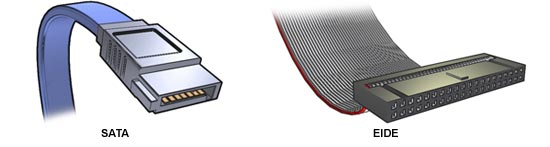
| D238 | WD5000YS-01MPB0 / WD5000AAKS | DD 500 GB SATA-2 3,5" 7200 rpm Western Digital | 1 | 75,90 | 75,90 |
| F77 | 9PX2502921 | Fuente alimentación ATX bajo ruido | 1 | 10,52 | 10,52 |
| L36 | A77001 | Cable alimentación para equipos | 1 | 1,00 | 1,00 |
| O497A | DH-20A4P | DVD+/- RW doble capa 20x Lite-on neg. | 1 | 19,90 | 19,90 |
| NU72 | R-425070 | Card Reader interno todo en uno negro C/USB 2.0 | 1 | 6,66 | 6,66 |
| B291 | Airis | Caja ATX Signum Pentium 4 | 1 | 44,00 | 44,00 |
| T31 | KB-0402PA | Teclado Airis Black/Silver PS/2 | 1 | 5,40 | 5,40 |
| R67 | MO-L033PS00400 | Ratón Airis internet óptico PS/2 black/silver | 1 | 3,50 | 3,50 |
| XTSL2 | Garantia TER SOB - 2 AñOS LEY | 1 | 20,00 | 20,00 | |
| X08 | Ensamblaje ordenador | 1 | 12,02 | 12,02 | |
| X09 | Embalaje especial para ordenador | 1 | 2,40 | 2,40 | |
| ZVS194 | Descuento Enero Airis Signum BR-194S | 1 | -60,00 | -60,00 | |
| M193 | LXL-970M-1 / modelo M193 [cfg] | TFT 19" panorámico OEM SXGA. Multimedia, 700:1/300cd. | 1 | 149,00 | 149,00 |
| PC0106 | 3307210245281 | CODEGAME AGE OF EMPIRES COLLECTOR'S EDITION | 1 | 3,00 | 3,00 |
| PC0104 | 3307210243874 | CODEGAME AGE OF MYTHOLOGY GOLD | 1 | 3,00 | 3,00 |
| ZE194 | Sufijo modelo CE | 1 | 0,00 | 0,00 | |
| ZVWEB | Descuento Internet | 1 | -1,66 | -1,66 | |
| X07 | Transporte | 1 | 12,34 | 12,34 | |
| ZVTRA | Descuento Transporte | 1 | -12,34 | -12,34 | |
En el apartado Standard CMOS Features aseg?rese de que el disco duro es detectado y en el apartado Integrated Peripherals tiene que asegurarse de que el disco duro est?en Enabled en On-Chip Primary PCI IDE, y en On-Chip SATA Mode situado en Auto.
Cargue los valores por defecto en la BIOS y env?nos una fotograf? de las pantallas:
La placa base que tiene montada su ordenador es una Gigabyte GA-G31M-S2L. Los ?ltimos drivers disponibles los tiene en la p?ina de soporte t?nico
En cuanto a los drivers para la tarjeta gr?ica nVidia, puede descargar la ?ltima versi? disponible desde la p?ina oficial
Recuerde que el orden recomendado de instalaci? de drivers es:
The Intel Xeon processor 3000, 3200, 5000, 5100, 5300, 7100, 7300 series,
Intel Core 2 Duo, Intel Core 2 Extreme processors,
Intel Core 2 Quad processors,
Pentium D processors, Pentium Dual-Core processor,
newer generations of Pentium 4 and Intel Xeon processor family
support Intel 64 architecture.
Chapter 1 - Page 1-2
The Core 2 brand refers to a range of Intel's consumer 64-bit dual-core and MCM quad-core CPUs with the x86-64 instruction set
Instruction Set : 64-bit
Tech details
Need SATA driver for the Motherboard ! Set BIOS to AHCI mode ?
Use dxDiag.exe !
Cables, compatibilitats, etc - URL
Line-In : blue color. Line-Out : blue color. Mic : pink color.
|
|
Tf Soporte AIRIS en garantia = 902.103.444
(horario = Lunes a Viernes de 9:00 a 17:00 ininterrumpido)
o
URL
o
Emilio para consultas técnicas.
Sin garantia : 96.338.19.93
(horario atención telefónica: Lun/Vie 10-14h y 17-20h)
o
URL
Pedido = 700.879.072.NM, modelo BR-194S, s/n 110.957.639
Para instalar el driver necesario para la instalación de Windows XP es necesaria una disquetera interna (no USB).
La descripción de uSoft :
Si presiona F6 cuando se solicita, aparece una pantalla que exige que se disponga del controlador adecuado en un disco e insertar el disco en la unidad para cargar el controlador.
Si necesita que un controlador OEM actualizado admita una controladora existente que se admita de forma original en Windows pero que no se detecta durante la instalación, debe reemplazar el controlador de Windows de la controladora con el nuevo controladr OEM. Puede encontrar el controlador de Windows para la controladora en uno de los seis discos de inicio del programa de instalación de Windows o en la carpeta de instalación temporal ($WIN_NT$.tildeBT). Esta sustitución permite a Windows utilizar el controlador OEM actualizado durante la instalación en modo de texto, pero debe copiar el mismo controlador OEM actualizado en la carpeta System32\Drivers de la instalación final de Windows antes de que la instalación continúe en modo gráfico.
Don't press F6. Press F5 instead. This will take you to a separate menu of Hardware Abstraction Layer's where you can choose an appropriate HAL that supports ACPI.
There are situations where it is definitely not desirable to use an ACPI HAL even if it is supported by the BIOS. This predominately applies to servers, but to ensure that an ACPI HAL will not be used or automatically detected and used, press F7 instead of F5.
Install Windows XP on SATA without a Floppy (F6) : SoftPedia (best, uses nLite), TricksPedia (nLite).
WD says : use the drivers supplied by your controller manufacturer or motherboard manufacturer.
Jo no t'ho aconsello.
Té advantatges, però probablement no t'apliquen, com ara adreçament de més de 4 GB (tens tanta RAM?), immunitat front els rootkits de 32bits (però no enfront d'altres virus), execució més ràpida d'alguns programes (només els compilats en 64bits, que no n'hi han gaires encara, la excepció més habitual pot ser el tractament de video amb programes de microsoft o d'alguns fabricants).
Té desavantatges de compatibilitat amb alguns dispositius de hw (es requereixen drivers específics de 64 bits i no tots els fabricants els tenen, especialment per dispositius vells), programes vells, (el WOW64 (windows-on-windows) permet executar programes de 32bits, però no de 16bits, particularment fotut per molts instaladors, per exemple de jocs, que tenen el install de 16bits encara que el programa sigui de 32), plugins i extensions, llibreries, components per alguns programes de 64bits com ara internet explorer o els codecs pel media player (les dll o activex de 32 bits no es carreguen en un procés de 64bits, molts fabricants de llibreries no tenen encara versions de 64bits disponibles), command prompts tenen restriccions de video i de execució de programes antics 16 bits i el suport de fonts type 1.
ISO : E:\ISOs\W10\nicolau\Win10_1607_EnglishInternational_x64_build14393.iso ( 4.238.336.000 )
|
SW
|
|
Serial Number : url Bearlake DVD ver 1.03 B7.0905.1 - "Intel P35/P31/G31/G33/G35/Q33/Q35/X38 Chipset Utilities CD"
|
|
XP [ES, u/k] Get WXP updates : URL
10/02/2008 : 62 actualitzacions (trec KB905474).
|
|
Mi PC + "c:\" + Herramientas + Opciones de carpeta + "Ver" Utilizar uso compartido simple de archivos (recomendado) - QUITAR ! |
|
SVGA GeForce 8400GS - nVidia VGA product driver for WXP 64bit - el SO que esta utilizando no es WXP x64 edition
ForceWare drivers version 163.71
|
|
Usuari "pere" per accés remot. |
|
Si hi posem un Linux (Ubuntu-64), ens convé el Compiz, desktop en 3-D, ex-Beryl |
|
Nero 7 Essentials :
Updates "DirectX 9.0c" |
|
Wifi : Ralink RT2500 Wireless LAN Card, v 2.2.1.0 {d:\winxp\rt2500.inf} Ki [WEP/WPA] Oddly, Win 7 has the driver for the RT2500 (Its the chipset that the bekin uses) but it doesn't recognise it. Get to Device Manager, Right click -> Update driver -> Browse -> Let Me Pick -> Network Adaptors -> RaLink Technology INC. (last one) -> then look for RT2500. And you are done! Bon foro |
| Partition Magic 8.01 (Build 1274) & BM C:\ := 100 GB, per Programes & E:\ := 100 GB, per Dades. |
| WinAmp 5.52 [k] |
| Process Explorer v 11.04 & TCPview v 2.53 |
| WinRAR 3.71 (cat) |
| Ghost 9.0, requires .Ner framework 1.1 Backup driver + "C:\" (13,5 GB) + "J:\Nicolau" + High Compression. IOMEGA:\\Nicolau\C_Drive.v21 = 6,4 GB after 40 minutes. |
| Daemon Tools 4.08HE (32 bit) |
| UltraISO 7.6.6.1308 |
| Delphi 7 Enterprise (no InterBase client) |
| Messenger 8.5.1302.1018 (instead of 4.7) |
| UltraEdit v 12.00+1 |
| uSoft Office Enterprise 2007 |
| SSH 3.8.1 (ip=1.34) |
| SkyPE 3.6.0.244 |
| Ad-Aware 2007 |
| cCleaner 2.04 |
| HiJackThis 2.0.2 |
| SpyBot 1.5.2 |
| Macromedia Flash MX |
| Adobe Acrobat Reader |
| iTunes |
| AVG antivirus |
| VNC [k] |
| Google Sketch |
| CDex - audio ripper - url |
| CD Burner XP - homepage |
|
|
Pendent de posar :
eMule, BootMagic, Google Earth, Potoxop,
| WXP [ES,SATA] | ISO = 543 MB |
| Gigabyte MotherBoard | ISO = 1,6 GB |
| GeForce 8400GS | ISO = 586 MB |
| WiFi Ralink RT2500 | ISO = 10 MB |
| Nero 7 | ISO = 582 MB |
| PM 8.01 | ZIP = 87 MB |
| Office 2007 | ISO = 602 MB |
CAUSE
This problem occurs because the NTFS volume
has an invalid or damaged record
in either the $UsnJrnl file or the $LogFile file.
Both of these files are internal files that are used only by NTFS.
RESOLUTION
Restart your Windows 2000-based computer to the Recovery Console
by using a Windows XP operating system CD. Run
CHKDSK.exe /r command.
You can also use CHKDSK to re-initialize the $LogFile file but not the $UsnJrnl file because not all NTFS volumes contain a $UsnJrnl file. A $UsnJrnl file is created on a volume only when a program that uses the file makes the first write request.
Chkdsk will only re-initialize the $LogFile file when you change the size of the log file by using the chkdsk volume_drive_letter: /f /l:new_size command. For example, if you type chkdsk f: /f /l:65536.
30/5/2009 - nou disc
9.04 (Jaunty Jackalope) DVD for Core2. Requested a CD.
[k]
To boot an USB, do
Airis homepage.
|
Updated 20180920
|
