
MIT App Inventor is an innovative, easy to use app
creation and development program. It is very suitable for first time
programmers and student friendly. It can be downloaded from http://ai2.appinventor.mit.edu/.
Remark: You have to create an account for using App Inventor.
Here is a step by step guide to develop the Football App to gather GPS
data from your students in real time while on the soccer pitch
|
DESIGN 00. Start a new project.
Screen1.AlignHorizontal: CENTER; AppName:
SEND DATA PLAYER; Icon: SCIENCE_ON_STAGE.GIF; Title: SEND DATA FOOTBALL
PLAYER
DESIGN 01
DESIGN 02
TableArrangement1. Columns: 2; Rows: 9
Label1.Text. PLAYER'S NAME:
DESIGN 03
Label2.Text. NUMBER'S NAME:
DESIGN 04
TextBox1. Hint: Introduce your name
DESIGN 05
TextBox2. Hint: Introduce your number; NumbersOnly
DESIGN 06
DESIGN 07
TextBox3. Hint: Introduce your storage
name
DESIGN 08
Label3.BackgroundColor: Orange; Text: GPS POSITION
DESIGN 09
Label4.Text. LATITUDE:
DESIGN 10
Label5.Text. LONGITUDE:
DESIGN 11
Label6.Text. LATITUDE VALUE:
DESIGN 12
Label7.Text. LONGITUDE VALUE:
DESIGN 13
Label8. FontSize:9;
Text.http://dweet.io/dweet/for/football
DESIGN 14
DESIGN 15
Button1. FontSize:11; Text: START SENDING
DATA
DESIGN 16
Button2. FontSize:11; Text: STOP SENDING
DATA
DESIGN 17
Button3. FontSize:11; Text: CLOSE APP
DESIGN 18
Button4. FontSize:11; Text: STORAGE NAME
DESIGN 19
Label9.Text. STORAGE NAME:
DESIGN 20
ListPicker1. FontSize:11; Text:
SELECT REFRESHING TIME (SECONDS)
DESIGN 21
Image1. Picture: SCIENCE_ON_STAGE.GIF
DESIGN 22
Clock1.TimerEnabled: NO; TimerInterval:
5000 (every 5 seconds)
DESIGN 23
Web1. Url:
http://dweet.io/dweet/for/thing (example: http://dweet.io/dweet/for/football the “thing” is in this case “football” but you can
choose any name your
class would like)
DESIGN 24
LocationSensor1. TimeInterval: 1000
(every 1 second)
DESIGN 25
|
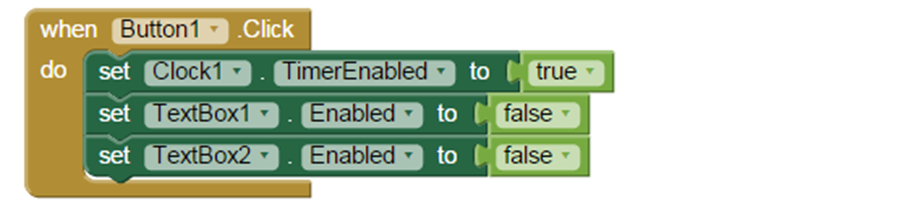
Click button 1, the data transmission clock is activated and changing the name and number of the player is disabled.
BLOCKS 01
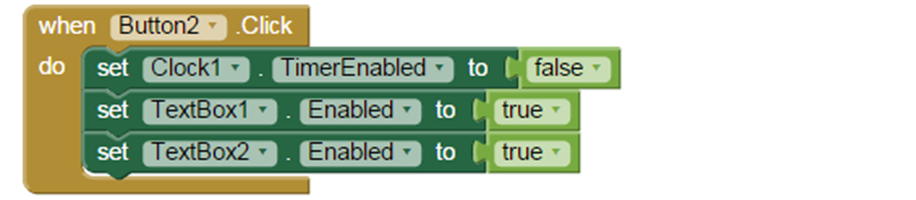
Click button 2, the data transmission clock is disabled and changing the name and number of the player is enabled.
BLOCKS 02 tornar a gravar
o retallar...

BLOCKS 04
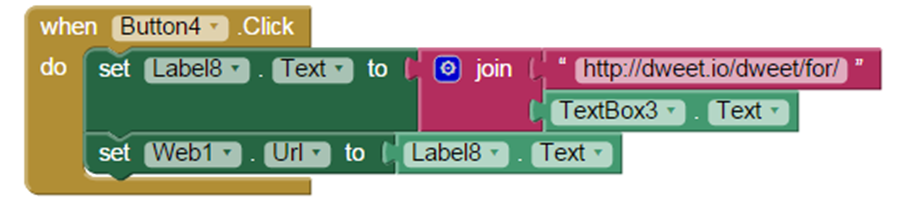
Click button 4, the URL of the file where you want to publish data at dweet.io changes.
BLOCKS 06
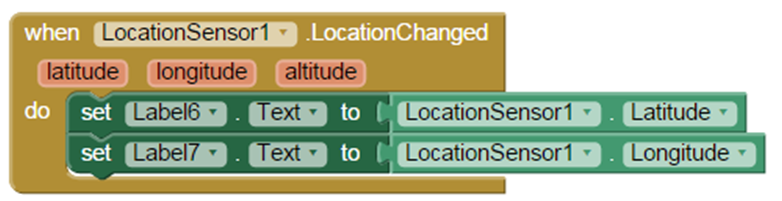
When the sensor detects a change in GPS position in latitude or longitude, this data is recorded in labels 6 and 7.
BLOCKS 08
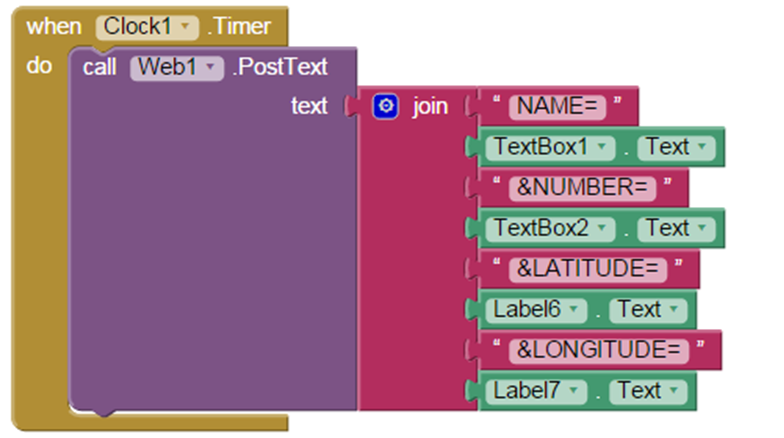
BLOCKS 09
The “ListPicker1” tab allows you to refresh time information in seconds; from 1 to 20 seconds.
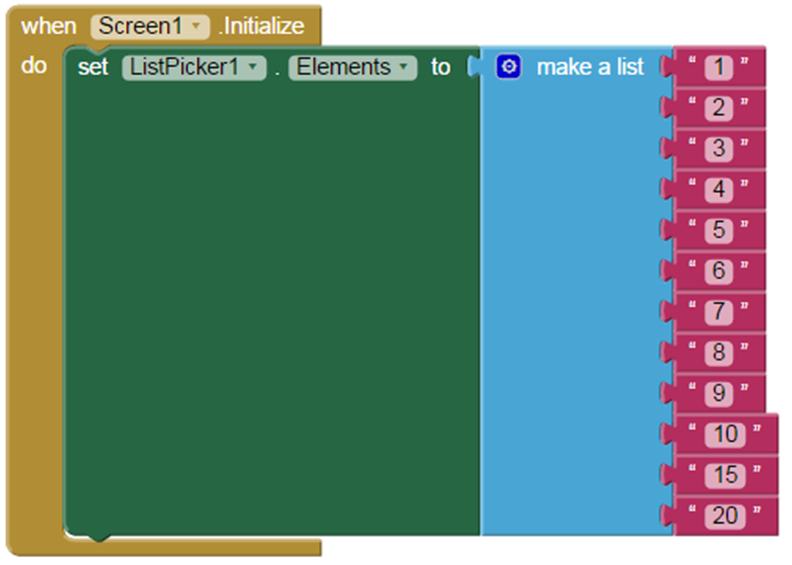
BLOCKS 10
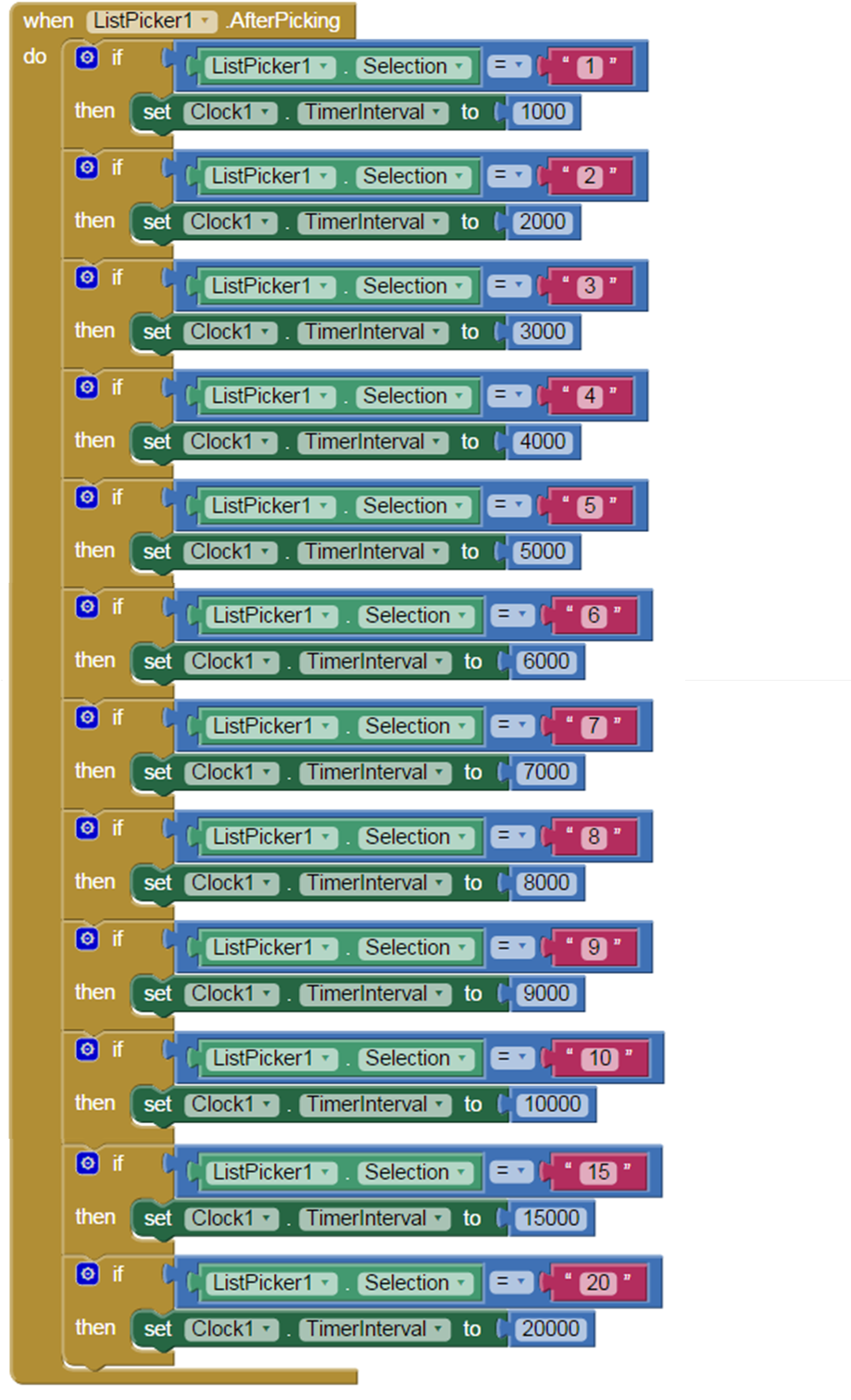
BLOCKS 11
BLOCKS 12
BLOCKS 13
|

|